Laptop gets hot when screen times out

redsox985

New member
Local time
5:44 AM
Messages
13
My laptop starts spinning up the fans and getting hotter onces the screen auto times out. When I wake it up, the core temp is around 160-170F, and drops almost immediately after swiping across the touch pad to wake the screen. The moment it wakes, CoreTemp shows it running at full clock (2.2 GHz i7-2675QM), but then it immediately drops to 800 MHz and goes to idle temp around 125-135F. Any ideas why it may be ramping up like this with the screen off?

EDIT: It's a Samsung 7 Series with W7U, 8GB RAM, 120GB SSD, and 1TB HDD.

TYIA!
 
Last edited:

My Computer My Computer

At a glance

Windows 7 Ultimatei7 2675QM8GBAMD Radeon HD 6490M
Computer Manufacturer/Model Number
Samsung 7 Series NP700Z5B-SO1UB
OS
Windows 7 Ultimate
CPU
i7 2675QM
Memory
8GB
Graphics Card(s)
AMD Radeon HD 6490M
Screen Resolution
1600x900
Hard Drives
1TB

Redsox when I first read this my immediate thought was perhaps the monitoris powering down because the machine is too hot. So I am assuming yo havechecked all the vents and outlets for dust etc? Is this the same as a previousmodel where the get to the HDD you can access the CPU and GPU?? If so have ordid you check the state of the thermal compounds because those temps you quote are reasonably warm for my liking especially idle see ARK | Intel® Core? i7-2675QM Processor (6M Cache, up to 3.10 GHz) the Tjunc is 100C and your idle is 52C and the other 78C which I would expect if you were running a heavy - ish game
 

My Computer My Computer

At a glance

Desk1 7 Home Prem / Desk2 10 Pro / Main lap A...Desk1 i5 3750K / Laptop i7 GTX 860M / Desk2 i...Desk1 8GB (1866) / Desk2 16GB (1333) / Laptop...Desk 1& 2NVidia GTX 650 & Laptops on board Intel
Computer type
PC/Desktop
Computer Manufacturer/Model Number
Own build (new) Desk1 / Asus ROG Win 7 / Desk2 1st build
OS
Desk1 7 Home Prem / Desk2 10 Pro / Main lap Asus ROG 10 Pro 2 laptop Toshiba 7 Pro Asus P2520 7 & 10
CPU
Desk1 i5 3750K / Laptop i7 GTX 860M / Desk2 i5 2500
Motherboard
Desk1 Asus P877-V / Desk2 Gigabyte H67 UD3H / Laptop ?
Memory
Desk1 8GB (1866) / Desk2 16GB (1333) / Laptop 8Gb DDR3
Graphics Card(s)
Desk 1& 2NVidia GTX 650 & Laptops on board Intel
Sound Card
Desk 1 & 2 -XONAR DG Realtek High Def audio Laptop
Monitor(s) Displays
Desk 1 Benq HD 2450 / Desk2 Philips 24" / Laptop 17.5"
Screen Resolution
1920x1080 D1 & D2 & Laptop 1
Hard Drives
Desk1 Samsung 120GB 830 SSD
Asus ROG 256GB 850 Pro SSD
Desk2 Samsung 840 256 SSD
Toshiba 120GB EVO
PSU
Desk 1 Corsair HX 1050/ Laptop ? / Desk 2 Corsair HX 650
Case
Desk 1 Cooler HAF XM ? Toshiba laptop / Desk2 Coolermaster
Cooling
Fans on all Desk1 -2 Desk2 - all Coolermasters 5 Laptop ?
Keyboard
Desk 1 MS Sidewinder X6 Desk 2 MS Sidewinder X 4
Mouse
Desk 1&2 - Gigabyte MS 900 gamer - laptop - Logitec wireless
Internet Speed
ADSL2+
Other Info
One other Desktop (tester) and spare Toshba laptop both with SSD's
Running Kaspersky 2016 ISS on all machines config'd identically
Logitec audio stereo systems on each machine (x3)
Canon MG5250MFC
Router/modem TP-Link running WPA2SK
I have checked the vents rather recently as I just installed the SSD about a month or two ago and had it completely open to clean it. I can remove the bottom (plastic unibody), clean the fans/vents, and check the compound. I expect it to be rather clean, but I'll double check. I can reapply paste, too while I'm in there. Just remove the old stuff with alcohol?
 

My Computer My Computer

At a glance

Windows 7 Ultimatei7 2675QM8GBAMD Radeon HD 6490M
Computer Manufacturer/Model Number
Samsung 7 Series NP700Z5B-SO1UB
OS
Windows 7 Ultimate
CPU
i7 2675QM
Memory
8GB
Graphics Card(s)
AMD Radeon HD 6490M
Screen Resolution
1600x900
Hard Drives
1TB
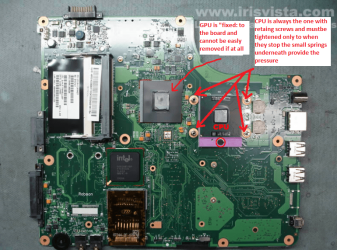
Ok mate now I am pretty ok with Toshiba stuff and Samsungs I have never had to deal with I saw a Youtube on the model before yours but could not see how the heatsink/s and heat pipes were held onto the motherboard but in the Toshiba's most of then you only need to tighten down the heatsink/s - there will be two CPU and GPU - just enough to take the slack up on the springs. again The Samasung might have a different system but what ever you do do not over tighten them.

Now for cleaning you can use alcohol but this is the very best Arctic Silver Incorporated - ArctiClean as it cleans and prepare the surfaces real good. The compound also Arctic Silver Arctic Silver Incorporated - Arctic Silver 5 What I do is to get a vinyl glove and thinly smear the compound (after cleaning) on both surfaces then a spot about the size of a grain of rice - no larger - then fix the heatsink/s down again.
If you happen to touch the surface before with you fingers - reclean as your skin has acids and the like on it but I am a bit pedantic it really is up to you.
In the pics it gives you a rough idea of what those chips will look like and while you are at it take time to reseat the RAM sticks and / or clean them.

SLOTCLEANING

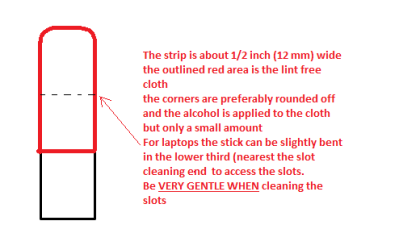
Now as for the slots to clean them use astrip of old credit card about 1/2 inch wide nip the corners off one end - preferably round them off hold apiece of thin lint free cloth over the end dab on some form of alcohol - isopropyl alcohol (what we swab the skin with before an injection) is good and GENTLY swipe along the slots.

This can also be done for the GPU slot/s.
 

Attachments

  • LAPBOARD.PNG
    LAPBOARD.PNG
    397.6 KB · Views: 2
  • CPU1.PNG
    CPU1.PNG
    259.7 KB · Views: 1
  • STICK CLEANER.PNG
    STICK CLEANER.PNG
    4.9 KB · Views: 12

My Computer My Computer

At a glance

Desk1 7 Home Prem / Desk2 10 Pro / Main lap A...Desk1 i5 3750K / Laptop i7 GTX 860M / Desk2 i...Desk1 8GB (1866) / Desk2 16GB (1333) / Laptop...Desk 1& 2NVidia GTX 650 & Laptops on board Intel
Computer type
PC/Desktop
Computer Manufacturer/Model Number
Own build (new) Desk1 / Asus ROG Win 7 / Desk2 1st build
OS
Desk1 7 Home Prem / Desk2 10 Pro / Main lap Asus ROG 10 Pro 2 laptop Toshiba 7 Pro Asus P2520 7 & 10
CPU
Desk1 i5 3750K / Laptop i7 GTX 860M / Desk2 i5 2500
Motherboard
Desk1 Asus P877-V / Desk2 Gigabyte H67 UD3H / Laptop ?
Memory
Desk1 8GB (1866) / Desk2 16GB (1333) / Laptop 8Gb DDR3
Graphics Card(s)
Desk 1& 2NVidia GTX 650 & Laptops on board Intel
Sound Card
Desk 1 & 2 -XONAR DG Realtek High Def audio Laptop
Monitor(s) Displays
Desk 1 Benq HD 2450 / Desk2 Philips 24" / Laptop 17.5"
Screen Resolution
1920x1080 D1 & D2 & Laptop 1
Hard Drives
Desk1 Samsung 120GB 830 SSD
Asus ROG 256GB 850 Pro SSD
Desk2 Samsung 840 256 SSD
Toshiba 120GB EVO
PSU
Desk 1 Corsair HX 1050/ Laptop ? / Desk 2 Corsair HX 650
Case
Desk 1 Cooler HAF XM ? Toshiba laptop / Desk2 Coolermaster
Cooling
Fans on all Desk1 -2 Desk2 - all Coolermasters 5 Laptop ?
Keyboard
Desk 1 MS Sidewinder X6 Desk 2 MS Sidewinder X 4
Mouse
Desk 1&2 - Gigabyte MS 900 gamer - laptop - Logitec wireless
Internet Speed
ADSL2+
Other Info
One other Desktop (tester) and spare Toshba laptop both with SSD's
Running Kaspersky 2016 ISS on all machines config'd identically
Logitec audio stereo systems on each machine (x3)
Canon MG5250MFC
Router/modem TP-Link running WPA2SK
Red I meant to add when doing laptops I do the work by placing a large white bath towel taped to the top so that if you drop those small screws they don't bounce off the top onto the floor where they often get lost the towel stops that happening and you can see them real easy. :)
 

My Computer My Computer

At a glance

Desk1 7 Home Prem / Desk2 10 Pro / Main lap A...Desk1 i5 3750K / Laptop i7 GTX 860M / Desk2 i...Desk1 8GB (1866) / Desk2 16GB (1333) / Laptop...Desk 1& 2NVidia GTX 650 & Laptops on board Intel
Computer type
PC/Desktop
Computer Manufacturer/Model Number
Own build (new) Desk1 / Asus ROG Win 7 / Desk2 1st build
OS
Desk1 7 Home Prem / Desk2 10 Pro / Main lap Asus ROG 10 Pro 2 laptop Toshiba 7 Pro Asus P2520 7 & 10
CPU
Desk1 i5 3750K / Laptop i7 GTX 860M / Desk2 i5 2500
Motherboard
Desk1 Asus P877-V / Desk2 Gigabyte H67 UD3H / Laptop ?
Memory
Desk1 8GB (1866) / Desk2 16GB (1333) / Laptop 8Gb DDR3
Graphics Card(s)
Desk 1& 2NVidia GTX 650 & Laptops on board Intel
Sound Card
Desk 1 & 2 -XONAR DG Realtek High Def audio Laptop
Monitor(s) Displays
Desk 1 Benq HD 2450 / Desk2 Philips 24" / Laptop 17.5"
Screen Resolution
1920x1080 D1 & D2 & Laptop 1
Hard Drives
Desk1 Samsung 120GB 830 SSD
Asus ROG 256GB 850 Pro SSD
Desk2 Samsung 840 256 SSD
Toshiba 120GB EVO
PSU
Desk 1 Corsair HX 1050/ Laptop ? / Desk 2 Corsair HX 650
Case
Desk 1 Cooler HAF XM ? Toshiba laptop / Desk2 Coolermaster
Cooling
Fans on all Desk1 -2 Desk2 - all Coolermasters 5 Laptop ?
Keyboard
Desk 1 MS Sidewinder X6 Desk 2 MS Sidewinder X 4
Mouse
Desk 1&2 - Gigabyte MS 900 gamer - laptop - Logitec wireless
Internet Speed
ADSL2+
Other Info
One other Desktop (tester) and spare Toshba laptop both with SSD's
Running Kaspersky 2016 ISS on all machines config'd identically
Logitec audio stereo systems on each machine (x3)
Canon MG5250MFC
Router/modem TP-Link running WPA2SK
Thanks for all the info. From being inside the laptop before, it does have the unified GPU/CPU cooler to two fans. I will clean and reapply paste, but I'm still wondering why it only really spins up the fans when the screen times out. If I use it for basic tasks like Chrome, Word, etc., it won't get as hot as it does once the ?10 min? screen timeout happens. Continual use will hover at a lower temp than screen off.
 

My Computer My Computer

At a glance

Windows 7 Ultimatei7 2675QM8GBAMD Radeon HD 6490M
Computer Manufacturer/Model Number
Samsung 7 Series NP700Z5B-SO1UB
OS
Windows 7 Ultimate
CPU
i7 2675QM
Memory
8GB
Graphics Card(s)
AMD Radeon HD 6490M
Screen Resolution
1600x900
Hard Drives
1TB
Back
Top