
You are using an out of date browser. It may not display this or other websites correctly.
You should upgrade or use an alternative browser.
You should upgrade or use an alternative browser.
Laptop having Problems booting System recovery Error 0x80070003
- Thread starter Phenom588
- Start date

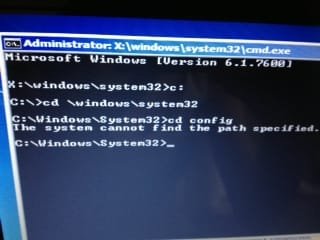
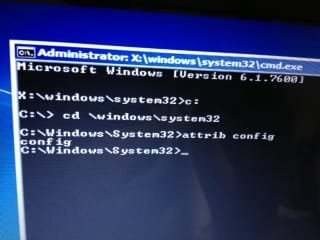
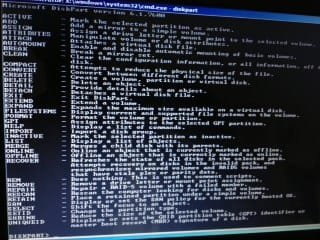
If I type the code in #56 there is a lot of text, but no config if that is what we are looking for...
My Computer
At a glance
Windows 7 Home Premium 64 bit
- Computer type
- Laptop
- Computer Manufacturer/Model Number
- Asus eee pc 1215B
- OS
- Windows 7 Home Premium 64 bit
- Keyboard
- SE
- Antivirus
- AVG
- Browser
- Chrome
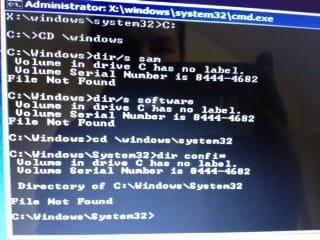
Code:
C:
cd  \windows
dir/s  sam
dir/s  software
post output
Code:
cd  \windows\system32
dir confi*My Computer
At a glance
Microsoft Windows 7 Home Premium 64-bits 7601...Intel(R) Core(TM) i3 CPU M 370 @ 2.40GHz4,00 GBATI Mobility Radeon HD 5400 Series
- Computer type
- Laptop
- Computer Manufacturer/Model Number
- ACER ASPIRE 5742G
- OS
- Microsoft Windows 7 Home Premium 64-bits 7601 Multiprocessor Free Service Pack 1
- CPU
- Intel(R) Core(TM) i3 CPU M 370 @ 2.40GHz
- Motherboard
- Acer Aspire 5742G
- Memory
- 4,00 GB
- Graphics Card(s)
- ATI Mobility Radeon HD 5400 Series
- Sound Card
- (1) AMD High Definition Audio Device (2) Realtek High Defi
- Screen Resolution
- 1366 x 768 x 32 bits (4294967296 colors) @ 60 Hz
- Hard Drives
- WDC WD5000BEVT-22ZAT0

- Local time
- 3:24 PM
- Messages
- 50,634
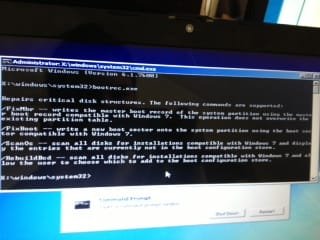
In addition if you only have access to the Command Line still, you can use Step 7 in Troubleshooting Windows 7 Failure to Start which shows exactly how to sequence the bootrec commands to jumpstart repairs or if an OS does not appear.
Does an OS appear to repair when you boot into Repair CD or DVD?
Does an OS appear to repair when you boot into Repair CD or DVD?
Greg it looks like his registry has been gone. C:\windows\system32\config folder is not there.In addition if you only have access to the Command Line still, you can use Step 7 in Troubleshooting Windows 7 Failure to Start which shows exactly how to sequence the bootrec commands to jumpstart repairs or if an OS does not appear.
Does an OS appear to repair when you boot into Repair CD or DVD?
Strange thing is attrib command doesn't show the folder name as it usually does. See screenshots in previous posts.
My Computer
At a glance
Microsoft Windows 7 Home Premium 64-bits 7601...Intel(R) Core(TM) i3 CPU M 370 @ 2.40GHz4,00 GBATI Mobility Radeon HD 5400 Series
- Computer type
- Laptop
- Computer Manufacturer/Model Number
- ACER ASPIRE 5742G
- OS
- Microsoft Windows 7 Home Premium 64-bits 7601 Multiprocessor Free Service Pack 1
- CPU
- Intel(R) Core(TM) i3 CPU M 370 @ 2.40GHz
- Motherboard
- Acer Aspire 5742G
- Memory
- 4,00 GB
- Graphics Card(s)
- ATI Mobility Radeon HD 5400 Series
- Sound Card
- (1) AMD High Definition Audio Device (2) Realtek High Defi
- Screen Resolution
- 1366 x 768 x 32 bits (4294967296 colors) @ 60 Hz
- Hard Drives
- WDC WD5000BEVT-22ZAT0
Trying the new code:
Reading through step 7 and using the bootrec tool now....
Reading through step 7 and using the bootrec tool now....
My Computer
At a glance
Windows 7 Home Premium 64 bit
- Computer type
- Laptop
- Computer Manufacturer/Model Number
- Asus eee pc 1215B
- OS
- Windows 7 Home Premium 64 bit
- Keyboard
- SE
- Antivirus
- AVG
- Browser
- Chrome
Im trying the bootrec.exe, but because I dont fully understand what the problem is I dont know what to do next =S
My Computer
At a glance
Windows 7 Home Premium 64 bit
- Computer type
- Laptop
- Computer Manufacturer/Model Number
- Asus eee pc 1215B
- OS
- Windows 7 Home Premium 64 bit
- Keyboard
- SE
- Antivirus
- AVG
- Browser
- Chrome
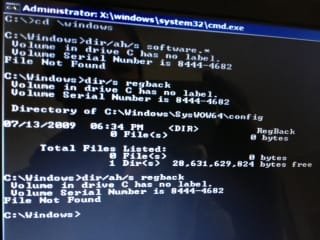
Code:
c:
cd  \windows
dir/ah/s software.*
dir/s regback
dir/ah/s regback
My Computer
At a glance
Microsoft Windows 7 Home Premium 64-bits 7601...Intel(R) Core(TM) i3 CPU M 370 @ 2.40GHz4,00 GBATI Mobility Radeon HD 5400 Series
- Computer type
- Laptop
- Computer Manufacturer/Model Number
- ACER ASPIRE 5742G
- OS
- Microsoft Windows 7 Home Premium 64-bits 7601 Multiprocessor Free Service Pack 1
- CPU
- Intel(R) Core(TM) i3 CPU M 370 @ 2.40GHz
- Motherboard
- Acer Aspire 5742G
- Memory
- 4,00 GB
- Graphics Card(s)
- ATI Mobility Radeon HD 5400 Series
- Sound Card
- (1) AMD High Definition Audio Device (2) Realtek High Defi
- Screen Resolution
- 1366 x 768 x 32 bits (4294967296 colors) @ 60 Hz
- Hard Drives
- WDC WD5000BEVT-22ZAT0
bootrec/fixmbrIm trying the bootrec.exe, but because I dont fully understand what the problem is I dont know what to do next =S
View attachment 257378
bootrec/fixboot
But why?? mbr is fine, and volume bootsector is fine as well. Anyway do both commands. Both succesful?
My Computer
At a glance
Microsoft Windows 7 Home Premium 64-bits 7601...Intel(R) Core(TM) i3 CPU M 370 @ 2.40GHz4,00 GBATI Mobility Radeon HD 5400 Series
- Computer type
- Laptop
- Computer Manufacturer/Model Number
- ACER ASPIRE 5742G
- OS
- Microsoft Windows 7 Home Premium 64-bits 7601 Multiprocessor Free Service Pack 1
- CPU
- Intel(R) Core(TM) i3 CPU M 370 @ 2.40GHz
- Motherboard
- Acer Aspire 5742G
- Memory
- 4,00 GB
- Graphics Card(s)
- ATI Mobility Radeon HD 5400 Series
- Sound Card
- (1) AMD High Definition Audio Device (2) Realtek High Defi
- Screen Resolution
- 1366 x 768 x 32 bits (4294967296 colors) @ 60 Hz
- Hard Drives
- WDC WD5000BEVT-22ZAT0
bootrec/fixmbr
bootrec/fixboot
Okej, I have done both of these and gotten the answer "The operation completed successfully" on both

My Computer
At a glance
Windows 7 Home Premium 64 bit
- Computer type
- Laptop
- Computer Manufacturer/Model Number
- Asus eee pc 1215B
- OS
- Windows 7 Home Premium 64 bit
- Keyboard
- SE
- Antivirus
- AVG
- Browser
- Chrome
syswow64 is for 32bits stuff.... not we are looking for.
c:\windows\system32\config is gone. So all stuff that should be in it.
Try this:
Code:
chkdsk/f c:My Computer
At a glance
Microsoft Windows 7 Home Premium 64-bits 7601...Intel(R) Core(TM) i3 CPU M 370 @ 2.40GHz4,00 GBATI Mobility Radeon HD 5400 Series
- Computer type
- Laptop
- Computer Manufacturer/Model Number
- ACER ASPIRE 5742G
- OS
- Microsoft Windows 7 Home Premium 64-bits 7601 Multiprocessor Free Service Pack 1
- CPU
- Intel(R) Core(TM) i3 CPU M 370 @ 2.40GHz
- Motherboard
- Acer Aspire 5742G
- Memory
- 4,00 GB
- Graphics Card(s)
- ATI Mobility Radeon HD 5400 Series
- Sound Card
- (1) AMD High Definition Audio Device (2) Realtek High Defi
- Screen Resolution
- 1366 x 768 x 32 bits (4294967296 colors) @ 60 Hz
- Hard Drives
- WDC WD5000BEVT-22ZAT0
Ehm... I type the chkdsk/f C: and get this:

Should I press Y here? Or is this a bad sign? :S
Should I press Y here? Or is this a bad sign? :S
My Computer
At a glance
Windows 7 Home Premium 64 bit
- Computer type
- Laptop
- Computer Manufacturer/Model Number
- Asus eee pc 1215B
- OS
- Windows 7 Home Premium 64 bit
- Keyboard
- SE
- Antivirus
- AVG
- Browser
- Chrome
Ah wait... I closed the cmd, and typed it again and now its running through the test
My Computer
At a glance
Windows 7 Home Premium 64 bit
- Computer type
- Laptop
- Computer Manufacturer/Model Number
- Asus eee pc 1215B
- OS
- Windows 7 Home Premium 64 bit
- Keyboard
- SE
- Antivirus
- AVG
- Browser
- Chrome
I think everything is fine, but posting the image just in case so that you can have a look

My Computer
At a glance
Windows 7 Home Premium 64 bit
- Computer type
- Laptop
- Computer Manufacturer/Model Number
- Asus eee pc 1215B
- OS
- Windows 7 Home Premium 64 bit
- Keyboard
- SE
- Antivirus
- AVG
- Browser
- Chrome
Only proble you have is:
You can't do a repair install, because that's actually un upgrade install and can only be run from within win7. Also there's nothing to update, there are no settings anymore.
Any important stuff on C you want to keep?
- You're missing \windows\system32\config
You can't do a repair install, because that's actually un upgrade install and can only be run from within win7. Also there's nothing to update, there are no settings anymore.
Any important stuff on C you want to keep?
My Computer
At a glance
Microsoft Windows 7 Home Premium 64-bits 7601...Intel(R) Core(TM) i3 CPU M 370 @ 2.40GHz4,00 GBATI Mobility Radeon HD 5400 Series
- Computer type
- Laptop
- Computer Manufacturer/Model Number
- ACER ASPIRE 5742G
- OS
- Microsoft Windows 7 Home Premium 64-bits 7601 Multiprocessor Free Service Pack 1
- CPU
- Intel(R) Core(TM) i3 CPU M 370 @ 2.40GHz
- Motherboard
- Acer Aspire 5742G
- Memory
- 4,00 GB
- Graphics Card(s)
- ATI Mobility Radeon HD 5400 Series
- Sound Card
- (1) AMD High Definition Audio Device (2) Realtek High Defi
- Screen Resolution
- 1366 x 768 x 32 bits (4294967296 colors) @ 60 Hz
- Hard Drives
- WDC WD5000BEVT-22ZAT0
Fill in your system specs! http://www.sevenforums.com/profile.php?do=extra
My Computer
At a glance
Microsoft Windows 7 Home Premium 64-bits 7601...Intel(R) Core(TM) i3 CPU M 370 @ 2.40GHz4,00 GBATI Mobility Radeon HD 5400 Series
- Computer type
- Laptop
- Computer Manufacturer/Model Number
- ACER ASPIRE 5742G
- OS
- Microsoft Windows 7 Home Premium 64-bits 7601 Multiprocessor Free Service Pack 1
- CPU
- Intel(R) Core(TM) i3 CPU M 370 @ 2.40GHz
- Motherboard
- Acer Aspire 5742G
- Memory
- 4,00 GB
- Graphics Card(s)
- ATI Mobility Radeon HD 5400 Series
- Sound Card
- (1) AMD High Definition Audio Device (2) Realtek High Defi
- Screen Resolution
- 1366 x 768 x 32 bits (4294967296 colors) @ 60 Hz
- Hard Drives
- WDC WD5000BEVT-22ZAT0
You have a Windows 7 64 bit installation DVD in your version (home premium,prof,ultimate)? Is it in your language?
My Computer
At a glance
Microsoft Windows 7 Home Premium 64-bits 7601...Intel(R) Core(TM) i3 CPU M 370 @ 2.40GHz4,00 GBATI Mobility Radeon HD 5400 Series
- Computer type
- Laptop
- Computer Manufacturer/Model Number
- ACER ASPIRE 5742G
- OS
- Microsoft Windows 7 Home Premium 64-bits 7601 Multiprocessor Free Service Pack 1
- CPU
- Intel(R) Core(TM) i3 CPU M 370 @ 2.40GHz
- Motherboard
- Acer Aspire 5742G
- Memory
- 4,00 GB
- Graphics Card(s)
- ATI Mobility Radeon HD 5400 Series
- Sound Card
- (1) AMD High Definition Audio Device (2) Realtek High Defi
- Screen Resolution
- 1366 x 768 x 32 bits (4294967296 colors) @ 60 Hz
- Hard Drives
- WDC WD5000BEVT-22ZAT0
Similar threads

- Replies
- 5
- Views
- 5K

- Replies
- 3
- Views
- 12K

