
Laptop making low grinding noise while scrolling

Berkey

Lost In Space
Power User
VIP
Local time
5:20 AM
Messages
328
Location
Cybertron
So recently my laptop seems to be making a low grinding noise, more like the old grinding noise computers use to make when they we loading back in the day, but the thing is it only happens when I scroll up or down on any program, be it chrome, word you name it. It isn't always consistent, sometimes it will be constant as I scroll, or only in short bursts and strange enough, for one instance I was over at ESPN and wasn't even moving the page, but there was a element that kept swiping from one article headline to another and my laptop with grind for the 1 second it took to slide headlines.

There hasn't been any performance issues or negative effects as far as I can tell, but I thought I'd ask around as see if it's perhaps a perquisite to an upcoming one. Anyone experience anything similar?
 

My Computer My Computer

Computer type
PC/Desktop
OS
Microsoft Windows 7 Professional 64-bit SP1
CPU
Intel(R) Core(TM) i5 CPU M 520 @ 2.40GHz
Motherboard
Dell Inc. 0K42JR
Memory
8.00 GB
Graphics Card(s)
NVIDIA NVS 3100M
Sound Card
(1) NVIDIA High Definition Audio (2) IDT High Definition A
Monitor(s) Displays
1
Screen Resolution
1440 x 900 x 32 bits (4294967296 colors) @ 59 Hz
Hard Drives
Samsung SSD 840 PRO Series ATA Device
Sounds like coil whine does it happen if you bring up nothing but a black screen on the browser and move your mouse around over it quickly? How old is the laptop?

EDIT: sorry if its grinding might be hard drive not power related at all. Though you have an SSD correct?
 

My Computer My Computer

Computer type
PC/Desktop
Computer Manufacturer/Model Number
Custom
OS
10 Pro x64
CPU
Ryzen 9 3900X
Motherboard
Asrock x370 Tachi
Memory
64GB(4x16GB) DDR4
Graphics Card(s)
EVGA 1080ti FTW3
Sound Card
ASUS Xonar Essence STX (V4 Bursons), ODAC rev B, NFB-11, O2
Monitor(s) Displays
3xASUS PB278Q/R, Optoma HD142X
Screen Resolution
3x1440p, 1080p
Hard Drives
512GB 850 EVO(OS, Programs)
4TB (Movies)
3TB (Downloads)
3TB (Programs)
1TB HDD (Games)
2x6TB R1 (videos)
PSU
AX760
Case
Fractal Define R5
Cooling
NH-D15S
Keyboard
Massdrop Ctrl with Box Navy's
Mouse
G903, Alioth XXL Mat
Internet Speed
280/40
Antivirus
MBAM, ESET
Browser
Canary 64 Bit
Other Info
I also own a Thinkpad P50 Xeon 4K, X220T, X1C5
Does the sound come from inside the laptop or through the speakers?
Use a cardboard tube held to your ear to pinpoint the location of the sound.

That "loading sound" was the floppy disk drive sound in my mind. Sort of an err-err---err err sound.
If that is so it could be your optical drive. Try opening the tray and leaving it open.

If it comes from the speakers then it could be radio interference. Cross talk between the touchpad and the audio.
That could be a driver issue.
 

My Computer My Computer

Computer type
PC/Desktop
Computer Manufacturer/Model Number
Home Built - Jan 2013
OS
Windows 7 64 Bit Home Premium SP1
CPU
i7-3820
Motherboard
Asus P9X79-PRO - Bios 4608
Memory
GSkill F3-14900CL9Q - 16GB
Graphics Card(s)
EVGA GeForce GTX660 - Driver 352.86
Sound Card
On board Realtek ALC898
Monitor(s) Displays
Acer S271HL
Screen Resolution
1920 x 1080
Hard Drives
#1- Samsung 840 Pro Series
#2- Western Digital WD1002FAEX Sata3 Black
#3- Western Digital WD1002FAEX Sata3 Black
PSU
Corsair CMPSU-850TX-V2 - 850 watt (by Seasonic)
Case
Corsair Obsidian 550D
Cooling
Standard 3 120mm case fans, Cooler Master Hyper 212 EVO
Keyboard
MS KC-0405
Mouse
Intellimouse 5-button
Internet Speed
56 Mbits/Sec (on a good day)
Antivirus
Avast & Malwarebytes
Browser
Firefox
Other Info
Asus DVD - DRW-24B1ST 24X
Placing my ear on the bottom side on the laptop, near the hard drive and where the ram is installed, i can hear the sound very clearly and it also sounds like faint scratching noise. I have an SSD, so I'll be bummed if it's the cause, but it sounds like it's in that area.:(
 

My Computer My Computer

Computer type
PC/Desktop
OS
Microsoft Windows 7 Professional 64-bit SP1
CPU
Intel(R) Core(TM) i5 CPU M 520 @ 2.40GHz
Motherboard
Dell Inc. 0K42JR
Memory
8.00 GB
Graphics Card(s)
NVIDIA NVS 3100M
Sound Card
(1) NVIDIA High Definition Audio (2) IDT High Definition A
Monitor(s) Displays
1
Screen Resolution
1440 x 900 x 32 bits (4294967296 colors) @ 59 Hz
Hard Drives
Samsung SSD 840 PRO Series ATA Device
So here is a test I ran with Crystaldisk to check the health of the SSD in general, I mean it;s only 8 months old at most. The laptop is a Dell Latitude from 2011 I believe, not much wear and tear other than average office work, but I popped the HDD and Ram out and replaced them. Nothing seems to come from the speakers so perhaps it something else? All joking aside it honestly sound like an old S.O.S. morse code when you listen closely. It's so strange like I said,if you go to ESPN theres a small rectangular sliding element that shows other stories and each time it swipes the grind occurs, but when it isn't moving no grind. Also when I open another tab (like this one I'm typing in for instance) the ESPN page is still open in the other tab, but the grinding does not occur, only when I view the page.

I also use a Ramdisk for my temporary internet files so I'm not sure if there's any correlation with that as well
 

Attachments

  • disk.png
    disk.png
    68.5 KB · Views: 7
Last edited:

My Computer My Computer

Computer type
PC/Desktop
OS
Microsoft Windows 7 Professional 64-bit SP1
CPU
Intel(R) Core(TM) i5 CPU M 520 @ 2.40GHz
Motherboard
Dell Inc. 0K42JR
Memory
8.00 GB
Graphics Card(s)
NVIDIA NVS 3100M
Sound Card
(1) NVIDIA High Definition Audio (2) IDT High Definition A
Monitor(s) Displays
1
Screen Resolution
1440 x 900 x 32 bits (4294967296 colors) @ 59 Hz
Hard Drives
Samsung SSD 840 PRO Series ATA Device
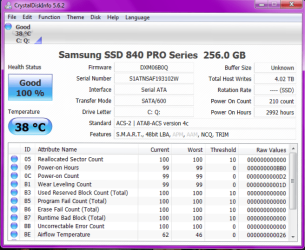
Looks like mine so unless you have freezing occurring prob not the ssd. Occurring at swipes ect leads me to power draw or gpu whine.
 

Attachments

  • ssddrive.png
    ssddrive.png
    34.8 KB · Views: 7

My Computer My Computer

Computer type
PC/Desktop
Computer Manufacturer/Model Number
Custom
OS
10 Pro x64
CPU
Ryzen 9 3900X
Motherboard
Asrock x370 Tachi
Memory
64GB(4x16GB) DDR4
Graphics Card(s)
EVGA 1080ti FTW3
Sound Card
ASUS Xonar Essence STX (V4 Bursons), ODAC rev B, NFB-11, O2
Monitor(s) Displays
3xASUS PB278Q/R, Optoma HD142X
Screen Resolution
3x1440p, 1080p
Hard Drives
512GB 850 EVO(OS, Programs)
4TB (Movies)
3TB (Downloads)
3TB (Programs)
1TB HDD (Games)
2x6TB R1 (videos)
PSU
AX760
Case
Fractal Define R5
Cooling
NH-D15S
Keyboard
Massdrop Ctrl with Box Navy's
Mouse
G903, Alioth XXL Mat
Internet Speed
280/40
Antivirus
MBAM, ESET
Browser
Canary 64 Bit
Other Info
I also own a Thinkpad P50 Xeon 4K, X220T, X1C5
The are no moving parts in an SSD so I can't imagine how and sound can be coming from there or the RAM.
What can be making that kind of noise is a mystery to me. Unless there is a motherboard speaker. Haven't seen one of those on a laptop. In any event, why the motherboard would be beeping (grinding) is also very unusual.
 

My Computer My Computer

Computer type
PC/Desktop
Computer Manufacturer/Model Number
Home Built - Jan 2013
OS
Windows 7 64 Bit Home Premium SP1
CPU
i7-3820
Motherboard
Asus P9X79-PRO - Bios 4608
Memory
GSkill F3-14900CL9Q - 16GB
Graphics Card(s)
EVGA GeForce GTX660 - Driver 352.86
Sound Card
On board Realtek ALC898
Monitor(s) Displays
Acer S271HL
Screen Resolution
1920 x 1080
Hard Drives
#1- Samsung 840 Pro Series
#2- Western Digital WD1002FAEX Sata3 Black
#3- Western Digital WD1002FAEX Sata3 Black
PSU
Corsair CMPSU-850TX-V2 - 850 watt (by Seasonic)
Case
Corsair Obsidian 550D
Cooling
Standard 3 120mm case fans, Cooler Master Hyper 212 EVO
Keyboard
MS KC-0405
Mouse
Intellimouse 5-button
Internet Speed
56 Mbits/Sec (on a good day)
Antivirus
Avast & Malwarebytes
Browser
Firefox
Other Info
Asus DVD - DRW-24B1ST 24X
Back
Top