Solved Laptop randomly freezes

Subiray

New member
Local time
7:52 PM
Messages
12
Searched a bit on the forums but I am unable to find a solution tied to my situation, perhaps I'm not confident enough to think so at least. So I'll ask for help here.

Lately (past two weeks) my laptop has been starting to freeze occasionally, whenever this happends is seemingly completely random. I'll list what I've noticed:

* Never happended while a game is running (so far), this has only happened when I'm browsing files or the internet.
* Sound goes completely quiet, no repeating or similar.
* Keyboard stops working, caps lock does not show a light.
* Ctrl+alt+del does nothing, screen remains frozen.
* Only option is to perform a hard reboot through the power button.
* No error report is shown when looking at the event viewer.

I have tried to let the laptop shut down/acquire a bluescreen by itself when the freeze happends, after two hours I've realized it's not going to happen.

So I'm just a newbie asking for directions in a dummy-friendly language. What could the reason be and how do I handle it?

Thanks!
 

My Computer

Computer type
Laptop
Computer Manufacturer/Model Number
Asus
OS
Microsoft Windows 7 Home Premium 64-bit 7601 Multiprocessor Free Service Pack 1
CPU
Intel(R) Core(TM) i7-2630QM CPU @ 2.00GHz
Motherboard
ASUSTeK Computer Inc. K53SV
Memory
6.00 GB
Graphics Card(s)
(1) NVIDIA GeForce GT 540M (2) Intel(R) HD Graphics Fa
Sound Card
(1) NVIDIA Virtual Audio Device (Wave Extensible) (WDM) (2
Screen Resolution
0 x 0 x 0 bits (0 colors) @ 0 Hz
Hard Drives
WDC WD7500BPVT-80HXZT1
Antivirus
Ad-Aware

My Computer

Computer type
PC/Desktop
Computer Manufacturer/Model Number
Custom Build
OS
Windows 7 Home Premium 32-Bit - Build 7600 SP1
CPU
Intel Core i3-2120 3.30Ghz
Motherboard
Asus P8Z68-V LX Intel Z68 Socket H2 ATX
Memory
Kingston 4 GB DDR3 1333 mhz
Graphics Card(s)
AMD Radeon HD6670
Sound Card
Sound Blaster Audigy SE 24-Bit
Monitor(s) Displays
Asus VE228
Screen Resolution
1440 X 900
Hard Drives
OCZ Vertex 3 120 GB Sata 3 SSD ==
Kingston SH103/S3 120 G Hyper X 120 GB SSD ==
Western Digital 500 GB Caviar Green 7200 RPM ==
PSU
Corsair CX600M == 600 Watt
Case
NZXT Apollo - Silver with Clear Side Panel
Cooling
Three 120 mm Fans
Keyboard
Microsoft Natural 4000
Mouse
Microsoft Custom Optical 3000
Internet Speed
AT&T Fiber Optic Wireless Network
Antivirus
Microsoft Security Essentials
Browser
Chrome
Other Info
120 mm Blue LED Fan -- Three Blue LED Lazer Light Sticks
The system restore does only shows one restore point - 26/12/2013 (two days ago). There are no other available restore points and I have checked the option to show other restore points.

I could still do the restore but it won't help me in any way.
 

My Computer

Computer type
Laptop
Computer Manufacturer/Model Number
Asus
OS
Microsoft Windows 7 Home Premium 64-bit 7601 Multiprocessor Free Service Pack 1
CPU
Intel(R) Core(TM) i7-2630QM CPU @ 2.00GHz
Motherboard
ASUSTeK Computer Inc. K53SV
Memory
6.00 GB
Graphics Card(s)
(1) NVIDIA GeForce GT 540M (2) Intel(R) HD Graphics Fa
Sound Card
(1) NVIDIA Virtual Audio Device (Wave Extensible) (WDM) (2
Screen Resolution
0 x 0 x 0 bits (0 colors) @ 0 Hz
Hard Drives
WDC WD7500BPVT-80HXZT1
Antivirus
Ad-Aware
Right, the Restore won't help. == I was thinking that the PC might be overheating. Download HWMonitor CPUID - System & hardware benchmark, monitoring, reporting and monitor the temp. If it gets hot you should get a warning. The CPU is what you are concerned with. The first one is your motherboard and the second one is your CPU. It will have the name listed. If your temps are in the 40 degree Centigrade, that is good. If it gets in the 60 degree area, that is warm. It will probably take something in the 80's to shut it down like the problem you have been having. See how that goes and let us know.
 

My Computer

Computer type
PC/Desktop
Computer Manufacturer/Model Number
Custom Build
OS
Windows 7 Home Premium 32-Bit - Build 7600 SP1
CPU
Intel Core i3-2120 3.30Ghz
Motherboard
Asus P8Z68-V LX Intel Z68 Socket H2 ATX
Memory
Kingston 4 GB DDR3 1333 mhz
Graphics Card(s)
AMD Radeon HD6670
Sound Card
Sound Blaster Audigy SE 24-Bit
Monitor(s) Displays
Asus VE228
Screen Resolution
1440 X 900
Hard Drives
OCZ Vertex 3 120 GB Sata 3 SSD ==
Kingston SH103/S3 120 G Hyper X 120 GB SSD ==
Western Digital 500 GB Caviar Green 7200 RPM ==
PSU
Corsair CX600M == 600 Watt
Case
NZXT Apollo - Silver with Clear Side Panel
Cooling
Three 120 mm Fans
Keyboard
Microsoft Natural 4000
Mouse
Microsoft Custom Optical 3000
Internet Speed
AT&T Fiber Optic Wireless Network
Antivirus
Microsoft Security Essentials
Browser
Chrome
Other Info
120 mm Blue LED Fan -- Three Blue LED Lazer Light Sticks
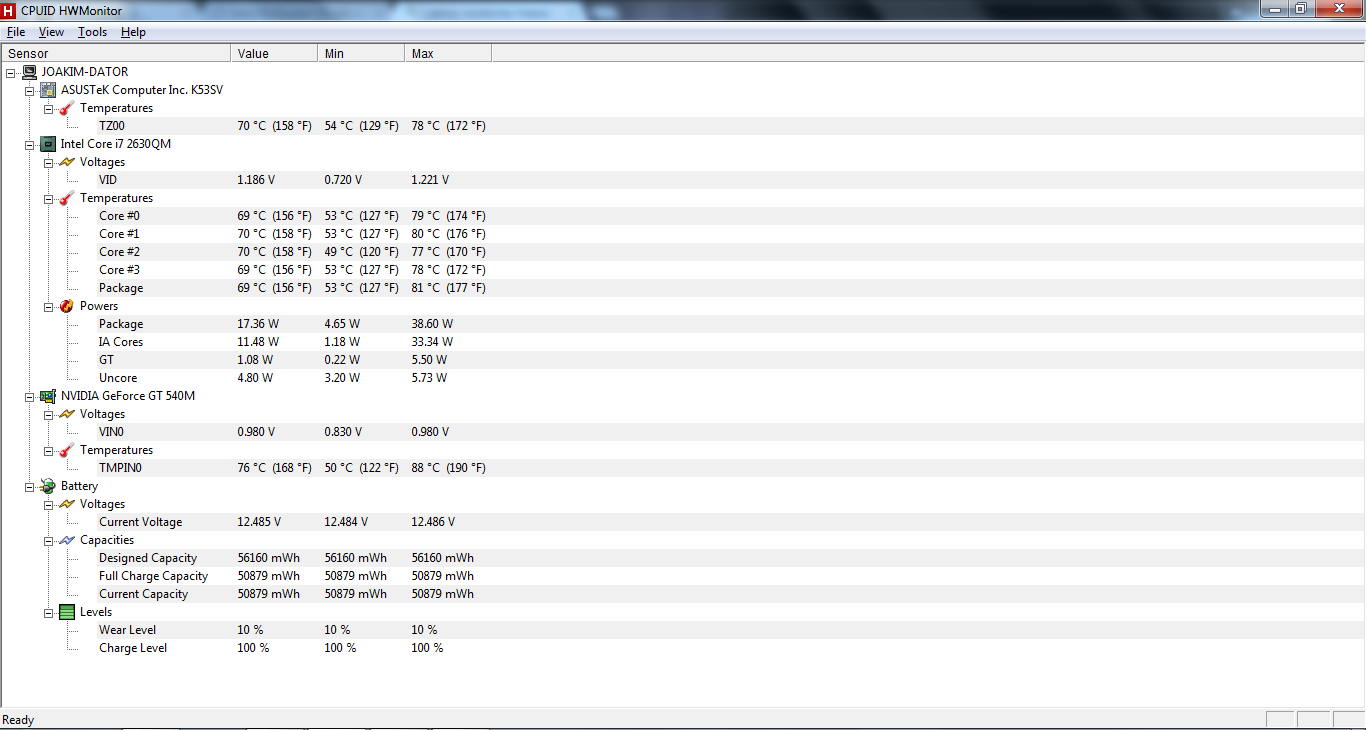
I downloaded it and ran Skyrim for around 30 minutes. I was fortunate enough to have the interface open when the computer crashed after I was done playing, but I was unable to take a screenshot before it happened.

Temp peaked at ~75 degrees during the time I was playing, at the point where the crash occurred the temperature was ~65-68 degrees, which was after I had stopped playing.

I've taken a screenshot after the reboot. I personally can't see anything that's remarkably weird, but I could very well be wrong. What troubles me is that if this is an overheating problem I am sure I would of experienced that when I was in fact using programs that were consuming alot of resources, rather than simply doing nothing.

82Cqy8w.png


Edit: Tabbed out to take a look, temp ~70 degrees, peaked at 80 at some point. No crashes ever happened while a game was running (not sure if that matters at all).
Yz8rxZf.png
 
Last edited:

My Computer

Computer type
Laptop
Computer Manufacturer/Model Number
Asus
OS
Microsoft Windows 7 Home Premium 64-bit 7601 Multiprocessor Free Service Pack 1
CPU
Intel(R) Core(TM) i7-2630QM CPU @ 2.00GHz
Motherboard
ASUSTeK Computer Inc. K53SV
Memory
6.00 GB
Graphics Card(s)
(1) NVIDIA GeForce GT 540M (2) Intel(R) HD Graphics Fa
Sound Card
(1) NVIDIA Virtual Audio Device (Wave Extensible) (WDM) (2
Screen Resolution
0 x 0 x 0 bits (0 colors) @ 0 Hz
Hard Drives
WDC WD7500BPVT-80HXZT1
Antivirus
Ad-Aware
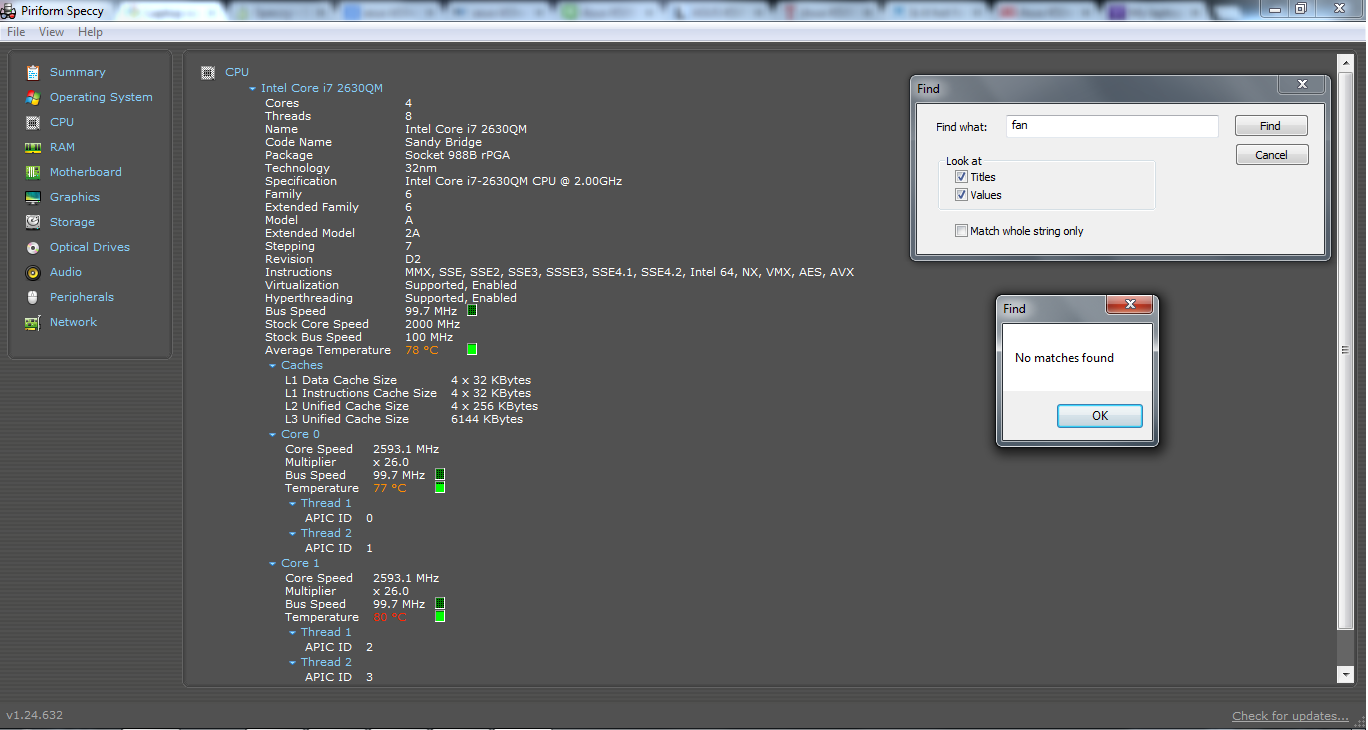
It is running hot. That is the reason for the crashes. It will eventually ruin the CPU and other things if it is too hot. In the second screenshot the four cores are all high 70's low 80's. That is too hot. They should be in 40's and maybe 50's for safe running temps. In the hardware you downloaded, I don't see anything about "Fans". Using the same program, mine shows "Fans". It makes me wonder if they are working. Download Speccy - System Information - Free Download "Speccy". Under CPU there should be be a "Fan Speed" listing. See what your RPM's are. Mine is in the area of 1300. Hopefully yours is also.
 

My Computer

Computer type
PC/Desktop
Computer Manufacturer/Model Number
Custom Build
OS
Windows 7 Home Premium 32-Bit - Build 7600 SP1
CPU
Intel Core i3-2120 3.30Ghz
Motherboard
Asus P8Z68-V LX Intel Z68 Socket H2 ATX
Memory
Kingston 4 GB DDR3 1333 mhz
Graphics Card(s)
AMD Radeon HD6670
Sound Card
Sound Blaster Audigy SE 24-Bit
Monitor(s) Displays
Asus VE228
Screen Resolution
1440 X 900
Hard Drives
OCZ Vertex 3 120 GB Sata 3 SSD ==
Kingston SH103/S3 120 G Hyper X 120 GB SSD ==
Western Digital 500 GB Caviar Green 7200 RPM ==
PSU
Corsair CX600M == 600 Watt
Case
NZXT Apollo - Silver with Clear Side Panel
Cooling
Three 120 mm Fans
Keyboard
Microsoft Natural 4000
Mouse
Microsoft Custom Optical 3000
Internet Speed
AT&T Fiber Optic Wireless Network
Antivirus
Microsoft Security Essentials
Browser
Chrome
Other Info
120 mm Blue LED Fan -- Three Blue LED Lazer Light Sticks
I concur with bigmck; this is definitely a overheating issue. When was the last time you dusted out the inside of your case? If it hasnt been lately; i would turn the system off and do a complete cleaning of the fans and other components; as dust and dirt can act as a blanket to trap heat in; especially if there is a lot of it. And yea; if yours fan(s) arent spinning at high enough rpm's; it may not cool enough or properly.
 

My Computer

Computer type
PC/Desktop
Computer Manufacturer/Model Number
custom built
OS
Windows 7 ultimate 64-bit
CPU
Intel I7 2600K 3.4ghz
Motherboard
Asus Evo P8P67
Memory
Corsair 16gb ddr3 1600mhz
Graphics Card(s)
Nvidia Geforce gt 430
Sound Card
Sound Blaster Titanium x-fi pci express
Monitor(s) Displays
Dell E198WFP
Hard Drives
1 western digital 2TB drive.
PSU
Antec 1200 watt
Case
Inwin Dragon Rider
Cooling
6 case supplied cooling fans
Keyboard
logitech mk700
Mouse
logitech m705
Internet Speed
25-50mbps download; 10mbps upload(i think)
Antivirus
avg free 2014
Browser
mozilla firefox
Other Info
Also have a pretty bad speaker setup which is a klipsch promedia 5.1 surround speaker setup with huge subwoofer and lg blu ray player/writer. Also a hp officejet pro 8600 plus wireless all in one and a logitech s7500 webcam.
Hmm..

wb7d4bJ.png


If it hasnt been lately; i would turn the system off and do a complete cleaning of the fans and other components;
Is there a good info-section regarding cleaning the components of a laptop? For some reason I feel alot more insecure when it comes to laptops rather than desktops, especially when it comes to opening it up.
 

My Computer

Computer type
Laptop
Computer Manufacturer/Model Number
Asus
OS
Microsoft Windows 7 Home Premium 64-bit 7601 Multiprocessor Free Service Pack 1
CPU
Intel(R) Core(TM) i7-2630QM CPU @ 2.00GHz
Motherboard
ASUSTeK Computer Inc. K53SV
Memory
6.00 GB
Graphics Card(s)
(1) NVIDIA GeForce GT 540M (2) Intel(R) HD Graphics Fa
Sound Card
(1) NVIDIA Virtual Audio Device (Wave Extensible) (WDM) (2
Screen Resolution
0 x 0 x 0 bits (0 colors) @ 0 Hz
Hard Drives
WDC WD7500BPVT-80HXZT1
Antivirus
Ad-Aware
I concur with bigmck; this is definitely a overheating issue. When was the last time you dusted out the inside of your case? If it hasnt been lately; i would turn the system off and do a complete cleaning of the fans and other components; as dust and dirt can act as a blanket to trap heat in; especially if there is a lot of it. And yea; if yours fan(s) arent spinning at high enough rpm's; it may not cool enough or properly.

Good idea Matts. == Subiray, you need to check for dust inside. Turn off the power of the laptop and turn it over. It is a good idea to remove your battery before opening the cover. There are a couple sections on the bottom. The biggest one is what you want to remove. Take the screws out and it should just slide off. If you have some compressed air, just blow all of the dust out, especially around the fans. If you have no compressed air, just do the best you can to get the dust out. Maybe a little blowing thru the mouth. Put the cover on, tighten the screws and put the battery on. Power up and see what you have as far as temps and let us know.
 

My Computer

Computer type
PC/Desktop
Computer Manufacturer/Model Number
Custom Build
OS
Windows 7 Home Premium 32-Bit - Build 7600 SP1
CPU
Intel Core i3-2120 3.30Ghz
Motherboard
Asus P8Z68-V LX Intel Z68 Socket H2 ATX
Memory
Kingston 4 GB DDR3 1333 mhz
Graphics Card(s)
AMD Radeon HD6670
Sound Card
Sound Blaster Audigy SE 24-Bit
Monitor(s) Displays
Asus VE228
Screen Resolution
1440 X 900
Hard Drives
OCZ Vertex 3 120 GB Sata 3 SSD ==
Kingston SH103/S3 120 G Hyper X 120 GB SSD ==
Western Digital 500 GB Caviar Green 7200 RPM ==
PSU
Corsair CX600M == 600 Watt
Case
NZXT Apollo - Silver with Clear Side Panel
Cooling
Three 120 mm Fans
Keyboard
Microsoft Natural 4000
Mouse
Microsoft Custom Optical 3000
Internet Speed
AT&T Fiber Optic Wireless Network
Antivirus
Microsoft Security Essentials
Browser
Chrome
Other Info
120 mm Blue LED Fan -- Three Blue LED Lazer Light Sticks
No fan speed I see. Mine is below "Bus Speed". Clean out the inside and see if that helps.
 

My Computer

Computer type
PC/Desktop
Computer Manufacturer/Model Number
Custom Build
OS
Windows 7 Home Premium 32-Bit - Build 7600 SP1
CPU
Intel Core i3-2120 3.30Ghz
Motherboard
Asus P8Z68-V LX Intel Z68 Socket H2 ATX
Memory
Kingston 4 GB DDR3 1333 mhz
Graphics Card(s)
AMD Radeon HD6670
Sound Card
Sound Blaster Audigy SE 24-Bit
Monitor(s) Displays
Asus VE228
Screen Resolution
1440 X 900
Hard Drives
OCZ Vertex 3 120 GB Sata 3 SSD ==
Kingston SH103/S3 120 G Hyper X 120 GB SSD ==
Western Digital 500 GB Caviar Green 7200 RPM ==
PSU
Corsair CX600M == 600 Watt
Case
NZXT Apollo - Silver with Clear Side Panel
Cooling
Three 120 mm Fans
Keyboard
Microsoft Natural 4000
Mouse
Microsoft Custom Optical 3000
Internet Speed
AT&T Fiber Optic Wireless Network
Antivirus
Microsoft Security Essentials
Browser
Chrome
Other Info
120 mm Blue LED Fan -- Three Blue LED Lazer Light Sticks
I'll do this monentarily. Would you recommend letting the laptop cool off to room-temperature or is it just me being paranoid?
 

My Computer

Computer type
Laptop
Computer Manufacturer/Model Number
Asus
OS
Microsoft Windows 7 Home Premium 64-bit 7601 Multiprocessor Free Service Pack 1
CPU
Intel(R) Core(TM) i7-2630QM CPU @ 2.00GHz
Motherboard
ASUSTeK Computer Inc. K53SV
Memory
6.00 GB
Graphics Card(s)
(1) NVIDIA GeForce GT 540M (2) Intel(R) HD Graphics Fa
Sound Card
(1) NVIDIA Virtual Audio Device (Wave Extensible) (WDM) (2
Screen Resolution
0 x 0 x 0 bits (0 colors) @ 0 Hz
Hard Drives
WDC WD7500BPVT-80HXZT1
Antivirus
Ad-Aware
I'll do this monentarily. Would you recommend letting the laptop cool off to room-temperature or is it just me being paranoid?

No need to wait.
 

My Computer

Computer type
PC/Desktop
Computer Manufacturer/Model Number
Custom Build
OS
Windows 7 Home Premium 32-Bit - Build 7600 SP1
CPU
Intel Core i3-2120 3.30Ghz
Motherboard
Asus P8Z68-V LX Intel Z68 Socket H2 ATX
Memory
Kingston 4 GB DDR3 1333 mhz
Graphics Card(s)
AMD Radeon HD6670
Sound Card
Sound Blaster Audigy SE 24-Bit
Monitor(s) Displays
Asus VE228
Screen Resolution
1440 X 900
Hard Drives
OCZ Vertex 3 120 GB Sata 3 SSD ==
Kingston SH103/S3 120 G Hyper X 120 GB SSD ==
Western Digital 500 GB Caviar Green 7200 RPM ==
PSU
Corsair CX600M == 600 Watt
Case
NZXT Apollo - Silver with Clear Side Panel
Cooling
Three 120 mm Fans
Keyboard
Microsoft Natural 4000
Mouse
Microsoft Custom Optical 3000
Internet Speed
AT&T Fiber Optic Wireless Network
Antivirus
Microsoft Security Essentials
Browser
Chrome
Other Info
120 mm Blue LED Fan -- Three Blue LED Lazer Light Sticks
I am guessing this the section I am pointing at is the one I want to remove. Bear with me please, I'm well aware that I'm making this harder than it already is ^_^
JQYPT7dh.jpg
 

My Computer

Computer type
Laptop
Computer Manufacturer/Model Number
Asus
OS
Microsoft Windows 7 Home Premium 64-bit 7601 Multiprocessor Free Service Pack 1
CPU
Intel(R) Core(TM) i7-2630QM CPU @ 2.00GHz
Motherboard
ASUSTeK Computer Inc. K53SV
Memory
6.00 GB
Graphics Card(s)
(1) NVIDIA GeForce GT 540M (2) Intel(R) HD Graphics Fa
Sound Card
(1) NVIDIA Virtual Audio Device (Wave Extensible) (WDM) (2
Screen Resolution
0 x 0 x 0 bits (0 colors) @ 0 Hz
Hard Drives
WDC WD7500BPVT-80HXZT1
Antivirus
Ad-Aware
No problem. Glad to help and wait. Yes, open and clean the section you are pointing at
 

My Computer

Computer type
PC/Desktop
Computer Manufacturer/Model Number
Custom Build
OS
Windows 7 Home Premium 32-Bit - Build 7600 SP1
CPU
Intel Core i3-2120 3.30Ghz
Motherboard
Asus P8Z68-V LX Intel Z68 Socket H2 ATX
Memory
Kingston 4 GB DDR3 1333 mhz
Graphics Card(s)
AMD Radeon HD6670
Sound Card
Sound Blaster Audigy SE 24-Bit
Monitor(s) Displays
Asus VE228
Screen Resolution
1440 X 900
Hard Drives
OCZ Vertex 3 120 GB Sata 3 SSD ==
Kingston SH103/S3 120 G Hyper X 120 GB SSD ==
Western Digital 500 GB Caviar Green 7200 RPM ==
PSU
Corsair CX600M == 600 Watt
Case
NZXT Apollo - Silver with Clear Side Panel
Cooling
Three 120 mm Fans
Keyboard
Microsoft Natural 4000
Mouse
Microsoft Custom Optical 3000
Internet Speed
AT&T Fiber Optic Wireless Network
Antivirus
Microsoft Security Essentials
Browser
Chrome
Other Info
120 mm Blue LED Fan -- Three Blue LED Lazer Light Sticks
Are you sure that I am supposed to dismantle the large section? I'm getting the feeling that it's not the way to go, then again I could be wrong. Am I supposed to open it through the keyboard section by any chance?

wHazhSgh.jpg


Edit: Did some research on my own, appearently I need to remove the keyboard in order to acess a few other screws.

http://gentechpcforums.com/Images/Manuals/K53 Series Guide Chapter 02-v1.0.pdf
 
Last edited:

My Computer

Computer type
Laptop
Computer Manufacturer/Model Number
Asus
OS
Microsoft Windows 7 Home Premium 64-bit 7601 Multiprocessor Free Service Pack 1
CPU
Intel(R) Core(TM) i7-2630QM CPU @ 2.00GHz
Motherboard
ASUSTeK Computer Inc. K53SV
Memory
6.00 GB
Graphics Card(s)
(1) NVIDIA GeForce GT 540M (2) Intel(R) HD Graphics Fa
Sound Card
(1) NVIDIA Virtual Audio Device (Wave Extensible) (WDM) (2
Screen Resolution
0 x 0 x 0 bits (0 colors) @ 0 Hz
Hard Drives
WDC WD7500BPVT-80HXZT1
Antivirus
Ad-Aware
I have never taken apart a laptop, but judging from the manual you provided, I don't think I would try that either. It appears a bit much for cleaning. Maybe someone else will come and lend some additional info. == I did notice one thing. In the picture you provided in message #13, the air hole in the middle of the laptop appears to have some dirt showing. If it is, you do need to clean it. If that is not dirt, then I would not be so alarmed. Hang in here for some one else who has taken one apart before. Guys check in all time on the problems.
 

My Computer

Computer type
PC/Desktop
Computer Manufacturer/Model Number
Custom Build
OS
Windows 7 Home Premium 32-Bit - Build 7600 SP1
CPU
Intel Core i3-2120 3.30Ghz
Motherboard
Asus P8Z68-V LX Intel Z68 Socket H2 ATX
Memory
Kingston 4 GB DDR3 1333 mhz
Graphics Card(s)
AMD Radeon HD6670
Sound Card
Sound Blaster Audigy SE 24-Bit
Monitor(s) Displays
Asus VE228
Screen Resolution
1440 X 900
Hard Drives
OCZ Vertex 3 120 GB Sata 3 SSD ==
Kingston SH103/S3 120 G Hyper X 120 GB SSD ==
Western Digital 500 GB Caviar Green 7200 RPM ==
PSU
Corsair CX600M == 600 Watt
Case
NZXT Apollo - Silver with Clear Side Panel
Cooling
Three 120 mm Fans
Keyboard
Microsoft Natural 4000
Mouse
Microsoft Custom Optical 3000
Internet Speed
AT&T Fiber Optic Wireless Network
Antivirus
Microsoft Security Essentials
Browser
Chrome
Other Info
120 mm Blue LED Fan -- Three Blue LED Lazer Light Sticks
Yeah I figured, I'll keep an eye on the forums for some advice. Thanks for helping me locate what's wrong with it though! Also, I took a peek at what you described but I found no dust or dirt of any kind in the vent. Would you think it's a bad thing to take some compressed air and blow through the air holes? Obviously by no extreme amounts as the fan could be damaged.
 

My Computer

Computer type
Laptop
Computer Manufacturer/Model Number
Asus
OS
Microsoft Windows 7 Home Premium 64-bit 7601 Multiprocessor Free Service Pack 1
CPU
Intel(R) Core(TM) i7-2630QM CPU @ 2.00GHz
Motherboard
ASUSTeK Computer Inc. K53SV
Memory
6.00 GB
Graphics Card(s)
(1) NVIDIA GeForce GT 540M (2) Intel(R) HD Graphics Fa
Sound Card
(1) NVIDIA Virtual Audio Device (Wave Extensible) (WDM) (2
Screen Resolution
0 x 0 x 0 bits (0 colors) @ 0 Hz
Hard Drives
WDC WD7500BPVT-80HXZT1
Antivirus
Ad-Aware
Yeah I figured, I'll keep an eye on the forums for some advice. Thanks for helping me locate what's wrong with it though! Also, I took a peek at what you described but I found no dust or dirt of any kind in the vent. Would you think it's a bad thing to take some compressed air and blow through the air holes? Obviously by no extreme amounts as the fan could be damaged.

If there is dust inside, there is no way for it to escape with the cover on, so it would not do much good. Hopefully someone else will come on that has taken one apart before. I will see if I can find someone online that might lend a hand.
 

My Computer

Computer type
PC/Desktop
Computer Manufacturer/Model Number
Custom Build
OS
Windows 7 Home Premium 32-Bit - Build 7600 SP1
CPU
Intel Core i3-2120 3.30Ghz
Motherboard
Asus P8Z68-V LX Intel Z68 Socket H2 ATX
Memory
Kingston 4 GB DDR3 1333 mhz
Graphics Card(s)
AMD Radeon HD6670
Sound Card
Sound Blaster Audigy SE 24-Bit
Monitor(s) Displays
Asus VE228
Screen Resolution
1440 X 900
Hard Drives
OCZ Vertex 3 120 GB Sata 3 SSD ==
Kingston SH103/S3 120 G Hyper X 120 GB SSD ==
Western Digital 500 GB Caviar Green 7200 RPM ==
PSU
Corsair CX600M == 600 Watt
Case
NZXT Apollo - Silver with Clear Side Panel
Cooling
Three 120 mm Fans
Keyboard
Microsoft Natural 4000
Mouse
Microsoft Custom Optical 3000
Internet Speed
AT&T Fiber Optic Wireless Network
Antivirus
Microsoft Security Essentials
Browser
Chrome
Other Info
120 mm Blue LED Fan -- Three Blue LED Lazer Light Sticks
No fan speed I see. Mine is below "Bus Speed". Clean out the inside and see if that helps.

Laptops usally dont show any fan speeds, Their biose's are extremely closed ( i know i had a latop for a long time)
 

My Computer

Computer type
PC/Desktop
Computer Manufacturer/Model Number
Custom Built
OS
Windows 10 64Bit
CPU
Intel i7 6700K Cooled by Noctua NH-U14S
Motherboard
ASUS Z170 Pro Gaming
Memory
16GB 2133MHZ DDR4 Corsair
Graphics Card(s)
ASUS Direct CUII OC GTX 660
Sound Card
Supreme FX (On-Board)
Monitor(s) Displays
1: 24" Asus 144hz 2: 21.5" Benq 3: 20" Hp 2009m
Screen Resolution
1:1920x1080 2:1920x1080 3:1600:900
Hard Drives
Primary/OS: Samsung 850 EVO SSD 250GB
Secondary/Main: Seagate 1TB SSHD 3.5"
Media/Backups: WD Green 2TB HDD 3.5"
PSU
Corsair RM 650W
Case
Fractal Design R4
Cooling
2 140mm Noctua NF-A14 ULN, Noctua NH-U14S Cpu cooler
Keyboard
Corsair K70 RGB
Mouse
ROCCAT Kone XTD
Internet Speed
100 Mbit/s Download 100MBit/s Upload
Antivirus
F-Secure SAFE
Browser
Chrome, Firefox
Other Info
I hope hanging up your harddrives in rubber-bands for noise reasons isn't too harmful for the drives :S, but eh, rather silence than lasting drives.. :|
I Would first tell you to clean your computer from dust and blame overheating. But though you said the freezing never happened when yyou gamed ony when searching the internet etc it cant be any heat problems, Try (may help/ may not but it doesent hurt) Rightclick CMD (Command prompt) take run as administrator (Kör som administratör) And type in sfc /scannow
Then when it says its done take (Skärmklippsverktyget) And take a "picture" of what it says and post it here,

And the other thing, What Operationg system are you running. 32/64 bit Vista/7/8 ?

And also Download CCLEANER and scan the computer and also scan for Regristry errors,

Also Run a full system scan with your anti virus system, (would also like to see wich anti virus you use
 

My Computer

Computer type
PC/Desktop
Computer Manufacturer/Model Number
Custom Built
OS
Windows 10 64Bit
CPU
Intel i7 6700K Cooled by Noctua NH-U14S
Motherboard
ASUS Z170 Pro Gaming
Memory
16GB 2133MHZ DDR4 Corsair
Graphics Card(s)
ASUS Direct CUII OC GTX 660
Sound Card
Supreme FX (On-Board)
Monitor(s) Displays
1: 24" Asus 144hz 2: 21.5" Benq 3: 20" Hp 2009m
Screen Resolution
1:1920x1080 2:1920x1080 3:1600:900
Hard Drives
Primary/OS: Samsung 850 EVO SSD 250GB
Secondary/Main: Seagate 1TB SSHD 3.5"
Media/Backups: WD Green 2TB HDD 3.5"
PSU
Corsair RM 650W
Case
Fractal Design R4
Cooling
2 140mm Noctua NF-A14 ULN, Noctua NH-U14S Cpu cooler
Keyboard
Corsair K70 RGB
Mouse
ROCCAT Kone XTD
Internet Speed
100 Mbit/s Download 100MBit/s Upload
Antivirus
F-Secure SAFE
Browser
Chrome, Firefox
Other Info
I hope hanging up your harddrives in rubber-bands for noise reasons isn't too harmful for the drives :S, but eh, rather silence than lasting drives.. :|
Back
Top