
Solved Laptop randomly freezes

Are you sure that I am supposed to dismantle the large section? I'm getting the feeling that it's not the way to go, then again I could be wrong. Am I supposed to open it through the keyboard section by any chance?

wHazhSgh.jpg


Edit: Did some research on my own, appearently I need to remove the keyboard in order to acess a few other screws.

http://gentechpcforums.com/Images/Manuals/K53 Series Guide Chapter 02-v1.0.pdf

oh no....

Try doing everything possible software wise before taking appart it -.-
Taking apart a laptop is very very hard and the possibility that something breaks or cant put it back together is large...

It cant be the hardware if you can game on it with no problem..
 

My Computer My Computer

Computer type
PC/Desktop
Computer Manufacturer/Model Number
Custom Built
OS
Windows 10 64Bit
CPU
Intel i7 6700K Cooled by Noctua NH-U14S
Motherboard
ASUS Z170 Pro Gaming
Memory
16GB 2133MHZ DDR4 Corsair
Graphics Card(s)
ASUS Direct CUII OC GTX 660
Sound Card
Supreme FX (On-Board)
Monitor(s) Displays
1: 24" Asus 144hz 2: 21.5" Benq 3: 20" Hp 2009m
Screen Resolution
1:1920x1080 2:1920x1080 3:1600:900
Hard Drives
Primary/OS: Samsung 850 EVO SSD 250GB
Secondary/Main: Seagate 1TB SSHD 3.5"
Media/Backups: WD Green 2TB HDD 3.5"
PSU
Corsair RM 650W
Case
Fractal Design R4
Cooling
2 140mm Noctua NF-A14 ULN, Noctua NH-U14S Cpu cooler
Keyboard
Corsair K70 RGB
Mouse
ROCCAT Kone XTD
Internet Speed
100 Mbit/s Download 100MBit/s Upload
Antivirus
F-Secure SAFE
Browser
Chrome, Firefox
Other Info
I hope hanging up your harddrives in rubber-bands for noise reasons isn't too harmful for the drives :S, but eh, rather silence than lasting drives.. :|
Sisrace -- We have determined that the problem is overheating. His temps are high 70's and low 80's. He needs to open and clean. I have never opened a laptop and am unsure on how to proceed. His manual is in message #15 if you have opened one before.
 

My Computer My Computer

Computer type
PC/Desktop
Computer Manufacturer/Model Number
Custom Build
OS
Windows 7 Home Premium 32-Bit - Build 7600 SP1
CPU
Intel Core i3-2120 3.30Ghz
Motherboard
Asus P8Z68-V LX Intel Z68 Socket H2 ATX
Memory
Kingston 4 GB DDR3 1333 mhz
Graphics Card(s)
AMD Radeon HD6670
Sound Card
Sound Blaster Audigy SE 24-Bit
Monitor(s) Displays
Asus VE228
Screen Resolution
1440 X 900
Hard Drives
OCZ Vertex 3 120 GB Sata 3 SSD ==
Kingston SH103/S3 120 G Hyper X 120 GB SSD ==
Western Digital 500 GB Caviar Green 7200 RPM ==
PSU
Corsair CX600M == 600 Watt
Case
NZXT Apollo - Silver with Clear Side Panel
Cooling
Three 120 mm Fans
Keyboard
Microsoft Natural 4000
Mouse
Microsoft Custom Optical 3000
Internet Speed
AT&T Fiber Optic Wireless Network
Antivirus
Microsoft Security Essentials
Browser
Chrome
Other Info
120 mm Blue LED Fan -- Three Blue LED Lazer Light Sticks
It is running hot. That is the reason for the crashes. It will eventually ruin the CPU and other things if it is too hot. In the second screenshot the four cores are all high 70's low 80's. That is too hot. They should be in 40's and maybe 50's for safe running temps. In the hardware you downloaded, I don't see anything about "Fans". Using the same program, mine shows "Fans". It makes me wonder if they are working. Download Speccy - System Information - Free Download "Speccy". Under CPU there should be be a "Fan Speed" listing. See what your RPM's are. Mine is in the area of 1300. Hopefully yours is also.

LOOK!!

Latops run VERY VERY hot,

A laptop compared to a desktop is made to run at hotter enviroments, My laptop whent up to over 85 degree C before the fan whent bananas and ramped up to max to cool it down to 80c again, And at idle it was around 45-50 and mostly around 60C laptops compared to desktops is a hole other thing..
 

My Computer My Computer

Computer type
PC/Desktop
Computer Manufacturer/Model Number
Custom Built
OS
Windows 10 64Bit
CPU
Intel i7 6700K Cooled by Noctua NH-U14S
Motherboard
ASUS Z170 Pro Gaming
Memory
16GB 2133MHZ DDR4 Corsair
Graphics Card(s)
ASUS Direct CUII OC GTX 660
Sound Card
Supreme FX (On-Board)
Monitor(s) Displays
1: 24" Asus 144hz 2: 21.5" Benq 3: 20" Hp 2009m
Screen Resolution
1:1920x1080 2:1920x1080 3:1600:900
Hard Drives
Primary/OS: Samsung 850 EVO SSD 250GB
Secondary/Main: Seagate 1TB SSHD 3.5"
Media/Backups: WD Green 2TB HDD 3.5"
PSU
Corsair RM 650W
Case
Fractal Design R4
Cooling
2 140mm Noctua NF-A14 ULN, Noctua NH-U14S Cpu cooler
Keyboard
Corsair K70 RGB
Mouse
ROCCAT Kone XTD
Internet Speed
100 Mbit/s Download 100MBit/s Upload
Antivirus
F-Secure SAFE
Browser
Chrome, Firefox
Other Info
I hope hanging up your harddrives in rubber-bands for noise reasons isn't too harmful for the drives :S, but eh, rather silence than lasting drives.. :|
Sisrace -- We have determined that the problem is overheating. His temps are high 70's and low 80's. He needs to open and clean. I have never opened a laptop and am unsure on how to proceed. His manual is in message #15 if you have opened one before.

Still weird though that it dont happen when he game, But when i clean the laptop i usally go a bit risky and just put the vaccum cleaner on the intake for a bit, i do this often so nothing really gets stuck, Otherwise if you have an Aircompresser use that, otherwise yes.. try opening it but dont take it all apart,

Also a thing to note! If you dont plug it out and walk around with it, Take out the battery, otherwise you will kill the battery,
 

My Computer My Computer

Computer type
PC/Desktop
Computer Manufacturer/Model Number
Custom Built
OS
Windows 10 64Bit
CPU
Intel i7 6700K Cooled by Noctua NH-U14S
Motherboard
ASUS Z170 Pro Gaming
Memory
16GB 2133MHZ DDR4 Corsair
Graphics Card(s)
ASUS Direct CUII OC GTX 660
Sound Card
Supreme FX (On-Board)
Monitor(s) Displays
1: 24" Asus 144hz 2: 21.5" Benq 3: 20" Hp 2009m
Screen Resolution
1:1920x1080 2:1920x1080 3:1600:900
Hard Drives
Primary/OS: Samsung 850 EVO SSD 250GB
Secondary/Main: Seagate 1TB SSHD 3.5"
Media/Backups: WD Green 2TB HDD 3.5"
PSU
Corsair RM 650W
Case
Fractal Design R4
Cooling
2 140mm Noctua NF-A14 ULN, Noctua NH-U14S Cpu cooler
Keyboard
Corsair K70 RGB
Mouse
ROCCAT Kone XTD
Internet Speed
100 Mbit/s Download 100MBit/s Upload
Antivirus
F-Secure SAFE
Browser
Chrome, Firefox
Other Info
I hope hanging up your harddrives in rubber-bands for noise reasons isn't too harmful for the drives :S, but eh, rather silence than lasting drives.. :|

My Computer My Computer

Computer Manufacturer/Model Number
HP, Dell, Gateway, Toshiba - 4 laptops and 2 desktops
OS
Vista, Windows7, Mint Mate, Zorin, Windows 8
CPU
from 1.6GHz Duo to i7
Monitor(s) Displays
2x HP w2207
Hard Drives
5x HDD, 7x SSD, 12x Externals
Keyboard
with trackball - no mices
Mouse
Trackball mice
Internet Speed
DSL 6000
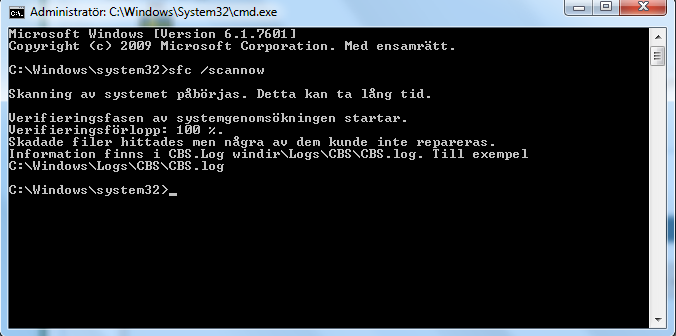
I have not disassembled the laptop more than what you've seen, it's working just as fine as before I unscrewed a few parts and put them back in place.

Regarding the cmd promt, if needed I'll get it translated. When opening the text file described in the cmd filed I'll get an error message following: "Acess denied!"
ZgUfL1j.png


OS and Antivirus system can be found in the small dropbox "My system specs".

It cant be the hardware if you can game on it with no problem..
Exactly what puzzles me.
 

My Computer My Computer

Computer type
Laptop
Computer Manufacturer/Model Number
Asus
OS
Microsoft Windows 7 Home Premium 64-bit 7601 Multiprocessor Free Service Pack 1
CPU
Intel(R) Core(TM) i7-2630QM CPU @ 2.00GHz
Motherboard
ASUSTeK Computer Inc. K53SV
Memory
6.00 GB
Graphics Card(s)
(1) NVIDIA GeForce GT 540M (2) Intel(R) HD Graphics Fa
Sound Card
(1) NVIDIA Virtual Audio Device (Wave Extensible) (WDM) (2
Screen Resolution
0 x 0 x 0 bits (0 colors) @ 0 Hz
Hard Drives
WDC WD7500BPVT-80HXZT1
Antivirus
Ad-Aware
I have not disassembled the laptop more than what you've seen, it's working just as fine as before I unscrewed a few parts and put them back in place.

Regarding the cmd promt, if needed I'll get it translated. When opening the text file described in the cmd filed I'll get an error message following: "Acess denied!"
ZgUfL1j.png


OS and Antivirus system can be found in the small dropbox "My system specs".

It cant be the hardware if you can game on it with no problem..
Exactly what puzzles me.

Ok. no prob with the translation im swedish (Halloj där :P)
it found some errors (pretty common) so it fixed some thing, dont expect miracles though,
But get CCLEANER and clean the computer, also just do a simple blow with compressed air on the intake or just put the vaccum cleaner there for a sec, ive done it a ton of times, no harm made.
(Dont do it on a desktop pc though. there are wires etc a lot more showed)

About the latop getting hot, Try PRIME it will set the cpu at full load, check the temps closely, if it goes above 87-90 turn prime of emidietly, if it stops around 85 there's nothing wrong, especially thinking of the i7 at 2ghz you have there. if it gets hot it will just clock down. my AMD A8 1.9Ghz goes up to 2.4ghz if it isnt too hot,

Laptops always run hot whatever you do, there's nothing you can do. only help it to not overheat totally

Also, Get Core Temp, It will show you the highest temp it got up to, i also think it has something called overheat protection so it will do something when the cpu getss hotter than you said it should
 

My Computer My Computer

Computer type
PC/Desktop
Computer Manufacturer/Model Number
Custom Built
OS
Windows 10 64Bit
CPU
Intel i7 6700K Cooled by Noctua NH-U14S
Motherboard
ASUS Z170 Pro Gaming
Memory
16GB 2133MHZ DDR4 Corsair
Graphics Card(s)
ASUS Direct CUII OC GTX 660
Sound Card
Supreme FX (On-Board)
Monitor(s) Displays
1: 24" Asus 144hz 2: 21.5" Benq 3: 20" Hp 2009m
Screen Resolution
1:1920x1080 2:1920x1080 3:1600:900
Hard Drives
Primary/OS: Samsung 850 EVO SSD 250GB
Secondary/Main: Seagate 1TB SSHD 3.5"
Media/Backups: WD Green 2TB HDD 3.5"
PSU
Corsair RM 650W
Case
Fractal Design R4
Cooling
2 140mm Noctua NF-A14 ULN, Noctua NH-U14S Cpu cooler
Keyboard
Corsair K70 RGB
Mouse
ROCCAT Kone XTD
Internet Speed
100 Mbit/s Download 100MBit/s Upload
Antivirus
F-Secure SAFE
Browser
Chrome, Firefox
Other Info
I hope hanging up your harddrives in rubber-bands for noise reasons isn't too harmful for the drives :S, but eh, rather silence than lasting drives.. :|
Also, Do a Full Virus search, always helps
 

My Computer My Computer

Computer type
PC/Desktop
Computer Manufacturer/Model Number
Custom Built
OS
Windows 10 64Bit
CPU
Intel i7 6700K Cooled by Noctua NH-U14S
Motherboard
ASUS Z170 Pro Gaming
Memory
16GB 2133MHZ DDR4 Corsair
Graphics Card(s)
ASUS Direct CUII OC GTX 660
Sound Card
Supreme FX (On-Board)
Monitor(s) Displays
1: 24" Asus 144hz 2: 21.5" Benq 3: 20" Hp 2009m
Screen Resolution
1:1920x1080 2:1920x1080 3:1600:900
Hard Drives
Primary/OS: Samsung 850 EVO SSD 250GB
Secondary/Main: Seagate 1TB SSHD 3.5"
Media/Backups: WD Green 2TB HDD 3.5"
PSU
Corsair RM 650W
Case
Fractal Design R4
Cooling
2 140mm Noctua NF-A14 ULN, Noctua NH-U14S Cpu cooler
Keyboard
Corsair K70 RGB
Mouse
ROCCAT Kone XTD
Internet Speed
100 Mbit/s Download 100MBit/s Upload
Antivirus
F-Secure SAFE
Browser
Chrome, Firefox
Other Info
I hope hanging up your harddrives in rubber-bands for noise reasons isn't too harmful for the drives :S, but eh, rather silence than lasting drives.. :|
Also noticed that your laptop draws a lot of its cooling air from the keyboard, so if you do like i did that you use the latop as a stationary computer, The screen closed and a main monitor with keyboard and mouse. make sure the screen is pulled up (Mu laptop draws like 50 from the keyboard and 50 from beneath, Very handy when having it in the coutch etc

(when the fan ramps up, cover the wasd area of the keyboard with your hand and you will probably feel air moving, and if you close the screen or even maybe when you have the hand there hear a different fan sound. you'll know it draws air from the keyboard as its air intake

Also, try putting the latop on a laptop cooler, becouse it may draw air from underneath too so just provide as much airflow to the laptop as possible.
 

My Computer My Computer

Computer type
PC/Desktop
Computer Manufacturer/Model Number
Custom Built
OS
Windows 10 64Bit
CPU
Intel i7 6700K Cooled by Noctua NH-U14S
Motherboard
ASUS Z170 Pro Gaming
Memory
16GB 2133MHZ DDR4 Corsair
Graphics Card(s)
ASUS Direct CUII OC GTX 660
Sound Card
Supreme FX (On-Board)
Monitor(s) Displays
1: 24" Asus 144hz 2: 21.5" Benq 3: 20" Hp 2009m
Screen Resolution
1:1920x1080 2:1920x1080 3:1600:900
Hard Drives
Primary/OS: Samsung 850 EVO SSD 250GB
Secondary/Main: Seagate 1TB SSHD 3.5"
Media/Backups: WD Green 2TB HDD 3.5"
PSU
Corsair RM 650W
Case
Fractal Design R4
Cooling
2 140mm Noctua NF-A14 ULN, Noctua NH-U14S Cpu cooler
Keyboard
Corsair K70 RGB
Mouse
ROCCAT Kone XTD
Internet Speed
100 Mbit/s Download 100MBit/s Upload
Antivirus
F-Secure SAFE
Browser
Chrome, Firefox
Other Info
I hope hanging up your harddrives in rubber-bands for noise reasons isn't too harmful for the drives :S, but eh, rather silence than lasting drives.. :|
Some COMPLETE system spec.'s would help! here's how to post them :http://www.sevenforums.com/tutorials/180324-system-info-see-your-system-specs.html

Just because its a lappy doesn't mean it won't show fan speed, mine does. Have you tried? A cleaning of the intakes AND exhaust will do wonders with overheating machines. Have you checked for any BIO's updates for your model? It is not near as hard taking a lappy apart as its been suggested. I've had mine apart multiple times.Its the only way to make sure everything is "right" , cables snug, dirt clogging intakes etc.

Also, have you checked the fan drivers? Since we don't know what kind of machine you have , this is as close I can get you to them : http://support.asus.com/download/Options.aspx?SLanguage=en&type=1
 
Last edited:

My Computer My Computer

Computer type
Laptop
Computer Manufacturer/Model Number
MSI GE72VR Apache Pro-416
OS
Windows 10x64 Build 1709
CPU
Intel i7 7700HQ Kaby Lake
Motherboard
Micro-Star Intl. MS-179B (U3C1)
Memory
16 GB DDR4 @2400
Graphics Card(s)
Nvidia Geforce GTX 1060
Screen Resolution
1920x1080 120Hz
Hard Drives
256 GB Nvme M.2 SSD

1TB HDD@7200
Cooling
Cooler Blast 4
Keyboard
Steel Series
Antivirus
Bit Defender Free
Browser
Edge
well, how hard it is to take apart is very different between all models, he said he wasnt to good in the computer world, so for him it may be pretty tricky..

Some laptops require you to take apart everything, and some are just having a little cover thats screwed down with four screws or somthing.
 

My Computer My Computer

Computer type
PC/Desktop
Computer Manufacturer/Model Number
Custom Built
OS
Windows 10 64Bit
CPU
Intel i7 6700K Cooled by Noctua NH-U14S
Motherboard
ASUS Z170 Pro Gaming
Memory
16GB 2133MHZ DDR4 Corsair
Graphics Card(s)
ASUS Direct CUII OC GTX 660
Sound Card
Supreme FX (On-Board)
Monitor(s) Displays
1: 24" Asus 144hz 2: 21.5" Benq 3: 20" Hp 2009m
Screen Resolution
1:1920x1080 2:1920x1080 3:1600:900
Hard Drives
Primary/OS: Samsung 850 EVO SSD 250GB
Secondary/Main: Seagate 1TB SSHD 3.5"
Media/Backups: WD Green 2TB HDD 3.5"
PSU
Corsair RM 650W
Case
Fractal Design R4
Cooling
2 140mm Noctua NF-A14 ULN, Noctua NH-U14S Cpu cooler
Keyboard
Corsair K70 RGB
Mouse
ROCCAT Kone XTD
Internet Speed
100 Mbit/s Download 100MBit/s Upload
Antivirus
F-Secure SAFE
Browser
Chrome, Firefox
Other Info
I hope hanging up your harddrives in rubber-bands for noise reasons isn't too harmful for the drives :S, but eh, rather silence than lasting drives.. :|
Alright lads, it's time to get back on this topic.

After going home the problem suddenly stopped and I didn't experience this issue for a long time until recently. It is now worse than ever but I have also managed to locate some sort of pattern for it.

* It never ever happends if any game is running. It has still never ever frozen whilst I've had a game running.
* The laptop is freezing regardless of temperature, this way I am sure it is not an overheating problem. I had just started my laptop today and it froze within the first 3-5 minutes.
* I'm currently on safe-mode and it does not freeze while I'm typing this. So I guess we could assume it's a driver or software problem?

I could also add that I never disassembled the laptop as the problem does not seem to be hardware related.

The question is what I do.. I still need help guys, this is driving me nuts.
 

My Computer My Computer

Computer type
Laptop
Computer Manufacturer/Model Number
Asus
OS
Microsoft Windows 7 Home Premium 64-bit 7601 Multiprocessor Free Service Pack 1
CPU
Intel(R) Core(TM) i7-2630QM CPU @ 2.00GHz
Motherboard
ASUSTeK Computer Inc. K53SV
Memory
6.00 GB
Graphics Card(s)
(1) NVIDIA GeForce GT 540M (2) Intel(R) HD Graphics Fa
Sound Card
(1) NVIDIA Virtual Audio Device (Wave Extensible) (WDM) (2
Screen Resolution
0 x 0 x 0 bits (0 colors) @ 0 Hz
Hard Drives
WDC WD7500BPVT-80HXZT1
Antivirus
Ad-Aware
Alright lads, it's time to get back on this topic.

After going home the problem suddenly stopped and I didn't experience this issue for a long time until recently. It is now worse than ever but I have also managed to locate some sort of pattern for it.

* It never ever happends if any game is running. It has still never ever frozen whilst I've had a game running.
* The laptop is freezing regardless of temperature, this way I am sure it is not an overheating problem. I had just started my laptop today and it froze within the first 3-5 minutes.
* I'm currently on safe-mode and it does not freeze while I'm typing this. So I guess we could assume it's a driver or software problem?

I could also add that I never disassembled the laptop as the problem does not seem to be hardware related.

The question is what I do.. I still need help guys, this is driving me nuts.

Ha like i told them.. not a overheating problem :P
anyhow my new desktop does this too but not very often at all but on that computer my psu is faulty.. like very seriously. For you, if you havent already, try this:
1: Update the gpu drivers ( if you have a nVidia card get Geforce Experience, it auto checks for updates.
(this may fix it but proboably not judging by the "never freezes while gaming")
2: Check your windows update and try to refresh and see if it has new updates
3: ( can be risky and tricky but can fix a lot of problems) Find out what motherboard you have and try downloading nessecary drivers and even a bios update ( theese can be found on the computers website, like asus's, hp, compaq, msi, dell etc...
bios update can fix alot
 

My Computer My Computer

Computer type
PC/Desktop
Computer Manufacturer/Model Number
Custom Built
OS
Windows 10 64Bit
CPU
Intel i7 6700K Cooled by Noctua NH-U14S
Motherboard
ASUS Z170 Pro Gaming
Memory
16GB 2133MHZ DDR4 Corsair
Graphics Card(s)
ASUS Direct CUII OC GTX 660
Sound Card
Supreme FX (On-Board)
Monitor(s) Displays
1: 24" Asus 144hz 2: 21.5" Benq 3: 20" Hp 2009m
Screen Resolution
1:1920x1080 2:1920x1080 3:1600:900
Hard Drives
Primary/OS: Samsung 850 EVO SSD 250GB
Secondary/Main: Seagate 1TB SSHD 3.5"
Media/Backups: WD Green 2TB HDD 3.5"
PSU
Corsair RM 650W
Case
Fractal Design R4
Cooling
2 140mm Noctua NF-A14 ULN, Noctua NH-U14S Cpu cooler
Keyboard
Corsair K70 RGB
Mouse
ROCCAT Kone XTD
Internet Speed
100 Mbit/s Download 100MBit/s Upload
Antivirus
F-Secure SAFE
Browser
Chrome, Firefox
Other Info
I hope hanging up your harddrives in rubber-bands for noise reasons isn't too harmful for the drives :S, but eh, rather silence than lasting drives.. :|
So it's time to end this thread.

I've concluded that the problem indeed was a heat-related issue. The freezes where due to the cpu and the gpu being basically fried and thereafter malfunctioning as a result of earlier overheating, meaning when we discovered that something was wrong the damage was already done and it was only a matter of time until the cpu is no longer working. What I could do is either replace the entire cooling system in the laptop and the cpu and hope that it'll work, or simply take what's left to take from the laptop and end it there, I've chosen the latter.

Upon disassembling the laptop I found a large portion of dust tucked in small "pockets", preventing air flow and trapping heat. What I could of done is to disassemble it regularly to clean it properly. Blowing through the air vents with compressed air or similar actions would have helped, but it probably would not prevent the ending result, only postpone it.

I've learnt a lot from this problem and the four months I've tried to solve it. At least I know what to expect from a laptop hereafter, and what not to. Thanks for the help nevertheless.

TL;DR: CPU fried due to heat issues since way earlier than when the problem was discovered. Disassembling the laptop and cleaning it out of pure habit would of helped.
 

My Computer My Computer

Computer type
Laptop
Computer Manufacturer/Model Number
Asus
OS
Microsoft Windows 7 Home Premium 64-bit 7601 Multiprocessor Free Service Pack 1
CPU
Intel(R) Core(TM) i7-2630QM CPU @ 2.00GHz
Motherboard
ASUSTeK Computer Inc. K53SV
Memory
6.00 GB
Graphics Card(s)
(1) NVIDIA GeForce GT 540M (2) Intel(R) HD Graphics Fa
Sound Card
(1) NVIDIA Virtual Audio Device (Wave Extensible) (WDM) (2
Screen Resolution
0 x 0 x 0 bits (0 colors) @ 0 Hz
Hard Drives
WDC WD7500BPVT-80HXZT1
Antivirus
Ad-Aware
Back
Top