Laptop slow [tried almost everything]

intel 4004

New member
Power User
Local time
8:17 AM
Messages
84
My Laptop is getting slower and slower. I is almost 5 years old now. I am dual booting Windows 7 and Ubuntu 12.04. On the Windows side, I have two partitions and both have plenty of space. I did a full scan with Avast and Malwarebyte and no virus is found. I tried to clean out the temp and other trash using Ccleaner, defrag the HHD, disable aero and almost other stuff that I can do besides disabling my wallpaper (which I know doesn't make a big difference in performances) What happen to my computer? Is it the CPU normally slows down over time? Or other things?
If I want to reinstall the windows, what is the proper way to do? Since I'm dual booting.
 

My Computer My Computer

Computer Manufacturer/Model Number
Lenovo T420s
OS
Windows 7 Ultimate 64bit
CPU
Intel Core i5 2520M
Memory
8GB DDR3 (4GB x 2)
Graphics Card(s)
Nvidia NVS 4200M/Intel HD Graphic 3000
Monitor(s) Displays
Thinkpad Display
Screen Resolution
1600 x 900
Hard Drives
Hitachi 320GB 7200rpm
Cooling
One Fan
Keyboard
Thinkpad
Mouse
Logitech MX Performance mouse
Internet Speed
At&t/Comcast
Other Info
It heats up...
intel 4004,

Have you monitored your cpu temperature during operation? CoreTemp should work, as should HWiNFO.

If your cpu is getting too hot it will throttle back to prevent damage. If it is getting hot, then perhaps your heatsink is clogged with lint and dust.

With the laptop performing a task that loads the cpu, hold the backs of your fingers to the exhaust port. You should be able to feel the hot air coming out.

If you don't feel any airflow, you may use canned air to blow into the exhaust port and see if a bunch of stuff comes out of the intake port. It's best to disassemble the laptop to do this, but it can be a tedious process. I always blow into the outlet because the dust accumulates on the leading edges of the fins and not between them.

I may be over cautious, but I usually put something (toothpick, bread tie, whatever will fit) into the fan to keep it from spinning and generating a potentially harmful voltage.
 

My Computer My Computer

Computer type
PC/Desktop
Computer Manufacturer/Model Number
Custom Build
OS
Windows 7 Home Premium x64
CPU
Intel Core i7 5960X @3.0 GHz
Motherboard
Gigabyte GA-X99-SOC Force
Memory
4 x 4 GB G.Skill Ripjaws4 DDR4-2400
Graphics Card(s)
PNY GTX 780
Sound Card
Realtek on-board ALC1150
Monitor(s) Displays
HP Z30i + Asus PA246Q + Dell U2412M
Screen Resolution
2560x1600 + 1920x1200 + 1920x1200
Hard Drives
Samsung 830 256GB
PSU
Antec EarthWatts 650W
Case
Cooler Master HAF 932
Cooling
Corsair Hydro Series H105
Keyboard
Razer BlackWidow Tournament Edition Stealth
Mouse
Razer Naga
My Laptop is getting slower and slower. I is almost 5 years old now. I am dual booting Windows 7 and Ubuntu 12.04. On the Windows side, I have two partitions and both have plenty of space. I did a full scan with Avast and Malwarebyte and no virus is found. I tried to clean out the temp and other trash using Ccleaner, defrag the HHD, disable aero and almost other stuff that I can do besides disabling my wallpaper (which I know doesn't make a big difference in performances) What happen to my computer? Is it the CPU normally slows down over time? Or other things?
If I want to reinstall the windows, what is the proper way to do? Since I'm dual booting.
Have you tried running system restore:http://www.sevenforums.com/tutorials/700-system-restore.html
 

My Computer My Computer

Computer type
PC/Desktop
Computer Manufacturer/Model Number
HP Pavilion P7-1010
OS
Windows 7 Professional x64 Service Pack 1
CPU
AMD Athlon X4 645
Motherboard
Foxxcon N-Alvorix RS880
Memory
6GB DDR3 1066
Graphics Card(s)
Sapphire Radeon HD 5670 512MB GDDR5
Sound Card
Realtek Integrated Audio
Monitor(s) Displays
HP 2011x
Screen Resolution
1600x900
Hard Drives
1. Crucial M4 128GB SSD
2. 1TB Seagate Barracuda 7200.12 RPM
3. 1TB Western Digital Caviar Green 5400RPM
PSU
Seasonic S12 II Bronze 380 Watt
Case
HP OEM
Cooling
Coolermaster Heatsink, AVC Case Fan
Keyboard
HP OEM- Made by Chicony
Mouse
HP OEM- Made by Logitech
Internet Speed
20MBit Down/4 Up
Antivirus
Microsoft Security Essentials
Browser
Internet Explorer 10
intel 4004,

Have you monitored your cpu temperature during operation? CoreTemp should work, as should HWiNFO.

If your cpu is getting too hot it will throttle back to prevent damage. If it is getting hot, then perhaps your heatsink is clogged with lint and dust.

With the laptop performing a task that loads the cpu, hold the backs of your fingers to the exhaust port. You should be able to feel the hot air coming out.

If you don't feel any airflow, you may use canned air to blow into the exhaust port and see if a bunch of stuff comes out of the intake port. It's best to disassemble the laptop to do this, but it can be a tedious process. I always blow into the outlet because the dust accumulates on the leading edges of the fins and not between them.

I may be over cautious, but I usually put something (toothpick, bread tie, whatever will fit) into the fan to keep it from spinning and generating a potentially harmful voltage.

When I check Core temp, its around 62c - 73c. I can feel air flowing. I cleaned the dust out before using a brush and a vacuum cleaner.

My Laptop is getting slower and slower. I is almost 5 years old now. I am dual booting Windows 7 and Ubuntu 12.04. On the Windows side, I have two partitions and both have plenty of space. I did a full scan with Avast and Malwarebyte and no virus is found. I tried to clean out the temp and other trash using Ccleaner, defrag the HHD, disable aero and almost other stuff that I can do besides disabling my wallpaper (which I know doesn't make a big difference in performances) What happen to my computer? Is it the CPU normally slows down over time? Or other things?
If I want to reinstall the windows, what is the proper way to do? Since I'm dual booting.
Have you tried running system restore:http://www.sevenforums.com/tutorials/700-system-restore.html

So system restore means make the computer go back in time? But you will need a store point right? I don't have a restore point...
 

My Computer My Computer

Computer Manufacturer/Model Number
Lenovo T420s
OS
Windows 7 Ultimate 64bit
CPU
Intel Core i5 2520M
Memory
8GB DDR3 (4GB x 2)
Graphics Card(s)
Nvidia NVS 4200M/Intel HD Graphic 3000
Monitor(s) Displays
Thinkpad Display
Screen Resolution
1600 x 900
Hard Drives
Hitachi 320GB 7200rpm
Cooling
One Fan
Keyboard
Thinkpad
Mouse
Logitech MX Performance mouse
Internet Speed
At&t/Comcast
Other Info
It heats up...
Forgot to say, I'm using two accounts. One is the Admin that a activated and the other is a normal user.
 

My Computer My Computer

Computer Manufacturer/Model Number
Lenovo T420s
OS
Windows 7 Ultimate 64bit
CPU
Intel Core i5 2520M
Memory
8GB DDR3 (4GB x 2)
Graphics Card(s)
Nvidia NVS 4200M/Intel HD Graphic 3000
Monitor(s) Displays
Thinkpad Display
Screen Resolution
1600 x 900
Hard Drives
Hitachi 320GB 7200rpm
Cooling
One Fan
Keyboard
Thinkpad
Mouse
Logitech MX Performance mouse
Internet Speed
At&t/Comcast
Other Info
It heats up...
Does it run slower in Windows and Ubuntu or only in Windows. Just to see whether it could be a hardware problem or an OS problem.
 

My Computer My Computer

Computer Manufacturer/Model Number
HP, Dell, Gateway, Toshiba - 4 laptops and 2 desktops
OS
Vista, Windows7, Mint Mate, Zorin, Windows 8
CPU
from 1.6GHz Duo to i7
Monitor(s) Displays
2x HP w2207
Hard Drives
5x HDD, 7x SSD, 12x Externals
Keyboard
with trackball - no mices
Mouse
Trackball mice
Internet Speed
DSL 6000
Does it run slower in Windows and Ubuntu or only in Windows. Just to see whether it could be a hardware problem or an OS problem.

From my feeling, Windows is running slower. Ubuntu because it has a very limited space, its a bit slow, but not as slow as Windows side.
 

My Computer My Computer

Computer Manufacturer/Model Number
Lenovo T420s
OS
Windows 7 Ultimate 64bit
CPU
Intel Core i5 2520M
Memory
8GB DDR3 (4GB x 2)
Graphics Card(s)
Nvidia NVS 4200M/Intel HD Graphic 3000
Monitor(s) Displays
Thinkpad Display
Screen Resolution
1600 x 900
Hard Drives
Hitachi 320GB 7200rpm
Cooling
One Fan
Keyboard
Thinkpad
Mouse
Logitech MX Performance mouse
Internet Speed
At&t/Comcast
Other Info
It heats up...
I had the understanding that there was a change over time. Did both change (get slower) or only Windows. I am just tryung to find out whether we are looking at a hardware or OS problem. What is your feeling??
 

My Computer My Computer

Computer Manufacturer/Model Number
HP, Dell, Gateway, Toshiba - 4 laptops and 2 desktops
OS
Vista, Windows7, Mint Mate, Zorin, Windows 8
CPU
from 1.6GHz Duo to i7
Monitor(s) Displays
2x HP w2207
Hard Drives
5x HDD, 7x SSD, 12x Externals
Keyboard
with trackball - no mices
Mouse
Trackball mice
Internet Speed
DSL 6000
I had the understanding that there was a change over time. Did both change (get slower) or only Windows. I am just tryung to find out whether we are looking at a hardware or OS problem. What is your feeling??

I guess maybe the Harddrive? I didn't notice any changes for Ubuntu, only Windows.
 

My Computer My Computer

Computer Manufacturer/Model Number
Lenovo T420s
OS
Windows 7 Ultimate 64bit
CPU
Intel Core i5 2520M
Memory
8GB DDR3 (4GB x 2)
Graphics Card(s)
Nvidia NVS 4200M/Intel HD Graphic 3000
Monitor(s) Displays
Thinkpad Display
Screen Resolution
1600 x 900
Hard Drives
Hitachi 320GB 7200rpm
Cooling
One Fan
Keyboard
Thinkpad
Mouse
Logitech MX Performance mouse
Internet Speed
At&t/Comcast
Other Info
It heats up...
Is the Windows side slow ALL the time?

Or only when booting?

Or only when doing certain things?

Have you looked in Task Manager or Resource Monitor?
 

My Computer My Computer

Computer type
PC/Desktop
Computer Manufacturer/Model Number
Ignatz Special; 4 speed manual gearbox; factory air conditioning; one of one
OS
Windows 7 Home Premium SP1, 64-bit
CPU
Intel Skylake i5-6600K, not overclocked
Motherboard
AsRock Z170M Extreme 4, micro ATX
Memory
8 GB HyperX DDR4-2666 (2 x 4 GB)
Graphics Card(s)
none; graphics are integrated on CPU
Sound Card
onboard: Realtek ALC1150; external: USB Behringer UF0-202
Monitor(s) Displays
Dell S2340M 23 inch IPS
Screen Resolution
1600 x 900
Hard Drives
System: Crucial MX100 series SSD, 128 GB;
Data: Samsung Spinpoint 103SJ, 1 TB;
Backup: WD Caviar Green WD30EZRX-00D8PB0, 3 TB
PSU
Rosewill SilentNight 500 watt fanless, semi-modular
Case
Antec Solo II
Cooling
Noctua NH-U12S; Noctua F12 intake, Noctua S12A exhaust
Keyboard
Microsoft 200 6JH-00001 USB
Mouse
Dell or Microsoft optical wired; USB
Antivirus
Microsoft Security Essentials and Malwarebytes Premium
Browser
Pale Moon
Other Info
All fans PWM; speeds at idle: CPU circa 500 rpm; intake circa 600 rpm; exhaust circa 600 rpm; CPU temps 27 idle and 47 C load in a warm room (27 C/81 F) when running Intel Extreme Tuning Utility stress test.
Intel4004,
Did you know that such an animal actually existed? Ah, the good ol' days.

Anyway, on to your problem.
Need DiskManagment info.
Need startup related into.

Here are the two boilerplate;
HOW TO POST A SNAPSHOT OF DISK MANAGEMENT DISPLAY
Run disk management:
WIN |
type DISKMGMT.MSC | ENTER
WIN=
key with Microsoft logo on top.


Maximize the output of Disk Management:
ALT-Spacebar
key combo | X key (selects Maximize) |
Drag the field separators (such as between Status and Capacity) to show entire field.


Make a snapshot:
WIN |
type SNIPPING | ENTER | New
Drag the cursor around the area you want to snip.
File | Save as | select save location and name | Save


Post the snapshot:
Post a File or Screenshot in Seven Forums

=====================================================
Install CCleaner:
CCleaner - PC Optimization and Cleaning - Free Download

list of STARTUP PROGRAMS

CCleaner | Tools
icon | Startup button | Windows tab |
click on Save to text file button (bottom right side) |
accept Startup.txt as file name | SAVE button

list of SCHEDULED TASKS

CCleaner | Tools
icon | Startup button | Scheduled Tasks tab |
click on Save to text file button (bottom right side) |
enter Scheduled Tasks as File name | Save button

List of INSTALLED PROGRAMS

CCleaner | Tools
icon | Uninstall button |
click on Save to text file button (bottom right side) |
accept install.txt as File name | Save button


UPLOAD the startup.txt file
UPLOAD the Scheduled Tasks.txt file
UPLOAD the install.txt file.

HOW TO UPLOAD
Post a File or Screenshot in Seven Forums
==============================================
also, run:
cleanmgr.exe

also,
win | type %temp% | enter | Ctrl + A | Ctrl + D
win is key withmicrosoft log on top.
 

My Computer My Computer

Computer Manufacturer/Model Number
Toshiba Satellite S875D-S7239 laptop
OS
MS Windows 7 Ultimate SP1 64-bit
CPU
AMD A10-4600M
Motherboard
AMD Pumori (Socket FT1)
Memory
6.00 GB Dual-Channel DDR3 @ 798MHz (11-11-12-28)
Graphics Card(s)
AMD Radeon HD 7660G
Sound Card
High Definition Audio Device
Monitor(s) Displays
Generic PnP Monitor (1600x900@60Hz)
Screen Resolution
1600x900@60Hz
Hard Drives
SSD 119GB Corsair CSSD-V128GB2 ATA Device
Keyboard
Standard PS/2 Keyboard
Mouse
HP Wireless Optical Mobile Mouse Model FHA-3410
Internet Speed
What the local pub, local coffee shop offers.
Other Info
Optical Drive:MATSHITA BD-CMB UJ160B ATA Device


Also have an Asus ha1002xp netbook with Win 7 Ultimate installed.
Is the Windows side slow ALL the time?

Or only when booting?

Or only when doing certain things?

Have you looked in Task Manager or Resource Monitor?

It is slow when for example, using Chrome, opened 5 tabs, one and youtube and it lags when I'm using another tab to browse the web. Or using photoshop and firefox, then switching between them is very slow (a few seconds)

There is not much stuff running when I look in the process.
 

My Computer My Computer

Computer Manufacturer/Model Number
Lenovo T420s
OS
Windows 7 Ultimate 64bit
CPU
Intel Core i5 2520M
Memory
8GB DDR3 (4GB x 2)
Graphics Card(s)
Nvidia NVS 4200M/Intel HD Graphic 3000
Monitor(s) Displays
Thinkpad Display
Screen Resolution
1600 x 900
Hard Drives
Hitachi 320GB 7200rpm
Cooling
One Fan
Keyboard
Thinkpad
Mouse
Logitech MX Performance mouse
Internet Speed
At&t/Comcast
Other Info
It heats up...
see post #11
 

My Computer My Computer

Computer Manufacturer/Model Number
Toshiba Satellite S875D-S7239 laptop
OS
MS Windows 7 Ultimate SP1 64-bit
CPU
AMD A10-4600M
Motherboard
AMD Pumori (Socket FT1)
Memory
6.00 GB Dual-Channel DDR3 @ 798MHz (11-11-12-28)
Graphics Card(s)
AMD Radeon HD 7660G
Sound Card
High Definition Audio Device
Monitor(s) Displays
Generic PnP Monitor (1600x900@60Hz)
Screen Resolution
1600x900@60Hz
Hard Drives
SSD 119GB Corsair CSSD-V128GB2 ATA Device
Keyboard
Standard PS/2 Keyboard
Mouse
HP Wireless Optical Mobile Mouse Model FHA-3410
Internet Speed
What the local pub, local coffee shop offers.
Other Info
Optical Drive:MATSHITA BD-CMB UJ160B ATA Device


Also have an Asus ha1002xp netbook with Win 7 Ultimate installed.
View attachment install.txt

View attachment startup.txt

screen1.jpg

Installed programs
7-Zip 9.20 11/1/2011
Adobe AIR Adobe Systems Incorporated 4/11/2012 3.2.0.2070
Adobe Creative Suite 4 Master Collection Adobe Systems Incorporated 11/7/2011 6,817 MB 4.0
Adobe Flash Player 11 ActiveX Adobe Systems Incorporated 5/6/2012 6.00 MB 11.2.202.235
Adobe Flash Player 11 Plugin Adobe Systems Incorporated 5/6/2012 6.00 MB 11.2.202.235
Adobe Media Player Adobe Systems Incorporated 11/7/2011 1.1
Adobe Photoshop CS6 Adobe Systems Incorporated 4/29/2012 1,606 MB 13.0
Adobe Reader X (10.1.1) Adobe Systems Incorporated 11/5/2011 114.0 MB 10.1.1
Aero Glass Mp3 Player Microsoft 4/22/2012 5.70 MB 1.0.0
Any Video Converter 3.3.7 Any-Video-Converter.com 5/1/2012 93.5 MB
Apple Application Support Apple Inc. 3/28/2012 61.0 MB 2.1.7
Apple Mobile Device Support Apple Inc. 3/28/2012 24.4 MB 4.0.0.97
Apple Software Update Apple Inc. 11/1/2011 2.38 MB 2.1.3.127
Autodesk SketchBookPro 2011 Autodesk 11/17/2011 176.9 MB 5.00.0000
avast! Free Antivirus AVAST Software 5/3/2012 7.0.1426.0
Bamboo Wacom Technology Corp. 4/12/2012 5.2.5-5
Bamboo Dock Wacom Co., Ltd. 4/11/2012 4.0
Blender Blender Foundation 4/16/2012 2.62-release
Bonjour Apple Inc. 11/1/2011 1.02 MB 3.0.0.10
CCleaner Piriform 12/26/2011 3.14
Clementine Clementine 4/8/2012 1.0.1
Core Temp 1.0 RC3 Alcpu 4/21/2012 1.92 MB 1.0
CyberLink PowerDirector CyberLink Corp. 2/18/2012 520 MB 9.0.0.2330
Defraggler Piriform 2/19/2012 2.09
Eraser 6.0.9.2343 The Eraser Project 4/29/2012 2.29 MB 6.0.2343
Facebook Messenger 2.0.4478.0 Facebook 4/5/2012 0.37 MB 2.0.4478.0
FBX Plugin 2006.08 for Max 9.0 2/13/2012
FileZilla Client 3.5.3 FileZilla Project 1/18/2012 16.6 MB 3.5.3
Google Chrome Google Inc. 11/29/2011 18.0.1025.168
Google Earth Google 5/2/2012 107.6 MB 6.2.2.6613
Hotspot Shield 2.24 AnchorFree 1/12/2012 2.24
HP Document Manager 2.0 HP 11/1/2011 2.0
HP Officejet 6500 E709 Series HP 1/7/2012 14.0
HP Solution Center 13.0 HP 11/1/2011 13.0
Intel(R) Graphics Media Accelerator Driver Intel Corporation 11/1/2011 54.3 MB 8.15.10.1930
Intel(R) TV Wizard Intel Corporation 11/1/2011
IrfanView (remove only) Irfan Skiljan 11/1/2011 1.50 MB 4.30
iTunes Apple Inc. 3/28/2012 157.4 MB 10.6.0.40
Java(TM) 6 Update 31 Oracle 3/6/2012 95.1 MB 6.0.310
Java(TM) 7 Update 2 Oracle 1/7/2012 99.1 MB 7.0.20
Java(TM) SE Development Kit 7 Update 2 Oracle 1/7/2012 137.2 MB 1.7.0.20
JavaFX 2.0.2 Oracle Corporation 1/7/2012 18.3 MB 2.0.2
JavaFX 2.0.2 SDK Oracle Corporation 1/7/2012 63.7 MB 2.0.2
Logitech Flow Scroll 4.0 Logitech 3/22/2012 15.6 MB 4.00.33
Logitech SetPoint 6.32 Logitech 3/22/2012 39.1 MB 6.32.20
Malwarebytes Anti-Malware version 1.61.0.1400 Malwarebytes Corporation 5/1/2012 18.0 MB 1.61.0.1400
Microsoft .NET Framework 4 Client Profile Microsoft Corporation 11/2/2011 38.8 MB 4.0.30319
Microsoft .NET Framework 4 Extended Microsoft Corporation 11/8/2011 52.0 MB 4.0.30319
Microsoft Office File Validation Add-In Microsoft Corporation 12/17/2011 7.95 MB 14.0.5130.5003
Microsoft Office Home and Student 2007 Microsoft Corporation 3/27/2012 12.0.6612.1000
Microsoft Silverlight Microsoft Corporation 2/15/2012 60.3 MB 4.1.10111.0
Microsoft SQL Server 2005 Compact Edition [ENU] Microsoft Corporation 4/27/2012 1.70 MB 3.1.0000
Microsoft Visual C++ 2005 Redistributable Microsoft Corporation 11/4/2011 0.29 MB 8.0.59193
Microsoft Visual C++ 2008 Redistributable - x86 9.0.30729.17 Microsoft Corporation 2/10/2012 0.23 MB 9.0.30729
Microsoft Visual C++ 2008 Redistributable - x86 9.0.30729.4148 Microsoft Corporation 11/1/2011 0.58 MB 9.0.30729.4148
Microsoft Visual C++ 2008 Redistributable - x86 9.0.30729.6161 Microsoft Corporation 11/4/2011 0.59 MB 9.0.30729.6161
Microsoft Visual C++ 2010 x86 Redistributable - 10.0.40219 Microsoft Corporation 3/25/2012 15.0 MB 10.0.40219
MiniTool Partition Wizard Professional Edition 6.0 MiniTool Solution Ltd. 11/4/2011 21.5 MB
Motorola SM56 Speakerphone Modem Motorola Inc 2/15/2012 6.12.25.06
Mozilla Firefox 13.0 (x86 en-US) Mozilla 4/27/2012 36.9 MB 13.0
Mozilla Maintenance Service Mozilla 4/27/2012 0.19 MB 13.0
MSXML 4.0 SP2 (KB954430) Microsoft Corporation 11/2/2011 1.28 MB 4.20.9870.0
MSXML 4.0 SP2 (KB973688) Microsoft Corporation 11/3/2011 1.33 MB 4.20.9876.0
Notepad++ 11/7/2011 5.9.6.1
PdaNet Desktop for iPhone 5.30 June Fabrics Technology Inc 12/30/2011 1.27 MB
QuickTime Apple Inc. 12/7/2011 73.3 MB 7.71.80.42
Recuva Piriform 3/19/2012 1.42
SmartSound Quicktracks 5 SmartSound Software Inc. 2/18/2012 49.2 MB 5.1.7
System Requirements Lab CYRI Husdawg, LLC 12/27/2011 0.45 MB 4.5.1.0
System Requirements Lab for Intel Husdawg, LLC 11/29/2011 0.75 MB 4.4.24.0
TeamViewer 6 TeamViewer GmbH 12/16/2011 6.0.11656
VirtualCloneDrive Elaborate Bytes 11/27/2011
VLC VLC 11/6/2011 0.43 MB 1.0.0.0
VLC media player 1.1.11 VideoLAN 11/27/2011 1.1.11
VNC Enterprise Edition E4.6.1 RealVNC Ltd 1/8/2012 8.09 MB E4.6.1
VNC Mirror Driver 1.8.0 RealVNC Ltd. 1/8/2012 0.88 MB 1.8.0
VNC Printer Driver 1.7.0 RealVNC Ltd. 1/8/2012 0.95 MB 1.7.0
VOCALOID2 Editor V2.0.2.4J Yamaha Corporation 2/11/2012 0.0.0.1
VOCALOID2 Expression DB (Standard) Yamaha Corporation 2/11/2012 0.0.0.1
VOCALOID2 Voice DB (Miku) Crypton Future Media Inc 2/11/2012 0.0.0.1
VOCALOID2 VSTi V2.0.2.0 Yamaha Corporation 2/11/2012 0.0.0.1
WebTablet FB Plugin Wacom Technology Corp. 4/11/2012 2.0.0.1
WebTablet IE Plugin Wacom Technology Corp. 4/11/2012 1.1.0.12
WebTablet Netscape Plugin Wacom Technology Corp. 4/11/2012 1.1.0.10
Windows Live Essentials Microsoft Corporation 4/27/2012 15.4.3555.0308
µTorrent 5/3/2012 3.1.3

Startup programs
Yes HKCU:Run AdobeBridge
No HKCU:Run Google Update "C:\Users\Administrator\AppData\Local\Google\Update\GoogleUpdate.exe" /c
No HKCU:Run Hobbyist Software VLC Streamer "G:\Program Files\Hobbyist Software\VLC Streamer\VLC Streamer Configuration.exe" /startup
No HKCU:Run msnmsgr "C:\Program Files\Windows Live\Messenger\msnmsgr.exe" /background
No HKCU:Run uTorrent "C:\Program Files\uTorrent\uTorrent.exe" /MINIMIZED
No HKLM:Run Acrobat Assistant 8.0 "G:\Program Files\Adobe\Acrobat 9.0\Acrobat\Acrotray.exe"
No HKLM:Run Adobe Acrobat Speed Launcher "G:\Program Files\Adobe\Acrobat 9.0\Acrobat\Acrobat_sl.exe"
No HKLM:Run Adobe ARM "C:\Program Files\Common Files\Adobe\ARM\1.0\AdobeARM.exe"
Yes HKLM:Run AdobeAAMUpdater-1.0 "C:\Program Files\Common Files\Adobe\OOBE\PDApp\UWA\UpdaterStartupUtility.exe"
No HKLM:Run AdobeCS4ServiceManager "C:\Program Files\Common Files\Adobe\CS4ServiceManager\CS4ServiceManager.exe" -launchedbylogin
Yes HKLM:Run AdobeCS6ServiceManager "C:\Program Files\Common Files\Adobe\CS6ServiceManager\CS6ServiceManager.exe" -launchedbylogin
Yes HKLM:Run APSDaemon "C:\Program Files\Common Files\Apple\Apple Application Support\APSDaemon.exe"
Yes HKLM:Run avast "G:\Program Files\AVAST Software\Avast\avastUI.exe" /nogui
Yes HKLM:Run Eraser "G:\PROGRA~1\Eraser\Eraser.exe" --atRestart
Yes HKLM:Run EvtMgr6 C:\Program Files\Logitech\SetPointP\SetPoint.exe /launchGaming
No HKLM:Run HDMI ARP Update reg add "HKCU\SOFTWARE\Microsoft\Windows\CurrentVersion\App Management\ARPCache\HDMI" /v Changed /t REG_DWORD /d 1 /f
Yes HKLM:Run HotKeysCmds C:\Windows\system32\hkcmd.exe
Yes HKLM:Run IgfxTray C:\Windows\system32\igfxtray.exe
No HKLM:Run iTunesHelper "G:\Program Files\iTunes\iTunesHelper.exe"
Yes HKLM:Run LogiScrollApp C:\Program Files\Logitech\FlowScroll\KhalScroll.exe
Yes HKLM:Run Persistence C:\Windows\system32\igfxpers.exe
No HKLM:Run QuickTime Task "C:\Program Files\QuickTime\QTTask.exe" -atboottime
Yes HKLM:Run SMSERIAL C:\Program Files\Motorola\SMSERIAL\sm56hlpr.exe
No HKLM:Run SunJavaUpdateSched "C:\Program Files\Common Files\Java\Java Update\jusched.exe"
Yes HKLM:Run SwitchBoard C:\Program Files\Common Files\Adobe\SwitchBoard\SwitchBoard.exe
No HKLM:Run VirtualCloneDrive "G:\Program Files\Elaborate Bytes\VirtualCloneDrive\VCDDaemon.exe" /s
No Startup Common SketchBook Snapshot.lnk G:\PROGRA~1\Autodesk\SKETCH~1\SKETCH~1.EXE
Yes Startup User Facebook Messenger.lnk C:\Users\Administrator\AppData\Local\Facebook\Messenger\2.0.4478.0\FacebookMessenger.exe
No Startup User Facebook Messenger.lnk C:\Users\ADMINI~1\AppData\Local\Facebook\MESSEN~1\204373~1.0\FACEBO~1.EXE
No Startup User PdaNet Desktop.lnk C:\PROGRA~1\PDANET~1\PdaNetPC.exe
No Startup User The Exchange.exe C:\Users\Crush\AppData\Roaming\Microsoft\Windows\Start Menu\Programs\Startup\The Exchange.exe

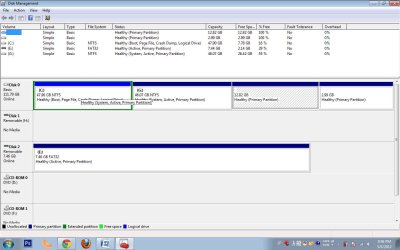
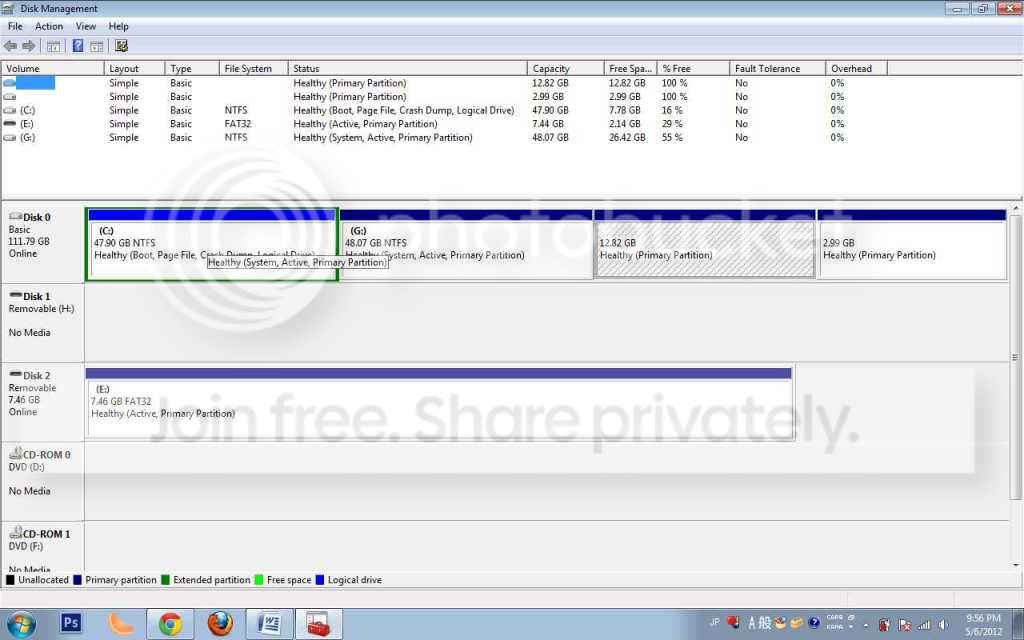
Disk managment
screen1.jpg
 
Last edited:

My Computer My Computer

Computer Manufacturer/Model Number
Lenovo T420s
OS
Windows 7 Ultimate 64bit
CPU
Intel Core i5 2520M
Memory
8GB DDR3 (4GB x 2)
Graphics Card(s)
Nvidia NVS 4200M/Intel HD Graphic 3000
Monitor(s) Displays
Thinkpad Display
Screen Resolution
1600 x 900
Hard Drives
Hitachi 320GB 7200rpm
Cooling
One Fan
Keyboard
Thinkpad
Mouse
Logitech MX Performance mouse
Internet Speed
At&t/Comcast
Other Info
It heats up...
In a second I'll look at the diskmangement.

In the meantime you can UPLOAD the three files as opposed to pasting them.
Evaluation is much easier when working with the uploaded .txt file.

The procedure I gave gives a link to how to upload a file.
thanks

Oh yes, please also use that upload procedure to upload the diskmanagement.png file.
thanks.
 

My Computer My Computer

Computer Manufacturer/Model Number
Toshiba Satellite S875D-S7239 laptop
OS
MS Windows 7 Ultimate SP1 64-bit
CPU
AMD A10-4600M
Motherboard
AMD Pumori (Socket FT1)
Memory
6.00 GB Dual-Channel DDR3 @ 798MHz (11-11-12-28)
Graphics Card(s)
AMD Radeon HD 7660G
Sound Card
High Definition Audio Device
Monitor(s) Displays
Generic PnP Monitor (1600x900@60Hz)
Screen Resolution
1600x900@60Hz
Hard Drives
SSD 119GB Corsair CSSD-V128GB2 ATA Device
Keyboard
Standard PS/2 Keyboard
Mouse
HP Wireless Optical Mobile Mouse Model FHA-3410
Internet Speed
What the local pub, local coffee shop offers.
Other Info
Optical Drive:MATSHITA BD-CMB UJ160B ATA Device


Also have an Asus ha1002xp netbook with Win 7 Ultimate installed.
I see 14 things running at startup.

How many of those need to be running all the time?

You might try it with only Avast running, via the checkboxes in the startup tab of msconfig.
 

My Computer My Computer

Computer type
PC/Desktop
Computer Manufacturer/Model Number
Ignatz Special; 4 speed manual gearbox; factory air conditioning; one of one
OS
Windows 7 Home Premium SP1, 64-bit
CPU
Intel Skylake i5-6600K, not overclocked
Motherboard
AsRock Z170M Extreme 4, micro ATX
Memory
8 GB HyperX DDR4-2666 (2 x 4 GB)
Graphics Card(s)
none; graphics are integrated on CPU
Sound Card
onboard: Realtek ALC1150; external: USB Behringer UF0-202
Monitor(s) Displays
Dell S2340M 23 inch IPS
Screen Resolution
1600 x 900
Hard Drives
System: Crucial MX100 series SSD, 128 GB;
Data: Samsung Spinpoint 103SJ, 1 TB;
Backup: WD Caviar Green WD30EZRX-00D8PB0, 3 TB
PSU
Rosewill SilentNight 500 watt fanless, semi-modular
Case
Antec Solo II
Cooling
Noctua NH-U12S; Noctua F12 intake, Noctua S12A exhaust
Keyboard
Microsoft 200 6JH-00001 USB
Mouse
Dell or Microsoft optical wired; USB
Antivirus
Microsoft Security Essentials and Malwarebytes Premium
Browser
Pale Moon
Other Info
All fans PWM; speeds at idle: CPU circa 500 rpm; intake circa 600 rpm; exhaust circa 600 rpm; CPU temps 27 idle and 47 C load in a warm room (27 C/81 F) when running Intel Extreme Tuning Utility stress test.
I see 14 things running at startup.

How many of those need to be running all the time?

You might try it with only Avast running, via the checkboxes in the startup tab of msconfig.

Some dont want to mess with it since I have no idea what it is. Some are for the mouse. and the Facebook messenger...
 

My Computer My Computer

Computer Manufacturer/Model Number
Lenovo T420s
OS
Windows 7 Ultimate 64bit
CPU
Intel Core i5 2520M
Memory
8GB DDR3 (4GB x 2)
Graphics Card(s)
Nvidia NVS 4200M/Intel HD Graphic 3000
Monitor(s) Displays
Thinkpad Display
Screen Resolution
1600 x 900
Hard Drives
Hitachi 320GB 7200rpm
Cooling
One Fan
Keyboard
Thinkpad
Mouse
Logitech MX Performance mouse
Internet Speed
At&t/Comcast
Other Info
It heats up...
Intel 4004,
Glad to see the uploads.

First thing is:
Please update your CCleaner.
Then you will have the tab for Scheduled Tasks so that you can also upload that file.

Will be looking at the uploads now.
 

My Computer My Computer

Computer Manufacturer/Model Number
Toshiba Satellite S875D-S7239 laptop
OS
MS Windows 7 Ultimate SP1 64-bit
CPU
AMD A10-4600M
Motherboard
AMD Pumori (Socket FT1)
Memory
6.00 GB Dual-Channel DDR3 @ 798MHz (11-11-12-28)
Graphics Card(s)
AMD Radeon HD 7660G
Sound Card
High Definition Audio Device
Monitor(s) Displays
Generic PnP Monitor (1600x900@60Hz)
Screen Resolution
1600x900@60Hz
Hard Drives
SSD 119GB Corsair CSSD-V128GB2 ATA Device
Keyboard
Standard PS/2 Keyboard
Mouse
HP Wireless Optical Mobile Mouse Model FHA-3410
Internet Speed
What the local pub, local coffee shop offers.
Other Info
Optical Drive:MATSHITA BD-CMB UJ160B ATA Device


Also have an Asus ha1002xp netbook with Win 7 Ultimate installed.
I see 14 things running at startup.

How many of those need to be running all the time?

You might try it with only Avast running, via the checkboxes in the startup tab of msconfig.

Some dont want to mess with it since I have no idea what it is. Some are for the mouse. and the Facebook messenger...

You can find out how necessary they are by unchecking them.

You can later go back and recheck them if some desired functionality is missing.

Most necessary applications will start on an as-needed basis and simply don't need to be running all the time.
 

My Computer My Computer

Computer type
PC/Desktop
Computer Manufacturer/Model Number
Ignatz Special; 4 speed manual gearbox; factory air conditioning; one of one
OS
Windows 7 Home Premium SP1, 64-bit
CPU
Intel Skylake i5-6600K, not overclocked
Motherboard
AsRock Z170M Extreme 4, micro ATX
Memory
8 GB HyperX DDR4-2666 (2 x 4 GB)
Graphics Card(s)
none; graphics are integrated on CPU
Sound Card
onboard: Realtek ALC1150; external: USB Behringer UF0-202
Monitor(s) Displays
Dell S2340M 23 inch IPS
Screen Resolution
1600 x 900
Hard Drives
System: Crucial MX100 series SSD, 128 GB;
Data: Samsung Spinpoint 103SJ, 1 TB;
Backup: WD Caviar Green WD30EZRX-00D8PB0, 3 TB
PSU
Rosewill SilentNight 500 watt fanless, semi-modular
Case
Antec Solo II
Cooling
Noctua NH-U12S; Noctua F12 intake, Noctua S12A exhaust
Keyboard
Microsoft 200 6JH-00001 USB
Mouse
Dell or Microsoft optical wired; USB
Antivirus
Microsoft Security Essentials and Malwarebytes Premium
Browser
Pale Moon
Other Info
All fans PWM; speeds at idle: CPU circa 500 rpm; intake circa 600 rpm; exhaust circa 600 rpm; CPU temps 27 idle and 47 C load in a warm room (27 C/81 F) when running Intel Extreme Tuning Utility stress test.
Uninstall:
Code:
avast! Free Antivirus    AVAST Software    5/3/2012        7.0.1426.0
Bonjour    Apple Inc.    11/1/2011    1.02 MB    3.0.0.10
FileZilla Client 3.5.3    FileZilla Project    1/18/2012    16.6 MB    3.5.3
VirtualCloneDrive    Elaborate Bytes    11/27/2011        
µTorrent        5/3/2012        3.1.3

REBOOT!

Since i can hear you screaming from here:
1. If you must use Avast, then at least used the pay version. I strongly recommend, I install, and I use exclusively MSE, Microsoft Security Essentials.
2. Filezilla is known for being unsecure and a source of malware.
3. Virtual Clone Drive has a habit of interfering with programs and slowing down a system. Oh yes, filezilla and VirtualCloneDrive I've used.
4. BonJour is known troublemaker.
5. see below about torrenting

REMOVAL OF P2P PROGRAMS

There are signs of one or more P2P (Peer to Peer) File Sharing Programs on your computer.

As long as you are using any form of P2P networking to download files, you can anticipate malware infestations.

References citing the risk of using P2P programs:
How cyber criminals infect victims via P2P with pirated software on Vimeo
Malware: Help prevent the Infection
Perils of P2P File Sharing
How to Prevent the Online Invasion of Spyware and Adware

I strongly recommend that you uninstall:
µTorrent


My Computer My Computer

Computer Manufacturer/Model Number
Toshiba Satellite S875D-S7239 laptop
OS
MS Windows 7 Ultimate SP1 64-bit
CPU
AMD A10-4600M
Motherboard
AMD Pumori (Socket FT1)
Memory
6.00 GB Dual-Channel DDR3 @ 798MHz (11-11-12-28)
Graphics Card(s)
AMD Radeon HD 7660G
Sound Card
High Definition Audio Device
Monitor(s) Displays
Generic PnP Monitor (1600x900@60Hz)
Screen Resolution
1600x900@60Hz
Hard Drives
SSD 119GB Corsair CSSD-V128GB2 ATA Device
Keyboard
Standard PS/2 Keyboard
Mouse
HP Wireless Optical Mobile Mouse Model FHA-3410
Internet Speed
What the local pub, local coffee shop offers.
Other Info
Optical Drive:MATSHITA BD-CMB UJ160B ATA Device


Also have an Asus ha1002xp netbook with Win 7 Ultimate installed.
Back
Top