Solved laptop slower since MSE found a potential threat (and didn't deal??)

ajaye

New member
Member
Local time
7:10 AM
Messages
79
Last night I ran a Microsoft Security Essentials full scan on my laptop. It found something it called potentially dangerous software. (I didn’t write down what it found, but remember the words Trojan and win.) I pressed the button to clear it and that process started but stalled about three quarters of the way through. I waited for a good hour but it didn’t get past that stalled point so I downloaded and ran the free Malwarebytes Anti-Malware - it didn’t find anything in its scan. I then ran an MSE quick scan and it didn’t find anything then either (I didn’t have enough time to do another full scan, which had taken a few hours).

Since this happened my laptop is markedly slower to start up. It takes a couple of minutes for the desktop items to appear and it never used to. Once everything does actually come up it seems to work the same as usual.

I’m running another MSE full scan this morning but it will take a few hours, so I thought I’d post here now in case there’s some things I should be doing instead/in the meantime.

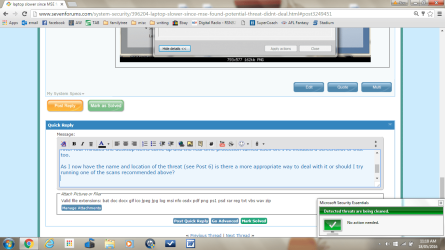
A couple of times during the MSE second, quick scan last night, and today’s scan, I’ve noticed a little MSE box come up (for only a couple of seconds) with a green tick saying detected threats are being cleaned.

Thanks in anticipation :)
 

My Computer My Computer

At a glance

64 bit, Windows 7 Home Premium SP1Intel (R) Core (TM) i3 CPU M370 @ 2.40GHz4.0GB (3.8GB usable)
Computer type
Laptop
Computer Manufacturer/Model Number
HP
OS
64 bit, Windows 7 Home Premium SP1
CPU
Intel (R) Core (TM) i3 CPU M370 @ 2.40GHz
Memory
4.0GB (3.8GB usable)
Internet Speed
rural = satellite = woefully slow
Antivirus
MSE, free Malwarebytes

My Computer My Computer

At a glance

Windows 10 Pro. 64/ version 1709 Windows 7 Pr...Intel i7-6800K @ 4.3Corsair Platinum 16 gig @2400EVGA GTX 1070 OC
Computer type
PC/Desktop
Computer Manufacturer/Model Number
Home made Desktop
OS
Windows 10 Pro. 64/ version 1709 Windows 7 Pro/64
CPU
Intel i7-6800K @ 4.3
Motherboard
ASUS X-99 Deluxe II
Memory
Corsair Platinum 16 gig @2400
Graphics Card(s)
EVGA GTX 1070 OC
Monitor(s) Displays
Asus 27" LED LCD/VE278Q
Screen Resolution
1920-1080 or 1280-720 HDMI
Hard Drives
INTEL SSD 730-240 Gb Sata 3.0/
PSU
EVGA Platium 1200W
Case
Phanteks Luxe Tempered Glass 8 fans/ one radiator
Cooling
XSPC/ Water Cooled CPU
Keyboard
Das 4 Professional
Mouse
Logitech M705/MX Anywhere 2-S
Internet Speed
100 mbits
Antivirus
Microsoft Security Essentials/ Malwarebytes Premium 3.0/ SAS
Browser
I.E. 11 default/Firefox/ ISP Time Warner Cable/Spectrum
Other Info
LG BluRay Burner/
Sound system-KLipsch-THX/
Icy Dock ssd Hot Swap bays.
Thanks L Bear. Should I stop the current MSE full scan or wait for that to finish?
 

My Computer My Computer

At a glance

64 bit, Windows 7 Home Premium SP1Intel (R) Core (TM) i3 CPU M370 @ 2.40GHz4.0GB (3.8GB usable)
Computer type
Laptop
Computer Manufacturer/Model Number
HP
OS
64 bit, Windows 7 Home Premium SP1
CPU
Intel (R) Core (TM) i3 CPU M370 @ 2.40GHz
Memory
4.0GB (3.8GB usable)
Internet Speed
rural = satellite = woefully slow
Antivirus
MSE, free Malwarebytes
Just let MSE complete.

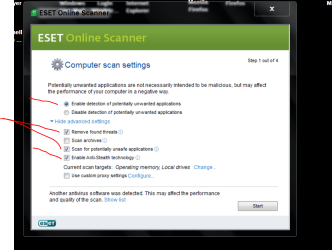
Here is a picture of how I do my settings with Eset online scanner.

I'm no security expert but this has always worked for me.


Eset online scanner.PNG
 

My Computer My Computer

At a glance

Windows 10 Pro. 64/ version 1709 Windows 7 Pr...Intel i7-6800K @ 4.3Corsair Platinum 16 gig @2400EVGA GTX 1070 OC
Computer type
PC/Desktop
Computer Manufacturer/Model Number
Home made Desktop
OS
Windows 10 Pro. 64/ version 1709 Windows 7 Pro/64
CPU
Intel i7-6800K @ 4.3
Motherboard
ASUS X-99 Deluxe II
Memory
Corsair Platinum 16 gig @2400
Graphics Card(s)
EVGA GTX 1070 OC
Monitor(s) Displays
Asus 27" LED LCD/VE278Q
Screen Resolution
1920-1080 or 1280-720 HDMI
Hard Drives
INTEL SSD 730-240 Gb Sata 3.0/
PSU
EVGA Platium 1200W
Case
Phanteks Luxe Tempered Glass 8 fans/ one radiator
Cooling
XSPC/ Water Cooled CPU
Keyboard
Das 4 Professional
Mouse
Logitech M705/MX Anywhere 2-S
Internet Speed
100 mbits
Antivirus
Microsoft Security Essentials/ Malwarebytes Premium 3.0/ SAS
Browser
I.E. 11 default/Firefox/ ISP Time Warner Cable/Spectrum
Other Info
LG BluRay Burner/
Sound system-KLipsch-THX/
Icy Dock ssd Hot Swap bays.
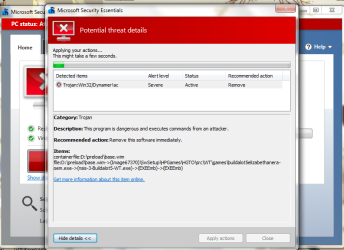
I stopped the MSE scan yesterday to go to work. Started it again when I got home and it took six hours to do the full scan (is that normal?) It found the same threat again so I took a screen shot. I left the laptop on overnight and the removal process is now about 70% through (computer kept going to sleep, I woke up to wake it up occasionally). I'll let it continue, see what happens and will report back.
 

Attachments

  • mse160517.png
    mse160517.png
    47.6 KB · Views: 1

My Computer My Computer

At a glance

64 bit, Windows 7 Home Premium SP1Intel (R) Core (TM) i3 CPU M370 @ 2.40GHz4.0GB (3.8GB usable)
Computer type
Laptop
Computer Manufacturer/Model Number
HP
OS
64 bit, Windows 7 Home Premium SP1
CPU
Intel (R) Core (TM) i3 CPU M370 @ 2.40GHz
Memory
4.0GB (3.8GB usable)
Internet Speed
rural = satellite = woefully slow
Antivirus
MSE, free Malwarebytes
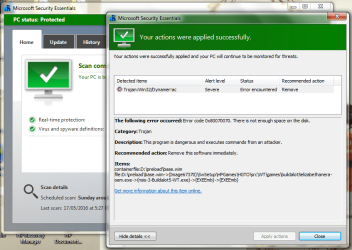
MSE finally finished removing the threat. But I don't know that it has removed the threat. It says it was successful but also that an error was encountered ... ??? I've included a screenshot of that.

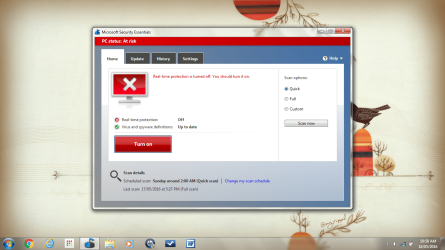
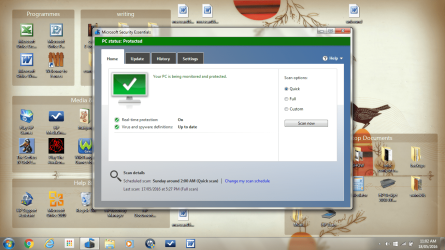
I restarted the computer and it is still unusually slow to get up. When the empty desktop appears if I click on MSE it says real time protection is not turned on. I've included a screenshot of that.

After four minutes the desktop items came up and the real time protection turned itself on. I've included a screenshot of that too.

As I now have the name and location of the threat (see Post 6) is there a more appropriate way to deal with it or should I try running one of the scans recommended above?

As I'm typing the little window I've never seen before this episode popped up so I've taken a screenshot and included it as well.
 

Attachments

  • mse160518.png
    mse160518.png
    59.7 KB · Views: 2
  • dtopa.png
    dtopa.png
    308.9 KB · Views: 1
  • dtopb.png
    dtopb.png
    301.2 KB · Views: 1
  • msedeal.png
    msedeal.png
    81.3 KB · Views: 1

My Computer My Computer

At a glance

64 bit, Windows 7 Home Premium SP1Intel (R) Core (TM) i3 CPU M370 @ 2.40GHz4.0GB (3.8GB usable)
Computer type
Laptop
Computer Manufacturer/Model Number
HP
OS
64 bit, Windows 7 Home Premium SP1
CPU
Intel (R) Core (TM) i3 CPU M370 @ 2.40GHz
Memory
4.0GB (3.8GB usable)
Internet Speed
rural = satellite = woefully slow
Antivirus
MSE, free Malwarebytes
Their are some reports that (win32/dyanmer!ac) is a false positive and many more say it's a real Rootkit.

From Microsoft.

https://www.microsoft.com/security/portal/threat/Encyclopedia/Entry.aspx?Name=Trojan:Win32/Dynamer!ac

Did you or did you not run Eset Online Scan? If you did what was the results.

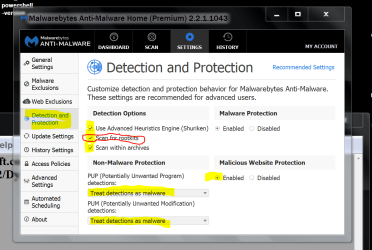
When you ran Malwarebyte Anti Malware did you have rootkit selected.

Malwarebytes today and tomorrow.PNG
 

My Computer My Computer

At a glance

Windows 10 Pro. 64/ version 1709 Windows 7 Pr...Intel i7-6800K @ 4.3Corsair Platinum 16 gig @2400EVGA GTX 1070 OC
Computer type
PC/Desktop
Computer Manufacturer/Model Number
Home made Desktop
OS
Windows 10 Pro. 64/ version 1709 Windows 7 Pro/64
CPU
Intel i7-6800K @ 4.3
Motherboard
ASUS X-99 Deluxe II
Memory
Corsair Platinum 16 gig @2400
Graphics Card(s)
EVGA GTX 1070 OC
Monitor(s) Displays
Asus 27" LED LCD/VE278Q
Screen Resolution
1920-1080 or 1280-720 HDMI
Hard Drives
INTEL SSD 730-240 Gb Sata 3.0/
PSU
EVGA Platium 1200W
Case
Phanteks Luxe Tempered Glass 8 fans/ one radiator
Cooling
XSPC/ Water Cooled CPU
Keyboard
Das 4 Professional
Mouse
Logitech M705/MX Anywhere 2-S
Internet Speed
100 mbits
Antivirus
Microsoft Security Essentials/ Malwarebytes Premium 3.0/ SAS
Browser
I.E. 11 default/Firefox/ ISP Time Warner Cable/Spectrum
Other Info
LG BluRay Burner/
Sound system-KLipsch-THX/
Icy Dock ssd Hot Swap bays.
No I haven't yet run Eset, each step is taking so long. (and I've got super slow internet as well.)

Just checked and no, scan for rootkits was not selected in Malwarebytes. I've now selected it and am running that scan again.

Will try Eset if that doesn't work.

Thanks again :)
 

My Computer My Computer

At a glance

64 bit, Windows 7 Home Premium SP1Intel (R) Core (TM) i3 CPU M370 @ 2.40GHz4.0GB (3.8GB usable)
Computer type
Laptop
Computer Manufacturer/Model Number
HP
OS
64 bit, Windows 7 Home Premium SP1
CPU
Intel (R) Core (TM) i3 CPU M370 @ 2.40GHz
Memory
4.0GB (3.8GB usable)
Internet Speed
rural = satellite = woefully slow
Antivirus
MSE, free Malwarebytes
Your scans will only run as fast as you hardware will allow.
If you have a slower computer the scans will run slower.

MSE and Eset will always take a long time.
 

My Computer My Computer

At a glance

Windows 10 Pro. 64/ version 1709 Windows 7 Pr...Intel i7-6800K @ 4.3Corsair Platinum 16 gig @2400EVGA GTX 1070 OC
Computer type
PC/Desktop
Computer Manufacturer/Model Number
Home made Desktop
OS
Windows 10 Pro. 64/ version 1709 Windows 7 Pro/64
CPU
Intel i7-6800K @ 4.3
Motherboard
ASUS X-99 Deluxe II
Memory
Corsair Platinum 16 gig @2400
Graphics Card(s)
EVGA GTX 1070 OC
Monitor(s) Displays
Asus 27" LED LCD/VE278Q
Screen Resolution
1920-1080 or 1280-720 HDMI
Hard Drives
INTEL SSD 730-240 Gb Sata 3.0/
PSU
EVGA Platium 1200W
Case
Phanteks Luxe Tempered Glass 8 fans/ one radiator
Cooling
XSPC/ Water Cooled CPU
Keyboard
Das 4 Professional
Mouse
Logitech M705/MX Anywhere 2-S
Internet Speed
100 mbits
Antivirus
Microsoft Security Essentials/ Malwarebytes Premium 3.0/ SAS
Browser
I.E. 11 default/Firefox/ ISP Time Warner Cable/Spectrum
Other Info
LG BluRay Burner/
Sound system-KLipsch-THX/
Icy Dock ssd Hot Swap bays.
What is d:\preload\base.wim?

Looks to he HP-related? I suspect a false positive. Navigate to the folder MSE is having an issue with and determine the legitimacy of the files.

If they are legitimate system files, than the HP OEM software that starts as part of the system may have been buggered by MSE causing your slow performance issues.
 

My Computer My Computer

At a glance

Windows 10 Pro x64 ; Xubuntu x64Intel i7 860 @ 2.80 GHz O/C'ed to 4.0GHz16GB Corsair Vengance DDR3 @ 661 MHz Dual Cha...EVGA NVidia GTX 560 1024MB
Computer type
PC/Desktop
Computer Manufacturer/Model Number
Golden Mk. I.4
OS
Windows 10 Pro x64 ; Xubuntu x64
CPU
Intel i7 860 @ 2.80 GHz O/C'ed to 4.0GHz
Motherboard
Gigabyte P55A-UD3R Rev.1. Award BIOS F13
Memory
16GB Corsair Vengance DDR3 @ 661 MHz Dual Channel (9-9-9-24)
Graphics Card(s)
EVGA NVidia GTX 560 1024MB
Sound Card
Realtek Integrated
Monitor(s) Displays
Dual Samsung SyncMaster 2494HS
Screen Resolution
1920*1080 and 1920*1080
Hard Drives
1*Samsung 840 EVO 120GB SSD;
1*OCZ Vertex 2 60GB SSD;
2*Samsung F3 SpinPoint 1TB in RAID0;
1*Samsung F1 SpinPoint 1TB;
2*Western Digital 1TB External USB 3.0
1*Western Digital 500GB External USB 3.0
1*Seagate 500GB External USB 2.0
PSU
Thermaltake ToughPower QFan 750W
Case
Thermaltake Element S VK60001W2Z
Cooling
Corsair H60 Water Cooling, 2*230mm and 2*80mm case fans
Keyboard
Logitech G110
Mouse
Logitech MX518
Thanks Golden :)

What is d:\preload\base.wim? I have no idea :shock:

Looks to he HP-related? I suspect a false positive. Navigate to the folder MSE is having an issue with and determine the legitimacy of the files. ok will do that tonight, after work

If they are legitimate system files, than the HP OEM software that starts as part of the system may have been buggered by MSE causing your slow performance issues. oh, you mean when MSE tried to remove the threat? :eek:

I'll be back.
 

My Computer My Computer

At a glance

64 bit, Windows 7 Home Premium SP1Intel (R) Core (TM) i3 CPU M370 @ 2.40GHz4.0GB (3.8GB usable)
Computer type
Laptop
Computer Manufacturer/Model Number
HP
OS
64 bit, Windows 7 Home Premium SP1
CPU
Intel (R) Core (TM) i3 CPU M370 @ 2.40GHz
Memory
4.0GB (3.8GB usable)
Internet Speed
rural = satellite = woefully slow
Antivirus
MSE, free Malwarebytes
Malwarebytes didn't find any threats and I did tick scan for rootkits.

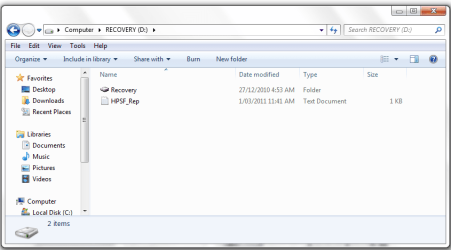
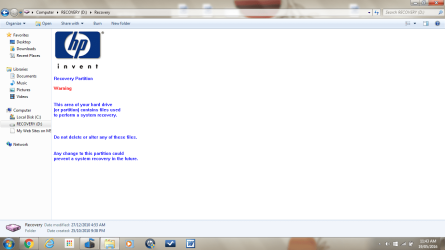
I can't find d:\preload\base.wim, only Recovery D: -
 

Attachments

  • ddrive.png
    ddrive.png
    22 KB · Views: 0

My Computer My Computer

At a glance

64 bit, Windows 7 Home Premium SP1Intel (R) Core (TM) i3 CPU M370 @ 2.40GHz4.0GB (3.8GB usable)
Computer type
Laptop
Computer Manufacturer/Model Number
HP
OS
64 bit, Windows 7 Home Premium SP1
CPU
Intel (R) Core (TM) i3 CPU M370 @ 2.40GHz
Memory
4.0GB (3.8GB usable)
Internet Speed
rural = satellite = woefully slow
Antivirus
MSE, free Malwarebytes

My Computer My Computer

At a glance

Windows 10 Pro x64 ; Xubuntu x64Intel i7 860 @ 2.80 GHz O/C'ed to 4.0GHz16GB Corsair Vengance DDR3 @ 661 MHz Dual Cha...EVGA NVidia GTX 560 1024MB
Computer type
PC/Desktop
Computer Manufacturer/Model Number
Golden Mk. I.4
OS
Windows 10 Pro x64 ; Xubuntu x64
CPU
Intel i7 860 @ 2.80 GHz O/C'ed to 4.0GHz
Motherboard
Gigabyte P55A-UD3R Rev.1. Award BIOS F13
Memory
16GB Corsair Vengance DDR3 @ 661 MHz Dual Channel (9-9-9-24)
Graphics Card(s)
EVGA NVidia GTX 560 1024MB
Sound Card
Realtek Integrated
Monitor(s) Displays
Dual Samsung SyncMaster 2494HS
Screen Resolution
1920*1080 and 1920*1080
Hard Drives
1*Samsung 840 EVO 120GB SSD;
1*OCZ Vertex 2 60GB SSD;
2*Samsung F3 SpinPoint 1TB in RAID0;
1*Samsung F1 SpinPoint 1TB;
2*Western Digital 1TB External USB 3.0
1*Western Digital 500GB External USB 3.0
1*Seagate 500GB External USB 2.0
PSU
Thermaltake ToughPower QFan 750W
Case
Thermaltake Element S VK60001W2Z
Cooling
Corsair H60 Water Cooling, 2*230mm and 2*80mm case fans
Keyboard
Logitech G110
Mouse
Logitech MX518
Yes Golden you're right, viewing of hidden files was not enabled. I changed it via Control Panel but it hasn't made any difference, Recovery D: details are the same as the screenshot in Post 12.
 

My Computer My Computer

At a glance

64 bit, Windows 7 Home Premium SP1Intel (R) Core (TM) i3 CPU M370 @ 2.40GHz4.0GB (3.8GB usable)
Computer type
Laptop
Computer Manufacturer/Model Number
HP
OS
64 bit, Windows 7 Home Premium SP1
CPU
Intel (R) Core (TM) i3 CPU M370 @ 2.40GHz
Memory
4.0GB (3.8GB usable)
Internet Speed
rural = satellite = woefully slow
Antivirus
MSE, free Malwarebytes
Should I try to run ESET?
 

My Computer My Computer

At a glance

64 bit, Windows 7 Home Premium SP1Intel (R) Core (TM) i3 CPU M370 @ 2.40GHz4.0GB (3.8GB usable)
Computer type
Laptop
Computer Manufacturer/Model Number
HP
OS
64 bit, Windows 7 Home Premium SP1
CPU
Intel (R) Core (TM) i3 CPU M370 @ 2.40GHz
Memory
4.0GB (3.8GB usable)
Internet Speed
rural = satellite = woefully slow
Antivirus
MSE, free Malwarebytes
Leave ESET to run overnight, but I don't think it will find anything.

Browse into D:\Recovery - what is in there?
 

My Computer My Computer

At a glance

Windows 10 Pro x64 ; Xubuntu x64Intel i7 860 @ 2.80 GHz O/C'ed to 4.0GHz16GB Corsair Vengance DDR3 @ 661 MHz Dual Cha...EVGA NVidia GTX 560 1024MB
Computer type
PC/Desktop
Computer Manufacturer/Model Number
Golden Mk. I.4
OS
Windows 10 Pro x64 ; Xubuntu x64
CPU
Intel i7 860 @ 2.80 GHz O/C'ed to 4.0GHz
Motherboard
Gigabyte P55A-UD3R Rev.1. Award BIOS F13
Memory
16GB Corsair Vengance DDR3 @ 661 MHz Dual Channel (9-9-9-24)
Graphics Card(s)
EVGA NVidia GTX 560 1024MB
Sound Card
Realtek Integrated
Monitor(s) Displays
Dual Samsung SyncMaster 2494HS
Screen Resolution
1920*1080 and 1920*1080
Hard Drives
1*Samsung 840 EVO 120GB SSD;
1*OCZ Vertex 2 60GB SSD;
2*Samsung F3 SpinPoint 1TB in RAID0;
1*Samsung F1 SpinPoint 1TB;
2*Western Digital 1TB External USB 3.0
1*Western Digital 500GB External USB 3.0
1*Seagate 500GB External USB 2.0
PSU
Thermaltake ToughPower QFan 750W
Case
Thermaltake Element S VK60001W2Z
Cooling
Corsair H60 Water Cooling, 2*230mm and 2*80mm case fans
Keyboard
Logitech G110
Mouse
Logitech MX518
I've got really really slow (satellite) internet and am thinking an online scan would be problematic??

I'm running MSE again and it's currently running through D: drive and there are oodles of preload\base.wim files. It hasn't yet got to the dodgy one again, if it's still there.

This is all I get when I open the Recovery folder -
 

Attachments

  • recovery.png
    recovery.png
    57.5 KB · Views: 2

My Computer My Computer

At a glance

64 bit, Windows 7 Home Premium SP1Intel (R) Core (TM) i3 CPU M370 @ 2.40GHz4.0GB (3.8GB usable)
Computer type
Laptop
Computer Manufacturer/Model Number
HP
OS
64 bit, Windows 7 Home Premium SP1
CPU
Intel (R) Core (TM) i3 CPU M370 @ 2.40GHz
Memory
4.0GB (3.8GB usable)
Internet Speed
rural = satellite = woefully slow
Antivirus
MSE, free Malwarebytes
In all honesty, I'm convinced it's a false positive since the file path that MSE displays clearly points to the HP recovery partition. MSE only scans it because it has a drive letter associated with it...normally these types of partitions do not have a drive letter and normally they don't need one.

A .wim file is a Windows Imaging format file, used to perform system recovery.
 

My Computer My Computer

At a glance

Windows 10 Pro x64 ; Xubuntu x64Intel i7 860 @ 2.80 GHz O/C'ed to 4.0GHz16GB Corsair Vengance DDR3 @ 661 MHz Dual Cha...EVGA NVidia GTX 560 1024MB
Computer type
PC/Desktop
Computer Manufacturer/Model Number
Golden Mk. I.4
OS
Windows 10 Pro x64 ; Xubuntu x64
CPU
Intel i7 860 @ 2.80 GHz O/C'ed to 4.0GHz
Motherboard
Gigabyte P55A-UD3R Rev.1. Award BIOS F13
Memory
16GB Corsair Vengance DDR3 @ 661 MHz Dual Channel (9-9-9-24)
Graphics Card(s)
EVGA NVidia GTX 560 1024MB
Sound Card
Realtek Integrated
Monitor(s) Displays
Dual Samsung SyncMaster 2494HS
Screen Resolution
1920*1080 and 1920*1080
Hard Drives
1*Samsung 840 EVO 120GB SSD;
1*OCZ Vertex 2 60GB SSD;
2*Samsung F3 SpinPoint 1TB in RAID0;
1*Samsung F1 SpinPoint 1TB;
2*Western Digital 1TB External USB 3.0
1*Western Digital 500GB External USB 3.0
1*Seagate 500GB External USB 2.0
PSU
Thermaltake ToughPower QFan 750W
Case
Thermaltake Element S VK60001W2Z
Cooling
Corsair H60 Water Cooling, 2*230mm and 2*80mm case fans
Keyboard
Logitech G110
Mouse
Logitech MX518
That sounds fine to me Golden. Would there be a reason MSE hasn't come up with it before, on previous scans?

Any ideas on how I can get my laptop back to starting as it used to? It's still taking four minutes to get up and going with icons on the desktop etc.
 

My Computer My Computer

At a glance

64 bit, Windows 7 Home Premium SP1Intel (R) Core (TM) i3 CPU M370 @ 2.40GHz4.0GB (3.8GB usable)
Computer type
Laptop
Computer Manufacturer/Model Number
HP
OS
64 bit, Windows 7 Home Premium SP1
CPU
Intel (R) Core (TM) i3 CPU M370 @ 2.40GHz
Memory
4.0GB (3.8GB usable)
Internet Speed
rural = satellite = woefully slow
Antivirus
MSE, free Malwarebytes
Honestly, I can't say why it has only happened now...perhaps new definitions are too agressive.

To attempt to repair the issues, try this :
1. Click Start
orb.png

2. In the search box, type cmd
3. In the list that appears, right-click on cmd.exe and choose Run as administrator
4. In the command window that opens, type sfc /scannow and hit enter.

Report the output from the command window once it finishes.

More detail: http://www.sevenforums.com/tutorials/1538-sfc-scannow-command-system-file-checker.html
 

My Computer My Computer

At a glance

Windows 10 Pro x64 ; Xubuntu x64Intel i7 860 @ 2.80 GHz O/C'ed to 4.0GHz16GB Corsair Vengance DDR3 @ 661 MHz Dual Cha...EVGA NVidia GTX 560 1024MB
Computer type
PC/Desktop
Computer Manufacturer/Model Number
Golden Mk. I.4
OS
Windows 10 Pro x64 ; Xubuntu x64
CPU
Intel i7 860 @ 2.80 GHz O/C'ed to 4.0GHz
Motherboard
Gigabyte P55A-UD3R Rev.1. Award BIOS F13
Memory
16GB Corsair Vengance DDR3 @ 661 MHz Dual Channel (9-9-9-24)
Graphics Card(s)
EVGA NVidia GTX 560 1024MB
Sound Card
Realtek Integrated
Monitor(s) Displays
Dual Samsung SyncMaster 2494HS
Screen Resolution
1920*1080 and 1920*1080
Hard Drives
1*Samsung 840 EVO 120GB SSD;
1*OCZ Vertex 2 60GB SSD;
2*Samsung F3 SpinPoint 1TB in RAID0;
1*Samsung F1 SpinPoint 1TB;
2*Western Digital 1TB External USB 3.0
1*Western Digital 500GB External USB 3.0
1*Seagate 500GB External USB 2.0
PSU
Thermaltake ToughPower QFan 750W
Case
Thermaltake Element S VK60001W2Z
Cooling
Corsair H60 Water Cooling, 2*230mm and 2*80mm case fans
Keyboard
Logitech G110
Mouse
Logitech MX518
Back
Top