Laptop speaker system (5.1) has incorrectly swapped outputs

Alexander Moore

New member
Member
VIP
Local time
7:07 PM
Messages
113
Location
Suzhou, China
My PC has an issue where the right stereo speaker is now using one of the speakers under the computer. The computer is fitted with a 5.1 setup, five speakers inside total, with two in the front and two more under the computer and a subwoofer.

I've consistently had issues with the 5.1 setup so I started using only the stereo speakers and subwoofer. Now all of a sudden the right speaker has swapped with one of the bottom speakers (which were not being used until it swapped on it's own) so now I can't even do that.

I've already tried reinstalling the drivers (RealTek drivers) to no avail. The outputs are still swapped.

Any idea what's going on and how I can fix this? So far I've found no working way within the sound options and drivers.

- Alex
 

My Computer My Computer

At a glance

Windows 7 Ultimate x64Intel i7 Extreme 2920XM Overclocked 4.1 (~4.8...16GB Kingston Hyper-X Dual Channel DDR3 @ 160...Overclocked 2GB NVIDIA 580M GTX
Computer type
PC/Desktop
Computer Manufacturer/Model Number
Origin EoN 17S
OS
Windows 7 Ultimate x64
CPU
Intel i7 Extreme 2920XM Overclocked 4.1 (~4.8Ghz Turbo Mode)
Motherboard
CLEVO P170HMx
Memory
16GB Kingston Hyper-X Dual Channel DDR3 @ 1600Mhz
Graphics Card(s)
Overclocked 2GB NVIDIA 580M GTX
Sound Card
Unknown - Uses Realtek Drivers
Monitor(s) Displays
FHD LED Display by LG
Screen Resolution
1920 x 1080
Hard Drives
OCZ Vertex 3 Max IOPS 240GB SDD||

750GB SATA III HDD
PSU
FSP220-ABAN1 (100-240V 50-60Hz, manufactured by FSP Group)
Case
CLEVO P150HM
Cooling
Dual fans (one for GPU, one for CPU)
Keyboard
Laptop keyboard
Mouse
Logitech Performance Mouse MX
Internet Speed
6mbps (locally). Often less internationally, even with VPN.
Antivirus
Microsoft Security Essentials
Browser
Google Chrome
Some of the speaker distribution is controlled by the speaker system and not the PC.
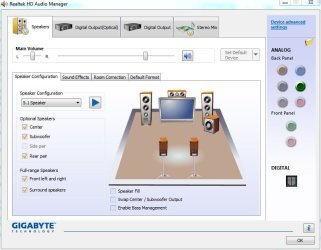
Check the RealTek HD Audio Manager, as there are a lot of options available for 5.1 systems, including using or swapping speakers.
 

My Computer My Computer

At a glance

Windows 10 64 bitIntel i7 6700K16GB Corsair DominatorIntel CPU Graphics
Computer type
PC/Desktop
Computer Manufacturer/Model Number
My Own Build
OS
Windows 10 64 bit
CPU
Intel i7 6700K
Motherboard
ASUS ROG Maximus VIII Hero
Memory
16GB Corsair Dominator
Graphics Card(s)
Intel CPU Graphics
Sound Card
RealTek
Monitor(s) Displays
27" Dell S2719dgf
Screen Resolution
2560X1440
Hard Drives
1 TB Samsung 850 EVO SSD for Win 10 Pro
500GB Samsung 850 EVO SSD for Win 10 Insider
2 TB drive for backup
PSU
EVGA Supernova 750G2
Case
BeQuiet Silent Base 600
Cooling
Deepcool Captain 120EX
Keyboard
Microsoft Wireless 2000
Mouse
Microsoft wireless
Internet Speed
100 MB/sec (Cable)
Antivirus
Microsoft Defender and Malwarebytes
Browser
Edge/Firefox
Other Info
Cakewalk (Sonar) by BandLab and Studio One 4.1 Pro recording studio software. MOTU 896Mk3 Hybrid recording interface, Frontier Tranzport wireless control unit, Behringer X-Touch Control Surface.
Five USB connected optical drives for CD Audio production using Nero BurningROM
I have done that. Everything is correct.

The only swap option is "Swap Center / Subwoofer output" which does not affect my problem because I am not having subwoofer issues.

When I test, it appear that the "Front Right" and "Rear Right" speakers are using the same output speaker for some reason. I can't seem to convince the software that my front right speaker physically exists.

Edit : Oh, swapping the Center and Subwoofer outputs seems to have fixed my subwoofer for some reason. before, the subwoofer would not work. But now the center does not work and only the subwoofer works.

This is confusing.
 

My Computer My Computer

At a glance

Windows 7 Ultimate x64Intel i7 Extreme 2920XM Overclocked 4.1 (~4.8...16GB Kingston Hyper-X Dual Channel DDR3 @ 160...Overclocked 2GB NVIDIA 580M GTX
Computer type
PC/Desktop
Computer Manufacturer/Model Number
Origin EoN 17S
OS
Windows 7 Ultimate x64
CPU
Intel i7 Extreme 2920XM Overclocked 4.1 (~4.8Ghz Turbo Mode)
Motherboard
CLEVO P170HMx
Memory
16GB Kingston Hyper-X Dual Channel DDR3 @ 1600Mhz
Graphics Card(s)
Overclocked 2GB NVIDIA 580M GTX
Sound Card
Unknown - Uses Realtek Drivers
Monitor(s) Displays
FHD LED Display by LG
Screen Resolution
1920 x 1080
Hard Drives
OCZ Vertex 3 Max IOPS 240GB SDD||

750GB SATA III HDD
PSU
FSP220-ABAN1 (100-240V 50-60Hz, manufactured by FSP Group)
Case
CLEVO P150HM
Cooling
Dual fans (one for GPU, one for CPU)
Keyboard
Laptop keyboard
Mouse
Logitech Performance Mouse MX
Internet Speed
6mbps (locally). Often less internationally, even with VPN.
Antivirus
Microsoft Security Essentials
Browser
Google Chrome
In fact, even when I'm using the Stereo option, the speaker output is using the wrong speaker. It sucks.
 

My Computer My Computer

At a glance

Windows 7 Ultimate x64Intel i7 Extreme 2920XM Overclocked 4.1 (~4.8...16GB Kingston Hyper-X Dual Channel DDR3 @ 160...Overclocked 2GB NVIDIA 580M GTX
Computer type
PC/Desktop
Computer Manufacturer/Model Number
Origin EoN 17S
OS
Windows 7 Ultimate x64
CPU
Intel i7 Extreme 2920XM Overclocked 4.1 (~4.8Ghz Turbo Mode)
Motherboard
CLEVO P170HMx
Memory
16GB Kingston Hyper-X Dual Channel DDR3 @ 1600Mhz
Graphics Card(s)
Overclocked 2GB NVIDIA 580M GTX
Sound Card
Unknown - Uses Realtek Drivers
Monitor(s) Displays
FHD LED Display by LG
Screen Resolution
1920 x 1080
Hard Drives
OCZ Vertex 3 Max IOPS 240GB SDD||

750GB SATA III HDD
PSU
FSP220-ABAN1 (100-240V 50-60Hz, manufactured by FSP Group)
Case
CLEVO P150HM
Cooling
Dual fans (one for GPU, one for CPU)
Keyboard
Laptop keyboard
Mouse
Logitech Performance Mouse MX
Internet Speed
6mbps (locally). Often less internationally, even with VPN.
Antivirus
Microsoft Security Essentials
Browser
Google Chrome
Proper connection to the audio I/O panel is imperative. Double or even triple check to make sure you have the correct connections both at the PC and at the speaker end.

I do not have a 5.1 speaker system but this is what is displayed on my RealTek HD Audio Manager for 5.1.
 

Attachments

  • Capture.JPG
    Capture.JPG
    58.6 KB · Views: 0

My Computer My Computer

At a glance

Windows 10 64 bitIntel i7 6700K16GB Corsair DominatorIntel CPU Graphics
Computer type
PC/Desktop
Computer Manufacturer/Model Number
My Own Build
OS
Windows 10 64 bit
CPU
Intel i7 6700K
Motherboard
ASUS ROG Maximus VIII Hero
Memory
16GB Corsair Dominator
Graphics Card(s)
Intel CPU Graphics
Sound Card
RealTek
Monitor(s) Displays
27" Dell S2719dgf
Screen Resolution
2560X1440
Hard Drives
1 TB Samsung 850 EVO SSD for Win 10 Pro
500GB Samsung 850 EVO SSD for Win 10 Insider
2 TB drive for backup
PSU
EVGA Supernova 750G2
Case
BeQuiet Silent Base 600
Cooling
Deepcool Captain 120EX
Keyboard
Microsoft Wireless 2000
Mouse
Microsoft wireless
Internet Speed
100 MB/sec (Cable)
Antivirus
Microsoft Defender and Malwarebytes
Browser
Edge/Firefox
Other Info
Cakewalk (Sonar) by BandLab and Studio One 4.1 Pro recording studio software. MOTU 896Mk3 Hybrid recording interface, Frontier Tranzport wireless control unit, Behringer X-Touch Control Surface.
Five USB connected optical drives for CD Audio production using Nero BurningROM
It's a laptop running internal speakers. I think that cuts this part out of it.

I am not using any external speakers.

My laptop has 5 built in speakers.

Just clarifying.
 

My Computer My Computer

At a glance

Windows 7 Ultimate x64Intel i7 Extreme 2920XM Overclocked 4.1 (~4.8...16GB Kingston Hyper-X Dual Channel DDR3 @ 160...Overclocked 2GB NVIDIA 580M GTX
Computer type
PC/Desktop
Computer Manufacturer/Model Number
Origin EoN 17S
OS
Windows 7 Ultimate x64
CPU
Intel i7 Extreme 2920XM Overclocked 4.1 (~4.8Ghz Turbo Mode)
Motherboard
CLEVO P170HMx
Memory
16GB Kingston Hyper-X Dual Channel DDR3 @ 1600Mhz
Graphics Card(s)
Overclocked 2GB NVIDIA 580M GTX
Sound Card
Unknown - Uses Realtek Drivers
Monitor(s) Displays
FHD LED Display by LG
Screen Resolution
1920 x 1080
Hard Drives
OCZ Vertex 3 Max IOPS 240GB SDD||

750GB SATA III HDD
PSU
FSP220-ABAN1 (100-240V 50-60Hz, manufactured by FSP Group)
Case
CLEVO P150HM
Cooling
Dual fans (one for GPU, one for CPU)
Keyboard
Laptop keyboard
Mouse
Logitech Performance Mouse MX
Internet Speed
6mbps (locally). Often less internationally, even with VPN.
Antivirus
Microsoft Security Essentials
Browser
Google Chrome
Ouch! If its not a configuration problem, it may be an internal speaker connector problem. That would probably involve tearing the laptop apart to get at the speaker connectors.
 

My Computer My Computer

At a glance

Windows 10 64 bitIntel i7 6700K16GB Corsair DominatorIntel CPU Graphics
Computer type
PC/Desktop
Computer Manufacturer/Model Number
My Own Build
OS
Windows 10 64 bit
CPU
Intel i7 6700K
Motherboard
ASUS ROG Maximus VIII Hero
Memory
16GB Corsair Dominator
Graphics Card(s)
Intel CPU Graphics
Sound Card
RealTek
Monitor(s) Displays
27" Dell S2719dgf
Screen Resolution
2560X1440
Hard Drives
1 TB Samsung 850 EVO SSD for Win 10 Pro
500GB Samsung 850 EVO SSD for Win 10 Insider
2 TB drive for backup
PSU
EVGA Supernova 750G2
Case
BeQuiet Silent Base 600
Cooling
Deepcool Captain 120EX
Keyboard
Microsoft Wireless 2000
Mouse
Microsoft wireless
Internet Speed
100 MB/sec (Cable)
Antivirus
Microsoft Defender and Malwarebytes
Browser
Edge/Firefox
Other Info
Cakewalk (Sonar) by BandLab and Studio One 4.1 Pro recording studio software. MOTU 896Mk3 Hybrid recording interface, Frontier Tranzport wireless control unit, Behringer X-Touch Control Surface.
Five USB connected optical drives for CD Audio production using Nero BurningROM
Well this sucks. I don't know how this would happen because it suddenly just stopped working. Never opened it or anything.

Every issue I have with the sound on this thing just comes out of the blue.
 

My Computer My Computer

At a glance

Windows 7 Ultimate x64Intel i7 Extreme 2920XM Overclocked 4.1 (~4.8...16GB Kingston Hyper-X Dual Channel DDR3 @ 160...Overclocked 2GB NVIDIA 580M GTX
Computer type
PC/Desktop
Computer Manufacturer/Model Number
Origin EoN 17S
OS
Windows 7 Ultimate x64
CPU
Intel i7 Extreme 2920XM Overclocked 4.1 (~4.8Ghz Turbo Mode)
Motherboard
CLEVO P170HMx
Memory
16GB Kingston Hyper-X Dual Channel DDR3 @ 1600Mhz
Graphics Card(s)
Overclocked 2GB NVIDIA 580M GTX
Sound Card
Unknown - Uses Realtek Drivers
Monitor(s) Displays
FHD LED Display by LG
Screen Resolution
1920 x 1080
Hard Drives
OCZ Vertex 3 Max IOPS 240GB SDD||

750GB SATA III HDD
PSU
FSP220-ABAN1 (100-240V 50-60Hz, manufactured by FSP Group)
Case
CLEVO P150HM
Cooling
Dual fans (one for GPU, one for CPU)
Keyboard
Laptop keyboard
Mouse
Logitech Performance Mouse MX
Internet Speed
6mbps (locally). Often less internationally, even with VPN.
Antivirus
Microsoft Security Essentials
Browser
Google Chrome
Back
Top