Laptop to Tv help

Zacandtia

New member
Local time
3:59 PM
Messages
5
I have my laptop hooked up to my TV via an S-video cable. I can get the picture fine but it only shows up as multiple monitors in screen resolution. This would be fine but it's annoying always having to keep my laptop open to watch movies and stuff. Another problem I'm having is the video is stretched on my TV so I'd like to know how to setup my TV as a single monitor. If anyone can help me this would be greatly appreciated
 

My Computer My Computer

At a glance

indows 7 Ultimate 32 bit
OS
indows 7 Ultimate 32 bit
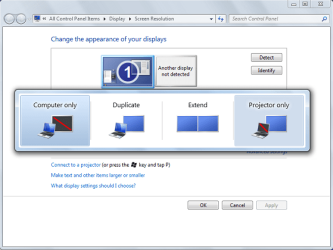
Right click on Desktop - Screen resolution- Connect to a projector.
And then choose Projector Only option.

Same menu can be accessed by Win+P combination.
You still would have to have your laptop open, but the screen will be turned off and TV will be functioning as a single monitor.
 

Attachments

  • projector.png
    projector.png
    28.8 KB · Views: 24

My Computer My Computer

At a glance

Windows 8.1 ; Windows 7 x86 (Dec2008-Jan2013)
Computer type
PC/Desktop
OS
Windows 8.1 ; Windows 7 x86 (Dec2008-Jan2013)
Other Info
"The scale icon at the top right of a post or tutorial is how you can give rep to the member."
Ok this worked. It's on TV only now. How would i be able to make it so i can close my laptop without it going into hibernate? also i still cant change the aspect ratio to fit my TV. How would i change that to fit my TV better?
 

My Computer My Computer

At a glance

indows 7 Ultimate 32 bit
OS
indows 7 Ultimate 32 bit
You wont be able to close laptop and have a movie running from it on TV.

The only way to do that is to disassemble the laptop and cut/break/tear off the sensor that checks whether the lid is open or not. I do not think that you would want to do that.

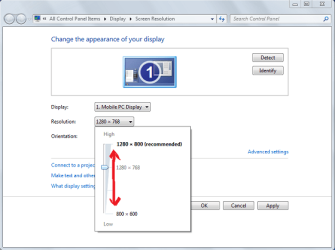
Have you tried changing resolution (see picture attached)?
 

Attachments

  • projector2.png
    projector2.png
    22.4 KB · Views: 13

My Computer My Computer

At a glance

Windows 8.1 ; Windows 7 x86 (Dec2008-Jan2013)
Computer type
PC/Desktop
OS
Windows 8.1 ; Windows 7 x86 (Dec2008-Jan2013)
Other Info
"The scale icon at the top right of a post or tutorial is how you can give rep to the member."
Yes I've tried that already and didn't work. I actually just used zoom on my TV settings and it looks decent now. Not the best quality but it's OK. That's Weird that it doesn't have a setting to disable the hibernation. Last question I have is when I use Homegroup to watch a movie on my laptop that I have backed up on my Main PC it streams so slow that it's choppy and doesn't play properly. Is there anyway of solving this or not?
 

My Computer My Computer

At a glance

indows 7 Ultimate 32 bit
OS
indows 7 Ultimate 32 bit

My Computer My Computer

At a glance

Windows 8.1 ; Windows 7 x86 (Dec2008-Jan2013)
Computer type
PC/Desktop
OS
Windows 8.1 ; Windows 7 x86 (Dec2008-Jan2013)
Other Info
"The scale icon at the top right of a post or tutorial is how you can give rep to the member."
Ok how might i go about setting that up? I have VLC player already but i dont know how I would stream from one computer to another with it. I saved all my dvd's in ISO format so how would I Do that?
 

My Computer My Computer

At a glance

indows 7 Ultimate 32 bit
OS
indows 7 Ultimate 32 bit
You can use Don't Sleep to change your laptop settings while you are watching a movie.

Don’t Sleep Prevent Windows from Standby, Shutdown, Hibernate and Restart | Raymond.CC Blog

The size issue is because you are using s-video out to the TV. It's not really meant for PC input. As you know, it will work, but is just a s-video input and you'd have to change it with whatever TV functions you have available. Your PC could change settings if it was VGA, or HDMI.

A Guy
 

My Computer My Computer

At a glance

Windows 10 Home x64INTEL Core i5-750 Quad-Core 3.37GHzHyperX Fury Black Series 8GB (2 x 4GB) 1866MhzEVGA GeForce GTX 750 Superclocked 1GB 128-Bit...
Computer type
PC/Desktop
OS
Windows 10 Home x64
CPU
INTEL Core i5-750 Quad-Core 3.37GHz
Motherboard
ASUS P7P55D
Memory
HyperX Fury Black Series 8GB (2 x 4GB) 1866Mhz
Graphics Card(s)
EVGA GeForce GTX 750 Superclocked 1GB 128-Bit GDDR5
Monitor(s) Displays
LG 32MA68HY 32" IPS
Screen Resolution
1920 x 1080
Hard Drives
Samsung 840 Evo 120GB, SEAGATE 500GB Barracuda® 7200.12, SATA 3 Gb/s, 7200 RPM, 16MB cache
PSU
ANTEC TruePower New TP-550, 80 PLUS, 550W
Case
ANTEC Three Hundred Illusion
Cooling
COOLER MASTER Hyper 212 Plus, 4 x 120mm 1 x 140mm Noctua's
Internet Speed
85 + Mbps
Antivirus
Avast
Browser
Vivaldi

My Computer My Computer

At a glance

Windows 8.1 ; Windows 7 x86 (Dec2008-Jan2013)
Computer type
PC/Desktop
OS
Windows 8.1 ; Windows 7 x86 (Dec2008-Jan2013)
Other Info
"The scale icon at the top right of a post or tutorial is how you can give rep to the member."
Ok I have most of it setup but I'm stuck on my network URL when i select open network stream. What do i enter for this if it's saved on my other computer?
 

My Computer My Computer

At a glance

indows 7 Ultimate 32 bit
OS
indows 7 Ultimate 32 bit
just picked up on this thread. Isn't their an option in power options in control panel to choose what happens when the lid is closed (menu on left hand side)
 

My Computer My Computer

At a glance

Windows11 ProIntel Skt 1200 Comet Lake Core i-7 3.80 GHZ32GB [4 x 8gb] Crucial Ballistix XMP DDR 4ATI [MSI] Radeon RX 5500 XT 8GB DDR6
Computer type
PC/Desktop
Computer Manufacturer/Model Number
Self Built with TLC
OS
Windows11 Pro
CPU
Intel Skt 1200 Comet Lake Core i-7 3.80 GHZ
Motherboard
Gigabyte Z590 UD AC
Memory
32GB [4 x 8gb] Crucial Ballistix XMP DDR 4
Graphics Card(s)
ATI [MSI] Radeon RX 5500 XT 8GB DDR6
Sound Card
Realtek HD 7.1 Onboard
Monitor(s) Displays
iiyama G2730HSU-B1 27" G-Master 75Mhz HD LED
Screen Resolution
1920 X 1080
Hard Drives
Samsung EVO 970 NVMe 1TB [Boot drive]
Samsung EVO 850 SSD 500GB
Western Digital DC WD10EFRX-68PJCN0 1TB
Western Digital DC WD1002FBYS-02A6B0 Enterprise 1TB
PSU
Corsair TX750M
Case
Zalman Z9 Plus
Cooling
Thermalright True Spirit 120 BW
Keyboard
Havit KB432L blue key mechanical
Mouse
Havit KB 432L Programmable
Internet Speed
Fibre To The Home 100Mbps from KCom
Antivirus
Avast Free
Browser
Firefox
Other Info
Logitech C525 HD Webcam
Epson XP-640 Expression-Premium printer with direct CD/DVD printing
Sure you can close your lid. Go to control panel>power options>when I close the lid>do nothing
 

My Computer My Computer

At a glance

Windows 7 Ultimateintel Core 2 Duo t52504gb PC2-5300 DDR2 SDRAMMobile Intel® Graphics Media Accelerator X310...
Computer Manufacturer/Model Number
Toshiba p205-s7469
OS
Windows 7 Ultimate
CPU
intel Core 2 Duo t5250
Motherboard
Mobile Intel® GM965 Express Chipset
Memory
4gb PC2-5300 DDR2 SDRAM
Graphics Card(s)
Mobile Intel® Graphics Media Accelerator X3100 with 64MB-251
Sound Card
Toshiba w/Realtek Audio & Harmon Kardon Speakers(2)+ subwoof
Monitor(s) Displays
17.0” widescreen TruBrite TFT LCD 1440x900
Hard Drives
toshiba 500gb sata (primary) Toshiba 200gb (secondary)
Back
Top