Laptop turns on by itself during the night.

Vlad64

New member
Local time
11:30 AM
Messages
8
Hey, i have a problem. My laptop turns on by itself during the night. This happens very often, like 5 times a week. This is very frustrating because it kills my battery and the next day i have to charge it. I never shutdown the laptop, i put it in sleep mode/hibernate. Also, the screen was down so i don't know how did it turned on. An example: Today i was talking on the phone and the laptop was sleeping (the power LED was blinking) but, it turned on without any reason.
Can anyone help me? Thanks in advance.
 

My Computer My Computer

At a glance

Windows 7 Professional x64Inter(R) Pentium (R) CPU B960 @ 2.20GHz4GBNVIDIA GeForce GT 630M
Computer type
Laptop
Computer Manufacturer/Model Number
Acer
OS
Windows 7 Professional x64
CPU
Inter(R) Pentium (R) CPU B960 @ 2.20GHz
Motherboard
Unknown
Memory
4GB
Graphics Card(s)
NVIDIA GeForce GT 630M
Hard Drives
WDC WD5000BPVT-22HXZT3 ATA Device (500GB)
Antivirus
Avira
Browser
Google Chrome
Do a shutdown. Then it won't happen.

Else you have to go into the device properties of all devices in Device Manager and look for the 'Allow this device to wake up the computer' and change those. Of course not for the keyboard and mouse.
 

My Computer My Computer

At a glance

Vista, Windows7, Mint Mate, Zorin, Windows 8from 1.6GHz Duo to i7
Computer Manufacturer/Model Number
HP, Dell, Gateway, Toshiba - 4 laptops and 2 desktops
OS
Vista, Windows7, Mint Mate, Zorin, Windows 8
CPU
from 1.6GHz Duo to i7
Monitor(s) Displays
2x HP w2207
Hard Drives
5x HDD, 7x SSD, 12x Externals
Keyboard
with trackball - no mices
Mouse
Trackball mice
Internet Speed
DSL 6000
Thanks for the answer, but i don't see where to disable that... Could you show me a picture or something?
 

My Computer My Computer

At a glance

Windows 7 Professional x64Inter(R) Pentium (R) CPU B960 @ 2.20GHz4GBNVIDIA GeForce GT 630M
Computer type
Laptop
Computer Manufacturer/Model Number
Acer
OS
Windows 7 Professional x64
CPU
Inter(R) Pentium (R) CPU B960 @ 2.20GHz
Motherboard
Unknown
Memory
4GB
Graphics Card(s)
NVIDIA GeForce GT 630M
Hard Drives
WDC WD5000BPVT-22HXZT3 ATA Device (500GB)
Antivirus
Avira
Browser
Google Chrome
Last edited by a moderator:

My Computer My Computer

At a glance

Vista, Windows7, Mint Mate, Zorin, Windows 8from 1.6GHz Duo to i7
Computer Manufacturer/Model Number
HP, Dell, Gateway, Toshiba - 4 laptops and 2 desktops
OS
Vista, Windows7, Mint Mate, Zorin, Windows 8
CPU
from 1.6GHz Duo to i7
Monitor(s) Displays
2x HP w2207
Hard Drives
5x HDD, 7x SSD, 12x Externals
Keyboard
with trackball - no mices
Mouse
Trackball mice
Internet Speed
DSL 6000
Do it happen when in sleep mode (laptop is actually still on!! And uses power from battery)?
Or are you talking about hibernation?
 

My Computer My Computer

At a glance

Microsoft Windows 7 Home Premium 64-bits 7601...Intel(R) Core(TM) i3 CPU M 370 @ 2.40GHz4,00 GBATI Mobility Radeon HD 5400 Series
Computer type
Laptop
Computer Manufacturer/Model Number
ACER ASPIRE 5742G
OS
Microsoft Windows 7 Home Premium 64-bits 7601 Multiprocessor Free Service Pack 1
CPU
Intel(R) Core(TM) i3 CPU M 370 @ 2.40GHz
Motherboard
Acer Aspire 5742G
Memory
4,00 GB
Graphics Card(s)
ATI Mobility Radeon HD 5400 Series
Sound Card
(1) AMD High Definition Audio Device (2) Realtek High Defi
Screen Resolution
1366 x 768 x 32 bits (4294967296 colors) @ 60 Hz
Hard Drives
WDC WD5000BEVT-22ZAT0
It's never good to have laptops sleep/hibernate all the time. I often had problems with my laptop after hibernating and sleeping i.e. slows down, running apps crash. It's always healthy to just restart your laptop maybe a couple days a week.
But for the actual problem just follow whs's instructions, they're probably your best bet if you insist on keeping your lappy hibernating or sleeping all the time.
 

My Computer My Computer

At a glance

Windows Seven UltimateAMD Piledriver FX 8320 @ 3.5GHzCrucial Ballistix 8GB 1600 MHz DDR3ASUS GeForce GTX 970 Strix Edition @ 1.114 GHz
Computer type
PC/Desktop
Computer Manufacturer/Model Number
The Dominator?
OS
Windows Seven Ultimate
CPU
AMD Piledriver FX 8320 @ 3.5GHz
Motherboard
ASUS M5A97 EVO R2.0
Memory
Crucial Ballistix 8GB 1600 MHz DDR3
Graphics Card(s)
ASUS GeForce GTX 970 Strix Edition @ 1.114 GHz
Sound Card
Integrated
Monitor(s) Displays
LG 23EA63V 23" IPS 1080p Monitor
Screen Resolution
1920x1080
Hard Drives
Samsung SSD 840 EVO 120 GB
1x WD GreenPower 500GB 7200RPM
1 External HDD 1TB
PSU
Corsair CX500
Case
Zalman Z9 Plus
Cooling
CPU - Corsair Hydro H80i, Case - 3x Aerocool Shark Edition
Keyboard
Xenta Backlit Keyboard (Not very good!)
Mouse
Logitech G400
Internet Speed
Download: 7 mb/s Upload: 0.76 mb/s
Antivirus
Microsoft Security Essentials
Browser
Google Chrome
Other Info
Overclockers UK Desk Pad 89 x 45 cm
1200x730x600mm Desk
Using Virtual Audio Cable to split stereo sound into Audio Technica ATH-M50 headphones and Logitech X-530 speakers.
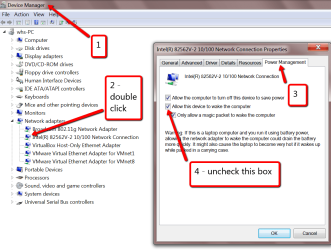
Here is one example from my system. But there may be other devices that can wake up the system. Go thru all of those that have a Power Management button in Properties. But leave Keyboard and Mouse alone.

http://www.sevenforums.com/tutorials/122027-devices-allow-prevent-wake-up-computer.html

View attachment 273369

Owww, thank you very much :)

Do it happen when in sleep mode (laptop is actually still on!! And uses power from battery)?
Or are you talking about hibernation?

Sleep mode.

It's never good to have laptops sleep/hibernate all the time. I often had problems with my laptop after hibernating and sleeping i.e. slows down, running apps crash. It's always healthy to just restart your laptop maybe a couple days a week.
But for the actual problem just follow whs's instructions, they're probably your best bet if you insist on keeping your lappy hibernating or sleeping all the time.

Ok, thanks for the advice :)
 

My Computer My Computer

At a glance

Windows 7 Professional x64Inter(R) Pentium (R) CPU B960 @ 2.20GHz4GBNVIDIA GeForce GT 630M
Computer type
Laptop
Computer Manufacturer/Model Number
Acer
OS
Windows 7 Professional x64
CPU
Inter(R) Pentium (R) CPU B960 @ 2.20GHz
Motherboard
Unknown
Memory
4GB
Graphics Card(s)
NVIDIA GeForce GT 630M
Hard Drives
WDC WD5000BPVT-22HXZT3 ATA Device (500GB)
Antivirus
Avira
Browser
Google Chrome

My Computer My Computer

At a glance

Multi-Boot W7_Pro_x64 W8.1_Pro_x64 W10_Pro_x6...AMD Athlon II x4 6206GB GSkill DDR2 800AMD 4670 GPU + AMD 4200 IGP
Computer type
PC/Desktop
Computer Manufacturer/Model Number
home built
OS
Multi-Boot W7_Pro_x64 W8.1_Pro_x64 W10_Pro_x64 +Linux_VMs +Chromium_VM
CPU
AMD Athlon II x4 620
Motherboard
Gigabyte GA-MA785G-UD3H
Memory
6GB GSkill DDR2 800
Graphics Card(s)
AMD 4670 GPU + AMD 4200 IGP
Sound Card
on board Realtek ALC889A
Monitor(s) Displays
RCA 40" LCD TV, Insignia 32" LCD TV, HP 15" LCD monitor
Screen Resolution
1680 x 1050
Hard Drives
OCZ Vertex 3 120GB,
Samsung F3 1TB (3),
Several others - WD, Seagate, Hitachi, ...
PSU
Corsair 500 W
Case
Rosewill mid tower
Cooling
CM 90mm rifle
Keyboard
Gyration wireless, Logitech wireless, Dell USB wired
Mouse
Gyration wireless, Logitech wireless, V7 USB wired
Internet Speed
Spectrum - 100Mbps D / 10Mbps U
Antivirus
Avast, MBAM3, EMET, WinPatrol
Browser
Pale Moon, Firefox, IE
Other Info
2 multi-boot PC's
Mainly HTPC/Office/Gen purpose (no gaming).
Trendnet USB KVM.
LG DVD burner/Blue Ray Player.
Tray system for removable SATA backup drives.

Not currently OCd, under-volted.
I use Hybrid sleep, rarely re-boot or shutdown.

Hauppauge HD-PVR, Avermedia PCIe TV Tuner, Hauppauge PCI TV Tuner.
Acer Laptop turns on by itself

My Acer is doing the same thing. The trouble it is, it isn't consistent. Sometimes it does it, sometimes it doesn't. I looked at all of the items in the Device Manager and all except my mouse were not able to wake the computer. I unchecked this and it is still doing it. I looked at the system logs and it shows a random wake up, but it says source unknown.

Virus maybe?
 

My Computer My Computer

At a glance

Windows vista
Computer type
PC/Desktop
OS
Windows vista
Back
Top