Laptop underperforming after fresh install, sound

sights

New member
Local time
2:32 AM
Messages
12
Hello,

I have a custom built laptop from 2011/2012. It was built by a company that specialized in building computers for music production. Streamlining and tweaking windows, and selecting components for that purpose.

Long story short:

My HDD crashed and I lost everything on the drive, including the recovery partition. I bought a new ssd drive to replace the crashed hdd, and installed a fresh version of windows 7.

However, it is underpermorming immensely. Multitasking performance is horribly. For example I get choppy sound and audio dropouts with my external soundcard when listening to a song in itunes while copying a file or installing something. The cpu also seems to spike whenever something happens (maximizing a window for example).
My DAW is pretty much unusable, dropouts occur whenever sound is being proccesed.

The company that built the laptop is no more. I had to track down all the drivers manually, but all of them are installed. I have tried most (if not all) reccomendations when googling the issue. But I thought I'd post something here before declaring my old work horse dead.

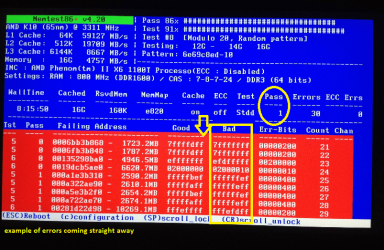
I have also run LatencyMon and the results are bad, disabling startup items and services has not helped. Driver's are up to date. The SSD is performing great, start up time is a couple of seconds so that can't be the problem. I've tried running memtest86, and the RAM stick come out error free when tested separately, and with about 22 errors when tested together (although I heard this is normal). AHCI drivers are installed and enabled in BIOS.

Not sure what else I can do, is it time to just get a new laptop, or is there a fix to this issue?

My specs:
Intel i5 2520m
8GB DDR3 RAM (2x4GB)
500GB Samsung 850 EVO (replaced the old HDD)
Intel Series 6 / c200 chipset
Native Instruments Komplete audio 6 USB 2.0 soundcard.
Windows 7 Ultimate 64-bit

Thanks!
 

My Computer My Computer

At a glance

Windows 7 Professional 64biti5 2520m8gbIntel 3000
Computer type
Laptop
Computer Manufacturer/Model Number
custom built
OS
Windows 7 Professional 64bit
CPU
i5 2520m
Memory
8gb
Graphics Card(s)
Intel 3000
Hard Drives
Samsung SSD Evo 850
Hello sights mate this might not cure the lot but it will help if you don't mind losing soem of the "bling" like transparency.
http://www.sevenforums.com/tutorials/11728-optimize-windows-7-a.html

The other thing is mate you have bad memory by your own admission - you have to try and find the bad stick or slot tedious but got to be done. ie stick 1 in slot 1 then stick 2 in slot one if no errors then stick 1 & 2 in slot 2. When you do get the errors you can then stop the test.

By the by we only recommend this for memtest
http://www.sevenforums.com/tutorials/105647-ram-test-memtest86.html
 

Attachments

  • MEM.PNG
    MEM.PNG
    227.6 KB · Views: 3

My Computer My Computer

At a glance

Desk1 7 Home Prem / Desk2 10 Pro / Main lap A...Desk1 i5 3750K / Laptop i7 GTX 860M / Desk2 i...Desk1 8GB (1866) / Desk2 16GB (1333) / Laptop...Desk 1& 2NVidia GTX 650 & Laptops on board Intel
Computer type
PC/Desktop
Computer Manufacturer/Model Number
Own build (new) Desk1 / Asus ROG Win 7 / Desk2 1st build
OS
Desk1 7 Home Prem / Desk2 10 Pro / Main lap Asus ROG 10 Pro 2 laptop Toshiba 7 Pro Asus P2520 7 & 10
CPU
Desk1 i5 3750K / Laptop i7 GTX 860M / Desk2 i5 2500
Motherboard
Desk1 Asus P877-V / Desk2 Gigabyte H67 UD3H / Laptop ?
Memory
Desk1 8GB (1866) / Desk2 16GB (1333) / Laptop 8Gb DDR3
Graphics Card(s)
Desk 1& 2NVidia GTX 650 & Laptops on board Intel
Sound Card
Desk 1 & 2 -XONAR DG Realtek High Def audio Laptop
Monitor(s) Displays
Desk 1 Benq HD 2450 / Desk2 Philips 24" / Laptop 17.5"
Screen Resolution
1920x1080 D1 & D2 & Laptop 1
Hard Drives
Desk1 Samsung 120GB 830 SSD
Asus ROG 256GB 850 Pro SSD
Desk2 Samsung 840 256 SSD
Toshiba 120GB EVO
PSU
Desk 1 Corsair HX 1050/ Laptop ? / Desk 2 Corsair HX 650
Case
Desk 1 Cooler HAF XM ? Toshiba laptop / Desk2 Coolermaster
Cooling
Fans on all Desk1 -2 Desk2 - all Coolermasters 5 Laptop ?
Keyboard
Desk 1 MS Sidewinder X6 Desk 2 MS Sidewinder X 4
Mouse
Desk 1&2 - Gigabyte MS 900 gamer - laptop - Logitec wireless
Internet Speed
ADSL2+
Other Info
One other Desktop (tester) and spare Toshba laptop both with SSD's
Running Kaspersky 2016 ISS on all machines config'd identically
Logitec audio stereo systems on each machine (x3)
Canon MG5250MFC
Router/modem TP-Link running WPA2SK
Thanks fir the reply ICIT2LOL.

Yeah, I have been doing the reccomended optimizations. But it seems the problem lies deeper than that.

Will do another rotation with the RAM and test them again.
The strange thing is that when I initially ran memtest86+ I got 65000+ errors. I then tested the sticks separately and got no errors. Put the sticks back but changed the placement on the two sticks, and I got only 22 errors.

But can a bad RAM be the cause of such a significant performance drop? When testing my DAW it feels like the performance has gone down 95% since the HDD crash. Now It was never a super fast laptop but always good enough for me to work with.

Will check the memory again tonight, thanks ICIT2LOL.
 

My Computer My Computer

At a glance

Windows 7 Professional 64biti5 2520m8gbIntel 3000
Computer type
Laptop
Computer Manufacturer/Model Number
custom built
OS
Windows 7 Professional 64bit
CPU
i5 2520m
Memory
8gb
Graphics Card(s)
Intel 3000
Hard Drives
Samsung SSD Evo 850
Ok mate well as a general rule if I ever get errors I replace the sticks regardless. I cannot account for the drop in errors though could be down to just dirt on the connecting surfaces to misalignment of the contacts to a combo of a bad stick in a bad slot.

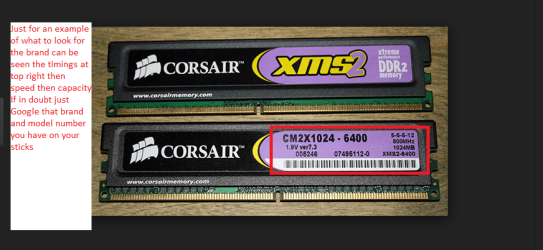
Now no offence but you do have the correct sticks in the slots?? because even mixing sticks of dffirent speeds will make for problems. Just check out the readings on the sides of the sticks it should have labels on them to say what they are, and again as a general rule always best to use at least the same brand, same speed timings and best of all the least number of sticks you can and if more than one then in matched pairs / quad sets.
In the pic you can see what to look for and if you have that info Google the stick and it will give you the info you need just remember the timings and speed are the most important followed closely by the capacity.

If you need in depth info you can run this
Using HW Info
PART A:
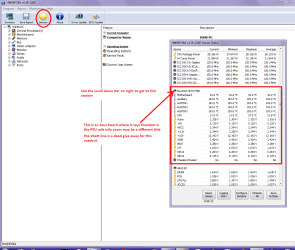
You can test the volts on the PSU with HW Info HWiNFO, HWiNFO32/64 - Download < download the right bit version and close the right hand window select Sensors and scroll down to the power section where you will see what the volts are doing see my pic. In my pic the section (Nuvoton) with VBATT as a dead give away you are in the section for the rail voltages. There are other section titles and one that pops up often is ITE (sometimes the usual one for Gigabyte boards)
Now the voltage on the different rails have to be within 5% =+/- of what is required or the machine will not work properly if at all.
Limits +/-
12v = 11.4 – 12.6v
5v = 4.74 – 5.25v
3.3v = 3.135 – 3.465v
The Power good signal voltage at pin 8 on the 24 pin plug (grey cable) should be the same as the 5v rail reading/s
See this for the rail voltage info
PSUs 101: A Detailed Look Into Power Supplies (Section 2.)
The original right hand window shows the machine running and is handy for that but for looking at the components in some detail close it and use the main left hand side panel
FOR OTHER COMPONENTS
PART B:
Open each small square with + in it on the section the components are in and then click on the individual component/s (it will highlight in blue) - in the right hand side will appear all sorts of details including brands speeds and other essential info that particular device. See pic for example.
Use PART B:
and also this
https://en.wikipedia.org/wiki/DDR_SDRAM
 

Attachments

  • STICKS.PNG
    STICKS.PNG
    115.8 KB · Views: 0

My Computer My Computer

At a glance

Desk1 7 Home Prem / Desk2 10 Pro / Main lap A...Desk1 i5 3750K / Laptop i7 GTX 860M / Desk2 i...Desk1 8GB (1866) / Desk2 16GB (1333) / Laptop...Desk 1& 2NVidia GTX 650 & Laptops on board Intel
Computer type
PC/Desktop
Computer Manufacturer/Model Number
Own build (new) Desk1 / Asus ROG Win 7 / Desk2 1st build
OS
Desk1 7 Home Prem / Desk2 10 Pro / Main lap Asus ROG 10 Pro 2 laptop Toshiba 7 Pro Asus P2520 7 & 10
CPU
Desk1 i5 3750K / Laptop i7 GTX 860M / Desk2 i5 2500
Motherboard
Desk1 Asus P877-V / Desk2 Gigabyte H67 UD3H / Laptop ?
Memory
Desk1 8GB (1866) / Desk2 16GB (1333) / Laptop 8Gb DDR3
Graphics Card(s)
Desk 1& 2NVidia GTX 650 & Laptops on board Intel
Sound Card
Desk 1 & 2 -XONAR DG Realtek High Def audio Laptop
Monitor(s) Displays
Desk 1 Benq HD 2450 / Desk2 Philips 24" / Laptop 17.5"
Screen Resolution
1920x1080 D1 & D2 & Laptop 1
Hard Drives
Desk1 Samsung 120GB 830 SSD
Asus ROG 256GB 850 Pro SSD
Desk2 Samsung 840 256 SSD
Toshiba 120GB EVO
PSU
Desk 1 Corsair HX 1050/ Laptop ? / Desk 2 Corsair HX 650
Case
Desk 1 Cooler HAF XM ? Toshiba laptop / Desk2 Coolermaster
Cooling
Fans on all Desk1 -2 Desk2 - all Coolermasters 5 Laptop ?
Keyboard
Desk 1 MS Sidewinder X6 Desk 2 MS Sidewinder X 4
Mouse
Desk 1&2 - Gigabyte MS 900 gamer - laptop - Logitec wireless
Internet Speed
ADSL2+
Other Info
One other Desktop (tester) and spare Toshba laptop both with SSD's
Running Kaspersky 2016 ISS on all machines config'd identically
Logitec audio stereo systems on each machine (x3)
Canon MG5250MFC
Router/modem TP-Link running WPA2SK
Okay, I checked the RAM modules again, separately in both sockets. Still no errors when testing them separately.

The two modules are the same, they are the two original modules from when the laptop was built, so they are compatible.

Voltage is normal as well. I am at a loss here. Could it simply be the start of total hardware failure of some sort? Like the motherboard?
The computer is old, But it just happened so suddenly, always been good enough for what I nees it for.

I've also tried another fresh install, everything updated, and cleaning of the vents and fan.
 

My Computer My Computer

At a glance

Windows 7 Professional 64biti5 2520m8gbIntel 3000
Computer type
Laptop
Computer Manufacturer/Model Number
custom built
OS
Windows 7 Professional 64bit
CPU
i5 2520m
Memory
8gb
Graphics Card(s)
Intel 3000
Hard Drives
Samsung SSD Evo 850
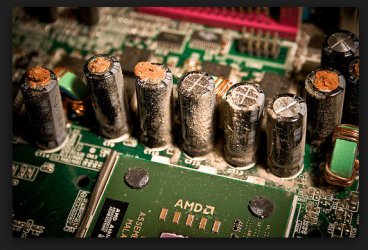
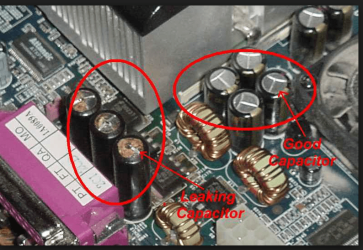
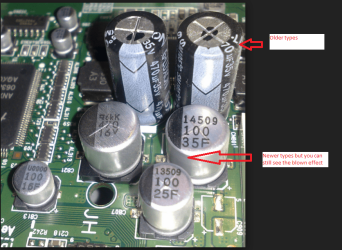
Hmm could be the board or simply something on it ie a bad cap which is my experience are very often a common cause of failure because caps on the older boards were not as reliable as they are today and just one blown one in a circuit can cause the failure of that circuit.
Now I don't know what board you have so I cannot check any pics of it to see if those caps are the older type tin can ones or the solid types that are mostly in use today.
It is an easy job for the best part to check just by visual inspection as they will appear bloated split or even leaking goo (electrolyte) of some sort around them. Some one cannot see without taking out the CPU because there are usually banks of them around it but I have attached some pics to show you just in case you are not familiar with them.

Now another and very possible cause may be the PSU and in that spiel I out in re HW Info could you use PART A: and post back a pick of the rials volts readout please - again a pic to show you what and where to look. That software will also tell you in PART B: what components you have on board(no pun) in detail so one can see what brand and other stuff about - for example the motherboard again see pic

You can also look for signs of scorching and there may even be a smell of resin printed circuit board (motherboard is one) having got really quite hot to burnt

NB One word of warning DO NOT attempt to do anything but shine a bright light into the PSU to see if caps are bad (and maybe a lot of dust) in there because there are potentially lethal voltages used inside and can have the effects of a heart defibrillator.
 

Attachments

  • HW INFO DESKTOP PSU.PNG
    HW INFO DESKTOP PSU.PNG
    49.8 KB · Views: 0
  • HW INFO DEVICES.PNG
    HW INFO DEVICES.PNG
    32.3 KB · Views: 0
  • CAP 1.PNG
    CAP 1.PNG
    125.9 KB · Views: 2
  • CAP 2.PNG
    CAP 2.PNG
    278.3 KB · Views: 0
  • CAP 3.PNG
    CAP 3.PNG
    260 KB · Views: 0

My Computer My Computer

At a glance

Desk1 7 Home Prem / Desk2 10 Pro / Main lap A...Desk1 i5 3750K / Laptop i7 GTX 860M / Desk2 i...Desk1 8GB (1866) / Desk2 16GB (1333) / Laptop...Desk 1& 2NVidia GTX 650 & Laptops on board Intel
Computer type
PC/Desktop
Computer Manufacturer/Model Number
Own build (new) Desk1 / Asus ROG Win 7 / Desk2 1st build
OS
Desk1 7 Home Prem / Desk2 10 Pro / Main lap Asus ROG 10 Pro 2 laptop Toshiba 7 Pro Asus P2520 7 & 10
CPU
Desk1 i5 3750K / Laptop i7 GTX 860M / Desk2 i5 2500
Motherboard
Desk1 Asus P877-V / Desk2 Gigabyte H67 UD3H / Laptop ?
Memory
Desk1 8GB (1866) / Desk2 16GB (1333) / Laptop 8Gb DDR3
Graphics Card(s)
Desk 1& 2NVidia GTX 650 & Laptops on board Intel
Sound Card
Desk 1 & 2 -XONAR DG Realtek High Def audio Laptop
Monitor(s) Displays
Desk 1 Benq HD 2450 / Desk2 Philips 24" / Laptop 17.5"
Screen Resolution
1920x1080 D1 & D2 & Laptop 1
Hard Drives
Desk1 Samsung 120GB 830 SSD
Asus ROG 256GB 850 Pro SSD
Desk2 Samsung 840 256 SSD
Toshiba 120GB EVO
PSU
Desk 1 Corsair HX 1050/ Laptop ? / Desk 2 Corsair HX 650
Case
Desk 1 Cooler HAF XM ? Toshiba laptop / Desk2 Coolermaster
Cooling
Fans on all Desk1 -2 Desk2 - all Coolermasters 5 Laptop ?
Keyboard
Desk 1 MS Sidewinder X6 Desk 2 MS Sidewinder X 4
Mouse
Desk 1&2 - Gigabyte MS 900 gamer - laptop - Logitec wireless
Internet Speed
ADSL2+
Other Info
One other Desktop (tester) and spare Toshba laptop both with SSD's
Running Kaspersky 2016 ISS on all machines config'd identically
Logitec audio stereo systems on each machine (x3)
Canon MG5250MFC
Router/modem TP-Link running WPA2SK
Back
Top