Solved Laptop won't boot (Logo screen),can't boot from USB/DVD or access BIOS

JoeHannes

New member
Local time
11:54 PM
Messages
14
Hey guys,

I've been searching the web for solutions for hours now and won't find anything that works for me. You are kinda like my last hope. :)

Situation
I have a Asus A54C Laptop here (it's my brother's), that won't boot. If I turn it on, it quickly shows the Logo screen and nothing else happens.
If I have a WIN7-DVD in the DVD-drive (created with downloaded ISO, it seems to be working on another laptop), the drive makes some noises but nothing else happens.
If I have a Ubuntu-Live-USB plugged in (worked on this Laptop before), nothing happens.
If I press F2 repeatedly after turning the Laotop on (it's the BIOS-key), nothing happens.

What I've tried
I tried several potential BIOS-keys, although I am 99% sure that F2 is the one.
I tried the turn off, deplug battery and cable, hit power-switch 20 times and for a minute thing.
I tried unplugging the Laptop while it was in the logo screen, hoping this would bring me to BIOS after starting it again.

How I got there
An Ubuntu system has been installed on the Laptop for a while. Now, my brother needed a windows and I wanted to create a dual boot system (what I had succesfully done before).
Some stupid mistakes later, I had a corrupted Win7 and wanted to overwrite it with a fresh install.
I tried to delete the 100MB system reserved partition (in the WIN7-installation menu) because I thought, a fresh install would create a new one. This took about 1 hour (for the 100 MBs) without any visible progress, I finally force-turned it off.
I then had a Blue Screen several times. On started with "0x0000007E", one was something like "stop: 0x00000050 (0xFFFFF6FC00002430, 0X0000000000000000, 0XFFFFF8000C4C92D4, 0X0000000000000009)".
Unfortunately, I don't exactly remember how I got from blue screens to where I am now.

How I imagine the solution
Is there a way to get into BIOS, so that I could set DVD or USB as booting device? I hope I could then reinstall WIN7.
Is there another way to force the Laptop to boot from USB / or USB?
Is there a way to plug the laptop to another laoptop, in order to solve the problem?

But that's just my amatuerish imagionation, any help is very much appreciated.
Yours
Joe
 
Last edited:

My Computer My Computer

At a glance

Windows 7 Home Premium 64 Bit
Computer type
Laptop
OS
Windows 7 Home Premium 64 Bit
Hello and welcome Joe mate the BIOS key is F2 and this is the manual for that model sorry but I can only access the English version - if you type in what you want to search for it automatically will go to that setting or instruction. https://www.manualowl.com/m/Asus/A54C/Manual/261331?page=84

Now if you select the optical as the first boot device and it will not go then maybe it needs a new optical drive - very cheap these days and you may be lucky that it is held in with one screw on the underside of the laptop without any pics it is hard to tell - it possibly could be in that manual.

Now for the BSOD's please use these if you want to get them analysed

http://www.sevenforums.com/tutorials/174459-dump-files-configure-windows-create-bsod.html

&

http://www.sevenforums.com/bsod-help-support/96879-blue-screen-death-bsod-posting-instructions.html
 

My Computer My Computer

At a glance

Desk1 7 Home Prem / Desk2 10 Pro / Main lap A...Desk1 i5 3750K / Laptop i7 GTX 860M / Desk2 i...Desk1 8GB (1866) / Desk2 16GB (1333) / Laptop...Desk 1& 2NVidia GTX 650 & Laptops on board Intel
Computer type
PC/Desktop
Computer Manufacturer/Model Number
Own build (new) Desk1 / Asus ROG Win 7 / Desk2 1st build
OS
Desk1 7 Home Prem / Desk2 10 Pro / Main lap Asus ROG 10 Pro 2 laptop Toshiba 7 Pro Asus P2520 7 & 10
CPU
Desk1 i5 3750K / Laptop i7 GTX 860M / Desk2 i5 2500
Motherboard
Desk1 Asus P877-V / Desk2 Gigabyte H67 UD3H / Laptop ?
Memory
Desk1 8GB (1866) / Desk2 16GB (1333) / Laptop 8Gb DDR3
Graphics Card(s)
Desk 1& 2NVidia GTX 650 & Laptops on board Intel
Sound Card
Desk 1 & 2 -XONAR DG Realtek High Def audio Laptop
Monitor(s) Displays
Desk 1 Benq HD 2450 / Desk2 Philips 24" / Laptop 17.5"
Screen Resolution
1920x1080 D1 & D2 & Laptop 1
Hard Drives
Desk1 Samsung 120GB 830 SSD
Asus ROG 256GB 850 Pro SSD
Desk2 Samsung 840 256 SSD
Toshiba 120GB EVO
PSU
Desk 1 Corsair HX 1050/ Laptop ? / Desk 2 Corsair HX 650
Case
Desk 1 Cooler HAF XM ? Toshiba laptop / Desk2 Coolermaster
Cooling
Fans on all Desk1 -2 Desk2 - all Coolermasters 5 Laptop ?
Keyboard
Desk 1 MS Sidewinder X6 Desk 2 MS Sidewinder X 4
Mouse
Desk 1&2 - Gigabyte MS 900 gamer - laptop - Logitec wireless
Internet Speed
ADSL2+
Other Info
One other Desktop (tester) and spare Toshba laptop both with SSD's
Running Kaspersky 2016 ISS on all machines config'd identically
Logitec audio stereo systems on each machine (x3)
Canon MG5250MFC
Router/modem TP-Link running WPA2SK
Hey ICIT2LOL,

thanks for the link to the manual. So, I was right about the F2 key.

Yet I don't get how the two BSDO links can help me? I cannot do anything with this notebook at the moment. Also, the blue screens don't appear any longer, just the black screen with the ASUS logo.

Have I missed anything in the threads you linked to?

Anyone any idea how to get this notebook running again? Thanks so much!
 

My Computer My Computer

At a glance

Windows 7 Home Premium 64 Bit
Computer type
Laptop
OS
Windows 7 Home Premium 64 Bit
Ok Joe it is just you mentioned blue screens in the first post. Now can you get into safe mode? If you cannot you might have to look at a clean install if it is not booting at all.
Now of course you need to retrieve all the data you need first and to do that you could try this
BOOTABLE UBUNTU
Make a bootable Ubuntu disk Download Ubuntu Desktop | Download | Ubuntu
Set the BIOS to boot from the optical when the machine boots it will show you a screen with TRY or INSTALL > select TRY not INSTALL
When it is finished - it takes very little time you will get a screen like in the pic .
Open the drive you want > User and dig down until you get to the data / settings you may be able to copy / paste the material you want to an external source or other installed drive doing this.
I am not sure if it will but I have recovered tons of data etc using this method both on "dead" or just plain drives that you cannot get data from using Windows.
There is a Linux Mint MATE version too however I find this as easy.

Some other options here http://www.sevenforums.com/tutorials/219533-troubleshooting-windows-7-failure-boot.html
 

My Computer My Computer

At a glance

Desk1 7 Home Prem / Desk2 10 Pro / Main lap A...Desk1 i5 3750K / Laptop i7 GTX 860M / Desk2 i...Desk1 8GB (1866) / Desk2 16GB (1333) / Laptop...Desk 1& 2NVidia GTX 650 & Laptops on board Intel
Computer type
PC/Desktop
Computer Manufacturer/Model Number
Own build (new) Desk1 / Asus ROG Win 7 / Desk2 1st build
OS
Desk1 7 Home Prem / Desk2 10 Pro / Main lap Asus ROG 10 Pro 2 laptop Toshiba 7 Pro Asus P2520 7 & 10
CPU
Desk1 i5 3750K / Laptop i7 GTX 860M / Desk2 i5 2500
Motherboard
Desk1 Asus P877-V / Desk2 Gigabyte H67 UD3H / Laptop ?
Memory
Desk1 8GB (1866) / Desk2 16GB (1333) / Laptop 8Gb DDR3
Graphics Card(s)
Desk 1& 2NVidia GTX 650 & Laptops on board Intel
Sound Card
Desk 1 & 2 -XONAR DG Realtek High Def audio Laptop
Monitor(s) Displays
Desk 1 Benq HD 2450 / Desk2 Philips 24" / Laptop 17.5"
Screen Resolution
1920x1080 D1 & D2 & Laptop 1
Hard Drives
Desk1 Samsung 120GB 830 SSD
Asus ROG 256GB 850 Pro SSD
Desk2 Samsung 840 256 SSD
Toshiba 120GB EVO
PSU
Desk 1 Corsair HX 1050/ Laptop ? / Desk 2 Corsair HX 650
Case
Desk 1 Cooler HAF XM ? Toshiba laptop / Desk2 Coolermaster
Cooling
Fans on all Desk1 -2 Desk2 - all Coolermasters 5 Laptop ?
Keyboard
Desk 1 MS Sidewinder X6 Desk 2 MS Sidewinder X 4
Mouse
Desk 1&2 - Gigabyte MS 900 gamer - laptop - Logitec wireless
Internet Speed
ADSL2+
Other Info
One other Desktop (tester) and spare Toshba laptop both with SSD's
Running Kaspersky 2016 ISS on all machines config'd identically
Logitec audio stereo systems on each machine (x3)
Canon MG5250MFC
Router/modem TP-Link running WPA2SK
Thanks for the quick reply.
Good news first: I have saved all the data before I started to work on the PC.
I have a bootable Ubuntu USB stick, a bootable Win7 USB stick and a Win7 installation CD. However, none of them helps me since I cannot access the BIOS to set the right boot priority.
If I got it all right, none of the options suggested in your linked thread would work for me (for the same reason). Please tell me, if I'm wrong.
Is there any way to get into BIOS again?
 

My Computer My Computer

At a glance

Windows 7 Home Premium 64 Bit
Computer type
Laptop
OS
Windows 7 Home Premium 64 Bit
Ok mate now just how are you trying to get into the BIOS?? if you are not using the F2 key??

Also I don't know for example even the model of machine you are using so some system specs might be handy http://www.sevenforums.com/tutorials/180324-system-info-see-your-system-specs.html

An option is to hit CTRL+ALT+ENTER instead of the F2 which by the way are you tapping all the way in or just the once - I have to ask because sometimes it is missed.

Going on I would even try taking out/ putting back the BIOS battery and/or replacing it.
 

My Computer My Computer

At a glance

Desk1 7 Home Prem / Desk2 10 Pro / Main lap A...Desk1 i5 3750K / Laptop i7 GTX 860M / Desk2 i...Desk1 8GB (1866) / Desk2 16GB (1333) / Laptop...Desk 1& 2NVidia GTX 650 & Laptops on board Intel
Computer type
PC/Desktop
Computer Manufacturer/Model Number
Own build (new) Desk1 / Asus ROG Win 7 / Desk2 1st build
OS
Desk1 7 Home Prem / Desk2 10 Pro / Main lap Asus ROG 10 Pro 2 laptop Toshiba 7 Pro Asus P2520 7 & 10
CPU
Desk1 i5 3750K / Laptop i7 GTX 860M / Desk2 i5 2500
Motherboard
Desk1 Asus P877-V / Desk2 Gigabyte H67 UD3H / Laptop ?
Memory
Desk1 8GB (1866) / Desk2 16GB (1333) / Laptop 8Gb DDR3
Graphics Card(s)
Desk 1& 2NVidia GTX 650 & Laptops on board Intel
Sound Card
Desk 1 & 2 -XONAR DG Realtek High Def audio Laptop
Monitor(s) Displays
Desk 1 Benq HD 2450 / Desk2 Philips 24" / Laptop 17.5"
Screen Resolution
1920x1080 D1 & D2 & Laptop 1
Hard Drives
Desk1 Samsung 120GB 830 SSD
Asus ROG 256GB 850 Pro SSD
Desk2 Samsung 840 256 SSD
Toshiba 120GB EVO
PSU
Desk 1 Corsair HX 1050/ Laptop ? / Desk 2 Corsair HX 650
Case
Desk 1 Cooler HAF XM ? Toshiba laptop / Desk2 Coolermaster
Cooling
Fans on all Desk1 -2 Desk2 - all Coolermasters 5 Laptop ?
Keyboard
Desk 1 MS Sidewinder X6 Desk 2 MS Sidewinder X 4
Mouse
Desk 1&2 - Gigabyte MS 900 gamer - laptop - Logitec wireless
Internet Speed
ADSL2+
Other Info
One other Desktop (tester) and spare Toshba laptop both with SSD's
Running Kaspersky 2016 ISS on all machines config'd identically
Logitec audio stereo systems on each machine (x3)
Canon MG5250MFC
Router/modem TP-Link running WPA2SK
I'm trying to get into BIOS by tapping F2 repeatedly after I turned the PC on. But this has no effect at all. All I get is the black logo screen.

The model is Asus A54C. On the bottom it says:
MODEL: A54C
MB Ver.: K54C ID: 5K
C2N0AS18245906C
A54C-S0325V


Do you need anything more specific? Unfortunately the link for system specs doesn't help me, since I can't access the PC anymore.

Hitting CTRL+ALT+ENTER instead of F2 doesn't do anything either. Just in case, I tried CTRL+ALT+DEL either with the same result: nothing happens.

About "taking out/ putting back the BIOS battery": Maybe you could explain me where the BIOS is physically located. So far I thought, it is located on the hard drive. Apparently that is not the case? Therefore replacing the drive couldn't even solve the problem, right?
How would I access the BIOS battery anyway?

Thank you so much for your patient help!
Joe
 

My Computer My Computer

At a glance

Windows 7 Home Premium 64 Bit
Computer type
Laptop
OS
Windows 7 Home Premium 64 Bit
Hi,
Common other keys could tapping the Delete key
Boot options can also be F8 or F10 or F12
 

My Computer My Computer

At a glance

Win-7-Pro64bit 7-H-Prem-64biti7-5930K 2nd i9-9940x both water blocked VRM'...Trident-z 3200C14 2nd Trident-z 3600C16EVGA 1080ti ftw3 2nd Titan Xp both water blocked
Computer type
PC/Desktop
Computer Manufacturer/Model Number
Custom assembled by me :}
OS
Win-7-Pro64bit 7-H-Prem-64bit
CPU
i7-5930K 2nd i9-9940x both water blocked VRM's too
Motherboard
ASUS SABERTOOTH X99 2nd ASUS x299 Apex
Memory
Trident-z 3200C14 2nd Trident-z 3600C16
Graphics Card(s)
EVGA 1080ti ftw3 2nd Titan Xp both water blocked
Sound Card
Built-in Realtek
Monitor(s) Displays
1-AOC G2460PG 24"G-Sync 144Hz/ 2nd 1-ASUS VG248QE 24" 144Hz
Screen Resolution
1920 x 1080 144Hz
Hard Drives
2-Samsung M.2 Evo & Evo Plus
2-Samsung 850 EVO 500GB SSD's/ 3-2.5 W.D. Black 1tb-&3-1tb/3-3.5 WD Black 1tb hdd's
PSU
EVGA SuperNOVA 1000-P2 2nd 1200-P2
Case
2-Corsair Obsidian Series 450D Black ATX Mid Tower
Cooling
Custom water loops
Keyboard
Logitech G710+/ 2nd Logitech G910
Mouse
2-RedDragon M901 Perdition 16400 dpi Gaming mouse = wired
Internet Speed
Comcast Ping 19ms 89.31mbps download speed 6.12mbps upload
Antivirus
Malwarebytes Pro/ Superantispyware Pro
Browser
FireFox & Pale moon
Other Info
2nd ASUS X299 Apex/Intel i9-9940x with Custom water loop/7H-Prem-x64/Corsair 450D case/Ram Trident-z 3600C16 4x8gb / Samsung970Evo plus 500gb SSD/Dual ssd EZ swap evo/PSU EVGA SuperNova 1200w-P2 80+Platinum/GPU Titan Xp /8-ML-140 on push-pull on 2-280GTX rads
Hi ThrashZone,

thanks a lot for your reply. I tried those already. Also, according to the manual, ICIT2LOL posted above, F2 is the right key. Nevertheless I just tried them again. Yes, I am desperat. :D But still no effect. All I get is the black screen (photo attached).
 

My Computer My Computer

At a glance

Windows 7 Home Premium 64 Bit
Computer type
Laptop
OS
Windows 7 Home Premium 64 Bit
Hold down the F8 key while you press the power button
Also try the F2 or Delete key too.
 

My Computer My Computer

At a glance

Win-7-Pro64bit 7-H-Prem-64biti7-5930K 2nd i9-9940x both water blocked VRM'...Trident-z 3200C14 2nd Trident-z 3600C16EVGA 1080ti ftw3 2nd Titan Xp both water blocked
Computer type
PC/Desktop
Computer Manufacturer/Model Number
Custom assembled by me :}
OS
Win-7-Pro64bit 7-H-Prem-64bit
CPU
i7-5930K 2nd i9-9940x both water blocked VRM's too
Motherboard
ASUS SABERTOOTH X99 2nd ASUS x299 Apex
Memory
Trident-z 3200C14 2nd Trident-z 3600C16
Graphics Card(s)
EVGA 1080ti ftw3 2nd Titan Xp both water blocked
Sound Card
Built-in Realtek
Monitor(s) Displays
1-AOC G2460PG 24"G-Sync 144Hz/ 2nd 1-ASUS VG248QE 24" 144Hz
Screen Resolution
1920 x 1080 144Hz
Hard Drives
2-Samsung M.2 Evo & Evo Plus
2-Samsung 850 EVO 500GB SSD's/ 3-2.5 W.D. Black 1tb-&3-1tb/3-3.5 WD Black 1tb hdd's
PSU
EVGA SuperNOVA 1000-P2 2nd 1200-P2
Case
2-Corsair Obsidian Series 450D Black ATX Mid Tower
Cooling
Custom water loops
Keyboard
Logitech G710+/ 2nd Logitech G910
Mouse
2-RedDragon M901 Perdition 16400 dpi Gaming mouse = wired
Internet Speed
Comcast Ping 19ms 89.31mbps download speed 6.12mbps upload
Antivirus
Malwarebytes Pro/ Superantispyware Pro
Browser
FireFox & Pale moon
Other Info
2nd ASUS X299 Apex/Intel i9-9940x with Custom water loop/7H-Prem-x64/Corsair 450D case/Ram Trident-z 3600C16 4x8gb / Samsung970Evo plus 500gb SSD/Dual ssd EZ swap evo/PSU EVGA SuperNova 1200w-P2 80+Platinum/GPU Titan Xp /8-ML-140 on push-pull on 2-280GTX rads
Still nothing
 

My Computer My Computer

At a glance

Windows 7 Home Premium 64 Bit
Computer type
Laptop
OS
Windows 7 Home Premium 64 Bit
Hello, found this when F2 does not work Untitled.jpg
 

My Computer My Computer

At a glance

windows 7 professional 64 bitCPU Genuine Intel (R) CPU [email protected]RAM 3 GBToshiba MK2555 GSX ATA
Computer type
Laptop
Computer Manufacturer/Model Number
HP Presario CQ70
OS
windows 7 professional 64 bit
CPU
CPU Genuine Intel (R) CPU [email protected]
Motherboard
APCI x 64 - based PC
Memory
RAM 3 GB
Graphics Card(s)
Toshiba MK2555 GSX ATA
Sound Card
Conexant High Def Smart Audio 221,
Monitor(s) Displays
monitor Generic PnP.
Screen Resolution
?
Hard Drives
HDAUDIO Soft Data Fax Modern with smart CP
PSU
?
Keyboard
Standard PS/2 keyboard
Mouse
PS/2 Compatible mouse
Antivirus
Hyjackthis and Superanti spyware, Mamb Ccleaner
Browser
Google Chrome
Hi thelma,
thanks for your help. How exactly would I unplug all my drives in a notebook? I'm not really firm in the disassembeling business …
 

My Computer My Computer

At a glance

Windows 7 Home Premium 64 Bit
Computer type
Laptop
OS
Windows 7 Home Premium 64 Bit
Ok mate sorry late reply usually there is a cover on the underside of the machine unless it is a late version one and all you need to do is to unscrew the fixing screw usually a small cross head one and lift off the cover.
The same goes for the RAM if you ever need to upgrade it.

The late version models I spoke of are different insomuch that one has to remove the whole bottom plate from the machine and in some that is easy some are real pigs to get off. A pic of the bottom would be good to see.

PS Make sure you have the adaptor and battery removed before you attempt any of that.

Ok have found this and I think it may be very similar to the machine you have


If you go ahead just a tip place the machine on a large preferably white bath towel (taped the table top) - this stops the small screws from bouncing off any hard surface and onto the floor where you will invariably have great difficulty in finding them.
 

My Computer My Computer

At a glance

Desk1 7 Home Prem / Desk2 10 Pro / Main lap A...Desk1 i5 3750K / Laptop i7 GTX 860M / Desk2 i...Desk1 8GB (1866) / Desk2 16GB (1333) / Laptop...Desk 1& 2NVidia GTX 650 & Laptops on board Intel
Computer type
PC/Desktop
Computer Manufacturer/Model Number
Own build (new) Desk1 / Asus ROG Win 7 / Desk2 1st build
OS
Desk1 7 Home Prem / Desk2 10 Pro / Main lap Asus ROG 10 Pro 2 laptop Toshiba 7 Pro Asus P2520 7 & 10
CPU
Desk1 i5 3750K / Laptop i7 GTX 860M / Desk2 i5 2500
Motherboard
Desk1 Asus P877-V / Desk2 Gigabyte H67 UD3H / Laptop ?
Memory
Desk1 8GB (1866) / Desk2 16GB (1333) / Laptop 8Gb DDR3
Graphics Card(s)
Desk 1& 2NVidia GTX 650 & Laptops on board Intel
Sound Card
Desk 1 & 2 -XONAR DG Realtek High Def audio Laptop
Monitor(s) Displays
Desk 1 Benq HD 2450 / Desk2 Philips 24" / Laptop 17.5"
Screen Resolution
1920x1080 D1 & D2 & Laptop 1
Hard Drives
Desk1 Samsung 120GB 830 SSD
Asus ROG 256GB 850 Pro SSD
Desk2 Samsung 840 256 SSD
Toshiba 120GB EVO
PSU
Desk 1 Corsair HX 1050/ Laptop ? / Desk 2 Corsair HX 650
Case
Desk 1 Cooler HAF XM ? Toshiba laptop / Desk2 Coolermaster
Cooling
Fans on all Desk1 -2 Desk2 - all Coolermasters 5 Laptop ?
Keyboard
Desk 1 MS Sidewinder X6 Desk 2 MS Sidewinder X 4
Mouse
Desk 1&2 - Gigabyte MS 900 gamer - laptop - Logitec wireless
Internet Speed
ADSL2+
Other Info
One other Desktop (tester) and spare Toshba laptop both with SSD's
Running Kaspersky 2016 ISS on all machines config'd identically
Logitec audio stereo systems on each machine (x3)
Canon MG5250MFC
Router/modem TP-Link running WPA2SK
Thanks for the vid, ICIT2LOL. This does look similar to what I have. The only problem is: I don't see the battery there. Here's what I found: https://www.youtube.com/watch?v=IbwY96pPDyE
Isn't the battery the little dark round thing in the upper left at 7:34?
These are many many screws. And I don't wanna *stupid pun* this up.
Any other way? Was I right about the thing that replacing the drive won't solve the BIOS problem?
 

My Computer My Computer

At a glance

Windows 7 Home Premium 64 Bit
Computer type
Laptop
OS
Windows 7 Home Premium 64 Bit
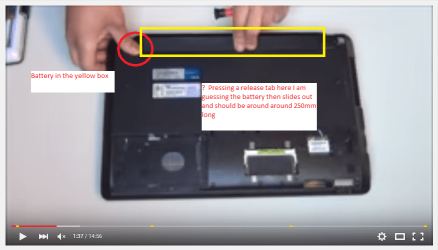
Ok mate see my pic I snipped one from that video and the battery is the long (about 250mm) object at the rear of the unit. There is a small latch you need to depress and slide the battery out - usually it is two locking latches but I can only see the video maker actuating one.

Now it is worth a try removing the drive mate as we have to cover all options.

PS If I am a long time getting back it is because my net connection is pretty pathetic where I am right now:(
 

Attachments

  • JOHAN.PNG
    JOHAN.PNG
    107.7 KB · Views: 0

My Computer My Computer

At a glance

Desk1 7 Home Prem / Desk2 10 Pro / Main lap A...Desk1 i5 3750K / Laptop i7 GTX 860M / Desk2 i...Desk1 8GB (1866) / Desk2 16GB (1333) / Laptop...Desk 1& 2NVidia GTX 650 & Laptops on board Intel
Computer type
PC/Desktop
Computer Manufacturer/Model Number
Own build (new) Desk1 / Asus ROG Win 7 / Desk2 1st build
OS
Desk1 7 Home Prem / Desk2 10 Pro / Main lap Asus ROG 10 Pro 2 laptop Toshiba 7 Pro Asus P2520 7 & 10
CPU
Desk1 i5 3750K / Laptop i7 GTX 860M / Desk2 i5 2500
Motherboard
Desk1 Asus P877-V / Desk2 Gigabyte H67 UD3H / Laptop ?
Memory
Desk1 8GB (1866) / Desk2 16GB (1333) / Laptop 8Gb DDR3
Graphics Card(s)
Desk 1& 2NVidia GTX 650 & Laptops on board Intel
Sound Card
Desk 1 & 2 -XONAR DG Realtek High Def audio Laptop
Monitor(s) Displays
Desk 1 Benq HD 2450 / Desk2 Philips 24" / Laptop 17.5"
Screen Resolution
1920x1080 D1 & D2 & Laptop 1
Hard Drives
Desk1 Samsung 120GB 830 SSD
Asus ROG 256GB 850 Pro SSD
Desk2 Samsung 840 256 SSD
Toshiba 120GB EVO
PSU
Desk 1 Corsair HX 1050/ Laptop ? / Desk 2 Corsair HX 650
Case
Desk 1 Cooler HAF XM ? Toshiba laptop / Desk2 Coolermaster
Cooling
Fans on all Desk1 -2 Desk2 - all Coolermasters 5 Laptop ?
Keyboard
Desk 1 MS Sidewinder X6 Desk 2 MS Sidewinder X 4
Mouse
Desk 1&2 - Gigabyte MS 900 gamer - laptop - Logitec wireless
Internet Speed
ADSL2+
Other Info
One other Desktop (tester) and spare Toshba laptop both with SSD's
Running Kaspersky 2016 ISS on all machines config'd identically
Logitec audio stereo systems on each machine (x3)
Canon MG5250MFC
Router/modem TP-Link running WPA2SK
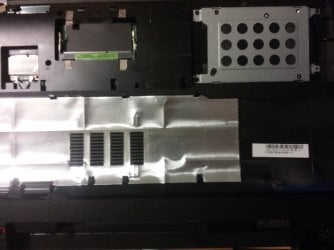
Awwh, I'm so sorry about not being precise: I was talking about the BIOS battery. Because you suggested to take it out and put it back in.
And I can't find the BIOS battery here. So: Is it the round little thing I was talking about in the first place?
 

Attachments

  • Bottom open.jpg
    Bottom open.jpg
    236.9 KB · Views: 2

My Computer My Computer

At a glance

Windows 7 Home Premium 64 Bit
Computer type
Laptop
OS
Windows 7 Home Premium 64 Bit
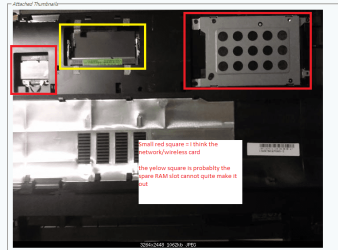
Actually I guessed that is what you meant and if that is the pic of your machine I cannot see the BIOS battery only the hard drive (in aluminium caddy) and possibly the spare slot for more RAM.

So if you have seen the round battery in your travels yes it is the BIOS one and removing it and leaving it out for a few minutes will clear the BIOS settings to default when you replace it.

The drive I think what the others meant was try accessing the BIOS with it out - worth a try in any case will ot do any harm.
 

Attachments

  • JOHAN 2.PNG
    JOHAN 2.PNG
    99.3 KB · Views: 1

My Computer My Computer

At a glance

Desk1 7 Home Prem / Desk2 10 Pro / Main lap A...Desk1 i5 3750K / Laptop i7 GTX 860M / Desk2 i...Desk1 8GB (1866) / Desk2 16GB (1333) / Laptop...Desk 1& 2NVidia GTX 650 & Laptops on board Intel
Computer type
PC/Desktop
Computer Manufacturer/Model Number
Own build (new) Desk1 / Asus ROG Win 7 / Desk2 1st build
OS
Desk1 7 Home Prem / Desk2 10 Pro / Main lap Asus ROG 10 Pro 2 laptop Toshiba 7 Pro Asus P2520 7 & 10
CPU
Desk1 i5 3750K / Laptop i7 GTX 860M / Desk2 i5 2500
Motherboard
Desk1 Asus P877-V / Desk2 Gigabyte H67 UD3H / Laptop ?
Memory
Desk1 8GB (1866) / Desk2 16GB (1333) / Laptop 8Gb DDR3
Graphics Card(s)
Desk 1& 2NVidia GTX 650 & Laptops on board Intel
Sound Card
Desk 1 & 2 -XONAR DG Realtek High Def audio Laptop
Monitor(s) Displays
Desk 1 Benq HD 2450 / Desk2 Philips 24" / Laptop 17.5"
Screen Resolution
1920x1080 D1 & D2 & Laptop 1
Hard Drives
Desk1 Samsung 120GB 830 SSD
Asus ROG 256GB 850 Pro SSD
Desk2 Samsung 840 256 SSD
Toshiba 120GB EVO
PSU
Desk 1 Corsair HX 1050/ Laptop ? / Desk 2 Corsair HX 650
Case
Desk 1 Cooler HAF XM ? Toshiba laptop / Desk2 Coolermaster
Cooling
Fans on all Desk1 -2 Desk2 - all Coolermasters 5 Laptop ?
Keyboard
Desk 1 MS Sidewinder X6 Desk 2 MS Sidewinder X 4
Mouse
Desk 1&2 - Gigabyte MS 900 gamer - laptop - Logitec wireless
Internet Speed
ADSL2+
Other Info
One other Desktop (tester) and spare Toshba laptop both with SSD's
Running Kaspersky 2016 ISS on all machines config'd identically
Logitec audio stereo systems on each machine (x3)
Canon MG5250MFC
Router/modem TP-Link running WPA2SK
I can only say it again: Thank you so much for your patience and your explanations.

I have taken a screenshot from a video I've seen (min 7:35): https://www.youtube.com/watch?v=IbwY96pPDyE
I am not sure wheter I got, what the BIOS battery is. Could you please verify it?
According to the video it's super complecated to get to the BIOS battery (assuming I am right) in this model.
Anyway, it is being late here in Germany, I'll go for the BIOS battery during the next days.
Of course, I will try the boot without hard drive thing first - once again: thanks for your clarification here.

I'll keep you updated - and will probably come up with tons of new questions. :rolleyes:
Joe
 

Attachments

  • video still - may be the BIOS battery.jpg
    video still - may be the BIOS battery.jpg
    36.7 KB · Views: 0
Last edited:

My Computer My Computer

At a glance

Windows 7 Home Premium 64 Bit
Computer type
Laptop
OS
Windows 7 Home Premium 64 Bit
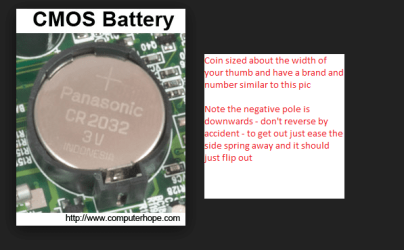
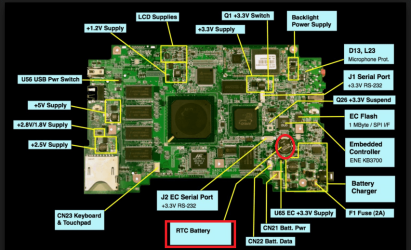
No problems mate that is what we are here for. The battery that is in your pic looks to be the BIOS battery it should be silver coloured (usually) the size of a medium coin and have something like CR2032 on it. See my pic/s the RTC means the CMOS/BIOS battery
 

Attachments

  • JOHAN 3.PNG
    JOHAN 3.PNG
    42.9 KB · Views: 8
  • JOHAN 4.PNG
    JOHAN 4.PNG
    160.4 KB · Views: 0

My Computer My Computer

At a glance

Desk1 7 Home Prem / Desk2 10 Pro / Main lap A...Desk1 i5 3750K / Laptop i7 GTX 860M / Desk2 i...Desk1 8GB (1866) / Desk2 16GB (1333) / Laptop...Desk 1& 2NVidia GTX 650 & Laptops on board Intel
Computer type
PC/Desktop
Computer Manufacturer/Model Number
Own build (new) Desk1 / Asus ROG Win 7 / Desk2 1st build
OS
Desk1 7 Home Prem / Desk2 10 Pro / Main lap Asus ROG 10 Pro 2 laptop Toshiba 7 Pro Asus P2520 7 & 10
CPU
Desk1 i5 3750K / Laptop i7 GTX 860M / Desk2 i5 2500
Motherboard
Desk1 Asus P877-V / Desk2 Gigabyte H67 UD3H / Laptop ?
Memory
Desk1 8GB (1866) / Desk2 16GB (1333) / Laptop 8Gb DDR3
Graphics Card(s)
Desk 1& 2NVidia GTX 650 & Laptops on board Intel
Sound Card
Desk 1 & 2 -XONAR DG Realtek High Def audio Laptop
Monitor(s) Displays
Desk 1 Benq HD 2450 / Desk2 Philips 24" / Laptop 17.5"
Screen Resolution
1920x1080 D1 & D2 & Laptop 1
Hard Drives
Desk1 Samsung 120GB 830 SSD
Asus ROG 256GB 850 Pro SSD
Desk2 Samsung 840 256 SSD
Toshiba 120GB EVO
PSU
Desk 1 Corsair HX 1050/ Laptop ? / Desk 2 Corsair HX 650
Case
Desk 1 Cooler HAF XM ? Toshiba laptop / Desk2 Coolermaster
Cooling
Fans on all Desk1 -2 Desk2 - all Coolermasters 5 Laptop ?
Keyboard
Desk 1 MS Sidewinder X6 Desk 2 MS Sidewinder X 4
Mouse
Desk 1&2 - Gigabyte MS 900 gamer - laptop - Logitec wireless
Internet Speed
ADSL2+
Other Info
One other Desktop (tester) and spare Toshba laptop both with SSD's
Running Kaspersky 2016 ISS on all machines config'd identically
Logitec audio stereo systems on each machine (x3)
Canon MG5250MFC
Router/modem TP-Link running WPA2SK
Back
Top