
Solved Changed BIOS Battery, Can't Boot/Access Setup; However USB Keyboard OK

Bob3677

New member
Local time
7:13 AM
Messages
30
I have an Old/Great Dell D531 Desktop that I did two things at same time, now no boot up and can't access bios for setup changes.

1) Changed bios battery;
2) added power to USB 3.0 PCI controller card that had been installed month earlier;
3) Now boots to Dell logo and nothing else and no flashing cursor;
4) USB keyboard not getting power so F2, F8, F12, ESC do not work;
5) Years ago added a 500gb harddrive [SATA3] with three partitions (J,K,M);
6) Computer was upgraded years ago from VISTA 64 on original C drive [SATA0] to Win7 64 on new drive partition J;
7) At times the attached file info appears which maybe of help.

Any non-sarcastic advice is much appreciated since on SS and can't afford another PC.
 

Attachments
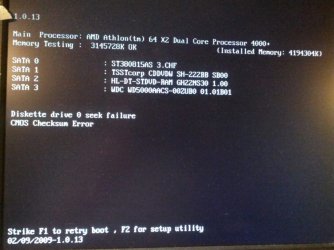
  • D531BadBootScreen.jpg
    D531BadBootScreen.jpg
    84.8 KB · Views: 2
Last edited:

My Computer My Computer

At a glance

Windows 7 Home Premium Home Edition 6.01.7600...AMD Athlon 64 X2 4000+ 2.10 Ghz2048 MB DDR2-SDRAM (1.87 MB usable)NVIDIA GeForce 6150SE nForce 430
Computer type
PC/Desktop
Computer Manufacturer/Model Number
Dell Inspiron 531
OS
Windows 7 Home Premium Home Edition 6.01.7600 (x64)
CPU
AMD Athlon 64 X2 4000+ 2.10 Ghz
Motherboard
Dell 0RY206 using latest version
Memory
2048 MB DDR2-SDRAM (1.87 MB usable)
Graphics Card(s)
NVIDIA GeForce 6150SE nForce 430
Sound Card
nForce 430 (MCP61) High Definition Audio
Monitor(s) Displays
Chuntex Electronic - CTX 18inch CRT
Screen Resolution
1280x1024 pixels at 85 Hz in True Colors (32-bit)
Hard Drives
- WD5000AACS (500 GB), three partitions with W7 on 1st + two data
- ST380815 (80 GB), two partitions with VISA removed from 2nd
Case
Dell (Mini Upright Desktop)
Cooling
GPU Fan - 100%
Keyboard
USB Input Device - Dell SK-8115
Mouse
USB Input Device - Dell M-UANDEL1
Internet Speed
ADSL 1.5mb download
Antivirus
Comodo CIS Freeware
Browser
FireFox, Chrome, IE
Other Info
- W7 upgraded from VISTA
- USB 3.0
- DVD-Rom:HL-DT-ST DVD-RAM GH22NS30 SCSI CdRom
- DVD-Rom:ATAPI DVD D DH16D2S SCSI CdRom
Hope you installed USB3 drivers, coz there arn't any in W7.

Roy
 

My Computer My Computer

At a glance

W7 home premium 32bit/W7HP 64bit/w10 tp insid...E5300 dual core3gbNvidia Geforce 7100 Nforce 630i
Computer type
PC/Desktop
Computer Manufacturer/Model Number
medionl/Aspire 6930G/acer x55a
OS
W7 home premium 32bit/W7HP 64bit/w10 tp insider ring
CPU
E5300 dual core
Motherboard
medion MS7366
Memory
3gb
Graphics Card(s)
Nvidia Geforce 7100 Nforce 630i
Monitor(s) Displays
avixc
Internet Speed
n (isp resticted to 72)
Antivirus
mse/pands
Browser
palemoon
Other Info
Belkin Fd7050 n USB using Railink RT2870 drivers, more upto date
USB Drivers

Thanks Roy,
that's good to know once I get pc booting again. When I first installed the USB3 card I do not remember if I updated drives since it was a couple of months ago and had no spare power connectors for USB3 pci card so did nothing until recently before issue started.
After having no-boot issue, I disconnected power to PCI card but that did nothing to help boot issue.

Thanks for your input

Bob

PS: I wrongly checked my thread resolved, can I do anything to remove RESOLVED check?
 

My Computer My Computer

At a glance

Windows 7 Home Premium Home Edition 6.01.7600...AMD Athlon 64 X2 4000+ 2.10 Ghz2048 MB DDR2-SDRAM (1.87 MB usable)NVIDIA GeForce 6150SE nForce 430
Computer type
PC/Desktop
Computer Manufacturer/Model Number
Dell Inspiron 531
OS
Windows 7 Home Premium Home Edition 6.01.7600 (x64)
CPU
AMD Athlon 64 X2 4000+ 2.10 Ghz
Motherboard
Dell 0RY206 using latest version
Memory
2048 MB DDR2-SDRAM (1.87 MB usable)
Graphics Card(s)
NVIDIA GeForce 6150SE nForce 430
Sound Card
nForce 430 (MCP61) High Definition Audio
Monitor(s) Displays
Chuntex Electronic - CTX 18inch CRT
Screen Resolution
1280x1024 pixels at 85 Hz in True Colors (32-bit)
Hard Drives
- WD5000AACS (500 GB), three partitions with W7 on 1st + two data
- ST380815 (80 GB), two partitions with VISA removed from 2nd
Case
Dell (Mini Upright Desktop)
Cooling
GPU Fan - 100%
Keyboard
USB Input Device - Dell SK-8115
Mouse
USB Input Device - Dell M-UANDEL1
Internet Speed
ADSL 1.5mb download
Antivirus
Comodo CIS Freeware
Browser
FireFox, Chrome, IE
Other Info
- W7 upgraded from VISTA
- USB 3.0
- DVD-Rom:HL-DT-ST DVD-RAM GH22NS30 SCSI CdRom
- DVD-Rom:ATAPI DVD D DH16D2S SCSI CdRom

PS: I wrongly checked my thread resolved, can I do anything to remove RESOLVED check?

I unsolved it for you, but you should be able to just click the green button again to mark unsolved,

2016-05-19_19h27_55.png
 

My Computer My Computer

At a glance

Win 10 Pro x64Intel I5-2500K @3.3GHz16GB G.Skill Ripjaws X (4x4GB)EVGA GeForce 750 Ti SC 2GB
Computer type
PC/Desktop
Computer Manufacturer/Model Number
Self Built
OS
Win 10 Pro x64
CPU
Intel I5-2500K @3.3GHz
Motherboard
Asrock P67 Extreme4
Memory
16GB G.Skill Ripjaws X (4x4GB)
Graphics Card(s)
EVGA GeForce 750 Ti SC 2GB
Sound Card
ASUS Xonar DG 5.1 Channels 24-bit 96KHz PCI Interface Sound
Monitor(s) Displays
auria eq2367
Screen Resolution
1920 x 1080
Hard Drives
250GB Samsung 850 EVO SSD
1TB WD Blue
1TB Hitachi
PSU
SeaSonic X 650W 80 Plus Gold
Case
Corsair Obsidian 750D
Cooling
Corsair H60, Three 140mm case fans
Keyboard
Logitech Wireless Keyboard K520
Mouse
Logitech Wireless Mouse M310
Internet Speed
Wave Broadband ~ 100 dn 5 up
Antivirus
Windows Defender, Malwarebytes Premium
Browser
Edge, IE11, Chrome
Other Info
Laptop specs: HP g7-1365dx /
CPU: AMD A6-3420M APU with Radeon(tm) HD Graphics /
RAM: Crucial 8Gb (2x4Gb) /
SSD: Crucial M4-CT128M4SSD2 ATA Device/ FW 000F /
GFX: AMD Radeon HD 6520G /
OS: Windows 10 Pro x64
Swaped SATA cables and no Help

Tried swapping Harddrive cables (SATA 0 & 3) to see if that would help but no luck. What I did get was a new msg pointing to failure at [50H] . Does this help me determine my problem? What is [50H] mean; see attached image file.
 

Attachments

  • BadBootAfterSATA3&0_Swap.jpg
    BadBootAfterSATA3&0_Swap.jpg
    78.5 KB · Views: 1

My Computer My Computer

At a glance

Windows 7 Home Premium Home Edition 6.01.7600...AMD Athlon 64 X2 4000+ 2.10 Ghz2048 MB DDR2-SDRAM (1.87 MB usable)NVIDIA GeForce 6150SE nForce 430
Computer type
PC/Desktop
Computer Manufacturer/Model Number
Dell Inspiron 531
OS
Windows 7 Home Premium Home Edition 6.01.7600 (x64)
CPU
AMD Athlon 64 X2 4000+ 2.10 Ghz
Motherboard
Dell 0RY206 using latest version
Memory
2048 MB DDR2-SDRAM (1.87 MB usable)
Graphics Card(s)
NVIDIA GeForce 6150SE nForce 430
Sound Card
nForce 430 (MCP61) High Definition Audio
Monitor(s) Displays
Chuntex Electronic - CTX 18inch CRT
Screen Resolution
1280x1024 pixels at 85 Hz in True Colors (32-bit)
Hard Drives
- WD5000AACS (500 GB), three partitions with W7 on 1st + two data
- ST380815 (80 GB), two partitions with VISA removed from 2nd
Case
Dell (Mini Upright Desktop)
Cooling
GPU Fan - 100%
Keyboard
USB Input Device - Dell SK-8115
Mouse
USB Input Device - Dell M-UANDEL1
Internet Speed
ADSL 1.5mb download
Antivirus
Comodo CIS Freeware
Browser
FireFox, Chrome, IE
Other Info
- W7 upgraded from VISTA
- USB 3.0
- DVD-Rom:HL-DT-ST DVD-RAM GH22NS30 SCSI CdRom
- DVD-Rom:ATAPI DVD D DH16D2S SCSI CdRom
Ok, I tried clearing CMOS on the motherboard and no improvement just a new checkpoint [7FH] as shown in attached image.

I have searched Dell technical support and no help. With all the experts out there I confused that no one has encountered anything like this before to give me some where to search for a fix to my issue.

I guess, I will have to try other forums...

Again, thanks to Roy for the only help so far.
 

Attachments

  • D531_CMOS_ClearedNoHelp.jpg
    D531_CMOS_ClearedNoHelp.jpg
    81.6 KB · Views: 1

My Computer My Computer

At a glance

Windows 7 Home Premium Home Edition 6.01.7600...AMD Athlon 64 X2 4000+ 2.10 Ghz2048 MB DDR2-SDRAM (1.87 MB usable)NVIDIA GeForce 6150SE nForce 430
Computer type
PC/Desktop
Computer Manufacturer/Model Number
Dell Inspiron 531
OS
Windows 7 Home Premium Home Edition 6.01.7600 (x64)
CPU
AMD Athlon 64 X2 4000+ 2.10 Ghz
Motherboard
Dell 0RY206 using latest version
Memory
2048 MB DDR2-SDRAM (1.87 MB usable)
Graphics Card(s)
NVIDIA GeForce 6150SE nForce 430
Sound Card
nForce 430 (MCP61) High Definition Audio
Monitor(s) Displays
Chuntex Electronic - CTX 18inch CRT
Screen Resolution
1280x1024 pixels at 85 Hz in True Colors (32-bit)
Hard Drives
- WD5000AACS (500 GB), three partitions with W7 on 1st + two data
- ST380815 (80 GB), two partitions with VISA removed from 2nd
Case
Dell (Mini Upright Desktop)
Cooling
GPU Fan - 100%
Keyboard
USB Input Device - Dell SK-8115
Mouse
USB Input Device - Dell M-UANDEL1
Internet Speed
ADSL 1.5mb download
Antivirus
Comodo CIS Freeware
Browser
FireFox, Chrome, IE
Other Info
- W7 upgraded from VISTA
- USB 3.0
- DVD-Rom:HL-DT-ST DVD-RAM GH22NS30 SCSI CdRom
- DVD-Rom:ATAPI DVD D DH16D2S SCSI CdRom
CMOS checksum error is normal after replacing battery. Clearing CMOS would 'fix' that, but your BIOS is now at default. All the problems probably boil down to needing to configure BIOS.* That may be easier said than done depending on your experience, but one thing at a time.

If possible try different USB keyboards; I've seen some work during POST when others fail. Otherwise, you'll have to dig up a PS/2 keyboard. There's a reason I keep my 20 yo PS/2 around despite numerous broken keycaps repaired with superglue and pennies... :P

* On further investigation, those checkpoint failures are troubling assuming they correspond with those listed here:

50h The memory below 1 MB has been tested and initialized. Adjusting the displayed memory size for relocation and shadowing next.
7Fh Extended NMI source enabling is in progress

But I'd still suggest trying a PS/2 keyboard if nothing else.
 
Last edited:

My Computer My Computer

At a glance

Windows 7 Professional x64, Arch Linux
Computer type
PC/Desktop
OS
Windows 7 Professional x64, Arch Linux
I agree, try a PS2 keyboard and mouse.

:ditto:
 

My Computer My Computer

At a glance

Windows 10 Pro x64Intel Core i7 6700KGSkill TridentZ RGB 16GB 3600 16-16-16-36EVGA GTX 980 Ti SC x2
Computer type
PC/Desktop
Computer Manufacturer/Model Number
Skylake Special #666
OS
Windows 10 Pro x64
CPU
Intel Core i7 6700K
Motherboard
Asus Sabertooth Z170 Mark 1
Memory
GSkill TridentZ RGB 16GB 3600 16-16-16-36
Graphics Card(s)
EVGA GTX 980 Ti SC x2
Sound Card
Realtek High Definition
Monitor(s) Displays
AOC G2460PG
Screen Resolution
1920 x 1080 144Hz
Hard Drives
Samsung 860 Pro 256GB, Seagate Barracuda 4TB x2
PSU
EVGA 1000 P2, EVGA White Custom Braided Cables
Case
Corsair Vengeance C70 Gunmetal Black
Cooling
Corsair H100i v2, Corsair ML120 x2, Thermal Grizzly Kryonaut
Keyboard
Logitech G910 Orion Spectrum
Mouse
Logitech G700s
Internet Speed
Verizon Fios Quantum Gateway 75/75
Antivirus
Windows Defender, Malwarebytes Free 3.8.3
Browser
Chrome
Other Info
Corsair SP120 x4, LG Blu-ray Drive, Durabrand HT-395 100 Watt Dolby Digital Amp, Corsair H2100 Wireless 7.1 Headset
PS/2 - Now I something to Work on

Thank you Alphaniner! Especially, the checkpoint appendix.
Since Addram agrees (thanks much also} I will focus on getting a used PS/2 key board, and maybe a PS/2 mouse.
I strongly believe, if I can get a keyboard to work and reset BIOS, as alphaniner fells too, all will return to normal...

Thanks much alphaniner & addram and will report results (hopefully successful).
 

My Computer My Computer

At a glance

Windows 7 Home Premium Home Edition 6.01.7600...AMD Athlon 64 X2 4000+ 2.10 Ghz2048 MB DDR2-SDRAM (1.87 MB usable)NVIDIA GeForce 6150SE nForce 430
Computer type
PC/Desktop
Computer Manufacturer/Model Number
Dell Inspiron 531
OS
Windows 7 Home Premium Home Edition 6.01.7600 (x64)
CPU
AMD Athlon 64 X2 4000+ 2.10 Ghz
Motherboard
Dell 0RY206 using latest version
Memory
2048 MB DDR2-SDRAM (1.87 MB usable)
Graphics Card(s)
NVIDIA GeForce 6150SE nForce 430
Sound Card
nForce 430 (MCP61) High Definition Audio
Monitor(s) Displays
Chuntex Electronic - CTX 18inch CRT
Screen Resolution
1280x1024 pixels at 85 Hz in True Colors (32-bit)
Hard Drives
- WD5000AACS (500 GB), three partitions with W7 on 1st + two data
- ST380815 (80 GB), two partitions with VISA removed from 2nd
Case
Dell (Mini Upright Desktop)
Cooling
GPU Fan - 100%
Keyboard
USB Input Device - Dell SK-8115
Mouse
USB Input Device - Dell M-UANDEL1
Internet Speed
ADSL 1.5mb download
Antivirus
Comodo CIS Freeware
Browser
FireFox, Chrome, IE
Other Info
- W7 upgraded from VISTA
- USB 3.0
- DVD-Rom:HL-DT-ST DVD-RAM GH22NS30 SCSI CdRom
- DVD-Rom:ATAPI DVD D DH16D2S SCSI CdRom
Are you sure about the model number? Everything I find says it's a laptop or notebook.

Is there a full model number?
 

My Computer My Computer

At a glance

Windows 10 Pro X64Intel Quad Core i7-4770 @ 3.4Ghz16.0GB PC3-12800 DDR3 SDRAM 1600 MHzIntel Integrated HD Graphics
Computer type
PC/Desktop
Computer Manufacturer/Model Number
Lenovo IdeaCenter 450
OS
Windows 10 Pro X64
CPU
Intel Quad Core i7-4770 @ 3.4Ghz
Memory
16.0GB PC3-12800 DDR3 SDRAM 1600 MHz
Graphics Card(s)
Intel Integrated HD Graphics
Sound Card
Realtek HD Audio
Monitor(s) Displays
HP 22" LCD
Screen Resolution
1680 x 1050
Hard Drives
250GB Samsung EVO SATA-3 SSD
2TB Seagate ST2000DM001 SATA-2
1.5TB Seagate ST3150041AS SATA
Keyboard
Dell USB
Mouse
Lenovo USB
Internet Speed
Cable via Road Runner 3MB Upload, 30MB Download
Antivirus
Windows Defender, MBAM Pro, MBAE
Browser
Seamonkey
Other Info
UEFI/GPT
PLDS DVD-RW DH16AERSH
Are you sure about the model number? Everything I find says it's a laptop or notebook.

Is there a full model number?

not sure but this is what I find for that model number but only has drivers for xp and vista 32 bit Product Support | Dell US
edit was going by his specs not the first post
 

My Computer My Computer

At a glance

win 10
Computer type
PC/Desktop
Computer Manufacturer/Model Number
dell xps 9000
OS
win 10
No PS/2 Connection

Todsy, picked up a used PS/2 keyboard and when I looked at back of desktop, no PS/2 connection.
I wish I had checked for capabily sooner so I didn't waist several days.

As for model - Dell Inspirion 531. SvcTag J26CZD1

Thanks for helping
 

My Computer My Computer

At a glance

Windows 7 Home Premium Home Edition 6.01.7600...AMD Athlon 64 X2 4000+ 2.10 Ghz2048 MB DDR2-SDRAM (1.87 MB usable)NVIDIA GeForce 6150SE nForce 430
Computer type
PC/Desktop
Computer Manufacturer/Model Number
Dell Inspiron 531
OS
Windows 7 Home Premium Home Edition 6.01.7600 (x64)
CPU
AMD Athlon 64 X2 4000+ 2.10 Ghz
Motherboard
Dell 0RY206 using latest version
Memory
2048 MB DDR2-SDRAM (1.87 MB usable)
Graphics Card(s)
NVIDIA GeForce 6150SE nForce 430
Sound Card
nForce 430 (MCP61) High Definition Audio
Monitor(s) Displays
Chuntex Electronic - CTX 18inch CRT
Screen Resolution
1280x1024 pixels at 85 Hz in True Colors (32-bit)
Hard Drives
- WD5000AACS (500 GB), three partitions with W7 on 1st + two data
- ST380815 (80 GB), two partitions with VISA removed from 2nd
Case
Dell (Mini Upright Desktop)
Cooling
GPU Fan - 100%
Keyboard
USB Input Device - Dell SK-8115
Mouse
USB Input Device - Dell M-UANDEL1
Internet Speed
ADSL 1.5mb download
Antivirus
Comodo CIS Freeware
Browser
FireFox, Chrome, IE
Other Info
- W7 upgraded from VISTA
- USB 3.0
- DVD-Rom:HL-DT-ST DVD-RAM GH22NS30 SCSI CdRom
- DVD-Rom:ATAPI DVD D DH16D2S SCSI CdRom
PC actually a Dell, not HP

Sorry for the confusion, I have updated original post to correct PC make from HP as WAS shown to Dell as NOW shown.
Item 6 shows I upgraded pc from VISTA 64 to Win7 64 (years ago).

So if I haven't pissed off everybody, maybe we can get back to steering me in what I can do to fix my issue of no keyboard capabily in order to reset BIOS.

As for PS/2 keyboard, I can't see that a PS/2 conversion to USB would help since USB outlets don't seem to be getting power; I have tried different USB memory sticks and no LED lights appear.
 

My Computer My Computer

At a glance

Windows 7 Home Premium Home Edition 6.01.7600...AMD Athlon 64 X2 4000+ 2.10 Ghz2048 MB DDR2-SDRAM (1.87 MB usable)NVIDIA GeForce 6150SE nForce 430
Computer type
PC/Desktop
Computer Manufacturer/Model Number
Dell Inspiron 531
OS
Windows 7 Home Premium Home Edition 6.01.7600 (x64)
CPU
AMD Athlon 64 X2 4000+ 2.10 Ghz
Motherboard
Dell 0RY206 using latest version
Memory
2048 MB DDR2-SDRAM (1.87 MB usable)
Graphics Card(s)
NVIDIA GeForce 6150SE nForce 430
Sound Card
nForce 430 (MCP61) High Definition Audio
Monitor(s) Displays
Chuntex Electronic - CTX 18inch CRT
Screen Resolution
1280x1024 pixels at 85 Hz in True Colors (32-bit)
Hard Drives
- WD5000AACS (500 GB), three partitions with W7 on 1st + two data
- ST380815 (80 GB), two partitions with VISA removed from 2nd
Case
Dell (Mini Upright Desktop)
Cooling
GPU Fan - 100%
Keyboard
USB Input Device - Dell SK-8115
Mouse
USB Input Device - Dell M-UANDEL1
Internet Speed
ADSL 1.5mb download
Antivirus
Comodo CIS Freeware
Browser
FireFox, Chrome, IE
Other Info
- W7 upgraded from VISTA
- USB 3.0
- DVD-Rom:HL-DT-ST DVD-RAM GH22NS30 SCSI CdRom
- DVD-Rom:ATAPI DVD D DH16D2S SCSI CdRom
Hi all, it's been a while since last posting and just wanted to let you know, with help from another forum, was able to fix my issue.

After much trial and error, one member from Secrets forum decided (based on 50H error) my issue would be memory related issue and asked me to remove one or more of the three memory sticks. After removing first, easy access, memory stick I was able to access CMOS, then fixed sittings and all was well again with my Old/Great Dell 531 desktop. I've updated all programs and all is well as before.

Again, thanks for trying to help and wanted to provide final answer.
 

My Computer My Computer

At a glance

Windows 7 Home Premium Home Edition 6.01.7600...AMD Athlon 64 X2 4000+ 2.10 Ghz2048 MB DDR2-SDRAM (1.87 MB usable)NVIDIA GeForce 6150SE nForce 430
Computer type
PC/Desktop
Computer Manufacturer/Model Number
Dell Inspiron 531
OS
Windows 7 Home Premium Home Edition 6.01.7600 (x64)
CPU
AMD Athlon 64 X2 4000+ 2.10 Ghz
Motherboard
Dell 0RY206 using latest version
Memory
2048 MB DDR2-SDRAM (1.87 MB usable)
Graphics Card(s)
NVIDIA GeForce 6150SE nForce 430
Sound Card
nForce 430 (MCP61) High Definition Audio
Monitor(s) Displays
Chuntex Electronic - CTX 18inch CRT
Screen Resolution
1280x1024 pixels at 85 Hz in True Colors (32-bit)
Hard Drives
- WD5000AACS (500 GB), three partitions with W7 on 1st + two data
- ST380815 (80 GB), two partitions with VISA removed from 2nd
Case
Dell (Mini Upright Desktop)
Cooling
GPU Fan - 100%
Keyboard
USB Input Device - Dell SK-8115
Mouse
USB Input Device - Dell M-UANDEL1
Internet Speed
ADSL 1.5mb download
Antivirus
Comodo CIS Freeware
Browser
FireFox, Chrome, IE
Other Info
- W7 upgraded from VISTA
- USB 3.0
- DVD-Rom:HL-DT-ST DVD-RAM GH22NS30 SCSI CdRom
- DVD-Rom:ATAPI DVD D DH16D2S SCSI CdRom
That's good news. Real glad you got it fixed.

If you can, would you post a link to the other forum so I can see it. I'm just curious and may learn something.
 

My Computer My Computer

At a glance

Windows 10 Pro X64Intel Quad Core i7-4770 @ 3.4Ghz16.0GB PC3-12800 DDR3 SDRAM 1600 MHzIntel Integrated HD Graphics
Computer type
PC/Desktop
Computer Manufacturer/Model Number
Lenovo IdeaCenter 450
OS
Windows 10 Pro X64
CPU
Intel Quad Core i7-4770 @ 3.4Ghz
Memory
16.0GB PC3-12800 DDR3 SDRAM 1600 MHz
Graphics Card(s)
Intel Integrated HD Graphics
Sound Card
Realtek HD Audio
Monitor(s) Displays
HP 22" LCD
Screen Resolution
1680 x 1050
Hard Drives
250GB Samsung EVO SATA-3 SSD
2TB Seagate ST2000DM001 SATA-2
1.5TB Seagate ST3150041AS SATA
Keyboard
Dell USB
Mouse
Lenovo USB
Internet Speed
Cable via Road Runner 3MB Upload, 30MB Download
Antivirus
Windows Defender, MBAM Pro, MBAE
Browser
Seamonkey
Other Info
UEFI/GPT
PLDS DVD-RW DH16AERSH

My Computer My Computer

At a glance

Windows 7 Home Premium Home Edition 6.01.7600...AMD Athlon 64 X2 4000+ 2.10 Ghz2048 MB DDR2-SDRAM (1.87 MB usable)NVIDIA GeForce 6150SE nForce 430
Computer type
PC/Desktop
Computer Manufacturer/Model Number
Dell Inspiron 531
OS
Windows 7 Home Premium Home Edition 6.01.7600 (x64)
CPU
AMD Athlon 64 X2 4000+ 2.10 Ghz
Motherboard
Dell 0RY206 using latest version
Memory
2048 MB DDR2-SDRAM (1.87 MB usable)
Graphics Card(s)
NVIDIA GeForce 6150SE nForce 430
Sound Card
nForce 430 (MCP61) High Definition Audio
Monitor(s) Displays
Chuntex Electronic - CTX 18inch CRT
Screen Resolution
1280x1024 pixels at 85 Hz in True Colors (32-bit)
Hard Drives
- WD5000AACS (500 GB), three partitions with W7 on 1st + two data
- ST380815 (80 GB), two partitions with VISA removed from 2nd
Case
Dell (Mini Upright Desktop)
Cooling
GPU Fan - 100%
Keyboard
USB Input Device - Dell SK-8115
Mouse
USB Input Device - Dell M-UANDEL1
Internet Speed
ADSL 1.5mb download
Antivirus
Comodo CIS Freeware
Browser
FireFox, Chrome, IE
Other Info
- W7 upgraded from VISTA
- USB 3.0
- DVD-Rom:HL-DT-ST DVD-RAM GH22NS30 SCSI CdRom
- DVD-Rom:ATAPI DVD D DH16D2S SCSI CdRom
Back
Top