Laptop won't connect to internet at all.

MadSeason25

New member
Local time
11:42 AM
Messages
3
Hey all, joined this forum hoping to get some help.

I have a Lenevo G770 Laptop running Windows 7 Home Premium 64bit, and it's worked well since I've gotten it, however a few months ago something happened.

I came home to find the laptop died after the charger was unplugged as it slept, no big deal so I go to start it up, and I'm getting the "Starting Windows" loop. I've dealt with this before and got past it easily, but I go on to find I can't connect to the internet. I try the usual fix (using the following DNS server and putting in 8.8.8.8. and 8.8.4.4.) but that didn't work, so I reset it.

I log back on to see it is now saying my copy of windows isn't genuine (build 7601) and I still can't connect to the internet. I've tried various fixes but sadly nothing has worked. It won't even connect with an Ethernet cable.

Anything I can do? I don't want to lose this laptop, it works amazingly well for it's age and I can't stand Windows 10.

I should add that the icon on the task bar shows it with the yellow triangle, and when I click on it, it says I'm connect to the wifi, but at the stop says Identifying... (wifi name) and no internet access. I mostly want the internet issue fixed first but if you can figure out why my original copy of windows is no longer genuine that'd be nice too.
 

My Computer My Computer

At a glance

Windows 7 Home Premium 64bit
Computer type
PC/Desktop
OS
Windows 7 Home Premium 64bit
Hello and welcome MadSeason mate can you get that machine into safe mode? if so please run these
SFC /SCANNOW Command - System File Checker
Disk Check < if necessary include the /f switch and if this does not make any improvement then just run this switch instead /r in the command line as per Option2
Run these in safe mode and the sfc often best run for two to three runs – you can leave out the /r switch in ckdsk if you feel it not necessary
 

My Computer My Computer

At a glance

Desk1 7 Home Prem / Desk2 10 Pro / Main lap A...Desk1 i5 3750K / Laptop i7 GTX 860M / Desk2 i...Desk1 8GB (1866) / Desk2 16GB (1333) / Laptop...Desk 1& 2NVidia GTX 650 & Laptops on board Intel
Computer type
PC/Desktop
Computer Manufacturer/Model Number
Own build (new) Desk1 / Asus ROG Win 7 / Desk2 1st build
OS
Desk1 7 Home Prem / Desk2 10 Pro / Main lap Asus ROG 10 Pro 2 laptop Toshiba 7 Pro Asus P2520 7 & 10
CPU
Desk1 i5 3750K / Laptop i7 GTX 860M / Desk2 i5 2500
Motherboard
Desk1 Asus P877-V / Desk2 Gigabyte H67 UD3H / Laptop ?
Memory
Desk1 8GB (1866) / Desk2 16GB (1333) / Laptop 8Gb DDR3
Graphics Card(s)
Desk 1& 2NVidia GTX 650 & Laptops on board Intel
Sound Card
Desk 1 & 2 -XONAR DG Realtek High Def audio Laptop
Monitor(s) Displays
Desk 1 Benq HD 2450 / Desk2 Philips 24" / Laptop 17.5"
Screen Resolution
1920x1080 D1 & D2 & Laptop 1
Hard Drives
Desk1 Samsung 120GB 830 SSD
Asus ROG 256GB 850 Pro SSD
Desk2 Samsung 840 256 SSD
Toshiba 120GB EVO
PSU
Desk 1 Corsair HX 1050/ Laptop ? / Desk 2 Corsair HX 650
Case
Desk 1 Cooler HAF XM ? Toshiba laptop / Desk2 Coolermaster
Cooling
Fans on all Desk1 -2 Desk2 - all Coolermasters 5 Laptop ?
Keyboard
Desk 1 MS Sidewinder X6 Desk 2 MS Sidewinder X 4
Mouse
Desk 1&2 - Gigabyte MS 900 gamer - laptop - Logitec wireless
Internet Speed
ADSL2+
Other Info
One other Desktop (tester) and spare Toshba laptop both with SSD's
Running Kaspersky 2016 ISS on all machines config'd identically
Logitec audio stereo systems on each machine (x3)
Canon MG5250MFC
Router/modem TP-Link running WPA2SK
Is the network adapter and wifi ok in device manager ie no yellow triangles?
opena cmd prompt then type

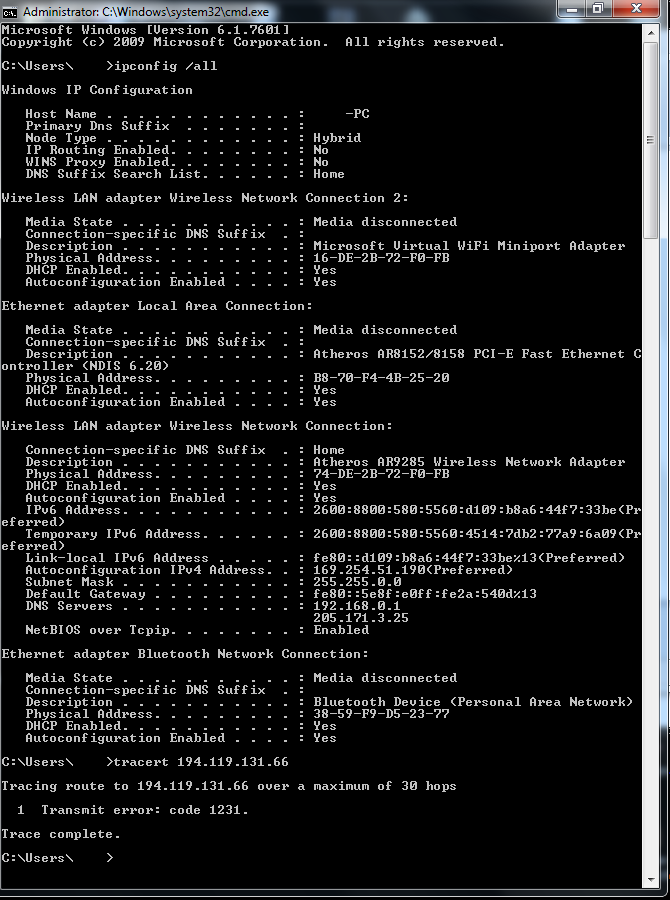
ipconfig /all post results

tracert 194.119.131.66 post results
 

My Computer My Computer

At a glance

win 8 32 bit
Computer type
PC/Desktop
OS
win 8 32 bit
Is the network adapter and wifi ok in device manager ie no yellow triangles?
opena cmd prompt then type

ipconfig /all post results

tracert 194.119.131.66 post results

The only thing in Device manager with the yellow triangle is Microsoft Teredo Tunneling Adapter.

imgsG8j.png
 

My Computer My Computer

At a glance

Windows 7 Home Premium 64bit
Computer type
PC/Desktop
OS
Windows 7 Home Premium 64bit
Network adapter show disconnected so it fault cable or card if you had cable plugged in wireless shows 169 IP so it's not getting IP from DHCP
 

My Computer My Computer

At a glance

win 8 32 bit
Computer type
PC/Desktop
OS
win 8 32 bit
Network adapter show disconnected so it fault cable or card if you had cable plugged in wireless shows 169 IP so it's not getting IP from DHCP

So any clue if I can do anything to fix it? By the way, I should note that all the other devices work fine on the network. My girlfriend works with routers and my laptop doesn't show up at all. We've changed routers and connection since this happened but the same problem persists, so it has to be something with my laptop.
 

My Computer My Computer

At a glance

Windows 7 Home Premium 64bit
Computer type
PC/Desktop
OS
Windows 7 Home Premium 64bit

My Computer My Computer

At a glance

Desk1 7 Home Prem / Desk2 10 Pro / Main lap A...Desk1 i5 3750K / Laptop i7 GTX 860M / Desk2 i...Desk1 8GB (1866) / Desk2 16GB (1333) / Laptop...Desk 1& 2NVidia GTX 650 & Laptops on board Intel
Computer type
PC/Desktop
Computer Manufacturer/Model Number
Own build (new) Desk1 / Asus ROG Win 7 / Desk2 1st build
OS
Desk1 7 Home Prem / Desk2 10 Pro / Main lap Asus ROG 10 Pro 2 laptop Toshiba 7 Pro Asus P2520 7 & 10
CPU
Desk1 i5 3750K / Laptop i7 GTX 860M / Desk2 i5 2500
Motherboard
Desk1 Asus P877-V / Desk2 Gigabyte H67 UD3H / Laptop ?
Memory
Desk1 8GB (1866) / Desk2 16GB (1333) / Laptop 8Gb DDR3
Graphics Card(s)
Desk 1& 2NVidia GTX 650 & Laptops on board Intel
Sound Card
Desk 1 & 2 -XONAR DG Realtek High Def audio Laptop
Monitor(s) Displays
Desk 1 Benq HD 2450 / Desk2 Philips 24" / Laptop 17.5"
Screen Resolution
1920x1080 D1 & D2 & Laptop 1
Hard Drives
Desk1 Samsung 120GB 830 SSD
Asus ROG 256GB 850 Pro SSD
Desk2 Samsung 840 256 SSD
Toshiba 120GB EVO
PSU
Desk 1 Corsair HX 1050/ Laptop ? / Desk 2 Corsair HX 650
Case
Desk 1 Cooler HAF XM ? Toshiba laptop / Desk2 Coolermaster
Cooling
Fans on all Desk1 -2 Desk2 - all Coolermasters 5 Laptop ?
Keyboard
Desk 1 MS Sidewinder X6 Desk 2 MS Sidewinder X 4
Mouse
Desk 1&2 - Gigabyte MS 900 gamer - laptop - Logitec wireless
Internet Speed
ADSL2+
Other Info
One other Desktop (tester) and spare Toshba laptop both with SSD's
Running Kaspersky 2016 ISS on all machines config'd identically
Logitec audio stereo systems on each machine (x3)
Canon MG5250MFC
Router/modem TP-Link running WPA2SK
Back
Top