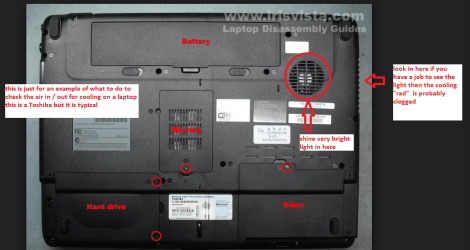
and finally applied new thermal paste
Why? Note that TIM (thermal interface material) will
easily last 10, 15 years or even longer AS LONG AS the cured bond between the mating surfaces is NEVER broken.
You NEVER need to replace TIM just because it is X number of years old. Remember, the purpose of TIM is to ONLY fill the microscopic pits and valleys in the CPU and heatsink mating surfaces to push out any trapped insulating air. Even if the TIM has dried out, it does not need to be replaced because the solids that remain are still occupying that space preventing any insulating air from getting in.
It is the solids in the TIM that do the work. The ONLY reason TIM has any liquid component to it is so it can be squeezed out of the tube and spread across the device easily, evenly, and smoothly.
If anyone says TIM needs to be replaced just because some arbitrary amount of time has passed,
demand they provide a link to
any CPU or GPU maker, motherboard maker, PC or notebook maker, graphics card maker, TIM maker, white paper or technical study that says TIM needs to be regularly replaced.
There are two main problems with replacing the TIM. (1) Too often the CPU or socket is damaged due to mishandling - typically due to ESD or rough handling. Did you take the
essential ESD control procedures? Note a static discharge (spark or electrical "arc") from your finger tips can torch a Grand Canyon sized trench (microscopically speaking) through 1000s of transistor gates on a CPU - yet the ESD can be so tiny, you (we as humans) are incapable of feeling, seeing, or hearing that discharge.

(2) Properly cleaning the mating surfaces is also essential. You never - as in NEVER EVER - just add more TIM. You MUST always thoroughly clean the two mating surfaces before applying a new layer of TIM. And then the new layer of TIM MUST be properly applied. It must be a thin a layer as possible while still providing complete coverage across the CPU die. The most effective transfer of heat occurs with direct metal-to-metal contacts of the mating surfaces. So any excess TIM is actually in the way and counterproductive to the most efficient transfer of heat.
Cleaning the interior of our computers of heat trapping dust is essential (and unfortunately, a real challenge with notebooks). But replacing the TIM just because it has not been done before or in awhile is not.
You say you were grounded the whole time - grounded to what? You don't need to be grounded to "Earth ground" but you do need to be grounded to the computer - that is, you and the computer must be at a "common ground". This ensures there is no "difference of potential" between you, thus preventing any "arc".
Then you said there is a chance static hit the CPU. That is my fear too.