Large font in some applications

sannu

New member
Local time
9:55 AM
Messages
4
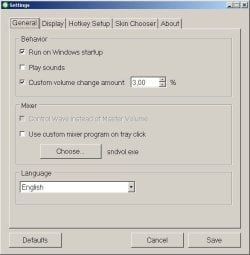
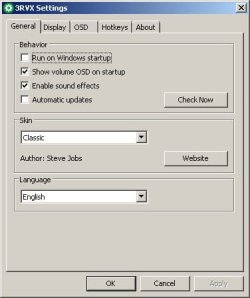
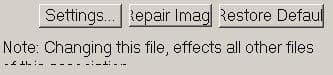
What could be causing font being incorrectly bigger in some applications. See attached examples (example1.jpg and example3-correct.jpg are from this application 3RVX). It's been like that for years, so I don't remember what could have caused it. There doesn't seem to be any pattern between applications showing font correctly or incorrectly. In some applications, some fonts have correct size, others not (example2.jpg - HD Tune Pro).

It's something profile specific because creating a new profile won't have this problem. But I don't want to create a new profile, because it would take quite some time to "restore" all the settings and it isn't too big problem, jast would be nice to get it fixed.
 

Attachments
  • example1.jpg
    example1.jpg
    6 KB · Views: 13
  • example2.jpg
    example2.jpg
    2.9 KB · Views: 13
  • example3.jpg
    example3.jpg
    31.9 KB · Views: 13
  • example3-correct.jpg
    example3-correct.jpg
    20.6 KB · Views: 13

My Computer

Computer type
PC/Desktop
OS
Windows 7 Ultimate x64
To make things smaller, hit [CTRL]-[+] (hold control and hit plus). To make things smaller, hit [CTRL]-[-].

I'm not sure why some things are bigger and some smaller, but the above should fix it.
 

My Computer

Computer type
PC/Desktop
Computer Manufacturer/Model Number
Dell
OS
Linux Mint 18.2 xfce 64-bit (VMWare host) / Windows 8.1 Pro 32-bit (VMWare guest)
CPU
Haswell
Memory
4 GB
Monitor(s) Displays
Acer 23"
Screen Resolution
1920 x 1080
Hard Drives
Two hard drives, 1TB each: One for Linux, one for my data.
Keyboard
IBM Model M
Antivirus
Sophos (Linux), Trend Micro (Windows)
Browser
Firefox, Opera
Other Info
I use Samba to share my data drive with the other computers at my house and with my guest session in VMWare Workstation Player.
Unfortunatelly, that's not the case (like it is in browsers).
 

My Computer

Computer type
PC/Desktop
OS
Windows 7 Ultimate x64
No no no :)

The problem isn't about browser font size. Look at the last two screenshots. The last on has correct font size (using additional Windows profile/username), but the one before it is the same application, but for some reason has a big font (using my everyday Windows profile/username).
 

My Computer

Computer type
PC/Desktop
OS
Windows 7 Ultimate x64
I knew that you weren't referring to the browser display size.

Have you tried my suggestion? It works in some non-browser situations, but not in all.
 

My Computer

Computer type
PC/Desktop
Computer Manufacturer/Model Number
Dell
OS
Linux Mint 18.2 xfce 64-bit (VMWare host) / Windows 8.1 Pro 32-bit (VMWare guest)
CPU
Haswell
Memory
4 GB
Monitor(s) Displays
Acer 23"
Screen Resolution
1920 x 1080
Hard Drives
Two hard drives, 1TB each: One for Linux, one for my data.
Keyboard
IBM Model M
Antivirus
Sophos (Linux), Trend Micro (Windows)
Browser
Firefox, Opera
Other Info
I use Samba to share my data drive with the other computers at my house and with my guest session in VMWare Workstation Player.
I knew that you weren't referring to the browser display size.

Sorry, my previous response was for another reply which since has been deleted.

Yes, I tried, no luck. But as you can see from the HD Tune Pro screenshot, not all texts are enlarged.
 

My Computer

Computer type
PC/Desktop
OS
Windows 7 Ultimate x64
Back
Top