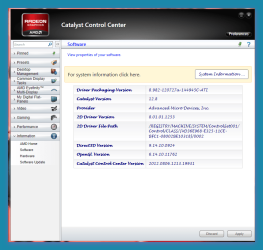
Before I forget, how do I turn off that dreaded HyperMemory feature? Some Google searches I did say to disable a non-existent setting in the registry, while others tell me to use ATI Tray Tools, which also doesn't do anything, because in my Display Properties, it still shows that my card still eats up to 767 MB of the main system RAM.
I also tried checking the BIOS; the only shared memory option there is the one for the onboard graphics which is Disabled for both.
I'd be inclined to double the RAM, meself..
that mobo should take 4Gig, I reckon..

My Computer
At a glance
Windows10 Pro - 64Bit vs.10547i7-965 Extreme Edition (8 Cores) at 3.3GHz (n...12G Corsair Dominator DDR3 - tripled2xAMD SapphireNITRO R9 380(4G) crossfire
- Computer type
- PC/Desktop
- Computer Manufacturer/Model Number
- benchtec, built to personal specs
- OS
- Windows10 Pro - 64Bit vs.10547
- CPU
- i7-965 Extreme Edition (8 Cores) at 3.3GHz (no OC)
- Motherboard
- BloodRageX58 (Socket1366)
- Memory
- 12G Corsair Dominator DDR3 - tripled
- Graphics Card(s)
- 2xAMD SapphireNITRO R9 380(4G) crossfire
- Sound Card
- Sonar(SB)X-Fi onboard
- Monitor(s) Displays
- SyncMaster P2050 20"
- Screen Resolution
- 1600x900 (widescreen)
- Hard Drives
- 480G\OCZSolid3SSD, 64G\OCZVertex3SSD,60G\OCZVertex2SSD, 1TB\spinpointF1SATAHDD
- PSU
- 1200w Power Station Gold
- Case
- ANTEC 900/2 all blue lights, etc..
- Cooling
- Noctua SE1366 NH-U12P - a tight fit, but a monster cooler!!
- Keyboard
- Logitech G19 (wired)
- Mouse
- Logitech G9 Laser (wired)
- Internet Speed
- 150mb unlimited
- Browser
- IE11(RP)
- Other Info
- Xbox One, Nokia735 Windows10 mobile, LG HD/DVD/Blu-Ray r/w, CyberlinkPowerDVD15, LogitechZ5500-SS(5.1), LogitechG35Phones-SS(7.1),MSOffice 2007,CorelDrawX7,Painter2016, Wacom Intuos Pro-SE

 ? Don't know if I should go with 12.6 or 12.4 instead of 12.7. Also if I try to rollback like I mention eailer,my info wont update and still say 12.6 even though I put 12.4.,same thing if I change to 12.7