Latest AMD Chipset Drivers Released

Hello ... I know that this thread is a few ... "older" ... but I'm having problem with my SSD 850 EVO 120GB and my sb7xx Motherboard (I've a Gigabyte GA-MA785GT-UD3H with chipset sb710) ... freeze, hangs, ... finally ... searching and searching ...

I've found this forum and I found the solution (If you need the link and you let me link it, I'll link you without problem).

My problem now is that I'm searching the 13-12 Win7-sb x64 (chipset driver, not graphics driver ... I found graphics driver in the post that suggested OvenMaster) for my PC (because the latest 14.12 give me BSOD). I only found 13-4 Win7-sb x64 ... anyone could help me? Where I can download this? I know that is older but ... I can't find it.

Sorry for my english! :o

Thanks so much!!!
 

My Computer

Computer type
PC/Desktop
OS
Windows 7 Ultimate x64
CPU
AMD Athlon II X4 630
Motherboard
Gigabyte GA-MA-785GT-UD3H Rev 1.1
Memory
G.Skill F3-12800CL7 2x4GB
Graphics Card(s)
Sapphire Vapor-X HD 5770
Hard Drives
Samsung 850 Evo SSD - 120GB
Seagate Barracuda 7200.14 - 1TB
WD Caviar Green - 1TB
I am looking to upgrade my HP Pavilion a1320in to Windows 7 and need drivers for my AMD RC410 chipset with IXP450 Southbridge driver. I know that this is an old chipset but I also know that some people out there have done it. I need help!

My computer details -
Pavilion a1320in

My motherboard is ECS RC410-M.
 

My Computer

Computer type
PC/Desktop
Computer Manufacturer/Model Number
HP
OS
Windows 7 Ultimate 32bit
Hey I just found this post and I need the correct driver for my gpu cuz I downloaded a driver from the official site and it didn't work, It named my GPU AMD RADEON HD 7400M Series instead of the appropriate name AMD Radeon HD 6470M. my laptop model is HP Pavilion G6 1047-SX. please help.
 

My Computer

Computer type
PC/Desktop
Computer Manufacturer/Model Number
HP
OS
Windows 7 Ultimate x64
CPU
Intel Core i5 480M
Memory
4GB
Graphics Card(s)
AMD Radeon HD 6470M
Hard Drives
750 GB HDD
Antivirus
None
Browser
Chrome

My Computer

Computer type
PC/Desktop
Computer Manufacturer/Model Number
Me
OS
Win 7 Ultimate x64
CPU
FX-8350 @ 4.6 GHz so far
Motherboard
Asus M5A97 EVO
Memory
ADATA XPG V1 Series Black 8GB DDR3 1600
Graphics Card(s)
Sapphire R9 270x Dual-X
Sound Card
Xonar DGX w/ Corsair Vengence 1300
Monitor(s) Displays
Acer S232HL Abid
Screen Resolution
1920x1080
Hard Drives
120 GB OCZ Vertex 3
500 GB Seagate 7200.12
PSU
Antec Earthwatts 650W Green
Case
Antec Three Hundred
Cooling
Cooler Master 212 EVO
Keyboard
Logitech G510
Mouse
Logitech G500s
Internet Speed
35000/3000
Well I already got that installed but I get BSODs playing GTA V every 20 mins or so. I also got an intel GPU I guess my laptop has "switchable graphics" so I'm looking for a driver that can fix those BSODs. Anyway thanks for your help.
 

My Computer

Computer type
PC/Desktop
Computer Manufacturer/Model Number
HP
OS
Windows 7 Ultimate x64
CPU
Intel Core i5 480M
Memory
4GB
Graphics Card(s)
AMD Radeon HD 6470M
Hard Drives
750 GB HDD
Antivirus
None
Browser
Chrome
Try increasing pagefile to 10GB and see if that will help. You can get help in BSOD section of the forums. Make a new thread there, providing the requested info.(read sticky)
 

My Computer

Computer type
PC/Desktop
Computer Manufacturer/Model Number
Custom Build
OS
Windows 7 Ultimate x64 SP1
CPU
AMD Phenom 2 1090T
Motherboard
Gigabyte GA-890FXA-UD5
Memory
2x8GB Kingston HyperX Fury Black 1600Mhz Unganged
Graphics Card(s)
MSI GTX 970 Gaming 4G
Sound Card
Realtek On-Board HD 7.1 Audio / Logitech G35
Monitor(s) Displays
3xAcer GD245HQ
Screen Resolution
1920x1080
Hard Drives
Samsung 850 Pro 512GB SSD - OS /
WD Caviar Black SATA 3 - 1 TBx2 - Dynamic RAID 0 /
WD Caviar Green SATA 2 - 640GBx2 - Dynamic RAID 0 /
WD Caviar Green SATA 2 - 640GB - Internal Backup /
Seagate Barracude SATA 3 - 3TB - External Backup/ Sync
PSU
HighPower 1000W
Case
Cooler Master HAF 932
Cooling
Noctua NH-D14
Keyboard
Logitech G19
Mouse
Logitech G500
Internet Speed
100/4 Mbit Cable (100GB quota)
Antivirus
ZoneAlarm Extreme Security / MBAM Pro / MBAE Free / SAS Free
Browser
IE 11 - Firefox - Chrome
Other Info
Logitech F710/ G27/ G940/ Z5500 // TrackIR 5 // Nvidia 3D Surround Vision
New AMD chipset driver 15.7 version available. See first post for more details. :)
 

My Computer

Computer type
PC/Desktop
Computer Manufacturer/Model Number
Self built custom
OS
64-bit Windows 11 Pro for Workstations
CPU
Intel i7-8700K OC'd to 5 GHz
Motherboard
ASUS ROG Maximus XI Formula Z390
Memory
64 GB (4x16GB) G.SKILL TridentZ RGB DDR4 3600 MHz
Graphics Card(s)
ASUS ROG-STRIX-GTX1080TI-O11G-GAMING
Sound Card
Integrated
Monitor(s) Displays
2 x Samsung Odyssey G7 27"
Screen Resolution
2560x1440
Hard Drives
1TB Samsung 990 PRO M.2,
4TB Samsung 990 PRO PRO M.2,
TerraMaster F8 SSD Plus NAS
PSU
Seasonic Prime Titanium 850W
Case
Thermaltake Core P3
Cooling
Corsair Hydro H115i
Keyboard
Logitech wireless K800
Mouse
Logitech MX Master 4
Internet Speed
2 Gb/s Download and 100 Mb/s Upload
Antivirus
Malwarebyte Anti-Malware Premium
Browser
Google Chrome
Other Info
Logitech Z625 speaker system,
Logitech BRIO 4K Pro webcam,
HP Color LaserJet Pro MFP M477fdn,
APC SMART-UPS RT 1000 XL - SURT1000XLI,
Galaxy S23 Plus phone
Driver nightmare

Glad you mentioned this. I'm preparing a clean reinstall and I was wondering whether I should download those AMD drivers.

I have upgraded my BIOS, but I have trouble identifying my drivers with Device Manager or even third-party tools, and deciding whether they should be upgraded. A few specific questions :

1. How does one identify one's motherboard chipset drivers ? I don't see them, in Device Manager or elsewhere.

2. Should one stick with the motherboard manufacturer's site (Asus for me), or bypass him for his vendors ? Asus tends to have fewer and older drivers. For instance, the newest chipset drivers for my motherboard at Asus have been issued on 2010, Sept. 10. Same thing for network or sound drivers, which seem to be much fresher at Realtek than at Asus.

However, Realtek says that you should prefer your motherboard manufacturer's site, and try to scare you from using their download service. Also, version numbers do not match, so you're not even sure you would be downloading the same beast.

I'm also at a loss about AHCI drivers, whatever that is. I can't seem to find any on my system, although I have enabled AHCI in my BIOS. There are some from 2010 at Asus, but the AMD "chipset drivers" you link to also have "AHCI drivers" (but which ones ?). How risky is it to install wrong "chipset drivers" from the wrong source ?

I've tried to upgrade through the Device Manager from the Internet, and it further complicates matters. Specifically, it found and installed a network driver which isn't on Asus site (but works fine). However, it says my USB 3.0 drivers are up to date, while there seems to be something newer at Asus.

I have upgraded my video chip driver from AMD's site, since this seems to be a better supported process. I now have the last update ever for my onboard graphics, which have been retired to legacy status. But AMD foisted upon me a bloated "AMD Vision Engine Control Center" which invades my context menus and mainly gets in the way.

3. It would seem that driver updating software is the only answer to that nightmare. However, apart from their being quite expensive from my point of view, I've read stern warnings against them : the claim is that they tend to over-update and screw your system up.
 

My Computer

Computer type
PC/Desktop
Computer Manufacturer/Model Number
Custom build
OS
Windows 7 Home Premium 64-bit (OEM)
CPU
AMD Athlon II X4 640 (3 GHz, 4 cores)
Motherboard
Asus M4A 89 GTD Pro/USB3
Memory
Patriot 16Gb DDR3 1600 (2 kits of 2)
Graphics Card(s)
ATI Radeon HD 4290 (integrated)
Sound Card
AMD + Realtek HD Audio (integrated)
Monitor(s) Displays
Hewlett-Packard ZR2440w (24")
Screen Resolution
1920 x 1200
Hard Drives
Internal : Samsung SSD 860 EVO 250 Gb (system), Seagate Barrcuda 1 Tb (data), Western Digital Caviar Blue 500 Gb (archives).
External (USB) : 2 x 1 Tb 2,5" Seagate Barracuda (backups).
PSU
Corsair VX 450 W
Case
Antec Solo
Cooling
Cooler Master Hyper 212 Plus, 2 Nexus Real Silent Case fans
Keyboard
Cherry KC 1000
Mouse
Logitech M 90
Internet Speed
Fiber, 300 Mbit/s down, 200 Mbit/s up
Antivirus
Microsoft Security Essentials
Browser
Vivaldi, Tor
Other Info
BIOS Date: 07/18/11 Ver: 08.00.15.
Modem-router : provided by ISP
1. Not sure if you can get the version of chipset drivers installed. There is the AMD Catalyst Install Manager in Programs and Features but it merely shows the installer version. AMD catalyst omega 14.12 chipset drivers are AMD Catalyst Install Manager version 8.0.916.0. (I have yet to install the latest 15.7)

2. I always use the vendor drivers if they are available. AMD, Realtek (both network and audio) in this case. There can be several different drivers for AHCI. For example I am using msahci (Windows built-in driver) instead of AMD AHCI drivers that come with chipset drivers. Intel for example use Intel Rapid Storage Technology drivers/software (IRST) called iaStor. You can download and just run AS SSD benchmark, when you start and select a disk, the driver that is used will show in the top left.

USB 3.0 drivers are most likely Renesas (you may have installed it with Windows Update), also included in AMD chipset driver suite.

You can use CCleaner (Run CCleaner - Tools - Startup - Context Menu - and disable unnecessary context menu entries for AMD software)

3. Never use those driver updating software. If in doubt come here and ask in the Drivers section, and you will be guided accordingly.
 

My Computer

Computer type
PC/Desktop
Computer Manufacturer/Model Number
Custom Build
OS
Windows 7 Ultimate x64 SP1
CPU
AMD Phenom 2 1090T
Motherboard
Gigabyte GA-890FXA-UD5
Memory
2x8GB Kingston HyperX Fury Black 1600Mhz Unganged
Graphics Card(s)
MSI GTX 970 Gaming 4G
Sound Card
Realtek On-Board HD 7.1 Audio / Logitech G35
Monitor(s) Displays
3xAcer GD245HQ
Screen Resolution
1920x1080
Hard Drives
Samsung 850 Pro 512GB SSD - OS /
WD Caviar Black SATA 3 - 1 TBx2 - Dynamic RAID 0 /
WD Caviar Green SATA 2 - 640GBx2 - Dynamic RAID 0 /
WD Caviar Green SATA 2 - 640GB - Internal Backup /
Seagate Barracude SATA 3 - 3TB - External Backup/ Sync
PSU
HighPower 1000W
Case
Cooler Master HAF 932
Cooling
Noctua NH-D14
Keyboard
Logitech G19
Mouse
Logitech G500
Internet Speed
100/4 Mbit Cable (100GB quota)
Antivirus
ZoneAlarm Extreme Security / MBAM Pro / MBAE Free / SAS Free
Browser
IE 11 - Firefox - Chrome
Other Info
Logitech F710/ G27/ G940/ Z5500 // TrackIR 5 // Nvidia 3D Surround Vision
Thank you, GokAy.

I had forgotten about that useful feature of CCleaner, and took advantage of it to prune my context menus. However, AMD VISION Engine Control Center does not show in that list.

I realise now that the unwanted line appears not in context menus, but in the Windows Explorer File menu. This doesn't seem to be affected by the disabling function of CCleaner, as various other programs I've installed have forced their way there and still remain.
 

My Computer

Computer type
PC/Desktop
Computer Manufacturer/Model Number
Custom build
OS
Windows 7 Home Premium 64-bit (OEM)
CPU
AMD Athlon II X4 640 (3 GHz, 4 cores)
Motherboard
Asus M4A 89 GTD Pro/USB3
Memory
Patriot 16Gb DDR3 1600 (2 kits of 2)
Graphics Card(s)
ATI Radeon HD 4290 (integrated)
Sound Card
AMD + Realtek HD Audio (integrated)
Monitor(s) Displays
Hewlett-Packard ZR2440w (24")
Screen Resolution
1920 x 1200
Hard Drives
Internal : Samsung SSD 860 EVO 250 Gb (system), Seagate Barrcuda 1 Tb (data), Western Digital Caviar Blue 500 Gb (archives).
External (USB) : 2 x 1 Tb 2,5" Seagate Barracuda (backups).
PSU
Corsair VX 450 W
Case
Antec Solo
Cooling
Cooler Master Hyper 212 Plus, 2 Nexus Real Silent Case fans
Keyboard
Cherry KC 1000
Mouse
Logitech M 90
Internet Speed
Fiber, 300 Mbit/s down, 200 Mbit/s up
Antivirus
Microsoft Security Essentials
Browser
Vivaldi, Tor
Other Info
BIOS Date: 07/18/11 Ver: 08.00.15.
Modem-router : provided by ISP

My Computer

Computer type
PC/Desktop
Computer Manufacturer/Model Number
Custom Build
OS
Windows 7 Ultimate x64 SP1
CPU
AMD Phenom 2 1090T
Motherboard
Gigabyte GA-890FXA-UD5
Memory
2x8GB Kingston HyperX Fury Black 1600Mhz Unganged
Graphics Card(s)
MSI GTX 970 Gaming 4G
Sound Card
Realtek On-Board HD 7.1 Audio / Logitech G35
Monitor(s) Displays
3xAcer GD245HQ
Screen Resolution
1920x1080
Hard Drives
Samsung 850 Pro 512GB SSD - OS /
WD Caviar Black SATA 3 - 1 TBx2 - Dynamic RAID 0 /
WD Caviar Green SATA 2 - 640GBx2 - Dynamic RAID 0 /
WD Caviar Green SATA 2 - 640GB - Internal Backup /
Seagate Barracude SATA 3 - 3TB - External Backup/ Sync
PSU
HighPower 1000W
Case
Cooler Master HAF 932
Cooling
Noctua NH-D14
Keyboard
Logitech G19
Mouse
Logitech G500
Internet Speed
100/4 Mbit Cable (100GB quota)
Antivirus
ZoneAlarm Extreme Security / MBAM Pro / MBAE Free / SAS Free
Browser
IE 11 - Firefox - Chrome
Other Info
Logitech F710/ G27/ G940/ Z5500 // TrackIR 5 // Nvidia 3D Surround Vision
I'll keep that link handy. Meanwhile, I uninstalled AMD Vision Engine Control Center.

Control Panel / AMD Catalyst Install Manager / Change / Uninstall Manager / Custom Uninstall / AMD Vision Engine Control Center.

Now, graphic bloatware is gone and Windows Explorer File menu is clean again.

However, you can't reverse the operation and reinstall the software from AMD Catalyst Install Manager. The checkbox for AMD Vision Engine Control Center is gone, Repair does not give it back to you and the only option left is to uninstall the whole package... including graphic drivers. A bit heavy-handed, if you ask me. I'd thought an install manager would... well... manage installs.

Even without its "Control Center", AMD Catalyst Install Manager shows you which drivers it installed (including AMD AHCI drivers), but you have to go through Custom Uninstall first. Weird.

Except for gamers (maybe), I can't see what this "Control Center" is for, except shoving AMD's brand in your face while you attend your business (and taking ages to install in the first place).
 

My Computer

Computer type
PC/Desktop
Computer Manufacturer/Model Number
Custom build
OS
Windows 7 Home Premium 64-bit (OEM)
CPU
AMD Athlon II X4 640 (3 GHz, 4 cores)
Motherboard
Asus M4A 89 GTD Pro/USB3
Memory
Patriot 16Gb DDR3 1600 (2 kits of 2)
Graphics Card(s)
ATI Radeon HD 4290 (integrated)
Sound Card
AMD + Realtek HD Audio (integrated)
Monitor(s) Displays
Hewlett-Packard ZR2440w (24")
Screen Resolution
1920 x 1200
Hard Drives
Internal : Samsung SSD 860 EVO 250 Gb (system), Seagate Barrcuda 1 Tb (data), Western Digital Caviar Blue 500 Gb (archives).
External (USB) : 2 x 1 Tb 2,5" Seagate Barracuda (backups).
PSU
Corsair VX 450 W
Case
Antec Solo
Cooling
Cooler Master Hyper 212 Plus, 2 Nexus Real Silent Case fans
Keyboard
Cherry KC 1000
Mouse
Logitech M 90
Internet Speed
Fiber, 300 Mbit/s down, 200 Mbit/s up
Antivirus
Microsoft Security Essentials
Browser
Vivaldi, Tor
Other Info
BIOS Date: 07/18/11 Ver: 08.00.15.
Modem-router : provided by ISP
I have a pre built HP Pavilion p6-2108p desktop computer. The chipset and sata drivers are very old from HP's website. Is it ok to install these drivers from AMD's website?
 

My Computer

Computer type
PC/Desktop
Computer Manufacturer/Model Number
HP Pavilion
OS
Windows 7 Home Premium 64bit
CPU
E2-3200
Memory
6gb
Graphics Card(s)
Radeon HD R7 240 2gb gddr3
Browser
IE 11
I have a pre built HP Pavilion p6-2108p desktop computer. The chipset and sata drivers are very old from HP's website. Is it ok to install these drivers from AMD's website?

Hello Xiusho, :)

Since you are not sure what AMD chipset you have, you could use the AMD Driver Autodetect program from AMD below to find which drivers you need.

AMD Driver Autodetect
 

My Computer

Computer type
PC/Desktop
Computer Manufacturer/Model Number
Self built custom
OS
64-bit Windows 11 Pro for Workstations
CPU
Intel i7-8700K OC'd to 5 GHz
Motherboard
ASUS ROG Maximus XI Formula Z390
Memory
64 GB (4x16GB) G.SKILL TridentZ RGB DDR4 3600 MHz
Graphics Card(s)
ASUS ROG-STRIX-GTX1080TI-O11G-GAMING
Sound Card
Integrated
Monitor(s) Displays
2 x Samsung Odyssey G7 27"
Screen Resolution
2560x1440
Hard Drives
1TB Samsung 990 PRO M.2,
4TB Samsung 990 PRO PRO M.2,
TerraMaster F8 SSD Plus NAS
PSU
Seasonic Prime Titanium 850W
Case
Thermaltake Core P3
Cooling
Corsair Hydro H115i
Keyboard
Logitech wireless K800
Mouse
Logitech MX Master 4
Internet Speed
2 Gb/s Download and 100 Mb/s Upload
Antivirus
Malwarebyte Anti-Malware Premium
Browser
Google Chrome
Other Info
Logitech Z625 speaker system,
Logitech BRIO 4K Pro webcam,
HP Color LaserJet Pro MFP M477fdn,
APC SMART-UPS RT 1000 XL - SURT1000XLI,
Galaxy S23 Plus phone
New AMD chipset driver 15.12 available. See first post for more details. :)
 

My Computer

Computer type
PC/Desktop
Computer Manufacturer/Model Number
Self built custom
OS
64-bit Windows 11 Pro for Workstations
CPU
Intel i7-8700K OC'd to 5 GHz
Motherboard
ASUS ROG Maximus XI Formula Z390
Memory
64 GB (4x16GB) G.SKILL TridentZ RGB DDR4 3600 MHz
Graphics Card(s)
ASUS ROG-STRIX-GTX1080TI-O11G-GAMING
Sound Card
Integrated
Monitor(s) Displays
2 x Samsung Odyssey G7 27"
Screen Resolution
2560x1440
Hard Drives
1TB Samsung 990 PRO M.2,
4TB Samsung 990 PRO PRO M.2,
TerraMaster F8 SSD Plus NAS
PSU
Seasonic Prime Titanium 850W
Case
Thermaltake Core P3
Cooling
Corsair Hydro H115i
Keyboard
Logitech wireless K800
Mouse
Logitech MX Master 4
Internet Speed
2 Gb/s Download and 100 Mb/s Upload
Antivirus
Malwarebyte Anti-Malware Premium
Browser
Google Chrome
Other Info
Logitech Z625 speaker system,
Logitech BRIO 4K Pro webcam,
HP Color LaserJet Pro MFP M477fdn,
APC SMART-UPS RT 1000 XL - SURT1000XLI,
Galaxy S23 Plus phone
Now i'm curious..

Glad I found this thread. I built my own HP PC and then added my own hardware. I never updated the chipset drivers. HP's site has what they call the original chipset and SATA driver. I have an integrated ATI Radeon 4200 that I don't use I uninstalled the AMD Catalyst software a couple years back.

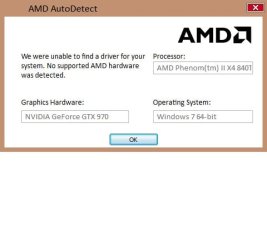
The AMD auto detect says can't find any AMD products? :confused: SS attached

My MB is N-Alvorix-RS880-uATX (Alvorix) with AMD 785G chipset.

Will these work should I install them?
AMD Chipset Drivers42 MBCrimson Edition 15.1212/17/2015
Thx!!

Specs:

OS: Windows 7 64 Bit Home Premium

CPU: AMD Phenom II X4 840T 2.90Ghz

Motherboard: N-Alvorix-RS880-uATX (Alvorix)

Memory: Corsair DDR3 16GB

Graphics Card: Nvidia GeForce GTX970

Sound Card: Creative Sound Blaster X-Fi Titanium

Monitor: Displays LG- 42' LCD

Power supply: Corsair CX850M
 

Attachments

  • Untitled.jpg
    Untitled.jpg
    37.8 KB · Views: 31

My Computer

Computer type
PC/Desktop
Computer Manufacturer/Model Number
Dell Alienware Aurora R7
OS
Windows 10 64-bit
CPU
Intel i7K 8700K
Motherboard
Alienware 0VDT73
Memory
16GB Dual Channel DDR4 @2666MHz
Graphics Card(s)
EVGA GeForce RTX 2080 Ti XC Ultra Gaming 11GB GDDR6
Sound Card
Realtek on-board w/Logitech z506 5.1 Surround
Monitor(s) Displays
LG - 65" Class - OLED - C9
Screen Resolution
3840 x 2160 4K
Hard Drives
512GB M.2 PCIe SSD
1TB 7200RPM SATA 6Gb/s (Storage)
PSU
850W EPA Bronze PSU Liquid Cooled Chassis
Case
Alienware Aurora
Cooling
Liquid Cooled
Keyboard
Logitech Wireless K800
Mouse
Logitech Performance MX
Internet Speed
100MB
Antivirus
Emsisoft
Browser
Firefox 64-bit
Other Info
Steelseries Artics Pro Wireless gaming headset.

https://steelseries.com/gaming-headsets/arctis-pro-wireless
I'm no expert, but I don't think the integrated video is available if you have a graphics card installed. That is why the AMD is not detected. I'm sure someone more learned will be along to explain ;)

A Guy
 

My Computer

Computer type
PC/Desktop
OS
Windows 10 Home x64
CPU
INTEL Core i5-750 Quad-Core 3.37GHz
Motherboard
ASUS P7P55D
Memory
HyperX Fury Black Series 8GB (2 x 4GB) 1866Mhz
Graphics Card(s)
EVGA GeForce GTX 750 Superclocked 1GB 128-Bit GDDR5
Monitor(s) Displays
LG 32MA68HY 32" IPS
Screen Resolution
1920 x 1080
Hard Drives
Samsung 840 Evo 120GB, SEAGATE 500GB Barracuda® 7200.12, SATA 3 Gb/s, 7200 RPM, 16MB cache
PSU
ANTEC TruePower New TP-550, 80 PLUS, 550W
Case
ANTEC Three Hundred Illusion
Cooling
COOLER MASTER Hyper 212 Plus, 4 x 120mm 1 x 140mm Noctua's
Internet Speed
85 + Mbps
Antivirus
Avast
Browser
Vivaldi
No worries :cool: i'm more concerned about the chipset drivers I figured it would detect those and i'm wondering if I can install them. My rig says I have AMD 785G so hopefully Brink will see my prior message :)
 

My Computer

Computer type
PC/Desktop
Computer Manufacturer/Model Number
Dell Alienware Aurora R7
OS
Windows 10 64-bit
CPU
Intel i7K 8700K
Motherboard
Alienware 0VDT73
Memory
16GB Dual Channel DDR4 @2666MHz
Graphics Card(s)
EVGA GeForce RTX 2080 Ti XC Ultra Gaming 11GB GDDR6
Sound Card
Realtek on-board w/Logitech z506 5.1 Surround
Monitor(s) Displays
LG - 65" Class - OLED - C9
Screen Resolution
3840 x 2160 4K
Hard Drives
512GB M.2 PCIe SSD
1TB 7200RPM SATA 6Gb/s (Storage)
PSU
850W EPA Bronze PSU Liquid Cooled Chassis
Case
Alienware Aurora
Cooling
Liquid Cooled
Keyboard
Logitech Wireless K800
Mouse
Logitech Performance MX
Internet Speed
100MB
Antivirus
Emsisoft
Browser
Firefox 64-bit
Other Info
Steelseries Artics Pro Wireless gaming headset.

https://steelseries.com/gaming-headsets/arctis-pro-wireless
I agree on board graphic's is usually disabled when a real gpu is installed
To update the chip set you'd have to remove the amd gpu.

That's just the way on board graphic's work or in your case does not work ;)
Mine is the same way for an Intel on board graphic's board

My Asus x99 does not have on board graphic's so the chip set can be sensed and installed
Although it's best to get it from the manufacture.
 

My Computer

Computer type
PC/Desktop
Computer Manufacturer/Model Number
Custom assembled by me :}
OS
Win-7-Pro64bit 7-H-Prem-64bit
CPU
i7-5930K 2nd i9-9940x both water blocked VRM's too
Motherboard
ASUS SABERTOOTH X99 2nd ASUS x299 Apex
Memory
Trident-z 3200C14 2nd Trident-z 3600C16
Graphics Card(s)
EVGA 1080ti ftw3 2nd Titan Xp both water blocked
Sound Card
Built-in Realtek
Monitor(s) Displays
1-AOC G2460PG 24"G-Sync 144Hz/ 2nd 1-ASUS VG248QE 24" 144Hz
Screen Resolution
1920 x 1080 144Hz
Hard Drives
2-Samsung M.2 Evo & Evo Plus
2-Samsung 850 EVO 500GB SSD's/ 3-2.5 W.D. Black 1tb-&3-1tb/3-3.5 WD Black 1tb hdd's
PSU
EVGA SuperNOVA 1000-P2 2nd 1200-P2
Case
2-Corsair Obsidian Series 450D Black ATX Mid Tower
Cooling
Custom water loops
Keyboard
Logitech G710+/ 2nd Logitech G910
Mouse
2-RedDragon M901 Perdition 16400 dpi Gaming mouse = wired
Internet Speed
Comcast Ping 19ms 89.31mbps download speed 6.12mbps upload
Antivirus
Malwarebytes Pro/ Superantispyware Pro
Browser
FireFox & Pale moon
Other Info
2nd ASUS X299 Apex/Intel i9-9940x with Custom water loop/7H-Prem-x64/Corsair 450D case/Ram Trident-z 3600C16 4x8gb / Samsung970Evo plus 500gb SSD/Dual ssd EZ swap evo/PSU EVGA SuperNova 1200w-P2 80+Platinum/GPU Titan Xp /8-ML-140 on push-pull on 2-280GTX rads
Back
Top