Solved Asrock or official AMD chipset driver?

Booster

New member
Local time
6:22 AM
Messages
12
Hello! I have a question about installing a driver for the motherboard.
I'm curious about drivers for AMD chipset motherboard.
Is it better to install drivers from ASRock or from AMD official site for chipset?
This motherboard is ASRock and drivers I have is All in one (this is chipset driver?),audio,LAN and other from this site
http://www.asrock.com/mb/overview.asp?cat=Download&os=Win764&Model=870%20Extreme3%20R2.0
and found this driver for chipset also
AMD Chipset Drivers
but not sure which is better solution?
Can I install chipset driver from AMD site,and all other drivers from ASRock site,except All in one driver?
OS is Win7 x64 and GPU is AMD Radeon HD 4000 series.
My English not so good.Sorry about that.
Need help please :confused:
 
Last edited:

My Computer

Computer type
Laptop
Computer Manufacturer/Model Number
Acer
OS
Ubuntu 12.04 x64
CPU
i7
Memory
6GB
Hard Drives
Toshiba 500GB
Antivirus
CIS
Browser
FF
Actually what motherboard you are using ?
 

My Computer

Computer type
PC/Desktop
Computer Manufacturer/Model Number
Custom build
OS
Windows 7 ultimate 64 bit
CPU
AMD FX 8-Core Black Edition 4.0Ghz (Overclocked)
Motherboard
Asus Evo M5A99X
Memory
Corsair Vengeance 32gb DDR3 1866Mhz
Graphics Card(s)
ATI Sapphire HD 4890 2gb 256bit Vapor-X
Sound Card
ASUS Xonar Essence STX
Monitor(s) Displays
Samsung Ultrathin LED screen 21" 1080i Full HD
Screen Resolution
3840x2160
Hard Drives
Seagate 3TB Barracuda SATA 6GB/s 7200 RPM (For entertainment and games!)

Seagate 1TB Barracuda SATA 7200 RPM 6GB/s (For personal files backup)

512GB Crucial m4 2.5 inch SATA 6Gb/s [SATA III] (For OS and programs/applications Only)
PSU
Corsair AX850
Case
Cooler Master HAF X 932
Cooling
Custom build liquid cooling system
Keyboard
Razer BlackWidow
Mouse
Razer Orochi
Internet Speed
4MB (2Mb Upload & 2Mb Download) 2Mbps [Overclocked Modem]
Antivirus
Eset Smart Security 6 2013
Browser
Chrome / Torch
Other Info
I'm a gamer and I would spend for it doesn't matter how much it costs!! Not because I don't have a life but I choose to have many!
Hi Booster What problems are you having ? If all is working well i would tend to leave things as they are
 

My Computer

Computer Manufacturer/Model Number
W530-3630QM1
OS
windows 7 home 64bit
CPU
INTEL-CORE I7
Memory
16GB
Hard Drives
750GB
Browser
Chrome
Currently I am on a laptop but I intend to install the system on a different - Desktop PC.
The motherboard is the ASRock 870 Extreme3 r2.0
My mistake in the first post,sorry.
CPU Phenom x1100T
GPU HD 4670 1GB ddr3
So I wonder which one of these chipset drivers is the right solution (AMD or ASrock chipset driver)?
So far I've always installed all drivers for motherboard from the ASRock site.
For GPU graphics driver from AMD.I know that this is working but I want to know Is there potential conflict if I install chipset driver from AMDs site first and then all other motherboard drivers but from ASrock and is this safer solution because my Antivirus program allways warning me about potential security issue when installing Etron USB 3.0 driver from Asrock,asking me something like "do you want allow to install something invisible".
I also want to know is this chipset driver from AMDs site same thing as All in one driver from ASrock site,is it a substitue for All in one?
I hope you understand what I want.
 

My Computer

Computer type
Laptop
Computer Manufacturer/Model Number
Acer
OS
Ubuntu 12.04 x64
CPU
i7
Memory
6GB
Hard Drives
Toshiba 500GB
Antivirus
CIS
Browser
FF
I tend to use the Manufactures site for Drivers as they tend to tweak their Drivers , And as you say they have proven to work from the site That is what i would tend to stick to As regards as your AV complaining about the usb 3.0 driver this does tend to happen so best ignored IMO
 

My Computer

Computer Manufacturer/Model Number
W530-3630QM1
OS
windows 7 home 64bit
CPU
INTEL-CORE I7
Memory
16GB
Hard Drives
750GB
Browser
Chrome
I tend to use the Manufactures site for Drivers as they tend to tweak their Drivers , And as you say they have proven to work from the site That is what i would tend to stick to As regards as your AV complaining about the usb 3.0 driver this does tend to happen so best ignored IMO


So the best drivers are from the manufacturer and does not need to bother with it?Thanks for reply btw ;)
 

My Computer

Computer type
Laptop
Computer Manufacturer/Model Number
Acer
OS
Ubuntu 12.04 x64
CPU
i7
Memory
6GB
Hard Drives
Toshiba 500GB
Antivirus
CIS
Browser
FF
Most welcome If you have any future problems when you install your new system You know where to come for help
 

My Computer

Computer Manufacturer/Model Number
W530-3630QM1
OS
windows 7 home 64bit
CPU
INTEL-CORE I7
Memory
16GB
Hard Drives
750GB
Browser
Chrome
Hello! I have a question about installing a driver for the motherboard.
I'm curious about drivers for AMD chipset motherboard.
Is it better to install drivers from ASRock or from AMD official site for chipset?
This motherboard is ASRock and drivers I have is All in one (this is chipset driver?),audio,LAN and other from this site
ASRock > 870 Extreme3 R2.0
and found this driver for chipset also
AMD Chipset Drivers
but not sure which is better solution?
Can I install chipset driver from AMD site,and all other drivers from ASRock site,except All in one driver?
OS is Win7 x64 and GPU is AMD Radeon HD 4000 series.
My English not so good.Sorry about that.
Need help please :confused:
Better to get them from AMD they are Universal and doesn't matter if you go through ASUS it might come with some features you probably wouldn't care for just for example

when you go to the direct site is much better but beware if this is a laptop you most likely will not have to update them now if you have done a clean install it is best to get them from the ASUS site if it is a laptop because the drivers from them will have specific code just for your unit

if you get normal drivers it might botch your resolution this would be onboard graphics only if you have a Mobil graphics card you could update through AMD but you have to find your card on there site just putting some clarification on it
 

My Computer

Computer type
PC/Desktop
Computer Manufacturer/Model Number
CoreI7-6700K MrFingerIII Special Builds
OS
Windows 10 Home Premium 64bit sp1
CPU
Intel I7-6700K @ 4.6 Ghz 1.344 volts everyday OC
Motherboard
Asrock Fatality K6 Z170 Socket 1151
Memory
32GB G-Skill TridentZ 3200mhz 16-18-18-38 DDR4
Graphics Card(s)
Sli Gigabyte Windforce GTX 980 G1
Sound Card
AC97 Creative Rage Tactic 3D Headphones Bluetooth
Monitor(s) Displays
27" Asus ROG Swift PG278Q G-Sync 48" Vizio Smart HD TV
Screen Resolution
2560x1440p 27"- 48" Currently Gaming at 2560x1440p Res 2K
Hard Drives
250GB Samsung Evo840SSD Seagate baracuda 500 GB WD Mybook 500Gb 1TB Seagate Barracuda
PSU
HX1050w Corsair Silver 80plus certified crosfire/sli
Case
Enthod Pro Full Tower
Cooling
Corsair H110i GT 280 mm High Performance WaterBlock
Keyboard
Logitech wireless keyboard
Mouse
Logitech wireless mouse
Internet Speed
Cox Cable 100+ mb
Antivirus
WebRoot Spysweeper with Antivirus
Browser
IE-10, Chrome, Opera
Other Info
My Other Rig is a AMD FX8320E @4.6Ghz 16GB Ballistic Sport Ram
Mobo Asrock Fatality 990FX 120GB OCZ SSD 1TB Seagate Barracuda Corsair H75 Cooling PSU Corsair CX750
GPU GTX Gigabyte 970G1
Hello! I have a question about installing a driver for the motherboard.
I'm curious about drivers for AMD chipset motherboard.
Is it better to install drivers from ASRock or from AMD official site for chipset?
This motherboard is ASRock and drivers I have is All in one (this is chipset driver?),audio,LAN and other from this site
ASRock > 870 Extreme3 R2.0
and found this driver for chipset also
AMD Chipset Drivers
Better to get them from AMD they are Universal and doesn't matter if you go through ASUS it might come with some features you probably wouldn't care for just for example

when you go to the direct site is much better but beware if this is a laptop you most likely will not have to update them now if you have done a clean install it is best to get them from the ASUS site if it is a laptop because the drivers from them will have specific code just for your unit

if you get normal drivers it might botch your resolution this would be onboard graphics only if you have a Mobil graphics card you could update through AMD but you have to find your card on there site just putting some clarification on it

Totally confused now.It is desktop PC with ASRock MBO and AMD ATI Radeon HD graphics card,not ASUS nor laptop.I didn't understand completely what did you wrote.
Can you be more specific.
Tnx
 

My Computer

Computer type
Laptop
Computer Manufacturer/Model Number
Acer
OS
Ubuntu 12.04 x64
CPU
i7
Memory
6GB
Hard Drives
Toshiba 500GB
Antivirus
CIS
Browser
FF
If it is a Desktop Pc with a installed Graphics card or even onboard graphics it is fine to use the AMD site

Now if you had a laptop it wouldn't be recommended simple enough ?
 

My Computer

Computer type
PC/Desktop
Computer Manufacturer/Model Number
CoreI7-6700K MrFingerIII Special Builds
OS
Windows 10 Home Premium 64bit sp1
CPU
Intel I7-6700K @ 4.6 Ghz 1.344 volts everyday OC
Motherboard
Asrock Fatality K6 Z170 Socket 1151
Memory
32GB G-Skill TridentZ 3200mhz 16-18-18-38 DDR4
Graphics Card(s)
Sli Gigabyte Windforce GTX 980 G1
Sound Card
AC97 Creative Rage Tactic 3D Headphones Bluetooth
Monitor(s) Displays
27" Asus ROG Swift PG278Q G-Sync 48" Vizio Smart HD TV
Screen Resolution
2560x1440p 27"- 48" Currently Gaming at 2560x1440p Res 2K
Hard Drives
250GB Samsung Evo840SSD Seagate baracuda 500 GB WD Mybook 500Gb 1TB Seagate Barracuda
PSU
HX1050w Corsair Silver 80plus certified crosfire/sli
Case
Enthod Pro Full Tower
Cooling
Corsair H110i GT 280 mm High Performance WaterBlock
Keyboard
Logitech wireless keyboard
Mouse
Logitech wireless mouse
Internet Speed
Cox Cable 100+ mb
Antivirus
WebRoot Spysweeper with Antivirus
Browser
IE-10, Chrome, Opera
Other Info
My Other Rig is a AMD FX8320E @4.6Ghz 16GB Ballistic Sport Ram
Mobo Asrock Fatality 990FX 120GB OCZ SSD 1TB Seagate Barracuda Corsair H75 Cooling PSU Corsair CX750
GPU GTX Gigabyte 970G1
I'll try to install first as usual and then as you told me.Some screenshot will be prepared for comparing system state.Tnx
 

My Computer

Computer type
Laptop
Computer Manufacturer/Model Number
Acer
OS
Ubuntu 12.04 x64
CPU
i7
Memory
6GB
Hard Drives
Toshiba 500GB
Antivirus
CIS
Browser
FF
Hello everybody.Here I go again.
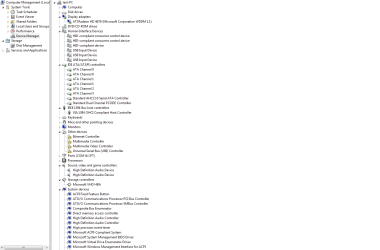
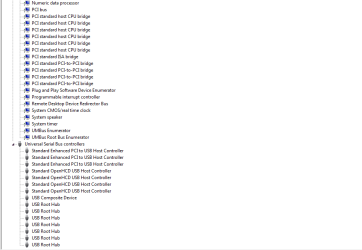
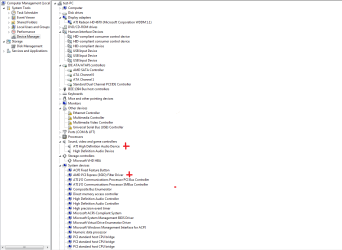
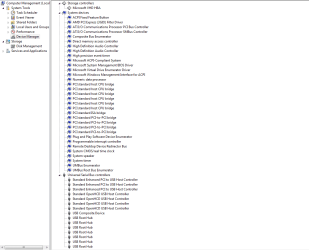
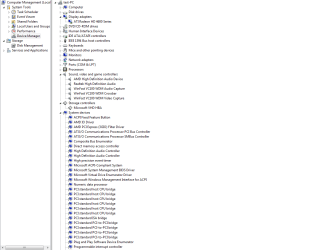
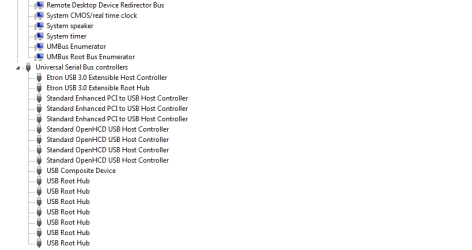
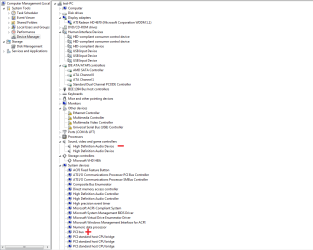
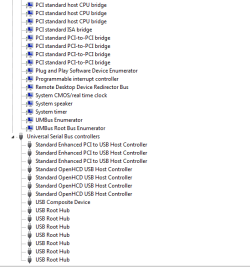
Here's a few screenshots of the system state before and after drivers installed.
The system is Win7 x86, installed on the VHD in native dual boot.
The first two screenshots showing the status of device manager with a clean system with no drivers installed.
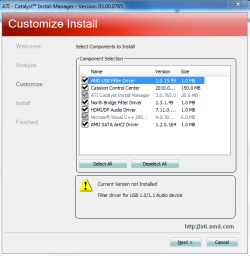
3.Screenshot : Installing All in one driver (Shows what will be installed)
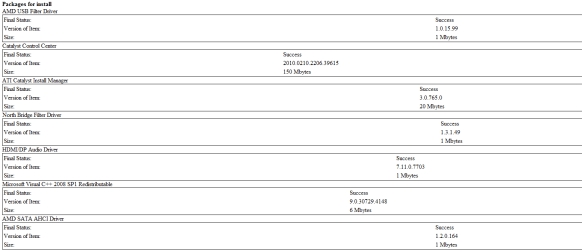
4. And finally installed
5.& 6. Device Manager after all in one installed.
7. & 8. All drivers.
The difference is marked.
 

Attachments

  • 1.No drivers1.PNG
    1.No drivers1.PNG
    26.9 KB · Views: 3
  • 2.No drivers2.PNG
    2.No drivers2.PNG
    8.8 KB · Views: 2
  • 3.All in one process.PNG
    3.All in one process.PNG
    24.3 KB · Views: 6
  • 4.Report1.PNG
    4.Report1.PNG
    17.5 KB · Views: 2
  • 6.All in one installed1.PNG
    6.All in one installed1.PNG
    27.8 KB · Views: 6
  • 7.All in one installed2.PNG
    7.All in one installed2.PNG
    20.9 KB · Views: 2
  • 19.GPU&ALL.PNG
    19.GPU&ALL.PNG
    27.1 KB · Views: 4
  • 20.GPU&ALL.PNG
    20.GPU&ALL.PNG
    5.7 KB · Views: 2

My Computer

Computer type
Laptop
Computer Manufacturer/Model Number
Acer
OS
Ubuntu 12.04 x64
CPU
i7
Memory
6GB
Hard Drives
Toshiba 500GB
Antivirus
CIS
Browser
FF
Here's device manager after system recovered from backup and "AMD Chipset Driver" installed first,without All in One.
The difference is marked
 

Attachments

  • 21.AMD CHIPSET DRIVER INSTALLED.PNG
    21.AMD CHIPSET DRIVER INSTALLED.PNG
    27.4 KB · Views: 4
  • 22.AMD CHIPSET DRIVER INSTALLED.PNG
    22.AMD CHIPSET DRIVER INSTALLED.PNG
    6.9 KB · Views: 4

My Computer

Computer type
Laptop
Computer Manufacturer/Model Number
Acer
OS
Ubuntu 12.04 x64
CPU
i7
Memory
6GB
Hard Drives
Toshiba 500GB
Antivirus
CIS
Browser
FF
I'm not sure what you are doing. Let's make some distinctions though. "Chipset" drivers are for the northbridge/southbridge motherboard chips. These control board functions such as RAM, CPU, and PCIe. They should be from the motherboard makers' site as stated they are made for specific boards.

If for graphics processor unit (GPU) then the ones from AMD are fine, or from the GPU vendor.
 

My Computer

Computer type
PC/Desktop
Computer Manufacturer/Model Number
Home Built Desktop By DataTech
OS
Windows 7 Ultimate X64 SP1
CPU
Intel i5-2550K, Differing ~4.4-4.8GHz No built in GPU
Motherboard
ASUS P8Z68-V PRO/GEN3
Memory
16GB G.Skill Sniper 1866MHz @ 2133MHz 2x8GB
Graphics Card(s)
ASUS GTX650TIB-DC2OC-2GD5, (650TI Boost)
Sound Card
Onboard Realtek 5-1
Monitor(s) Displays
Samsung P2570HD
Screen Resolution
1920x1080
Hard Drives
Samsung 840 Pro 256GB SSD for OS, 500GB Seagate Constellation (Enterprise drive) for Data
PSU
Corsair HX650W
Case
Inwin Dragon Rider
Cooling
Hyper 212 EVO w/two Noctua fans, push-pull, @1300 RPM
Keyboard
E-Z Eyes, bright yellow keys with large characters
Mouse
steelseries SENSEI Laser Pro Gaming
Internet Speed
48-51Mbs Mbs down, 11 Mbs up Xfinity Cable
Antivirus
Norton Internet Security 2013
Browser
IE 10, Opera, Pale Moon if needed
Other Info
4 case fans, LG BluRay-RE, ASUS DVD-RW, Mr. Fusion power supply, 1.21 gigawatts.
I do not understand why there is this chipset driver from AMD site if you install all the necessary drivers from the site of the motherboard manufacturers (Asrock in this case) and the drivers for the graphics card (HD Radeon in this case)from AMD's site?


I got that all mixed up because of that chipset driver (check the link)


I deal with computers for a long time but this confused me.
Thanks a lot Britton.Now I know more
 

My Computer

Computer type
Laptop
Computer Manufacturer/Model Number
Acer
OS
Ubuntu 12.04 x64
CPU
i7
Memory
6GB
Hard Drives
Toshiba 500GB
Antivirus
CIS
Browser
FF
You're welcome. also if you used the drivers from the motherboard CD, they are probably old ones. I suggest you go to the ASRock support page for your board and get the newest ones.
 

My Computer

Computer type
PC/Desktop
Computer Manufacturer/Model Number
Home Built Desktop By DataTech
OS
Windows 7 Ultimate X64 SP1
CPU
Intel i5-2550K, Differing ~4.4-4.8GHz No built in GPU
Motherboard
ASUS P8Z68-V PRO/GEN3
Memory
16GB G.Skill Sniper 1866MHz @ 2133MHz 2x8GB
Graphics Card(s)
ASUS GTX650TIB-DC2OC-2GD5, (650TI Boost)
Sound Card
Onboard Realtek 5-1
Monitor(s) Displays
Samsung P2570HD
Screen Resolution
1920x1080
Hard Drives
Samsung 840 Pro 256GB SSD for OS, 500GB Seagate Constellation (Enterprise drive) for Data
PSU
Corsair HX650W
Case
Inwin Dragon Rider
Cooling
Hyper 212 EVO w/two Noctua fans, push-pull, @1300 RPM
Keyboard
E-Z Eyes, bright yellow keys with large characters
Mouse
steelseries SENSEI Laser Pro Gaming
Internet Speed
48-51Mbs Mbs down, 11 Mbs up Xfinity Cable
Antivirus
Norton Internet Security 2013
Browser
IE 10, Opera, Pale Moon if needed
Other Info
4 case fans, LG BluRay-RE, ASUS DVD-RW, Mr. Fusion power supply, 1.21 gigawatts.
So,conclusion is that this is not necessary if i install all drivers from MBO and GPU manufacturer?
I'm allways using the latest drivers,thanks :D
 

My Computer

Computer type
Laptop
Computer Manufacturer/Model Number
Acer
OS
Ubuntu 12.04 x64
CPU
i7
Memory
6GB
Hard Drives
Toshiba 500GB
Antivirus
CIS
Browser
FF
Correct in my opinion. Manufacturers modify standard chipset drivers and BIOSes to suit their board specs.
 

My Computer

Computer type
PC/Desktop
Computer Manufacturer/Model Number
Home Built Desktop By DataTech
OS
Windows 7 Ultimate X64 SP1
CPU
Intel i5-2550K, Differing ~4.4-4.8GHz No built in GPU
Motherboard
ASUS P8Z68-V PRO/GEN3
Memory
16GB G.Skill Sniper 1866MHz @ 2133MHz 2x8GB
Graphics Card(s)
ASUS GTX650TIB-DC2OC-2GD5, (650TI Boost)
Sound Card
Onboard Realtek 5-1
Monitor(s) Displays
Samsung P2570HD
Screen Resolution
1920x1080
Hard Drives
Samsung 840 Pro 256GB SSD for OS, 500GB Seagate Constellation (Enterprise drive) for Data
PSU
Corsair HX650W
Case
Inwin Dragon Rider
Cooling
Hyper 212 EVO w/two Noctua fans, push-pull, @1300 RPM
Keyboard
E-Z Eyes, bright yellow keys with large characters
Mouse
steelseries SENSEI Laser Pro Gaming
Internet Speed
48-51Mbs Mbs down, 11 Mbs up Xfinity Cable
Antivirus
Norton Internet Security 2013
Browser
IE 10, Opera, Pale Moon if needed
Other Info
4 case fans, LG BluRay-RE, ASUS DVD-RW, Mr. Fusion power supply, 1.21 gigawatts.
Problem solved.Thanks Maxie,Britton and Solarstarshines :thumbsup:
Still remains the hardest and most boring part .....to install all of that and much more :huh:
 

My Computer

Computer type
Laptop
Computer Manufacturer/Model Number
Acer
OS
Ubuntu 12.04 x64
CPU
i7
Memory
6GB
Hard Drives
Toshiba 500GB
Antivirus
CIS
Browser
FF
You're welcome. What did you do to fix it?
 

My Computer

Computer type
PC/Desktop
Computer Manufacturer/Model Number
Home Built Desktop By DataTech
OS
Windows 7 Ultimate X64 SP1
CPU
Intel i5-2550K, Differing ~4.4-4.8GHz No built in GPU
Motherboard
ASUS P8Z68-V PRO/GEN3
Memory
16GB G.Skill Sniper 1866MHz @ 2133MHz 2x8GB
Graphics Card(s)
ASUS GTX650TIB-DC2OC-2GD5, (650TI Boost)
Sound Card
Onboard Realtek 5-1
Monitor(s) Displays
Samsung P2570HD
Screen Resolution
1920x1080
Hard Drives
Samsung 840 Pro 256GB SSD for OS, 500GB Seagate Constellation (Enterprise drive) for Data
PSU
Corsair HX650W
Case
Inwin Dragon Rider
Cooling
Hyper 212 EVO w/two Noctua fans, push-pull, @1300 RPM
Keyboard
E-Z Eyes, bright yellow keys with large characters
Mouse
steelseries SENSEI Laser Pro Gaming
Internet Speed
48-51Mbs Mbs down, 11 Mbs up Xfinity Cable
Antivirus
Norton Internet Security 2013
Browser
IE 10, Opera, Pale Moon if needed
Other Info
4 case fans, LG BluRay-RE, ASUS DVD-RW, Mr. Fusion power supply, 1.21 gigawatts.
Back
Top