Latest CCleaner Version Released

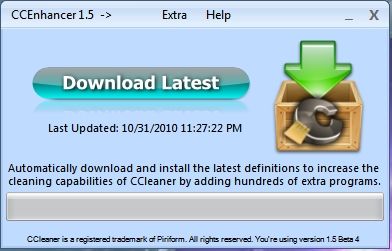
I can not get the CCleaner Enhancer v1.5 Beta 3 to work with CCleaner v3.0.1303 x64 on my Win 7 computer it just says "Custom Rules not present" and does not download from the internet although it does ask permission to do so. Any suggestions?

~Maxx~
.
da59fa57.png
 

My Computer

Computer Manufacturer/Model Number
HP HPE 270f
OS
Windows 7 x64 Home Premium
CPU
Intel Core i7 930 @ 2.8 Ghz Socket 1366 LGA
Motherboard
Pegatron Truckee v1.04E41
Memory
8 GB 1366 Mhz DDR3 (PC3-10700) RAM
Graphics Card(s)
ATI Radeon 5770 1 GB DDR5 RAM
Sound Card
Realtech High Definition
Monitor(s) Displays
32" Sony Bravia
Screen Resolution
1366 X 768
Hard Drives
Intel 25nm 120 GB Series 320 SSD HD Tune- 265 MBps Read/ 130 MBps Write

LaCie 1TB + 1TB RAID 0 eSATA Drive HD Tune- 160 MBps Read/ 90 MBps Write
Keyboard
Logitech Illuminated
Mouse
Logitech MX Revolution
Internet Speed
36.4 Mbps Maximum on a 37 Mbps Motorola SB501 Modem
Don't think that 1.5 Beta works on 64 bit systems right yet with the 3.0 version of ccleaner. Was reading about it somewheres...I think here:

CCEnhancer 1.5 Beta | The Web Atom

Suggestion would be to wait until it's fixed.
 

My Computer

Computer type
PC/Desktop
Computer Manufacturer/Model Number
Airbot 2.0
OS
Windows 7 Ultimate x64 SP1
CPU
Core i7 920 (D0) @ 4Ghz, *26c idle *65c full load on air
Motherboard
Asus P6X58D Premium - Sata 6Gb/s - USB 3.0
Memory
12GB DDR3 Corsair Dominator -CMD12GX3M6A1600C8 at 1600MHz
Graphics Card(s)
Zotac Geforce GTX 770
Sound Card
ASUS Xonar D2X
Monitor(s) Displays
1 LG 24" Flatron W2453V-PF 1 Samsung 24" P2450H both 2ms RT
Screen Resolution
1920x1080@60hz
Hard Drives
1 Samsung 250GB 840 Evo SSD
1 OCZ Vertex2 180GB SSD
1 TB Samsung Spinpoint F1 7200RPM 32MB cache
2 500GB WD Caviar Blacks 7200RPM 32MB cache (WD5001AALS)

Pioneer DVD Burner DVR-S18M
PSU
Corsair HX1000W
Case
Cooler Master HAF 932
Cooling
Case Fans *3 230mm, *1 140mm/CPU - *Tuniq Tower 120 Extreme
Keyboard
Logitech Wireless MK700
Mouse
Logitech Wireless MK700
Internet Speed
DL 15 Mbps UL 0.98 Mbps
Antivirus
None
Browser
Firefox Nightly
Other Info
Processor-7.7 *RAM- 7.9 *Graphics-7.9 *Gaming Graphics- 7.9 *SSD- 7.8 W.E.I final score= 7.7
*Phone- LG Nexus 5
Don't think that 1.5 Beta works on 64 bit systems right yet with the 3.0 version of ccleaner. Suggestion would be to wait until it's fixed.

Thanks Airbot! CCleaner is my most frequently used software and I just wanted to keep it as fully functional and up to date as possible. This CCleaner Enhancer update will be worth waiting for.

~Maxx~

CCleaner77.png
 

My Computer

Computer Manufacturer/Model Number
HP HPE 270f
OS
Windows 7 x64 Home Premium
CPU
Intel Core i7 930 @ 2.8 Ghz Socket 1366 LGA
Motherboard
Pegatron Truckee v1.04E41
Memory
8 GB 1366 Mhz DDR3 (PC3-10700) RAM
Graphics Card(s)
ATI Radeon 5770 1 GB DDR5 RAM
Sound Card
Realtech High Definition
Monitor(s) Displays
32" Sony Bravia
Screen Resolution
1366 X 768
Hard Drives
Intel 25nm 120 GB Series 320 SSD HD Tune- 265 MBps Read/ 130 MBps Write

LaCie 1TB + 1TB RAID 0 eSATA Drive HD Tune- 160 MBps Read/ 90 MBps Write
Keyboard
Logitech Illuminated
Mouse
Logitech MX Revolution
Internet Speed
36.4 Mbps Maximum on a 37 Mbps Motorola SB501 Modem
Don't think that 1.5 Beta works on 64 bit systems right yet with the 3.0 version of ccleaner. Was reading about it somewheres...I think here:

CCEnhancer 1.5 Beta | The Web Atom

Suggestion would be to wait until it's fixed.

It will work if you do this:

Click on the CCleaner Enhancer exe, click NO when the first window opens. Click on Extra, click on Install For Portable CCleaner, browse to the CCleaner installation folder, this will install the winapp2.ini


Also

If you are using x64 version of Windows. Check your current configuration for reference, uninstall CCleaner. And run a fresh install. This will install in the correct Program Files folder (instead of Program Files(x86). Now CCleaner will run the x64 executable by default (even though it still installs the x86 exe as well).

If you update, it will use the x86 exe by default unless you manually change the path on the shortcut. You can then set the configuration to match your old one.

A Guy
 

My Computer

Computer type
PC/Desktop
OS
Windows 10 Home x64
CPU
INTEL Core i5-750 Quad-Core 3.37GHz
Motherboard
ASUS P7P55D
Memory
HyperX Fury Black Series 8GB (2 x 4GB) 1866Mhz
Graphics Card(s)
EVGA GeForce GTX 750 Superclocked 1GB 128-Bit GDDR5
Monitor(s) Displays
LG 32MA68HY 32" IPS
Screen Resolution
1920 x 1080
Hard Drives
Samsung 840 Evo 120GB, SEAGATE 500GB Barracuda® 7200.12, SATA 3 Gb/s, 7200 RPM, 16MB cache
PSU
ANTEC TruePower New TP-550, 80 PLUS, 550W
Case
ANTEC Three Hundred Illusion
Cooling
COOLER MASTER Hyper 212 Plus, 4 x 120mm 1 x 140mm Noctua's
Internet Speed
85 + Mbps
Antivirus
Avast
Browser
Vivaldi
Don't think that 1.5 Beta works on 64 bit systems right yet with the 3.0 version of ccleaner. Was reading about it somewheres...I think here:

CCEnhancer 1.5 Beta | The Web Atom

Suggestion would be to wait until it's fixed.

It will work if you do this:

Click on the CCleaner Enhancer exe, click NO when the first window opens. Click on Extra, click on Install For Portable CCleaner, browse to the CCleaner installation folder, this will install the winapp2.ini


Also

If you are using x64 version of Windows. Check your current configuration for reference, uninstall CCleaner. And run a fresh install. This will install in the correct Program Files folder (instead of Program Files(x86). Now CCleaner will run the x64 executable by default (even though it still installs the x86 exe as well).

If you update, it will use the x86 exe by default unless you manually change the path on the shortcut. You can then set the configuration to match your old one.

A Guy

I have been updating CCleaner for awhile. This new version showed 64bit in the screen but found the program was in the Program Files (x86) directory. I uninstalled it and then reinstalled. It is now in the Program Files directory and the default shortcut will exe the 64bit version. Thanks for the information A Guy.

Jim :cool:
 

My Computer

Computer type
PC/Desktop
Computer Manufacturer/Model Number
Home Built
OS
Windows 8.1 Pro w/Media Center 64bit, Windows 7 HP 64bit
CPU
Phenom II X6 1100T
Motherboard
ASUS M5A99X EVO
Memory
Crucial Balistic 8gb DDR3-1866 CL9
Graphics Card(s)
MSI R6850 Cyclone IGD5 PE
Sound Card
On Board
Monitor(s) Displays
ASUS VE258Q 25" LED with DVI-HDMI-DisplayPort
Screen Resolution
1920 x 1080
Hard Drives
Two WD Cavier Black 2TB Sata III, WD My Book Essential 2TB USB 3.0
PSU
Seasonic X650 80 Plus GOLD Modular
Case
Corsair 400R
Cooling
Antec Kuhler H2O 620, Two 120mm and four 140mm
Keyboard
Logitech K120
Mouse
Logitech Marble Mouse USB, Logitech Precision Game Pad
Internet Speed
15MB
Antivirus
Norton IS 2013, Malwarebytes Pro Beta 2
Browser
IE-11, FF-27
Other Info
APC UPS ES 750, Netgear WNR3500L Gigabit & Wireless N Router with SamKnows Test Program, Motorola SB6120 Gigabit Cable Modem. Brother HL-2170W Laser Printer, Epson V300 Scanner
Enhancer1stUpdate.jpg


Everything worked exactly as you said it would, no trick...all treat! Right down to reinstalling CCleaner v3.0 x64 and it going into the x64 programs folder...

CCleaner30x64.jpg


I can't remember the time that I didn't have CCleaner installed on my computers and it was quite weird uninstalling it, but I trusted your guidance and everything turned out great! Your quite A Guy!

~Maxx~

CCleaner77.png
 

My Computer

Computer Manufacturer/Model Number
HP HPE 270f
OS
Windows 7 x64 Home Premium
CPU
Intel Core i7 930 @ 2.8 Ghz Socket 1366 LGA
Motherboard
Pegatron Truckee v1.04E41
Memory
8 GB 1366 Mhz DDR3 (PC3-10700) RAM
Graphics Card(s)
ATI Radeon 5770 1 GB DDR5 RAM
Sound Card
Realtech High Definition
Monitor(s) Displays
32" Sony Bravia
Screen Resolution
1366 X 768
Hard Drives
Intel 25nm 120 GB Series 320 SSD HD Tune- 265 MBps Read/ 130 MBps Write

LaCie 1TB + 1TB RAID 0 eSATA Drive HD Tune- 160 MBps Read/ 90 MBps Write
Keyboard
Logitech Illuminated
Mouse
Logitech MX Revolution
Internet Speed
36.4 Mbps Maximum on a 37 Mbps Motorola SB501 Modem

My Computer

Computer type
PC/Desktop
OS
Windows 10 Home x64
CPU
INTEL Core i5-750 Quad-Core 3.37GHz
Motherboard
ASUS P7P55D
Memory
HyperX Fury Black Series 8GB (2 x 4GB) 1866Mhz
Graphics Card(s)
EVGA GeForce GTX 750 Superclocked 1GB 128-Bit GDDR5
Monitor(s) Displays
LG 32MA68HY 32" IPS
Screen Resolution
1920 x 1080
Hard Drives
Samsung 840 Evo 120GB, SEAGATE 500GB Barracuda® 7200.12, SATA 3 Gb/s, 7200 RPM, 16MB cache
PSU
ANTEC TruePower New TP-550, 80 PLUS, 550W
Case
ANTEC Three Hundred Illusion
Cooling
COOLER MASTER Hyper 212 Plus, 4 x 120mm 1 x 140mm Noctua's
Internet Speed
85 + Mbps
Antivirus
Avast
Browser
Vivaldi
Don't think that 1.5 Beta works on 64 bit systems right yet with the 3.0 version of ccleaner. Was reading about it somewheres...I think here:

CCEnhancer 1.5 Beta | The Web Atom

Suggestion would be to wait until it's fixed.

It will work if you do this:

Click on the CCleaner Enhancer exe, click NO when the first window opens. Click on Extra, click on Install For Portable CCleaner, browse to the CCleaner installation folder, this will install the winapp2.ini

Also

If you are using x64 version of Windows. Check your current configuration for reference, uninstall CCleaner. And run a fresh install. This will install in the correct Program Files folder (instead of Program Files(x86). Now CCleaner will run the x64 executable by default (even though it still installs the x86 exe as well).

If you update, it will use the x86 exe by default unless you manually change the path on the shortcut. You can then set the configuration to match your old one.

A Guy

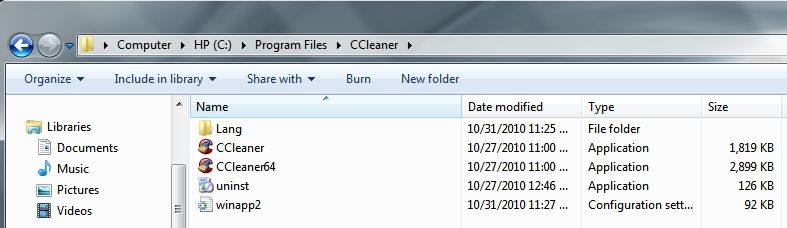
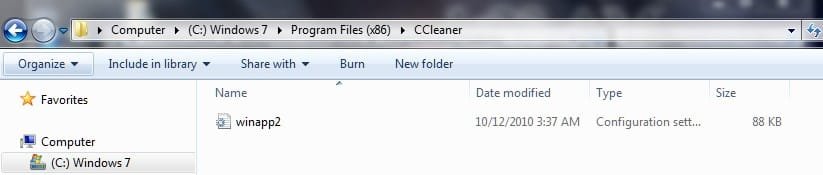
Thank's A Guy If I followed your instructions correctly ??? This is what I should see.
 

Attachments

  • x86.jpg
    x86.jpg
    16.7 KB · Views: 9
  • Pfx64.jpg
    Pfx64.jpg
    24.4 KB · Views: 12

My Computer

Computer type
PC/Desktop
Computer Manufacturer/Model Number
My own abomination, I call it the Money Pit
OS
Windows 10 Pro x 2/Windows 11 Home
CPU
Intel i7 2600K @ 3.40 GHz
Motherboard
ASUS Sabertooth P67
Memory
Corsair Vengeance 16GB DDR3 1600MHz CL8 Dual Channel Kit
Graphics Card(s)
EVGA GeForce RTX 3080 XC3 ULTRA GAMING 10GB GDDR6X
Sound Card
Onboard Realtek or Nvidia High Definition Audio (HDMI)
Monitor(s) Displays
Samsung JS7000 50" SUHD TV or Samsung 27" FHD 60Hz 8ms GTG V
Screen Resolution
1920 x 1080
Hard Drives
1 x Samsung 870 EVO 250 GB SSD (Windows 10 Pro), 1 x Samsung 850 EVO 250 GB SSD (Windows 10 Pro)
PSU
Corsair AX860 - 860W Modular Power Supply
Case
Phanteks Enthoo Luxe Full Tower Case - Black
Cooling
CORSAIR Hydro Series H150i PRO RGB 360mm Liquid CPU Cooler
Keyboard
Logitech K830 Illuminated Living-Room Keyboard
Mouse
Logitech MX Anywhere 2S Wireless Mouse
Internet Speed
100 Mbps
Antivirus
ESET Internet Security
Browser
Latest Version Of Firefox & Microsoft Edge Chromium Stable
Other Info
LG Super Multi Blue Internal Blu-ray Disk Rewriter - BH10LS30
6x2 HDMI Switcher (6 inputs, 2 outputs) so I can send the output of my Cable Box, Roku, or any my 4 computers to either my TV or Monitor separately or simultaneously.
Thank's A Guy If I followed your instructions correctly ??? This is what I should see.

Did you do the reinstall? You're still installed to the x86 program files, which will work, but won't default to the native x64 exe. Otherwise, you do have the new winapp2 file in place. A Guy
 

My Computer

Computer type
PC/Desktop
OS
Windows 10 Home x64
CPU
INTEL Core i5-750 Quad-Core 3.37GHz
Motherboard
ASUS P7P55D
Memory
HyperX Fury Black Series 8GB (2 x 4GB) 1866Mhz
Graphics Card(s)
EVGA GeForce GTX 750 Superclocked 1GB 128-Bit GDDR5
Monitor(s) Displays
LG 32MA68HY 32" IPS
Screen Resolution
1920 x 1080
Hard Drives
Samsung 840 Evo 120GB, SEAGATE 500GB Barracuda® 7200.12, SATA 3 Gb/s, 7200 RPM, 16MB cache
PSU
ANTEC TruePower New TP-550, 80 PLUS, 550W
Case
ANTEC Three Hundred Illusion
Cooling
COOLER MASTER Hyper 212 Plus, 4 x 120mm 1 x 140mm Noctua's
Internet Speed
85 + Mbps
Antivirus
Avast
Browser
Vivaldi
Very nice contribution mate. I'll be sure to check this out.
 

My Computer

OS
Windows 7 Ultimate x64
Thank's A Guy If I followed your instructions correctly ??? This is what I should see.

Did you do the reinstall? You're still installed to the x86 program files, which will work, but won't default to the native x64 exe. Otherwise, you do have the new winapp2 file in place. A Guy

Yes I uninstalled/reinstalled and all the files are in program files ( which would be x64 ) > CCleaner which includes a winapp2 file ?, but as you noticed I also have a lonely winapp32 file in the program files x86 > CCleaner

I guess my question is A) does the winapp2 file apply only to the x64 bit entries, and B) the lonely winapp32 apply only to the x86 entries (need both) or would the winapp2 file work for both x64 and x86 entries allowing deletion of the program files x86 > CCleaner > winapp32 file.
 

My Computer

Computer type
PC/Desktop
Computer Manufacturer/Model Number
My own abomination, I call it the Money Pit
OS
Windows 10 Pro x 2/Windows 11 Home
CPU
Intel i7 2600K @ 3.40 GHz
Motherboard
ASUS Sabertooth P67
Memory
Corsair Vengeance 16GB DDR3 1600MHz CL8 Dual Channel Kit
Graphics Card(s)
EVGA GeForce RTX 3080 XC3 ULTRA GAMING 10GB GDDR6X
Sound Card
Onboard Realtek or Nvidia High Definition Audio (HDMI)
Monitor(s) Displays
Samsung JS7000 50" SUHD TV or Samsung 27" FHD 60Hz 8ms GTG V
Screen Resolution
1920 x 1080
Hard Drives
1 x Samsung 870 EVO 250 GB SSD (Windows 10 Pro), 1 x Samsung 850 EVO 250 GB SSD (Windows 10 Pro)
PSU
Corsair AX860 - 860W Modular Power Supply
Case
Phanteks Enthoo Luxe Full Tower Case - Black
Cooling
CORSAIR Hydro Series H150i PRO RGB 360mm Liquid CPU Cooler
Keyboard
Logitech K830 Illuminated Living-Room Keyboard
Mouse
Logitech MX Anywhere 2S Wireless Mouse
Internet Speed
100 Mbps
Antivirus
ESET Internet Security
Browser
Latest Version Of Firefox & Microsoft Edge Chromium Stable
Other Info
LG Super Multi Blue Internal Blu-ray Disk Rewriter - BH10LS30
6x2 HDMI Switcher (6 inputs, 2 outputs) so I can send the output of my Cable Box, Roku, or any my 4 computers to either my TV or Monitor separately or simultaneously.
Bill- Have you gone to TheWebAtom website with this yet? I just visited there and it sounds like they are still struggling with how to get CCleaner Enhancer to work on CCleaner 3.0.1303 x64...

"Thanks for the CCleaner 3 support but, I believe it will only work for x86 users. People who are using an x64 operating system; CCEnhancer won’t detect CCleaner as installed. So, those users will have to use the portable install for now."

~Maxx~

CCleaner77.png
 

My Computer

Computer Manufacturer/Model Number
HP HPE 270f
OS
Windows 7 x64 Home Premium
CPU
Intel Core i7 930 @ 2.8 Ghz Socket 1366 LGA
Motherboard
Pegatron Truckee v1.04E41
Memory
8 GB 1366 Mhz DDR3 (PC3-10700) RAM
Graphics Card(s)
ATI Radeon 5770 1 GB DDR5 RAM
Sound Card
Realtech High Definition
Monitor(s) Displays
32" Sony Bravia
Screen Resolution
1366 X 768
Hard Drives
Intel 25nm 120 GB Series 320 SSD HD Tune- 265 MBps Read/ 130 MBps Write

LaCie 1TB + 1TB RAID 0 eSATA Drive HD Tune- 160 MBps Read/ 90 MBps Write
Keyboard
Logitech Illuminated
Mouse
Logitech MX Revolution
Internet Speed
36.4 Mbps Maximum on a 37 Mbps Motorola SB501 Modem
Don't think that 1.5 Beta works on 64 bit systems right yet with the 3.0 version of ccleaner. Was reading about it somewheres...I think here:

CCEnhancer 1.5 Beta | The Web Atom

Suggestion would be to wait until it's fixed.

It will work if you do this:

Click on the CCleaner Enhancer exe, click NO when the first window opens. Click on Extra, click on Install For Portable CCleaner, browse to the CCleaner installation folder, this will install the winapp2.ini


Also

If you are using x64 version of Windows. Check your current configuration for reference, uninstall CCleaner. And run a fresh install. This will install in the correct Program Files folder (instead of Program Files(x86). Now CCleaner will run the x64 executable by default (even though it still installs the x86 exe as well).

If you update, it will use the x86 exe by default unless you manually change the path on the shortcut. You can then set the configuration to match your old one.

A Guy

+1 for that info Bill. I'd rep you for real but I have to spread it around some. (The reps, that is! :D )
 

My Computer

Computer type
Laptop
Computer Manufacturer/Model Number
Sony Vaio VPCEB47GM Laptop
OS
Win 7 Pro 64-bit
CPU
Intel i5 2.4 Ghz
Memory
8GB DDR3
Graphics Card(s)
Intel HD 3000
Sound Card
IDT High Definition
Monitor(s) Displays
15.6 WGXA Anti-Glare LED
Screen Resolution
1280x800
Hard Drives
640Gb 7200rpm
Antivirus
MSE
Browser
Opera (primary) with IE9 backup
Thank's A Guy If I followed your instructions correctly ??? This is what I should see.

Did you do the reinstall? You're still installed to the x86 program files, which will work, but won't default to the native x64 exe. Otherwise, you do have the new winapp2 file in place. A Guy

Yes I uninstalled/reinstalled and all the files are in program files ( which would be x64 ) > CCleaner which includes a winapp2 file ?, but as you noticed I also have a lonely winapp32 file in the program files x86 > CCleaner

I guess my question is A) does the winapp2 file apply only to the x64 bit entries, and B) the lonely winapp32 apply only to the x86 entries (need both) or would the winapp2 file work for both x64 and x86 entries allowing deletion of the program files x86 > CCleaner > winapp32 file.

It looks like the entry in Programs Files (x86) is a left over. It shows a date of 10/12. I would delete the CCleaner folder in Programs Files (x86) and see how it works. Check the CCleaner shortcut and make sure it is running the 64bit exe file.

Jim :cool:
 

My Computer

Computer type
PC/Desktop
Computer Manufacturer/Model Number
Home Built
OS
Windows 8.1 Pro w/Media Center 64bit, Windows 7 HP 64bit
CPU
Phenom II X6 1100T
Motherboard
ASUS M5A99X EVO
Memory
Crucial Balistic 8gb DDR3-1866 CL9
Graphics Card(s)
MSI R6850 Cyclone IGD5 PE
Sound Card
On Board
Monitor(s) Displays
ASUS VE258Q 25" LED with DVI-HDMI-DisplayPort
Screen Resolution
1920 x 1080
Hard Drives
Two WD Cavier Black 2TB Sata III, WD My Book Essential 2TB USB 3.0
PSU
Seasonic X650 80 Plus GOLD Modular
Case
Corsair 400R
Cooling
Antec Kuhler H2O 620, Two 120mm and four 140mm
Keyboard
Logitech K120
Mouse
Logitech Marble Mouse USB, Logitech Precision Game Pad
Internet Speed
15MB
Antivirus
Norton IS 2013, Malwarebytes Pro Beta 2
Browser
IE-11, FF-27
Other Info
APC UPS ES 750, Netgear WNR3500L Gigabit & Wireless N Router with SamKnows Test Program, Motorola SB6120 Gigabit Cable Modem. Brother HL-2170W Laser Printer, Epson V300 Scanner
Thank's A Guy If I followed your instructions correctly ??? This is what I should see.

Did you do the reinstall? You're still installed to the x86 program files, which will work, but won't default to the native x64 exe. Otherwise, you do have the new winapp2 file in place. A Guy

Yes I uninstalled/reinstalled and all the files are in program files ( which would be x64 ) > CCleaner which includes a winapp2 file ?, but as you noticed I also have a lonely winapp32 file in the program files x86 > CCleaner

I guess my question is A) does the winapp2 file apply only to the x64 bit entries, and B) the lonely winapp32 apply only to the x86 entries (need both) or would the winapp2 file work for both x64 and x86 entries allowing deletion of the program files x86 > CCleaner > winapp32 file.

Id's just a file that's referenced by CCleaner, the uninstall of CCleaner left it in the x86 folder because it isn't a part of CC. Feel free to delete the entire folder in x86 :)

A Guy
 

My Computer

Computer type
PC/Desktop
OS
Windows 10 Home x64
CPU
INTEL Core i5-750 Quad-Core 3.37GHz
Motherboard
ASUS P7P55D
Memory
HyperX Fury Black Series 8GB (2 x 4GB) 1866Mhz
Graphics Card(s)
EVGA GeForce GTX 750 Superclocked 1GB 128-Bit GDDR5
Monitor(s) Displays
LG 32MA68HY 32" IPS
Screen Resolution
1920 x 1080
Hard Drives
Samsung 840 Evo 120GB, SEAGATE 500GB Barracuda® 7200.12, SATA 3 Gb/s, 7200 RPM, 16MB cache
PSU
ANTEC TruePower New TP-550, 80 PLUS, 550W
Case
ANTEC Three Hundred Illusion
Cooling
COOLER MASTER Hyper 212 Plus, 4 x 120mm 1 x 140mm Noctua's
Internet Speed
85 + Mbps
Antivirus
Avast
Browser
Vivaldi
Bill- Have you gone to TheWebAtom website with this yet? I just visited there and it sounds like they are still struggling with how to get CCleaner Enhancer to work on CCleaner 3.0.1303 x64...

"Thanks for the CCleaner 3 support but, I believe it will only work for x86 users. People who are using an x64 operating system; CCEnhancer won’t detect CCleaner as installed. So, those users will have to use the portable install for now."

~Maxx~

CCleaner77.png

The developer is aware of the issue, it is path related. He fixed the actual program, but no, I haven't seen any mention of the workaround there. Feel free to mention it if you like, I'd assume he'd be aware of it, but perhaps doesn't wish to offer a workaround, preferring to fix the program instead. He mentioned having exams yesterday, and would work on it today.

A Guy
 

My Computer

Computer type
PC/Desktop
OS
Windows 10 Home x64
CPU
INTEL Core i5-750 Quad-Core 3.37GHz
Motherboard
ASUS P7P55D
Memory
HyperX Fury Black Series 8GB (2 x 4GB) 1866Mhz
Graphics Card(s)
EVGA GeForce GTX 750 Superclocked 1GB 128-Bit GDDR5
Monitor(s) Displays
LG 32MA68HY 32" IPS
Screen Resolution
1920 x 1080
Hard Drives
Samsung 840 Evo 120GB, SEAGATE 500GB Barracuda® 7200.12, SATA 3 Gb/s, 7200 RPM, 16MB cache
PSU
ANTEC TruePower New TP-550, 80 PLUS, 550W
Case
ANTEC Three Hundred Illusion
Cooling
COOLER MASTER Hyper 212 Plus, 4 x 120mm 1 x 140mm Noctua's
Internet Speed
85 + Mbps
Antivirus
Avast
Browser
Vivaldi
Id's just a file that's referenced by CCleaner, the uninstall of CCleaner left it in the x86 folder because it isn't a part of CC. Feel free to delete the entire folder in x86 :)

A Guy

I went back to delete the CCleaner x86 file, but when I got there it was already gone. Then I remembered that I ununstalled it with Revo Pro Uninstaller x64 which had removed all traces of the CCleaner x86 files.

~Maxx~
.
Win7_50.png
 

My Computer

Computer Manufacturer/Model Number
HP HPE 270f
OS
Windows 7 x64 Home Premium
CPU
Intel Core i7 930 @ 2.8 Ghz Socket 1366 LGA
Motherboard
Pegatron Truckee v1.04E41
Memory
8 GB 1366 Mhz DDR3 (PC3-10700) RAM
Graphics Card(s)
ATI Radeon 5770 1 GB DDR5 RAM
Sound Card
Realtech High Definition
Monitor(s) Displays
32" Sony Bravia
Screen Resolution
1366 X 768
Hard Drives
Intel 25nm 120 GB Series 320 SSD HD Tune- 265 MBps Read/ 130 MBps Write

LaCie 1TB + 1TB RAID 0 eSATA Drive HD Tune- 160 MBps Read/ 90 MBps Write
Keyboard
Logitech Illuminated
Mouse
Logitech MX Revolution
Internet Speed
36.4 Mbps Maximum on a 37 Mbps Motorola SB501 Modem
Did you do the reinstall? You're still installed to the x86 program files, which will work, but won't default to the native x64 exe. Otherwise, you do have the new winapp2 file in place. A Guy

Yes I uninstalled/reinstalled and all the files are in program files ( which would be x64 ) > CCleaner which includes a winapp2 file ?, but as you noticed I also have a lonely winapp32 file in the program files x86 > CCleaner

I guess my question is A) does the winapp2 file apply only to the x64 bit entries, and B) the lonely winapp32 apply only to the x86 entries (need both) or would the winapp2 file work for both x64 and x86 entries allowing deletion of the program files x86 > CCleaner > winapp32 file.

Id's just a file that's referenced by CCleaner, the uninstall of CCleaner left it in the x86 folder because it isn't a part of CC. Feel free to delete the entire folder in x86 :)

A Guy

Thank's for the clarification, when I uninstalled/reinstalled plus rebooted I thought the Program files x86 would disappear but did'nt.

@ Phone Man yes I am using the x64 .exe but a cruel irony that I just came to realize is there is only one x64 bit program that CCleaner Enhanced indexes, the rest are in the x86 folder.

PS: Gotta spread the rep so I think I'll call Ma Bell next - Thanks
 

My Computer

Computer type
PC/Desktop
Computer Manufacturer/Model Number
My own abomination, I call it the Money Pit
OS
Windows 10 Pro x 2/Windows 11 Home
CPU
Intel i7 2600K @ 3.40 GHz
Motherboard
ASUS Sabertooth P67
Memory
Corsair Vengeance 16GB DDR3 1600MHz CL8 Dual Channel Kit
Graphics Card(s)
EVGA GeForce RTX 3080 XC3 ULTRA GAMING 10GB GDDR6X
Sound Card
Onboard Realtek or Nvidia High Definition Audio (HDMI)
Monitor(s) Displays
Samsung JS7000 50" SUHD TV or Samsung 27" FHD 60Hz 8ms GTG V
Screen Resolution
1920 x 1080
Hard Drives
1 x Samsung 870 EVO 250 GB SSD (Windows 10 Pro), 1 x Samsung 850 EVO 250 GB SSD (Windows 10 Pro)
PSU
Corsair AX860 - 860W Modular Power Supply
Case
Phanteks Enthoo Luxe Full Tower Case - Black
Cooling
CORSAIR Hydro Series H150i PRO RGB 360mm Liquid CPU Cooler
Keyboard
Logitech K830 Illuminated Living-Room Keyboard
Mouse
Logitech MX Anywhere 2S Wireless Mouse
Internet Speed
100 Mbps
Antivirus
ESET Internet Security
Browser
Latest Version Of Firefox & Microsoft Edge Chromium Stable
Other Info
LG Super Multi Blue Internal Blu-ray Disk Rewriter - BH10LS30
6x2 HDMI Switcher (6 inputs, 2 outputs) so I can send the output of my Cable Box, Roku, or any my 4 computers to either my TV or Monitor separately or simultaneously.
[I am using the x64 .exe but a cruel irony that I just came to realize is there is only one x64 bit program that CCleaner Enhanced indexes, the rest are in the x86 folder.

Please help me out here. I have no CCleaner x86 folder and there are hundreds of programs listed in the CCleaner Enhancer's .app2ini file in CCleaner's x64 program file. Are you saying that only one of those programs listed is x64?

~Maxx~

CCleaner77.png
 

My Computer

Computer Manufacturer/Model Number
HP HPE 270f
OS
Windows 7 x64 Home Premium
CPU
Intel Core i7 930 @ 2.8 Ghz Socket 1366 LGA
Motherboard
Pegatron Truckee v1.04E41
Memory
8 GB 1366 Mhz DDR3 (PC3-10700) RAM
Graphics Card(s)
ATI Radeon 5770 1 GB DDR5 RAM
Sound Card
Realtech High Definition
Monitor(s) Displays
32" Sony Bravia
Screen Resolution
1366 X 768
Hard Drives
Intel 25nm 120 GB Series 320 SSD HD Tune- 265 MBps Read/ 130 MBps Write

LaCie 1TB + 1TB RAID 0 eSATA Drive HD Tune- 160 MBps Read/ 90 MBps Write
Keyboard
Logitech Illuminated
Mouse
Logitech MX Revolution
Internet Speed
36.4 Mbps Maximum on a 37 Mbps Motorola SB501 Modem
[I am using the x64 .exe but a cruel irony that I just came to realize is there is only one x64 bit program that CCleaner Enhanced indexes, the rest are in the x86 folder.

Please help me out here. I have no CCleaner x86 folder and there are hundreds of programs listed in the CCleaner Enhancer's .app2ini file in CCleaner's x64 program file. Are you saying that only one of those programs listed is x64?

~Maxx~

CCleaner77.png

No what I mean is all the rest of my programs are installed/run from the x86 folder and only one or two run from the x64 but CCleaner Enhancer picks them all up as the applications with an asterisk beside them are CCleaner Enhancer entries (I could be wrong of course)

ccEnhancer.jpg
 

My Computer

Computer type
PC/Desktop
Computer Manufacturer/Model Number
My own abomination, I call it the Money Pit
OS
Windows 10 Pro x 2/Windows 11 Home
CPU
Intel i7 2600K @ 3.40 GHz
Motherboard
ASUS Sabertooth P67
Memory
Corsair Vengeance 16GB DDR3 1600MHz CL8 Dual Channel Kit
Graphics Card(s)
EVGA GeForce RTX 3080 XC3 ULTRA GAMING 10GB GDDR6X
Sound Card
Onboard Realtek or Nvidia High Definition Audio (HDMI)
Monitor(s) Displays
Samsung JS7000 50" SUHD TV or Samsung 27" FHD 60Hz 8ms GTG V
Screen Resolution
1920 x 1080
Hard Drives
1 x Samsung 870 EVO 250 GB SSD (Windows 10 Pro), 1 x Samsung 850 EVO 250 GB SSD (Windows 10 Pro)
PSU
Corsair AX860 - 860W Modular Power Supply
Case
Phanteks Enthoo Luxe Full Tower Case - Black
Cooling
CORSAIR Hydro Series H150i PRO RGB 360mm Liquid CPU Cooler
Keyboard
Logitech K830 Illuminated Living-Room Keyboard
Mouse
Logitech MX Anywhere 2S Wireless Mouse
Internet Speed
100 Mbps
Antivirus
ESET Internet Security
Browser
Latest Version Of Firefox & Microsoft Edge Chromium Stable
Other Info
LG Super Multi Blue Internal Blu-ray Disk Rewriter - BH10LS30
6x2 HDMI Switcher (6 inputs, 2 outputs) so I can send the output of my Cable Box, Roku, or any my 4 computers to either my TV or Monitor separately or simultaneously.
Back
Top