Latest CCleaner Version Released

The only change in this version is that it moves the 'Enable Active Monitoring' option from the Advanced to the Monitoring section of the Options. A Guy
 

My Computer

Computer type
PC/Desktop
OS
Windows 10 Home x64
CPU
INTEL Core i5-750 Quad-Core 3.37GHz
Motherboard
ASUS P7P55D
Memory
HyperX Fury Black Series 8GB (2 x 4GB) 1866Mhz
Graphics Card(s)
EVGA GeForce GTX 750 Superclocked 1GB 128-Bit GDDR5
Monitor(s) Displays
LG 32MA68HY 32" IPS
Screen Resolution
1920 x 1080
Hard Drives
Samsung 840 Evo 120GB, SEAGATE 500GB Barracuda® 7200.12, SATA 3 Gb/s, 7200 RPM, 16MB cache
PSU
ANTEC TruePower New TP-550, 80 PLUS, 550W
Case
ANTEC Three Hundred Illusion
Cooling
COOLER MASTER Hyper 212 Plus, 4 x 120mm 1 x 140mm Noctua's
Internet Speed
85 + Mbps
Antivirus
Avast
Browser
Vivaldi
Ver 4.18.4844 released today. Looks like same changelog.

v4.18.4844 (26 Sep 2014)

- Added Active System Monitoring for Free users
- Improved Firefox Saved Password cleaning.
- Improved Opera History cleaning.
- Improved 64-bit build architecture for Window 8 and 8.1.
- Added Ashampoo Burning Studio 14, XnView and FastStone Capture cleaning.
- Improved localization support.
- Minor GUI Improvements.
- Minor bug fixes.

A Guy
Yep Bill it picked that up a soon as I clicked on the CC for a clean as per my post previously:)
 

My Computer

Computer type
PC/Desktop
Computer Manufacturer/Model Number
Own build (new) Desk1 / Asus ROG Win 7 / Desk2 1st build
OS
Desk1 7 Home Prem / Desk2 10 Pro / Main lap Asus ROG 10 Pro 2 laptop Toshiba 7 Pro Asus P2520 7 & 10
CPU
Desk1 i5 3750K / Laptop i7 GTX 860M / Desk2 i5 2500
Motherboard
Desk1 Asus P877-V / Desk2 Gigabyte H67 UD3H / Laptop ?
Memory
Desk1 8GB (1866) / Desk2 16GB (1333) / Laptop 8Gb DDR3
Graphics Card(s)
Desk 1& 2NVidia GTX 650 & Laptops on board Intel
Sound Card
Desk 1 & 2 -XONAR DG Realtek High Def audio Laptop
Monitor(s) Displays
Desk 1 Benq HD 2450 / Desk2 Philips 24" / Laptop 17.5"
Screen Resolution
1920x1080 D1 & D2 & Laptop 1
Hard Drives
Desk1 Samsung 120GB 830 SSD
Asus ROG 256GB 850 Pro SSD
Desk2 Samsung 840 256 SSD
Toshiba 120GB EVO
PSU
Desk 1 Corsair HX 1050/ Laptop ? / Desk 2 Corsair HX 650
Case
Desk 1 Cooler HAF XM ? Toshiba laptop / Desk2 Coolermaster
Cooling
Fans on all Desk1 -2 Desk2 - all Coolermasters 5 Laptop ?
Keyboard
Desk 1 MS Sidewinder X6 Desk 2 MS Sidewinder X 4
Mouse
Desk 1&2 - Gigabyte MS 900 gamer - laptop - Logitec wireless
Internet Speed
ADSL2+
Other Info
One other Desktop (tester) and spare Toshba laptop both with SSD's
Running Kaspersky 2016 ISS on all machines config'd identically
Logitec audio stereo systems on each machine (x3)
Canon MG5250MFC
Router/modem TP-Link running WPA2SK
CCEnhancer 4.1

CCEnhancer 4.1 adds a graphical interface for adding your own cleaning routines to CCleaner, Slokak and Greek localizations plus bug fixes.
Added Greek and Slovak localizations
Added interface for adding custom winapp2.ini entries
Now detects CCleaner64.exe when CCleaner.exe has been deleted
Removed in-app advertisement
Updated Bulgarian and Russian localizations

CCEnhancer 4.1 | SingularLabs

Download CCEnhancer - SingularLabs

A Guy
 

My Computer

Computer type
PC/Desktop
OS
Windows 10 Home x64
CPU
INTEL Core i5-750 Quad-Core 3.37GHz
Motherboard
ASUS P7P55D
Memory
HyperX Fury Black Series 8GB (2 x 4GB) 1866Mhz
Graphics Card(s)
EVGA GeForce GTX 750 Superclocked 1GB 128-Bit GDDR5
Monitor(s) Displays
LG 32MA68HY 32" IPS
Screen Resolution
1920 x 1080
Hard Drives
Samsung 840 Evo 120GB, SEAGATE 500GB Barracuda® 7200.12, SATA 3 Gb/s, 7200 RPM, 16MB cache
PSU
ANTEC TruePower New TP-550, 80 PLUS, 550W
Case
ANTEC Three Hundred Illusion
Cooling
COOLER MASTER Hyper 212 Plus, 4 x 120mm 1 x 140mm Noctua's
Internet Speed
85 + Mbps
Antivirus
Avast
Browser
Vivaldi
Thank you Bill. First post updated. :)
 

My Computer

Computer type
PC/Desktop
Computer Manufacturer/Model Number
Self built custom
OS
64-bit Windows 11 Pro for Workstations
CPU
Intel i7-8700K OC'd to 5 GHz
Motherboard
ASUS ROG Maximus XI Formula Z390
Memory
64 GB (4x16GB) G.SKILL TridentZ RGB DDR4 3600 MHz
Graphics Card(s)
ASUS ROG-STRIX-GTX1080TI-O11G-GAMING
Sound Card
Integrated
Monitor(s) Displays
2 x Samsung Odyssey G7 27"
Screen Resolution
2560x1440
Hard Drives
1TB Samsung 990 PRO M.2,
4TB Samsung 990 PRO PRO M.2,
TerraMaster F8 SSD Plus NAS
PSU
Seasonic Prime Titanium 850W
Case
Thermaltake Core P3
Cooling
Corsair Hydro H115i
Keyboard
Logitech wireless K800
Mouse
Logitech MX Master 4
Internet Speed
2 Gb/s Download and 100 Mb/s Upload
Antivirus
Malwarebyte Anti-Malware Premium
Browser
Google Chrome
Other Info
Logitech Z625 speaker system,
Logitech BRIO 4K Pro webcam,
HP Color LaserJet Pro MFP M477fdn,
APC SMART-UPS RT 1000 XL - SURT1000XLI,
Galaxy S23 Plus phone
Version 4.18 of CCleaner had Active System Monitoring added and it is automatically activated. I didn't like it taking extra system resources on my system. You can disable the Active System Monitoring, but just be aware of it. Here's a link to a discussion about it on Piriform forums (the mfg of CCleaner).

New CCleaner build 4.18.4844 - CCleaner Discussion - Piriform Community Forums

Also, be careful with CCEnhancer. I added it to CCleaner 4.17 and checked some boxes to do extra cleaning and it damaged my Malwarebytes Pro install. I had to reinstall Malwarebytes Pro as it would no longer run or download and update its database. So just also be aware of this possibility. I uninstalled CCEnhancer, but I still use CCleaner 4.17 (without the Active System Monitoring feature).
 

My Computer

Computer type
Laptop
Computer Manufacturer/Model Number
Dell Inspiron 17R - 5737
OS
Windows 8.1 OEM 64-bit
CPU
Intel i5-4200U Processor (3M Cache, up to 2.6 GHz, UMA)
Memory
8 GB Dual Channel DDR3L 1600MHz (4GBx2) Memory
Graphics Card(s)
Intel HD Graphics
Sound Card
Realtek High Definition Audio
Monitor(s) Displays
17.3 inch LED Backlit Display with Truelife and HD+
Screen Resolution
1600 x 900
Hard Drives
Western Digital, 1-TB WD Blue SATA III, 5400 RPM, 8 MB Cache
Mouse
Microsoft Comfort Mouse 4500
Internet Speed
20 mb up / 17 mb down
Antivirus
MS Defender / Malwarebytes PRO
Browser
Google Chrome 64-bit

My Computer

Computer type
PC/Desktop
Computer Manufacturer/Model Number
Customs, Dell, Gateway, HP, Toshiba, Acer, ASUS
OS
Windows 7 Ultimate 64-bit, Windows 8.1 64-bit, Mac OS X 10.10, Linux Mint 17, Windows 10 Pro TP
Keyboard
Microsoft
Mouse
Microsoft
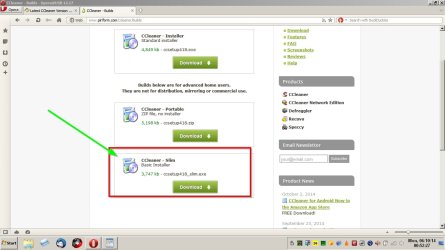
Slim Build

They used to offer a slim built which was great, (did not offer the toolbar)
but it is no longer listed on there official ccleaner site under builds.

Ccleaner.jpg

When a new version is released the Slim version doesn't appear on the builds page for at least a few days. I always wait until it's available.

Quote from Softpedia CCleaner download page:

Note to Softpedia users: We typically update this version a few days after the portable edition, because we prefer to wait for the ad-free version to be released, instead of listing the ad-supported edition. If you wish to be notified as soon as a new build is available, we advise you to follow that listing instead of this one. Thank you for understanding!
 

My Computer

Computer type
Laptop
Computer Manufacturer/Model Number
ASUS
OS
Microsoft Windows 7 Home Premium 64-bit 7601 Multiprocessor Free Service Pack 1
CPU
AMD C-60 APU with Radeon(tm) HD Graphics
Motherboard
ASUSTeK COMPUTER INC. X501U
Memory
4.00 GB
Graphics Card(s)
AMD Radeon HD 6290 Graphics
Sound Card
(1) AMD High Definition Audio Device (2) Realtek High Defi
Screen Resolution
1366 x 768 x 32 bits (4294967296 colors) @ 60 Hz
Hard Drives
Hitachi HTS545050A7E380 SATA Disk Device
Antivirus
Comodo CIS & FW, SecureAplus App Whitelisting, Threatfire
Browser
Cyberfox 64bit, Opera 64bit, Airfox
Other Info
Spy-The-Spy, HitmanPro.Alert, Norton Connect Safe, MJRegWatcher, BitDefender TrafficLight, Voodoo Shield, Zemana AntiMalware
Callender thank you. :)
 

My Computer

Computer type
PC/Desktop
Computer Manufacturer/Model Number
Custom Built
OS
Windows 10 Pro
CPU
AMD Ryzen 5 2400G Processor with Radeon RX Vega 11 Graphics
Motherboard
ASRock X470 Master SLI/AC AM4 AMD Promontory X470 SATA 6Gb/s
Memory
G.SKILL Ripjaws V Series 16GB (2 x 8GB) 288-Pin DDR4 SDRAM D
Graphics Card(s)
2047MB NVIDIA GeForce GTX 1060 6GB (EVGA)
Sound Card
Motherboard Built in
Monitor(s) Displays
Acer R240HY bidx 23.8-Inch IPS HDMI DVI VGA (1920 x 1080) Wi
Screen Resolution
1920 x 1080
Hard Drives
1TB Sandisk SSD PLUS (Main drive)
500 GB Seagate 7200 RPM (Games)
500 GB Western Digital 7200 RPM (Virtual Machines)
PSU
CORSAIR TX Series TX650M 650W 80+ Gold Modular Power Supply
Case
CORSAIR CARBIDE SPEC-02 Mid-Tower Gaming Case, Red LED Fan
Cooling
220mm, two 120mm, and four 60mm fans
Keyboard
Wired Dell keyboard
Mouse
Wireless Logitech mouse
Internet Speed
250mb down, 30mb up
Antivirus
Panda Cloud Antivirus
Browser
Chrome-ish x64
Other Info
Your awesome for reading this.
Version 4.18 of CCleaner had Active System Monitoring added and it is automatically activated. I didn't like it taking extra system resources on my system. You can disable the Active System Monitoring, but just be aware of it. Here's a link to a discussion about it on Piriform forums (the mfg of CCleaner).

New CCleaner build 4.18.4844 - CCleaner Discussion - Piriform Community Forums

Also, be careful with CCEnhancer. I added it to CCleaner 4.17 and checked some boxes to do extra cleaning and it damaged my Malwarebytes Pro install. I had to reinstall Malwarebytes Pro as it would no longer run or download and update its database. So just also be aware of this possibility. I uninstalled CCEnhancer, but I still use CCleaner 4.17 (without the Active System Monitoring feature).
May explain why my MBAM (paid for) goes not responding from time to time then) it does eventually resolve.

The update as I put in post #769 means I don't have to check it is down auto and I do not have any problems with e piriform site so why go to a mirror site?
 

My Computer

Computer type
PC/Desktop
Computer Manufacturer/Model Number
Own build (new) Desk1 / Asus ROG Win 7 / Desk2 1st build
OS
Desk1 7 Home Prem / Desk2 10 Pro / Main lap Asus ROG 10 Pro 2 laptop Toshiba 7 Pro Asus P2520 7 & 10
CPU
Desk1 i5 3750K / Laptop i7 GTX 860M / Desk2 i5 2500
Motherboard
Desk1 Asus P877-V / Desk2 Gigabyte H67 UD3H / Laptop ?
Memory
Desk1 8GB (1866) / Desk2 16GB (1333) / Laptop 8Gb DDR3
Graphics Card(s)
Desk 1& 2NVidia GTX 650 & Laptops on board Intel
Sound Card
Desk 1 & 2 -XONAR DG Realtek High Def audio Laptop
Monitor(s) Displays
Desk 1 Benq HD 2450 / Desk2 Philips 24" / Laptop 17.5"
Screen Resolution
1920x1080 D1 & D2 & Laptop 1
Hard Drives
Desk1 Samsung 120GB 830 SSD
Asus ROG 256GB 850 Pro SSD
Desk2 Samsung 840 256 SSD
Toshiba 120GB EVO
PSU
Desk 1 Corsair HX 1050/ Laptop ? / Desk 2 Corsair HX 650
Case
Desk 1 Cooler HAF XM ? Toshiba laptop / Desk2 Coolermaster
Cooling
Fans on all Desk1 -2 Desk2 - all Coolermasters 5 Laptop ?
Keyboard
Desk 1 MS Sidewinder X6 Desk 2 MS Sidewinder X 4
Mouse
Desk 1&2 - Gigabyte MS 900 gamer - laptop - Logitec wireless
Internet Speed
ADSL2+
Other Info
One other Desktop (tester) and spare Toshba laptop both with SSD's
Running Kaspersky 2016 ISS on all machines config'd identically
Logitec audio stereo systems on each machine (x3)
Canon MG5250MFC
Router/modem TP-Link running WPA2SK
The update as I put in post #769 means I don't have to check it is down auto and I do not have any problems with e piriform site so why go to a mirror site?

Sorry, I don't understand this comment. My comment about CCleaner 4.18 is not about checking for updates. It's about it running Automatic System Monitoring (basically running in memory monitoring status of needing a cleaning and then and running a cleaning when it thinks it is needed, automatically.) The first 4.18 version didn't let you turn this off. The latest version does let you deactivate. I have a copy of version 4.17 that works fine and will continue to use that.

I don't understand the comment about a mirror site, I didn't mention one. I just linked to the Piriform Community Forums message board where they were discussing problems with the new features.

In CCEnhancer, I believe that I had checked the cleaning box for MalwareBytes Pro. After that I noticed it wasn't running and would not accept database updates. So I uninstalled it and reinstalled it, then I started working again.

To get rid of CCEnhancer, I don't think it had an uninstall program. Uninstalling and reinstalling CCleaner didn't remove the CCEnhancer extra features. I had to delete the CCEnhancer folder from the hard disk. Then CCleaner was back to normal on reinstall.
 

My Computer

Computer type
Laptop
Computer Manufacturer/Model Number
Dell Inspiron 17R - 5737
OS
Windows 8.1 OEM 64-bit
CPU
Intel i5-4200U Processor (3M Cache, up to 2.6 GHz, UMA)
Memory
8 GB Dual Channel DDR3L 1600MHz (4GBx2) Memory
Graphics Card(s)
Intel HD Graphics
Sound Card
Realtek High Definition Audio
Monitor(s) Displays
17.3 inch LED Backlit Display with Truelife and HD+
Screen Resolution
1600 x 900
Hard Drives
Western Digital, 1-TB WD Blue SATA III, 5400 RPM, 8 MB Cache
Mouse
Microsoft Comfort Mouse 4500
Internet Speed
20 mb up / 17 mb down
Antivirus
MS Defender / Malwarebytes PRO
Browser
Google Chrome 64-bit
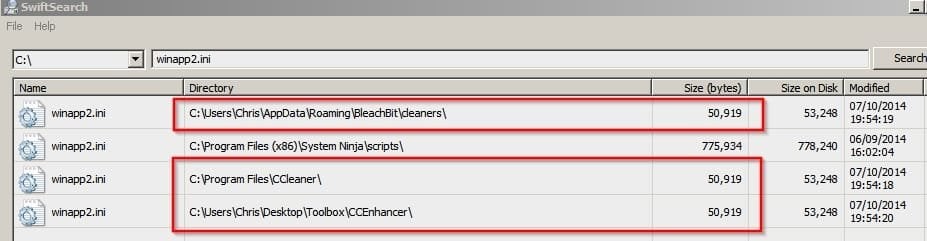
Berton above mentioned Major Geeks, that was a reply to him. The first 4.18 version had the ability to disable the monitoring, but it was in the advanced settings. The next update just moved it to a more obvious place. CCEnhancer just places a winapp2.ini in the CCleaner directory. Deleting that removes the additional options. I have the Malwarebytes settings checked, and no issues with MBAM. But each system is unique ;)

A Guy
 

My Computer

Computer type
PC/Desktop
OS
Windows 10 Home x64
CPU
INTEL Core i5-750 Quad-Core 3.37GHz
Motherboard
ASUS P7P55D
Memory
HyperX Fury Black Series 8GB (2 x 4GB) 1866Mhz
Graphics Card(s)
EVGA GeForce GTX 750 Superclocked 1GB 128-Bit GDDR5
Monitor(s) Displays
LG 32MA68HY 32" IPS
Screen Resolution
1920 x 1080
Hard Drives
Samsung 840 Evo 120GB, SEAGATE 500GB Barracuda® 7200.12, SATA 3 Gb/s, 7200 RPM, 16MB cache
PSU
ANTEC TruePower New TP-550, 80 PLUS, 550W
Case
ANTEC Three Hundred Illusion
Cooling
COOLER MASTER Hyper 212 Plus, 4 x 120mm 1 x 140mm Noctua's
Internet Speed
85 + Mbps
Antivirus
Avast
Browser
Vivaldi
The update as I put in post #769 means I don't have to check it is down auto and I do not have any problems with e piriform site so why go to a mirror site?

Sorry, I don't understand this comment. My comment about CCleaner 4.18 is not about checking for updates. It's about it running Automatic System Monitoring (basically running in memory monitoring status of needing a cleaning and then and running a cleaning when it thinks it is needed, automatically.) The first 4.18 version didn't let you turn this off. The latest version does let you deactivate. I have a copy of version 4.17 that works fine and will continue to use that.

I don't understand the comment about a mirror site, I didn't mention one. I just linked to the Piriform Community Forums message board where they were discussing problems with the new features.

In CCEnhancer, I believe that I had checked the cleaning box for MalwareBytes Pro. After that I noticed it wasn't running and would not accept database updates. So I uninstalled it and reinstalled it, then I started working again.

To get rid of CCEnhancer, I don't think it had an uninstall program. Uninstalling and reinstalling CCleaner didn't remove the CCEnhancer extra features. I had to delete the CCEnhancer folder from the hard disk. Then CCleaner was back to normal on reinstall.
I wasn't referring to your post I was just making a general statement about what and how others get the updates as I find it the simplest way is to do what I did in the post I referred to.
Sorry I fit looked like I was having a go or something it wasn't really anything to do with your post per se' I don't us e Enhancer as I really don't feel the need:)
 

My Computer

Computer type
PC/Desktop
Computer Manufacturer/Model Number
Own build (new) Desk1 / Asus ROG Win 7 / Desk2 1st build
OS
Desk1 7 Home Prem / Desk2 10 Pro / Main lap Asus ROG 10 Pro 2 laptop Toshiba 7 Pro Asus P2520 7 & 10
CPU
Desk1 i5 3750K / Laptop i7 GTX 860M / Desk2 i5 2500
Motherboard
Desk1 Asus P877-V / Desk2 Gigabyte H67 UD3H / Laptop ?
Memory
Desk1 8GB (1866) / Desk2 16GB (1333) / Laptop 8Gb DDR3
Graphics Card(s)
Desk 1& 2NVidia GTX 650 & Laptops on board Intel
Sound Card
Desk 1 & 2 -XONAR DG Realtek High Def audio Laptop
Monitor(s) Displays
Desk 1 Benq HD 2450 / Desk2 Philips 24" / Laptop 17.5"
Screen Resolution
1920x1080 D1 & D2 & Laptop 1
Hard Drives
Desk1 Samsung 120GB 830 SSD
Asus ROG 256GB 850 Pro SSD
Desk2 Samsung 840 256 SSD
Toshiba 120GB EVO
PSU
Desk 1 Corsair HX 1050/ Laptop ? / Desk 2 Corsair HX 650
Case
Desk 1 Cooler HAF XM ? Toshiba laptop / Desk2 Coolermaster
Cooling
Fans on all Desk1 -2 Desk2 - all Coolermasters 5 Laptop ?
Keyboard
Desk 1 MS Sidewinder X6 Desk 2 MS Sidewinder X 4
Mouse
Desk 1&2 - Gigabyte MS 900 gamer - laptop - Logitec wireless
Internet Speed
ADSL2+
Other Info
One other Desktop (tester) and spare Toshba laptop both with SSD's
Running Kaspersky 2016 ISS on all machines config'd identically
Logitec audio stereo systems on each machine (x3)
Canon MG5250MFC
Router/modem TP-Link running WPA2SK
CCEnhancer

Interesting comments on CCEnhancer!

I've been using it for a couple of years. I use MBAM free version rather than the paid version.

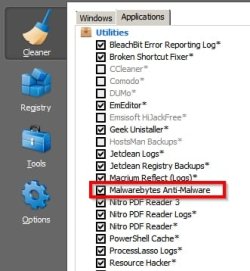
Sreenshots show entries added by CCEnhancer are denoted by an asterisk *

CCEnhancer makes use of winapp2.ini also available here: Downloads - Winapp2.com

Ccleaner.ini after adding winapp2.ini via CCEnhancerand running Ccleaner:

Ccleaner ini.jpg

Ccleaner options after adding winapp2.ini via CCEnhancer

Ccleaner 2.jpg

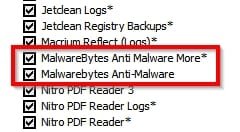
It's highly likely that selecting:

The checkbox for Malwarebytes Anti-Malware removes any saved logs.

It's possible but I can't confirm that selecting the checkbox for:

Malwarebytes Anti-Malware More*

might screw up the updates.

In any case I've always used the trim feature to remove that option. See this screenshot after trimming:

Ccleaner.jpg

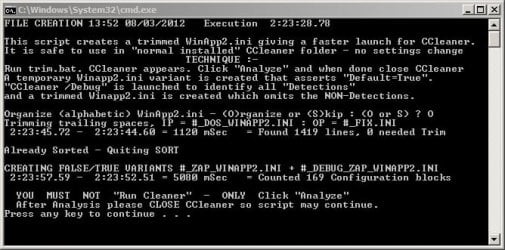
Trimming in progress:

Ccleaner Trim.jpg

Instructions for trimming: http://winapp2.com/Trim_HELP.txt

Download for trim.bat

Downloads - Winapp2.com
 

My Computer

Computer type
Laptop
Computer Manufacturer/Model Number
ASUS
OS
Microsoft Windows 7 Home Premium 64-bit 7601 Multiprocessor Free Service Pack 1
CPU
AMD C-60 APU with Radeon(tm) HD Graphics
Motherboard
ASUSTeK COMPUTER INC. X501U
Memory
4.00 GB
Graphics Card(s)
AMD Radeon HD 6290 Graphics
Sound Card
(1) AMD High Definition Audio Device (2) Realtek High Defi
Screen Resolution
1366 x 768 x 32 bits (4294967296 colors) @ 60 Hz
Hard Drives
Hitachi HTS545050A7E380 SATA Disk Device
Antivirus
Comodo CIS & FW, SecureAplus App Whitelisting, Threatfire
Browser
Cyberfox 64bit, Opera 64bit, Airfox
Other Info
Spy-The-Spy, HitmanPro.Alert, Norton Connect Safe, MJRegWatcher, BitDefender TrafficLight, Voodoo Shield, Zemana AntiMalware
Lol, I was going to do the trim until I read the instructions ;)

A Guy
 

My Computer

Computer type
PC/Desktop
OS
Windows 10 Home x64
CPU
INTEL Core i5-750 Quad-Core 3.37GHz
Motherboard
ASUS P7P55D
Memory
HyperX Fury Black Series 8GB (2 x 4GB) 1866Mhz
Graphics Card(s)
EVGA GeForce GTX 750 Superclocked 1GB 128-Bit GDDR5
Monitor(s) Displays
LG 32MA68HY 32" IPS
Screen Resolution
1920 x 1080
Hard Drives
Samsung 840 Evo 120GB, SEAGATE 500GB Barracuda® 7200.12, SATA 3 Gb/s, 7200 RPM, 16MB cache
PSU
ANTEC TruePower New TP-550, 80 PLUS, 550W
Case
ANTEC Three Hundred Illusion
Cooling
COOLER MASTER Hyper 212 Plus, 4 x 120mm 1 x 140mm Noctua's
Internet Speed
85 + Mbps
Antivirus
Avast
Browser
Vivaldi
Trim insstructions?

Lol, I was going to do the trim until I read the instructions ;)

A Guy

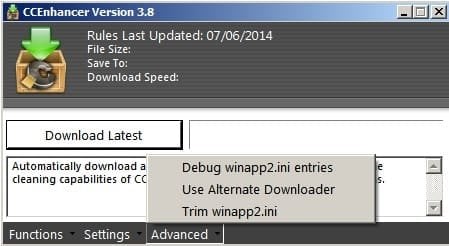
I know what you mean! Luckily CCEnhancer also has trim functionality built in. Next time you've made a system image backup you might like to give it a try. Your winapp2.ini should be copied and renamed so that you've got a backup.

Method that I use: Run Ccleaner and apply the ticks in the checkboxes that you need. Click Analyze.

Then before cleaning select Trim winapp2.ini in CCEnhancer.

Trim.jpg

Size after trim:

Trim 2.jpg
 

My Computer

Computer type
Laptop
Computer Manufacturer/Model Number
ASUS
OS
Microsoft Windows 7 Home Premium 64-bit 7601 Multiprocessor Free Service Pack 1
CPU
AMD C-60 APU with Radeon(tm) HD Graphics
Motherboard
ASUSTeK COMPUTER INC. X501U
Memory
4.00 GB
Graphics Card(s)
AMD Radeon HD 6290 Graphics
Sound Card
(1) AMD High Definition Audio Device (2) Realtek High Defi
Screen Resolution
1366 x 768 x 32 bits (4294967296 colors) @ 60 Hz
Hard Drives
Hitachi HTS545050A7E380 SATA Disk Device
Antivirus
Comodo CIS & FW, SecureAplus App Whitelisting, Threatfire
Browser
Cyberfox 64bit, Opera 64bit, Airfox
Other Info
Spy-The-Spy, HitmanPro.Alert, Norton Connect Safe, MJRegWatcher, BitDefender TrafficLight, Voodoo Shield, Zemana AntiMalware
CCleaner

Version History

  • v4.19.4867 (24 Oct 2014) - Added Windows 10 Preview compatibility.
    - Improved Opera 25 Cache cleaning.
    - Improved exception handling and reporting architecture.
    - Improved Auto-Update checking process.
    - Updated various translations.
    - Minor GUI Improvements.
    - Minor bug fixes.
 

My Computer

Computer type
PC/Desktop
Computer Manufacturer/Model Number
Custom Build
OS
Windows 7 Professional SP1 - x64 [Non-UEFI Boot]
CPU
Ivy Bridge Core i5 3570K (Delidded)
Motherboard
Asus P8Z77-V LE PLUS
Memory
G.Skill "Ares" DDR3 PC3-12800 - 1600MHz (16Gb)
Graphics Card(s)
Asus Dual-RX480-O4G
Sound Card
Creative Sound Blaster Z w/5.1 sound system
Monitor(s) Displays
Asus IPS 23"
Screen Resolution
16/9
Hard Drives
Internal:
500Go Sata 6Gb/s (x2)
500Go Sata 3Gb/s (x2)
SSD 60Go Sata 6Gb/s
PSU
In Win C 900W Series 80+ Platinum
Case
Thermaltake Chaser A71
Cooling
Custom Water Cooling Loop
Keyboard
Cooler Master QuickFire XTi
Mouse
Razer Imperator 2012 (4G)
Antivirus
MSE
Browser
IE 11.0.xxx Rtm
Other Info
"Raid0" with Intel Smart Response Technology (HDD/SSD)
Thank you NoN. First post updated. :)
 

My Computer

Computer type
PC/Desktop
Computer Manufacturer/Model Number
Self built custom
OS
64-bit Windows 11 Pro for Workstations
CPU
Intel i7-8700K OC'd to 5 GHz
Motherboard
ASUS ROG Maximus XI Formula Z390
Memory
64 GB (4x16GB) G.SKILL TridentZ RGB DDR4 3600 MHz
Graphics Card(s)
ASUS ROG-STRIX-GTX1080TI-O11G-GAMING
Sound Card
Integrated
Monitor(s) Displays
2 x Samsung Odyssey G7 27"
Screen Resolution
2560x1440
Hard Drives
1TB Samsung 990 PRO M.2,
4TB Samsung 990 PRO PRO M.2,
TerraMaster F8 SSD Plus NAS
PSU
Seasonic Prime Titanium 850W
Case
Thermaltake Core P3
Cooling
Corsair Hydro H115i
Keyboard
Logitech wireless K800
Mouse
Logitech MX Master 4
Internet Speed
2 Gb/s Download and 100 Mb/s Upload
Antivirus
Malwarebyte Anti-Malware Premium
Browser
Google Chrome
Other Info
Logitech Z625 speaker system,
Logitech BRIO 4K Pro webcam,
HP Color LaserJet Pro MFP M477fdn,
APC SMART-UPS RT 1000 XL - SURT1000XLI,
Galaxy S23 Plus phone
CCleaner v5.0 is now available in Beta!

After months of design, development and testing we are very excited to announce that CCleaner v5.0 is available to download in Beta!

CCleaner v5.0 sees a change with a redesigned, modern interface. The current interface you know and love has remained largely the same since its first release almost 10 years ago, so we decided it was time to give it a fresh new look!

Our design team have worked hard to bring CCleaner up-to-date while making sure it still felt like the same tool that our hundreds of millions of users love. We are extremely happy with the result, and we hope you are too!

For advanced users we have a beta version of CCleaner v5 available for you to download. (We don't recommend using this outside of test environments.)

Download CCleaner v5.0 Beta

This build includes just the interface change. The other features will be coming over the next week, with a final release build at the end of the month.

Source

A Guy
 

My Computer

Computer type
PC/Desktop
OS
Windows 10 Home x64
CPU
INTEL Core i5-750 Quad-Core 3.37GHz
Motherboard
ASUS P7P55D
Memory
HyperX Fury Black Series 8GB (2 x 4GB) 1866Mhz
Graphics Card(s)
EVGA GeForce GTX 750 Superclocked 1GB 128-Bit GDDR5
Monitor(s) Displays
LG 32MA68HY 32" IPS
Screen Resolution
1920 x 1080
Hard Drives
Samsung 840 Evo 120GB, SEAGATE 500GB Barracuda® 7200.12, SATA 3 Gb/s, 7200 RPM, 16MB cache
PSU
ANTEC TruePower New TP-550, 80 PLUS, 550W
Case
ANTEC Three Hundred Illusion
Cooling
COOLER MASTER Hyper 212 Plus, 4 x 120mm 1 x 140mm Noctua's
Internet Speed
85 + Mbps
Antivirus
Avast
Browser
Vivaldi
Thank you Bill. First post updated. :)
 

My Computer

Computer type
PC/Desktop
Computer Manufacturer/Model Number
Self built custom
OS
64-bit Windows 11 Pro for Workstations
CPU
Intel i7-8700K OC'd to 5 GHz
Motherboard
ASUS ROG Maximus XI Formula Z390
Memory
64 GB (4x16GB) G.SKILL TridentZ RGB DDR4 3600 MHz
Graphics Card(s)
ASUS ROG-STRIX-GTX1080TI-O11G-GAMING
Sound Card
Integrated
Monitor(s) Displays
2 x Samsung Odyssey G7 27"
Screen Resolution
2560x1440
Hard Drives
1TB Samsung 990 PRO M.2,
4TB Samsung 990 PRO PRO M.2,
TerraMaster F8 SSD Plus NAS
PSU
Seasonic Prime Titanium 850W
Case
Thermaltake Core P3
Cooling
Corsair Hydro H115i
Keyboard
Logitech wireless K800
Mouse
Logitech MX Master 4
Internet Speed
2 Gb/s Download and 100 Mb/s Upload
Antivirus
Malwarebyte Anti-Malware Premium
Browser
Google Chrome
Other Info
Logitech Z625 speaker system,
Logitech BRIO 4K Pro webcam,
HP Color LaserJet Pro MFP M477fdn,
APC SMART-UPS RT 1000 XL - SURT1000XLI,
Galaxy S23 Plus phone
UGH> I hate the new "modern" interfaces. They are so freaking ugly.
 

My Computer

Computer type
PC/Desktop
Computer Manufacturer/Model Number
Custom Built
OS
Windows 10 Pro
CPU
AMD Ryzen 5 2400G Processor with Radeon RX Vega 11 Graphics
Motherboard
ASRock X470 Master SLI/AC AM4 AMD Promontory X470 SATA 6Gb/s
Memory
G.SKILL Ripjaws V Series 16GB (2 x 8GB) 288-Pin DDR4 SDRAM D
Graphics Card(s)
2047MB NVIDIA GeForce GTX 1060 6GB (EVGA)
Sound Card
Motherboard Built in
Monitor(s) Displays
Acer R240HY bidx 23.8-Inch IPS HDMI DVI VGA (1920 x 1080) Wi
Screen Resolution
1920 x 1080
Hard Drives
1TB Sandisk SSD PLUS (Main drive)
500 GB Seagate 7200 RPM (Games)
500 GB Western Digital 7200 RPM (Virtual Machines)
PSU
CORSAIR TX Series TX650M 650W 80+ Gold Modular Power Supply
Case
CORSAIR CARBIDE SPEC-02 Mid-Tower Gaming Case, Red LED Fan
Cooling
220mm, two 120mm, and four 60mm fans
Keyboard
Wired Dell keyboard
Mouse
Wireless Logitech mouse
Internet Speed
250mb down, 30mb up
Antivirus
Panda Cloud Antivirus
Browser
Chrome-ish x64
Other Info
Your awesome for reading this.
Back
Top