Latest Intel Chipset Device Software

I have found many manufacturers sites do not have the latest drivers , they offer drivers that work with your machine but they are far from the latest.

You are right.
 

My Computer

Computer type
Laptop
Computer Manufacturer/Model Number
Lenovo ThinkPad X1 Carbon
OS
Windows 10 Pro 64-bit
CPU
Intel Core i7 5600U @ 2.60GHz Broadwell-U 14nm Technology
Motherboard
LENOVO 20BTS0Y500 (U3E1)
Memory
8.00GB Dual-Channel DDR3 @ 798MHz (11-11-11-28)
Graphics Card(s)
Intel HD Graphics 5500
Sound Card
Speaker/HP (Realtek High Definition Audio)
Monitor(s) Displays
Generic PnP Monitor on Intel HD Graphics 5500
Screen Resolution
1920 x 1080 x 32 bits per pixel
Hard Drives
SAMSUNG MZHPV256HDGL-000L1 (256 GB SSD)
Keyboard
Standard PS/2 Keyboard
Mouse
Logitech G102 Prodigy Gaming Mouse
Internet Speed
10 Mbps
Antivirus
Comodo Firewall 11.0.0.6606
Browser
Google Chrome and Firefox
Are you having problems if so ask a new question about the issues ?
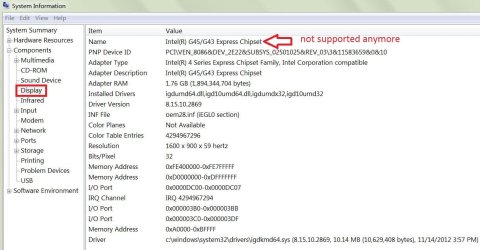
First I would guess you need to know what chip set you have i5 ? well onboard graphic's you'd have a chip set listing too in System information under Display
My old G45/ G43 is no longer supported but then again I have a GTX 980 instead for graphic that is supported by GeForce so the chip set driver is irrelevant it can come from the windows update system,
system-info-display-no support.jpg
 

My Computer

Computer type
PC/Desktop
Computer Manufacturer/Model Number
Custom assembled by me :}
OS
Win-7-Pro64bit 7-H-Prem-64bit
CPU
i7-5930K 2nd i9-9940x both water blocked VRM's too
Motherboard
ASUS SABERTOOTH X99 2nd ASUS x299 Apex
Memory
Trident-z 3200C14 2nd Trident-z 3600C16
Graphics Card(s)
EVGA 1080ti ftw3 2nd Titan Xp both water blocked
Sound Card
Built-in Realtek
Monitor(s) Displays
1-AOC G2460PG 24"G-Sync 144Hz/ 2nd 1-ASUS VG248QE 24" 144Hz
Screen Resolution
1920 x 1080 144Hz
Hard Drives
2-Samsung M.2 Evo & Evo Plus
2-Samsung 850 EVO 500GB SSD's/ 3-2.5 W.D. Black 1tb-&3-1tb/3-3.5 WD Black 1tb hdd's
PSU
EVGA SuperNOVA 1000-P2 2nd 1200-P2
Case
2-Corsair Obsidian Series 450D Black ATX Mid Tower
Cooling
Custom water loops
Keyboard
Logitech G710+/ 2nd Logitech G910
Mouse
2-RedDragon M901 Perdition 16400 dpi Gaming mouse = wired
Internet Speed
Comcast Ping 19ms 89.31mbps download speed 6.12mbps upload
Antivirus
Malwarebytes Pro/ Superantispyware Pro
Browser
FireFox & Pale moon
Other Info
2nd ASUS X299 Apex/Intel i9-9940x with Custom water loop/7H-Prem-x64/Corsair 450D case/Ram Trident-z 3600C16 4x8gb / Samsung970Evo plus 500gb SSD/Dual ssd EZ swap evo/PSU EVGA SuperNova 1200w-P2 80+Platinum/GPU Titan Xp /8-ML-140 on push-pull on 2-280GTX rads
If you were replying to me , no problems my friend ( a few mental issues) but thats something for another time.

Never mind , i don't think you were even referring to me , how embarrassing , need to go lay down now.
 

My Computer

Computer type
Laptop
Computer Manufacturer/Model Number
Asus laptop U56E
OS
Microsoft Windows 7 Home Premium 64-bit 7601 Multiprocessor Free Service Pack 1
CPU
Intel(R) Core(TM) i5-2430M CPU @ 2.40GHz
Motherboard
ASUSTeK Computer Inc. U56E
Memory
6.00 GB
Graphics Card(s)
Intel(R) HD Graphics 3000
Sound Card
(1) High Definition Audio Device (2) High Definition Audio
Screen Resolution
1366 x 768 x 32 bits (4294967296 colors) @ 60 Hz
Hard Drives
WDC WD6400BPVT-80HXZT3
New Intel chipset driver 10.1.1.14 WHQL version release. See first post for more details. :)
 

My Computer

Computer type
PC/Desktop
Computer Manufacturer/Model Number
Self built custom
OS
64-bit Windows 11 Pro for Workstations
CPU
Intel i7-8700K OC'd to 5 GHz
Motherboard
ASUS ROG Maximus XI Formula Z390
Memory
64 GB (4x16GB) G.SKILL TridentZ RGB DDR4 3600 MHz
Graphics Card(s)
ASUS ROG-STRIX-GTX1080TI-O11G-GAMING
Sound Card
Integrated
Monitor(s) Displays
2 x Samsung Odyssey G7 27"
Screen Resolution
2560x1440
Hard Drives
1TB Samsung 990 PRO M.2,
4TB Samsung 990 PRO PRO M.2,
TerraMaster F8 SSD Plus NAS
PSU
Seasonic Prime Titanium 850W
Case
Thermaltake Core P3
Cooling
Corsair Hydro H115i
Keyboard
Logitech wireless K800
Mouse
Logitech MX Master 4
Internet Speed
2 Gb/s Download and 100 Mb/s Upload
Antivirus
Malwarebyte Anti-Malware Premium
Browser
Google Chrome
Other Info
Logitech Z625 speaker system,
Logitech BRIO 4K Pro webcam,
HP Color LaserJet Pro MFP M477fdn,
APC SMART-UPS RT 1000 XL - SURT1000XLI,
Galaxy S23 Plus phone
Question: Dell Prec WS T3620. Windows freezes during post and goes on a boot loop. Dell says a New Intel chipset is the cause. They send me to the client with a new SSD, with notes of " replace hard drive". Client tells me I am suppose to install the new chipset. How do I suppose to install the new chipset when windows isn't running? To warn- I'm not really good using CMD?
 

My Computer

Computer Manufacturer/Model Number
Dell Latitude e6530
OS
Windows 7 pro x64
CPU
3rd gen Intel Core i5-3340M
Memory
8 GB
Graphics Card(s)
Intel HD Graphics 4000
Screen Resolution
15.6" HD+ (1600x900) Wide View Anti-Glare WLED-backlit
Hard Drives
2.5 inch 500GB Solid State Hybrid Drive
Keyboard
USA
Internet Speed
15 MB Down/ 5 MB Up
Antivirus
norton internet security
Browser
Firefox
If you have to replace the drive, then you`ll have to reinstall windows, didn`t you read the job description ?

Try running a startup repair first, or a system restore.

You do whatever you`re paid to do, that`s it, nothing more :)

A chipset driver would not cause a boot loop, as it hasn`t even got to windows yet.

Someone messed up their PC and you have to fix it.

Welcome to the world of a Field Technician :D
 

My Computer

Computer type
PC/Desktop
Computer Manufacturer/Model Number
Skylake Special #666
OS
Windows 10 Pro x64
CPU
Intel Core i7 6700K
Motherboard
Asus Sabertooth Z170 Mark 1
Memory
GSkill TridentZ RGB 16GB 3600 16-16-16-36
Graphics Card(s)
EVGA GTX 980 Ti SC x2
Sound Card
Realtek High Definition
Monitor(s) Displays
AOC G2460PG
Screen Resolution
1920 x 1080 144Hz
Hard Drives
Samsung 860 Pro 256GB, Seagate Barracuda 4TB x2
PSU
EVGA 1000 P2, EVGA White Custom Braided Cables
Case
Corsair Vengeance C70 Gunmetal Black
Cooling
Corsair H100i v2, Corsair ML120 x2, Thermal Grizzly Kryonaut
Keyboard
Logitech G910 Orion Spectrum
Mouse
Logitech G700s
Internet Speed
Verizon Fios Quantum Gateway 75/75
Antivirus
Windows Defender, Malwarebytes Free 3.8.3
Browser
Chrome
Other Info
Corsair SP120 x4, LG Blu-ray Drive, Durabrand HT-395 100 Watt Dolby Digital Amp, Corsair H2100 Wireless 7.1 Headset
Job notes read " Replace SSD".

Get onsite, cx is telling me I need to install a chipset update if/when the new formatted SSD installs. But when windows tries to start, it stops, restarts, stops again (Boot loop).
By replacing the SSD, I fulfilled my job requirements.
Customer (who is confined to wheel chair) runs a marketing business from home. I was trying to be nice and "go the extra step".

SO I came on here asking if there is a way to install a chipset update without a working OS?


If you have to replace the drive, then you`ll have to reinstall windows, didn`t you read the job description ?

Try running a startup repair first, or a system restore.

You do whatever you`re paid to do, that`s it, nothing more :)

A chipset driver would not cause a boot loop, as it hasn`t even got to windows yet.

Someone messed up their PC and you have to fix it.

Welcome to the world of a Field Technician :D
 

My Computer

Computer Manufacturer/Model Number
Dell Latitude e6530
OS
Windows 7 pro x64
CPU
3rd gen Intel Core i5-3340M
Memory
8 GB
Graphics Card(s)
Intel HD Graphics 4000
Screen Resolution
15.6" HD+ (1600x900) Wide View Anti-Glare WLED-backlit
Hard Drives
2.5 inch 500GB Solid State Hybrid Drive
Keyboard
USA
Internet Speed
15 MB Down/ 5 MB Up
Antivirus
norton internet security
Browser
Firefox
New Intel chipset driver 10.1.1.42 WHQL version release. See first post for more details. :)
 

My Computer

Computer type
PC/Desktop
Computer Manufacturer/Model Number
Self built custom
OS
64-bit Windows 11 Pro for Workstations
CPU
Intel i7-8700K OC'd to 5 GHz
Motherboard
ASUS ROG Maximus XI Formula Z390
Memory
64 GB (4x16GB) G.SKILL TridentZ RGB DDR4 3600 MHz
Graphics Card(s)
ASUS ROG-STRIX-GTX1080TI-O11G-GAMING
Sound Card
Integrated
Monitor(s) Displays
2 x Samsung Odyssey G7 27"
Screen Resolution
2560x1440
Hard Drives
1TB Samsung 990 PRO M.2,
4TB Samsung 990 PRO PRO M.2,
TerraMaster F8 SSD Plus NAS
PSU
Seasonic Prime Titanium 850W
Case
Thermaltake Core P3
Cooling
Corsair Hydro H115i
Keyboard
Logitech wireless K800
Mouse
Logitech MX Master 4
Internet Speed
2 Gb/s Download and 100 Mb/s Upload
Antivirus
Malwarebyte Anti-Malware Premium
Browser
Google Chrome
Other Info
Logitech Z625 speaker system,
Logitech BRIO 4K Pro webcam,
HP Color LaserJet Pro MFP M477fdn,
APC SMART-UPS RT 1000 XL - SURT1000XLI,
Galaxy S23 Plus phone
New Intel chipset driver 10.1.17765.8094 version release. See first post for more details. :-)
 

My Computer

Computer type
PC/Desktop
Computer Manufacturer/Model Number
Self built custom
OS
64-bit Windows 11 Pro for Workstations
CPU
Intel i7-8700K OC'd to 5 GHz
Motherboard
ASUS ROG Maximus XI Formula Z390
Memory
64 GB (4x16GB) G.SKILL TridentZ RGB DDR4 3600 MHz
Graphics Card(s)
ASUS ROG-STRIX-GTX1080TI-O11G-GAMING
Sound Card
Integrated
Monitor(s) Displays
2 x Samsung Odyssey G7 27"
Screen Resolution
2560x1440
Hard Drives
1TB Samsung 990 PRO M.2,
4TB Samsung 990 PRO PRO M.2,
TerraMaster F8 SSD Plus NAS
PSU
Seasonic Prime Titanium 850W
Case
Thermaltake Core P3
Cooling
Corsair Hydro H115i
Keyboard
Logitech wireless K800
Mouse
Logitech MX Master 4
Internet Speed
2 Gb/s Download and 100 Mb/s Upload
Antivirus
Malwarebyte Anti-Malware Premium
Browser
Google Chrome
Other Info
Logitech Z625 speaker system,
Logitech BRIO 4K Pro webcam,
HP Color LaserJet Pro MFP M477fdn,
APC SMART-UPS RT 1000 XL - SURT1000XLI,
Galaxy S23 Plus phone
New Intel chipset driver 10.1.17765.8094 version release. See first post for more details. :-)

Greetings Brink,

Both 10.1.1.42 and 10.1.17 are still listed on the intel website as latest. Can you kindly explain the difference between these and 10.1.17765.8094?

Many thanks and best regards,
 

My Computer

Computer type
PC/Desktop
OS
Windows 7 Ultimate x86
10.1.17765.8094 is just the latest version released.
 

My Computer

Computer type
PC/Desktop
Computer Manufacturer/Model Number
Self built custom
OS
64-bit Windows 11 Pro for Workstations
CPU
Intel i7-8700K OC'd to 5 GHz
Motherboard
ASUS ROG Maximus XI Formula Z390
Memory
64 GB (4x16GB) G.SKILL TridentZ RGB DDR4 3600 MHz
Graphics Card(s)
ASUS ROG-STRIX-GTX1080TI-O11G-GAMING
Sound Card
Integrated
Monitor(s) Displays
2 x Samsung Odyssey G7 27"
Screen Resolution
2560x1440
Hard Drives
1TB Samsung 990 PRO M.2,
4TB Samsung 990 PRO PRO M.2,
TerraMaster F8 SSD Plus NAS
PSU
Seasonic Prime Titanium 850W
Case
Thermaltake Core P3
Cooling
Corsair Hydro H115i
Keyboard
Logitech wireless K800
Mouse
Logitech MX Master 4
Internet Speed
2 Gb/s Download and 100 Mb/s Upload
Antivirus
Malwarebyte Anti-Malware Premium
Browser
Google Chrome
Other Info
Logitech Z625 speaker system,
Logitech BRIO 4K Pro webcam,
HP Color LaserJet Pro MFP M477fdn,
APC SMART-UPS RT 1000 XL - SURT1000XLI,
Galaxy S23 Plus phone
Thanks Brink,
Can this be used for Skylake CPU?
 

My Computer

Computer type
PC/Desktop
OS
Windows 7 Ultimate x86
If it's 6th Gen Core, it should.

Products formerly Skylake

The installer will check and let you know if it's not compatible.
 

My Computer

Computer type
PC/Desktop
Computer Manufacturer/Model Number
Self built custom
OS
64-bit Windows 11 Pro for Workstations
CPU
Intel i7-8700K OC'd to 5 GHz
Motherboard
ASUS ROG Maximus XI Formula Z390
Memory
64 GB (4x16GB) G.SKILL TridentZ RGB DDR4 3600 MHz
Graphics Card(s)
ASUS ROG-STRIX-GTX1080TI-O11G-GAMING
Sound Card
Integrated
Monitor(s) Displays
2 x Samsung Odyssey G7 27"
Screen Resolution
2560x1440
Hard Drives
1TB Samsung 990 PRO M.2,
4TB Samsung 990 PRO PRO M.2,
TerraMaster F8 SSD Plus NAS
PSU
Seasonic Prime Titanium 850W
Case
Thermaltake Core P3
Cooling
Corsair Hydro H115i
Keyboard
Logitech wireless K800
Mouse
Logitech MX Master 4
Internet Speed
2 Gb/s Download and 100 Mb/s Upload
Antivirus
Malwarebyte Anti-Malware Premium
Browser
Google Chrome
Other Info
Logitech Z625 speaker system,
Logitech BRIO 4K Pro webcam,
HP Color LaserJet Pro MFP M477fdn,
APC SMART-UPS RT 1000 XL - SURT1000XLI,
Galaxy S23 Plus phone
Thanks Brink, but can't seem to find a w7 version?
 

My Computer

Computer type
PC/Desktop
OS
Windows 7 Ultimate x86
Thanks Brink, but can't seem to find a w7 version?

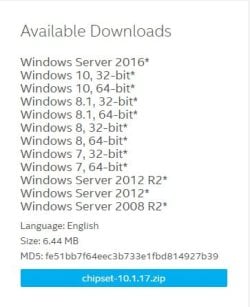
The download link on the first page is for Windows 7 as well.

downloads.jpg
 

My Computer

Computer type
PC/Desktop
Computer Manufacturer/Model Number
Self built custom
OS
64-bit Windows 11 Pro for Workstations
CPU
Intel i7-8700K OC'd to 5 GHz
Motherboard
ASUS ROG Maximus XI Formula Z390
Memory
64 GB (4x16GB) G.SKILL TridentZ RGB DDR4 3600 MHz
Graphics Card(s)
ASUS ROG-STRIX-GTX1080TI-O11G-GAMING
Sound Card
Integrated
Monitor(s) Displays
2 x Samsung Odyssey G7 27"
Screen Resolution
2560x1440
Hard Drives
1TB Samsung 990 PRO M.2,
4TB Samsung 990 PRO PRO M.2,
TerraMaster F8 SSD Plus NAS
PSU
Seasonic Prime Titanium 850W
Case
Thermaltake Core P3
Cooling
Corsair Hydro H115i
Keyboard
Logitech wireless K800
Mouse
Logitech MX Master 4
Internet Speed
2 Gb/s Download and 100 Mb/s Upload
Antivirus
Malwarebyte Anti-Malware Premium
Browser
Google Chrome
Other Info
Logitech Z625 speaker system,
Logitech BRIO 4K Pro webcam,
HP Color LaserJet Pro MFP M477fdn,
APC SMART-UPS RT 1000 XL - SURT1000XLI,
Galaxy S23 Plus phone
I mention that the URL no longer points to the 10.1.17 version, which definitely did support Win7.

The web page on the Intel site pointed to by the URL in post #1 of this thread now provides version 10.1.18 for download, which appears to now be for Win10-only. No more official support for Win7 from Intel I guess, and they're "cleaning house" to reflect that.

I propose that the "legacy" final 10.1.17 version of the Chipset INF Utility be posted here on SevenForums, as a download link in post #1 of this thread.

I haven't attempted to use 10.1.18 to see if it would still work for Win7, but I doubt that it will. So I feel we really need to memorialize the final 10.1.17 version and make it available in perpetuity, right here on this thread, in case anybody actually needs to or wants to reinstall Win7 in the future.

Same as through a how-to thread in the Installation Sub-forum we now provide an automated way (e.g. user-developed 7UP command) to produce a totally updated Win7 install media (slipstreaming all past Windows Updates with retail Win7 install media), to insure against MS totally shutting down the Windows Updates server for Win7, it seems like a good insurance policy to also provide for download the required 10.1.17 Intel Chipset INF Utility on SevenForums.
 

My Computer

Computer type
PC/Desktop
Computer Manufacturer/Model Number
Home-built, two systems (1) and (2)
OS
Windows 7 Pro x64 (1), Win7 Pro X64 (2)
CPU
i5-3350p 3.1Ghz/6MB-cache (1); E8400 3.0Ghz/6MB-cache (2)
Motherboard
ASUS P8Z77-V Pro (1); ASUS P5Q3 (2)
Memory
8GB PC3-12800 DDR3 (1); 4GB PC3-10600 DDR3 (2)
Graphics Card(s)
ATI HD7750 (1), (see TV cards); ATI R7 250 (2)
Sound Card
Realtek ALC892 HD Audio (1); Realtek ALC1200 HD Audio (2)
Monitor(s) Displays
Eizo HD2441W LCD, Eizo S2433W (1); Eizo 24" S2433W (2)
Screen Resolution
1920x1200, 1920x1200 (1); 1920x1200 (2)
Hard Drives
(1) 1TB SATA-II (7200RPM), 2x2TB SATA-III (7200RPM), 250GB SATA-III (10000RPM) for OS; 2x2TB external USB 3.0

(2) 320GB SATA-II (7200RPM), 750GB SATA-II (7200RPM), 150GB SATA-II (10000RPM) for OS; 2TB external USB 3.0
PSU
Nesteq ECS-6001 600W (1); Nesteq ECS-5001 500W (2)
Case
Acousti-Case 360 (1) and (2)
Cooling
Noctua NH-U12P SE2 for CPU, 2x120mm case fans (1) and (2)
Keyboard
IBM PS/2 (1) and (2)
Mouse
Logitech MX Revolution wireless (1); Microsoft wired (2)
Internet Speed
100mbps down / 10mbps up
Antivirus
Microsoft Security Essentials; Malwarebyte Anti-Malware Pro
Browser
Firefox
Other Info
Ceton InfiniTV 4-tuner cablecard-enabled TV card as well as Hauppauge HVR-2250 OTA/ATSC 2-tuner TV card in (1), running under Win7 WMC

My Computer

Computer type
PC/Desktop
Computer Manufacturer/Model Number
Self built custom
OS
64-bit Windows 11 Pro for Workstations
CPU
Intel i7-8700K OC'd to 5 GHz
Motherboard
ASUS ROG Maximus XI Formula Z390
Memory
64 GB (4x16GB) G.SKILL TridentZ RGB DDR4 3600 MHz
Graphics Card(s)
ASUS ROG-STRIX-GTX1080TI-O11G-GAMING
Sound Card
Integrated
Monitor(s) Displays
2 x Samsung Odyssey G7 27"
Screen Resolution
2560x1440
Hard Drives
1TB Samsung 990 PRO M.2,
4TB Samsung 990 PRO PRO M.2,
TerraMaster F8 SSD Plus NAS
PSU
Seasonic Prime Titanium 850W
Case
Thermaltake Core P3
Cooling
Corsair Hydro H115i
Keyboard
Logitech wireless K800
Mouse
Logitech MX Master 4
Internet Speed
2 Gb/s Download and 100 Mb/s Upload
Antivirus
Malwarebyte Anti-Malware Premium
Browser
Google Chrome
Other Info
Logitech Z625 speaker system,
Logitech BRIO 4K Pro webcam,
HP Color LaserJet Pro MFP M477fdn,
APC SMART-UPS RT 1000 XL - SURT1000XLI,
Galaxy S23 Plus phone
I mention that the URL no longer points to the 10.1.17 version, which definitely did support Win7.

The web page on the Intel site pointed to by the URL in post #1 of this thread now provides version 10.1.18 for download, which appears to now be for Win10-only. No more official support for Win7 from Intel I guess, and they're "cleaning house" to reflect that.

I propose that the "legacy" final 10.1.17 version of the Chipset INF Utility be posted here on SevenForums, as a download link in post #1 of this thread.

I haven't attempted to use 10.1.18 to see if it would still work for Win7, but I doubt that it will. So I feel we really need to memorialize the final 10.1.17 version and make it available in perpetuity, right here on this thread, in case anybody actually needs to or wants to reinstall Win7 in the future.

Same as through a how-to thread in the Installation Sub-forum we now provide an automated way (e.g. user-developed 7UP command) to produce a totally updated Win7 install media (slipstreaming all past Windows Updates with retail Win7 install media), to insure against MS totally shutting down the Windows Updates server for Win7, it seems like a good insurance policy to also provide for download the required 10.1.17 Intel Chipset INF Utility on SevenForums.

You can follow and trust this Source, you'll find your need with Intel Chipset Device Software Serie 10.0.x & 10.1.1.x.
 

My Computer

Computer type
PC/Desktop
Computer Manufacturer/Model Number
Custom Build
OS
Windows 7 Professional SP1 - x64 [Non-UEFI Boot]
CPU
Ivy Bridge Core i5 3570K (Delidded)
Motherboard
Asus P8Z77-V LE PLUS
Memory
G.Skill "Ares" DDR3 PC3-12800 - 1600MHz (16Gb)
Graphics Card(s)
Asus Dual-RX480-O4G
Sound Card
Creative Sound Blaster Z w/5.1 sound system
Monitor(s) Displays
Asus IPS 23"
Screen Resolution
16/9
Hard Drives
Internal:
500Go Sata 6Gb/s (x2)
500Go Sata 3Gb/s (x2)
SSD 60Go Sata 6Gb/s
PSU
In Win C 900W Series 80+ Platinum
Case
Thermaltake Chaser A71
Cooling
Custom Water Cooling Loop
Keyboard
Cooler Master QuickFire XTi
Mouse
Razer Imperator 2012 (4G)
Antivirus
MSE
Browser
IE 11.0.xxx Rtm
Other Info
"Raid0" with Intel Smart Response Technology (HDD/SSD)
You can also download the Win7 version of the chipset driver from the archive of Intel's website:

chipset-10.1.17.zip (MD5: fe51bb7f64eec3b733e1fbd814927b39)

Based on the processors/chipsets it supports, I think it should work fine up to 9th gen processors.
 
Last edited:

My Computers

System One System Two

  • Computer type
    PC/Desktop
    OS
    Windows 7 Home Premium (X64) / Windows Server 2008 R2 Standard
  • Computer type
    PC/Desktop
Back
Top