Latest NVIDIA ForceWare Video Drivers Windows 7

Mine aren't dropping below 405 with these drivers :(


Same here, at 405, and never goes down below that. And it doesn't show that it can be set down lower than that with any OC'ing programs. :huh:

I think it could be done in Nvidia Inspector, as it has the 3 performance profiles with the speeds for each level. Just the only problem with Nvidia Inspector is there's no option to apply speeds on startup.

I disabled my second monitor, but also had to disable my gadgets for the speeds to drop. As soon as they did my idle temps dropped straight down to 50c idle *sigh*.
 

My Computer My Computer

Computer type
PC/Desktop
Computer Manufacturer/Model Number
Custom Built
OS
Windows 8.1 Pro x64
CPU
Intel Core i7 4790k
Motherboard
MSI Z97S Krait Edition
Memory
8GB Corsair Dominator 1600MHz
Graphics Card(s)
MSI TwinFrozr GeForce GTX770
Sound Card
ASUS Xonar DX/XD 7.1
Monitor(s) Displays
Dell 24" S2409W + Dell 20" E207WFP
Screen Resolution
1920x1080 + 1680x1050
Hard Drives
1x 120GB OCZ Agility 3, 1x 750GB Western Digital Caviar Black, 1x 1TB Western Digital Caviar Blue
PSU
Corsair HX850 modular
Case
Fractal Design Define R4
Cooling
Corsair H60 w/ twin Corsair SP120 fans
Keyboard
Logitech G510S Keyboard
Mouse
Logitech G500S Laser Mouse
Internet Speed
40Mbps
Antivirus
Microsoft Security Essentials
Browser
Google Chrome
Other Info
LG Blu-Ray player
I disabled my second monitor, but also had to disable my gadgets for the speeds to drop. As soon as they did my idle temps dropped straight down to 50c idle *sigh*.


With just the one monitor right? You're not saying you disabled it, then enable back again and it staying dropped?

I also unplugged my monitor, just to see if it would clear, and saw the low idle clocks. Then back again with 2, the same 405. :(

Wonder if a clean install, or disconnecting the card out of it's slot and back in would do anything. :huh:
 

My Computer My Computer

Computer type
PC/Desktop
Computer Manufacturer/Model Number
Airbot 2.0
OS
Windows 7 Ultimate x64 SP1
CPU
Core i7 920 (D0) @ 4Ghz, *26c idle *65c full load on air
Motherboard
Asus P6X58D Premium - Sata 6Gb/s - USB 3.0
Memory
12GB DDR3 Corsair Dominator -CMD12GX3M6A1600C8 at 1600MHz
Graphics Card(s)
Zotac Geforce GTX 770
Sound Card
ASUS Xonar D2X
Monitor(s) Displays
1 LG 24" Flatron W2453V-PF 1 Samsung 24" P2450H both 2ms RT
Screen Resolution
1920x1080@60hz
Hard Drives
1 Samsung 250GB 840 Evo SSD
1 OCZ Vertex2 180GB SSD
1 TB Samsung Spinpoint F1 7200RPM 32MB cache
2 500GB WD Caviar Blacks 7200RPM 32MB cache (WD5001AALS)

Pioneer DVD Burner DVR-S18M
PSU
Corsair HX1000W
Case
Cooler Master HAF 932
Cooling
Case Fans *3 230mm, *1 140mm/CPU - *Tuniq Tower 120 Extreme
Keyboard
Logitech Wireless MK700
Mouse
Logitech Wireless MK700
Internet Speed
DL 15 Mbps UL 0.98 Mbps
Antivirus
None
Browser
Firefox Nightly
Other Info
Processor-7.7 *RAM- 7.9 *Graphics-7.9 *Gaming Graphics- 7.9 *SSD- 7.8 W.E.I final score= 7.7
*Phone- LG Nexus 5
Just the one monitor yea, as soon as I renabled the second monitor, the clocks went back up and stayed there and the temps shot back up.

People on the nvnews forum are saying these drivers are best with a clean install. Might try and reinstall the drivers tomorrow though, if not then can only hope it's fixed with the WHQL ones.
 

My Computer My Computer

Computer type
PC/Desktop
Computer Manufacturer/Model Number
Custom Built
OS
Windows 8.1 Pro x64
CPU
Intel Core i7 4790k
Motherboard
MSI Z97S Krait Edition
Memory
8GB Corsair Dominator 1600MHz
Graphics Card(s)
MSI TwinFrozr GeForce GTX770
Sound Card
ASUS Xonar DX/XD 7.1
Monitor(s) Displays
Dell 24" S2409W + Dell 20" E207WFP
Screen Resolution
1920x1080 + 1680x1050
Hard Drives
1x 120GB OCZ Agility 3, 1x 750GB Western Digital Caviar Black, 1x 1TB Western Digital Caviar Blue
PSU
Corsair HX850 modular
Case
Fractal Design Define R4
Cooling
Corsair H60 w/ twin Corsair SP120 fans
Keyboard
Logitech G510S Keyboard
Mouse
Logitech G500S Laser Mouse
Internet Speed
40Mbps
Antivirus
Microsoft Security Essentials
Browser
Google Chrome
Other Info
LG Blu-Ray player
Did you guys do clean install of the drivers?
You know like, uninstall, boot to safe mode, driver sweeper then back to windows and install.

edit: i dont think theres anything wrong with drivers, because it works for some, or then theres something more to it.
 

My Computer My Computer

OS
Windows 7 Professional x64
CPU
E6420 (temporary)
Motherboard
G43 Twins-FullHD (temporary)
Memory
DDR2 2x1gb (temporary)
Graphics Card(s)
Evga GTX 480 Superclocked+
Sound Card
Creative X-FI Extreme Audio Pci-E
Monitor(s) Displays
2x24" Samsung SyncMaster 2494HS
Screen Resolution
1920x1080
Hard Drives
2xSamsung 500GB
Samsung F3 1 TB
PSU
OCZ GameXstream 850w
Case
Cooler Master HAF X
Keyboard
Logitech Illuminated
Mouse
Logitech MX518
Internet Speed
40/2
Hello Nikkeli,

I just install the new versions on top of my current version without any issue.
 

My Computer My Computer

Computer type
PC/Desktop
Computer Manufacturer/Model Number
Self built custom
OS
64-bit Windows 11 Pro for Workstations
CPU
Intel i7-8700K OC'd to 5 GHz
Motherboard
ASUS ROG Maximus XI Formula Z390
Memory
64 GB (4x16GB) G.SKILL TridentZ RGB DDR4 3600 MHz
Graphics Card(s)
ASUS ROG-STRIX-GTX1080TI-O11G-GAMING
Sound Card
Integrated
Monitor(s) Displays
2 x Samsung Odyssey G7 27"
Screen Resolution
2560x1440
Hard Drives
1TB Samsung 990 PRO M.2,
4TB Samsung 990 PRO PRO M.2,
TerraMaster F8 SSD Plus NAS
PSU
Seasonic Prime Titanium 850W
Case
Thermaltake Core P3
Cooling
Corsair Hydro H115i
Keyboard
Logitech wireless K800
Mouse
Logitech MX Master 4
Internet Speed
2 Gb/s Download and 100 Mb/s Upload
Antivirus
Malwarebyte Anti-Malware Premium
Browser
Google Chrome
Other Info
Logitech Z625 speaker system,
Logitech BRIO 4K Pro webcam,
HP Color LaserJet Pro MFP M477fdn,
APC SMART-UPS RT 1000 XL - SURT1000XLI,
Galaxy S23 Plus phone
Hello Nikkeli,

I just install the new versions on top of my current version without any issue.

Which is exactly why something unexpected can happen, most of the times everything goes just fine.
 

My Computer My Computer

OS
Windows 7 Professional x64
CPU
E6420 (temporary)
Motherboard
G43 Twins-FullHD (temporary)
Memory
DDR2 2x1gb (temporary)
Graphics Card(s)
Evga GTX 480 Superclocked+
Sound Card
Creative X-FI Extreme Audio Pci-E
Monitor(s) Displays
2x24" Samsung SyncMaster 2494HS
Screen Resolution
1920x1080
Hard Drives
2xSamsung 500GB
Samsung F3 1 TB
PSU
OCZ GameXstream 850w
Case
Cooler Master HAF X
Keyboard
Logitech Illuminated
Mouse
Logitech MX518
Internet Speed
40/2
True, but if it does, you can just uninstall the video driver (in safe mode if need be), then install the new driver version.
 

My Computer My Computer

Computer type
PC/Desktop
Computer Manufacturer/Model Number
Self built custom
OS
64-bit Windows 11 Pro for Workstations
CPU
Intel i7-8700K OC'd to 5 GHz
Motherboard
ASUS ROG Maximus XI Formula Z390
Memory
64 GB (4x16GB) G.SKILL TridentZ RGB DDR4 3600 MHz
Graphics Card(s)
ASUS ROG-STRIX-GTX1080TI-O11G-GAMING
Sound Card
Integrated
Monitor(s) Displays
2 x Samsung Odyssey G7 27"
Screen Resolution
2560x1440
Hard Drives
1TB Samsung 990 PRO M.2,
4TB Samsung 990 PRO PRO M.2,
TerraMaster F8 SSD Plus NAS
PSU
Seasonic Prime Titanium 850W
Case
Thermaltake Core P3
Cooling
Corsair Hydro H115i
Keyboard
Logitech wireless K800
Mouse
Logitech MX Master 4
Internet Speed
2 Gb/s Download and 100 Mb/s Upload
Antivirus
Malwarebyte Anti-Malware Premium
Browser
Google Chrome
Other Info
Logitech Z625 speaker system,
Logitech BRIO 4K Pro webcam,
HP Color LaserJet Pro MFP M477fdn,
APC SMART-UPS RT 1000 XL - SURT1000XLI,
Galaxy S23 Plus phone
If you installed the new driver and your PhysX stopped working, go to Control Panel> programs >PhysX and click > do repair. This will re-enable PhysX.
Just thought I would mention this, just in case.
 

My Computer My Computer

Computer Manufacturer/Model Number
self built
OS
Windows 7 Professional 64
CPU
i7 860
Motherboard
ASUS P7P55D-E Pro /onboard SATA 6Gb/s USB 3.0
Memory
8GB Corsair CMX4GX3M2A1600C9 DDR3 1600
Graphics Card(s)
(2) Nvidia EVGA GTX 470 SLI
Sound Card
Onboard VIA VT1828S 8 channels
Monitor(s) Displays
ASUS VW266H 25.5" HDMI Widescreen LCD and HP vs19 LCD 19"
Screen Resolution
1920 x 1200 : 1280 X 1024 dual
Hard Drives
Intel X25-M 80GB SSD (boot)
Seagate Barracuda 80GB
Western Digital Caviar Black 500GB
Asus DRW-24B1ST/BLK/B/AS
PSU
COOLER MASTER Silent Pro 1000W
Case
LIAN LI Lancool PC-K62
Cooling
Prolimatech Megahalems with Scythe "ULTRA KAZE" 120
Keyboard
Saitek
Mouse
Microsoft Optical comfort mouse 3000
Internet Speed
Comcast Ultra tier 30/5
I used the same method Brink described, installing them on top of the other ones, but ever since the 2 previous forcewares I've been having trouble with that message
The display driver stopped working......

I'm not o'cing my GPU, but I get it every once in a while, even when I'm not gaming, when I view a video or browse through a video folder on the PC, and aero momentarily disappears and basic mode kicks in for a while.......


Is anyone else getting this? Solution pls........
 

My Computer My Computer

Computer Manufacturer/Model Number
It's a Custom Build.....
OS
Windows 7 Ultimate x64, 7600.20647 RTM
CPU
Intel Core2Quad Q9505 @ 4.0Ghz
Motherboard
Intel Skyburg DP45SG
Memory
6GB Transcend DDR3-1333 Dual Channel
Graphics Card(s)
ASUS GTX285 1GB GDDR3
Sound Card
OnBoard Intel IDT HD Audio
Monitor(s) Displays
HP w2207h 22" WideScreen LCD, VGA & HDMI
Screen Resolution
1680x1050, 60Hz
Hard Drives
1TB WD Caviar Black, Green Power...
1TB Dell, 32Mb/s, Internal SATA
320GB Seagate Internal SATA (3 Partitions)
PSU
Omega 600W ATX2.0 Dual Rail, 2x Fans
Case
Cooler Master HAF 922
Cooling
Corsair Hydro H50 in Push-Pull mode, 4 Case Fans with LED
Keyboard
White aigo keyboard with blue LED on the keys....
Mouse
Genius Mini Tracer
Internet Speed
I'm ashamed to say...
Other Info
Aigo wireless keyboard(black) and a 2.1 Speaker System(white)
I used the same method Brink described, installing them on top of the other ones, but ever since the 2 previous forcewares I've been having trouble with that message
The display driver stopped working......
I'm not o'cing my GPU, but I get it every once in a while, even when I'm not gaming, when I view a video or browse through a video folder on the PC, and aero momentarily disappears and basic mode kicks in for a while.......


Is anyone else getting this? Solution pls........


I get the same from time too time:sleepy: and the fan speed in nvidia system tools does not save so i have to set it every time i boot!:confused: but the last few days its been fine. Oh i forgot to mention that today pc rebooted at welcome screen and im guessing its the drivers cause i did test on Ram and other devices with SIS and microsoft:sleepy:
 

My Computer My Computer

Computer Manufacturer/Model Number
build it myself
OS
Windows 8 X64 M3 8102 / Windows 7 Ultimate X64
CPU
Core i7 2600K @3.7ghz
Motherboard
GA-Z68XP-UD3R
Memory
32GB DDR-3 1866mhz
Graphics Card(s)
AMD Radeon 6990 + Geforce GTX560
Sound Card
SB Xfi Fatality
Monitor(s) Displays
4x 23" + 30" Dell
Screen Resolution
4x 1920x1080 + Main 2560x1600 Dell
Hard Drives
2x OCZ Agility 3 120gb SATA3
1x Kingston 120gb SATA3
1x Corsair 120gb SATA3
1x Intel 512gb SATA3 (STEAM)
5x 3TB SATA 3 WD Black (Storage)
PSU
Antec 1300W HC
Case
HAF X (USB3)
Cooling
Swiftech H20-320 Edge Liquid Cooling Kit
Keyboard
Optimus Maximus replaced G19
Mouse
Saitek Cyborg R.A.T. 7 Replaced Sidewinder X5
Internet Speed
Internode 1TB Cap ADSL2+ (NBN Optic)
I uninstalled mine, but didn't use driver sweeper, just restarted and installed latest ones. I'll do a driver sweeper clean today.
 

My Computer My Computer

Computer type
PC/Desktop
Computer Manufacturer/Model Number
Custom Built
OS
Windows 8.1 Pro x64
CPU
Intel Core i7 4790k
Motherboard
MSI Z97S Krait Edition
Memory
8GB Corsair Dominator 1600MHz
Graphics Card(s)
MSI TwinFrozr GeForce GTX770
Sound Card
ASUS Xonar DX/XD 7.1
Monitor(s) Displays
Dell 24" S2409W + Dell 20" E207WFP
Screen Resolution
1920x1080 + 1680x1050
Hard Drives
1x 120GB OCZ Agility 3, 1x 750GB Western Digital Caviar Black, 1x 1TB Western Digital Caviar Blue
PSU
Corsair HX850 modular
Case
Fractal Design Define R4
Cooling
Corsair H60 w/ twin Corsair SP120 fans
Keyboard
Logitech G510S Keyboard
Mouse
Logitech G500S Laser Mouse
Internet Speed
40Mbps
Antivirus
Microsoft Security Essentials
Browser
Google Chrome
Other Info
LG Blu-Ray player
Just done full clean with driver sweeper and still no difference with the clock speeds :(
 

My Computer My Computer

Computer type
PC/Desktop
Computer Manufacturer/Model Number
Custom Built
OS
Windows 8.1 Pro x64
CPU
Intel Core i7 4790k
Motherboard
MSI Z97S Krait Edition
Memory
8GB Corsair Dominator 1600MHz
Graphics Card(s)
MSI TwinFrozr GeForce GTX770
Sound Card
ASUS Xonar DX/XD 7.1
Monitor(s) Displays
Dell 24" S2409W + Dell 20" E207WFP
Screen Resolution
1920x1080 + 1680x1050
Hard Drives
1x 120GB OCZ Agility 3, 1x 750GB Western Digital Caviar Black, 1x 1TB Western Digital Caviar Blue
PSU
Corsair HX850 modular
Case
Fractal Design Define R4
Cooling
Corsair H60 w/ twin Corsair SP120 fans
Keyboard
Logitech G510S Keyboard
Mouse
Logitech G500S Laser Mouse
Internet Speed
40Mbps
Antivirus
Microsoft Security Essentials
Browser
Google Chrome
Other Info
LG Blu-Ray player
Hello Nikkeli,

I just install the new versions on top of my current version without any issue.

except the bloated filerespository folder.....
 

My Computer My Computer

OS
Windows 7
CPU
Core i7 920 D0
Motherboard
Rampage II Gene
Memory
Corsair Dominator 1600
Graphics Card(s)
Geforce GTX 275
Sound Card
Auzentech Prelude
Monitor(s) Displays
BenQ G2400WD
Screen Resolution
1920x1200
Hard Drives
WD AAKS 500GB
WD 1TB
Seagate 160GB
PSU
Corsair HX620
Case
NZXT Rogue
Cooling
TRUE Copper
Keyboard
Logitech G15
Internet Speed
Anywhere from 2.5 to 3.5mb

My Computer My Computer

OS
Windows 7
CPU
Core i7 920 D0
Motherboard
Rampage II Gene
Memory
Corsair Dominator 1600
Graphics Card(s)
Geforce GTX 275
Sound Card
Auzentech Prelude
Monitor(s) Displays
BenQ G2400WD
Screen Resolution
1920x1200
Hard Drives
WD AAKS 500GB
WD 1TB
Seagate 160GB
PSU
Corsair HX620
Case
NZXT Rogue
Cooling
TRUE Copper
Keyboard
Logitech G15
Internet Speed
Anywhere from 2.5 to 3.5mb
Hi guys,

I have a GTX 285 running on the 197.45 drivers, is it worth updating to the new ones. I have read the release notes and they seem to only have improvements for the 400 cards
 

My Computer My Computer

Computer Manufacturer/Model Number
Modified Packard Bell M5772
OS
Windows 7 Ultimate 64 bit
CPU
Intel Core 2 Quad CPU Q8300 @ 2.55GHz
Motherboard
Packard Bell EG43M
Memory
6 GB DDR2
Graphics Card(s)
MSI GTX 570 TWIN FROZR III POWER EDITION
Sound Card
XONAR DG
Monitor(s) Displays
Samsung T200HD
Screen Resolution
1680 x 1050
Hard Drives
Western Digital Caviar Green Hard Disk (1 TB)
Western Digital Caviar Green Hard Disk (500GB)
PSU
EzCool Tornado 800w PSU
Case
Packard Bell Case
Cooling
Stock
Keyboard
Microsoft sidewinder x6
Mouse
Microsoft sidewinder x8
Internet Speed
10 mb/s
Other Info
http://support.packardbell.com/uk/item/index.php?pn=PT.U4002.012&g=1400
Hi guys,

I have a GTX 285 running on the 197.45 drivers, is it worth updating to the new ones. I have read the release notes and they seem to only have improvements for the 400 cards

There's some improvement for 285 cards. A few people have said on other forums that games like Bad Company 2 plays better.
 

My Computer My Computer

Computer type
PC/Desktop
Computer Manufacturer/Model Number
Custom Built
OS
Windows 8.1 Pro x64
CPU
Intel Core i7 4790k
Motherboard
MSI Z97S Krait Edition
Memory
8GB Corsair Dominator 1600MHz
Graphics Card(s)
MSI TwinFrozr GeForce GTX770
Sound Card
ASUS Xonar DX/XD 7.1
Monitor(s) Displays
Dell 24" S2409W + Dell 20" E207WFP
Screen Resolution
1920x1080 + 1680x1050
Hard Drives
1x 120GB OCZ Agility 3, 1x 750GB Western Digital Caviar Black, 1x 1TB Western Digital Caviar Blue
PSU
Corsair HX850 modular
Case
Fractal Design Define R4
Cooling
Corsair H60 w/ twin Corsair SP120 fans
Keyboard
Logitech G510S Keyboard
Mouse
Logitech G500S Laser Mouse
Internet Speed
40Mbps
Antivirus
Microsoft Security Essentials
Browser
Google Chrome
Other Info
LG Blu-Ray player
These drivers are horrible for my GTX 260. Less performance in a number of games. Back to 197.45.
 

My Computer My Computer

Computer type
PC/Desktop
Computer Manufacturer/Model Number
Home Built
OS
Win7 Ultimate x64
CPU
Intel I5 4690k
Motherboard
MSI Z97 Gaming 5
Memory
16gb Corsair DDR3 @1600mhz
Graphics Card(s)
GTX 970
Sound Card
Realtek HD 5.1
Monitor(s) Displays
Acer 23" LCD
Screen Resolution
1920x1080
Hard Drives
Samsung Evo III SSD
WD 1TB Black
PSU
EVGA Supernove 650w
Case
Diabolik
Cooling
Cooler Master
Keyboard
Logitech
Mouse
Logitech
Internet Speed
Fiber
Other Info
Logitech X-540 5.1 Surround Sound/
Logitech Rumblepad2/
Thrustmaster RGT FFB Wheel
drivers seem fine to me.
 

My Computer My Computer

OS
Windows 7
CPU
Core i7 920 D0
Motherboard
Rampage II Gene
Memory
Corsair Dominator 1600
Graphics Card(s)
Geforce GTX 275
Sound Card
Auzentech Prelude
Monitor(s) Displays
BenQ G2400WD
Screen Resolution
1920x1200
Hard Drives
WD AAKS 500GB
WD 1TB
Seagate 160GB
PSU
Corsair HX620
Case
NZXT Rogue
Cooling
TRUE Copper
Keyboard
Logitech G15
Internet Speed
Anywhere from 2.5 to 3.5mb
The new drivers are also good here.

There is no improvement in fps but I have noticed some games are less glitchy
 

My Computer My Computer

Computer Manufacturer/Model Number
Custom Build.
OS
Windows 7 Ultimate x64.
CPU
i5 760 @ 4.2Ghz. 1.18v
Motherboard
Gigabyte - H55M-USB3
Memory
4g Corsair xms3 ddr3, 1600Mhz.
Graphics Card(s)
Gigabyte GTX-560Ti soc edition
Sound Card
Asus Xonar Dx - Logitech Z5500.
Monitor(s) Displays
Acer 22" LCD Wide screen 1680-1050 -Samsung 42" Plasma....
Screen Resolution
1680/1050 -----1920/1080p.
Hard Drives
2x 2TB Seagate Go Flex,
1x 1TB Seagate,
1x 640WD Black,
x16 Gig sandisc flash drive,
1x8Gig sandisc flash drive.
PSU
XigmaTek 80plus NRP-PC702 - 700w dual 30a.
Case
Venus Gamers Midi Tower Case with LED Display
Cooling
Arctic Freezer 7 Pro Rev 2... x2 Arctic F8 case fans........
Keyboard
Logitech G15-v2 Gaming.
Mouse
Microsoft Sidewinder X8.
Internet Speed
Virgin Media - 50mb down- 8mb up.
Other Info
x2 Xbox 360 wireless controllers...

Dual layer optical disc drive...

Chrome 79million

A.V = MSE
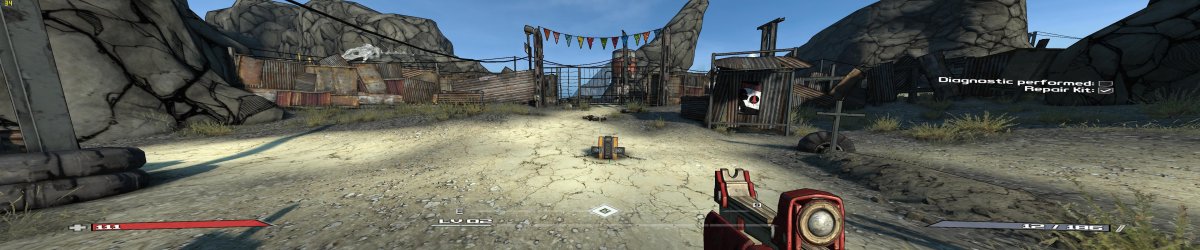
The 257.15 Are awesome :devil2: they still wok with my SoftTH Beta SOFTTH DOWNLOAD and its running my PowerDVD 10 3D Ultra even better wile i play games
 

Attachments

  • Borderlands 5760x1200 140 FOV.jpg
    Borderlands 5760x1200 140 FOV.jpg
    942.8 KB · Views: 20
Last edited:

My Computer My Computer

Computer Manufacturer/Model Number
build it myself
OS
Windows 8 X64 M3 8102 / Windows 7 Ultimate X64
CPU
Core i7 2600K @3.7ghz
Motherboard
GA-Z68XP-UD3R
Memory
32GB DDR-3 1866mhz
Graphics Card(s)
AMD Radeon 6990 + Geforce GTX560
Sound Card
SB Xfi Fatality
Monitor(s) Displays
4x 23" + 30" Dell
Screen Resolution
4x 1920x1080 + Main 2560x1600 Dell
Hard Drives
2x OCZ Agility 3 120gb SATA3
1x Kingston 120gb SATA3
1x Corsair 120gb SATA3
1x Intel 512gb SATA3 (STEAM)
5x 3TB SATA 3 WD Black (Storage)
PSU
Antec 1300W HC
Case
HAF X (USB3)
Cooling
Swiftech H20-320 Edge Liquid Cooling Kit
Keyboard
Optimus Maximus replaced G19
Mouse
Saitek Cyborg R.A.T. 7 Replaced Sidewinder X5
Internet Speed
Internode 1TB Cap ADSL2+ (NBN Optic)
Back
Top