Latest NVIDIA ForceWare Video Drivers Windows 7

only issue i've found is manual fan settings aren't sticking as manual, also if my gpu reaches temps below 50c, it'll drop the fan speed back to 40% or actually invert the % slider.
 

My Computer My Computer

OS
Windows 7
CPU
Core i7 920 D0
Motherboard
Rampage II Gene
Memory
Corsair Dominator 1600
Graphics Card(s)
Geforce GTX 275
Sound Card
Auzentech Prelude
Monitor(s) Displays
BenQ G2400WD
Screen Resolution
1920x1200
Hard Drives
WD AAKS 500GB
WD 1TB
Seagate 160GB
PSU
Corsair HX620
Case
NZXT Rogue
Cooling
TRUE Copper
Keyboard
Logitech G15
Internet Speed
Anywhere from 2.5 to 3.5mb
only issue i've found is manual fan settings aren't sticking as manual, also if my gpu reaches temps below 50c, it'll drop the fan speed back to 40% or actually invert the % slider.

Same for me here with mine:cry:
 

My Computer My Computer

Computer Manufacturer/Model Number
build it myself
OS
Windows 8 X64 M3 8102 / Windows 7 Ultimate X64
CPU
Core i7 2600K @3.7ghz
Motherboard
GA-Z68XP-UD3R
Memory
32GB DDR-3 1866mhz
Graphics Card(s)
AMD Radeon 6990 + Geforce GTX560
Sound Card
SB Xfi Fatality
Monitor(s) Displays
4x 23" + 30" Dell
Screen Resolution
4x 1920x1080 + Main 2560x1600 Dell
Hard Drives
2x OCZ Agility 3 120gb SATA3
1x Kingston 120gb SATA3
1x Corsair 120gb SATA3
1x Intel 512gb SATA3 (STEAM)
5x 3TB SATA 3 WD Black (Storage)
PSU
Antec 1300W HC
Case
HAF X (USB3)
Cooling
Swiftech H20-320 Edge Liquid Cooling Kit
Keyboard
Optimus Maximus replaced G19
Mouse
Saitek Cyborg R.A.T. 7 Replaced Sidewinder X5
Internet Speed
Internode 1TB Cap ADSL2+ (NBN Optic)
so this issue isn't just on GTX 200 then?

report it via the submit feedback form, it'll get fixed faster then.
 

My Computer My Computer

OS
Windows 7
CPU
Core i7 920 D0
Motherboard
Rampage II Gene
Memory
Corsair Dominator 1600
Graphics Card(s)
Geforce GTX 275
Sound Card
Auzentech Prelude
Monitor(s) Displays
BenQ G2400WD
Screen Resolution
1920x1200
Hard Drives
WD AAKS 500GB
WD 1TB
Seagate 160GB
PSU
Corsair HX620
Case
NZXT Rogue
Cooling
TRUE Copper
Keyboard
Logitech G15
Internet Speed
Anywhere from 2.5 to 3.5mb
I'm having zero problems with the 257's so far, but then I'm not changing fan speeds or anything. (H20 :D)

I got some good performance increases. but I can't get my F@H to use more than 51% GPU Usage while folding on 257's. Thats no good. takes twice as long and kills PPD
 

My Computer My Computer

OS
Windows 7 Ultimate Edition x64
CPU
Q9650 E0 @ 4.0 GHz 1.304v
Motherboard
eVGA 750i FTW!
Memory
2x2GB Corsair Dominator PC2-8500C5D 1100 Mhz 5-5-5-15
Graphics Card(s)
eVGA/Gigabyte GTX 480's SLI
Sound Card
X-Fi XtremeGamer
Monitor(s) Displays
Dell U2410 24" IPS Panel (Beautiful)
Screen Resolution
1900 x 1200 & 1680 x 1050
Hard Drives
WD Caviar Black 640GB AALS x2 (Raid0) + Seagate Pro 500GB External x2
PSU
Enermax Revolution 85+ 1050w PSU
Case
Cooler Master HAF 932 H20
Cooling
Apogee GTZ, Feser 360, D5 Vario, Scythe GT 1850's
Keyboard
Logitech G11
Mouse
Logitech MX-518 / G9
Internet Speed
Fast!
Other Info
Nikon D40 DSLR 18-105mm VR - Nikon 35mm f/1.8 & 55-200mm VR
Bose Companion 3 - 16GB Patriot Xporter USB - ATH AD900's & UR Triple.Fi 10 Custom Phones w/ 32GB iPod Touch 3rd Gen -
Google Nexus One (Phone Rocks!) w/ Kingston 16GB MicroSDHC Class 10 running Amon RA1.7 and Cyan 5.06.1
My folding is using 99% of my 470 GPU, with the 257's.
 

My Computer My Computer

Computer Manufacturer/Model Number
self built
OS
Windows 7 Professional 64
CPU
i7 860
Motherboard
ASUS P7P55D-E Pro /onboard SATA 6Gb/s USB 3.0
Memory
8GB Corsair CMX4GX3M2A1600C9 DDR3 1600
Graphics Card(s)
(2) Nvidia EVGA GTX 470 SLI
Sound Card
Onboard VIA VT1828S 8 channels
Monitor(s) Displays
ASUS VW266H 25.5" HDMI Widescreen LCD and HP vs19 LCD 19"
Screen Resolution
1920 x 1200 : 1280 X 1024 dual
Hard Drives
Intel X25-M 80GB SSD (boot)
Seagate Barracuda 80GB
Western Digital Caviar Black 500GB
Asus DRW-24B1ST/BLK/B/AS
PSU
COOLER MASTER Silent Pro 1000W
Case
LIAN LI Lancool PC-K62
Cooling
Prolimatech Megahalems with Scythe "ULTRA KAZE" 120
Keyboard
Saitek
Mouse
Microsoft Optical comfort mouse 3000
Internet Speed
Comcast Ultra tier 30/5
197.45 OK for 64-bit, 8400GS ?

gents
couple of dumb questions here after reading the progression of releases...you guys are doing great work on this forum.

Currently running the default 8.15.nnn.nnnnn via microsoft on Win7 64-bit.. Am I safe to uninstall drivers and load 197.45 ? and, process-wise, should I simply run the nvidia installer, or 'run as administrator', or 'run in compatibility mode' or ???

a good friend of mine who is a bit of a computer novice said he did this on his 32-bit win7, uninstalling the ms-provided nvidia driver and running the install of the new, and got the jerky-flashing problem described elsewhere, but I'm thinking he may have restarted his machine before loading the nvidia wad, thus win7 auto-installed the default driver again without him knowing it.

thx for the tips
 

My Computer My Computer

Computer Manufacturer/Model Number
HP DC7600, HP DC7600[2], HP DC7100, Samsung NC10
OS
Windows XP Pro SP3, Windows 7 Pro 32-bit, Windows 7 Ultimate 64bit, Windows XP Home SP3
CPU
Pentium 4 3.2GHz, Pentium 4 3.4GHz 64bit, Atom,
Motherboard
Dunno
Memory
4GB matched, 1GB, 2.5GB, 4.0 GB
Graphics Card(s)
Geforce 8400 GS and others
Sound Card
RealteK ALC260 and others
Monitor(s) Displays
Asus HD
Screen Resolution
1920x1080
Hard Drives
WD Caviar 640gb SATA
Cooling
We Be Cool
don't bother uninstalling the default driver, you can't install the nvidia driver without it installed anyway.
 

My Computer My Computer

OS
Windows 7
CPU
Core i7 920 D0
Motherboard
Rampage II Gene
Memory
Corsair Dominator 1600
Graphics Card(s)
Geforce GTX 275
Sound Card
Auzentech Prelude
Monitor(s) Displays
BenQ G2400WD
Screen Resolution
1920x1200
Hard Drives
WD AAKS 500GB
WD 1TB
Seagate 160GB
PSU
Corsair HX620
Case
NZXT Rogue
Cooling
TRUE Copper
Keyboard
Logitech G15
Internet Speed
Anywhere from 2.5 to 3.5mb
Where'd the Wizard go

I'm graphically challenged.... I need the nvidia display optimization wizard :cry:
Its not in this 197.45 package for 64-bit :(
is there a way I can just go get it and load it anyway?

my colors look awful and the more I mess with them the worse I get it.
 

My Computer My Computer

Computer Manufacturer/Model Number
HP DC7600, HP DC7600[2], HP DC7100, Samsung NC10
OS
Windows XP Pro SP3, Windows 7 Pro 32-bit, Windows 7 Ultimate 64bit, Windows XP Home SP3
CPU
Pentium 4 3.2GHz, Pentium 4 3.4GHz 64bit, Atom,
Motherboard
Dunno
Memory
4GB matched, 1GB, 2.5GB, 4.0 GB
Graphics Card(s)
Geforce 8400 GS and others
Sound Card
RealteK ALC260 and others
Monitor(s) Displays
Asus HD
Screen Resolution
1920x1080
Hard Drives
WD Caviar 640gb SATA
Cooling
We Be Cool
yep.
ok i got it installed. looks ok, except I am dependent on that blasted wizard for setting gamma correctly. can I download just that applet somehow?

don't bother uninstalling the default driver, you can't install the nvidia driver without it installed anyway.
 

My Computer My Computer

Computer Manufacturer/Model Number
HP DC7600, HP DC7600[2], HP DC7100, Samsung NC10
OS
Windows XP Pro SP3, Windows 7 Pro 32-bit, Windows 7 Ultimate 64bit, Windows XP Home SP3
CPU
Pentium 4 3.2GHz, Pentium 4 3.4GHz 64bit, Atom,
Motherboard
Dunno
Memory
4GB matched, 1GB, 2.5GB, 4.0 GB
Graphics Card(s)
Geforce 8400 GS and others
Sound Card
RealteK ALC260 and others
Monitor(s) Displays
Asus HD
Screen Resolution
1920x1080
Hard Drives
WD Caviar 640gb SATA
Cooling
We Be Cool
yep.
ok i got it installed. looks ok, except I am dependent on that blasted wizard for setting gamma correctly. can I download just that applet somehow?
If I'm not mistaken, they haven't been in any drivers other than XP since about v176 or v177... I remember something on the NVidia forum a long time back about it not being included in the Vista drivers, so it wouldn't have been added to the Win7 drivers either. I'm not entirely sure why though..
 

My Computer My Computer

Computer type
PC/Desktop
OS
Win 10 x64 Pro x64 / Ubuntu 15.10 x64
CPU
Intel i7-4960X
Motherboard
Asus Rampage IV Black Edition
Memory
4x8GB Corsair Dominator Platinum @2400MHz 10-12-12-31
Graphics Card(s)
2x MSI GTX780Ti 3GB (SLI)
Sound Card
Onboard SupremeFX (Cirrus Logic CS4398)
Monitor(s) Displays
3x LG Cinema 27" IPS LED (27MP65)
Screen Resolution
[1920x1080]x3
Hard Drives
Crucial M500 120GB, Crucial M500 480GB, Toshiba DT01ACA200 2TB
PSU
CoolerMaster V1000
Case
Corsair Obsidian 750D
Cooling
ThermalTake Water 3.0 Extreme, 4xSP120, 3xAF120
Keyboard
Moshi Luna
Mouse
Logitech G700s / Roccat Tyon
Internet Speed
4Mb uncapped ADSL (Afrihost)
Antivirus
MS Security Essentials
Browser
Chrome... Duh. (:
that tool is no longer available because windows vista/7 includes a colour profile wizard by default.
 

My Computer My Computer

OS
Windows 7
CPU
Core i7 920 D0
Motherboard
Rampage II Gene
Memory
Corsair Dominator 1600
Graphics Card(s)
Geforce GTX 275
Sound Card
Auzentech Prelude
Monitor(s) Displays
BenQ G2400WD
Screen Resolution
1920x1200
Hard Drives
WD AAKS 500GB
WD 1TB
Seagate 160GB
PSU
Corsair HX620
Case
NZXT Rogue
Cooling
TRUE Copper
Keyboard
Logitech G15
Internet Speed
Anywhere from 2.5 to 3.5mb
Installed 257.15 BETA, it did bump the vid card scores a smidge.
TY Brink
 

My Computer My Computer

Computer Manufacturer/Model Number
DIY #3, #2
OS
W7 Ulti/64, XP Pro/32
CPU
INTEL i7 920 DO, Core2 Duo 6400
Motherboard
GIGABYTE EX58 UD3R-SLI, EP45-UD3R
Memory
KINGSTON DDR3 1333MHz, CORSAIR DDR2 800MHz
Graphics Card(s)
EVGA GTX 260 x2, 8800 GTX
Sound Card
REALTEK HD onboard, ditto
Monitor(s) Displays
SONY 40" BRAVIA LCD
Screen Resolution
1360 X 768
Hard Drives
OCZ VERTEX/RAID0 -3, Vertex 30GB
PSU
COOLERMASTER 900W, ENERMAX 850W
Case
COOLERMASTER HAF 932 x2
Cooling
stock
Keyboard
MS
Mouse
MS
Internet Speed
ADSL 3MB/768KBs
Other Info
amateur enthusiast
Hi, was going to try this beta driver with my 260GTX but the Nvidia download page won't let me input my product or OS. I don't get a dropdown choice once I've put in 200 series. Odd.
 

My Computer My Computer

Computer Manufacturer/Model Number
The Monolith. 3.1
OS
Windows 7 Home Premium 64 bit
CPU
i7 [email protected]
Motherboard
Gigabyte Z77-D3H
Memory
2x4GB Corsair Vegeance DDR3
Graphics Card(s)
XFX GTX 260 Black Edition
Sound Card
none-through large stereo hi fi
Monitor(s) Displays
Croosover 27MDP LED IPS Dell 2408 WFP
Screen Resolution
2560x1440 1920x1200
Hard Drives
1x Samsung 840Pro 128GB SSD
1x Samsung Spinpoint F1 1TB
PSU
Corsair AX 850 Watt
Case
Cooler Master ACTS 840
Cooling
Be Quiet! Dark Rock Pro
Keyboard
Enermax Aurora
Mouse
Logitech Ballmouse
Internet Speed
20MBPS
Hi, was going to try this beta driver with my 260GTX but the Nvidia download page won't let me input my product or OS. I don't get a dropdown choice once I've put in 200 series. Odd.

I think there's something wrong with their website right now because I couldn't even get to the "Download Drivers" page let alone that particular one.
 

My Computer My Computer

Computer type
PC/Desktop
Computer Manufacturer/Model Number
Alienware® ALX X58
OS
Win 7 Ult SP1/Win 10 Pro (all x64)
CPU
Intel® Core™ i7-975 Extreme O/C to 4.02 GHz, 8MB Cache
Motherboard
Asus® P6T Deluxe V2 X58 LGA1366
Memory
24GB Corsair Vengeance DDR3 SDRAM at 1600MHz - 6 x 4096MB
Graphics Card(s)
1792 MB NVIDIA® GeForce® GTX 295 Dual Core
Sound Card
Onboard Soundmax® High-Definition 7.1 Performance Audio
Monitor(s) Displays
Samsung XL2370 LED backlit 23" W/S 2ms response time
Screen Resolution
1920 X 1080
Hard Drives
2 x 500gb SATA II
1 x 1TB SATA II
1 external eSATA LaCie 3TB
(Non-RAID)
PSU
Alienware® 1200 Watt Multi-GPU
Case
Alienware® P2 ALX Chassis with AlienIce™ 3.0 Video Cooling
Cooling
Alienware® High-Perf. Liquid Cooling + Acoustic Dampening
Keyboard
Microsoft® Wireless Entertainment 8000 + Logitech® G15 Wired
Mouse
Microsoft® Wireless Laser 8000 + Logitech® G9 Wired
Internet Speed
1Gb/s
Antivirus
McAfee LiveSafe
Browser
Firefox - latest
Other Info
Using non-RAID on purpose as I find RAID to be too temperamental.
Now set to AHCI
I've noticed that the NIVIDIA site is loading the web pages real slow right now for me as well. It's taking a few moments for anything to show up after each click. Best to try back later when they are not so overloaded.
 

My Computer My Computer

Computer type
PC/Desktop
Computer Manufacturer/Model Number
Self built custom
OS
64-bit Windows 11 Pro for Workstations
CPU
Intel i7-8700K OC'd to 5 GHz
Motherboard
ASUS ROG Maximus XI Formula Z390
Memory
64 GB (4x16GB) G.SKILL TridentZ RGB DDR4 3600 MHz
Graphics Card(s)
ASUS ROG-STRIX-GTX1080TI-O11G-GAMING
Sound Card
Integrated
Monitor(s) Displays
2 x Samsung Odyssey G7 27"
Screen Resolution
2560x1440
Hard Drives
1TB Samsung 990 PRO M.2,
4TB Samsung 990 PRO PRO M.2,
TerraMaster F8 SSD Plus NAS
PSU
Seasonic Prime Titanium 850W
Case
Thermaltake Core P3
Cooling
Corsair Hydro H115i
Keyboard
Logitech wireless K800
Mouse
Logitech MX Master 4
Internet Speed
2 Gb/s Download and 100 Mb/s Upload
Antivirus
Malwarebyte Anti-Malware Premium
Browser
Google Chrome
Other Info
Logitech Z625 speaker system,
Logitech BRIO 4K Pro webcam,
HP Color LaserJet Pro MFP M477fdn,
APC SMART-UPS RT 1000 XL - SURT1000XLI,
Galaxy S23 Plus phone
I tried to run NVIDIA's scanner to check my current video status and here's the result.

Product:
NVIDIA GeForce G210M

Current Installed Driver:
186.47

Latest Driver Update:
The manufacturer of this system requires that you download the driver for your GPU from their support site.

The GeForce M series and GeForce Go series notebook GPUs use drivers that have been customized by the notebook manufacturers to support hot key functions, power management functions, lid close and suspend/resume behavior. NVIDIA has worked with some notebook manufacturers to provide notebook-specific driver updates, however, most notebook driver updates must come from the notebook manufacturer. Additionally, the desktop GeForce graphics drivers will not install on Geforce M series and Quadro M series notebook GPU's.

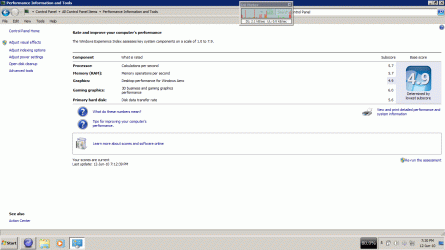
Here's my WEI: (attached) Could you point me to the right location on where can I get the appropriate driver to replace my current version?
 

Attachments

  • wei.gif
    wei.gif
    44.1 KB · Views: 14

My Computer My Computer

Computer Manufacturer/Model Number
SONY VAIO Laptop
OS
Windows® 7 Home Basic 64bit, Build 7600
CPU
Inter Core 2 Duo CPU T6600 @ 2.20GHz
Memory
4GB
Graphics Card(s)
nVidia GeForce G210M
Sound Card
Realtek HD Integrated Audio
Monitor(s) Displays
LG TV-1 (NVIDIA High Definition Audio)
Screen Resolution
1366 x 768 (Wide)
Hard Drives
320GB HDD - Internal
360GB - External
500GB (x2) - External
1TB - External
PSU
Internal
Keyboard
Integrated
Mouse
Synaptic Keypad & A4tech Cordless MOuse
Internet Speed
LAN, T1
Other Info
A4tech Analog Joypad
I tried to run NVIDIA's scanner to check my current video status and here's the result.

Product:
NVIDIA GeForce G210M

Current Installed Driver:
186.47

Latest Driver Update:
The manufacturer of this system requires that you download the driver for your GPU from their support site.

The GeForce M series and GeForce Go series notebook GPUs use drivers that have been customized by the notebook manufacturers to support hot key functions, power management functions, lid close and suspend/resume behavior. NVIDIA has worked with some notebook manufacturers to provide notebook-specific driver updates, however, most notebook driver updates must come from the notebook manufacturer. Additionally, the desktop GeForce graphics drivers will not install on Geforce M series and Quadro M series notebook GPU's.

Here's my WEI: (attached) Could you point me to the right location on where can I get the appropriate driver to replace my current version?


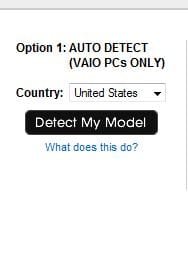
You could try here,

Sony eSupport - Computers & Peripherals - Select Your Model
 

My Computer My Computer

Computer type
PC/Desktop
Computer Manufacturer/Model Number
Self Built
OS
Win 10 Pro x64
CPU
Intel I5-2500K @3.3GHz
Motherboard
Asrock P67 Extreme4
Memory
16GB G.Skill Ripjaws X (4x4GB)
Graphics Card(s)
EVGA GeForce 750 Ti SC 2GB
Sound Card
ASUS Xonar DG 5.1 Channels 24-bit 96KHz PCI Interface Sound
Monitor(s) Displays
auria eq2367
Screen Resolution
1920 x 1080
Hard Drives
250GB Samsung 850 EVO SSD
1TB WD Blue
1TB Hitachi
PSU
SeaSonic X 650W 80 Plus Gold
Case
Corsair Obsidian 750D
Cooling
Corsair H60, Three 140mm case fans
Keyboard
Logitech Wireless Keyboard K520
Mouse
Logitech Wireless Mouse M310
Internet Speed
Wave Broadband ~ 100 dn 5 up
Antivirus
Windows Defender, Malwarebytes Premium
Browser
Edge, IE11, Chrome
Other Info
Laptop specs: HP g7-1365dx /
CPU: AMD A6-3420M APU with Radeon(tm) HD Graphics /
RAM: Crucial 8Gb (2x4Gb) /
SSD: Crucial M4-CT128M4SSD2 ATA Device/ FW 000F /
GFX: AMD Radeon HD 6520G /
OS: Windows 10 Pro x64

My Computer My Computer

Computer Manufacturer/Model Number
SONY VAIO Laptop
OS
Windows® 7 Home Basic 64bit, Build 7600
CPU
Inter Core 2 Duo CPU T6600 @ 2.20GHz
Memory
4GB
Graphics Card(s)
nVidia GeForce G210M
Sound Card
Realtek HD Integrated Audio
Monitor(s) Displays
LG TV-1 (NVIDIA High Definition Audio)
Screen Resolution
1366 x 768 (Wide)
Hard Drives
320GB HDD - Internal
360GB - External
500GB (x2) - External
1TB - External
PSU
Internal
Keyboard
Integrated
Mouse
Synaptic Keypad & A4tech Cordless MOuse
Internet Speed
LAN, T1
Other Info
A4tech Analog Joypad

Attachments

  • auto.JPG
    auto.JPG
    12.8 KB · Views: 185

My Computer My Computer

Computer type
PC/Desktop
Computer Manufacturer/Model Number
Self Built
OS
Win 10 Pro x64
CPU
Intel I5-2500K @3.3GHz
Motherboard
Asrock P67 Extreme4
Memory
16GB G.Skill Ripjaws X (4x4GB)
Graphics Card(s)
EVGA GeForce 750 Ti SC 2GB
Sound Card
ASUS Xonar DG 5.1 Channels 24-bit 96KHz PCI Interface Sound
Monitor(s) Displays
auria eq2367
Screen Resolution
1920 x 1080
Hard Drives
250GB Samsung 850 EVO SSD
1TB WD Blue
1TB Hitachi
PSU
SeaSonic X 650W 80 Plus Gold
Case
Corsair Obsidian 750D
Cooling
Corsair H60, Three 140mm case fans
Keyboard
Logitech Wireless Keyboard K520
Mouse
Logitech Wireless Mouse M310
Internet Speed
Wave Broadband ~ 100 dn 5 up
Antivirus
Windows Defender, Malwarebytes Premium
Browser
Edge, IE11, Chrome
Other Info
Laptop specs: HP g7-1365dx /
CPU: AMD A6-3420M APU with Radeon(tm) HD Graphics /
RAM: Crucial 8Gb (2x4Gb) /
SSD: Crucial M4-CT128M4SSD2 ATA Device/ FW 000F /
GFX: AMD Radeon HD 6520G /
OS: Windows 10 Pro x64

My Computer My Computer

Computer Manufacturer/Model Number
SONY VAIO Laptop
OS
Windows® 7 Home Basic 64bit, Build 7600
CPU
Inter Core 2 Duo CPU T6600 @ 2.20GHz
Memory
4GB
Graphics Card(s)
nVidia GeForce G210M
Sound Card
Realtek HD Integrated Audio
Monitor(s) Displays
LG TV-1 (NVIDIA High Definition Audio)
Screen Resolution
1366 x 768 (Wide)
Hard Drives
320GB HDD - Internal
360GB - External
500GB (x2) - External
1TB - External
PSU
Internal
Keyboard
Integrated
Mouse
Synaptic Keypad & A4tech Cordless MOuse
Internet Speed
LAN, T1
Other Info
A4tech Analog Joypad
Back
Top