Launch Systray Apps with a Single Click?

msafi

New member
Member
Local time
7:59 PM
Messages
15
Open Systray Apps with a Single Click?

I set folders/icons on my computer to open with a single click. It'd be nice to also be able to open systray apps with a single click.

With the way systray icons behave in Windows 7, it feels intuitive to me to be able to launch them with a single-click. For example, I have Digsby and uTorrent both in the systray, but they refuse to launch except with double-click. When I single click on their icons, I get the visual feedback of a click but nothing happens.

Most applications are programmed this way because Microsoft used to suggest this behavior to programmers as a guideline. Maybe they'll suggest something different in the future and programmers will catch up, but until then, is there like a little utility app or something to mitigate this?
 

My Computer My Computer

At a glance

Windows 7 Professional 64-bit
Computer Manufacturer/Model Number
ThinkPad T410
OS
Windows 7 Professional 64-bit
In utorrent, under Preferences-General-System Tray, check the box in "Single click on tray icon to open".
Hope that helps.
 

My Computer My Computer

At a glance

Windows 7 x64 pro/ Windows 7 x86 Pro/ XP SP3 x86
Computer Manufacturer/Model Number
Too many to describe...
OS
Windows 7 x64 pro/ Windows 7 x86 Pro/ XP SP3 x86
I set folders/icons on my computer to open with a single click. It'd be nice to also be able to open systray apps with a single click.

With the way systray icons behave in Windows 7, it feels intuitive to me to be able to launch them with a single-click. For example, I have Digsby and uTorrent both in the systray, but they refuse to launch except with double-click. When I single click on their icons, I get the visual feedback of a click but nothing happens.

Most applications are programmed this way because Microsoft used to suggest this behavior to programmers as a guideline. Maybe they'll suggest something different in the future and programmers will catch up, but until then, is there like a little utility app or something to mitigate this?

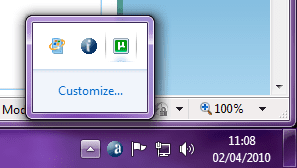
Unfortunately, the way in which System Tray applications are opened is not controlled by Windows, but by the application itself. Case in point:

systray_apps.png

The above screenshot shows 3 systry apps (Windows Update, Avast Recovery Generator and uTorrent).
  • A single click will open Windows Update
  • The Avast Recovery Generator does not open at all, but rather provide a right-click menu interface to adjust settings
  • uTorrent requires a double-click to open
I think that serves to illustrate that systry apps are controlled by the developer...
 

My Computer My Computer

At a glance

Windows 7 Professional 32-bit SP1AMD A4/A63.00GB EDOVMware SVGA 3D
Computer type
PC/Desktop
Computer Manufacturer/Model Number
Virtual Machine
OS
Windows 7 Professional 32-bit SP1
CPU
AMD A4/A6
Motherboard
Intel Corporation 440BX Desktop Reference Platform
Memory
3.00GB EDO
Graphics Card(s)
VMware SVGA 3D
Sound Card
High Definition Audio Device
Monitor(s) Displays
Generic Non-PnP Monitor on VMware SVGA 3D
Screen Resolution
1440x900
Hard Drives
1 x 60GB VMware Virtual SATA Hard Drive ATA Device
Antivirus
Kaspersky Total Security
In utorrent, under Preferences-General-System Tray, check the box in "Single click on tray icon to open".
Hope that helps.

Thanks for that tip Bill....

+1 Rep.
 

My Computer My Computer

At a glance

Windows 7 Professional 32-bit SP1AMD A4/A63.00GB EDOVMware SVGA 3D
Computer type
PC/Desktop
Computer Manufacturer/Model Number
Virtual Machine
OS
Windows 7 Professional 32-bit SP1
CPU
AMD A4/A6
Motherboard
Intel Corporation 440BX Desktop Reference Platform
Memory
3.00GB EDO
Graphics Card(s)
VMware SVGA 3D
Sound Card
High Definition Audio Device
Monitor(s) Displays
Generic Non-PnP Monitor on VMware SVGA 3D
Screen Resolution
1440x900
Hard Drives
1 x 60GB VMware Virtual SATA Hard Drive ATA Device
Antivirus
Kaspersky Total Security
Thanks, Dzomlija. Just a minor correction, the "System Tray" options would be under "UI Settings" in Preferences and not under "General". My apologies.
 

My Computer My Computer

At a glance

Windows 7 x64 pro/ Windows 7 x86 Pro/ XP SP3 x86
Computer Manufacturer/Model Number
Too many to describe...
OS
Windows 7 x64 pro/ Windows 7 x86 Pro/ XP SP3 x86
Thanks, Dzomlija. Just a minor correction, the "System Tray" options would be under "UI Settings" in Preferences and not under "General". My apologies.

Got it, thanks.
 

My Computer My Computer

At a glance

Windows 7 Professional 32-bit SP1AMD A4/A63.00GB EDOVMware SVGA 3D
Computer type
PC/Desktop
Computer Manufacturer/Model Number
Virtual Machine
OS
Windows 7 Professional 32-bit SP1
CPU
AMD A4/A6
Motherboard
Intel Corporation 440BX Desktop Reference Platform
Memory
3.00GB EDO
Graphics Card(s)
VMware SVGA 3D
Sound Card
High Definition Audio Device
Monitor(s) Displays
Generic Non-PnP Monitor on VMware SVGA 3D
Screen Resolution
1440x900
Hard Drives
1 x 60GB VMware Virtual SATA Hard Drive ATA Device
Antivirus
Kaspersky Total Security
@Bill2, Thanks for the tip! It helps. Unfortunately, not all programs are as smart as uTorrent.

@Dzomlija, I see that it's controlled by the developer. But a 3rd party app that fixes this issue could still be made, I would imagine, with relative ease for someone who has the experience.
 

My Computer My Computer

At a glance

Windows 7 Professional 64-bit
Computer Manufacturer/Model Number
ThinkPad T410
OS
Windows 7 Professional 64-bit
I see that it's controlled by the developer. But a 3rd party app that fixes this issue could still be made, I would imagine, with relative ease for someone who has the experience.

I suppose, but then that would also require knowledge of the app. Being a programmer myself, I believe that it may be possible, but the effort required in creating such a utility would be to great, as there is no "one global fix" that would work. If there was, then Windows itself would have sich a facility for system tray apps.

The real problem comes in is that too many developers misuse the system tray for purposes other than for what it was intended. It is supposed to be a notifcation area, the most notable example of which is Windows Update. An icon appears notifying you that updates are ready, and when those updates are installed, the icon disappears.

I remember back in the days of Windws 95/98, the Lotus Smartsuite applications had the habit of using the system tray as an ad-hoc quick launch bar (before quick launch was introduced in Windows 98). People just didn't understand what the system tray was supposed to be used for, and it eventually became unmanagable. Windows XPtried to help by automatically hiding inactive icons, but the problem still didn't go away. In Windows 7, the default icons of only the Volume control, Action Center and Networking will appear, and you need to click the Up Arrow to see others.

As you have seen in the screenshot I posted earlier, the ONLY 3rd-party program I have running there are Avast and uTorrent. I make it a habit of using MSCONFIG of disabling any program that adds icons to the system tray (unless I need the app). That way I can rest assured that the system tray is being used for what it was intended: notifications.
 

My Computer My Computer

At a glance

Windows 7 Professional 32-bit SP1AMD A4/A63.00GB EDOVMware SVGA 3D
Computer type
PC/Desktop
Computer Manufacturer/Model Number
Virtual Machine
OS
Windows 7 Professional 32-bit SP1
CPU
AMD A4/A6
Motherboard
Intel Corporation 440BX Desktop Reference Platform
Memory
3.00GB EDO
Graphics Card(s)
VMware SVGA 3D
Sound Card
High Definition Audio Device
Monitor(s) Displays
Generic Non-PnP Monitor on VMware SVGA 3D
Screen Resolution
1440x900
Hard Drives
1 x 60GB VMware Virtual SATA Hard Drive ATA Device
Antivirus
Kaspersky Total Security
Hmmm. I see. I'm used to the old way, which is: the programs you always run and that you need access to, you put in the systray. But you're right, that's not the proper use for it. Before Win 7's taskbar, there was no other way, though. But now, it's better to pin those programs to the taskbar and organize them there.

So, this leads me to a new question: how can I remove app icons from the systray? :P LOL!
 

My Computer My Computer

At a glance

Windows 7 Professional 64-bit
Computer Manufacturer/Model Number
ThinkPad T410
OS
Windows 7 Professional 64-bit
if you click customise, you can set it to "show notifications only" for the apps you dont want to see,
 

My Computer My Computer

At a glance

Windows 10 Pro x64Intel Core i5 7400 @ 3.00GHz8GB 2133Mhz DDR4 (OEM supplied)Gygabyte Windforce GTX 1050Ti (Factory Overcl...
Computer type
PC/Desktop
Computer Manufacturer/Model Number
Medion Erazer (note to self: insert model number) - with custom additions
OS
Windows 10 Pro x64
CPU
Intel Core i5 7400 @ 3.00GHz
Motherboard
OEM supllied with PC
Memory
8GB 2133Mhz DDR4 (OEM supplied)
Graphics Card(s)
Gygabyte Windforce GTX 1050Ti (Factory Overclocked)
Sound Card
Realtek
Monitor(s) Displays
Acer Al1980 + HKC
Screen Resolution
1360*768(HKC) / 1280*1024(Acer)
Hard Drives
1TB Toshiba
1TB WD Caviar Green
120GB Samsung Evo 840
PSU
OEM supplied (no power rating on case)
Case
OEM Supplied
Cooling
Stock
Keyboard
Logitech Wireless
Mouse
Logitect Wireless
Internet Speed
40Mb/s Down 10Mb/s Up
Antivirus
Defender
Browser
Firefox

My Computer My Computer

At a glance

W 7 64-bit UltimateIntel Q9550 Yorkfield8GB Dominator 8500C5DATI : XFX 5870
Computer Manufacturer/Model Number
* BFK Customs *
OS
W 7 64-bit Ultimate
CPU
Intel Q9550 Yorkfield
Motherboard
ASUS P5Q Pro
Memory
8GB Dominator 8500C5D
Graphics Card(s)
ATI : XFX 5870
Sound Card
Realtek HD Audio 7-1
Monitor(s) Displays
1x 47" LCD HDMI & 3x 26" LCD HDMI
Screen Resolution
1920x1080P & 1920x1200
Hard Drives
1x 80GB Intel X25-M G2 SSD : 1x 500GB & 1x 640GB WD Caviar Black(s)
PSU
Corsair 620HX
Case
Cooler Master RC-690
Cooling
Tuniq Tower 120, 2x 140mm and 3x 120mm case fans
Keyboard
Microsoft 500
Mouse
Razer Diamondback 3G
Internet Speed
14 Mb/s
Other Info
1x Koutech 3Gb/s SATA HDD Hot Swap Rack
Back
Top