LCD Controller Board

iGeriya

New member
Member
Local time
12:43 AM
Messages
29
Location
Western Europe ! Moving around ...
Hello people !

I have no idea where to post that topic, but I believe since it's pure hardware stuff that it belongs right here.
I'm trying to build myself an External Monitor since I'm desperatly in need of a second monitor.
I disassembled and retrieved the LCD screen from my former Laptop wich was an ASUS. And I can't find for christ's sake any LCD Controller Board for this one ... no where, not even Ebay.

Manufacturer : AU Optronics ;
Model No : B156XW02 V.0 ;
Dimension : 15.6" ;
Resolution : 1366x768

From an Asus Laptop which I forgot the Model No, but it's from Sept 2009, Intel Dual Core & stuff.

Now. Please, someone tell me he knows where I can get one ... Please please please please please please :confused:
 

My Computer

Computer type
PC/Desktop
Computer Manufacturer/Model Number
[Laptop] MEDION Akoya P6815 (Temporary ...)
OS
Windows 7 Ultimate 64bit - Laptop
CPU
Intel Core i7-3630QM @ 2.40GHz | Intel HD Graphics 4000
Motherboard
Mobile Intel HM77 Express Chipset
Memory
8Gb RAM DDR3 1333 Mhz
Graphics Card(s)
Intel HD Graphics 4000 | Nvidia GeForce GT-650M 2Gb GDDR3
Monitor(s) Displays
Factory Laptop Screen @ 15,6" 16:9 Full HD Non-Glare LED
Screen Resolution
1920*1080px
Hard Drives
Samsung 32Gb Internal SSD
Samsung 840 Series 120Gb SSD
Seagate Expansion 1Tb External 5400Tr
Cooling
Cooling Master NotePal U3 [Cooling Pad for Laptop]
Antivirus
Avast! |
Browser
Mozilla FireFox 22.0 | Google Chrome
21min after I post it. And I spent a whole evening looking for one ...

Big thanks !
 
Last edited:

My Computer

Computer type
PC/Desktop
Computer Manufacturer/Model Number
[Laptop] MEDION Akoya P6815 (Temporary ...)
OS
Windows 7 Ultimate 64bit - Laptop
CPU
Intel Core i7-3630QM @ 2.40GHz | Intel HD Graphics 4000
Motherboard
Mobile Intel HM77 Express Chipset
Memory
8Gb RAM DDR3 1333 Mhz
Graphics Card(s)
Intel HD Graphics 4000 | Nvidia GeForce GT-650M 2Gb GDDR3
Monitor(s) Displays
Factory Laptop Screen @ 15,6" 16:9 Full HD Non-Glare LED
Screen Resolution
1920*1080px
Hard Drives
Samsung 32Gb Internal SSD
Samsung 840 Series 120Gb SSD
Seagate Expansion 1Tb External 5400Tr
Cooling
Cooling Master NotePal U3 [Cooling Pad for Laptop]
Antivirus
Avast! |
Browser
Mozilla FireFox 22.0 | Google Chrome
Most welcome
 

My Computer

Computer Manufacturer/Model Number
W530-3630QM1
OS
windows 7 home 64bit
CPU
INTEL-CORE I7
Memory
16GB
Hard Drives
750GB
Browser
Chrome
Wait, I have one last question. The title of the offer on Ebay says :

LVDS VGA LCD Screen Controller Board Kit for 15.6" B156XW02 V.2 V.3 V.6 V0

I ask for a V.0 ... and this V0 I don't know what it is ... I've read many times this V0 while searching the internet, and don't know what it is ... I first thought it's just a missing dot, but in the end I'm sure it's just not about a missing dot between the V and 0. Don't wanna play it "freak", but I'm scared to end with an uncompatible product.
 

My Computer

Computer type
PC/Desktop
Computer Manufacturer/Model Number
[Laptop] MEDION Akoya P6815 (Temporary ...)
OS
Windows 7 Ultimate 64bit - Laptop
CPU
Intel Core i7-3630QM @ 2.40GHz | Intel HD Graphics 4000
Motherboard
Mobile Intel HM77 Express Chipset
Memory
8Gb RAM DDR3 1333 Mhz
Graphics Card(s)
Intel HD Graphics 4000 | Nvidia GeForce GT-650M 2Gb GDDR3
Monitor(s) Displays
Factory Laptop Screen @ 15,6" 16:9 Full HD Non-Glare LED
Screen Resolution
1920*1080px
Hard Drives
Samsung 32Gb Internal SSD
Samsung 840 Series 120Gb SSD
Seagate Expansion 1Tb External 5400Tr
Cooling
Cooling Master NotePal U3 [Cooling Pad for Laptop]
Antivirus
Avast! |
Browser
Mozilla FireFox 22.0 | Google Chrome
Hi there The seller has it down as Compatible .. If you have any doubts Email works
 

My Computer

Computer Manufacturer/Model Number
W530-3630QM1
OS
windows 7 home 64bit
CPU
INTEL-CORE I7
Memory
16GB
Hard Drives
750GB
Browser
Chrome
Being from china (outside EU), check your customs. Might add some fees.

if you look down in the compatibility list:

Compatible Models:
B156XW02 V.0
B156XW02 V.1
B156XW02 V.2
B156XW02 V.3
B156XW02 V.6

first line is your screen, if what you posted is correct.
 

My Computer

Computer type
PC/Desktop
Computer Manufacturer/Model Number
custom built
OS
Win 7 Pro 64-bit 7601
CPU
AMD Phenom 9650 QuadCore, revision DR-B3
Motherboard
ASUS M4A78
Memory
5 GB yes I run 2x 2GB and 1x 1GB, different brand, spank me.
Graphics Card(s)
NVIDIA GeForce 9800 GT 512 Mb, unknown manufacturer.
Sound Card
Crappy Realtek Integrated Audio
Monitor(s) Displays
Fujitsu Siemens P19-3P
Screen Resolution
1280 x 1024 x 32 bits @ 60 Hz Oh yeah, 4:3 rocks!
Hard Drives
(1) MAXTOR S TM3320613AS SATA Disk Device (2) STM35004 18AS SATA Disk Device (3) TOSHIBA USB 2.5"-HDD
PSU
whatever, around 450w
Case
Scavenged from old company PC, 10+ years old
Cooling
CPU fan, GPU fan, case fan, nothing fancy
Keyboard
Microsoft, PS/2, white.
Mouse
Optical, logitec.
Internet Speed
effective max speeds: 70-ish kB/s down 30-ish kB/s up
Antivirus
Avira, free edition.
Browser
Firefox with FXChrome to make it look like Google Chrome :P
Other Info
Was discarded by previous owner due to "horrible performance".
Was running Win Xp from a IDE drive. Yeah. Was a pain.
SATA II drive and Win7 and it zips away! Yay!
All right, I feel like a pure dumbass now. But it answers all my questions. Thank you Boba.
 

My Computer

Computer type
PC/Desktop
Computer Manufacturer/Model Number
[Laptop] MEDION Akoya P6815 (Temporary ...)
OS
Windows 7 Ultimate 64bit - Laptop
CPU
Intel Core i7-3630QM @ 2.40GHz | Intel HD Graphics 4000
Motherboard
Mobile Intel HM77 Express Chipset
Memory
8Gb RAM DDR3 1333 Mhz
Graphics Card(s)
Intel HD Graphics 4000 | Nvidia GeForce GT-650M 2Gb GDDR3
Monitor(s) Displays
Factory Laptop Screen @ 15,6" 16:9 Full HD Non-Glare LED
Screen Resolution
1920*1080px
Hard Drives
Samsung 32Gb Internal SSD
Samsung 840 Series 120Gb SSD
Seagate Expansion 1Tb External 5400Tr
Cooling
Cooling Master NotePal U3 [Cooling Pad for Laptop]
Antivirus
Avast! |
Browser
Mozilla FireFox 22.0 | Google Chrome
No problem. I'm curious to know how you will turn this in a monitor though.

I mean ok it will work, but it's still a naked laptop screen attached to a naked circuit board. Needs some skeleton to stand upright and a casing to keep them safe. Might want to invest in a broken LCD monitor of the same screen size to fill with your hardware.

Although duct-taping everything to a wall will work. :p

Btw, if the laptop was still working and you don't need to game on this setup, this program will turn a working laptop (connected to the same network) in a second monitor.
 

My Computer

Computer type
PC/Desktop
Computer Manufacturer/Model Number
custom built
OS
Win 7 Pro 64-bit 7601
CPU
AMD Phenom 9650 QuadCore, revision DR-B3
Motherboard
ASUS M4A78
Memory
5 GB yes I run 2x 2GB and 1x 1GB, different brand, spank me.
Graphics Card(s)
NVIDIA GeForce 9800 GT 512 Mb, unknown manufacturer.
Sound Card
Crappy Realtek Integrated Audio
Monitor(s) Displays
Fujitsu Siemens P19-3P
Screen Resolution
1280 x 1024 x 32 bits @ 60 Hz Oh yeah, 4:3 rocks!
Hard Drives
(1) MAXTOR S TM3320613AS SATA Disk Device (2) STM35004 18AS SATA Disk Device (3) TOSHIBA USB 2.5"-HDD
PSU
whatever, around 450w
Case
Scavenged from old company PC, 10+ years old
Cooling
CPU fan, GPU fan, case fan, nothing fancy
Keyboard
Microsoft, PS/2, white.
Mouse
Optical, logitec.
Internet Speed
effective max speeds: 70-ish kB/s down 30-ish kB/s up
Antivirus
Avira, free edition.
Browser
Firefox with FXChrome to make it look like Google Chrome :P
Other Info
Was discarded by previous owner due to "horrible performance".
Was running Win Xp from a IDE drive. Yeah. Was a pain.
SATA II drive and Win7 and it zips away! Yay!
Sure does seem like an Interesting Project . Maybe you could post us some screenshots
 

My Computer

Computer Manufacturer/Model Number
W530-3630QM1
OS
windows 7 home 64bit
CPU
INTEL-CORE I7
Memory
16GB
Hard Drives
750GB
Browser
Chrome
Yes, it won't be that easy, but I got some metal rails in aluminium (from a huge guitar shop, they use them to hold them guitars). In the end I will screw those rails to the metal skeleton/frame that was fixing the LCD in the laptop plastic screen frame. In the end I will add longer rails in a vertical position on the wall to hold the whole (and to adjust height). Although I have to move from this house in a few months, I will re-adapt, perhaps using a mechanical desktop lamp arm later on.

I will definitly post screenshots when over. I found the idea of using a mechanical desktop lamp arm from another site when looking up for my project :
How to Convert a Laptop LCD into an External Monitor.
 
Last edited:

My Computer

Computer type
PC/Desktop
Computer Manufacturer/Model Number
[Laptop] MEDION Akoya P6815 (Temporary ...)
OS
Windows 7 Ultimate 64bit - Laptop
CPU
Intel Core i7-3630QM @ 2.40GHz | Intel HD Graphics 4000
Motherboard
Mobile Intel HM77 Express Chipset
Memory
8Gb RAM DDR3 1333 Mhz
Graphics Card(s)
Intel HD Graphics 4000 | Nvidia GeForce GT-650M 2Gb GDDR3
Monitor(s) Displays
Factory Laptop Screen @ 15,6" 16:9 Full HD Non-Glare LED
Screen Resolution
1920*1080px
Hard Drives
Samsung 32Gb Internal SSD
Samsung 840 Series 120Gb SSD
Seagate Expansion 1Tb External 5400Tr
Cooling
Cooling Master NotePal U3 [Cooling Pad for Laptop]
Antivirus
Avast! |
Browser
Mozilla FireFox 22.0 | Google Chrome
Hi there .. Had a quick look at that Link you posted .. Sure looks cool will look into it more later . Good luck with the build and many thanks for keeping us posted
 

My Computer

Computer Manufacturer/Model Number
W530-3630QM1
OS
windows 7 home 64bit
CPU
INTEL-CORE I7
Memory
16GB
Hard Drives
750GB
Browser
Chrome
Glad to help for once ;).
But it will take quite a time. I won't find the LCD controller in my mailbox before end of augustus :/, time to ship it in here for no fees.
 

My Computer

Computer type
PC/Desktop
Computer Manufacturer/Model Number
[Laptop] MEDION Akoya P6815 (Temporary ...)
OS
Windows 7 Ultimate 64bit - Laptop
CPU
Intel Core i7-3630QM @ 2.40GHz | Intel HD Graphics 4000
Motherboard
Mobile Intel HM77 Express Chipset
Memory
8Gb RAM DDR3 1333 Mhz
Graphics Card(s)
Intel HD Graphics 4000 | Nvidia GeForce GT-650M 2Gb GDDR3
Monitor(s) Displays
Factory Laptop Screen @ 15,6" 16:9 Full HD Non-Glare LED
Screen Resolution
1920*1080px
Hard Drives
Samsung 32Gb Internal SSD
Samsung 840 Series 120Gb SSD
Seagate Expansion 1Tb External 5400Tr
Cooling
Cooling Master NotePal U3 [Cooling Pad for Laptop]
Antivirus
Avast! |
Browser
Mozilla FireFox 22.0 | Google Chrome
You just might be surprised i have got a few things in the past from there .. And it did not take that long only a few weeks . Though now i would tend to avoid buying from there
 

My Computer

Computer Manufacturer/Model Number
W530-3630QM1
OS
windows 7 home 64bit
CPU
INTEL-CORE I7
Memory
16GB
Hard Drives
750GB
Browser
Chrome
Yeah ? Well I got a lil problem :D !

RECEPTION of the LCD CTRL BrD
I recieved the LCD Controller Board for the B156XW02 V.0 AU Optronics LCD screen just 17 days after order. It arrived with EVERYTHING needed. All wires, cables, power, and EVEN a VGA cable. So it's a all in one package.

Thing is it does not match my inverter wires -_- ... So I strongly believe that I did not order the right one. I was about to send it back (have 60 days to return it, just pay the shipment), but maybe it can be fixed, I don't know yet.

IS IT THE RIGHT MODEL NUMBER ?
First, before posting pictures showing how and why it does not match, here's (below) a pic of the back of the LCD screen so maybe someone will tell me I did not read the right Model No.


So is B156XW02 V.0 the right number ? I didn't order a wrong board ?

I just looked over the net again and checked for this serial number : CP433368-01 01a
and it does match a Fujitsu LCD screen ... so I got a lil confused. Mine is an AUO previously installed on an ASUS, nothing related to Fujitsu. Yet, since I can't connect my original cables to the controller board, I don't know what to think.

EDIT : I just read in micro characters B156XW02 V0 M60 on the side of the LCD screen
And again, I have the same number displayed just like below right next to the LVDS input on the back of the screen.

B156XW01 V0 CTRL BD
15B36-C09

So technically it's the right model name, but maybe shoudl I have specified M60 or something ? Doesn't make much sense since the seller did not specified any of this.
I feel really confused. Shall I go to a Computer repair shop and ask for more advices on what to do with this LCD Ctrl Board ?


________________

PICTURES OF THE LCD CONTROLLER BOARD

Here are pics of the LCD Screen and the inverter cables taken off from the laptop lcd inverter (Pics quality is EXTREMELY bad as Im using a Sony Experia J. I always felt amazed how bad this smartphone is. Absolutely nothing works properly)

Inverter cables have this exact label (copied as read):
PEGATRON N51TP INVERTER CABLE
PIN: 1410-0044000 FVC 09/07/02

LCD Controller Board :


LCD Controller Board closer look for pins :


LCD Controller Board - Cables/wires output/inputs :


Inverter cables and LCD Controller Board :


Inverter cables and LCD controller board input incompatibility :
 
Last edited:

My Computer

Computer type
PC/Desktop
Computer Manufacturer/Model Number
[Laptop] MEDION Akoya P6815 (Temporary ...)
OS
Windows 7 Ultimate 64bit - Laptop
CPU
Intel Core i7-3630QM @ 2.40GHz | Intel HD Graphics 4000
Motherboard
Mobile Intel HM77 Express Chipset
Memory
8Gb RAM DDR3 1333 Mhz
Graphics Card(s)
Intel HD Graphics 4000 | Nvidia GeForce GT-650M 2Gb GDDR3
Monitor(s) Displays
Factory Laptop Screen @ 15,6" 16:9 Full HD Non-Glare LED
Screen Resolution
1920*1080px
Hard Drives
Samsung 32Gb Internal SSD
Samsung 840 Series 120Gb SSD
Seagate Expansion 1Tb External 5400Tr
Cooling
Cooling Master NotePal U3 [Cooling Pad for Laptop]
Antivirus
Avast! |
Browser
Mozilla FireFox 22.0 | Google Chrome
Hi there .. I cannot see your pics . It is not that they are that bad its just my poor eye sight .. Any how if it is not Compatible . I would Return it to the seller as it was clearly stated that it was compatible.
 

My Computer

Computer Manufacturer/Model Number
W530-3630QM1
OS
windows 7 home 64bit
CPU
INTEL-CORE I7
Memory
16GB
Hard Drives
750GB
Browser
Chrome
While I don't disagree with Maxie, here is something worth checking first.

For the having two model numbers, it could be that the screen has connectors for both, so it can act as a B156XW02 V0 or a CP433368-01 01a. I saw some such dual-mode screens in the past.

Since it clearly states "model number:" and "AU optronics" I am inclined to assume that it's not a fujitsu screen and that the other serial is either listed as it has more connectors or it is a part number for Asus or whatever.

Now, looking up the specs of that screen here they say the screen has only one I-PEX-20455-040E-12 connector behind, and that power and signal all go through it.
It should look like this (the thing at the bottom, soldered to the green board):
I-PEX_20455-040E-12_ipex20455-050E-12_20455-030E-12_20455-020E-12.jpg


Looking up the serial of your screen's connector cable I get here and here where it seems the cable is detachable somehow.

So, the first question is:
does the screen have the above-mentioned port? Look well, sense if it isn't under stickers or whatever. Or already connected to something else.

Second question:
Does the thing you bought have a matching connector? It theoretically should. the I-PEX-20455-040E-12 is a 40-pin connector, and the thing on Ebay is has a [FONT=Arial, Helvetica, sans-serif]"LVDS connector [/FONT] [FONT=Arial,]40pin"[/FONT].

Because it might be that you need to remove/ignore the current connector cable (and any other device/electronic board between it and the screen's connector) and connect your new device directly to the screen's port. It is both a controller and a power supply for the screen, so it shouldn't need other stuff in between.

And maybe connect the other black plug with blue-white wires to the free header on the new device's board. (check the manual if there is one).


As far as your Xperia J, it's a pretty good entry-level phone spec-wise.
I have an Xperia Sola and I know that Sony didn't do a very good ROM (operating system, yes it's Android, but it has to be tweaked for each device to run well) for it. Had to flash a custom ROM to get it to perform as expected from specs.
I suggest to head over to xda developer forums and find a good stable and working custom/tweaked ROM for it. Although as all guys there say, it's all at your own risk.
 
Last edited:

My Computer

Computer type
PC/Desktop
Computer Manufacturer/Model Number
custom built
OS
Win 7 Pro 64-bit 7601
CPU
AMD Phenom 9650 QuadCore, revision DR-B3
Motherboard
ASUS M4A78
Memory
5 GB yes I run 2x 2GB and 1x 1GB, different brand, spank me.
Graphics Card(s)
NVIDIA GeForce 9800 GT 512 Mb, unknown manufacturer.
Sound Card
Crappy Realtek Integrated Audio
Monitor(s) Displays
Fujitsu Siemens P19-3P
Screen Resolution
1280 x 1024 x 32 bits @ 60 Hz Oh yeah, 4:3 rocks!
Hard Drives
(1) MAXTOR S TM3320613AS SATA Disk Device (2) STM35004 18AS SATA Disk Device (3) TOSHIBA USB 2.5"-HDD
PSU
whatever, around 450w
Case
Scavenged from old company PC, 10+ years old
Cooling
CPU fan, GPU fan, case fan, nothing fancy
Keyboard
Microsoft, PS/2, white.
Mouse
Optical, logitec.
Internet Speed
effective max speeds: 70-ish kB/s down 30-ish kB/s up
Antivirus
Avira, free edition.
Browser
Firefox with FXChrome to make it look like Google Chrome :P
Other Info
Was discarded by previous owner due to "horrible performance".
Was running Win Xp from a IDE drive. Yeah. Was a pain.
SATA II drive and Win7 and it zips away! Yay!
Hey bobba, sorry for late reply.
Are you getting paid for being that useful ? I mean you even took some time to investigate my lcd screen and all ;). I truely appreciate all the help you provide me since I registered on this forum.

I already did find this port mentioned above, and connected the whole thing together. The screen lit up, but no real connection between my laptop and the screen seemed to work (having plugged the VGA between them both before obviously).

After I finishing to plug every wires and after turning it on ... nothing really big happened -_-'
I must do something wrong, or I must have forgotten about an important step since I cannot get anything to show up on my screen. Although Windows "screen resolution" settings say it becomes the "main screen" once plugged in.
I could not have anything to show up on the screen, but it does light up (slightly brighter on front, and very bright in the back because of the LEDs). so in the end maybe I damaged it ? doubt that cause just before I completely remove it from my laptop (at that time I did not remove all LVDS cables since I had to open naked my hardware to find the other output of the wire), I tried to reconnect everything together and it worked like a charm.

I don't know, but I connected the 40pin connector to the back of the screen as mentioned (even though obvious). I plugged the power cable, I connected all the wires from the LCD Ctrl bd together so there aren't any wires left. Yet it does not work :(.

I must suck somewhere ... Do you need me to upload photos to clear it out ?

Thank anyway for all the help you provided me.
 

My Computer

Computer type
PC/Desktop
Computer Manufacturer/Model Number
[Laptop] MEDION Akoya P6815 (Temporary ...)
OS
Windows 7 Ultimate 64bit - Laptop
CPU
Intel Core i7-3630QM @ 2.40GHz | Intel HD Graphics 4000
Motherboard
Mobile Intel HM77 Express Chipset
Memory
8Gb RAM DDR3 1333 Mhz
Graphics Card(s)
Intel HD Graphics 4000 | Nvidia GeForce GT-650M 2Gb GDDR3
Monitor(s) Displays
Factory Laptop Screen @ 15,6" 16:9 Full HD Non-Glare LED
Screen Resolution
1920*1080px
Hard Drives
Samsung 32Gb Internal SSD
Samsung 840 Series 120Gb SSD
Seagate Expansion 1Tb External 5400Tr
Cooling
Cooling Master NotePal U3 [Cooling Pad for Laptop]
Antivirus
Avast! |
Browser
Mozilla FireFox 22.0 | Google Chrome
Cool, so you are still at it. Another step closer to victory.

Seems like the laptop talks to the controller board (windows detects a new "screen"), but stuff does not reach the actual screen. Apart from power to the backlight.

I'm guessing it didn't come with any kind of manual or documentation right? Anything resembling a manual would be really helpful.
If it's in some kind of asian language you can try posting them and hopefully an asian member of the forum (or someone who knows people/language) could help.

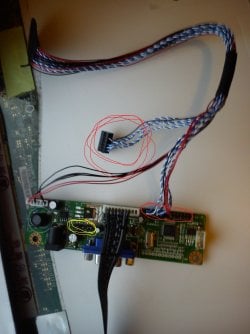
If there is no documentation whatsoever, I'm taking a wild shot in the dark and say you might have connected the blue-white cables incorrectly. They should be data lines, while the red and black should be power lines (again guessing from position and number of them).


Try swapping the two data connectors you have or rotating them on the same header. This shouldn't theoretically endanger the screen, but with these things you never know.

Check that the power cables on the header are in the right place as if they are not in the right place the screen's LCD isn't receiving power.

Make sure you don't change the power cable positions unless you have a manual, see white text on the board indicating it, or feel very sure (or very brave), as placing power on a data line can damage the screen. Or not, if the board is smart enough to detect it.

I also see jumpers on that board. Any indication of what they act on? (stuff written in white on the board surface near them) They usually switch a feature on or off.

For the sake of clarity, in the below work of fine art you can see the cables and header in red and the jumpers in yellow.
asdasdasd.jpg

Another feasible thing to do is asking the seller how to operate the product, where stuff goes and whatnot.
I did have some luck in the past and a few sellers were actually able to help me figure out how a particular interface board worked. Or to get in touch with someone who does. Most chinese sellers tend to write in horribly broken English, but can draw signs on an image.
 

My Computer

Computer type
PC/Desktop
Computer Manufacturer/Model Number
custom built
OS
Win 7 Pro 64-bit 7601
CPU
AMD Phenom 9650 QuadCore, revision DR-B3
Motherboard
ASUS M4A78
Memory
5 GB yes I run 2x 2GB and 1x 1GB, different brand, spank me.
Graphics Card(s)
NVIDIA GeForce 9800 GT 512 Mb, unknown manufacturer.
Sound Card
Crappy Realtek Integrated Audio
Monitor(s) Displays
Fujitsu Siemens P19-3P
Screen Resolution
1280 x 1024 x 32 bits @ 60 Hz Oh yeah, 4:3 rocks!
Hard Drives
(1) MAXTOR S TM3320613AS SATA Disk Device (2) STM35004 18AS SATA Disk Device (3) TOSHIBA USB 2.5"-HDD
PSU
whatever, around 450w
Case
Scavenged from old company PC, 10+ years old
Cooling
CPU fan, GPU fan, case fan, nothing fancy
Keyboard
Microsoft, PS/2, white.
Mouse
Optical, logitec.
Internet Speed
effective max speeds: 70-ish kB/s down 30-ish kB/s up
Antivirus
Avira, free edition.
Browser
Firefox with FXChrome to make it look like Google Chrome :P
Other Info
Was discarded by previous owner due to "horrible performance".
Was running Win Xp from a IDE drive. Yeah. Was a pain.
SATA II drive and Win7 and it zips away! Yay!
I thought about these exact wires (red circles). But I'm pretty sure I'm right on it, since both parts (removable parts) were cut in two. And to actually make those wires "fit" all together, there's only one way to put them on . sooo :/

About the Jumper : I noticed that one and figured out I have nothing to match. I did not find any use to it yet.
It seems to be split in two parts, 5 pins in total. There's already a little plastic thing renforced with a very thin metal layer inside. All I can read (in very small caracters) is "12V" under the "first part" (first two pins on the left of the picture above), then 5V and 3V3 under the "second part" (3 pins, the two on the right (of the picture you used above) are connected each other with that little plastic thing renforced with a metal layer)

I have NO documentation with the controller board ... only the package and the controller and wires (+VGA for free btw)
Beyond that I'm a asian (along with being caucasian and latin at the same time) and have plenty of family to translate asian languages already so don't worry about that.

I'll take a chance at a repair shop I know near downtown on tomorrow or try to contact the seller to figure this out.

Once again, thank you so much for your quick and very satisfying help. And thanks to all others too of course ;)

About the Sony Experia J : It's a second hand, my step mother gave it to me when she switched for the Z. The camera does not work properly since I believe the "auto zoom" algorithm must be corrupted (it really doesnt work, I have to re-focus the objective plenty of times before it succeeds auto zooming). Other than that I have troubles every time. Multiple and constant crashes, proximity captors are really bad and I need to turn the screen off every time I answer the phone otherwise the heat of my cheek will make it "work", switching pages, changing settings sometimes etc xD xD !! And a lot of other issues. Not saying Sony's extra layer on Android is absolutly useless.
 

My Computer

Computer type
PC/Desktop
Computer Manufacturer/Model Number
[Laptop] MEDION Akoya P6815 (Temporary ...)
OS
Windows 7 Ultimate 64bit - Laptop
CPU
Intel Core i7-3630QM @ 2.40GHz | Intel HD Graphics 4000
Motherboard
Mobile Intel HM77 Express Chipset
Memory
8Gb RAM DDR3 1333 Mhz
Graphics Card(s)
Intel HD Graphics 4000 | Nvidia GeForce GT-650M 2Gb GDDR3
Monitor(s) Displays
Factory Laptop Screen @ 15,6" 16:9 Full HD Non-Glare LED
Screen Resolution
1920*1080px
Hard Drives
Samsung 32Gb Internal SSD
Samsung 840 Series 120Gb SSD
Seagate Expansion 1Tb External 5400Tr
Cooling
Cooling Master NotePal U3 [Cooling Pad for Laptop]
Antivirus
Avast! |
Browser
Mozilla FireFox 22.0 | Google Chrome
Back
Top