Left Blue Pane in win 7 or Vista ?

simonsez9

New member
Member
Local time
8:47 AM
Messages
72
hi folks, i am using win xp sp3 and using the theme of win 7. Now what i want to ask here when i have installed win 7 or Vista Ultimate i didnt see this dark blue left pane. So is there any way to get this blue pane in both of the system and how can i achieve this Blue Pane what settings should i change or i have to use the 3rd party theme to get this ?
 

Attachments
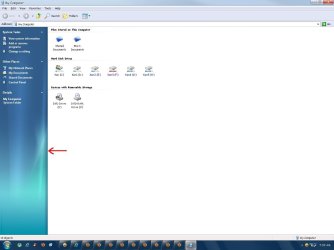
  • leftblue.JPG
    leftblue.JPG
    61.1 KB · Views: 23

My Computer My Computer

At a glance

Windows 7 Ultimate 64 Bit Sp1Intel Quad Core Q9650Kingston DDR 3 8GB 1333 MhzGigabyte 5450 1Gb DDR3
Computer type
PC/Desktop
Computer Manufacturer/Model Number
Custom build
OS
Windows 7 Ultimate 64 Bit Sp1
CPU
Intel Quad Core Q9650
Motherboard
Asus P5G41T-MLX
Memory
Kingston DDR 3 8GB 1333 Mhz
Graphics Card(s)
Gigabyte 5450 1Gb DDR3
Sound Card
Mobo Built
Monitor(s) Displays
Dell 24 wm
Screen Resolution
1080 P
Hard Drives
2 Tb Sata Drive
PSU
Coolermatser GX750
Case
Cooler Master Casing
Cooling
Normal
I'm not sure why you need to worry about getting the "blue pane" in Win7/Vista if you've already got it in XP... Planning an upgrade or just want to know?

Anyway, I've used both Vista and 7 for a while and never seen that before so I'd guess the developer of the Win7 theme you're using has added that in himself, that theme is probably compatible with Win7/Vista too, as both operating systems have quite good backward compatibility. If you want to get that blue pane on a different PC using XP/Win7/Vista, seems the best thing to do is simply use that theme on the other PC.
 

My Computer My Computer

At a glance

Win7 Enterprise x64AMD Phenom II - x4 945 (3.2GHz)3GBGTS 250
Computer Manufacturer/Model Number
Custom
OS
Win7 Enterprise x64
CPU
AMD Phenom II - x4 945 (3.2GHz)
Motherboard
ASUS M478a Deluxe (or something like that.. Can't remember)
Memory
3GB
Graphics Card(s)
GTS 250
Monitor(s) Displays
32" Sony Bravia
Hard Drives
1TB WD
500GB Sandisk
160GB Sandisk
PSU
650W CiT
Keyboard
G15 Generation 1
Internet Speed
Terrifyingly slow
Those "blue panels" in Windows 7 are in C:\Windows\System32\shell32.dll bitmap folder image number 632 and 633, and if you are using 64-bit they are also in C:\Windows\SysWOW64\shell32.dll you will need a resource editor to replace the images. If you can find the images from XP or the .dll from XP I can change them for you and tell you how to replace the shell32.dll
Jerry
 

My Computer My Computer

At a glance

Win 7 Pro x64 / Win 10 ProIntel(R) Core(TM) i7-3630QM CPU @ 2.40GHz12 GB(1) Intel(R) HD Graphics 4000 (2) NVIDIA GeFo...
Computer type
Laptop
Computer Manufacturer/Model Number
Sager NP9170
OS
Win 7 Pro x64 / Win 10 Pro
CPU
Intel(R) Core(TM) i7-3630QM CPU @ 2.40GHz
Motherboard
CLEVO P170EM
Memory
12 GB
Graphics Card(s)
(1) Intel(R) HD Graphics 4000 (2) NVIDIA GeForce GTX 675M
Sound Card
(1) Realtek High Definition Audio (2) Intel(R) Display Aud
Monitor(s) Displays
17.3
Screen Resolution
1920x1080
Hard Drives
(1) Samsung 860 EVO 500GB(OS) (1) Samsung 860 EVO 500GB(Data)
Keyboard
Backlite
Antivirus
MSE, Malwarebytes Pro
Browser
Firefox
Other Info
DESKTOP: Custom-built.
OS: Win 10 Pro x64.
CASE: Rosewill R5.
CPU: Intel I5 4670K CPU @ 3.40GHz.
CPU COOLER: Cool Master Hyper 212 EVO.
MOTHERBOARD: Asus Z87-A.
MEMORY: Kingston HyperX 2x4 GB.
GPU: Nvidia Geforce 650 TI.
PSU: Corsair TX750.
DRIVES: (1) Samsung 840 120 GB SSD (2) Western Digital blue 500 GB 7200 RPM.
^^^ thx for the reply both of the folk's

@Bongo and did u see then size of the icon on task bar i am unable to get the same exact size of the icon's on taskbar wondering how to get them here below is the link of the my screen shot for win 7 using the basic theme if u want the reg file i am using to the icon let me know i will send it so you can analyze it as well
 

Attachments

  • 1.jpg
    1.jpg
    187.3 KB · Views: 5

My Computer My Computer

At a glance

Windows 7 Ultimate 64 Bit Sp1Intel Quad Core Q9650Kingston DDR 3 8GB 1333 MhzGigabyte 5450 1Gb DDR3
Computer type
PC/Desktop
Computer Manufacturer/Model Number
Custom build
OS
Windows 7 Ultimate 64 Bit Sp1
CPU
Intel Quad Core Q9650
Motherboard
Asus P5G41T-MLX
Memory
Kingston DDR 3 8GB 1333 Mhz
Graphics Card(s)
Gigabyte 5450 1Gb DDR3
Sound Card
Mobo Built
Monitor(s) Displays
Dell 24 wm
Screen Resolution
1080 P
Hard Drives
2 Tb Sata Drive
PSU
Coolermatser GX750
Case
Cooler Master Casing
Cooling
Normal
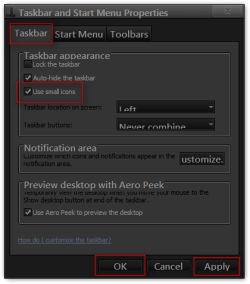
As far as I know you only have two choices for the size of the icon on the taskbar large and small.
Right click on the taskbar go to properties if it's not there already click on the Taskbar tab then you can either check or uncheck the use small icons then click apply and then OK.
Jerry
Taskbar and Start Menu Properties.png
 

My Computer My Computer

At a glance

Win 7 Pro x64 / Win 10 ProIntel(R) Core(TM) i7-3630QM CPU @ 2.40GHz12 GB(1) Intel(R) HD Graphics 4000 (2) NVIDIA GeFo...
Computer type
Laptop
Computer Manufacturer/Model Number
Sager NP9170
OS
Win 7 Pro x64 / Win 10 Pro
CPU
Intel(R) Core(TM) i7-3630QM CPU @ 2.40GHz
Motherboard
CLEVO P170EM
Memory
12 GB
Graphics Card(s)
(1) Intel(R) HD Graphics 4000 (2) NVIDIA GeForce GTX 675M
Sound Card
(1) Realtek High Definition Audio (2) Intel(R) Display Aud
Monitor(s) Displays
17.3
Screen Resolution
1920x1080
Hard Drives
(1) Samsung 860 EVO 500GB(OS) (1) Samsung 860 EVO 500GB(Data)
Keyboard
Backlite
Antivirus
MSE, Malwarebytes Pro
Browser
Firefox
Other Info
DESKTOP: Custom-built.
OS: Win 10 Pro x64.
CASE: Rosewill R5.
CPU: Intel I5 4670K CPU @ 3.40GHz.
CPU COOLER: Cool Master Hyper 212 EVO.
MOTHERBOARD: Asus Z87-A.
MEMORY: Kingston HyperX 2x4 GB.
GPU: Nvidia Geforce 650 TI.
PSU: Corsair TX750.
DRIVES: (1) Samsung 840 120 GB SSD (2) Western Digital blue 500 GB 7200 RPM.
Back
Top