Left Mouse Button - Stops working from time to time.

OphionLuteus

New member
Local time
12:25 AM
Messages
6
Location
Liverpool, UK.
Hello everyone,

For the second time within the past two weeks I've had quite an annoying problem regarding my left mouse button on my synaptics pointing device, all of a sudden the left mouse button will stop working. The right mouse button and the rest of the touchpad will work apart from being able to click the LMB function. I've had this happen once before quite a few months ago but thought nothing of it at the time. This occurs for around half a minute to sometimes a minute before returning to normal and being able to use the LMB. I am using a Lenovo Z580 if that is any help to anyone.

I have tried searching around the internet for any information regarding this problem but I have not been able to find any solution or information connected to my issue.

Thank you in advance!
 

My Computer My Computer

At a glance

Windows 7 64bitQuadcore Intel Core i5-3210M8GBIntel HD Graphics 4000
Computer Manufacturer/Model Number
Lenovo Ideapad Z580
OS
Windows 7 64bit
CPU
Quadcore Intel Core i5-3210M
Motherboard
Lenovo
Memory
8GB
Graphics Card(s)
Intel HD Graphics 4000
Sound Card
Intel Display Audio/Realtek High Definition Audio
Screen Resolution
1366x768
Hard Drives
Hitachi HTS547575A9E384
Mouse
Lenovo/Synaptics Pointing Device
Hello LO mate when you click the button do you hear an audible click from inside the mouse it could be something as simple as a stuck micro switch.

Also if it is a wired one check the USB contacts too - in the plug and socket. You can clean them gently with a strip (about 5 mm with the corners rounded off) of old credit card with some lint free cloth around the end of it moistened very lightly with some alcohol

By the way just how old is the mouse?
 

My Computer My Computer

At a glance

Desk1 7 Home Prem / Desk2 10 Pro / Main lap A...Desk1 i5 3750K / Laptop i7 GTX 860M / Desk2 i...Desk1 8GB (1866) / Desk2 16GB (1333) / Laptop...Desk 1& 2NVidia GTX 650 & Laptops on board Intel
Computer type
PC/Desktop
Computer Manufacturer/Model Number
Own build (new) Desk1 / Asus ROG Win 7 / Desk2 1st build
OS
Desk1 7 Home Prem / Desk2 10 Pro / Main lap Asus ROG 10 Pro 2 laptop Toshiba 7 Pro Asus P2520 7 & 10
CPU
Desk1 i5 3750K / Laptop i7 GTX 860M / Desk2 i5 2500
Motherboard
Desk1 Asus P877-V / Desk2 Gigabyte H67 UD3H / Laptop ?
Memory
Desk1 8GB (1866) / Desk2 16GB (1333) / Laptop 8Gb DDR3
Graphics Card(s)
Desk 1& 2NVidia GTX 650 & Laptops on board Intel
Sound Card
Desk 1 & 2 -XONAR DG Realtek High Def audio Laptop
Monitor(s) Displays
Desk 1 Benq HD 2450 / Desk2 Philips 24" / Laptop 17.5"
Screen Resolution
1920x1080 D1 & D2 & Laptop 1
Hard Drives
Desk1 Samsung 120GB 830 SSD
Asus ROG 256GB 850 Pro SSD
Desk2 Samsung 840 256 SSD
Toshiba 120GB EVO
PSU
Desk 1 Corsair HX 1050/ Laptop ? / Desk 2 Corsair HX 650
Case
Desk 1 Cooler HAF XM ? Toshiba laptop / Desk2 Coolermaster
Cooling
Fans on all Desk1 -2 Desk2 - all Coolermasters 5 Laptop ?
Keyboard
Desk 1 MS Sidewinder X6 Desk 2 MS Sidewinder X 4
Mouse
Desk 1&2 - Gigabyte MS 900 gamer - laptop - Logitec wireless
Internet Speed
ADSL2+
Other Info
One other Desktop (tester) and spare Toshba laptop both with SSD's
Running Kaspersky 2016 ISS on all machines config'd identically
Logitec audio stereo systems on each machine (x3)
Canon MG5250MFC
Router/modem TP-Link running WPA2SK
I don't recall hearing anything, but if it happens to be a stuck micro switch then how do I go about resolving that issue?

and the touchpad is around 8 months old:)

Thank you for your reply!
 

My Computer My Computer

At a glance

Windows 7 64bitQuadcore Intel Core i5-3210M8GBIntel HD Graphics 4000
Computer Manufacturer/Model Number
Lenovo Ideapad Z580
OS
Windows 7 64bit
CPU
Quadcore Intel Core i5-3210M
Motherboard
Lenovo
Memory
8GB
Graphics Card(s)
Intel HD Graphics 4000
Sound Card
Intel Display Audio/Realtek High Definition Audio
Screen Resolution
1366x768
Hard Drives
Hitachi HTS547575A9E384
Mouse
Lenovo/Synaptics Pointing Device
I don't recall hearing anything, but if it happens to be a stuck micro switch then how do I go about resolving that issue?

and the touchpad is around 8 months old:)

Thank you for your reply!
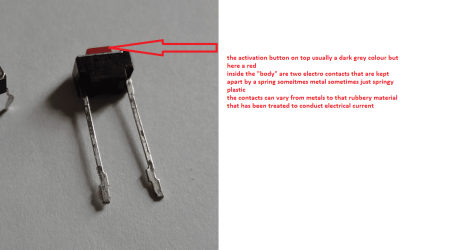
Hum sorry late reply - well if you put your ear close to the left click button you should hear a definite click-click as the switch is activated and then returns to its off position when you release pressure on it. It is essentially a on/off toggle type switch much the same as the keyboard keys.

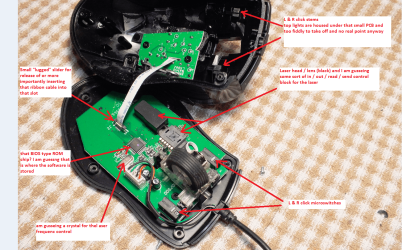
Now the only thing you can do about getting it unstuck is to de-construct the mouse find the switch and see if you can free it up. That may be quite easy unless the return spring mechanism inside is broken, the button stuck firmly down or the two electronic contacts surfaces inside the switch are contaminated or just plain worn out. ?No coffee spills or little grubby fingers mucking around with it?

See my pics one is one of my Gigabyte mice that went south on me and I had to have a look :)
 

Attachments

  • MICRO.PNG
    MICRO.PNG
    116.3 KB · Views: 2
  • MOUSE.PNG
    MOUSE.PNG
    689.5 KB · Views: 2

My Computer My Computer

At a glance

Desk1 7 Home Prem / Desk2 10 Pro / Main lap A...Desk1 i5 3750K / Laptop i7 GTX 860M / Desk2 i...Desk1 8GB (1866) / Desk2 16GB (1333) / Laptop...Desk 1& 2NVidia GTX 650 & Laptops on board Intel
Computer type
PC/Desktop
Computer Manufacturer/Model Number
Own build (new) Desk1 / Asus ROG Win 7 / Desk2 1st build
OS
Desk1 7 Home Prem / Desk2 10 Pro / Main lap Asus ROG 10 Pro 2 laptop Toshiba 7 Pro Asus P2520 7 & 10
CPU
Desk1 i5 3750K / Laptop i7 GTX 860M / Desk2 i5 2500
Motherboard
Desk1 Asus P877-V / Desk2 Gigabyte H67 UD3H / Laptop ?
Memory
Desk1 8GB (1866) / Desk2 16GB (1333) / Laptop 8Gb DDR3
Graphics Card(s)
Desk 1& 2NVidia GTX 650 & Laptops on board Intel
Sound Card
Desk 1 & 2 -XONAR DG Realtek High Def audio Laptop
Monitor(s) Displays
Desk 1 Benq HD 2450 / Desk2 Philips 24" / Laptop 17.5"
Screen Resolution
1920x1080 D1 & D2 & Laptop 1
Hard Drives
Desk1 Samsung 120GB 830 SSD
Asus ROG 256GB 850 Pro SSD
Desk2 Samsung 840 256 SSD
Toshiba 120GB EVO
PSU
Desk 1 Corsair HX 1050/ Laptop ? / Desk 2 Corsair HX 650
Case
Desk 1 Cooler HAF XM ? Toshiba laptop / Desk2 Coolermaster
Cooling
Fans on all Desk1 -2 Desk2 - all Coolermasters 5 Laptop ?
Keyboard
Desk 1 MS Sidewinder X6 Desk 2 MS Sidewinder X 4
Mouse
Desk 1&2 - Gigabyte MS 900 gamer - laptop - Logitec wireless
Internet Speed
ADSL2+
Other Info
One other Desktop (tester) and spare Toshba laptop both with SSD's
Running Kaspersky 2016 ISS on all machines config'd identically
Logitec audio stereo systems on each machine (x3)
Canon MG5250MFC
Router/modem TP-Link running WPA2SK
Back
Top