
Legacy Networking - Simple File Sharing

Treebeard

New member
Local time
2:29 PM
Messages
20
Hi

I have 2 Windows 7 machines connected to a network with several other devices all of which I can see in Windows Explorer - Networking. I've set up shares on each of the Windows 7 machines and turned off Password protected sharing in Advanced sharing settings. The first time I try to access shares on either of the Windows 7 machines from the other machine it asks for a username and password before I can access the shares. Once the credentials have been accepted the shares continue until the machine is rebooted. Setting the 'Remember credentials' box on the login page doesn't help. Other shared resources (XP desktop, NAS, Media player) on the network all work fine from either of the Win 7 machines. What I am looking for is the equivalent of the old "Simple file sharing" from XP, can anyone tell me how to set this in Windows 7 (Ultimate & Professional)?

Andy
 

My Computer

Computer Manufacturer/Model Number
Dell Latitude D630
OS
Windows 7 Professional 32 Bit RTM
CPU
T8100
Memory
2 GB
Graphics Card(s)
Mobile Intel 965 Express
Hard Drives
160GB Western Digital Scorpio Black SATA

My Computer

Computer type
PC/Desktop
Computer Manufacturer/Model Number
Home built
OS
Windows 7 Ult, Windows 8.1 Pro,
CPU
Q9650-4.275GHz, E8600 4.5GHz, E6750-3.8GHz
Motherboard
Evga 780i FTW
Memory
G.Skill PC2 9600 1200Mhz 5 5 5 15 2T
Graphics Card(s)
GTX480
Sound Card
Asus Xonar D2
Monitor(s) Displays
HannsG
Screen Resolution
1680X1050
Hard Drives
GSkill Phoenix Pro 120GB SSD
PSU
ThermalTake Toughpower 1000Watt modular
Case
ThermalTake XaserV
Cooling
Xigmatek S1283
Keyboard
Logitech G15
Mouse
Logitech G9
Internet Speed
T1
Thanks for that. Just about everything works as it should, the only issue I have is that I need to input Username & Password the first time I try to connect between either of the 2 Win 7 machines after first logging on.

I've already been through the link you kindly provided and everything is as it should be.

Cheers - Andy
 

My Computer

Computer Manufacturer/Model Number
Dell Latitude D630
OS
Windows 7 Professional 32 Bit RTM
CPU
T8100
Memory
2 GB
Graphics Card(s)
Mobile Intel 965 Express
Hard Drives
160GB Western Digital Scorpio Black SATA
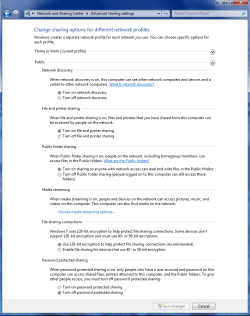
Make sure all these settings are set like the screen shots below for both Home, Work and public file sharing.

Also try turning on passwork protected sharing in the Home and Work advanced settings as this is supposed to keep you from having to enter the password. Try it in both the on and off positions.
 

Attachments

  • Home or work homegroup enable.PNG
    Home or work homegroup enable.PNG
    189.2 KB · Views: 2,341
  • public sharing enabled all.PNG
    public sharing enabled all.PNG
    148.4 KB · Views: 1,427

My Computer

Computer type
PC/Desktop
Computer Manufacturer/Model Number
Home built
OS
Windows 7 Ult, Windows 8.1 Pro,
CPU
Q9650-4.275GHz, E8600 4.5GHz, E6750-3.8GHz
Motherboard
Evga 780i FTW
Memory
G.Skill PC2 9600 1200Mhz 5 5 5 15 2T
Graphics Card(s)
GTX480
Sound Card
Asus Xonar D2
Monitor(s) Displays
HannsG
Screen Resolution
1680X1050
Hard Drives
GSkill Phoenix Pro 120GB SSD
PSU
ThermalTake Toughpower 1000Watt modular
Case
ThermalTake XaserV
Cooling
Xigmatek S1283
Keyboard
Logitech G15
Mouse
Logitech G9
Internet Speed
T1
Well. if I turn password protected sharing ON, it still asks for the credentials but it at least remembers them for the next boot if I tell it to remember. (I've also set the same Username & Password on both Win 7 PCs which might be helping.)

This solves the immediate problem but I'm sure I'm now going to have trouble accessing shares from non Win 7 devices. That'll be tomorrow's problem! :rolleyes:

Andy
 

My Computer

Computer Manufacturer/Model Number
Dell Latitude D630
OS
Windows 7 Professional 32 Bit RTM
CPU
T8100
Memory
2 GB
Graphics Card(s)
Mobile Intel 965 Express
Hard Drives
160GB Western Digital Scorpio Black SATA
Well at least I helped out that problem. Using the same user name and password does help when sharing between different Op systems as you found out.

As for accessing the other shares, it should work if permissions are set up correctly. Tutorial for permissions > http://www.sevenforums.com/tutorials/24232-sharing-permissions.html?filter


If I helped don't forget to Rep, little scale upper right.
 

My Computer

Computer type
PC/Desktop
Computer Manufacturer/Model Number
Home built
OS
Windows 7 Ult, Windows 8.1 Pro,
CPU
Q9650-4.275GHz, E8600 4.5GHz, E6750-3.8GHz
Motherboard
Evga 780i FTW
Memory
G.Skill PC2 9600 1200Mhz 5 5 5 15 2T
Graphics Card(s)
GTX480
Sound Card
Asus Xonar D2
Monitor(s) Displays
HannsG
Screen Resolution
1680X1050
Hard Drives
GSkill Phoenix Pro 120GB SSD
PSU
ThermalTake Toughpower 1000Watt modular
Case
ThermalTake XaserV
Cooling
Xigmatek S1283
Keyboard
Logitech G15
Mouse
Logitech G9
Internet Speed
T1
Back
Top