lending internet to a friend and homegroups

ap0calyptic

New member
Local time
5:26 AM
Messages
29
hello! A friend is asking me to lend her an internet
connection Cause hers wont work 2days. Id like to
know if i tell her my wifi password will she be
able to have access to my homegroup data too?
Or she needs my pass there too? (i know
homegroups got them) so i dont want her to access my data, so is there 100% if i give her my
wifi pass that she wont also get access to my
data? I need a quick answer please
 

My Computer My Computer

At a glance

win 7
OS
win 7
I dont believe lending just the wifi password will enable her to access your network as well; so im pretty sure you should be fine as far as that goes.
 

My Computer My Computer

At a glance

Windows 7 ultimate 64-bitIntel I7 2600K 3.4ghzCorsair 16gb ddr3 1600mhzNvidia Geforce gt 430
Computer type
PC/Desktop
Computer Manufacturer/Model Number
custom built
OS
Windows 7 ultimate 64-bit
CPU
Intel I7 2600K 3.4ghz
Motherboard
Asus Evo P8P67
Memory
Corsair 16gb ddr3 1600mhz
Graphics Card(s)
Nvidia Geforce gt 430
Sound Card
Sound Blaster Titanium x-fi pci express
Monitor(s) Displays
Dell E198WFP
Hard Drives
1 western digital 2TB drive.
PSU
Antec 1200 watt
Case
Inwin Dragon Rider
Cooling
6 case supplied cooling fans
Keyboard
logitech mk700
Mouse
logitech m705
Internet Speed
25-50mbps download; 10mbps upload(i think)
Antivirus
avg free 2014
Browser
mozilla firefox
Other Info
Also have a pretty bad speaker setup which is a klipsch promedia 5.1 surround speaker setup with huge subwoofer and lg blu ray player/writer. Also a hp officejet pro 8600 plus wireless all in one and a logitech s7500 webcam.
Network shares (files)

Hi,

I believe that matts6887 is correct. If you are at all worried about files that can be viewed by people using other machines on a network you can check out who's been looking at what by making use of a simple to use program.

There's two version. One that can be installed and one that's portable. I use the portable version and if you want to try it you can download it here:

Portable NetShareMonitor Free Download

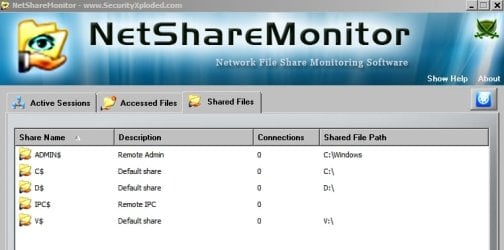
Extract the contents and place them somewhere handy. When you run the program you'll see something like the following (screenshots):

NetShareMonitor.jpg

For each connection, it will show the IP address, user name and the shared files being accessed by that person.

Tip: It's portable and runs without installation - however, if you make use if it, open the settings and uncheck "Run on windows startup".
 

My Computer My Computer

At a glance

Microsoft Windows 7 Home Premium 64-bit 7601 ...AMD C-60 APU with Radeon(tm) HD Graphics4.00 GBAMD Radeon HD 6290 Graphics
Computer type
Laptop
Computer Manufacturer/Model Number
ASUS
OS
Microsoft Windows 7 Home Premium 64-bit 7601 Multiprocessor Free Service Pack 1
CPU
AMD C-60 APU with Radeon(tm) HD Graphics
Motherboard
ASUSTeK COMPUTER INC. X501U
Memory
4.00 GB
Graphics Card(s)
AMD Radeon HD 6290 Graphics
Sound Card
(1) AMD High Definition Audio Device (2) Realtek High Defi
Screen Resolution
1366 x 768 x 32 bits (4294967296 colors) @ 60 Hz
Hard Drives
Hitachi HTS545050A7E380 SATA Disk Device
Antivirus
Comodo CIS & FW, SecureAplus App Whitelisting, Threatfire
Browser
Cyberfox 64bit, Opera 64bit, Airfox
Other Info
Spy-The-Spy, HitmanPro.Alert, Norton Connect Safe, MJRegWatcher, BitDefender TrafficLight, Voodoo Shield, Zemana AntiMalware
hm here if i click these folders itll show me whos accesing them? Also if i install this only on my laptop is it ok or do i have to also install on my desktop pc?
 

My Computer My Computer

At a glance

win 7
OS
win 7
No need to install anything

hm here if i click these folders itll show me whos accesing them? Also if i install this only on my laptop is it ok or do i have to also install on my desktop pc?

Hi again - the program is portable so it doesn't need to be installed. Just extract the files and run it from the executable.

It will show files that are being accessed by other users using other machines and it needs to run on the machine that you're using. It doesn't need to be running on any other machine. It will only show shared files on your machine that are being accessed by others.

Whenever any users accesses your Shared Files, NetShareMonitor alerts you by blinking the icon in the system tray or making an alert sound. For each connection, it will show the IP address, user name & shared files being accessed by that user.

Of course you could just disable all file sharing if your aim is privacy.
 

My Computer My Computer

At a glance

Microsoft Windows 7 Home Premium 64-bit 7601 ...AMD C-60 APU with Radeon(tm) HD Graphics4.00 GBAMD Radeon HD 6290 Graphics
Computer type
Laptop
Computer Manufacturer/Model Number
ASUS
OS
Microsoft Windows 7 Home Premium 64-bit 7601 Multiprocessor Free Service Pack 1
CPU
AMD C-60 APU with Radeon(tm) HD Graphics
Motherboard
ASUSTeK COMPUTER INC. X501U
Memory
4.00 GB
Graphics Card(s)
AMD Radeon HD 6290 Graphics
Sound Card
(1) AMD High Definition Audio Device (2) Realtek High Defi
Screen Resolution
1366 x 768 x 32 bits (4294967296 colors) @ 60 Hz
Hard Drives
Hitachi HTS545050A7E380 SATA Disk Device
Antivirus
Comodo CIS & FW, SecureAplus App Whitelisting, Threatfire
Browser
Cyberfox 64bit, Opera 64bit, Airfox
Other Info
Spy-The-Spy, HitmanPro.Alert, Norton Connect Safe, MJRegWatcher, BitDefender TrafficLight, Voodoo Shield, Zemana AntiMalware
Back
Top