Lexmark drivers

Relived

New member
Local time
7:03 PM
Messages
11
Hey guys,

I recently installed Windows 7 7000/7022/7048, and also installed the 64bit drivers for my Lexmark X5150. The problem is i can't print sometimes, it comes in the printing dialog or It prints but when i send a second set it keeps saying deleting the first set. Or it does not print until I restart print spooler, and it starts printing the one that was "deleting". Its seems like Lexmark never learns.. I had this problem too in Vista.
If anyone can shed a light on this problem it would be great..
Thanks!
 

My Computer

OS
Windows 7 / Windows XP
CPU
AMD Athlon X4 955 3.2Ghz
Motherboard
Asus M4A78-ME
Memory
2x 2GB OCZ Platinum 1066Mhz
Graphics Card(s)
Sapphire Radeon HD4870 1GB
Sound Card
On Board
Monitor(s) Displays
Samsung 20", IBM 15"
Screen Resolution
1680x1050,1154x864
Hard Drives
1x WD 320GB
1x 400GB
PSU
OCZ OCZ600SXS StealthXStream 600W
Case
Standard Mid Tower
Internet Speed
1Mbit Down - 512kbps UP
I could only find these drivers for your printer. The site did mention a universal driver but no download link?
Lexmark - United States :)
 

My Computer

Computer Manufacturer/Model Number
Dilithium Computers/Engineering (Myself) Star date 42.739285.5432.9
OS
Win7 Ultimate x64 on Desktop / Win7 Ultimate x86 on laptop / Win7 x86 Starter on Netbook
CPU
AMD Phenom 965 X4 3.4Ghz cpu Black Edition
Motherboard
Gigabyte 790XT
Memory
12 Gb DDR3
Graphics Card(s)
Nvidea Gforce GTX 470
Sound Card
Onboard Realtek hi-fi
Monitor(s) Displays
Lg 3D led 23"
Screen Resolution
1920x1080
Hard Drives
Loads maxstore sata 1 & 2/ loads of partitions + 1Tb Hitachi sata 2. 256Gb Crucial ssd.
PSU
OCZ 700W GameXstream
Case
Artec 10000
Cooling
On board + many case fans
Keyboard
Logitech wireless K350
Mouse
Inferno gaming mouse
Internet Speed
Talk talk. 10Mb
Other Info
My PC was hand built with matchsticks. xbox 360 controller. Printers,fax.........

My Computer

Computer Manufacturer/Model Number
Self build
OS
Windows 7 Ultimate x64
CPU
AMD Phenom II x4
Motherboard
Gigabyte 880
Memory
8GB
Graphics Card(s)
NVIDIA GeForce HD
Sound Card
Realtek HD Audio
Screen Resolution
1920 x 1080
Hard Drives
2 x 1TB
PSU
Thermalake 550w
Case
XCase
Internet Speed
8MB
I am using the ones that are on the Lexmark site. And those are the buggy ones..
Any other ones or fix?
 

My Computer

OS
Windows 7 / Windows XP
CPU
AMD Athlon X4 955 3.2Ghz
Motherboard
Asus M4A78-ME
Memory
2x 2GB OCZ Platinum 1066Mhz
Graphics Card(s)
Sapphire Radeon HD4870 1GB
Sound Card
On Board
Monitor(s) Displays
Samsung 20", IBM 15"
Screen Resolution
1680x1050,1154x864
Hard Drives
1x WD 320GB
1x 400GB
PSU
OCZ OCZ600SXS StealthXStream 600W
Case
Standard Mid Tower
Internet Speed
1Mbit Down - 512kbps UP
I don't think any other drivers are available at the moment.
 

My Computer

Computer Manufacturer/Model Number
Dilithium Computers/Engineering (Myself) Star date 42.739285.5432.9
OS
Win7 Ultimate x64 on Desktop / Win7 Ultimate x86 on laptop / Win7 x86 Starter on Netbook
CPU
AMD Phenom 965 X4 3.4Ghz cpu Black Edition
Motherboard
Gigabyte 790XT
Memory
12 Gb DDR3
Graphics Card(s)
Nvidea Gforce GTX 470
Sound Card
Onboard Realtek hi-fi
Monitor(s) Displays
Lg 3D led 23"
Screen Resolution
1920x1080
Hard Drives
Loads maxstore sata 1 & 2/ loads of partitions + 1Tb Hitachi sata 2. 256Gb Crucial ssd.
PSU
OCZ 700W GameXstream
Case
Artec 10000
Cooling
On board + many case fans
Keyboard
Logitech wireless K350
Mouse
Inferno gaming mouse
Internet Speed
Talk talk. 10Mb
Other Info
My PC was hand built with matchsticks. xbox 360 controller. Printers,fax.........
Mine is Working!!!! (X2470)

Here's how I got my Lexmark printer to work in Windows 7:

I have a X2470, but hopefully this will work for others as well.

1. Download the Vista drivers for your printer. For me it was cjr2400EN.exe

2. Do NOT click on the file to execute it! Instead, right click it and unzip to another folder (mine was named cjr2400EN).

3. In that folder, find Setup.exe. Right click on that file.

3. In Properties, select Compatibility.

4. Select Run this program in compatibility mode for: Windows Vista

5. At the bottom, check Run this program as an administrator.

6. Click Apply and ok.

7. Then, click on the setup file as you normally would to install. From that point on my install was normal and the printer seems to work fine.

Hope this helps!
 

My Computer

OS
Windows 7 RC 7100
Here's how I got my Lexmark printer to work in Windows 7:

I have a X2470, but hopefully this will work for others as well.

1. Download the Vista drivers for your printer. For me it was cjr2400EN.exe

2. Do NOT click on the file to execute it! Instead, right click it and unzip to another folder (mine was named cjr2400EN).

3. In that folder, find Setup.exe. Right click on that file.

3. In Properties, select Compatibility.

4. Select Run this program in compatibility mode for: Windows Vista

5. At the bottom, check Run this program as an administrator.

6. Click Apply and ok.

7. Then, click on the setup file as you normally would to install. From that point on my install was normal and the printer seems to work fine.

Hope this helps!

I tried this but sadly it hasn't worked for me :(
I have a Lexmark 730.
I'm really desperate to get it working, please help.
 

My Computer

OS
Windows 7
Here's how I got my Lexmark printer to work in Windows 7:

I have a X2470, but hopefully this will work for others as well.

1. Download the Vista drivers for your printer. For me it was cjr2400EN.exe

2. Do NOT click on the file to execute it! Instead, right click it and unzip to another folder (mine was named cjr2400EN).

3. In that folder, find Setup.exe. Right click on that file.

3. In Properties, select Compatibility.

4. Select Run this program in compatibility mode for: Windows Vista

5. At the bottom, check Run this program as an administrator.

6. Click Apply and ok.

7. Then, click on the setup file as you normally would to install. From that point on my install was normal and the printer seems to work fine.

Hope this helps!

After weeks of messing with my Lexmark X6570, the above information worked. If you have already tried to install the drivers, uninstall everything first, then do the above.

If you double click on the download and it starts unzipping, no worries. After it unzips, close it out and go to the directory it unzipped to, usually C:/Lexmark/drivers/6500/setup (or whichever number driver you are using).

Thanks wetherb67!
 

My Computer

Computer Manufacturer/Model Number
HP Pavilion a6400f (KT372AAR-ABA a6518f)
OS
Win7
CPU
AMD Athlon(tm) 64 X2 Dual Core Processor 5400+
Memory
3.0 GB DDR
Graphics Card(s)
NVIDIA GeForce 6150SE nForce 430
Hard Drives
500GB Primary, 80GB Slave, 250GB Portable Backup
Excellent, Wetherb67...saved me a ton of time. My Lexmark X6150 prints and scans now! It would probably print even better if it weren't so low on ink but I think I'm on my own there.

The printer was my only real issue in the install...cool!
 

My Computer

OS
Windows 7
Here's how I got my Lexmark printer to work in Windows 7:

I have a X2470, but hopefully this will work for others as well.

1. Download the Vista drivers for your printer. For me it was cjr2400EN.exe

2. Do NOT click on the file to execute it! Instead, right click it and unzip to another folder (mine was named cjr2400EN).

3. In that folder, find Setup.exe. Right click on that file.

3. In Properties, select Compatibility.

4. Select Run this program in compatibility mode for: Windows Vista

5. At the bottom, check Run this program as an administrator.

6. Click Apply and ok.

7. Then, click on the setup file as you normally would to install. From that point on my install was normal and the printer seems to work fine.

Hope this helps!

This worked for me and my X5270, with one small change: I had to "enable bidirectional communications". Thank you, so much, for ur great directions, as even a pc dummy like me was able to follow. :D
 

My Computer

OS
windows 7
Drastic action for installing Lexmark X6570 win7 driver

I tried all the above, but no joy. Finally I uninstalled the lexmark drivers and then went thru /windows/system7 and removed all lx*.dll AND via regedit, removed all references to 'lexmark'. There were a lot of old drivers for x84-85 and vista x6500 drivers. After ridding the registry of all lexmark references and rebooting, I installed the win7 x6500 series drivers and it all worked. (It took about 15 minutes to go thru the registry). --ChinaKat.
 

My Computer

OS
windows 7
CPU
Intel
Motherboard
Asus P5K-EMU
I have the Lexmark x8350 and no joy for me either :(
 

Attachments

  • lex.jpg
    lex.jpg
    46 KB · Views: 606

My Computer

Computer Manufacturer/Model Number
HP Pavilion p6210y
OS
windows 7
CPU
Athlonll X4 (P) 620 2.6 GHz (95W)
Motherboard
M2N78-LA
Memory
6 GB
Graphics Card(s)
GeForce 9100 Integrated on motherboard
Monitor(s) Displays
Samsung Syncmaster 225sw
Hard Drives
•640 GB SATA 3G (3.0 Gb/sec)
•7200 rpm
Welcome casualty: Have you tried the above solutions about deleting all references, files and registry entries to your printer first? Fabe
 

My Computer

Computer Manufacturer/Model Number
Self Built
OS
Windows 7 ultimate 64 bit / XP Home sp3
CPU
intel Core 2 Duo E8400 3.0ghz
Motherboard
Asus P5ND bios 1401
Memory
8 gigs 1066 OCZ Fata1ty
Graphics Card(s)
EVGA GTX 580 Call of Duty Black Ops Edition
Sound Card
Creative Soundblaster Audigy 2zs
Monitor(s) Displays
Asus 24in LCD's 2MS X2
Screen Resolution
1920x1080p @60Hz
Hard Drives
WD Caviar 500 Black/ WD Caviar 200 Blue
PSU
OCZ 700W GameXtreme
Case
NZXT Apollo
Cooling
Corsair H50 CPU/120mm x3 /60mm x2 /Corsair Dominator Ram
Keyboard
Logitech Bluetooth Wireless MX5000
Mouse
Logitech Bluetooth Wireless MX1000
Internet Speed
Download 19.83 Upload 0.97
Other Info
Logitech Z2300 Speakers/ Bose Noise Cancelling Headphones/Avermedia PCI-e Hybrid TV Bravo/Epson NX415 all in one/ 4 Port Powered USB Hub/ LG 10x Bluray Burner /TSST Corp DVDRW External
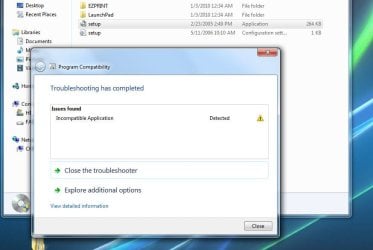
Win 7 is responding with incompatible application, which probably means its loading the old drivers and not the new ones. Try uninstalling the Lexmark drivers first via control panel then move all lx*.dll and lx*.exe etc to a sub-directory and try going thru the registry and removing all lexmark references. Then reboot, and re-install the win7 lexmark drivers.
 

My Computer

OS
windows 7
CPU
Intel
Motherboard
Asus P5K-EMU
apparently the problem with my x7350 aio was my firewall. after i uninstalled comodo. installed my x7350 aio (vistax64)-it seems to be working.
 

My Computer

OS
windows 7
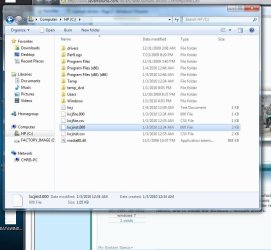
Are some of those lx files related to lexmark? If so they are in an odd place. BTW, I didn't install the old drivers as far as I know.

I went to the lexmark site and got cjr8300en.zip, which was what the lexmark site said to use. Thanks for the replies.
 

Attachments

  • lex.jpg
    lex.jpg
    72.6 KB · Views: 383

My Computer

Computer Manufacturer/Model Number
HP Pavilion p6210y
OS
windows 7
CPU
Athlonll X4 (P) 620 2.6 GHz (95W)
Motherboard
M2N78-LA
Memory
6 GB
Graphics Card(s)
GeForce 9100 Integrated on motherboard
Monitor(s) Displays
Samsung Syncmaster 225sw
Hard Drives
•640 GB SATA 3G (3.0 Gb/sec)
•7200 rpm
I hope someone can help me. I have a new laptop running windows 7 that I cannot print from. My network has 2 other computers on it both XP. My printer is Lexmark z65 which I've discovered there are no drivers for Vista or Windows 7. Is there anyway I can make the XP drivers compatible? When I try to install I get a message saying .inf files cannot be found. Any help would be appreciated. I'm hoping I don't have to buy a new printer.
 

My Computer

Computer Manufacturer/Model Number
Dell
OS
windows 7
first call lexmark support to see if you are eligible for help at 1 800-lex-mark
 

My Computer

OS
windows 7
Lexmark P3150 Windows 7 Ultimate 64-bit

Hey everyone, I have a Lexmark P3150 Windows 7 Ultimate 64-bit and was wondering if anyone knew what I could do to get it working properly? I can't seem to find any drivers and most places I check just either give me the run-around or make me lose hope lol...


Can anyone please help? :cry:
 

My Computer

OS
Windows 7 Ultimate 64-bit
wetherb67 Thanks. Followed your steps and they worked for me for my 6570. Had to disable the constant register reminder after install. Really apprecite the advice. It was a great help!!
 

My Computer

OS
Win 7
Back
Top