Libraries folder

alex69

New member
Local time
12:29 PM
Messages
18
I made a silly mistake and deleted everything(files & folders) under libraries folder. I then found out that those data were wiped out of my hard drve. So I am in a big ****.
I can not see them in recyle bin. I then used different recovery software, found just few small files, but almost all are corrupted.
My question is where are these deleted files are hidden if they can not be seen in bin.
Thanks
 

My Computer

OS
windows 7 ultimate 64bit
Did you back up any of the files and folders before you accidently deleted them?

MS describes two ways to recover them Recover lost or deleted files
 

My Computer

Computer type
PC/Desktop
Computer Manufacturer/Model Number
Bruce ... somewhere in his 40's
OS
Windows 7 Ultimate 32bit SP1
CPU
Intel(R) Core(TM)2 Quad CPU @ 2.40GHz, 2400 MHz
Motherboard
INTEL/D975XBX2
Memory
4 GB
Graphics Card(s)
ATI Radeon HD 2600 Pro
Monitor(s) Displays
Samsung SyncMaster 914v
Screen Resolution
1280 x 1024
Hard Drives
2/500GB each ... ST3500630AS ATA Device.
One is not connected
PSU
Rocketfish 700 W
Case
G.Skill Gigabyte Chassis
Keyboard
Standard PS/2 Keyboard
Mouse
Microsoft PS/2 Mouse
Internet Speed
DSL
Antivirus
Avira Internet Security
Browser
IE 11
Other Info
ATI HDMI Audio

My Computer

Computer Manufacturer/Model Number
HP, Dell, Gateway, Toshiba - 4 laptops and 2 desktops
OS
Vista, Windows7, Mint Mate, Zorin, Windows 8
CPU
from 1.6GHz Duo to i7
Monitor(s) Displays
2x HP w2207
Hard Drives
5x HDD, 7x SSD, 12x Externals
Keyboard
with trackball - no mices
Mouse
Trackball mice
Internet Speed
DSL 6000
Thanks whs,
I installed shadowExplorer, but it only shows drive C, and my data were on partion drive D.
Would I b able to find libraries sub folders some where under c drive?
 

My Computer

OS
windows 7 ultimate 64bit
Hmm, if your data was on D and you had not enabled restore points for D, then there is no chance to get them back with SE. I always recommend to enable restore points for all partitions and to take them from time to time - just for problems like yours (have to do it yourself for partitions other than C - is not automatic). Sorry, but there is not much you can do. You can try Recuva - but that works only sometimes.
 

My Computer

Computer Manufacturer/Model Number
HP, Dell, Gateway, Toshiba - 4 laptops and 2 desktops
OS
Vista, Windows7, Mint Mate, Zorin, Windows 8
CPU
from 1.6GHz Duo to i7
Monitor(s) Displays
2x HP w2207
Hard Drives
5x HDD, 7x SSD, 12x Externals
Keyboard
with trackball - no mices
Mouse
Trackball mice
Internet Speed
DSL 6000
There is no logical reason that these files would not be in the Recycle Bin unless it was emptied either by a person or a program after the deletes were done. I'm not saying you're wrong...just saying that they should have been there immediately after deletion unless something else happened. Do you have some type of a "cleaner" utility on your system that would have emptied the Bin?
 

My Computer

Computer Manufacturer/Model Number
Custom
OS
Windows 7 Ultimate RTM (Technet)
CPU
3.00 gigahertz Intel Core2 Duo E8400
Motherboard
ASUSTeK Computer INC. P5K/EPU Rev 1.xx
Memory
4GB
Graphics Card(s)
ATI Radeon X1950 Pro
Sound Card
Built in HD Audio
Monitor(s) Displays
22" Gateway LCD
Screen Resolution
1920 x 1200
Hard Drives
ST3160023A [Hard drive] (160.04 GB) -- drive 0, rev 8.01, ST3500630AS [Hard drive] (500.11 GB) -- drive 2, rev 3.AAK
ST3500630AS [Hard drive] (500.11 GB) -- drive 1, rev 3.AAK
Keyboard
Logitech G11
Mouse
Microsoft Wireless Laser Mouse 5000
Internet Speed
13.44 Mbps
some folders are too large for the recycle bin and would be deleted off the computer bypassing the recycle bin , usually there is a message window about that, however by deleting from the library and not the root folder this may not be the case
 

My Computer

Computer Manufacturer/Model Number
Hewlett packard/p6512uk
OS
Microsoft Windows 7 Home Premium 64-bit 7600
CPU
IIx4 amd athelon 635 processor
Motherboard
FOXCONN 2AA9
Memory
2x2gb
Graphics Card(s)
ati radeon HD 5450
Sound Card
(1) Realtek High Definition Audio (2) AMD High Definition
Monitor(s) Displays
samsung lcd tv 32"
Screen Resolution
1360x 768
Hard Drives
(1) WDC WD10 01FAES-60Z2A0 SATA Disk Device (2) Maxtor OneTouch USB Device (3) ST310003 33AS USB Device (4) WD My Book 1111 USB Device
PSU
?
Cooling
air!
Keyboard
wireless hp
Mouse
wireless Hp,optical
Internet Speed
1.10mb/s
Antivirus
MSE
Browser
Firefox
The first place I checked was recycle bin. I have not emtied the bin or emptied by any other programs. Do u know the exact location of libraries on drive C: ?
Thanks
 

My Computer

OS
windows 7 ultimate 64bit

My Computer

Computer Manufacturer/Model Number
Hewlett packard/p6512uk
OS
Microsoft Windows 7 Home Premium 64-bit 7600
CPU
IIx4 amd athelon 635 processor
Motherboard
FOXCONN 2AA9
Memory
2x2gb
Graphics Card(s)
ati radeon HD 5450
Sound Card
(1) Realtek High Definition Audio (2) AMD High Definition
Monitor(s) Displays
samsung lcd tv 32"
Screen Resolution
1360x 768
Hard Drives
(1) WDC WD10 01FAES-60Z2A0 SATA Disk Device (2) Maxtor OneTouch USB Device (3) ST310003 33AS USB Device (4) WD My Book 1111 USB Device
PSU
?
Cooling
air!
Keyboard
wireless hp
Mouse
wireless Hp,optical
Internet Speed
1.10mb/s
Antivirus
MSE
Browser
Firefox
If you deleted folders from "libraries" all you really did was delete the shortcut that point to the real files which are located in C:/users/username/mydocuments, my music, my pictures, etc.
 

My Computer

Computer Manufacturer/Model Number
Custom Build
OS
Windows 7 Pro/32 Academic. Build 7600
CPU
Intel 2.3 Duo core
Motherboard
EliteGroup G31T-M
Memory
4 GB DDR
Graphics Card(s)
Nvidia GeForce 9500 GT
Sound Card
Built in
Monitor(s) Displays
Viewsonic 15" 4:3
Screen Resolution
1280 x 1024
Hard Drives
WD Caviar Black 750 GB
WD 250 GB External
PSU
Antec 450w
Keyboard
Standard windows
Mouse
Logitech USB
Internet Speed
Bellsouth DSL 6.0
Yes, but why the actual data was also deleted from drive D.
 

My Computer

OS
windows 7 ultimate 64bit
You might check out the Any ideas?! thread right above this one. It has some excellent suggestions. I posted in that thread about 3 MiniTool apps that have been used with excellent success when other recovery tools failed. I'll give you the information here as well:

MiniTool Power Data Recovery Free Edition - can restore lost data even if the partition is formatted or deleted, restore data from corrupted hard drive, virus infection, unexpected system shutdown or software failure. It support IDE, SATA, SCSI, USB hard disk, memory card, USB flash drive, CD/DVD, Blue-Ray Disk, iPod.

MiniTool Damaged Partition Recovery module is a powerful data recovery module of MiniTool Power Data Recovery. This data recovery module focuses on recovering data from damaged or formatted partitions. As long as the partition is existing, you can use this data recovery module to recover data from the partition irrespective of whatever happen to cause the data loss. And this data recovery module not only supports MBR-style partition, but also supports Windows Dynamic disk volume. For example: Simple Volume, Spanned Volume, Stripped Volume and RAID-5 Volume.

MiniTool Lost Partition Recovery If you cannot find the partition you like to recover in this data recovery module, you need to use Lost Partition Recovery module, designed to recover data from lost/deleted partitions. This data recovery module can help to recover your data when your hard drive crashes, MBR is corrupted, a disk is repartitioned (fdisk), and a partition is overwritten when you use data backup software to restore the disk image.
 

My Computer

Computer Manufacturer/Model Number
HP Pavillion dv5t (generation 1)
OS
Vista 64 bit and 32 bit (SP2)
CPU
Intel(R) Core(TM)2 Duo Processor T9400 (2.53 GHz
Memory
4GB DDR2 System Memory (2 Dimm)
Graphics Card(s)
512 MB NVIDIA GeForce 9600M GT
Monitor(s) Displays
15.4" diagonal WSXGA+ High-Definition HP BrightView Widescre
Screen Resolution
1680 x 1050
Hard Drives
320GB 5400RPM SATA Hard Drive with HP ProtectSmart Hard Drive Protection
Keyboard
Built-in HP
Mouse
Built in - Synaptics TouchPad V6.5 on PS/2 Port
Internet Speed
Max
Other Info
~ Intel Next-Gen Wireless-N Mini-card w/Bluetooth ~ Blu-Ray ROM DVD+/-R/RW ~ Integ. HDTV Hybrid Tuner ~ 12 Cell Battery ~ MS Office (Home Premium) 2007 ~
Yes, but why the actual data was also deleted from drive D.
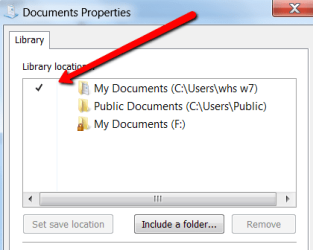
When you go into Properties of the Libraries, there is always one that is marked with a checkmark as "default". That is the one into which files are stored in case you chose the library (rather than the folder) to move or copy data.
My guess is that this one is also deleted when you delete the library. Check whether you still have the "public" Picures, Music, etc. folders because those are not part of the defaults.
 

Attachments

  • 2011-01-21_1119.png
    2011-01-21_1119.png
    10.1 KB · Views: 2
Last edited:

My Computer

Computer Manufacturer/Model Number
HP, Dell, Gateway, Toshiba - 4 laptops and 2 desktops
OS
Vista, Windows7, Mint Mate, Zorin, Windows 8
CPU
from 1.6GHz Duo to i7
Monitor(s) Displays
2x HP w2207
Hard Drives
5x HDD, 7x SSD, 12x Externals
Keyboard
with trackball - no mices
Mouse
Trackball mice
Internet Speed
DSL 6000
Yes I have those folders.
Thanks to Imperfect1 for suggesting those softwares. I have managed to retrive some of the data, but almost all r corrupted.
I have now given up on recovering.
But I am very interested to find out what happened to some of my folders which contained large ( movies, training movs...) files.

I should have found out more about libraries and its use, which now I know it is waste of space, thats microsoft for you. I would hold on to my mac book pro
Thanks to all.
 

My Computer

OS
windows 7 ultimate 64bit
Yes I have those folders.
Thanks to Imperfect1 for suggesting those softwares. I have managed to retrive some of the data, but almost all r corrupted.
I have now given up on recovering.
But I am very interested to find out what happened to some of my folders which contained large ( movies, training movs...) files.

I should have found out more about libraries and its use, which now I know it is waste of space, thats microsoft for you. I would hold on to my mac book pro
Thanks to all.

Actually, Libraries does have its uses. It's really a file management tool, but one shouldn't rely exlusively on it. That said, a good imaging program to backup partitions is a lifesaver!

James
 

My Computer

OS
Win7U 64 RTM
CPU
Q9550
Motherboard
GA-EP45-UD3R
Memory
8GB Gskill
Graphics Card(s)
ASUS|EAH4850/HTDI/1GD3/A
Sound Card
xfi Plat
Monitor(s) Displays
Dell 2405fpw
Screen Resolution
1920x1200
Hard Drives
Seagate & WD sata Drives
PSU
Antec
Case
Antec
Keyboard
MS Natural Ergonomic 4000
Mouse
Logitech MX610 USB Cordless
I should have found out more about libraries and its use, which now I know it is waste of space, thats microsoft for you. I would hold on to my mac book pro
Thanks to all.

The first half of the quote is correct, you should have done more research on librarys before moving or deleteing, second Microsoft had nothing to do with deleteing your files. Third there is a very good lession to be learned here, if you use the tools Microsoft gave you ie backing up your files you wouldn't be in this situation.:(
 

My Computer

Computer Manufacturer/Model Number
Dell XPS 730
OS
Windows 7 Home Premium 64 bit
CPU
Intel Core 2 quad Extreme Q9770 @ 3.2 GHz
Memory
4x2 GB Muskin 1600 MHz ram
Graphics Card(s)
NVidia GTX 250
Sound Card
Soundblaster X-Fi Fatality Champion
Monitor(s) Displays
2 Dell 2007WFP Ultrascans
Screen Resolution
3360 x 1050
Hard Drives
WD Black 1TB sata, 2-WD Black 500 sata, 2-Seagate 500 Go external
PSU
1000 Watt
Cooling
air
Keyboard
MS Natrual Keyboard Pro
Mouse
Logitech Wireless Trackball
Internet Speed
DSL Elite
I should have found out more about libraries and its use, which now I know it is waste of space, thats microsoft for you. I would hold on to my mac book pro
Thanks to all.

The first half of the quote is correct, you should have done more research on librarys before moving or deleteing, second Microsoft had nothing to do with deleteing your files. Third there is a very good lession to be learned here, if you use the tools Microsoft gave you ie backing up your files you wouldn't be in this situation.:(
Harsh but true ! :)
 

My Computer

Computer Manufacturer/Model Number
Hewlett packard/p6512uk
OS
Microsoft Windows 7 Home Premium 64-bit 7600
CPU
IIx4 amd athelon 635 processor
Motherboard
FOXCONN 2AA9
Memory
2x2gb
Graphics Card(s)
ati radeon HD 5450
Sound Card
(1) Realtek High Definition Audio (2) AMD High Definition
Monitor(s) Displays
samsung lcd tv 32"
Screen Resolution
1360x 768
Hard Drives
(1) WDC WD10 01FAES-60Z2A0 SATA Disk Device (2) Maxtor OneTouch USB Device (3) ST310003 33AS USB Device (4) WD My Book 1111 USB Device
PSU
?
Cooling
air!
Keyboard
wireless hp
Mouse
wireless Hp,optical
Internet Speed
1.10mb/s
Antivirus
MSE
Browser
Firefox
some folders are too large for the recycle bin and would be deleted off the computer bypassing the recycle bin , usually there is a message window about that, however by deleting from the library and not the root folder this may not be the case

Deleting from Libraries DOES delete from the true location of the file and behaves exactly the same.
 

My Computer

Computer Manufacturer/Model Number
Custom
OS
Windows 7 Ultimate RTM (Technet)
CPU
3.00 gigahertz Intel Core2 Duo E8400
Motherboard
ASUSTeK Computer INC. P5K/EPU Rev 1.xx
Memory
4GB
Graphics Card(s)
ATI Radeon X1950 Pro
Sound Card
Built in HD Audio
Monitor(s) Displays
22" Gateway LCD
Screen Resolution
1920 x 1200
Hard Drives
ST3160023A [Hard drive] (160.04 GB) -- drive 0, rev 8.01, ST3500630AS [Hard drive] (500.11 GB) -- drive 2, rev 3.AAK
ST3500630AS [Hard drive] (500.11 GB) -- drive 1, rev 3.AAK
Keyboard
Logitech G11
Mouse
Microsoft Wireless Laser Mouse 5000
Internet Speed
13.44 Mbps
Yes, but why the actual data was also deleted from drive D.

I think you're not getting how Libraries work. Libraries are just pointers to the real files. They are not "pseudo" files or ghost images or copies. The files you see in a Library ARE the REAL files. If you delete them, you delete them. A Library is a tool to help you organize your files. For example, let's say you store videos in several places across multiple hard drives. You add each of those locations to your Video Library (or a library of your own creation for that matter). Now, when you open the Video Library, you see ALL your videos, regardless of where they are. If you can call this a "waste of space," so be it. I consider it an amazing, valuable tool and personally use it multiple times per day. I have libraries for schoolwork, personal info, business info, you name it.
 

My Computer

Computer Manufacturer/Model Number
Custom
OS
Windows 7 Ultimate RTM (Technet)
CPU
3.00 gigahertz Intel Core2 Duo E8400
Motherboard
ASUSTeK Computer INC. P5K/EPU Rev 1.xx
Memory
4GB
Graphics Card(s)
ATI Radeon X1950 Pro
Sound Card
Built in HD Audio
Monitor(s) Displays
22" Gateway LCD
Screen Resolution
1920 x 1200
Hard Drives
ST3160023A [Hard drive] (160.04 GB) -- drive 0, rev 8.01, ST3500630AS [Hard drive] (500.11 GB) -- drive 2, rev 3.AAK
ST3500630AS [Hard drive] (500.11 GB) -- drive 1, rev 3.AAK
Keyboard
Logitech G11
Mouse
Microsoft Wireless Laser Mouse 5000
Internet Speed
13.44 Mbps
Back
Top