Libraries

jackdash

New member
Local time
10:41 AM
Messages
168
I am a little confused by Library's in Windows 7.
Is using libraries a good place to store all your folders?
Supposing I created a library named Cooking ( I am a chef) then a folder named MainCourse to store all my main course data.
Would this data all have to be on the C: drive? as all the libraries seem to be on this drive.
Right now I keep this data on an external drive so as apposed to libraries would it be better to just keep this folder on the external?

If this makes sense I would appreciate any answers.

jack
 

My Computer

Computer Manufacturer/Model Number
Packard Bell
OS
Windows 7 Home Premium
CPU
Intel(R) Core(TM2) Quad CPU Q8300 @ 2.50Mhz 4 Core(s)
Motherboard
Packard Bell EG43M
Memory
6.00 GB
Graphics Card(s)
Geforce GT220
Hard Drives
1.5 TB
Keyboard
Logitech Wireless
Mouse
Logitech Wireless
Hi . no libraries is the location where you can look at all your files and folders from all locations ,externals as well.
then you can see them in one place so for documents in several locations you can right click the document folder in libraries ,select properties /include a folder .
continue to do this until you have it as you want.
n .the same applies to videos etc and you can create a new category for the library also ie Ebooks
or maybe recipies
 

My Computer

Computer Manufacturer/Model Number
Hewlett packard/p6512uk
OS
Microsoft Windows 7 Home Premium 64-bit 7600
CPU
IIx4 amd athelon 635 processor
Motherboard
FOXCONN 2AA9
Memory
2x2gb
Graphics Card(s)
ati radeon HD 5450
Sound Card
(1) Realtek High Definition Audio (2) AMD High Definition
Monitor(s) Displays
samsung lcd tv 32"
Screen Resolution
1360x 768
Hard Drives
(1) WDC WD10 01FAES-60Z2A0 SATA Disk Device (2) Maxtor OneTouch USB Device (3) ST310003 33AS USB Device (4) WD My Book 1111 USB Device
PSU
?
Cooling
air!
Keyboard
wireless hp
Mouse
wireless Hp,optical
Internet Speed
1.10mb/s
Antivirus
MSE
Browser
Firefox
Hi jackdash,

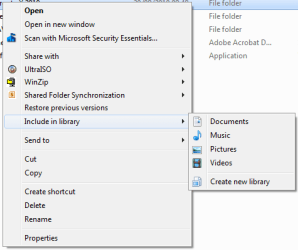
Library data is generically stored on the C: drive. But, however, if you have folders on a separate drive you can choose to include them in a current library or even create a new library.

Capture.PNG

When you right-click a folder you can choose a library with which to include it in. This will store the library file (shadow copy) on the C: drive but will link to whichever drive/folder you have chosen to include.

Hope this helps :)


OS
 

My Computer

Computer Manufacturer/Model Number
Compaq Desktop
OS
Windows 7 Ultimate x64
CPU
AMD Sempron Dual Core
Memory
3GB
Graphics Card(s)
NVIDIA GeForce 6150SE nForce 430
Screen Resolution
1024x768
Hard Drives
150GB Sata

My Computer

Computer Manufacturer/Model Number
Hewlett packard/p6512uk
OS
Microsoft Windows 7 Home Premium 64-bit 7600
CPU
IIx4 amd athelon 635 processor
Motherboard
FOXCONN 2AA9
Memory
2x2gb
Graphics Card(s)
ati radeon HD 5450
Sound Card
(1) Realtek High Definition Audio (2) AMD High Definition
Monitor(s) Displays
samsung lcd tv 32"
Screen Resolution
1360x 768
Hard Drives
(1) WDC WD10 01FAES-60Z2A0 SATA Disk Device (2) Maxtor OneTouch USB Device (3) ST310003 33AS USB Device (4) WD My Book 1111 USB Device
PSU
?
Cooling
air!
Keyboard
wireless hp
Mouse
wireless Hp,optical
Internet Speed
1.10mb/s
Antivirus
MSE
Browser
Firefox
Hi jackdash,

Library data is generically stored on the C: drive. But, however, if you have folders on a separate drive you can choose to include them in a current library or even create a new library.

View attachment 101710

When you right-click a folder you can choose a library with which to include it in. This will store the library file (shadow copy) on the C: drive but will link to whichever drive/folder you have chosen to include.

Hope this helps :)


OS
this is also another way to do it . seems a lot easier that the way i showed . so thanks orbital now i have two methods :D
 

My Computer

Computer Manufacturer/Model Number
Hewlett packard/p6512uk
OS
Microsoft Windows 7 Home Premium 64-bit 7600
CPU
IIx4 amd athelon 635 processor
Motherboard
FOXCONN 2AA9
Memory
2x2gb
Graphics Card(s)
ati radeon HD 5450
Sound Card
(1) Realtek High Definition Audio (2) AMD High Definition
Monitor(s) Displays
samsung lcd tv 32"
Screen Resolution
1360x 768
Hard Drives
(1) WDC WD10 01FAES-60Z2A0 SATA Disk Device (2) Maxtor OneTouch USB Device (3) ST310003 33AS USB Device (4) WD My Book 1111 USB Device
PSU
?
Cooling
air!
Keyboard
wireless hp
Mouse
wireless Hp,optical
Internet Speed
1.10mb/s
Antivirus
MSE
Browser
Firefox
this is also another way to do it . seems a lot easier that the way i showed . so thanks orbital now i have two methods :D

That's quite all right :)
 

My Computer

Computer Manufacturer/Model Number
Compaq Desktop
OS
Windows 7 Ultimate x64
CPU
AMD Sempron Dual Core
Memory
3GB
Graphics Card(s)
NVIDIA GeForce 6150SE nForce 430
Screen Resolution
1024x768
Hard Drives
150GB Sata
Thanks everyone I am now in the picture.
I thought to use libraries both the folder and its content had to be in the C: drive and therfore the drive would soon fill up.
I realise now using Include in library you are just putting short-cuts in.

Many thanks
jack
 

My Computer

Computer Manufacturer/Model Number
Packard Bell
OS
Windows 7 Home Premium
CPU
Intel(R) Core(TM2) Quad CPU Q8300 @ 2.50Mhz 4 Core(s)
Motherboard
Packard Bell EG43M
Memory
6.00 GB
Graphics Card(s)
Geforce GT220
Hard Drives
1.5 TB
Keyboard
Logitech Wireless
Mouse
Logitech Wireless
Back
Top