
Libraries

ZenixNet

Student IT
Power User
Local time
6:19 PM
Messages
331
Location
Ohio - U.S.A
Ive got a SD card that is going to live in my computer, treat it as another hard drive, and I want to add it to my videos library but Windows says I cant.

Is there a way to add removable storage into a library?
 

My Computer

Computer Manufacturer/Model Number
Dell XPS 8100
OS
Windows 7 Home Premium 64-bit
CPU
Intel Core i7 860 @ 2.80GHz
Motherboard
Dell Inc. 0T568R
Memory
8.0GB Dual-Channel DDR3 @ 529MHz 4-7-7-20
Graphics Card(s)
ATI Radeon HD 5770
Sound Card
Realtek High Definition Audio
Monitor(s) Displays
3 Widescreen HD Monitors
Screen Resolution
1600x800
Hard Drives
1000GB Seagate ST31000528AS (SCSI)
1500GB Western Digital WDC WD1001FALS-00J7B1 (SCSI)
PSU
750W
Case
-
Cooling
Fans
Keyboard
Logitech Illuminated Keyboard
Mouse
Logitech MX
Internet Speed
6MBS-15MBS Upload
Other Info
Laptop (Dell Studio 1537)
Intel Mobile Core 2 Duo T6400 @ 2.00GHz
4.0GB Dual-Channel DDR2
Ive got a SD card that is going to live in my computer, treat it as another hard drive, and I want to add it to my videos library but Windows says I cant.

Is there a way to add removable storage into a library?

I just tried that too, looks like these are the only places you can add to the libraries.
 

Attachments

  • Capture.JPG
    Capture.JPG
    67.4 KB · Views: 29

My Computer

Computer type
PC/Desktop
Computer Manufacturer/Model Number
Self Built
OS
Win 10 Pro x64
CPU
Intel I5-2500K @3.3GHz
Motherboard
Asrock P67 Extreme4
Memory
16GB G.Skill Ripjaws X (4x4GB)
Graphics Card(s)
EVGA GeForce 750 Ti SC 2GB
Sound Card
ASUS Xonar DG 5.1 Channels 24-bit 96KHz PCI Interface Sound
Monitor(s) Displays
auria eq2367
Screen Resolution
1920 x 1080
Hard Drives
250GB Samsung 850 EVO SSD
1TB WD Blue
1TB Hitachi
PSU
SeaSonic X 650W 80 Plus Gold
Case
Corsair Obsidian 750D
Cooling
Corsair H60, Three 140mm case fans
Keyboard
Logitech Wireless Keyboard K520
Mouse
Logitech Wireless Mouse M310
Internet Speed
Wave Broadband ~ 100 dn 5 up
Antivirus
Windows Defender, Malwarebytes Premium
Browser
Edge, IE11, Chrome
Other Info
Laptop specs: HP g7-1365dx /
CPU: AMD A6-3420M APU with Radeon(tm) HD Graphics /
RAM: Crucial 8Gb (2x4Gb) /
SSD: Crucial M4-CT128M4SSD2 ATA Device/ FW 000F /
GFX: AMD Radeon HD 6520G /
OS: Windows 10 Pro x64
Is there any way to get around it thought so i can?
 

My Computer

Computer Manufacturer/Model Number
Dell XPS 8100
OS
Windows 7 Home Premium 64-bit
CPU
Intel Core i7 860 @ 2.80GHz
Motherboard
Dell Inc. 0T568R
Memory
8.0GB Dual-Channel DDR3 @ 529MHz 4-7-7-20
Graphics Card(s)
ATI Radeon HD 5770
Sound Card
Realtek High Definition Audio
Monitor(s) Displays
3 Widescreen HD Monitors
Screen Resolution
1600x800
Hard Drives
1000GB Seagate ST31000528AS (SCSI)
1500GB Western Digital WDC WD1001FALS-00J7B1 (SCSI)
PSU
750W
Case
-
Cooling
Fans
Keyboard
Logitech Illuminated Keyboard
Mouse
Logitech MX
Internet Speed
6MBS-15MBS Upload
Other Info
Laptop (Dell Studio 1537)
Intel Mobile Core 2 Duo T6400 @ 2.00GHz
4.0GB Dual-Channel DDR2
ZenixNet:

I don't know about setting it up, but won't using an SD as a hard drive fry that thing in no time?

I know "thumb-drives" weren't designed for that type of use and will die quickly if use in that manner.

Curious...
 

My Computer

Computer Manufacturer/Model Number
OEM - Me
OS
Windows 7 Home Premium x64
CPU
AMD Phenom II X6 1600T
Motherboard
GigaByte GZ-990FXA-UD3
Memory
16GB PC3-10700 (1342MHz)
Graphics Card(s)
ATI Radeon 5770 HD (x2) CrossFire
Sound Card
On-board RealTek chipset
Monitor(s) Displays
3x Hanns-G 1920x1080 Monitors
Screen Resolution
3x Hanns-G 1920x1080 Monitors
Hard Drives
Intel 25-V SSD 40GB: 218 MB/s AT: 0.1ms
Intel X-25M SSD 80GB: 230MB/s AT: 0.1ms
Seagate 750GB: 133 MB/s AT: 13ms (perpendicular storage)
Buffalo HD-PCTU3 1TB External drive
PSU
OCZ Stealth X Stream 750W
Case
Cheap (unknown)
Cooling
Stock
Keyboard
HP USB
Mouse
LogiTech USB
Internet Speed
1.5 Mbps - Slow - At the tail-end of a rural network
Other Info
Printer: Epson Stylus C-84
Scanner: HP 3500C Flatbed
DVD-RW: Plextor
DVD-ROM: Unknown
WEI: 7.4
ZenixNet:

I don't know about setting it up, but won't using an SD as a hard drive fry that thing in no time?

I know "thumb-drives" weren't designed for that type of use and will die quickly if use in that manner.

Curious...
I'm not actually going to use it as a hard drive, i was just comparing it to that. Im using it as additional storage on my HP Slate 500.
 

My Computer

Computer Manufacturer/Model Number
Dell XPS 8100
OS
Windows 7 Home Premium 64-bit
CPU
Intel Core i7 860 @ 2.80GHz
Motherboard
Dell Inc. 0T568R
Memory
8.0GB Dual-Channel DDR3 @ 529MHz 4-7-7-20
Graphics Card(s)
ATI Radeon HD 5770
Sound Card
Realtek High Definition Audio
Monitor(s) Displays
3 Widescreen HD Monitors
Screen Resolution
1600x800
Hard Drives
1000GB Seagate ST31000528AS (SCSI)
1500GB Western Digital WDC WD1001FALS-00J7B1 (SCSI)
PSU
750W
Case
-
Cooling
Fans
Keyboard
Logitech Illuminated Keyboard
Mouse
Logitech MX
Internet Speed
6MBS-15MBS Upload
Other Info
Laptop (Dell Studio 1537)
Intel Mobile Core 2 Duo T6400 @ 2.00GHz
4.0GB Dual-Channel DDR2
"Ive got a SD card that is going to live in my computer, treat it as another hard drive, and I want to add it to my videos library but Windows says I cant."

This is what probably through me off track....
 

My Computer

Computer Manufacturer/Model Number
OEM - Me
OS
Windows 7 Home Premium x64
CPU
AMD Phenom II X6 1600T
Motherboard
GigaByte GZ-990FXA-UD3
Memory
16GB PC3-10700 (1342MHz)
Graphics Card(s)
ATI Radeon 5770 HD (x2) CrossFire
Sound Card
On-board RealTek chipset
Monitor(s) Displays
3x Hanns-G 1920x1080 Monitors
Screen Resolution
3x Hanns-G 1920x1080 Monitors
Hard Drives
Intel 25-V SSD 40GB: 218 MB/s AT: 0.1ms
Intel X-25M SSD 80GB: 230MB/s AT: 0.1ms
Seagate 750GB: 133 MB/s AT: 13ms (perpendicular storage)
Buffalo HD-PCTU3 1TB External drive
PSU
OCZ Stealth X Stream 750W
Case
Cheap (unknown)
Cooling
Stock
Keyboard
HP USB
Mouse
LogiTech USB
Internet Speed
1.5 Mbps - Slow - At the tail-end of a rural network
Other Info
Printer: Epson Stylus C-84
Scanner: HP 3500C Flatbed
DVD-RW: Plextor
DVD-ROM: Unknown
WEI: 7.4
Well yes, I was just trying to compare. But that's beside the point. I want to find out if there is a way to put it on a library.
 

My Computer

Computer Manufacturer/Model Number
Dell XPS 8100
OS
Windows 7 Home Premium 64-bit
CPU
Intel Core i7 860 @ 2.80GHz
Motherboard
Dell Inc. 0T568R
Memory
8.0GB Dual-Channel DDR3 @ 529MHz 4-7-7-20
Graphics Card(s)
ATI Radeon HD 5770
Sound Card
Realtek High Definition Audio
Monitor(s) Displays
3 Widescreen HD Monitors
Screen Resolution
1600x800
Hard Drives
1000GB Seagate ST31000528AS (SCSI)
1500GB Western Digital WDC WD1001FALS-00J7B1 (SCSI)
PSU
750W
Case
-
Cooling
Fans
Keyboard
Logitech Illuminated Keyboard
Mouse
Logitech MX
Internet Speed
6MBS-15MBS Upload
Other Info
Laptop (Dell Studio 1537)
Intel Mobile Core 2 Duo T6400 @ 2.00GHz
4.0GB Dual-Channel DDR2
Do a search on the Forum there is a long thread only a week or two old on this subject. Conclusion was that you cannot add an SD card to the library in Windows 7!
 

My Computer

Computer type
PC/Desktop
OS
Microsoft Windows 7 Home Premium 64-bit 7601 Multiprocessor Free Service Pack 1
CPU
Intel(R) Core(TM) i7-3770 CPU @ 3.40GHz
Motherboard
ASUSTeK COMPUTER INC. P8H77-M
Memory
8.00 GB
Graphics Card(s)
Intel(R) HD Graphics 4000
Sound Card
On Board
Monitor(s) Displays
Dell 24"
Screen Resolution
1920 x 1080
Hard Drives
(1) INTEL SSDSC2CT180A3 ATA Device (2) ST500DM002-1BD142 ATA Device (3) WDC WD3200AAKS-75L9A0 ATA Device (4) Generic- Compact Flash USB Device (5) Generic- MS/MS-Pro USB Device (6) Generic- SD/MMC USB Device (7) Generic- SM/xD-Picture USB
PSU
500w Corsair
Case
Cooler Master
Cooling
3 Fans
Keyboard
Logitech MK300
Mouse
Logitech WOM
Internet Speed
75Mb
Antivirus
Norton 360
Browser
Firefox, Opera, IE

My Computer

Computer type
PC/Desktop
OS
Microsoft Windows 7 Home Premium 64-bit 7601 Multiprocessor Free Service Pack 1
CPU
Intel(R) Core(TM) i7-3770 CPU @ 3.40GHz
Motherboard
ASUSTeK COMPUTER INC. P8H77-M
Memory
8.00 GB
Graphics Card(s)
Intel(R) HD Graphics 4000
Sound Card
On Board
Monitor(s) Displays
Dell 24"
Screen Resolution
1920 x 1080
Hard Drives
(1) INTEL SSDSC2CT180A3 ATA Device (2) ST500DM002-1BD142 ATA Device (3) WDC WD3200AAKS-75L9A0 ATA Device (4) Generic- Compact Flash USB Device (5) Generic- MS/MS-Pro USB Device (6) Generic- SD/MMC USB Device (7) Generic- SM/xD-Picture USB
PSU
500w Corsair
Case
Cooler Master
Cooling
3 Fans
Keyboard
Logitech MK300
Mouse
Logitech WOM
Internet Speed
75Mb
Antivirus
Norton 360
Browser
Firefox, Opera, IE
Well yes, I was just trying to compare. But that's beside the point. I want to find out if there is a way to put it on a library.
It is actually pretty simple. Create a folder on that SD card. Then use "send to" to put this folder into e.g. Documents. Create a new library (or use an existing one) and include that folder. That's at least how I do it with USB sticks which have the same problem. Then you can create subfolders to that folder - if you wish.
 
Last edited:

My Computer

Computer Manufacturer/Model Number
HP, Dell, Gateway, Toshiba - 4 laptops and 2 desktops
OS
Vista, Windows7, Mint Mate, Zorin, Windows 8
CPU
from 1.6GHz Duo to i7
Monitor(s) Displays
2x HP w2207
Hard Drives
5x HDD, 7x SSD, 12x Externals
Keyboard
with trackball - no mices
Mouse
Trackball mice
Internet Speed
DSL 6000
I tried that whs, created a file on the USB drive but it didn't work for me. According to windows you can't include a folder from a removable device in Library's.

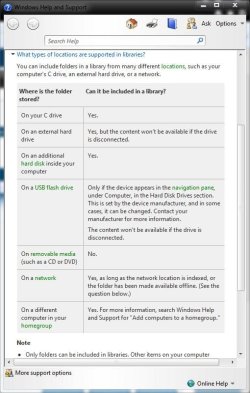
Although it does show USB drives could work.

On a USB flash drive
Only if the device appears in the navigation pane, under Computer, in the Hard Disk Drives section. This is set by the device manufacturer, and in some cases, it can be changed. Contact your manufacturer for more information.

Which is interesting because my USB drive does show up under Computer and also shows up in the navigation pane but it wouldn't let me include the file I made on the USB drive in Library's. Maybe I didn't do something right?

You can include folders in a library from many different locations, such as your computer's C drive, an external hard drive, or a network.
Where is the folder stored?
Can it be included in a library?
On your C drive
Yes.
On an external hard drive
Yes, but the content won't be available if the drive is disconnected.
On an additional hard disk inside your computer
Yes.
On a USB flash drive
Only if the device appears in the navigation pane, under Computer, in the Hard Disk Drives section. This is set by the device manufacturer, and in some cases, it can be changed. Contact your manufacturer for more information.
The content won't be available if the drive is disconnected.
On removable media (such as a CD or DVD)
No.
On a network
Yes, as long as the network location is indexed or has been made available offline. (See the question below.)
On a different computer in your homegroup
Yes.
 

My Computer

Computer type
PC/Desktop
Computer Manufacturer/Model Number
Home built
OS
Windows 7 Ult, Windows 8.1 Pro,
CPU
Q9650-4.275GHz, E8600 4.5GHz, E6750-3.8GHz
Motherboard
Evga 780i FTW
Memory
G.Skill PC2 9600 1200Mhz 5 5 5 15 2T
Graphics Card(s)
GTX480
Sound Card
Asus Xonar D2
Monitor(s) Displays
HannsG
Screen Resolution
1680X1050
Hard Drives
GSkill Phoenix Pro 120GB SSD
PSU
ThermalTake Toughpower 1000Watt modular
Case
ThermalTake XaserV
Cooling
Xigmatek S1283
Keyboard
Logitech G15
Mouse
Logitech G9
Internet Speed
T1
Back
Top