Lightscribe won't write disk label

Merkosh

New member
Local time
11:33 PM
Messages
12
Hi there ..

I've got a weird problem wit Lightscribe.

I have a new system, Win7 pro x64. The optical drive (LG BH10LS30) is capable for labelling discs with lightscribe. The lightscribe drivers are installed as Admin, and I've tried to label discs with the lightscribe native "simple Labeller" and with Ashampoo Burning Studio 10.

The result is similar ... the process runs thru without any error message, but extremely fast (estimated by the software: several minutes, real less than 15 seconds). And nothing appears on the disc.

The lightsrcibe diagnostics tells that everyting is perfectly well (drive accessible, medium OK, etc.)

I suspect some permissions problem, but tghere's noting to find anywhere in the event log, the lightscribe logs or else.

Any hint ?
 

My Computer

OS
Win7 pro x64
you should install the drivers with the "run as admin" option, under you normal account, see if that helps
 

My Computer

Computer Manufacturer/Model Number
dell m5030
OS
windows 7 premium 64 bit
CPU
AMD Athlon IIP360 Dual core 2.3ghz
Memory
4GB PC3
Graphics Card(s)
ATI Mobility Radeon HD 4250
Monitor(s) Displays
15.6 inch
Hard Drives
120gb Patriot PYRO
Two Packages

There are two apps to Light Scribe. The Light Scribe System Software (LSS) and Light Scribe Template Labler (there is a simplier ver of the Labler) But at least for it to work LSS and one of the lablers must be loaded. It must be loaded at boot or you have to manually start the service in your services panel. Here is a link for dl.

LightScribe - Downloads - Windows
 

My Computer

Computer Manufacturer/Model Number
BGC (Bob's Garage Crew)
OS
win 7 X64 Ultimate SP1
CPU
I3770K
Motherboard
Asus P8Z77-V Deluxe
Memory
G Skill F3-14900CL9-4GBXL x 4
Graphics Card(s)
NVIDIA GeForce GTX670 + Intel 4000
Sound Card
Realtek HD 5.1 (MOB)
Monitor(s) Displays
Asus VW224T (1)
Screen Resolution
1920 x 1080
Hard Drives
SATA Corsair Force GT 2.5" 180GB (System) Sata 3
OCZ Vertex3 120GB
OCZ Vertex 2 120GB 2.5" SATA II
ST31000524AS 1000.2GB
WD15EARS (External)
PSU
CoolerMaster 1000 Watt
Case
CoolerMaster HAF X
Cooling
CPU -- CoolerMaster 520N
Keyboard
MS Wireless 3000 V2
Mouse
MS Wireless 3000 V2
Internet Speed
Cable
Antivirus
Norton Internet Security
Browser
IE9
Other Info
AMI Bios 1805
OC'd 3%
Did you turn the disc over? It should prompt to flip the disc. Also, I don't see where the Ashampoo software supports Lightscribe. It says it creates printable "labels". (as is ink)

Create covers and labels
The full-featured cover and label designer prints to labels or directly to printable discs. It comes with a selection of point-and-click themes for instant results and easy-to-use creative tools for designing your own layouts.
 

My Computer

Computer type
PC/Desktop
Computer Manufacturer/Model Number
Built 2/11/2011
OS
Windows 7 Pro-x64
CPU
i7-2600 3.4GHz - 3.8GHz Turbo
Motherboard
Intel DH67BL-B3
Memory
8Gb - 2x4GB, Muskin 991770 PC3-1333
Graphics Card(s)
Integrated Intel HD 2000
Sound Card
Integrated Intel 10.1 HD, RealTek ALC892
Monitor(s) Displays
Asus LCD VH222H, Haier HL24XSL2a
Screen Resolution
1920x1080, 1920x1080
Hard Drives
Crucial SSD C300-128Gb,
Western Digital WD5002AALX - 500Gb,
Western Digital WD7501AALS - 750Gb
PSU
Seasonic 650W 80+ Gold Modular
Case
Rosewill Defender
Cooling
Stock CPU, Four 120mm case fans, PCH fan added
Keyboard
Logitech EX100 Y-RBH94 Wireless
Mouse
Logitech EX100 M-RCE95 Wireless
Internet Speed
3.0/1.5 Mbs
Antivirus
Microsoft Security Essentials
Browser
Microsoft Internet Explorer 11
Other Info
Antec Veris Premier-Multimedia IR Station,
Cyber Accoustics-3602 Speakers,
AFT XM-5U Card Reader,
Hauppauge TV-HVR-2250,
Sony LX300 USB Turntable
Hi friends,

thanks for the answers - so far ... here are my further infos:

you should install the drivers with the "run as admin" option, under you normal account, see if that helps

  • My accout has admin privileges, and additional
  • I've installed both Lightscribe System Software and Template Labeller with "Run as Admin".
There are two apps to Light Scribe. The Light Scribe System Software (LSS) and Light Scribe Template Labler (there is a simplier ver of the Labler) But at least for it to work LSS and one of the lablers must be loaded. It must be loaded at boot or you have to manually start the service in your services panel. Here is a link for dl.

LightScribe - Downloads - Windows


  • I've installed them both with "Run as admin".
  • I'll check the run state of the service ASAP.
  • I already suspect it to be running, because the Lightscribe diag software reports everything from the software and drive down to the medium as correct and without fault.
Did you turn the disc over? It should prompt to flip the disc. Also, I don't see where the Ashampoo software supports Lightscribe. It says it creates printable "labels". (as is ink)

Create covers and labels
The full-featured cover and label designer prints to labels or directly to printable discs. It comes with a selection of point-and-click themes for instant results and easy-to-use creative tools for designing your own layouts.


  • Yes - good question ;) - I definitely have turned over the disc. Lightscribable side down.
  • Trust me, it does. When I select "Create Labels & Covers" from the main menu I can design disc labels, and there's a lightscribe option somewhere in the printer selection or template list (I'm not at my PC right now ...). And when I choose this, I get the LS dialog when I try to "print" that label.
Any further hints ?


Merkosh
 

My Computer

OS
Win7 pro x64
Conflict

Have you got Ashampoo installed as well as Light Scribe. I wonder if there could be a conflict between the two?

About 2/3 down this page there is a diagnostic that you might try. I don't have a clue if it is any good.

http://lightscribe.com/support/index.aspx
 
Last edited:

My Computer

Computer Manufacturer/Model Number
BGC (Bob's Garage Crew)
OS
win 7 X64 Ultimate SP1
CPU
I3770K
Motherboard
Asus P8Z77-V Deluxe
Memory
G Skill F3-14900CL9-4GBXL x 4
Graphics Card(s)
NVIDIA GeForce GTX670 + Intel 4000
Sound Card
Realtek HD 5.1 (MOB)
Monitor(s) Displays
Asus VW224T (1)
Screen Resolution
1920 x 1080
Hard Drives
SATA Corsair Force GT 2.5" 180GB (System) Sata 3
OCZ Vertex3 120GB
OCZ Vertex 2 120GB 2.5" SATA II
ST31000524AS 1000.2GB
WD15EARS (External)
PSU
CoolerMaster 1000 Watt
Case
CoolerMaster HAF X
Cooling
CPU -- CoolerMaster 520N
Keyboard
MS Wireless 3000 V2
Mouse
MS Wireless 3000 V2
Internet Speed
Cable
Antivirus
Norton Internet Security
Browser
IE9
Other Info
AMI Bios 1805
OC'd 3%
A quick test to see if it is the LSS or Ashapmoo, give this a try,

CDBurnerXP: Downloads

Used it with mine with no problems. Just make sure to get the 32 bit version as Lightscribe doesn't work with the 64 bit. Also click on "more download options" and you can try the portable version without the need to install it.
 

My Computer

Computer type
PC/Desktop
Computer Manufacturer/Model Number
Me
OS
Win 7 Ultimate x64
CPU
FX-8350 @ 4.6 GHz so far
Motherboard
Asus M5A97 EVO
Memory
ADATA XPG V1 Series Black 8GB DDR3 1600
Graphics Card(s)
Sapphire R9 270x Dual-X
Sound Card
Xonar DGX w/ Corsair Vengence 1300
Monitor(s) Displays
Acer S232HL Abid
Screen Resolution
1920x1080
Hard Drives
120 GB OCZ Vertex 3
500 GB Seagate 7200.12
PSU
Antec Earthwatts 650W Green
Case
Antec Three Hundred
Cooling
Cooler Master 212 EVO
Keyboard
Logitech G510
Mouse
Logitech G500s
Internet Speed
35000/3000
Hi friends,

Hi friends,
thanks for the answers - so far ... here are my further infos:
(...)

  • I'll check the run state of the service ASAP.
  • I already suspect it to be running, because the Lightscribe diag software reports everything from the software and drive down to the medium as correct and without fault.

Addendum:

I've just checked the service, it's start type ist "automatic" and it's running. Logged in as "Local System account".

Curious as I am, I've changed the login info temporary to "local service". This results in the drive being invisible to the labeling software (Simple Labeler) - while it normally tells me the optical drive as target, it then states "no lightscribe drives".

I've changed it back to "local system account" and tried again ... it further resits my attempts to write the disc (Verbatim 43659) but while trying, the drive's light blinks ... seems to access it in some way).


Have you got Ashampoo installed as well as Light Scribe. I wonder if there could be a conflict between the two?

I wouldn't think so - both weave the layout in their own way, but when it comes to labelling, the same dialog pops up ... just like the printing dialog of some special printer driver. I presume they both create some kind of standard layout file and subsequently call the LSS for printing - and that way would work with as many installed applications as would fit on the HDD ....

Have you got Ashampoo installed as well as Light About 2/3 down this page there is a diagnostic that you might try. I don't have a clue if it is any good. LightScribe - Support

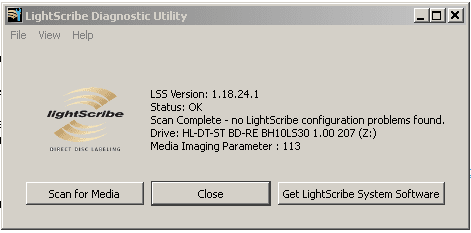
I've used that util before - by now it shows the attached messge. LSS 1.18.24.1 is the current version, as of today evening ...

A quick test to see if it is the LSS or Ashapmoo, give this a try, CDBurnerXP: Downloads

Hmmm - gave it a quick try ("portable"), but I can't find out how to label a disc without burning it first ... precisely, I saw only "burn" and "erase", but not labelling and did not try to burn just to get to "label". Any hint on that ?

Greetings

Merkosh
 

Attachments

  • lssdiag.png
    lssdiag.png
    4.8 KB · Views: 17

My Computer

OS
Win7 pro x64
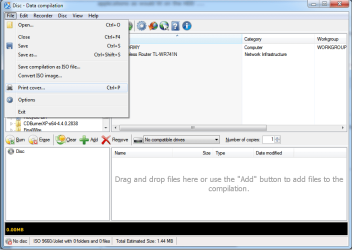
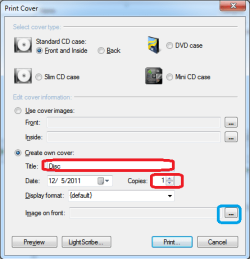
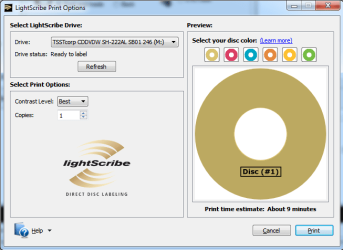
To burn the label,

ls.png
ls2.png
ls1.png

Leave the Title blank unless you want it to show up on the disk. Same goes for "copies", set it to zero. Once that is done then click where the blue box is to add the image you want to use, then click on the Lightscribe button.

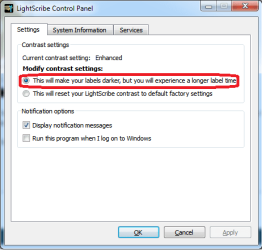
Before doing the above you might want to open the Lightscribe Control panel (found in the Start menu) and make one small change,

ls3.png

as this will give a much better final result. I have found it only adds about 5 minutes or so to the time it takes to burn the image.

And no you don't have to burn anything to the disk first before burning the label, you can do either first.
 

My Computer

Computer type
PC/Desktop
Computer Manufacturer/Model Number
Me
OS
Win 7 Ultimate x64
CPU
FX-8350 @ 4.6 GHz so far
Motherboard
Asus M5A97 EVO
Memory
ADATA XPG V1 Series Black 8GB DDR3 1600
Graphics Card(s)
Sapphire R9 270x Dual-X
Sound Card
Xonar DGX w/ Corsair Vengence 1300
Monitor(s) Displays
Acer S232HL Abid
Screen Resolution
1920x1080
Hard Drives
120 GB OCZ Vertex 3
500 GB Seagate 7200.12
PSU
Antec Earthwatts 650W Green
Case
Antec Three Hundred
Cooling
Cooler Master 212 EVO
Keyboard
Logitech G510
Mouse
Logitech G500s
Internet Speed
35000/3000
To burn the label,
(...)

Thanks for the help.

I've just tried that. Besides of the unique dialogues of CDBurnerXP, the result is the same ... the LSS dialog is opened, it pretends to write with an impossible speed (it calculates 10 minutes and completes in less than 10 seconds), opens the drive try and has written nothing at all.

Any further hint ?

Greetings

Merkosh

P.S.: I've attached a screen recording of the "burning" process ...
 

Attachments

Last edited:

My Computer

OS
Win7 pro x64
This is an odd problem. Just checking, what firmware version does the drive have? You can check it in Device Manager and on the Details tab of the drive Properties dialog select Hardware lds from the drop down list; on the right it should show a number. The latest for your drive is ver. 1.01. here under Drivers & Software.
 

My Computer

Computer type
PC/Desktop
Computer Manufacturer/Model Number
Wordsworth 5000
OS
Windows 10 Pro 64 bit
CPU
Core i7 6700K Skylake 4.0GHz
Motherboard
Asus Z170 Pro
Memory
Corsair Vengeance LPX DDR4 32GB 3000MHz
Graphics Card(s)
Asus Radeon RX480 Strix 8GB
Sound Card
Asus Xonar DSX
Monitor(s) Displays
HP 2709m
Screen Resolution
1920x1080
Hard Drives
Intel 600p M.2 PCIe NVMe SSD 512GB; Intel 335 SSD 240GB ;Western Digital Caviar Black 1TB
PSU
Thermaltake Toughpower Grand Platinum 850W
Case
Lian Li PC-B70
Cooling
CPU-Noctua NH D15, GPU-Stock, Case-Noctua 2x140, 2x120
Keyboard
Microsoft Natural Ergo 4000
Mouse
Microsoft Wireless Optical 1000
Internet Speed
Cable
Other Info
HP bd 340,
HP bd 240,
Klipsch Promedia 5.1 THX
Spare?

Now would be a good time to have a spare drive to install and try out.
 

My Computer

Computer Manufacturer/Model Number
BGC (Bob's Garage Crew)
OS
win 7 X64 Ultimate SP1
CPU
I3770K
Motherboard
Asus P8Z77-V Deluxe
Memory
G Skill F3-14900CL9-4GBXL x 4
Graphics Card(s)
NVIDIA GeForce GTX670 + Intel 4000
Sound Card
Realtek HD 5.1 (MOB)
Monitor(s) Displays
Asus VW224T (1)
Screen Resolution
1920 x 1080
Hard Drives
SATA Corsair Force GT 2.5" 180GB (System) Sata 3
OCZ Vertex3 120GB
OCZ Vertex 2 120GB 2.5" SATA II
ST31000524AS 1000.2GB
WD15EARS (External)
PSU
CoolerMaster 1000 Watt
Case
CoolerMaster HAF X
Cooling
CPU -- CoolerMaster 520N
Keyboard
MS Wireless 3000 V2
Mouse
MS Wireless 3000 V2
Internet Speed
Cable
Antivirus
Norton Internet Security
Browser
IE9
Other Info
AMI Bios 1805
OC'd 3%
Hi friends,

This is an odd problem. Just checking, what firmware version does the drive have?

Can't check now, but the LG autoupdater told that there's no newer available, I barely remember.

Now would be a good time to have a spare drive to install and try out.

That's the reason I can't check right now - this morning I pulled the drive out and shoved it back to the store that built my machine, along with one of the discs.

Now the testing is on them - I presume they just exchange it. They only didn't have one of 'em on the shelf.

I'll keep you informed ...

Greetings

Merkosh
 

My Computer

OS
Win7 pro x64
Do you have to use Lightscribe disks? I have a stack of dvd's that are made just for lightscribe. Can you use lightscribe with any disk? Ive never actually used it but have a lightscribe drive and disks. Just need to hook it up!
 

My Computer

Computer Manufacturer/Model Number
Sony Vaio VGN-NW120J/S
OS
Windows 7
CPU
Intel Core 2 T6500 / 2.10 Ghz
Memory
4gb
Graphics Card(s)
Mobile Intel Graphics Media Accelerator 4500MHD
Monitor(s) Displays
15.5 / 1366x768
Hard Drives
Western Digital Scorpio Black WD3200BEKT
Yep

The disk has to be light scribe disk. The back side of the light scribe disk is special.
 

My Computer

Computer Manufacturer/Model Number
BGC (Bob's Garage Crew)
OS
win 7 X64 Ultimate SP1
CPU
I3770K
Motherboard
Asus P8Z77-V Deluxe
Memory
G Skill F3-14900CL9-4GBXL x 4
Graphics Card(s)
NVIDIA GeForce GTX670 + Intel 4000
Sound Card
Realtek HD 5.1 (MOB)
Monitor(s) Displays
Asus VW224T (1)
Screen Resolution
1920 x 1080
Hard Drives
SATA Corsair Force GT 2.5" 180GB (System) Sata 3
OCZ Vertex3 120GB
OCZ Vertex 2 120GB 2.5" SATA II
ST31000524AS 1000.2GB
WD15EARS (External)
PSU
CoolerMaster 1000 Watt
Case
CoolerMaster HAF X
Cooling
CPU -- CoolerMaster 520N
Keyboard
MS Wireless 3000 V2
Mouse
MS Wireless 3000 V2
Internet Speed
Cable
Antivirus
Norton Internet Security
Browser
IE9
Other Info
AMI Bios 1805
OC'd 3%
Do you have to use Lightscribe disks? I have a stack of dvd's that are made just for lightscribe. Can you use lightscribe with any disk? Ive never actually used it but have a lightscribe drive and disks. Just need to hook it up!

Yes - you need discs especially made for Lightscribe. Those discs have a laser sensitive coating and some kind of identification and sync code around the hole.

No chance wth "standard" discs.
 

My Computer

OS
Win7 pro x64
Some news - got the drive back from the dealer - he'd tested it and it worked fine ... he burned one of my Verbatim discs with a test label.

Any further hint ?
 

My Computer

OS
Win7 pro x64
Some news - got the drive back from the dealer - he'd tested it and it worked fine ... he burned one of my Verbatim discs with a test label.

Any further hint ?

What OS did his test machine have?

What programs did he use?

Did he also have ashampoo installed?

I'm asking just to get a feel for the difference between the two systems.

Fabe
 

My Computer

Computer Manufacturer/Model Number
Self Built
OS
Windows 7 ultimate 64 bit / XP Home sp3
CPU
intel Core 2 Duo E8400 3.0ghz
Motherboard
Asus P5ND bios 1401
Memory
8 gigs 1066 OCZ Fata1ty
Graphics Card(s)
EVGA GTX 580 Call of Duty Black Ops Edition
Sound Card
Creative Soundblaster Audigy 2zs
Monitor(s) Displays
Asus 24in LCD's 2MS X2
Screen Resolution
1920x1080p @60Hz
Hard Drives
WD Caviar 500 Black/ WD Caviar 200 Blue
PSU
OCZ 700W GameXtreme
Case
NZXT Apollo
Cooling
Corsair H50 CPU/120mm x3 /60mm x2 /Corsair Dominator Ram
Keyboard
Logitech Bluetooth Wireless MX5000
Mouse
Logitech Bluetooth Wireless MX1000
Internet Speed
Download 19.83 Upload 0.97
Other Info
Logitech Z2300 Speakers/ Bose Noise Cancelling Headphones/Avermedia PCI-e Hybrid TV Bravo/Epson NX415 all in one/ 4 Port Powered USB Hub/ LG 10x Bluray Burner /TSST Corp DVDRW External
What OS did his test machine have?

Haven't seen the machine - he told me it's the same as on my machine Win7x64pro

What programs did he use?

Original Lightscribe system software ("LSS") and the original Lightscribe simple labeler.

Did he also have ashampoo installed?

I presume not to. Since I get to the Lightscribe dialog from every software I've tried, I suppose that's not the problem ...


I'm asking just to get a feel for the difference between the two systems.

No problem with that. The primary info from that is that the drive itself seems to be "not guilty". There must be a configuration problem on my machine.

Just for info: I'm runnig Comodo Internet Security Premium V5.8.213334.2131, but the problem resists even if I deactivate all functions of it. Windows firewall is disabled.
 

My Computer

OS
Win7 pro x64
Lightscribe disk
 

My Computer

Computer Manufacturer/Model Number
Home build
OS
Windows 7 Pro x64
CPU
AMD FX 4100 4 Core 3.6GHz AM3+
Motherboard
ASROCK 970 Extreme3
Memory
16GB G.Skill RipjawsX
Graphics Card(s)
Radeon 6850
Sound Card
ASUS Xonar D1
Monitor(s) Displays
ASUS 23" LCD
Hard Drives
SSD 120GB
WD 750GB Black series
WD 640GB Black series
PSU
700W
Case
Antec 100
Cooling
Hyper 212 Plus
Internet Speed
50MB
Back
Top