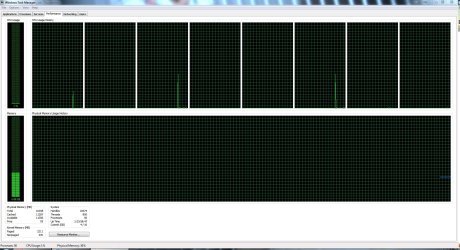
Limit RAM Cache?

One question I would ask is, have you made changes to the page file or does Windows manage it?

If Windows does not free the ram when you run the game you could try running a ram freeing program before playing and I would also suggest closing all unnecessary programs before playing.

I haven't made any changes, so I'm assuming Windows is managing it. I have tried a RAM freeing application, it does very little to nothing.

Thanks for the reply!
 

My Computer

Computer type
PC/Desktop
Computer Manufacturer/Model Number
Custom Build
OS
Windows 7 Home Premium x64
CPU
Intel Core i7-3770S Quad @ 3.1 GHz (Turbo-Boost to 3.9GHz)
Motherboard
ASUS ROG Maximus V Formula ATX
Memory
16GB (DDR3) @1,600MHz Corsair Vengeance 2
Graphics Card(s)
EVGA GeForce GTX 960 SuperSC ACX 2.0+ 2GB
Monitor(s) Displays
Acer 23" S230HL
Screen Resolution
1920 x 1080
Hard Drives
Seagate 1TB @7,200rpm
PSU
850W Power Supply (Thermaltake - SP850M)
Case
NZXT SWITCH 810 Gun-Metal CA-SW810-G1
Cooling
Cooler Master Hyper 212 EVO (RR-212E-20PK)
Keyboard
Logitech G510
Mouse
Logitech G602
Internet Speed
5Mbps Download / 756kbps Upload
Antivirus
Microsoft Security Essentials
This is with 1 tab open in Google Chrome, and iTunes with a song playing.
Look at mine (attached). I have 16GB RAM, yet our percentages are virtually the same in all four categories under "Physical Memory".

I do notice that you have twice as many processes running with only two programs open. When I snapped mine just now I had Firefox, Thunderbird, Sunbird and Q-Dir (an Explorer-type program) open. Are you sure your sluggishness isn't due to too much background stuff running?
 

Attachments

  • Performance 16Feb2012.JPG
    Performance 16Feb2012.JPG
    343.9 KB · Views: 89

My Computer

Computer Manufacturer/Model Number
Self
OS
Main - Windows 7 Pro SP1 64-Bit; 2nd - Windows Server 2008 R2
CPU
Main - Core i7 2600K; 2nd - Core i7 920
Motherboard
Main - Asus P8Z68-V Pro/Gen3; 2nd - Gigabyte GA-EX58-UDR3
Memory
Main - 16GB Corsair Vengeance; 2nd - 12GB Corsair Vengeance
Graphics Card(s)
Main - XFX Radeon 6870 1GB; 2nd - XFX Radeon 4870 1GB
Sound Card
Both: Onboard Realtek Azalia
Monitor(s) Displays
Main - Hann 25" + I-INC 25" + Acer 23"; 2nd - Upgrading Soon
Screen Resolution
Main - 1920x1080 (All Three Monitors); 2nd - Upgrading Soon
Hard Drives
Main - (1) Crucial M4 128GB (Boot)
Main - (1) Seagate 2TB 64MB Cache (Data)
Main - (1) Seagate 2TB 64MB Cache (Data Backup)
2nd - (1) Intel X25-M SSD 80GB (Boot)
2nd - (3) Seagate 1TB 32MB Cache (Data Backup)
2nd - (1) Seagate 320GB (Because)
PSU
Main - OCZ 600W Modular; 2nd - OCZ 600W
Case
Main - Thermaltake Element G; 2nd - NZXT something or other
Cooling
Main - Corsair H80; 2nd - Prolimatech Megahalems
Keyboard
Main - Razer Reclusa; 2nd - Old MS Keyboard
Mouse
Main - Logitech MX Revolution; 2nd - Old MS Mouse
Internet Speed
20Mbps Time-Warner Cable
So when you run your game you ALT+TAB out and check your cache and it's still around 4000 and something?

Here is a something you could try, more out of interest than help.

Fresh boot the PC, let it idle for 10mins before checking and recording the cache.
Next open msconfig.exe click on the Services tab, check Hide all MS services and then click Disable All.
Next click on the Startup tab and click Disable All.
Now close msconfig and restart. Let the PC idle for 10mins again before checking the cache.

Mine before using msconfig is 1375mb and after it's 1128mb. Now you can see there's not much difference, so taking a guess my extra services and startup processes only add 247mb to my cache. I wonder what yours add?

If it's still around 4000 after disabling the services and startup processes how well does your game run?

I found this program RAMMap.
I ran it, clicked Empty on the menu bar then clicked Empty Standby List and my cache dropped to 150mb-350mb depending on how much I clicked it and closed/reopened it, clicked it again.

The only thing here is the cache would rebuild instantly close to what it was.
 

My Computer

Computer Manufacturer/Model Number
Self built
OS
Windows 7 Ultimate x64
CPU
Intel Pentium Dual Core E5200 2.5GHz (3.77GHz OC)
Motherboard
Asus P5Q-E
Memory
Corsair 4GB DDR2 (4x1GB CM2X1024-6400C4)
Graphics Card(s)
Palit GeForce GTS 250 (1024MB)
Sound Card
On Board (ADI AD2000B 8ch HD)
Monitor(s) Displays
Samsung 32in LCD TV
Screen Resolution
1360x768
Hard Drives
2 x 1TB Samsung 103SJ (Raid0)
2 x External 500GB Samsung 502IJ (NexStar 3 HD Enclosures)
PSU
550W Antec Neo HE 550
Case
Antec P180
Cooling
Xigmatex Red Scorpion CPU Cooler. 3x120mm Fans
Keyboard
Logitech MX5000 Laser (Combo)
Mouse
Logitech MX5000 Laser (Combo)
Internet Speed
ADSL2+ (avg 10 Mbps Down, 0.80 Mbps up)
Other Info
Gigabyte GN-WP01GS 54g Wireless Lan Card
This is with 1 tab open in Google Chrome, and iTunes with a song playing.

One thing to remember that when looking at those numbers in Task Manager is that "Available" is +/- a few MB the total of cached and free memory.
 

My Computer

Computer type
PC/Desktop
Computer Manufacturer/Model Number
Me
OS
Win 7 Ultimate x64
CPU
FX-8350 @ 4.6 GHz so far
Motherboard
Asus M5A97 EVO
Memory
ADATA XPG V1 Series Black 8GB DDR3 1600
Graphics Card(s)
Sapphire R9 270x Dual-X
Sound Card
Xonar DGX w/ Corsair Vengence 1300
Monitor(s) Displays
Acer S232HL Abid
Screen Resolution
1920x1080
Hard Drives
120 GB OCZ Vertex 3
500 GB Seagate 7200.12
PSU
Antec Earthwatts 650W Green
Case
Antec Three Hundred
Cooling
Cooler Master 212 EVO
Keyboard
Logitech G510
Mouse
Logitech G500s
Internet Speed
35000/3000
Go go msconfig and check Start Up and see what is starting up when booted. While your in msconfig go to Services. Check Hide all Microsof Services and see what is checked. You could have many things running in the background. Let us know what you find. I recommend not messing with Microsoft Services. I know this has been requested before but I don't see a answer.
 

My Computer

Computer type
PC/Desktop
Computer Manufacturer/Model Number
Home made Desktop
OS
Windows 10 Pro. 64/ version 1709 Windows 7 Pro/64
CPU
Intel i7-6800K @ 4.3
Motherboard
ASUS X-99 Deluxe II
Memory
Corsair Platinum 16 gig @2400
Graphics Card(s)
EVGA GTX 1070 OC
Monitor(s) Displays
Asus 27" LED LCD/VE278Q
Screen Resolution
1920-1080 or 1280-720 HDMI
Hard Drives
INTEL SSD 730-240 Gb Sata 3.0/
PSU
EVGA Platium 1200W
Case
Phanteks Luxe Tempered Glass 8 fans/ one radiator
Cooling
XSPC/ Water Cooled CPU
Keyboard
Das 4 Professional
Mouse
Logitech M705/MX Anywhere 2-S
Internet Speed
100 mbits
Antivirus
Microsoft Security Essentials/ Malwarebytes Premium 3.0/ SAS
Browser
I.E. 11 default/Firefox/ ISP Time Warner Cable/Spectrum
Other Info
LG BluRay Burner/
Sound system-KLipsch-THX/
Icy Dock ssd Hot Swap bays.
So when you run your game you ALT+TAB out and check your cache and it's still around 4000 and something?

Here is a something you could try, more out of interest than help.

Fresh boot the PC, let it idle for 10mins before checking and recording the cache.
Next open msconfig.exe click on the Services tab, check Hide all MS services and then click Disable All.
Next click on the Startup tab and click Disable All.
Now close msconfig and restart. Let the PC idle for 10mins again before checking the cache.

Mine before using msconfig is 1375mb and after it's 1128mb. Now you can see there's not much difference, so taking a guess my extra services and startup processes only add 247mb to my cache. I wonder what yours add?

If it's still around 4000 after disabling the services and startup processes how well does your game run?

I found this program RAMMap.
I ran it, clicked Empty on the menu bar then clicked Empty Standby List and my cache dropped to 150mb-350mb depending on how much I clicked it and closed/reopened it, clicked it again.

The only thing here is the cache would rebuild instantly close to what it was.

I unchecked many start-up items in msconfig. My cache has cut in half! 2GB more to work with, thank you. Any other ideas to knock off another GB?

screenshot0001february1.jpg
 

My Computer

Computer type
PC/Desktop
Computer Manufacturer/Model Number
Custom Build
OS
Windows 7 Home Premium x64
CPU
Intel Core i7-3770S Quad @ 3.1 GHz (Turbo-Boost to 3.9GHz)
Motherboard
ASUS ROG Maximus V Formula ATX
Memory
16GB (DDR3) @1,600MHz Corsair Vengeance 2
Graphics Card(s)
EVGA GeForce GTX 960 SuperSC ACX 2.0+ 2GB
Monitor(s) Displays
Acer 23" S230HL
Screen Resolution
1920 x 1080
Hard Drives
Seagate 1TB @7,200rpm
PSU
850W Power Supply (Thermaltake - SP850M)
Case
NZXT SWITCH 810 Gun-Metal CA-SW810-G1
Cooling
Cooler Master Hyper 212 EVO (RR-212E-20PK)
Keyboard
Logitech G510
Mouse
Logitech G602
Internet Speed
5Mbps Download / 756kbps Upload
Antivirus
Microsoft Security Essentials
Do this. Open Resource Monitor by typing it into the start menu search. Go to the Memory tab, make sure Physical Memory is open. Then run your game for a few minutes, return to Resource Monitor while the game is active. Take a screen shot and show us.

I unchecked many start-up items in msconfig. My cache has cut in half! 2GB more to work with, thank you. Any other ideas to knock off another GB?

I want to see for myself if the cache is causing you problems first. Otherwise, just be chasing phantom geese with bad advice.
 

My Computer

Computer type
PC/Desktop
Computer Manufacturer/Model Number
Alienware Aurora ALX R4
OS
Windows 10 Pro (x64)
CPU
Intel Core i7-3930K (3.2GHz - 4.5GHz)
Motherboard
Alienware Aurora-R4 x79
Memory
4x Samsung 4GB PC3-12800 DDR3 (16GB 1600MHz)
Graphics Card(s)
Nvidia Geforce GTX 690
Sound Card
SteelSeries Siberia Elite
Monitor(s) Displays
Dell UltraSharp U3011
Screen Resolution
2560x1600
Hard Drives
Samsung 850 Pro 256 GB, Seagate 1TB Desktop Hybrid HDD, 2x Western Digital 4TB Green HDD
PSU
875W Some Dell PSU <.<
Case
Alienware Aurora ALX
Cooling
Custom Liquid Cooling (EK CPU & GPU blocks) dual EK 480RAD
Keyboard
Logitech G710+ Mechanical
Mouse
Logitech G700s
Internet Speed
Verizon Fios (50 mbps average)
Other Info
Server: Intel NUC D54250WYK: i5-4250U, 16GB, 256 GB mSATA, Windows Server 2012 R2
Do this. Open Resource Monitor by typing it into the start menu search. Go to the Memory tab, make sure Physical Memory is open. Then run your game for a few minutes, return to Resource Monitor while the game is active. Take a screen shot and show us.

I unchecked many start-up items in msconfig. My cache has cut in half! 2GB more to work with, thank you. Any other ideas to knock off another GB?

I want to see for myself if the cache is causing you problems first. Otherwise, just be chasing phantom geese with bad advice.

I can tell you that when I was playing the game, I had 0mb Free, 4.3k MB Cached, and 3.78GB in use. And I saw that the free memory was bouncing between 0 - 20mb. I just saw the cache was not freeing up and I'm assuming that was the case.

As far as the game goes, it's been better for whatever reason, without lag. I find that it requires more RAM the longer I play the game, so it may take me awhile to find that problem I was looking for in the beginning.
 

My Computer

Computer type
PC/Desktop
Computer Manufacturer/Model Number
Custom Build
OS
Windows 7 Home Premium x64
CPU
Intel Core i7-3770S Quad @ 3.1 GHz (Turbo-Boost to 3.9GHz)
Motherboard
ASUS ROG Maximus V Formula ATX
Memory
16GB (DDR3) @1,600MHz Corsair Vengeance 2
Graphics Card(s)
EVGA GeForce GTX 960 SuperSC ACX 2.0+ 2GB
Monitor(s) Displays
Acer 23" S230HL
Screen Resolution
1920 x 1080
Hard Drives
Seagate 1TB @7,200rpm
PSU
850W Power Supply (Thermaltake - SP850M)
Case
NZXT SWITCH 810 Gun-Metal CA-SW810-G1
Cooling
Cooler Master Hyper 212 EVO (RR-212E-20PK)
Keyboard
Logitech G510
Mouse
Logitech G602
Internet Speed
5Mbps Download / 756kbps Upload
Antivirus
Microsoft Security Essentials
...As far as the game goes, it's been better for whatever reason, without lag. I find that it requires more RAM the longer I play the game...
That may be just a case of less-than-stellar programming by the game designers. You can tweak Windows all day long, but if the game ends up being a black hole for RAM there is little you can do about it.

Having said that, starting with more free RAM to begin with by having non-essential stuff not loading at boot will postpone the day of reckoning which comes when the game finally maxes things out.
 

My Computer

Computer Manufacturer/Model Number
Self
OS
Main - Windows 7 Pro SP1 64-Bit; 2nd - Windows Server 2008 R2
CPU
Main - Core i7 2600K; 2nd - Core i7 920
Motherboard
Main - Asus P8Z68-V Pro/Gen3; 2nd - Gigabyte GA-EX58-UDR3
Memory
Main - 16GB Corsair Vengeance; 2nd - 12GB Corsair Vengeance
Graphics Card(s)
Main - XFX Radeon 6870 1GB; 2nd - XFX Radeon 4870 1GB
Sound Card
Both: Onboard Realtek Azalia
Monitor(s) Displays
Main - Hann 25" + I-INC 25" + Acer 23"; 2nd - Upgrading Soon
Screen Resolution
Main - 1920x1080 (All Three Monitors); 2nd - Upgrading Soon
Hard Drives
Main - (1) Crucial M4 128GB (Boot)
Main - (1) Seagate 2TB 64MB Cache (Data)
Main - (1) Seagate 2TB 64MB Cache (Data Backup)
2nd - (1) Intel X25-M SSD 80GB (Boot)
2nd - (3) Seagate 1TB 32MB Cache (Data Backup)
2nd - (1) Seagate 320GB (Because)
PSU
Main - OCZ 600W Modular; 2nd - OCZ 600W
Case
Main - Thermaltake Element G; 2nd - NZXT something or other
Cooling
Main - Corsair H80; 2nd - Prolimatech Megahalems
Keyboard
Main - Razer Reclusa; 2nd - Old MS Keyboard
Mouse
Main - Logitech MX Revolution; 2nd - Old MS Mouse
Internet Speed
20Mbps Time-Warner Cable
What is the game? If it's big budget you shouldn't actually need to reduce the size of the cache before playing. You might also find a patch that may fix this issue.

As for dropping down any more my only guess would be too lose more startup and background processes. This may not be what you want though. If your game is running better I wouldn't worry about it.

If you want some of those startup processes back you can add all of them again and start disabling them 2-3 at a time, you might find a single process is using a large chunk of the cache, although I'd say unlikely.

logicearth may provide some better options if you preform his steps and follow his advice.
Do this. Open Resource Monitor by typing it into the start menu search. Go to the Memory tab, make sure Physical Memory is open. Then run your game for a few minutes, return to Resource Monitor while the game is active. Take a screen shot and show us.
 

My Computer

Computer Manufacturer/Model Number
Self built
OS
Windows 7 Ultimate x64
CPU
Intel Pentium Dual Core E5200 2.5GHz (3.77GHz OC)
Motherboard
Asus P5Q-E
Memory
Corsair 4GB DDR2 (4x1GB CM2X1024-6400C4)
Graphics Card(s)
Palit GeForce GTS 250 (1024MB)
Sound Card
On Board (ADI AD2000B 8ch HD)
Monitor(s) Displays
Samsung 32in LCD TV
Screen Resolution
1360x768
Hard Drives
2 x 1TB Samsung 103SJ (Raid0)
2 x External 500GB Samsung 502IJ (NexStar 3 HD Enclosures)
PSU
550W Antec Neo HE 550
Case
Antec P180
Cooling
Xigmatex Red Scorpion CPU Cooler. 3x120mm Fans
Keyboard
Logitech MX5000 Laser (Combo)
Mouse
Logitech MX5000 Laser (Combo)
Internet Speed
ADSL2+ (avg 10 Mbps Down, 0.80 Mbps up)
Other Info
Gigabyte GN-WP01GS 54g Wireless Lan Card
I'm back here again, exactly one year later with the same problem. 0mb of RAM is free, and over 4,500 cached.

Following applications are open:

  • Firefox 19.0
  • iTunes 11.0.1
  • Teamspeak 3.0.9
  • Windows Task Manager
  • World of Tanks Client (Video Game)
I'm having difficulty watching YouTube videos, playing video games, and even browsing the web at times. Windows 7 is managing my Physical Memory very poorly, and I'm not sure if there is any new methods to avoid this problem?
 

My Computer

Computer type
PC/Desktop
Computer Manufacturer/Model Number
Custom Build
OS
Windows 7 Home Premium x64
CPU
Intel Core i7-3770S Quad @ 3.1 GHz (Turbo-Boost to 3.9GHz)
Motherboard
ASUS ROG Maximus V Formula ATX
Memory
16GB (DDR3) @1,600MHz Corsair Vengeance 2
Graphics Card(s)
EVGA GeForce GTX 960 SuperSC ACX 2.0+ 2GB
Monitor(s) Displays
Acer 23" S230HL
Screen Resolution
1920 x 1080
Hard Drives
Seagate 1TB @7,200rpm
PSU
850W Power Supply (Thermaltake - SP850M)
Case
NZXT SWITCH 810 Gun-Metal CA-SW810-G1
Cooling
Cooler Master Hyper 212 EVO (RR-212E-20PK)
Keyboard
Logitech G510
Mouse
Logitech G602
Internet Speed
5Mbps Download / 756kbps Upload
Antivirus
Microsoft Security Essentials
Ignore the "Free" field it is meaningless. The only important value is "Available"
Open Resource Monitor and give us a screen shot of the Memory tab with the Physical Memory pane open. While you are running your game.
 

My Computer

Computer type
PC/Desktop
Computer Manufacturer/Model Number
Alienware Aurora ALX R4
OS
Windows 10 Pro (x64)
CPU
Intel Core i7-3930K (3.2GHz - 4.5GHz)
Motherboard
Alienware Aurora-R4 x79
Memory
4x Samsung 4GB PC3-12800 DDR3 (16GB 1600MHz)
Graphics Card(s)
Nvidia Geforce GTX 690
Sound Card
SteelSeries Siberia Elite
Monitor(s) Displays
Dell UltraSharp U3011
Screen Resolution
2560x1600
Hard Drives
Samsung 850 Pro 256 GB, Seagate 1TB Desktop Hybrid HDD, 2x Western Digital 4TB Green HDD
PSU
875W Some Dell PSU <.<
Case
Alienware Aurora ALX
Cooling
Custom Liquid Cooling (EK CPU & GPU blocks) dual EK 480RAD
Keyboard
Logitech G710+ Mechanical
Mouse
Logitech G700s
Internet Speed
Verizon Fios (50 mbps average)
Other Info
Server: Intel NUC D54250WYK: i5-4250U, 16GB, 256 GB mSATA, Windows Server 2012 R2
Ignore the "Free" field it is meaningless. The only important value is "Available"
Open Resource Monitor and give us a screen shot of the Memory tab with the Physical Memory pane open. While you are running your game.

Available memory doesn't become relevant until it becomes Free. Which is my issue.
 

My Computer

Computer type
PC/Desktop
Computer Manufacturer/Model Number
Custom Build
OS
Windows 7 Home Premium x64
CPU
Intel Core i7-3770S Quad @ 3.1 GHz (Turbo-Boost to 3.9GHz)
Motherboard
ASUS ROG Maximus V Formula ATX
Memory
16GB (DDR3) @1,600MHz Corsair Vengeance 2
Graphics Card(s)
EVGA GeForce GTX 960 SuperSC ACX 2.0+ 2GB
Monitor(s) Displays
Acer 23" S230HL
Screen Resolution
1920 x 1080
Hard Drives
Seagate 1TB @7,200rpm
PSU
850W Power Supply (Thermaltake - SP850M)
Case
NZXT SWITCH 810 Gun-Metal CA-SW810-G1
Cooling
Cooler Master Hyper 212 EVO (RR-212E-20PK)
Keyboard
Logitech G510
Mouse
Logitech G602
Internet Speed
5Mbps Download / 756kbps Upload
Antivirus
Microsoft Security Essentials
Available memory doesn't become relevant until it becomes Free. Which is my issue.
Available is free RAM! It signifies what RAM is available to applications without having to page anything out. The standby (cache) memory is not your problem. Something else is involved here. Which is why I asked you for a screen shot of the problem area which you have yet to provide.
 

My Computer

Computer type
PC/Desktop
Computer Manufacturer/Model Number
Alienware Aurora ALX R4
OS
Windows 10 Pro (x64)
CPU
Intel Core i7-3930K (3.2GHz - 4.5GHz)
Motherboard
Alienware Aurora-R4 x79
Memory
4x Samsung 4GB PC3-12800 DDR3 (16GB 1600MHz)
Graphics Card(s)
Nvidia Geforce GTX 690
Sound Card
SteelSeries Siberia Elite
Monitor(s) Displays
Dell UltraSharp U3011
Screen Resolution
2560x1600
Hard Drives
Samsung 850 Pro 256 GB, Seagate 1TB Desktop Hybrid HDD, 2x Western Digital 4TB Green HDD
PSU
875W Some Dell PSU <.<
Case
Alienware Aurora ALX
Cooling
Custom Liquid Cooling (EK CPU & GPU blocks) dual EK 480RAD
Keyboard
Logitech G710+ Mechanical
Mouse
Logitech G700s
Internet Speed
Verizon Fios (50 mbps average)
Other Info
Server: Intel NUC D54250WYK: i5-4250U, 16GB, 256 GB mSATA, Windows Server 2012 R2
"Available" includes "Free" and "Standby."

Unless you managed to come across some crazy Windows 7 bug that no one knows about, your alleged problem is not because of the Standy SuperFetch cache, even if you mistakenly think it is.
 

My Computer

Computer type
PC/Desktop
OS
Windows 7 Professional SP1 64bit, Manjaro Xfce, Debian 10 64bit Xfce
CPU
Intel i7-3930K @ 4.2GHz
Motherboard
ASUS P9X79 WS
Memory
Corsair Dominator 64GB Quad Channel DDR3 @ 1600MHz
Graphics Card(s)
EVGA GeForce GTX Titan Black Superclocked (×2, SLI)
Monitor(s) Displays
Sony Bravia 46"
Screen Resolution
1920×1080 (Full Screen), 1366×768 (Windows)
Hard Drives
Samsung 860 PRO 4TB SSD, Samsung 850 EVO 1TB SSD, Western Digital WD Gold 16TB 7200 RPM 512MB Cache HDD
PSU
Corsair AX1200 (1200W, 100.4A @ 12V)
Case
Corsair Obsidian 750D
Cooling
Corsair H110, 5 NOCTUA NF-A14 industrialPPC-3000 PWM Fans
Keyboard
Logitech K360
Mouse
Logitech M220
Browser
Firefox Developer Edition, Pale Moon, Tor
there is a bug - became my problem also

Available memory doesn't become relevant until it becomes Free. Which is my issue.
Available is free RAM! It signifies what RAM is available to applications without having to page anything out. The standby (cache) memory is not your problem. Something else is involved here. Which is why I asked you for a screen shot of the problem area which you have yet to provide.

"Available" includes "Free" and "Standby."

Unless you managed to come across some crazy Windows 7 bug that no one knows about, your alleged problem is not because of the Standy SuperFetch cache, even if you mistakenly think it is.

There is a bug. The Bug is that "Free" and "available" should be transparrent to a running program - BUT DO NOT SEEM TO BE!!11!1!!!!11!!
Look at the last 2 posts in the following thread:
how do you shut off standby memory in windows 7 - Microsoft Community
Quote of Anooshiravan Ahmadi:
"Your problem is that some of the games are designed to look at “free memory” to calculate the available memory. Many windows applications are looking correctly to “available pool” to allocate memory, but some games look at the “free memory”, it is simply a programmer’s choice.
Answer to your question:
Please download RamMap from Sysinternals:
RAMMap
And from the menu “empty standby memory” -> you will see in task manager that all cached memory is added to the free pool. Then you can start your game without having to restart Windows.
Also there is a tool called EmptyStandbyList.exe (please google for it) that does the same action from command line, so you can schedule it for instance."

And one other quote from that thread, Gnostic1977:
"OMG Thank you. RamMap solved the problem for me. memu Empty - Empty standby list
Thank you.
I have been getting the same run around the earlier posters got from people.
I know what standby memory is, the definitions, its use, how it is used and the theory behind "standby memory."
However somewhere in the development of MicroSoft's code the "Standby Memory" evolved into used memory that is not available / free for use.
My system (8G ram) has been thrashing with 100K to 3 meg of "free ram" and "standby memory" has been acting like a memory leak that is constantly chewing up more and more memory.
This problem has keep my company using XP as this sort of issue was not a problem with XP."

Unfortunately, yes, this is a problem, and I flush the "Cached" pool myself with RAMMap, when W7 says that it is running out of memory.

EDIT: I have all sorts of prefetch disabled, both in services and REGEDIT... - does seem to help
 
Last edited:

My Computer

Computer type
PC/Desktop
OS
W7 64
Back
Top