
You are using an out of date browser. It may not display this or other websites correctly.
You should upgrade or use an alternative browser.
You should upgrade or use an alternative browser.
"Limited Access" issues with all networks I connect to
- Thread starter JacksonR
- Start date

Welcome to Seven Forums,
Is this a wired or wireless connection issue?
What type of Security or Anti-Virus Software are you using?
Can you please post an ipconfig /all output for review?
http://www.sevenforums.com/network-sharing/144365-network-posting-tips.html#post1238712
Is this a wired or wireless connection issue?
What type of Security or Anti-Virus Software are you using?
Can you please post an ipconfig /all output for review?
http://www.sevenforums.com/network-sharing/144365-network-posting-tips.html#post1238712
My Computer
At a glance
Win7 & Win8 64bitIntel i5
- Computer Manufacturer/Model Number
- Lenovo Desktop/Samsung Laptop
- OS
- Win7 & Win8 64bit
- CPU
- Intel i5
- Internet Speed
- Charter-20 Mbps
- Antivirus
- Avast
- Browser
- FF, IE9 and Chrome
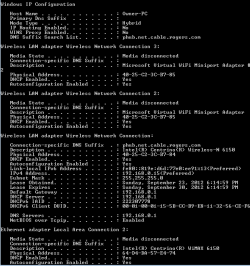
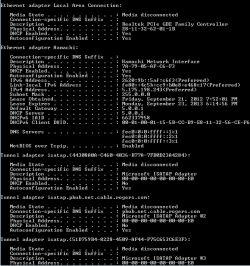
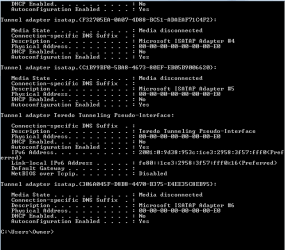
Thanks for the output provided. Have you tried disabling Hamachi and see if it helps?
You might have ovelooked this:
You might have ovelooked this:
What type of Security or Anti-Virus Software are you using?
My Computer
At a glance
Win7 & Win8 64bitIntel i5
- Computer Manufacturer/Model Number
- Lenovo Desktop/Samsung Laptop
- OS
- Win7 & Win8 64bit
- CPU
- Intel i5
- Internet Speed
- Charter-20 Mbps
- Antivirus
- Avast
- Browser
- FF, IE9 and Chrome
Have you tried a System Restore, restore it a point when your computer was able to connect. This process will undo the latest Windows Updates.
- Restart your computer, continue tapping F8 and select Safe Mode with Networking, see if you can connect here.
- Open up a command prompt and type ping yahoo.com then press enter, please post the results.
Another update will be appreciated.
If the above suggestion didn't help let's do some tests:I should also add that this happened after Windows did one of those forced updates.
- Restart your computer, continue tapping F8 and select Safe Mode with Networking, see if you can connect here.
- Open up a command prompt and type ping yahoo.com then press enter, please post the results.
Another update will be appreciated.
My Computer
At a glance
Win7 & Win8 64bitIntel i5
- Computer Manufacturer/Model Number
- Lenovo Desktop/Samsung Laptop
- OS
- Win7 & Win8 64bit
- CPU
- Intel i5
- Internet Speed
- Charter-20 Mbps
- Antivirus
- Avast
- Browser
- FF, IE9 and Chrome
- Local time
- 10:53 PM
- Messages
- 8,138
Please pardon me sticking my nose in to the middle of this thread.......Hamachi has been disabled. No difference.
...but the Hamachi virtual adapter is not disabled in the screenshots that you posted. It has a leased IP and a gateway. Sometimes that confuses a Windows computer.
If by disabled, you mean that you have turned the Hamachi GUI off, then that does not solve the issue of dual gateways. You need to temporarily (for testing) disable the virtual adapter.
If you have already disabled the Hamachi virtual adapter, rebooted and found that it was not the issue.... then forget that I was ever here

I now return you to your regularly scheduled thread.
My Computer
At a glance
W7 Pro SP1 64biti78GBIntel HD Graphics
- Computer type
- Laptop
- Computer Manufacturer/Model Number
- Employer provided Dell Latitude
- OS
- W7 Pro SP1 64bit
- CPU
- i7
- Memory
- 8GB
- Graphics Card(s)
- Intel HD Graphics
- Hard Drives
- crappy SSD
- Antivirus
- Employer mandated Symantec Endpoint Protection
- Browser
- Pale Moon 64bit, IE11 64bit & Chrome 64bit

Please pardon me sticking my nose in to the middle of this thread.......Hamachi has been disabled. No difference.
...but the Hamachi virtual adapter is not disabled in the screenshots that you posted. It has a leased IP and a gateway. Sometimes that confuses a Windows computer.
If by disabled, you mean that you have turned the Hamachi GUI off, then that does not solve the issue of dual gateways. You need to temporarily (for testing) disable the virtual adapter.
If you have already disabled the Hamachi virtual adapter, rebooted and found that it was not the issue.... then forget that I was ever here
I now return you to your regularly scheduled thread.
I agree with disabling Hamachi and it's probably best to keep it disabled until after the problem is fixed.
The Op will also want to disable both of the Microsoft Virtual WiFi mini port adaptors as they are also famous for causing this problem.
You need to go into Device Manager for that.

As for the Windows update created problem, you can also go to Windows update in the Control Panel and roll back that update then hide it by right clicking the update and choose to hide it.
Anyway back to 2Xg's thread.
Last edited:
My Computer
At a glance
Windows 7 Ult, Windows 8.1 Pro,Q9650-4.275GHz, E8600 4.5GHz, E6750-3.8GHzG.Skill PC2 9600 1200Mhz 5 5 5 15 2TGTX480
- Computer type
- PC/Desktop
- Computer Manufacturer/Model Number
- Home built
- OS
- Windows 7 Ult, Windows 8.1 Pro,
- CPU
- Q9650-4.275GHz, E8600 4.5GHz, E6750-3.8GHz
- Motherboard
- Evga 780i FTW
- Memory
- G.Skill PC2 9600 1200Mhz 5 5 5 15 2T
- Graphics Card(s)
- GTX480
- Sound Card
- Asus Xonar D2
- Monitor(s) Displays
- HannsG
- Screen Resolution
- 1680X1050
- Hard Drives
- GSkill Phoenix Pro 120GB SSD
- PSU
- ThermalTake Toughpower 1000Watt modular
- Case
- ThermalTake XaserV
- Cooling
- Xigmatek S1283
- Keyboard
- Logitech G15
- Mouse
- Logitech G9
- Internet Speed
- T1
I think that it's best that we confirm from OP=JacksonR if he really disabled Hamachi. When I asked him to ran ipconfig/all and that's in Post# 2, then he uploaded the output in Post# 4. In Post# 5 I have replied again and informed him to disable Hamachi, he then replied back in Post# 6 that Himachi has been disabled but... he never posted another ipconfig/all output. Perhaps another output will be good to confirm that it's disabled?
Anyway back to 2Xg's thread.
My Computer
At a glance
Win7 & Win8 64bitIntel i5
- Computer Manufacturer/Model Number
- Lenovo Desktop/Samsung Laptop
- OS
- Win7 & Win8 64bit
- CPU
- Intel i5
- Internet Speed
- Charter-20 Mbps
- Antivirus
- Avast
- Browser
- FF, IE9 and Chrome
I uninstalled hamachi AND uninstalled the update that I thought screwed it up... Still nothing, I tried pinging google.com and yahoo.com, nothing. One strange thing I noticed is now when I do ipconfig /all it only shows
Host name . . . . . . . Sam-PC
Primary Dns Suffix . . . . . . . . . . .:
Node type . . . . . . . . . . Hybrid
IP Routing Enabled . . . . . . No
WINS Proxy Enabled . . . . . . No
Host name . . . . . . . Sam-PC
Primary Dns Suffix . . . . . . . . . . .:
Node type . . . . . . . . . . Hybrid
IP Routing Enabled . . . . . . No
WINS Proxy Enabled . . . . . . No
My Computer
At a glance
Windows 7
- OS
- Windows 7
See if you have restore points and go back a day. Run ipconfig /all again please.
System Restore - Windows 7 features - Microsoft Windows
System Restore - Windows 7 features - Microsoft Windows
My Computer
At a glance
Win7 & Win8 64bitIntel i5
- Computer Manufacturer/Model Number
- Lenovo Desktop/Samsung Laptop
- OS
- Win7 & Win8 64bit
- CPU
- Intel i5
- Internet Speed
- Charter-20 Mbps
- Antivirus
- Avast
- Browser
- FF, IE9 and Chrome
Oh no, this is embarassing... Just realized that the ipconfig /all from earlier was from the computer that I am browsing this forum on... There are no restore points available on the problematic computer, and it says the same thing as earlier when I ipconfig /all the problematic one.
My Computer
At a glance
Windows 7
- OS
- Windows 7
So currently you aren't able to use both wired and wireless connection?
I'd like you to try the following suggestions:
Check your computer's Bios setting, navigate around and try to locate the integrated ethernet controller and make sure that ethernet controllers (also Wi-Fi) is/are enabled.
How to enter the BIOS or CMOS setup.
Click on Start and right click Computer, choose Manage, go to Device Manager, expand network adapters, do you see your Network adapters?
Verify that all your Network Services are Started from Control Panel and its Dependencies.
Click on the Start button and type services.msc press enter.
• COM+ Event System (for WZC issues)
• Computer Browser
• DHCP Client
• DNS Client
• Network Connections
• Network Location Awareness
• Remote Procedure Call (RPC)
• Server
• TCP/IP Netbios helper
• WLAN AutoConfig
• Workstation
Another update of your progress will be nice.
I'd like you to try the following suggestions:
Check your computer's Bios setting, navigate around and try to locate the integrated ethernet controller and make sure that ethernet controllers (also Wi-Fi) is/are enabled.
How to enter the BIOS or CMOS setup.
Click on Start and right click Computer, choose Manage, go to Device Manager, expand network adapters, do you see your Network adapters?
Verify that all your Network Services are Started from Control Panel and its Dependencies.
Click on the Start button and type services.msc press enter.
• COM+ Event System (for WZC issues)
• Computer Browser
• DHCP Client
• DNS Client
• Network Connections
• Network Location Awareness
• Remote Procedure Call (RPC)
• Server
• TCP/IP Netbios helper
• WLAN AutoConfig
• Workstation
Another update of your progress will be nice.
My Computer
At a glance
Win7 & Win8 64bitIntel i5
- Computer Manufacturer/Model Number
- Lenovo Desktop/Samsung Laptop
- OS
- Win7 & Win8 64bit
- CPU
- Intel i5
- Internet Speed
- Charter-20 Mbps
- Antivirus
- Avast
- Browser
- FF, IE9 and Chrome
When I expand the network adaptors, I see the Aetheros Ethernet Controller and an Atheros Wireless Network Adaptor. All of those were on except Computer Browser, I turned it on and restarted, still no luck. When I go to the LAN section of the BIOS, it says "Check cable connection! Now closing" then it goes back to the boot screen, then boots normally.
My Computer
At a glance
Windows 7
- OS
- Windows 7
Next task to do if above recommendation is unsuccessful:
Click on Start=> All Programs => Accessories and right click on Command Prompt, select "Run as Administrator" to open a command prompt.
Reset IPv4 TCP/IP stack to installation defaults. netsh int ipv4 reset reset.log press enter
Reset IPv6 TCP/IP stack to installation defaults. netsh int ipv6 reset reset.log press enter
Reset WINSOCK entries to installation defaults: netsh winsock reset catalog press enter
Restart the computer after.
Do sfc /scannow:
Use the System File Checker tool to troubleshoot missing or corrupted system files on Windows Vista or on Windows 7
Let's pause here for now and please report back.
Click on Start=> All Programs => Accessories and right click on Command Prompt, select "Run as Administrator" to open a command prompt.
Reset IPv4 TCP/IP stack to installation defaults. netsh int ipv4 reset reset.log press enter
Reset IPv6 TCP/IP stack to installation defaults. netsh int ipv6 reset reset.log press enter
Reset WINSOCK entries to installation defaults: netsh winsock reset catalog press enter
Restart the computer after.
Do sfc /scannow:
Use the System File Checker tool to troubleshoot missing or corrupted system files on Windows Vista or on Windows 7
Let's pause here for now and please report back.
My Computer
At a glance
Win7 & Win8 64bitIntel i5
- Computer Manufacturer/Model Number
- Lenovo Desktop/Samsung Laptop
- OS
- Win7 & Win8 64bit
- CPU
- Intel i5
- Internet Speed
- Charter-20 Mbps
- Antivirus
- Avast
- Browser
- FF, IE9 and Chrome
Did you do the TCP/IP and Winsock resets as suggested? Usually copying and pasting the commands will be easier.
My Computer
At a glance
Win7 & Win8 64bitIntel i5
- Computer Manufacturer/Model Number
- Lenovo Desktop/Samsung Laptop
- OS
- Win7 & Win8 64bit
- CPU
- Intel i5
- Internet Speed
- Charter-20 Mbps
- Antivirus
- Avast
- Browser
- FF, IE9 and Chrome
Similar threads
- Replies
- 5
- Views
- 2K

- Replies
- 3
- Views
- 1K
- Replies
- 11
- Views
- 3K

- Replies
- 13
- Views
- 15K
