Limited access - unidentified network

Jyennes

New member
Local time
4:53 PM
Messages
6
Whenever i start-up my computer, i get a limited access problem, and it can only get temporarily fixed by putting the computer to sleep and then waking it up. sometimes it'll take two or three attempts to make it work again. after about 20 - 30 minutes the problem comes back again. it also happens 5 minutes after i start playing a game that takes up allot of memory, such as minecraft. this problem started ever since i bought my computer, and i have been doing the same "sleep and wake" trick everyday. ive had this computer for 2 months now, and i have tried so many different solutions, but none of them work. can you please get me a permanent solution to this issue.
 

My Computer

OS
Windows 7 Home Premium 32bit
Have you contacted your computer's manufacturer? It's brand new, so you get free support.

If you'd like some help here, please fill out your system specs and explain how you have your home network configured.
 

My Computer

Computer Manufacturer/Model Number
Dell XPS 15 L502x
OS
Windows 7 Ultimate x64 SP1
CPU
Core i7-2670QM
Memory
8GB DDR3 PC3-10600
Graphics Card(s)
Intel HD Graphics 3000 + GeForce GT 540M
Screen Resolution
1920x1080
Hard Drives
1TB 5400RPM Seagate
And add a little more clarification to:
i get a limited access problem
As in, limited access to what?
 

My Computer

OS
Windows 7 Ultimate x64
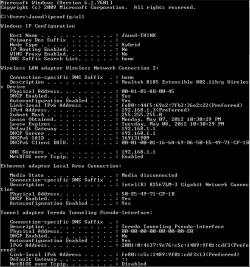
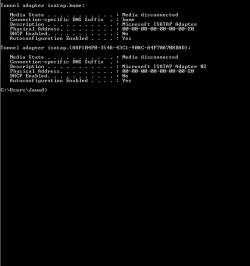
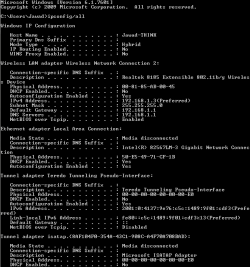
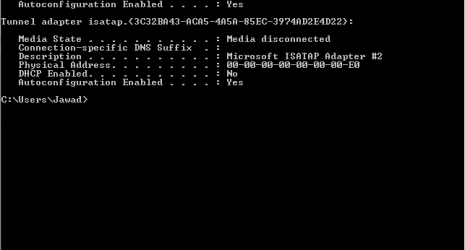
this is my ipconfig when the internet is working, but when its not working, it has different numbers for the default gateway, subnet mask, and ipv4. i tried manually inputing the working numbers, but when i restarted my computer, it would not work. so i went back automatic, and it worked again.
sibbil - the limited access says, my network security key is incorrect, even though the key is correct.
 

Attachments

  • Capture 1.PNG
    Capture 1.PNG
    11.1 KB · Views: 52
  • Capture.PNG
    Capture.PNG
    4.3 KB · Views: 29

My Computer

OS
Windows 7 Home Premium 32bit
Have you tried deleting the profile and then recreating it?
 

My Computer

OS
Windows 7 Ultimate x64
Go to:

Control Panel > All Control Panel Items > Network and Sharing Center

On the left side of the window, select Manage wireless networks.

Right click on the one that's giving you problems and select delete.

Then re-establish a network connection by clicking on the little network icon in your taskbar (lower right side of your screen). You'll need to enter the password for the network again.
 

My Computer

OS
Windows 7 Ultimate x64
ive done that plenty of times. i have tried so many different things, but none of them work for me.
 

My Computer

OS
Windows 7 Home Premium 32bit
Do you have another wireless signal around you that may be interfering? Maybe one that's setup in your computer to automatically connect to?

Do a screenshot of ipconfig /all when the connection fails.

Other things:

Wireless driver up to date?

Try uninstalling the wireless device in Device Manager, then rebooting so that it automatically prompts a re-install.
 

My Computer

OS
Windows 7 Ultimate x64
i have a bunch of these random networks that all say connect automatically - http://puu.sh/tGTT - but they only show up in that little network bar, its shown at the "manage wireless networks" location. my driver is up to date, and i already tried that uninstall trick, and it didn't work. here's my ipconfig when its broken, but the ipv4 and gateway don't look different, like i said earlier, because i changed it manually to always stay that way.
 

Attachments

  • 1.PNG
    1.PNG
    10.7 KB · Views: 25
  • 4.PNG
    4.PNG
    2.8 KB · Views: 8

My Computer

OS
Windows 7 Home Premium 32bit
Please fill out your system specs. Click the first link in my signature for an explanation on how to do it.
 

My Computer

Computer Manufacturer/Model Number
Dell XPS 15 L502x
OS
Windows 7 Ultimate x64 SP1
CPU
Core i7-2670QM
Memory
8GB DDR3 PC3-10600
Graphics Card(s)
Intel HD Graphics 3000 + GeForce GT 540M
Screen Resolution
1920x1080
Hard Drives
1TB 5400RPM Seagate
i have a bunch of these random networks that all say connect automatically - http://puu.sh/tGTT - but they only show up in that little network bar, its shown at the "manage wireless networks" location. my driver is up to date, and i already tried that uninstall trick, and it didn't work. here's my ipconfig when its broken, but the ipv4 and gateway don't look different, like i said earlier, because i changed it manually to always stay that way.

If these random networks only appear when you click on the taskbar icon, and these same random networks do not appear in the "manage wireless networks", then they should not be autoconnecting. If they are, they should appear in "manage wireless networks", where you can right click on them and either delete them or set them to only manually connect. I'd set it up so that the only one that connects automatically is the one that represents your own network.

Do you know how to get to your router's or access point's configuration pages?

Also, would like to echo kegobeer's request for you to fill in your system specs to the best of your ability. It's just one of the simpler things you can do to help folks that are trying to help you.
 

My Computer

OS
Windows 7 Ultimate x64
thanks for trying to help. i just re installed windows 7 and the problem got fixed!
 

My Computer

OS
Windows 7 Home Premium 32bit
Back
Top