Limited Connectivity After Restarting HP Laptop

UCSDstudent

New member
Local time
7:34 AM
Messages
8
Hello helpful forum wanderer,

I would really appreciate help, as I am returning to school in two days and I urgently need to retrieve my internet before I leave. Thanks!

Here's the story. I had internet completely problem-free for almost two years, until about a month ago, when I restarted my computer and installed Windows Updates. Then, this Limited Connectivity problem came up for the first time.

I used System Restore and the problem went away. However, recently I restarted my laptop again and had the same Limited Connectivity problem. The old System Restore point was missing (probably because I had used Disk Clean-up and deleted it).

I don't believe the router has a problem, because two other computers are connecting to the internet just fine.

Interestingly, when I try to connect my laptop directly to the router using an ethernet cable, nothing happens.

THINGS I HAVE TRIED
- netsh winsock commands
- ipconfig /release, and ipconfig /renew, but both of these give the following:
"Windows IP Configuration
The operation failed as no adapter is in the state permissible for this operation."
- uninstalling and reinstalling network drivers
- system restore

DESCRIPTION OF MY LAPTOP
My HP laptop is a G60-530US model.

My network drivers are updated I believe, and as follows...
- Intel(R) WiFi Link 1000 BGN
- Microsoft Virtual WiFi Miniport Adapter
- Realtek PCIe FE Family Controller

The router I am using:
Netgear 54Mbps WGR614 v5

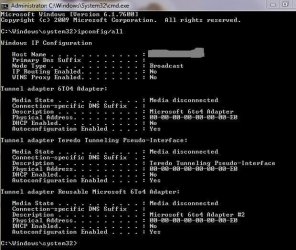
Here is my ipconfig /all:
ipconfig -all.JPG

Thanks much in advance,
UCSDstudent :D
 
Last edited:

My Computer My Computer

At a glance

Windows 7 Home Premium
Computer Manufacturer/Model Number
HP G60-530US
OS
Windows 7 Home Premium
From the icon in the tray, use the troubleshooter.
It fixes the problem, most of the time.
 

My Computer My Computer

At a glance

Windows 7 Home Premium 64 bitIntel Core i7-4790G.SKILL 8GB (2 x 4GB) DDR3 F3-10666CL9D-8GBNTAMD Radeon R7 250
Computer type
PC/Desktop
Computer Manufacturer/Model Number
Custom Build
OS
Windows 7 Home Premium 64 bit
CPU
Intel Core i7-4790
Motherboard
GA-Z87X-D3H
Memory
G.SKILL 8GB (2 x 4GB) DDR3 F3-10666CL9D-8GBNT
Graphics Card(s)
AMD Radeon R7 250
Sound Card
Realtek ALC892
Monitor(s) Displays
Samsung UN32EH5000, Dell 1703FPT
Screen Resolution
1920 x 1080, 1280 x 1024
Hard Drives
WD5003AZEX
WD10EZEX
Samsung HD103SJ
Samsung 128 GB 840 PRO
PSU
SeaSonic M12II SS-500GM
Case
Fractal Design Define R4
Cooling
Zalman CNPS9900ALED
Keyboard
Logitech K800
Mouse
Logitech M705
Internet Speed
16 Mbps
Antivirus
Avast
Browser
Firefox
Other Info
Bose Companion 2 Multimedia Speakers
Hi 5bdkw,
Thanks for your prompt reply!

I have tried the troubleshooter, but it always says that it cannot detect the problem.
It says...
There might be a problem with the driver for the Local Area Connection adapter and the Wireless Network Connection adapter.
"Windows couldn't automatically bind the IP protocol stack to the network adapter" for both connections.

Any other help out there? I will be waiting right here!

Thanks,
UCSDstudent
 
Last edited:

My Computer My Computer

At a glance

Windows 7 Home Premium
Computer Manufacturer/Model Number
HP G60-530US
OS
Windows 7 Home Premium
Have you tried resetting the router?
 

My Computer My Computer

At a glance

Windows 7 Home Premium 64 bitIntel Core i7-4790G.SKILL 8GB (2 x 4GB) DDR3 F3-10666CL9D-8GBNTAMD Radeon R7 250
Computer type
PC/Desktop
Computer Manufacturer/Model Number
Custom Build
OS
Windows 7 Home Premium 64 bit
CPU
Intel Core i7-4790
Motherboard
GA-Z87X-D3H
Memory
G.SKILL 8GB (2 x 4GB) DDR3 F3-10666CL9D-8GBNT
Graphics Card(s)
AMD Radeon R7 250
Sound Card
Realtek ALC892
Monitor(s) Displays
Samsung UN32EH5000, Dell 1703FPT
Screen Resolution
1920 x 1080, 1280 x 1024
Hard Drives
WD5003AZEX
WD10EZEX
Samsung HD103SJ
Samsung 128 GB 840 PRO
PSU
SeaSonic M12II SS-500GM
Case
Fractal Design Define R4
Cooling
Zalman CNPS9900ALED
Keyboard
Logitech K800
Mouse
Logitech M705
Internet Speed
16 Mbps
Antivirus
Avast
Browser
Firefox
Other Info
Bose Companion 2 Multimedia Speakers
Hi again p5bdkw,

Does resetting the router consist of turning it off and then back on again?
If so, I have tried that to no avail.

Any other ideas?

Thanks again,
UCSDstudent
 

My Computer My Computer

At a glance

Windows 7 Home Premium
Computer Manufacturer/Model Number
HP G60-530US
OS
Windows 7 Home Premium
devices?

Look in Device Manager... any network devices showing an exclamation mark?
Try updating device drivers for network devices
What firewall are you running? Any changes made to its settings?
ANYTHING else changed around the time you started getting problems?
 

My Computer My Computer

At a glance

Windows 7 Pro 64 bitIntel i5 7604GB DDR3 (2 x 2GB CorsairGigabyte GTX 460
Computer Manufacturer/Model Number
Custom build
OS
Windows 7 Pro 64 bit
CPU
Intel i5 760
Motherboard
ASUS P7P55D-E PRO
Memory
4GB DDR3 (2 x 2GB Corsair
Graphics Card(s)
Gigabyte GTX 460
Sound Card
Asus DX
Monitor(s) Displays
BENQ HDMI
Hard Drives
128GB SSD
+ Seagate 500GB SATA
PSU
Lian-Li Extreme 650W PSU
Case
Lian-Li PC60FNWX
Cooling
2 x chassis fans; Thermalright MUX-120 CPU cooler
Internet Speed
34Mb/sec
Hi piattj,

No network devices in Device Manager show an exclamation mark - they are all functioning properly.
I have tried updating the drivers for the network adapters.

I am not sure what firewall I am running (Windows? Norton?), but I have not made any changes to the settings. I have tried uninstalling and reinstalling Norton as well to no success.
I don't believe I changed anything else to cause the problem - from my observations, it just occurred upon restarting.

Thanks,
UCSDstudent
 

My Computer My Computer

At a glance

Windows 7 Home Premium
Computer Manufacturer/Model Number
HP G60-530US
OS
Windows 7 Home Premium
Hi again p5bdkw,

Does resetting the router consist of turning it off and then back on again?
If so, I have tried that to no avail.

Any other ideas?

Thanks again,
UCSDstudent

Usually a reset involves pressing a button on the router and holding it for a few seconds while it powers on. You may want to consult your manual on how to do it for your router.
 

My Computer My Computer

At a glance

Windows 7 Home Premium 64 bitIntel Core i7-4790G.SKILL 8GB (2 x 4GB) DDR3 F3-10666CL9D-8GBNTAMD Radeon R7 250
Computer type
PC/Desktop
Computer Manufacturer/Model Number
Custom Build
OS
Windows 7 Home Premium 64 bit
CPU
Intel Core i7-4790
Motherboard
GA-Z87X-D3H
Memory
G.SKILL 8GB (2 x 4GB) DDR3 F3-10666CL9D-8GBNT
Graphics Card(s)
AMD Radeon R7 250
Sound Card
Realtek ALC892
Monitor(s) Displays
Samsung UN32EH5000, Dell 1703FPT
Screen Resolution
1920 x 1080, 1280 x 1024
Hard Drives
WD5003AZEX
WD10EZEX
Samsung HD103SJ
Samsung 128 GB 840 PRO
PSU
SeaSonic M12II SS-500GM
Case
Fractal Design Define R4
Cooling
Zalman CNPS9900ALED
Keyboard
Logitech K800
Mouse
Logitech M705
Internet Speed
16 Mbps
Antivirus
Avast
Browser
Firefox
Other Info
Bose Companion 2 Multimedia Speakers
Hmm... resetting the router didn't work.

But, I also noticed something else odd. The laptop has limited connectivity when I have all three drivers working, but when the Microsoft Virtual WiFi Miniport Adapter is uninstalled, I get no connectivity, and no detection of any networks.

Do you have any idea why this is? It's so frustrating, because when I uninstall my drivers, Microsoft Virtual WiFi Miniport Adapter never gets reinstalled and I don't know where I can download or install it.

Thanks in advance,
UCSDstudent
 

My Computer My Computer

At a glance

Windows 7 Home Premium
Computer Manufacturer/Model Number
HP G60-530US
OS
Windows 7 Home Premium
Hello,

Did you use the Norton Removal Tool to completely uninstall and remove all the remains. Install MSE to replace Norton.
I am not sure what firewall I am running (Windows? Norton?), but I have not made any changes to the settings. I have tried uninstalling and reinstalling Norton as well to no success.

Also, pls. try the following recommendations:

Remove all wireless network stored in your computer, then re-add your own SSID. If the network is secured, make sure to type in the correct network key.
http://www.sevenforums.com/tutorials/120670-wireless-network-remove.html

Your ipconfig /all output is incomplete, can't see the Intel's info., but anyway, make sure that your wireless setting is on DHCP and Obtain DNS Server is set to auto.
How to Configure DHCP in Windows 7

Please give us an update.
 

My Computer My Computer

At a glance

Win7 & Win8 64bitIntel i5
Computer Manufacturer/Model Number
Lenovo Desktop/Samsung Laptop
OS
Win7 & Win8 64bit
CPU
Intel i5
Internet Speed
Charter-20 Mbps
Antivirus
Avast
Browser
FF, IE9 and Chrome
Dear all,

Thanks for all your help.
I eventually gave up with quick fixes and performed the last resort of backing up my files... and then using a System Recovery.

Sadly, many programs need to be reinstalled. But at least the internet is working again!:D

Should I mark this thread as solved, or no? The specific problem was not solved - I still do not know what it is.

Thanks all for your time,
UCSDstudent
 

My Computer My Computer

At a glance

Windows 7 Home Premium
Computer Manufacturer/Model Number
HP G60-530US
OS
Windows 7 Home Premium
Hello all,

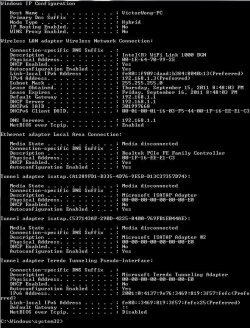
If some wizzes would like to compare my ipconfigs and determine what the problem was, here is my functioning ipconfig /all:
ipconfig-all.JPG


Your ipconfig /all output is incomplete, can't see the Intel's info.
Please give us an update.
But regarding this... the ipconfig picture was all that was showing on my cmd. Does that possibly mean something?

Thanks,
UCSDstudent
 

My Computer My Computer

At a glance

Windows 7 Home Premium
Computer Manufacturer/Model Number
HP G60-530US
OS
Windows 7 Home Premium
Thanks for posting the ipconfig /all output, it looks good this time compare to your first post.
Pls. verify again that you have the latest driver for your network adapter pls. download the driver from the Manufacturer's site.

Can I verify something? Is your issue wired or wireless? Your ipconfig /all output is showing a good output coming from your Wireless. Realtek (wired) is showing a 'Media Disconnected', is this the problematic one?

Did you leave your Norton uninstalled? Have you ran the Norton Removal Tool? You may install MSE for protection, I have provided you with all the links.
 

My Computer My Computer

At a glance

Win7 & Win8 64bitIntel i5
Computer Manufacturer/Model Number
Lenovo Desktop/Samsung Laptop
OS
Win7 & Win8 64bit
CPU
Intel i5
Internet Speed
Charter-20 Mbps
Antivirus
Avast
Browser
FF, IE9 and Chrome
Hi 2xg,
I will verify that I have the latest driver for my network adapter - thanks!

My issue was wired and wireless. Wired - my laptop did nothing, and wireless - my computer only had limited connectivity. Now both work fine.

Also, could you let me know about why you prefer MSE to Norton? That would be greatly appreciated for my curiosity. Thanks!

Regards,
UCSDstudent
 

My Computer My Computer

At a glance

Windows 7 Home Premium
Computer Manufacturer/Model Number
HP G60-530US
OS
Windows 7 Home Premium
Norton causes connectivity issue, none with MSE that I am aware of. :)
Here's a good read.
Also, could you let me know about why you prefer MSE to Norton?
 

My Computer My Computer

At a glance

Win7 & Win8 64bitIntel i5
Computer Manufacturer/Model Number
Lenovo Desktop/Samsung Laptop
OS
Win7 & Win8 64bit
CPU
Intel i5
Internet Speed
Charter-20 Mbps
Antivirus
Avast
Browser
FF, IE9 and Chrome
Back
Top