
Solved Limited internet connectivity...

Hmmm, its not happening.
I'm gunna leave it till tomorrow, sorry guys!

Thanks for your help tonight though! ;)
 

My Computer

OS
Seven Ultimate 64bit /Macbuntu 10.10 32bit (desktop) Android 4.0.3 ICS (tablet)
CPU
AMD FX-4170 Quad-Core @ 4.2GHz
Motherboard
ASUS M5A78L-M/USB3
Memory
8GB DDR3 @ 1333MHz
Graphics Card(s)
Nvidia geforce GTS240 1GB, 3GB shared memory. SLI soon.
Sound Card
VIA Audio or smth. I dunno.
Monitor(s) Displays
19 inch widescreen monitor
Screen Resolution
1440 by 900, 32 bit colour, 75 hertz
Hard Drives
1 128GB Kingston SSD Now OS drive
1 500GB for re-directs from OS disk.
1 250GB sata main drive.
1 Seagate GoFlex External 1TB with backups.
PSU
750 watt.
Case
Foxconn TSAA699.
Cooling
5 fans.
Keyboard
Trust Wireless Optical Deskset Keyboard.
Mouse
Trust Wireless Optical Deskset Mouse.
Internet Speed
download about 60/65MB/s, upload about 4/5MB/s.
Other Info
ASUS EEEPad Transformer 16GB with Dock w/32GB class10 SD |
HP ProLiant DL360 G3|
HP ProLiant ML350 G4|
HP ProLiant DL380 G7|
Dell OptiPlex GX270|
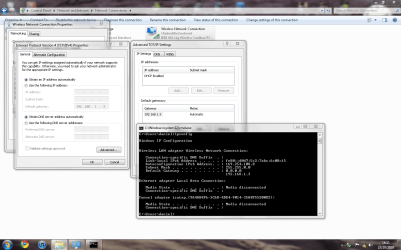
Okay, good afternoon!
I'm back for round 2 lol ;)

I have tried a different wireless card but nothing.

EDIT;
I think I'm onto something here...
 

Attachments

  • network connections.PNG
    network connections.PNG
    83.1 KB · Views: 21
Last edited:

My Computer

OS
Seven Ultimate 64bit /Macbuntu 10.10 32bit (desktop) Android 4.0.3 ICS (tablet)
CPU
AMD FX-4170 Quad-Core @ 4.2GHz
Motherboard
ASUS M5A78L-M/USB3
Memory
8GB DDR3 @ 1333MHz
Graphics Card(s)
Nvidia geforce GTS240 1GB, 3GB shared memory. SLI soon.
Sound Card
VIA Audio or smth. I dunno.
Monitor(s) Displays
19 inch widescreen monitor
Screen Resolution
1440 by 900, 32 bit colour, 75 hertz
Hard Drives
1 128GB Kingston SSD Now OS drive
1 500GB for re-directs from OS disk.
1 250GB sata main drive.
1 Seagate GoFlex External 1TB with backups.
PSU
750 watt.
Case
Foxconn TSAA699.
Cooling
5 fans.
Keyboard
Trust Wireless Optical Deskset Keyboard.
Mouse
Trust Wireless Optical Deskset Mouse.
Internet Speed
download about 60/65MB/s, upload about 4/5MB/s.
Other Info
ASUS EEEPad Transformer 16GB with Dock w/32GB class10 SD |
HP ProLiant DL360 G3|
HP ProLiant ML350 G4|
HP ProLiant DL380 G7|
Dell OptiPlex GX270|
Yes you have done good so far could you try a Diagnostic report from Windows 7 Network support

If it comes up with some steps then please try them

Many Thanks,
Josh
 

My Computer

Computer type
PC/Desktop
Computer Manufacturer/Model Number
Custom Built
OS
Windows 7 Professional x64 SP1 ; Windows Server 2012 R2 Standard
CPU
Intel Core i5 2400 @ 3.10GHz
Motherboard
Foxconn H67MP-S/-V/H67MP
Memory
8.0GB DDR3 @ 665MHz (2GBx4)
Graphics Card(s)
AMD Radeon HD 6870
Sound Card
Realtek High Definition Audio
Monitor(s) Displays
AOC 2243W & SMB1930NW
Screen Resolution
1440x900 & 1920x1080
Hard Drives
977GB Seagate ST31000524AS ATA Drive (SATA)
250GB WD iSCSI attached Drive
PSU
750W Gaming PSU
Case
Novatech Night
Cooling
Fan
Keyboard
Dell Standard PS/2 Keyboard
Mouse
R.A.T 07 Gaming Mouse
Internet Speed
Download: 10 Mbps Ping: 30ms Upload: 0.81 Mbps
Browser
Google Chrome
Other Info
Optiarc DVD RW AD-5260S ATA Device
Okay, good afternoon!
I'm back for round 2 lol ;)

I have tried a different wireless card but nothing.

EDIT;
I think I'm onto something here...

I see that you manually put in the default gateway which is good but it's not working yet. You still aren't getting anything from your router. Your routers ip is more likely to be 192.168.1.1 which is the standard default gateway for netgear, I'm not sure why you are using 192.168.1.3?

The problem here isn't the card it's the router.
 

My Computer

Computer type
PC/Desktop
Computer Manufacturer/Model Number
Home built
OS
Windows 7 Ult, Windows 8.1 Pro,
CPU
Q9650-4.275GHz, E8600 4.5GHz, E6750-3.8GHz
Motherboard
Evga 780i FTW
Memory
G.Skill PC2 9600 1200Mhz 5 5 5 15 2T
Graphics Card(s)
GTX480
Sound Card
Asus Xonar D2
Monitor(s) Displays
HannsG
Screen Resolution
1680X1050
Hard Drives
GSkill Phoenix Pro 120GB SSD
PSU
ThermalTake Toughpower 1000Watt modular
Case
ThermalTake XaserV
Cooling
Xigmatek S1283
Keyboard
Logitech G15
Mouse
Logitech G9
Internet Speed
T1
Hmm, the Windows Diagnostics aren't doing anything.
I think the 0.0.0.0 has got something to do with this, how would I remove it?
Checked settings but can't find anything...

EDIT,
Copied the wrong IP from ipconfig on my laptop, .3 is my laptop lol :o
 

My Computer

OS
Seven Ultimate 64bit /Macbuntu 10.10 32bit (desktop) Android 4.0.3 ICS (tablet)
CPU
AMD FX-4170 Quad-Core @ 4.2GHz
Motherboard
ASUS M5A78L-M/USB3
Memory
8GB DDR3 @ 1333MHz
Graphics Card(s)
Nvidia geforce GTS240 1GB, 3GB shared memory. SLI soon.
Sound Card
VIA Audio or smth. I dunno.
Monitor(s) Displays
19 inch widescreen monitor
Screen Resolution
1440 by 900, 32 bit colour, 75 hertz
Hard Drives
1 128GB Kingston SSD Now OS drive
1 500GB for re-directs from OS disk.
1 250GB sata main drive.
1 Seagate GoFlex External 1TB with backups.
PSU
750 watt.
Case
Foxconn TSAA699.
Cooling
5 fans.
Keyboard
Trust Wireless Optical Deskset Keyboard.
Mouse
Trust Wireless Optical Deskset Mouse.
Internet Speed
download about 60/65MB/s, upload about 4/5MB/s.
Other Info
ASUS EEEPad Transformer 16GB with Dock w/32GB class10 SD |
HP ProLiant DL360 G3|
HP ProLiant ML350 G4|
HP ProLiant DL380 G7|
Dell OptiPlex GX270|
The 0.0.0.0 is what you get when the router isn't working. You should try to reset your router by pushing the reset button. You should also be using the IP 192.168.1.1 The one you are using now won't get you anywhere. As it stands your router isn't working.

What you are seeing is a typical problem with older routers. Try the link below which explains this problem in more detail.
http://pocketpccentral.net/blog/200...cess-no-internet-connection-problem-resolved/
 

My Computer

Computer type
PC/Desktop
Computer Manufacturer/Model Number
Home built
OS
Windows 7 Ult, Windows 8.1 Pro,
CPU
Q9650-4.275GHz, E8600 4.5GHz, E6750-3.8GHz
Motherboard
Evga 780i FTW
Memory
G.Skill PC2 9600 1200Mhz 5 5 5 15 2T
Graphics Card(s)
GTX480
Sound Card
Asus Xonar D2
Monitor(s) Displays
HannsG
Screen Resolution
1680X1050
Hard Drives
GSkill Phoenix Pro 120GB SSD
PSU
ThermalTake Toughpower 1000Watt modular
Case
ThermalTake XaserV
Cooling
Xigmatek S1283
Keyboard
Logitech G15
Mouse
Logitech G9
Internet Speed
T1
Thats the link I used to manually set the default gateway.
Trying a different wireless card now.
 

My Computer

OS
Seven Ultimate 64bit /Macbuntu 10.10 32bit (desktop) Android 4.0.3 ICS (tablet)
CPU
AMD FX-4170 Quad-Core @ 4.2GHz
Motherboard
ASUS M5A78L-M/USB3
Memory
8GB DDR3 @ 1333MHz
Graphics Card(s)
Nvidia geforce GTS240 1GB, 3GB shared memory. SLI soon.
Sound Card
VIA Audio or smth. I dunno.
Monitor(s) Displays
19 inch widescreen monitor
Screen Resolution
1440 by 900, 32 bit colour, 75 hertz
Hard Drives
1 128GB Kingston SSD Now OS drive
1 500GB for re-directs from OS disk.
1 250GB sata main drive.
1 Seagate GoFlex External 1TB with backups.
PSU
750 watt.
Case
Foxconn TSAA699.
Cooling
5 fans.
Keyboard
Trust Wireless Optical Deskset Keyboard.
Mouse
Trust Wireless Optical Deskset Mouse.
Internet Speed
download about 60/65MB/s, upload about 4/5MB/s.
Other Info
ASUS EEEPad Transformer 16GB with Dock w/32GB class10 SD |
HP ProLiant DL360 G3|
HP ProLiant ML350 G4|
HP ProLiant DL380 G7|
Dell OptiPlex GX270|
The default gateway was the IP I saw when I was copying from my laptop.
Changed the wireless card and it works now. :sarc:
 

My Computer

OS
Seven Ultimate 64bit /Macbuntu 10.10 32bit (desktop) Android 4.0.3 ICS (tablet)
CPU
AMD FX-4170 Quad-Core @ 4.2GHz
Motherboard
ASUS M5A78L-M/USB3
Memory
8GB DDR3 @ 1333MHz
Graphics Card(s)
Nvidia geforce GTS240 1GB, 3GB shared memory. SLI soon.
Sound Card
VIA Audio or smth. I dunno.
Monitor(s) Displays
19 inch widescreen monitor
Screen Resolution
1440 by 900, 32 bit colour, 75 hertz
Hard Drives
1 128GB Kingston SSD Now OS drive
1 500GB for re-directs from OS disk.
1 250GB sata main drive.
1 Seagate GoFlex External 1TB with backups.
PSU
750 watt.
Case
Foxconn TSAA699.
Cooling
5 fans.
Keyboard
Trust Wireless Optical Deskset Keyboard.
Mouse
Trust Wireless Optical Deskset Mouse.
Internet Speed
download about 60/65MB/s, upload about 4/5MB/s.
Other Info
ASUS EEEPad Transformer 16GB with Dock w/32GB class10 SD |
HP ProLiant DL360 G3|
HP ProLiant ML350 G4|
HP ProLiant DL380 G7|
Dell OptiPlex GX270|
Oh ok well for netgear it's usually 192.168.1.1 but your router is older so it may be using another one.

Maybe the old wireless card was just broken, happens a lot around here.

I'm kinda wondering what your ipconfig /all looks like now that you have a working adaptor.
 

My Computer

Computer type
PC/Desktop
Computer Manufacturer/Model Number
Home built
OS
Windows 7 Ult, Windows 8.1 Pro,
CPU
Q9650-4.275GHz, E8600 4.5GHz, E6750-3.8GHz
Motherboard
Evga 780i FTW
Memory
G.Skill PC2 9600 1200Mhz 5 5 5 15 2T
Graphics Card(s)
GTX480
Sound Card
Asus Xonar D2
Monitor(s) Displays
HannsG
Screen Resolution
1680X1050
Hard Drives
GSkill Phoenix Pro 120GB SSD
PSU
ThermalTake Toughpower 1000Watt modular
Case
ThermalTake XaserV
Cooling
Xigmatek S1283
Keyboard
Logitech G15
Mouse
Logitech G9
Internet Speed
T1
I don't usually Understand Networking myself there are a lot of Protocols and things to go wrong ;) But I am glad you have got it sorted

Josh
 

My Computer

Computer type
PC/Desktop
Computer Manufacturer/Model Number
Custom Built
OS
Windows 7 Professional x64 SP1 ; Windows Server 2012 R2 Standard
CPU
Intel Core i5 2400 @ 3.10GHz
Motherboard
Foxconn H67MP-S/-V/H67MP
Memory
8.0GB DDR3 @ 665MHz (2GBx4)
Graphics Card(s)
AMD Radeon HD 6870
Sound Card
Realtek High Definition Audio
Monitor(s) Displays
AOC 2243W & SMB1930NW
Screen Resolution
1440x900 & 1920x1080
Hard Drives
977GB Seagate ST31000524AS ATA Drive (SATA)
250GB WD iSCSI attached Drive
PSU
750W Gaming PSU
Case
Novatech Night
Cooling
Fan
Keyboard
Dell Standard PS/2 Keyboard
Mouse
R.A.T 07 Gaming Mouse
Internet Speed
Download: 10 Mbps Ping: 30ms Upload: 0.81 Mbps
Browser
Google Chrome
Other Info
Optiarc DVD RW AD-5260S ATA Device
Maybe, I tried 2 of the same make/model and it wasn't working, then chaged it to a completely different brand and it works.
Could be that the cards aren't compatible with Seven...
 

My Computer

OS
Seven Ultimate 64bit /Macbuntu 10.10 32bit (desktop) Android 4.0.3 ICS (tablet)
CPU
AMD FX-4170 Quad-Core @ 4.2GHz
Motherboard
ASUS M5A78L-M/USB3
Memory
8GB DDR3 @ 1333MHz
Graphics Card(s)
Nvidia geforce GTS240 1GB, 3GB shared memory. SLI soon.
Sound Card
VIA Audio or smth. I dunno.
Monitor(s) Displays
19 inch widescreen monitor
Screen Resolution
1440 by 900, 32 bit colour, 75 hertz
Hard Drives
1 128GB Kingston SSD Now OS drive
1 500GB for re-directs from OS disk.
1 250GB sata main drive.
1 Seagate GoFlex External 1TB with backups.
PSU
750 watt.
Case
Foxconn TSAA699.
Cooling
5 fans.
Keyboard
Trust Wireless Optical Deskset Keyboard.
Mouse
Trust Wireless Optical Deskset Mouse.
Internet Speed
download about 60/65MB/s, upload about 4/5MB/s.
Other Info
ASUS EEEPad Transformer 16GB with Dock w/32GB class10 SD |
HP ProLiant DL360 G3|
HP ProLiant ML350 G4|
HP ProLiant DL380 G7|
Dell OptiPlex GX270|
Maybe, I tried 2 of the same make/model and it wasn't working, then chaged it to a completely different brand and it works.
Could be that the cards aren't compatible with Seven...

Or the drivers aren't up to date or were never written for Windows 7. I assumed that this adaptor already worked at one time. It was strange to not see anything from the router though, usually you will see something even with a bad driver.
 

My Computer

Computer type
PC/Desktop
Computer Manufacturer/Model Number
Home built
OS
Windows 7 Ult, Windows 8.1 Pro,
CPU
Q9650-4.275GHz, E8600 4.5GHz, E6750-3.8GHz
Motherboard
Evga 780i FTW
Memory
G.Skill PC2 9600 1200Mhz 5 5 5 15 2T
Graphics Card(s)
GTX480
Sound Card
Asus Xonar D2
Monitor(s) Displays
HannsG
Screen Resolution
1680X1050
Hard Drives
GSkill Phoenix Pro 120GB SSD
PSU
ThermalTake Toughpower 1000Watt modular
Case
ThermalTake XaserV
Cooling
Xigmatek S1283
Keyboard
Logitech G15
Mouse
Logitech G9
Internet Speed
T1
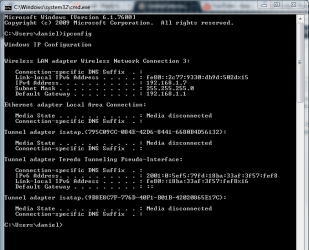
Okay, working ipconfig as requested.

Yeah, the adaptor worked with my Vista before I upgraded..
 

Attachments

  • ipworking.PNG
    ipworking.PNG
    17.4 KB · Views: 15

My Computer

OS
Seven Ultimate 64bit /Macbuntu 10.10 32bit (desktop) Android 4.0.3 ICS (tablet)
CPU
AMD FX-4170 Quad-Core @ 4.2GHz
Motherboard
ASUS M5A78L-M/USB3
Memory
8GB DDR3 @ 1333MHz
Graphics Card(s)
Nvidia geforce GTS240 1GB, 3GB shared memory. SLI soon.
Sound Card
VIA Audio or smth. I dunno.
Monitor(s) Displays
19 inch widescreen monitor
Screen Resolution
1440 by 900, 32 bit colour, 75 hertz
Hard Drives
1 128GB Kingston SSD Now OS drive
1 500GB for re-directs from OS disk.
1 250GB sata main drive.
1 Seagate GoFlex External 1TB with backups.
PSU
750 watt.
Case
Foxconn TSAA699.
Cooling
5 fans.
Keyboard
Trust Wireless Optical Deskset Keyboard.
Mouse
Trust Wireless Optical Deskset Mouse.
Internet Speed
download about 60/65MB/s, upload about 4/5MB/s.
Other Info
ASUS EEEPad Transformer 16GB with Dock w/32GB class10 SD |
HP ProLiant DL360 G3|
HP ProLiant ML350 G4|
HP ProLiant DL380 G7|
Dell OptiPlex GX270|
Okay, working ipconfig as requested.

Yeah, the adaptor worked with my Vista before I upgraded..

That ipconfig looks good and as I mentioned earlier the default gateway for your Netgear router is indeed 192.168.1.1, I'm not sure why you were seeing another default gateway on your laptop?

If you gave me the exact type of adaptor I could have probably tracked down working drivers for it but I'm not sure what brand were talking about here.

Anyway, thanks for posting the ipconfig, that makes it so much easier, and I'm glad it's working for you again although I'm perplexed about why there were no working drivers for old your adaptor, usually Win 7 auto installs them most of the time.
 

My Computer

Computer type
PC/Desktop
Computer Manufacturer/Model Number
Home built
OS
Windows 7 Ult, Windows 8.1 Pro,
CPU
Q9650-4.275GHz, E8600 4.5GHz, E6750-3.8GHz
Motherboard
Evga 780i FTW
Memory
G.Skill PC2 9600 1200Mhz 5 5 5 15 2T
Graphics Card(s)
GTX480
Sound Card
Asus Xonar D2
Monitor(s) Displays
HannsG
Screen Resolution
1680X1050
Hard Drives
GSkill Phoenix Pro 120GB SSD
PSU
ThermalTake Toughpower 1000Watt modular
Case
ThermalTake XaserV
Cooling
Xigmatek S1283
Keyboard
Logitech G15
Mouse
Logitech G9
Internet Speed
T1
I thought Seven wound install them too. It didn't say nothing about it in the upgrade advisor about it...
The IP address I copied down was my laptops IP address, read the wrong one :o.
Thanks for the help guys, really appreciate it!
Daniel ;)
 

My Computer

OS
Seven Ultimate 64bit /Macbuntu 10.10 32bit (desktop) Android 4.0.3 ICS (tablet)
CPU
AMD FX-4170 Quad-Core @ 4.2GHz
Motherboard
ASUS M5A78L-M/USB3
Memory
8GB DDR3 @ 1333MHz
Graphics Card(s)
Nvidia geforce GTS240 1GB, 3GB shared memory. SLI soon.
Sound Card
VIA Audio or smth. I dunno.
Monitor(s) Displays
19 inch widescreen monitor
Screen Resolution
1440 by 900, 32 bit colour, 75 hertz
Hard Drives
1 128GB Kingston SSD Now OS drive
1 500GB for re-directs from OS disk.
1 250GB sata main drive.
1 Seagate GoFlex External 1TB with backups.
PSU
750 watt.
Case
Foxconn TSAA699.
Cooling
5 fans.
Keyboard
Trust Wireless Optical Deskset Keyboard.
Mouse
Trust Wireless Optical Deskset Mouse.
Internet Speed
download about 60/65MB/s, upload about 4/5MB/s.
Other Info
ASUS EEEPad Transformer 16GB with Dock w/32GB class10 SD |
HP ProLiant DL360 G3|
HP ProLiant ML350 G4|
HP ProLiant DL380 G7|
Dell OptiPlex GX270|
I thought Seven wound install them too. It didn't say nothing about it in the upgrade advisor about it...
The IP address I copied down was my laptops IP address, read the wrong one :o.
Thanks for the help guys, really appreciate it!
Daniel ;)

Ok, yes I figured that out LOL, knew there was something wrong with that IP. Too bad you have two adaptors you can't use now unless you find a driver for them. :geek:
 

My Computer

Computer type
PC/Desktop
Computer Manufacturer/Model Number
Home built
OS
Windows 7 Ult, Windows 8.1 Pro,
CPU
Q9650-4.275GHz, E8600 4.5GHz, E6750-3.8GHz
Motherboard
Evga 780i FTW
Memory
G.Skill PC2 9600 1200Mhz 5 5 5 15 2T
Graphics Card(s)
GTX480
Sound Card
Asus Xonar D2
Monitor(s) Displays
HannsG
Screen Resolution
1680X1050
Hard Drives
GSkill Phoenix Pro 120GB SSD
PSU
ThermalTake Toughpower 1000Watt modular
Case
ThermalTake XaserV
Cooling
Xigmatek S1283
Keyboard
Logitech G15
Mouse
Logitech G9
Internet Speed
T1
Lol :)
We thought the adaptors were marvell Libretas 802.11g/b, but the label on the back says NLWL-PCI02, so its a Linkskys adaptor lol ;)
 

My Computer

OS
Seven Ultimate 64bit /Macbuntu 10.10 32bit (desktop) Android 4.0.3 ICS (tablet)
CPU
AMD FX-4170 Quad-Core @ 4.2GHz
Motherboard
ASUS M5A78L-M/USB3
Memory
8GB DDR3 @ 1333MHz
Graphics Card(s)
Nvidia geforce GTS240 1GB, 3GB shared memory. SLI soon.
Sound Card
VIA Audio or smth. I dunno.
Monitor(s) Displays
19 inch widescreen monitor
Screen Resolution
1440 by 900, 32 bit colour, 75 hertz
Hard Drives
1 128GB Kingston SSD Now OS drive
1 500GB for re-directs from OS disk.
1 250GB sata main drive.
1 Seagate GoFlex External 1TB with backups.
PSU
750 watt.
Case
Foxconn TSAA699.
Cooling
5 fans.
Keyboard
Trust Wireless Optical Deskset Keyboard.
Mouse
Trust Wireless Optical Deskset Mouse.
Internet Speed
download about 60/65MB/s, upload about 4/5MB/s.
Other Info
ASUS EEEPad Transformer 16GB with Dock w/32GB class10 SD |
HP ProLiant DL360 G3|
HP ProLiant ML350 G4|
HP ProLiant DL380 G7|
Dell OptiPlex GX270|
Back
Top