Solved Limited internet connectivity...

smurfyy

New member
Power User
Local time
3:02 PM
Messages
55
Location
England!!
Hey guys!
I installed Seven Professional last night and installed the drives for my WiFi card.
It works, can connect to my wireless network, but it says there is limited connectivity, its not the router, because my laptop is connected through the same network and has internet connectivity.
This ones really got me, I followed what it said to solve the problem, but nothing..

Any advice would be great!

Thanks!
Daniel ;)
 

My Computer

OS
Seven Ultimate 64bit /Macbuntu 10.10 32bit (desktop) Android 4.0.3 ICS (tablet)
CPU
AMD FX-4170 Quad-Core @ 4.2GHz
Motherboard
ASUS M5A78L-M/USB3
Memory
8GB DDR3 @ 1333MHz
Graphics Card(s)
Nvidia geforce GTS240 1GB, 3GB shared memory. SLI soon.
Sound Card
VIA Audio or smth. I dunno.
Monitor(s) Displays
19 inch widescreen monitor
Screen Resolution
1440 by 900, 32 bit colour, 75 hertz
Hard Drives
1 128GB Kingston SSD Now OS drive
1 500GB for re-directs from OS disk.
1 250GB sata main drive.
1 Seagate GoFlex External 1TB with backups.
PSU
750 watt.
Case
Foxconn TSAA699.
Cooling
5 fans.
Keyboard
Trust Wireless Optical Deskset Keyboard.
Mouse
Trust Wireless Optical Deskset Mouse.
Internet Speed
download about 60/65MB/s, upload about 4/5MB/s.
Other Info
ASUS EEEPad Transformer 16GB with Dock w/32GB class10 SD |
HP ProLiant DL360 G3|
HP ProLiant ML350 G4|
HP ProLiant DL380 G7|
Dell OptiPlex GX270|
Hello smurfyy,

Does the laptop have Windows 7 installed on it? How far is the problem machine from the router and how many walls are you going through?

Did you designate the security,encryption type or connection type "b g n" in the machines settings using the manual wireless connection set up in Windows 7?

Can you post an ipconfig /all screen shot from the problem machine?
 

My Computer

Computer type
PC/Desktop
Computer Manufacturer/Model Number
Home built
OS
Windows 7 Ult, Windows 8.1 Pro,
CPU
Q9650-4.275GHz, E8600 4.5GHz, E6750-3.8GHz
Motherboard
Evga 780i FTW
Memory
G.Skill PC2 9600 1200Mhz 5 5 5 15 2T
Graphics Card(s)
GTX480
Sound Card
Asus Xonar D2
Monitor(s) Displays
HannsG
Screen Resolution
1680X1050
Hard Drives
GSkill Phoenix Pro 120GB SSD
PSU
ThermalTake Toughpower 1000Watt modular
Case
ThermalTake XaserV
Cooling
Xigmatek S1283
Keyboard
Logitech G15
Mouse
Logitech G9
Internet Speed
T1
Hey!
Thanks for the quick reply!
The problem PC was running Vista Business, the laptop is running Vista Home Basic.
Both have excellent wireless signal as the router is in the next room, so one wall.

I'm upgrading the PC from Vista Business to Seven Professional at the moment hoping that the settings for the wireless card will carry over.
I'll post back when it's done upgrading.

Thanks again! ;)
 

My Computer

OS
Seven Ultimate 64bit /Macbuntu 10.10 32bit (desktop) Android 4.0.3 ICS (tablet)
CPU
AMD FX-4170 Quad-Core @ 4.2GHz
Motherboard
ASUS M5A78L-M/USB3
Memory
8GB DDR3 @ 1333MHz
Graphics Card(s)
Nvidia geforce GTS240 1GB, 3GB shared memory. SLI soon.
Sound Card
VIA Audio or smth. I dunno.
Monitor(s) Displays
19 inch widescreen monitor
Screen Resolution
1440 by 900, 32 bit colour, 75 hertz
Hard Drives
1 128GB Kingston SSD Now OS drive
1 500GB for re-directs from OS disk.
1 250GB sata main drive.
1 Seagate GoFlex External 1TB with backups.
PSU
750 watt.
Case
Foxconn TSAA699.
Cooling
5 fans.
Keyboard
Trust Wireless Optical Deskset Keyboard.
Mouse
Trust Wireless Optical Deskset Mouse.
Internet Speed
download about 60/65MB/s, upload about 4/5MB/s.
Other Info
ASUS EEEPad Transformer 16GB with Dock w/32GB class10 SD |
HP ProLiant DL360 G3|
HP ProLiant ML350 G4|
HP ProLiant DL380 G7|
Dell OptiPlex GX270|
Hey!
Thanks for the quick reply!
The problem PC was running Vista Business, the laptop is running Vista Home Basic.
Both have excellent wireless signal as the router is in the next room, so one wall.

I'm upgrading the PC from Vista Business to Seven Professional at the moment hoping that the settings for the wireless card will carry over.
I'll post back when it's done upgrading.

Thanks again! ;)

Sounds good smurfyy, just keep in mind that often times your router will require a firmware update in order to work properly with Windows 7. If you have problems post your ipconfig /all and we can go from there.
 

My Computer

Computer type
PC/Desktop
Computer Manufacturer/Model Number
Home built
OS
Windows 7 Ult, Windows 8.1 Pro,
CPU
Q9650-4.275GHz, E8600 4.5GHz, E6750-3.8GHz
Motherboard
Evga 780i FTW
Memory
G.Skill PC2 9600 1200Mhz 5 5 5 15 2T
Graphics Card(s)
GTX480
Sound Card
Asus Xonar D2
Monitor(s) Displays
HannsG
Screen Resolution
1680X1050
Hard Drives
GSkill Phoenix Pro 120GB SSD
PSU
ThermalTake Toughpower 1000Watt modular
Case
ThermalTake XaserV
Cooling
Xigmatek S1283
Keyboard
Logitech G15
Mouse
Logitech G9
Internet Speed
T1
Heyy!
Upgrade went great, got all my files and programs there.
Still no internet access :/
 

My Computer

OS
Seven Ultimate 64bit /Macbuntu 10.10 32bit (desktop) Android 4.0.3 ICS (tablet)
CPU
AMD FX-4170 Quad-Core @ 4.2GHz
Motherboard
ASUS M5A78L-M/USB3
Memory
8GB DDR3 @ 1333MHz
Graphics Card(s)
Nvidia geforce GTS240 1GB, 3GB shared memory. SLI soon.
Sound Card
VIA Audio or smth. I dunno.
Monitor(s) Displays
19 inch widescreen monitor
Screen Resolution
1440 by 900, 32 bit colour, 75 hertz
Hard Drives
1 128GB Kingston SSD Now OS drive
1 500GB for re-directs from OS disk.
1 250GB sata main drive.
1 Seagate GoFlex External 1TB with backups.
PSU
750 watt.
Case
Foxconn TSAA699.
Cooling
5 fans.
Keyboard
Trust Wireless Optical Deskset Keyboard.
Mouse
Trust Wireless Optical Deskset Mouse.
Internet Speed
download about 60/65MB/s, upload about 4/5MB/s.
Other Info
ASUS EEEPad Transformer 16GB with Dock w/32GB class10 SD |
HP ProLiant DL360 G3|
HP ProLiant ML350 G4|
HP ProLiant DL380 G7|
Dell OptiPlex GX270|
Which model of router are you using, brand and version number would be helpful. :)

Are these upgrade installs or clean installations?
 

My Computer

Computer type
PC/Desktop
Computer Manufacturer/Model Number
Home built
OS
Windows 7 Ult, Windows 8.1 Pro,
CPU
Q9650-4.275GHz, E8600 4.5GHz, E6750-3.8GHz
Motherboard
Evga 780i FTW
Memory
G.Skill PC2 9600 1200Mhz 5 5 5 15 2T
Graphics Card(s)
GTX480
Sound Card
Asus Xonar D2
Monitor(s) Displays
HannsG
Screen Resolution
1680X1050
Hard Drives
GSkill Phoenix Pro 120GB SSD
PSU
ThermalTake Toughpower 1000Watt modular
Case
ThermalTake XaserV
Cooling
Xigmatek S1283
Keyboard
Logitech G15
Mouse
Logitech G9
Internet Speed
T1
Okay could you Please try the Following This will Refresh your DNS And Ip Address (It may not work)


Flush DNS Cache and restore HOSTS file

Copy and paste the following into notepad and save it as a batch file (.bat)

@Echo on
pushd\windows\system32\drivers\etc
attrib -h -s -r hosts
echo 127.0.0.1 localhost>HOSTS
attrib +r +h +s hosts
popd
ipconfig /release
ipconfig /renew
ipconfig /flushdns
netsh winsock reset all
netsh int ip reset all
shutdown -r -t 1
del %0

Then run this batch file as an administrator.


Be Warned that this will Restart your Computer and the File will be deleted

Hope This Helps,
Josh
 

My Computer

Computer type
PC/Desktop
Computer Manufacturer/Model Number
Custom Built
OS
Windows 7 Professional x64 SP1 ; Windows Server 2012 R2 Standard
CPU
Intel Core i5 2400 @ 3.10GHz
Motherboard
Foxconn H67MP-S/-V/H67MP
Memory
8.0GB DDR3 @ 665MHz (2GBx4)
Graphics Card(s)
AMD Radeon HD 6870
Sound Card
Realtek High Definition Audio
Monitor(s) Displays
AOC 2243W & SMB1930NW
Screen Resolution
1440x900 & 1920x1080
Hard Drives
977GB Seagate ST31000524AS ATA Drive (SATA)
250GB WD iSCSI attached Drive
PSU
750W Gaming PSU
Case
Novatech Night
Cooling
Fan
Keyboard
Dell Standard PS/2 Keyboard
Mouse
R.A.T 07 Gaming Mouse
Internet Speed
Download: 10 Mbps Ping: 30ms Upload: 0.81 Mbps
Browser
Google Chrome
Other Info
Optiarc DVD RW AD-5260S ATA Device
Also could you Post up your IP Config all

Please open Up an Elevated Command Prompt and type in ipconfig /all Then Upload a Screenshot of the Following information that will appear
 

My Computer

Computer type
PC/Desktop
Computer Manufacturer/Model Number
Custom Built
OS
Windows 7 Professional x64 SP1 ; Windows Server 2012 R2 Standard
CPU
Intel Core i5 2400 @ 3.10GHz
Motherboard
Foxconn H67MP-S/-V/H67MP
Memory
8.0GB DDR3 @ 665MHz (2GBx4)
Graphics Card(s)
AMD Radeon HD 6870
Sound Card
Realtek High Definition Audio
Monitor(s) Displays
AOC 2243W & SMB1930NW
Screen Resolution
1440x900 & 1920x1080
Hard Drives
977GB Seagate ST31000524AS ATA Drive (SATA)
250GB WD iSCSI attached Drive
PSU
750W Gaming PSU
Case
Novatech Night
Cooling
Fan
Keyboard
Dell Standard PS/2 Keyboard
Mouse
R.A.T 07 Gaming Mouse
Internet Speed
Download: 10 Mbps Ping: 30ms Upload: 0.81 Mbps
Browser
Google Chrome
Other Info
Optiarc DVD RW AD-5260S ATA Device
okay,
chev65, the router is a Netgear WGR614-6VGUKS, its an Upgrade installation.

Shadowjk, Ran the batch, just rebooting now, will do the ipconfig/all when it comes back up.

EDIT,
Its a WGR614 v9
 

My Computer

OS
Seven Ultimate 64bit /Macbuntu 10.10 32bit (desktop) Android 4.0.3 ICS (tablet)
CPU
AMD FX-4170 Quad-Core @ 4.2GHz
Motherboard
ASUS M5A78L-M/USB3
Memory
8GB DDR3 @ 1333MHz
Graphics Card(s)
Nvidia geforce GTS240 1GB, 3GB shared memory. SLI soon.
Sound Card
VIA Audio or smth. I dunno.
Monitor(s) Displays
19 inch widescreen monitor
Screen Resolution
1440 by 900, 32 bit colour, 75 hertz
Hard Drives
1 128GB Kingston SSD Now OS drive
1 500GB for re-directs from OS disk.
1 250GB sata main drive.
1 Seagate GoFlex External 1TB with backups.
PSU
750 watt.
Case
Foxconn TSAA699.
Cooling
5 fans.
Keyboard
Trust Wireless Optical Deskset Keyboard.
Mouse
Trust Wireless Optical Deskset Mouse.
Internet Speed
download about 60/65MB/s, upload about 4/5MB/s.
Other Info
ASUS EEEPad Transformer 16GB with Dock w/32GB class10 SD |
HP ProLiant DL360 G3|
HP ProLiant ML350 G4|
HP ProLiant DL380 G7|
Dell OptiPlex GX270|
Well I was about to suggest running a batch file but mine is already an .exe, and yes the ipconfig /all would be helpful. I also just asked for the ipconfig /all, is there an echo in here?

Try running this batch file which will reset winsock, reset the TCP/IP stack and release renew your IP.

As for your router, it's outdated a bit so may or may not work with Windows 7. The latest firmware is from 07.


My Computer

Computer type
PC/Desktop
Computer Manufacturer/Model Number
Home built
OS
Windows 7 Ult, Windows 8.1 Pro,
CPU
Q9650-4.275GHz, E8600 4.5GHz, E6750-3.8GHz
Motherboard
Evga 780i FTW
Memory
G.Skill PC2 9600 1200Mhz 5 5 5 15 2T
Graphics Card(s)
GTX480
Sound Card
Asus Xonar D2
Monitor(s) Displays
HannsG
Screen Resolution
1680X1050
Hard Drives
GSkill Phoenix Pro 120GB SSD
PSU
ThermalTake Toughpower 1000Watt modular
Case
ThermalTake XaserV
Cooling
Xigmatek S1283
Keyboard
Logitech G15
Mouse
Logitech G9
Internet Speed
T1
My Fault :o Just realized

I also just asked for the ipconfig /all, is there an echo in here?
 

My Computer

Computer type
PC/Desktop
Computer Manufacturer/Model Number
Custom Built
OS
Windows 7 Professional x64 SP1 ; Windows Server 2012 R2 Standard
CPU
Intel Core i5 2400 @ 3.10GHz
Motherboard
Foxconn H67MP-S/-V/H67MP
Memory
8.0GB DDR3 @ 665MHz (2GBx4)
Graphics Card(s)
AMD Radeon HD 6870
Sound Card
Realtek High Definition Audio
Monitor(s) Displays
AOC 2243W & SMB1930NW
Screen Resolution
1440x900 & 1920x1080
Hard Drives
977GB Seagate ST31000524AS ATA Drive (SATA)
250GB WD iSCSI attached Drive
PSU
750W Gaming PSU
Case
Novatech Night
Cooling
Fan
Keyboard
Dell Standard PS/2 Keyboard
Mouse
R.A.T 07 Gaming Mouse
Internet Speed
Download: 10 Mbps Ping: 30ms Upload: 0.81 Mbps
Browser
Google Chrome
Other Info
Optiarc DVD RW AD-5260S ATA Device
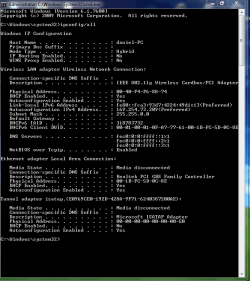
Okay, ipconfig here.
 

Attachments

  • ipconfig.PNG
    ipconfig.PNG
    21.3 KB · Views: 46

My Computer

OS
Seven Ultimate 64bit /Macbuntu 10.10 32bit (desktop) Android 4.0.3 ICS (tablet)
CPU
AMD FX-4170 Quad-Core @ 4.2GHz
Motherboard
ASUS M5A78L-M/USB3
Memory
8GB DDR3 @ 1333MHz
Graphics Card(s)
Nvidia geforce GTS240 1GB, 3GB shared memory. SLI soon.
Sound Card
VIA Audio or smth. I dunno.
Monitor(s) Displays
19 inch widescreen monitor
Screen Resolution
1440 by 900, 32 bit colour, 75 hertz
Hard Drives
1 128GB Kingston SSD Now OS drive
1 500GB for re-directs from OS disk.
1 250GB sata main drive.
1 Seagate GoFlex External 1TB with backups.
PSU
750 watt.
Case
Foxconn TSAA699.
Cooling
5 fans.
Keyboard
Trust Wireless Optical Deskset Keyboard.
Mouse
Trust Wireless Optical Deskset Mouse.
Internet Speed
download about 60/65MB/s, upload about 4/5MB/s.
Other Info
ASUS EEEPad Transformer 16GB with Dock w/32GB class10 SD |
HP ProLiant DL360 G3|
HP ProLiant ML350 G4|
HP ProLiant DL380 G7|
Dell OptiPlex GX270|
Okay, ipconfig here.

The problem is right there, you aren't getting the default gateway from your router, in fact you aren't getting anything from your router at all, the 169 address is just the default for Windows when it's not getting anything. Usually it will show up as an Unidentified network when this happens.

This can be a problem with older routers that don't have recent firmware updates but it can also be something else causing the problem. You might try typing 192.168.1.1 into your IPv4 properties window into where it says "Default Gateway"

This link explains how to do this. > http://pocketpccentral.net/blog/200...cess-no-internet-connection-problem-resolved/


To access your routers set up page >
  1. Access the router (http://192.168.1.1
You should try updating to the most recent firmware for your router then run the ipconfig /all again.

Answer
 

My Computer

Computer type
PC/Desktop
Computer Manufacturer/Model Number
Home built
OS
Windows 7 Ult, Windows 8.1 Pro,
CPU
Q9650-4.275GHz, E8600 4.5GHz, E6750-3.8GHz
Motherboard
Evga 780i FTW
Memory
G.Skill PC2 9600 1200Mhz 5 5 5 15 2T
Graphics Card(s)
GTX480
Sound Card
Asus Xonar D2
Monitor(s) Displays
HannsG
Screen Resolution
1680X1050
Hard Drives
GSkill Phoenix Pro 120GB SSD
PSU
ThermalTake Toughpower 1000Watt modular
Case
ThermalTake XaserV
Cooling
Xigmatek S1283
Keyboard
Logitech G15
Mouse
Logitech G9
Internet Speed
T1

My Computer

Computer type
PC/Desktop
Computer Manufacturer/Model Number
Home built
OS
Windows 7 Ult, Windows 8.1 Pro,
CPU
Q9650-4.275GHz, E8600 4.5GHz, E6750-3.8GHz
Motherboard
Evga 780i FTW
Memory
G.Skill PC2 9600 1200Mhz 5 5 5 15 2T
Graphics Card(s)
GTX480
Sound Card
Asus Xonar D2
Monitor(s) Displays
HannsG
Screen Resolution
1680X1050
Hard Drives
GSkill Phoenix Pro 120GB SSD
PSU
ThermalTake Toughpower 1000Watt modular
Case
ThermalTake XaserV
Cooling
Xigmatek S1283
Keyboard
Logitech G15
Mouse
Logitech G9
Internet Speed
T1
Not Sure but at least we know the Problem Just got to find the Default Gateway Ohh and smurfyy it will be in a form of IP Address e.g 192.168.2.1

Just A Question can you reach your Routers Configuration Using your Browser?
 

My Computer

Computer type
PC/Desktop
Computer Manufacturer/Model Number
Custom Built
OS
Windows 7 Professional x64 SP1 ; Windows Server 2012 R2 Standard
CPU
Intel Core i5 2400 @ 3.10GHz
Motherboard
Foxconn H67MP-S/-V/H67MP
Memory
8.0GB DDR3 @ 665MHz (2GBx4)
Graphics Card(s)
AMD Radeon HD 6870
Sound Card
Realtek High Definition Audio
Monitor(s) Displays
AOC 2243W & SMB1930NW
Screen Resolution
1440x900 & 1920x1080
Hard Drives
977GB Seagate ST31000524AS ATA Drive (SATA)
250GB WD iSCSI attached Drive
PSU
750W Gaming PSU
Case
Novatech Night
Cooling
Fan
Keyboard
Dell Standard PS/2 Keyboard
Mouse
R.A.T 07 Gaming Mouse
Internet Speed
Download: 10 Mbps Ping: 30ms Upload: 0.81 Mbps
Browser
Google Chrome
Other Info
Optiarc DVD RW AD-5260S ATA Device
Yeah, logged onto it now.
Just a thought, theres other computers on the same network..
 

My Computer

OS
Seven Ultimate 64bit /Macbuntu 10.10 32bit (desktop) Android 4.0.3 ICS (tablet)
CPU
AMD FX-4170 Quad-Core @ 4.2GHz
Motherboard
ASUS M5A78L-M/USB3
Memory
8GB DDR3 @ 1333MHz
Graphics Card(s)
Nvidia geforce GTS240 1GB, 3GB shared memory. SLI soon.
Sound Card
VIA Audio or smth. I dunno.
Monitor(s) Displays
19 inch widescreen monitor
Screen Resolution
1440 by 900, 32 bit colour, 75 hertz
Hard Drives
1 128GB Kingston SSD Now OS drive
1 500GB for re-directs from OS disk.
1 250GB sata main drive.
1 Seagate GoFlex External 1TB with backups.
PSU
750 watt.
Case
Foxconn TSAA699.
Cooling
5 fans.
Keyboard
Trust Wireless Optical Deskset Keyboard.
Mouse
Trust Wireless Optical Deskset Mouse.
Internet Speed
download about 60/65MB/s, upload about 4/5MB/s.
Other Info
ASUS EEEPad Transformer 16GB with Dock w/32GB class10 SD |
HP ProLiant DL360 G3|
HP ProLiant ML350 G4|
HP ProLiant DL380 G7|
Dell OptiPlex GX270|
Yeah, logged onto it now.
Just a thought, theres other computers on the same network..

Yes, but are they Windows 7 machines?

The network stack has changed considerably since the XP or Vista days, therefore in order for many newer Windows 7 machines to access the internet the router often requires a new firmware in order to work with Windows 7. Your particular router hasn't seen a firmware update for years. But there is another problem this can be but I havn't got to that one yet.
 

My Computer

Computer type
PC/Desktop
Computer Manufacturer/Model Number
Home built
OS
Windows 7 Ult, Windows 8.1 Pro,
CPU
Q9650-4.275GHz, E8600 4.5GHz, E6750-3.8GHz
Motherboard
Evga 780i FTW
Memory
G.Skill PC2 9600 1200Mhz 5 5 5 15 2T
Graphics Card(s)
GTX480
Sound Card
Asus Xonar D2
Monitor(s) Displays
HannsG
Screen Resolution
1680X1050
Hard Drives
GSkill Phoenix Pro 120GB SSD
PSU
ThermalTake Toughpower 1000Watt modular
Case
ThermalTake XaserV
Cooling
Xigmatek S1283
Keyboard
Logitech G15
Mouse
Logitech G9
Internet Speed
T1
Yeah, logged onto it now.
Just a thought, theres other computers on the same network..

Yes, but are they Windows 7 machines?

The network stack has changed considerably since the XP or Vista days, therefore in order for many newer Windows 7 machines to access the internet the router often requires a new firmware in order to work with Windows 7. Your particular router hasn't seen a firmware update for years.

Ahaa, I see where your coming from.
The router was supplied to us from Virgin Media.
 

My Computer

OS
Seven Ultimate 64bit /Macbuntu 10.10 32bit (desktop) Android 4.0.3 ICS (tablet)
CPU
AMD FX-4170 Quad-Core @ 4.2GHz
Motherboard
ASUS M5A78L-M/USB3
Memory
8GB DDR3 @ 1333MHz
Graphics Card(s)
Nvidia geforce GTS240 1GB, 3GB shared memory. SLI soon.
Sound Card
VIA Audio or smth. I dunno.
Monitor(s) Displays
19 inch widescreen monitor
Screen Resolution
1440 by 900, 32 bit colour, 75 hertz
Hard Drives
1 128GB Kingston SSD Now OS drive
1 500GB for re-directs from OS disk.
1 250GB sata main drive.
1 Seagate GoFlex External 1TB with backups.
PSU
750 watt.
Case
Foxconn TSAA699.
Cooling
5 fans.
Keyboard
Trust Wireless Optical Deskset Keyboard.
Mouse
Trust Wireless Optical Deskset Mouse.
Internet Speed
download about 60/65MB/s, upload about 4/5MB/s.
Other Info
ASUS EEEPad Transformer 16GB with Dock w/32GB class10 SD |
HP ProLiant DL360 G3|
HP ProLiant ML350 G4|
HP ProLiant DL380 G7|
Dell OptiPlex GX270|
Also Could you check your Wireless Properties By Going to Start>Control Panel > Networking and Sharing Centre

After that could you click on the View Status by your Connection type and then click the Details Box

After that could you Upload us a ScreenShot


Also I am using my Vista Machine so the Steps maybe Slightly Different

Many Thanks,
Josh
 

My Computer

Computer type
PC/Desktop
Computer Manufacturer/Model Number
Custom Built
OS
Windows 7 Professional x64 SP1 ; Windows Server 2012 R2 Standard
CPU
Intel Core i5 2400 @ 3.10GHz
Motherboard
Foxconn H67MP-S/-V/H67MP
Memory
8.0GB DDR3 @ 665MHz (2GBx4)
Graphics Card(s)
AMD Radeon HD 6870
Sound Card
Realtek High Definition Audio
Monitor(s) Displays
AOC 2243W & SMB1930NW
Screen Resolution
1440x900 & 1920x1080
Hard Drives
977GB Seagate ST31000524AS ATA Drive (SATA)
250GB WD iSCSI attached Drive
PSU
750W Gaming PSU
Case
Novatech Night
Cooling
Fan
Keyboard
Dell Standard PS/2 Keyboard
Mouse
R.A.T 07 Gaming Mouse
Internet Speed
Download: 10 Mbps Ping: 30ms Upload: 0.81 Mbps
Browser
Google Chrome
Other Info
Optiarc DVD RW AD-5260S ATA Device
Yeah, logged onto it now.
Just a thought, theres other computers on the same network..

Yes, but are they Windows 7 machines?

The network stack has changed considerably since the XP or Vista days, therefore in order for many newer Windows 7 machines to access the internet the router often requires a new firmware in order to work with Windows 7. Your particular router hasn't seen a firmware update for years.

Ahaa, I see where your coming from.
The router was supplied to us from Virgin Media.

The router is a bit outdated but may still work.

It would be helpful to know what settings this router is using like wireless B,G,N and the type of security used WPA2, WEP, and the encryption being used "AES or TKIP?.

Once you get this info you can set up a new connection in Windows 7. Go to the "Network and Sharing center" then to set up a new connection or Network and choose the Manually connect to a wireless network. After that, define the routers settings when you set up the connection.

You can also use the mixed settings but it usually works best to define the settings rather than using the mixed settings.
 

My Computer

Computer type
PC/Desktop
Computer Manufacturer/Model Number
Home built
OS
Windows 7 Ult, Windows 8.1 Pro,
CPU
Q9650-4.275GHz, E8600 4.5GHz, E6750-3.8GHz
Motherboard
Evga 780i FTW
Memory
G.Skill PC2 9600 1200Mhz 5 5 5 15 2T
Graphics Card(s)
GTX480
Sound Card
Asus Xonar D2
Monitor(s) Displays
HannsG
Screen Resolution
1680X1050
Hard Drives
GSkill Phoenix Pro 120GB SSD
PSU
ThermalTake Toughpower 1000Watt modular
Case
ThermalTake XaserV
Cooling
Xigmatek S1283
Keyboard
Logitech G15
Mouse
Logitech G9
Internet Speed
T1
Back
Top