Line-in Troubles

sleepingonthero

New member
Local time
2:46 AM
Messages
3
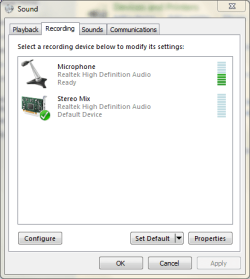
I recently installed Adobe Auditions 3.0. I record from a mixer that has a line level output so I went to inputs and selected stereo mix but found that when I began to record nothing happened. I looked in the control panel under recording and switched the default to Stereo Mix, but when I make sound from the mixer, the microphone still picks it up. The only way to record sound in Auditions is to go to inputs and select Microphone. Stereo mix doesn't work at all. Is there any way to fix this?
 

Attachments

  • Capture.PNG
    Capture.PNG
    13.5 KB · Views: 6

My Computer My Computer

OS
windows 7 home premium 64bit
Looking at the attaced Sound/Recording panel, it does not show a "line in", only the microphone input. You didn't fill in system specs so we can't really comment.

Some PC's, especially laptops, have a combination mic/line in jack depending on how it's used. Some other systems only show an input port if something is plugged in.

In most systems, if you have the Stereo Mix (System Mixer) any input (if it's a device that is detected and shown) will automatically be available to a program as this is what you are hearing on the speakers.
 

My Computer My Computer

Computer type
PC/Desktop
Computer Manufacturer/Model Number
My Own Build
OS
Windows 10 64 bit
CPU
Intel i7 6700K
Motherboard
ASUS ROG Maximus VIII Hero
Memory
16GB Corsair Dominator
Graphics Card(s)
Intel CPU Graphics
Sound Card
RealTek
Monitor(s) Displays
27" Dell S2719dgf
Screen Resolution
2560X1440
Hard Drives
1 TB Samsung 850 EVO SSD for Win 10 Pro
500GB Samsung 850 EVO SSD for Win 10 Insider
2 TB drive for backup
PSU
EVGA Supernova 750G2
Case
BeQuiet Silent Base 600
Cooling
Deepcool Captain 120EX
Keyboard
Microsoft Wireless 2000
Mouse
Microsoft wireless
Internet Speed
100 MB/sec (Cable)
Antivirus
Microsoft Defender and Malwarebytes
Browser
Edge/Firefox
Other Info
Cakewalk (Sonar) by BandLab and Studio One 4.1 Pro recording studio software. MOTU 896Mk3 Hybrid recording interface, Frontier Tranzport wireless control unit, Behringer X-Touch Control Surface.
Five USB connected optical drives for CD Audio production using Nero BurningROM
The output from the mixer is line level so I'm trying to use Stereo mix. Even though it is selected, the computer still only acknowledges the microphone.


System Info:

OS Name Microsoft Windows 7 Home Premium
Version 6.1.7600 Build 7600
Other OS Description Not Available
OS Manufacturer Microsoft Corporation
System Manufacturer Hewlett-Packard
System Model HP G62 Notebook PC
System Type x64-based PC
Processor Intel(R) Pentium(R) CPU P6100 @ 2.00GHz, 1999 Mhz, 2 Core(s), 2 Logical Processor(s)
BIOS Version/Date Hewlett-Packard F.26, 11/8/2010
SMBIOS Version 2.6
Windows Directory C:\Windows
System Directory C:\Windows\system32
Boot Device \Device\HarddiskVolume1
Locale United States
Hardware Abstraction Layer Version = "6.1.7600.16385"
Time Zone Central Daylight Time
Installed Physical Memory (RAM) 4.00 GB
Total Physical Memory 3.80 GB
Available Physical Memory 2.43 GB
Total Virtual Memory 7.60 GB
Available Virtual Memory 6.03 GB
Page File Space 3.80 GB
Page File C:\pagefile.sys

Sound info:

Name Intel(R) Display Audio
Manufacturer Intel(R) Corporation
Status OK
PNP Device ID HDAUDIO\FUNC_01&VEN_8086&DEV_2804&SUBSYS_80860101&REV_1000\4&1471BAA9&0&0301
Driver c:\windows\system32\drivers\intcdaud.sys (6.12.0.3047, 265.50 KB (271,872 bytes), 11/20/2010 2:42 AM)

Name Realtek High Definition Audio
Manufacturer Realtek
Status OK
PNP Device ID HDAUDIO\FUNC_01&VEN_10EC&DEV_0270&SUBSYS_103C1425&REV_1001\4&1471BAA9&0&0001
Driver c:\windows\system32\drivers\rtkvhd64.sys (6.0.1.6206, 2.38 MB (2,494,056 bytes), 3/4/2011 6:54 PM)

 

My Computer My Computer

OS
windows 7 home premium 64bit
Right click on Stereo Mix to enable Show Disabled Devices.
You should be able to see Line In.
Select it and see if you can record.
 

My Computer My Computer

Computer type
PC/Desktop
Computer Manufacturer/Model Number
Custom Build
OS
Windows 7 Home Premium 64 bit
CPU
Intel Core i7-4790
Motherboard
GA-Z87X-D3H
Memory
G.SKILL 8GB (2 x 4GB) DDR3 F3-10666CL9D-8GBNT
Graphics Card(s)
AMD Radeon R7 250
Sound Card
Realtek ALC892
Monitor(s) Displays
Samsung UN32EH5000, Dell 1703FPT
Screen Resolution
1920 x 1080, 1280 x 1024
Hard Drives
WD5003AZEX
WD10EZEX
Samsung HD103SJ
Samsung 128 GB 840 PRO
PSU
SeaSonic M12II SS-500GM
Case
Fractal Design Define R4
Cooling
Zalman CNPS9900ALED
Keyboard
Logitech K800
Mouse
Logitech M705
Internet Speed
16 Mbps
Antivirus
Avast
Browser
Firefox
Other Info
Bose Companion 2 Multimedia Speakers
I think I figured it out. No line in, but I can fix the levels and eq on Audition so that it sounds fine. Eventually I'll spring for an external sound card with a line in jack.
 

My Computer My Computer

OS
windows 7 home premium 64bit
If it's strictly a Mic jack (which I doubt) you will only get one channel, not stereo as the "Ring" on a mic jack has 5VDC for a computer (condenser) mic. If it's a combo jack it will automatically switch to "line" in and allow two channel input.

I would run the input at -4DB, not 0DB, to keep from overloading the PC input. I have a recording studio using Sonar and am a musician (and ex-amp tech).
 

My Computer My Computer

Computer type
PC/Desktop
Computer Manufacturer/Model Number
My Own Build
OS
Windows 10 64 bit
CPU
Intel i7 6700K
Motherboard
ASUS ROG Maximus VIII Hero
Memory
16GB Corsair Dominator
Graphics Card(s)
Intel CPU Graphics
Sound Card
RealTek
Monitor(s) Displays
27" Dell S2719dgf
Screen Resolution
2560X1440
Hard Drives
1 TB Samsung 850 EVO SSD for Win 10 Pro
500GB Samsung 850 EVO SSD for Win 10 Insider
2 TB drive for backup
PSU
EVGA Supernova 750G2
Case
BeQuiet Silent Base 600
Cooling
Deepcool Captain 120EX
Keyboard
Microsoft Wireless 2000
Mouse
Microsoft wireless
Internet Speed
100 MB/sec (Cable)
Antivirus
Microsoft Defender and Malwarebytes
Browser
Edge/Firefox
Other Info
Cakewalk (Sonar) by BandLab and Studio One 4.1 Pro recording studio software. MOTU 896Mk3 Hybrid recording interface, Frontier Tranzport wireless control unit, Behringer X-Touch Control Surface.
Five USB connected optical drives for CD Audio production using Nero BurningROM
Back
Top