Solved Link problem in Outlook 2010

Loves_to_Dance

New member
Local time
6:41 AM
Messages
6
Link problem in Outlook 2010 – Windows 7 PC

When I click a link in Outlook 2010 I get this error message instead of a jump.

Microsoft Word
This operation has been cancelled due to restrictions in effect on this computer.
Please contact your system administrator


I’m pretty sure that I caused this problem when I inadvertently deleted a registry key while trying to correct a macro warning in Word 2010; I don’t remember which key I deleted.
How do I correct this problem?
Thanks
 

My Computer

Computer Manufacturer/Model Number
SONY All-in-one P
OS
Win 7 Pro SP1 64bit
Go to Start > Control Panel > Programs > Programs and Features.

Select the row for your Office 2010 installation

Select change from the menu bar

office1.png

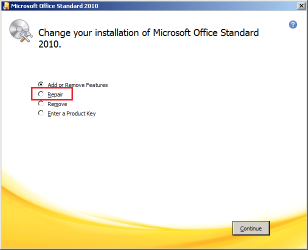
Once the installer starts > select Repair and follow the prompts from there.

office2.png
 

My Computer

Computer type
Laptop
Computer Manufacturer/Model Number
Employer provided Dell Latitude
OS
W7 Pro SP1 64bit
CPU
i7
Memory
8GB
Graphics Card(s)
Intel HD Graphics
Hard Drives
crappy SSD
Antivirus
Employer mandated Symantec Endpoint Protection
Browser
Pale Moon 64bit, IE11 64bit & Chrome 64bit
The above procedure did not correct the problem.

Anything else I can try?

TY
 

My Computer

Computer Manufacturer/Model Number
SONY All-in-one P
OS
Win 7 Pro SP1 64bit

My Computers

System One System Two

  • Computer type
    PC/Desktop
    Computer Manufacturer/Model Number
    HP Pavilion 6751c
    OS
    Win7, Win10, Win11
    Internet Speed
    100 Mbps
    Antivirus
    Norton 360
    Browser
    IE 11
  • Computer type
    PC/Desktop
    System Manufacturer/Model Number
    HP ENVY 750-514 & Dell XPS 8960
    OS
    Win7, Win10, Win11
    Antivirus
    Norton 360
Back
Top