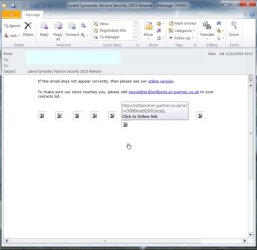
Solved Linked images "lost" in Outlook 2010 after SSD installation

Have rebooted from original HDD now:
Start button....search progs and files........displays progs and data files normally.
Outlook: Open emails with embedded images, momentary pause as images loaded...but OK
Attached images display without problem (think OK with SSD too)
Indexing: when Outlook first opened...Indexing in progress, 1066 files to index. Few minutes later O files to index.
System Protection: C drive only (but different physical drive of course)


So everything as I expected it to be. Should I clone again and see?
 

My Computer My Computer

At a glance

Windows 7 Home Premium 64bitCore i7 Quad 870 2.9312GB CorsairZotac GeForce GT240 512Mb
Computer type
PC/Desktop
Computer Manufacturer/Model Number
Home-made
OS
Windows 7 Home Premium 64bit
CPU
Core i7 Quad 870 2.93
Motherboard
Asus P7P55D-EPRO
Memory
12GB Corsair
Graphics Card(s)
Zotac GeForce GT240 512Mb
Sound Card
Some cheap Audigy job!
Monitor(s) Displays
Asus PA248Q
Hard Drives
500GB SATA2 x1
500GB Seagate RAID1 SATA2
Seagate 2TB SATA3
PSU
Coolermaster Silent Pro 600w
Yes clone again and test. Do you clone from within win7?
 

My Computer My Computer

At a glance

Microsoft Windows 7 Home Premium 64-bits 7601...Intel(R) Core(TM) i3 CPU M 370 @ 2.40GHz4,00 GBATI Mobility Radeon HD 5400 Series
Computer type
Laptop
Computer Manufacturer/Model Number
ACER ASPIRE 5742G
OS
Microsoft Windows 7 Home Premium 64-bits 7601 Multiprocessor Free Service Pack 1
CPU
Intel(R) Core(TM) i3 CPU M 370 @ 2.40GHz
Motherboard
Acer Aspire 5742G
Memory
4,00 GB
Graphics Card(s)
ATI Mobility Radeon HD 5400 Series
Sound Card
(1) AMD High Definition Audio Device (2) Realtek High Defi
Screen Resolution
1366 x 768 x 32 bits (4294967296 colors) @ 60 Hz
Hard Drives
WDC WD5000BEVT-22ZAT0
Yes I did Is that OK? Will try Macrium this time.
 

My Computer My Computer

At a glance

Windows 7 Home Premium 64bitCore i7 Quad 870 2.9312GB CorsairZotac GeForce GT240 512Mb
Computer type
PC/Desktop
Computer Manufacturer/Model Number
Home-made
OS
Windows 7 Home Premium 64bit
CPU
Core i7 Quad 870 2.93
Motherboard
Asus P7P55D-EPRO
Memory
12GB Corsair
Graphics Card(s)
Zotac GeForce GT240 512Mb
Sound Card
Some cheap Audigy job!
Monitor(s) Displays
Asus PA248Q
Hard Drives
500GB SATA2 x1
500GB Seagate RAID1 SATA2
Seagate 2TB SATA3
PSU
Coolermaster Silent Pro 600w
Yes I did Is that OK? Will try Macrium this time.
Cloning live in win7 is okay.... if the software allows it. But why?? Everything you do after starting the clone won't be cloned anyway.

But sure after cloning:
  • It's really booting from the SSD
  • The SSD is C
  • All drive letters are still the same..... exept the cloned partitions
System protection is still the way you want.
 

My Computer My Computer

At a glance

Microsoft Windows 7 Home Premium 64-bits 7601...Intel(R) Core(TM) i3 CPU M 370 @ 2.40GHz4,00 GBATI Mobility Radeon HD 5400 Series
Computer type
Laptop
Computer Manufacturer/Model Number
ACER ASPIRE 5742G
OS
Microsoft Windows 7 Home Premium 64-bits 7601 Multiprocessor Free Service Pack 1
CPU
Intel(R) Core(TM) i3 CPU M 370 @ 2.40GHz
Motherboard
Acer Aspire 5742G
Memory
4,00 GB
Graphics Card(s)
ATI Mobility Radeon HD 5400 Series
Sound Card
(1) AMD High Definition Audio Device (2) Realtek High Defi
Screen Resolution
1366 x 768 x 32 bits (4294967296 colors) @ 60 Hz
Hard Drives
WDC WD5000BEVT-22ZAT0
Well, have cloned again, this time with Macrium. Set to boot from SSD, and this time disconnected old boot HDD afterwards. Drive letters all correct.

In Outlook 2010 Indexing status started at 0, then 36, now 63, so increasing
Search in Outlook, carries on searching without producing match.
Start Button......Search Progs and Files........Only finds files on C drive.

So, unfortunately, nothing has changed.
 

My Computer My Computer

At a glance

Windows 7 Home Premium 64bitCore i7 Quad 870 2.9312GB CorsairZotac GeForce GT240 512Mb
Computer type
PC/Desktop
Computer Manufacturer/Model Number
Home-made
OS
Windows 7 Home Premium 64bit
CPU
Core i7 Quad 870 2.93
Motherboard
Asus P7P55D-EPRO
Memory
12GB Corsair
Graphics Card(s)
Zotac GeForce GT240 512Mb
Sound Card
Some cheap Audigy job!
Monitor(s) Displays
Asus PA248Q
Hard Drives
500GB SATA2 x1
500GB Seagate RAID1 SATA2
Seagate 2TB SATA3
PSU
Coolermaster Silent Pro 600w
Well, have cloned again, this time with Macrium. Set to boot from SSD, and this time disconnected old boot HDD afterwards. Drive letters all correct.

In Outlook 2010 Indexing status started at 0, then 36, now 63, so increasing
Search in Outlook, carries on searching without producing match.
Start Button......Search Progs and Files........Only finds files on C drive.

So, unfortunately, nothing has changed.
 

My Computer My Computer

At a glance

Windows 7 Home Premium 64bitCore i7 Quad 870 2.9312GB CorsairZotac GeForce GT240 512Mb
Computer type
PC/Desktop
Computer Manufacturer/Model Number
Home-made
OS
Windows 7 Home Premium 64bit
CPU
Core i7 Quad 870 2.93
Motherboard
Asus P7P55D-EPRO
Memory
12GB Corsair
Graphics Card(s)
Zotac GeForce GT240 512Mb
Sound Card
Some cheap Audigy job!
Monitor(s) Displays
Asus PA248Q
Hard Drives
500GB SATA2 x1
500GB Seagate RAID1 SATA2
Seagate 2TB SATA3
PSU
Coolermaster Silent Pro 600w
Email No pics.jpg
 

My Computer My Computer

At a glance

Windows 7 Home Premium 64bitCore i7 Quad 870 2.9312GB CorsairZotac GeForce GT240 512Mb
Computer type
PC/Desktop
Computer Manufacturer/Model Number
Home-made
OS
Windows 7 Home Premium 64bit
CPU
Core i7 Quad 870 2.93
Motherboard
Asus P7P55D-EPRO
Memory
12GB Corsair
Graphics Card(s)
Zotac GeForce GT240 512Mb
Sound Card
Some cheap Audigy job!
Monitor(s) Displays
Asus PA248Q
Hard Drives
500GB SATA2 x1
500GB Seagate RAID1 SATA2
Seagate 2TB SATA3
PSU
Coolermaster Silent Pro 600w
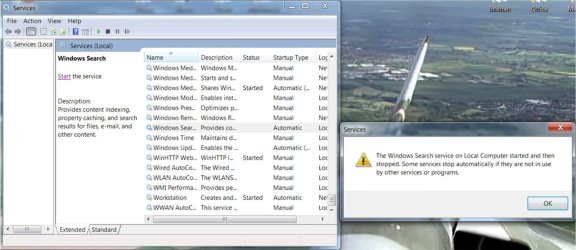
Picture2.jpg

Go to Start.....Indexing Options.....Indexing is not running. select Rebuild and nothing happens

Go to Start. Type services.msc..... Services (Local)......Windows Search.....Select Automatic (Was on Automatic (Delayed Start)).....Search starts and then stops as in screen grab.Same whether or not Outlook is open and searching.

Any ideas...I'm running out!! Thanks
 

My Computer My Computer

At a glance

Windows 7 Home Premium 64bitCore i7 Quad 870 2.9312GB CorsairZotac GeForce GT240 512Mb
Computer type
PC/Desktop
Computer Manufacturer/Model Number
Home-made
OS
Windows 7 Home Premium 64bit
CPU
Core i7 Quad 870 2.93
Motherboard
Asus P7P55D-EPRO
Memory
12GB Corsair
Graphics Card(s)
Zotac GeForce GT240 512Mb
Sound Card
Some cheap Audigy job!
Monitor(s) Displays
Asus PA248Q
Hard Drives
500GB SATA2 x1
500GB Seagate RAID1 SATA2
Seagate 2TB SATA3
PSU
Coolermaster Silent Pro 600w
Can you try setting a new location for the Index location? I had a system a while back that the index store was corrupted and the only way I could get it to rebuild was to move the location of the store.
 

My Computer My Computer

At a glance

Windows 7 Pro 64-bit
Computer type
PC/Desktop
OS
Windows 7 Pro 64-bit
Have tried following this as a resolution (Microsoft):

To resolve this issue, delete all files with .BLF and .REGTRANS-MS extension in the following directory:

C:\windows\system32\config\TxR

Note: The files in the folder location above are hidden and will thus not be visible unless you set the system to not Hide Protected Operating System Files under Tools - Folder Options.

Once these files are deleted, reboot the machine. Once rebooted, observe that the Windows Search service has already started and is in process of rebuilding the Index.

Trouble was, about 6 of the files could not be deleted; because "File is open in system". so I've deletaed about half of them, and on reboot, no change.

Could you explain how you "move the location of the store". I'm not familier with any of this!

(I was wondering if it will not Index because it is an SSD and Windows is minimising Read/Writes to it....but then everyone doing this would have had the same issue)

Thanks
 

My Computer My Computer

At a glance

Windows 7 Home Premium 64bitCore i7 Quad 870 2.9312GB CorsairZotac GeForce GT240 512Mb
Computer type
PC/Desktop
Computer Manufacturer/Model Number
Home-made
OS
Windows 7 Home Premium 64bit
CPU
Core i7 Quad 870 2.93
Motherboard
Asus P7P55D-EPRO
Memory
12GB Corsair
Graphics Card(s)
Zotac GeForce GT240 512Mb
Sound Card
Some cheap Audigy job!
Monitor(s) Displays
Asus PA248Q
Hard Drives
500GB SATA2 x1
500GB Seagate RAID1 SATA2
Seagate 2TB SATA3
PSU
Coolermaster Silent Pro 600w
To move the store location Index Options > Advanced >Under Index Location click select new.

I have an SSD and don't have any issues. After restoring an image to my drive I delete restore points and the indexing store and let it rebuild and have no issues.
 

My Computer My Computer

At a glance

Windows 7 Pro 64-bit
Computer type
PC/Desktop
OS
Windows 7 Pro 64-bit
For anyone interested, I believe I have solved the problems, just as I was about to carry out a clean reinstall.

Searching for why Windows search can be started, but then immediately stops, came across this:
http://www.sevenforums.com/general-...dows-search-service-started-then-stopped.html
As well as the Search/Indexing problem this thread includes non-functioning windows update which I hadn't realised I also had!
I have an Intel Raid1 set up on my PC which has been managed with Intel Matrix Storage s/w. The above thread suggests replacing with Intel Rapid Storage Technology, downloaded from here:
https://downloadcenter.intel.com/SearchResult.aspx?lang=&ProductID=2101&ProdId=2101

At the moment I don't really understand how the problem was fixed, because the RAID appeared fine, but it has!
Problems sorted:
1. Windows Search functions normally
2. Indexing has started
3. Embedded images in email are now present again
4. Windows update now active.

Hope this will help anyone with similar problems. Guess it can happen if you have an Intel RAID set up, and are still using Matrix Storage technology when a SSD is cloned.:D
 

My Computer My Computer

At a glance

Windows 7 Home Premium 64bitCore i7 Quad 870 2.9312GB CorsairZotac GeForce GT240 512Mb
Computer type
PC/Desktop
Computer Manufacturer/Model Number
Home-made
OS
Windows 7 Home Premium 64bit
CPU
Core i7 Quad 870 2.93
Motherboard
Asus P7P55D-EPRO
Memory
12GB Corsair
Graphics Card(s)
Zotac GeForce GT240 512Mb
Sound Card
Some cheap Audigy job!
Monitor(s) Displays
Asus PA248Q
Hard Drives
500GB SATA2 x1
500GB Seagate RAID1 SATA2
Seagate 2TB SATA3
PSU
Coolermaster Silent Pro 600w
SSD is part of raid?
old hdd was part of raid?

Old hdd and SSD are clones of each other.... both have same drivers. Very strange it was a driver problem.
 

My Computer My Computer

At a glance

Microsoft Windows 7 Home Premium 64-bits 7601...Intel(R) Core(TM) i3 CPU M 370 @ 2.40GHz4,00 GBATI Mobility Radeon HD 5400 Series
Computer type
Laptop
Computer Manufacturer/Model Number
ACER ASPIRE 5742G
OS
Microsoft Windows 7 Home Premium 64-bits 7601 Multiprocessor Free Service Pack 1
CPU
Intel(R) Core(TM) i3 CPU M 370 @ 2.40GHz
Motherboard
Acer Aspire 5742G
Memory
4,00 GB
Graphics Card(s)
ATI Mobility Radeon HD 5400 Series
Sound Card
(1) AMD High Definition Audio Device (2) Realtek High Defi
Screen Resolution
1366 x 768 x 32 bits (4294967296 colors) @ 60 Hz
Hard Drives
WDC WD5000BEVT-22ZAT0
SSD is part of raid?
old hdd was part of raid?

Old hdd and SSD are clones of each other.... both have same drivers. Very strange it was a driver problem.

No, RAID1 discs only store data including .pst file (see Disc 1 with 4 partitions on screen grab, page 1of this thread). SSD is on one of the other SATA connectors, same for original HDD holding OS.

I'm thinking that new SSD is accessing email from RAID discs, also other data files for indexing. I'm assuming the old HDD was compatible with Intel Matrix RAID software, but the new SSD needs a newer version to function properly. The new drive was able to "see" the files, but until the RAID controller was updated, the more sophisticated functions failed to function.

That's how I understand it. My fault I suppose for not upgrading the Intel RAID software, but as it was working, left well alone!
 

My Computer My Computer

At a glance

Windows 7 Home Premium 64bitCore i7 Quad 870 2.9312GB CorsairZotac GeForce GT240 512Mb
Computer type
PC/Desktop
Computer Manufacturer/Model Number
Home-made
OS
Windows 7 Home Premium 64bit
CPU
Core i7 Quad 870 2.93
Motherboard
Asus P7P55D-EPRO
Memory
12GB Corsair
Graphics Card(s)
Zotac GeForce GT240 512Mb
Sound Card
Some cheap Audigy job!
Monitor(s) Displays
Asus PA248Q
Hard Drives
500GB SATA2 x1
500GB Seagate RAID1 SATA2
Seagate 2TB SATA3
PSU
Coolermaster Silent Pro 600w

My Computer My Computer

At a glance

Microsoft Windows 7 Home Premium 64-bits 7601...Intel(R) Core(TM) i3 CPU M 370 @ 2.40GHz4,00 GBATI Mobility Radeon HD 5400 Series
Computer type
Laptop
Computer Manufacturer/Model Number
ACER ASPIRE 5742G
OS
Microsoft Windows 7 Home Premium 64-bits 7601 Multiprocessor Free Service Pack 1
CPU
Intel(R) Core(TM) i3 CPU M 370 @ 2.40GHz
Motherboard
Acer Aspire 5742G
Memory
4,00 GB
Graphics Card(s)
ATI Mobility Radeon HD 5400 Series
Sound Card
(1) AMD High Definition Audio Device (2) Realtek High Defi
Screen Resolution
1366 x 768 x 32 bits (4294967296 colors) @ 60 Hz
Hard Drives
WDC WD5000BEVT-22ZAT0
Back
Top