Linksys router problems

trashdog

New member
Member
Local time
9:19 AM
Messages
67
I just purchased a NETSYS WRT120N Home Router to replace my older NETSYS router that had ceased to function. To make a long story short I try to use the router and the computer doesn't see the router.

I can't get the router to work. I can only get the internet to work by wiring directly to the cable modem. This is driving me crazy. I need wireless internet for my laptop in the other room.

I get an error message that tells me the IP is bad or some sort of message when the router is hooked up. When the router isn't hooked and it's wired directly to the cable modem box everything seems to work fine. I want a home wireless network again, PLEASE HELP MEEEEEEEEEEEEEEE!!!
 

My Computer

Computer Manufacturer/Model Number
Dell
OS
Windows 7
I tried to install the router again and during the install program it says that it can not detect my router. Everything is plugged in correctly and I have tried the whole power cycle thing repeatedly. Do you think my NIC card may be bad or going bad? I'm grasping at straws here.
 

My Computer

Computer Manufacturer/Model Number
Dell
OS
Windows 7
Any help at all would be greatly appreciated. I tried to repair the connection with Windows 7 but it said it had a bad ip address. How can an IP Address be good one day and bad the next?
 

My Computer

Computer Manufacturer/Model Number
Dell
OS
Windows 7
Welcome

Welcome to Windows 7 Support forums.
In order for us to assist in trouble shooting please fill out your system specs completely.

Adrian
 

My Computer

Computer Manufacturer/Model Number
Custom Build
OS
Windows 7 7600 1 X64
CPU
AMD PHENOM II X 550 PROCESSOR 3.1 ghz
Motherboard
ASUS M4A78-TE
Memory
Corsair 4 gig ddr 3
Graphics Card(s)
ati radeon 3300
Sound Card
ati hd
Monitor(s) Displays
syncmaster 2033sw
Screen Resolution
1600X900 60 hz refresh
Hard Drives
twin_seagates SATA's 1 TB & 500 Gig, hitachi_slimline 160 gig
PSU
antec_550 watt
Case
cooler master GLite
Cooling
stock_heat sink
Internet Speed
20mbs up/ 1.5mbs down
Other Info
favorite child "stewie"
favorite dog "brian"
I just purchased a NETSYS WRT120N Home Router to replace my older NETSYS router that had ceased to function. To make a long story short I try to use the router and the computer doesn't see the router.

I can't get the router to work. I can only get the internet to work by wiring directly to the cable modem. This is driving me crazy. I need wireless internet for my laptop in the other room.

!!!
Well we can eliminate your NIC card as it does function through direct connect.
WHats failing is the TX/RX part of your laptop when you try to go wireless.
I'm guessing you are attempting to use the router straight out of the box?
If so you may need to update your wirless card driver on your lap top.
Is the router recognised on the host computer?
Can you describe your system configuration?
 

My Computer

Computer Manufacturer/Model Number
Custom Build
OS
Windows 7 7600 1 X64
CPU
AMD PHENOM II X 550 PROCESSOR 3.1 ghz
Motherboard
ASUS M4A78-TE
Memory
Corsair 4 gig ddr 3
Graphics Card(s)
ati radeon 3300
Sound Card
ati hd
Monitor(s) Displays
syncmaster 2033sw
Screen Resolution
1600X900 60 hz refresh
Hard Drives
twin_seagates SATA's 1 TB & 500 Gig, hitachi_slimline 160 gig
PSU
antec_550 watt
Case
cooler master GLite
Cooling
stock_heat sink
Internet Speed
20mbs up/ 1.5mbs down
Other Info
favorite child "stewie"
favorite dog "brian"
Screen shots

Are you able to provide screenshots?
 

My Computer

Computer Manufacturer/Model Number
Custom Build
OS
Windows 7 7600 1 X64
CPU
AMD PHENOM II X 550 PROCESSOR 3.1 ghz
Motherboard
ASUS M4A78-TE
Memory
Corsair 4 gig ddr 3
Graphics Card(s)
ati radeon 3300
Sound Card
ati hd
Monitor(s) Displays
syncmaster 2033sw
Screen Resolution
1600X900 60 hz refresh
Hard Drives
twin_seagates SATA's 1 TB & 500 Gig, hitachi_slimline 160 gig
PSU
antec_550 watt
Case
cooler master GLite
Cooling
stock_heat sink
Internet Speed
20mbs up/ 1.5mbs down
Other Info
favorite child "stewie"
favorite dog "brian"
I want to make sure

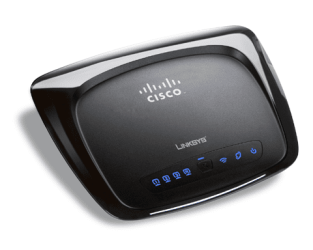
Is this your router?
 

Attachments

  • router.png
    router.png
    149.2 KB · Views: 3

My Computer

Computer Manufacturer/Model Number
Custom Build
OS
Windows 7 7600 1 X64
CPU
AMD PHENOM II X 550 PROCESSOR 3.1 ghz
Motherboard
ASUS M4A78-TE
Memory
Corsair 4 gig ddr 3
Graphics Card(s)
ati radeon 3300
Sound Card
ati hd
Monitor(s) Displays
syncmaster 2033sw
Screen Resolution
1600X900 60 hz refresh
Hard Drives
twin_seagates SATA's 1 TB & 500 Gig, hitachi_slimline 160 gig
PSU
antec_550 watt
Case
cooler master GLite
Cooling
stock_heat sink
Internet Speed
20mbs up/ 1.5mbs down
Other Info
favorite child "stewie"
favorite dog "brian"
Yes that's the router. The problem I'm having is with the desktop. I'm trying to wire it up in my living room so the laptop can get the signal in the bedroom.

System specs are as follows

OS Name Microsoft Windows 7 Home Premium
Version 6.1.7600 Build 7600
Other OS Description Not Available
OS Manufacturer Microsoft Corporation
System Name JOHN-PC
System Manufacturer Dell Inc.
System Model Dell DM061
System Type X86-based PC
Processor Intel(R) Core(TM)2 CPU 6400 @ 2.13GHz, 2128 Mhz, 2 Core(s), 2 Logical Processor(s)
BIOS Version/Date Dell Inc. 2.4.0, 5/24/2007
SMBIOS Version 2.3
Windows Directory C:\Windows
System Directory C:\Windows\system32
Boot Device \Device\HarddiskVolume1
Locale United States
Hardware Abstraction Layer Version = "6.1.7600.16385"
User Name John-PC\John
Time Zone Central Daylight Time
Installed Physical Memory (RAM) 2.00 GB
Total Physical Memory 2.00 GB
Available Physical Memory 862 MB
Total Virtual Memory 4.00 GB
 

My Computer

Computer Manufacturer/Model Number
Dell
OS
Windows 7
The reason I was suspecting the NIC card was that the DS light on the cable modem is yellow, while all the rest are green. The cable modem is a UBEE D3.0
 

My Computer

Computer Manufacturer/Model Number
Dell
OS
Windows 7
Anyone got any ideas before I put in a new NIC Card. I've tried the IPCONFIG /release and IPCONFIG /renew but when I do the renew it gives me an error message.
 

My Computer

Computer Manufacturer/Model Number
Dell
OS
Windows 7
Anyone got any ideas before I put in a new NIC Card. I've tried the IPCONFIG /release and IPCONFIG /renew but when I do the renew it gives me an error message.
Again, I do not think its the NIC as you stated, when you connect directly to your pc you have internet access. I suspect you may need to upgrade your firmware for the router.
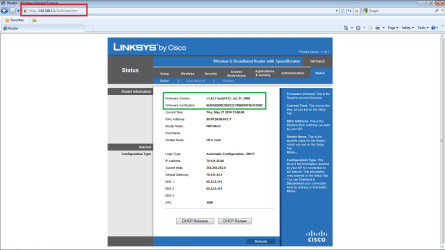
Access your router and review the firmware version, then go to your support page for Cisco and review if there are updated versions of your particular router and if there are d/l and reflash your router.
 

My Computer

Computer Manufacturer/Model Number
Custom Build
OS
Windows 7 7600 1 X64
CPU
AMD PHENOM II X 550 PROCESSOR 3.1 ghz
Motherboard
ASUS M4A78-TE
Memory
Corsair 4 gig ddr 3
Graphics Card(s)
ati radeon 3300
Sound Card
ati hd
Monitor(s) Displays
syncmaster 2033sw
Screen Resolution
1600X900 60 hz refresh
Hard Drives
twin_seagates SATA's 1 TB & 500 Gig, hitachi_slimline 160 gig
PSU
antec_550 watt
Case
cooler master GLite
Cooling
stock_heat sink
Internet Speed
20mbs up/ 1.5mbs down
Other Info
favorite child "stewie"
favorite dog "brian"
Access your Router

Access your router using your web browser.
In your browsers address bar type the following: http:\\192.168.1.1

You will be prompted for the account name: admin
Then you will be prompted for password: admin
Next go to status and you will see your firmware version and date.
I attached an image for you to look at.
 

Attachments

  • firm.png
    firm.png
    106.2 KB · Views: 33

My Computer

Computer Manufacturer/Model Number
Custom Build
OS
Windows 7 7600 1 X64
CPU
AMD PHENOM II X 550 PROCESSOR 3.1 ghz
Motherboard
ASUS M4A78-TE
Memory
Corsair 4 gig ddr 3
Graphics Card(s)
ati radeon 3300
Sound Card
ati hd
Monitor(s) Displays
syncmaster 2033sw
Screen Resolution
1600X900 60 hz refresh
Hard Drives
twin_seagates SATA's 1 TB & 500 Gig, hitachi_slimline 160 gig
PSU
antec_550 watt
Case
cooler master GLite
Cooling
stock_heat sink
Internet Speed
20mbs up/ 1.5mbs down
Other Info
favorite child "stewie"
favorite dog "brian"
I'll give that a try once I get home from my holiday. Thanks
 

My Computer

Computer Manufacturer/Model Number
Dell
OS
Windows 7
Also check that the DHCP server settings on the PC are set to automatic and the dhcp server is on in the router.

I have seen this sort of error caused by the old router address being manually entered in network settings
 

My Computers

System One System Two

  • Computer type
    PC/Desktop
    Computer Manufacturer/Model Number
    ChillBlast - Custom to my design
    OS
    Windows 11 Pro x64 [Latest Release and Release Preview]
    CPU
    Ryzen 9 5950X, 3.8 - 5.2 MHz
    Motherboard
    Asus Prime X570-Pro
    Memory
    64GB [2 x 32GB] DDR4 3200MHz
    Graphics Card(s)
    4GB NVIDIA GEFORCE GTX 1650 Ti
    Sound Card
    On-board SPDIF to 5.1 System + HDMI [5.1 system]
    Monitor(s) Displays
    32" UHD 32 Bit HDR Monitor + 43" UHD 4K 32Bit HDR TV
    Screen Resolution
    2 x 3840 x 2160 @60Hz
    Hard Drives
    1TB M2 SSD OS, 500GB Fast Access SSD, 2 x 8TB Data + Various Externals from 1TB to 4TB, 10TB NAS
    PSU
    NZXT C750 80 PLUS Gold 750W Modular PSU
    Case
    Workstation Case [Matt Black]
    Cooling
    NZXT Kraken X63 280mm CPU Cooler +2x Quiet Case fans
    Keyboard
    Logitech Wireless MX Keys & K400 + others
    Mouse
    Logitech Wireless MX Master 3S
    Internet Speed
    920 MB Down 50 MB Up
    Antivirus
    BitDefender Total Security Pro
    Browser
    Chrome (always run latest Non-Beta)
    Other Info
    Also run ...
    Laptop - Quad 8GB - Windows 10 Pro x64
    Nexus 7 Android tablet x2
    Samsung 10.2" tablet
    Blackview TAB 8 4G Android Tablet c/w Keyboard
    Wacom Intuos Pro Medium Pen Pad
    Wacom Intuos Pro Small Pen Pad
    Wacom Expresskeys Remote
    Loopdeck+ Graphics Controller
    Shuttle Pro v2 Control
  • Computer type
    Laptop
    System Manufacturer/Model Number
    Dell XPS 17 10750H
    OS
    Windows 11 Pro x64 Latest RP
    CPU
    Intel I7 10750H 5.0GHz
    Motherboard
    Dell XPS
    Memory
    32GB [2x16GB] DDR4 2933 MHz
    Graphics Card(s)
    nVidia GTX1650Ti 4 GB GDDR6
    Sound Card
    Stock [Realtek] 4 Speaker
    Monitor(s) Displays
    17" IPS UHD+ Infinity Edge Touchscreen
    Screen Resolution
    3840 x 2400
    Hard Drives
    2TB M2 NVMe, 4TB External + various 500GB & 1TB External NVMe (also have access to spinner HDD from
    PSU
    Stock
    Case
    Stock XPS Aluminium & Carbon Fibre
    Cooling
    Stock - Active Fan Control
    Keyboard
    Backlit + Various Logitech
    Mouse
    Stock Track Pad + Logitech MX Trackball
    Internet Speed
    72 MB Down 18MB Up
    Browser
    Chrome
    Other Info
    Also run ...
    Laptop - Quad 8GB - Windows 10 Pro x64
    Nexus 7 Android tablet x2
    10.2" tablet
    Sony Z3 Android Smartphone
    Wacom Intuos Pro Medium Pen Pad
    Wacom Intuos Pro Small Pen Pad
    Wacom Expresskeys Remote
    Loopdeck+ Graphics Controller
    Shuttle Pro v2 Control Pad
    10TB NAS
So the laptop is picking up the SSID fine, just you cannot browse the internet.
I guess check the router to have auto config DHPC, check that you have assigned it 192.168.1.1 as the router's IP, subnet mask 255.255.255.0. and like barman said check your pc's ipv4 to see all IP is set to dynamically assigned (ie auto detect). The DNS should be profiled by your ISP DHCP server. This is what will get you to server the net.
 

My Computer

Computer Manufacturer/Model Number
Lenovo ThinkPad T60
OS
Windows 7 Ultimate 64Bit
CPU
GenuineIntel Intel(R) Core(TM) DuoCore T2400 @ 1.83GHz
Motherboard
Intel(R) 82801G (ICH7 Family)
Memory
2.00 GB
Graphics Card(s)
Mobile Intel(R) 945 Express Chipset
Sound Card
SoundMAX Integrated Digital HD Audio
Monitor(s) Displays
ThinkPad Display
Screen Resolution
1400x1050
Hard Drives
100Gb SATA
Keyboard
Standard Keyboard
Mouse
HID-compliant Mouse
Internet Speed
Cable Broadband - 54Mbps
Other Info
Intel(R) PRO/1000 PL Network Connection
11a/b/g Wireless LAN Mini PCI Express Adapter
Let's start from the beginning. I've connected the router to the computer to the internet and to the modem. I run the installation software and it hangs at detecting modem. What should I try next?

I also am unable to get to the internet on the computer.

I tried to do http:\\192.168.1.1 in IE is unable to connect to the router.
 
Last edited:

My Computer

Computer Manufacturer/Model Number
Dell
OS
Windows 7
windows 7 sees the router and but doesn't know what it is. It has an IP Addy of 127.0.0.1 and a MAC address of unavailable.

I'm flummoxed....lol
 

My Computer

Computer Manufacturer/Model Number
Dell
OS
Windows 7
Before you connect the router. Can you confirm you can access the internet by directly connecting to the modem?

I assume this is your setup

Modem (wan port) < ----> router (internet port)

router (LAN port, 4-ports?) <-------> Pc (ethernet port).

You should be able to fire up 192.168.1.1 from your pc browser, make sure you clear all cookies and cache.
 

My Computer

Computer Manufacturer/Model Number
Lenovo ThinkPad T60
OS
Windows 7 Ultimate 64Bit
CPU
GenuineIntel Intel(R) Core(TM) DuoCore T2400 @ 1.83GHz
Motherboard
Intel(R) 82801G (ICH7 Family)
Memory
2.00 GB
Graphics Card(s)
Mobile Intel(R) 945 Express Chipset
Sound Card
SoundMAX Integrated Digital HD Audio
Monitor(s) Displays
ThinkPad Display
Screen Resolution
1400x1050
Hard Drives
100Gb SATA
Keyboard
Standard Keyboard
Mouse
HID-compliant Mouse
Internet Speed
Cable Broadband - 54Mbps
Other Info
Intel(R) PRO/1000 PL Network Connection
11a/b/g Wireless LAN Mini PCI Express Adapter
Let's start from the beginning. I've connected the router to the computer to the internet and to the modem. I run the installation software and it hangs at detecting modem. What should I try next?

I also am unable to get to the internet on the computer.

I tried to do http:\\192.168.1.1 in IE is unable to connect to the router.
How exactly did you wire it all together? The correct setup is PC -> [LAN ports]Linksys[Internet port] -> modem. Can you make pictures of the wiring?

zzz2496
 

My Computer

Computer Manufacturer/Model Number
Self Built
OS
Windows7 Ultimate 64bit
CPU
Intel Core 2 Quad Q6600
Motherboard
Abit IN9-32X-MMAX
Memory
DDR2 Adata 4GB
Graphics Card(s)
Nvidia GeForce GTX 285 1024 and Nvidia GeForce 8800GT 512
Sound Card
Asus Xonar HDAV 1.3
Monitor(s) Displays
Dell 2407WFP and BenQ 2400v and Philips 150v3
Screen Resolution
3840x1200 and 1024x768
Hard Drives
2 WDC 1TB
1 WDC 1.5TB
1 WDC 640GB
1 WDC 320GB
1 Seagate 200GB
PSU
Corsair TX 850W
Case
Cooler Master HAF932
Cooling
Arctic Cooling Freezer Extreme and plenty of fans...
Keyboard
MicrosoftNaturalKeyboard 4000/Apple Alu keyboard/Dinovo mini
Mouse
Logitech G5/MarbleMouseTrackball/PerformanceMX/SpacePilotPRO
Internet Speed
1.5Mbps down/384Kbps up
Other Info
APC SURT 1000XL
Logitech Z-560
Wiimote
Mikrotik Router
Linksys (now Cisco) SD2008 8 port Gigabit switch
Linksys WRT54G (acting as AP)
Apple wireless Aluminium keyboard
Apple Magic Mouse
Xbox360 wired controller
I'm connecting to the internet now through the computer wired direct to the cable modem. I've wired it correctly it's the same wiring pattern as my old linksys modem. If it's any help I don't think there was anything wrong with my old linksys router. One day it just stopped working, and this new one never has worked. Not sure why? Was there a security update or something that would disable routers?
 

My Computer

Computer Manufacturer/Model Number
Dell
OS
Windows 7
Back
Top