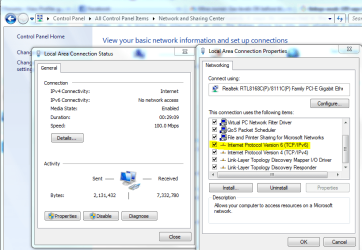
linksys wusb 100 says its connected buts its not help!

supplyslim sady

New member
Local time
1:44 AM
Messages
7
Ive been using a linksys wusb 100 v2 on win7 64 bit for months now and there's been nothing wrong at all until a few hours ago when it said it was connected to my router but when i clicked on the connection status it says APv6 connectivity: No Internet access so basicly it says its connected in the system tray in the bottom right but when i go to browse the internet or go into the itunes store log into msn whatever it wont connect ive tryed resetting my router still no luck i have an ipod and i can still connect on that so im sure its my adapter Help is realy needed thanks
 

My Computer My Computer

At a glance

windows 7 home premium 64 bitAMD 2 X4 965 processor2X 2GBGEforce 8800 gs
OS
windows 7 home premium 64 bit
CPU
AMD 2 X4 965 processor
Memory
2X 2GB
Graphics Card(s)
GEforce 8800 gs
Hard Drives
150gb
PSU
750w
Welcome!

Try disabling IPv6, forcing it to use IPv4. If you use Homegroup, you might have a problem, because it uses IPv6.

Capture.PNG
 

My Computer My Computer

At a glance

Windows 7 Professional x64Intel i7 2600K OC'd @ 4620 MHz16GB GSkill Sniper 2133 Mhz (4x4GB)EVGA GeForce GTX 480 SuperClocked+
Computer Manufacturer/Model Number
Custom
OS
Windows 7 Professional x64
CPU
Intel i7 2600K OC'd @ 4620 MHz
Motherboard
Asus P8Z68-V Pro
Memory
16GB GSkill Sniper 2133 Mhz (4x4GB)
Graphics Card(s)
EVGA GeForce GTX 480 SuperClocked+
Sound Card
Realtek High Definition Audio
Monitor(s) Displays
2x Acer S273HLbmii 27"
Screen Resolution
2 x 1920x1080
Hard Drives
64GB Crucial M4 SSD

Storage: Hitachi 1TB 5400RPM, Samsung 1.5TB 5400RPM
PSU
Corsair HW Series 750w (modular)
Case
Cooler Master HAF 932 Advanced Blue Edition
Cooling
CM Hyper 212+ CPU cooler, 3x 230mm + 1x 140mm case fans
Keyboard
Logitech MK320 (wireless)
Mouse
Logitech MK320 (wireless)
Internet Speed
30 Mb/s : 2 Mb/s
Hey i Tried disabling IPv6 but still no luck IPV6 Connectivity: No network access Ipv4 Connectivity: Internet
 

My Computer My Computer

At a glance

windows 7 home premium 64 bitAMD 2 X4 965 processor2X 2GBGEforce 8800 gs
OS
windows 7 home premium 64 bit
CPU
AMD 2 X4 965 processor
Memory
2X 2GB
Graphics Card(s)
GEforce 8800 gs
Hard Drives
150gb
PSU
750w
Try resetting your router. Push the reset button with a paperclip, or unplug it for about 30 seconds.
 

My Computer My Computer

At a glance

Windows 7 Professional x64Intel i7 2600K OC'd @ 4620 MHz16GB GSkill Sniper 2133 Mhz (4x4GB)EVGA GeForce GTX 480 SuperClocked+
Computer Manufacturer/Model Number
Custom
OS
Windows 7 Professional x64
CPU
Intel i7 2600K OC'd @ 4620 MHz
Motherboard
Asus P8Z68-V Pro
Memory
16GB GSkill Sniper 2133 Mhz (4x4GB)
Graphics Card(s)
EVGA GeForce GTX 480 SuperClocked+
Sound Card
Realtek High Definition Audio
Monitor(s) Displays
2x Acer S273HLbmii 27"
Screen Resolution
2 x 1920x1080
Hard Drives
64GB Crucial M4 SSD

Storage: Hitachi 1TB 5400RPM, Samsung 1.5TB 5400RPM
PSU
Corsair HW Series 750w (modular)
Case
Cooler Master HAF 932 Advanced Blue Edition
Cooling
CM Hyper 212+ CPU cooler, 3x 230mm + 1x 140mm case fans
Keyboard
Logitech MK320 (wireless)
Mouse
Logitech MK320 (wireless)
Internet Speed
30 Mb/s : 2 Mb/s
Have done still no luck sometimes it works and other times it doesn't even though it says its connected and this only started a few days ago if i disconnect then reconnect it works for like 3mins max then goes dead again meanwhile it says its still connected but im not
 

My Computer My Computer

At a glance

windows 7 home premium 64 bitAMD 2 X4 965 processor2X 2GBGEforce 8800 gs
OS
windows 7 home premium 64 bit
CPU
AMD 2 X4 965 processor
Memory
2X 2GB
Graphics Card(s)
GEforce 8800 gs
Hard Drives
150gb
PSU
750w
Back
Top