Linux to Windows 7 - Big Problem

Roflamaow

New member
Local time
10:43 AM
Messages
14
I know that a Windows Seven forum is not the best place to ask this, but I find the LinuxForums staff to be a bit, un-nice, I thought I'd give here a try. I've been stuck on the problem for a while, and I require some assistance.

First of all.
1. I do not know how to use the fdisk command, I'm a Windows Geek, not a Linux Geek.
2. I don't have a recovery CD for Ubuntu. I DO have a readable CD of Windows Seven.
3. My problem is, is that when trying to boot into the CD, it boots me into Linux.

Thanks for all the help, if no help can be provided, I understand, and there are other places to ask.

Please help me step by step..
 

My Computer

OS
Ubuntu 9.0.4
What are you trying to accomplish with CD you describe?

Do you have a WIn7 installer DVD?

Are you trying to get rid of Linux and install WIn7, or dual boot Linux with WIn7?

Is your BIOS set to boot your CD/DVD drive first?
 
I have a install DVD disc for Windows 7.

I want to remove Linux, and install Windows 7.

Please tell me how I can tell whether my BIOS is set to CD first.
 

My Computer

OS
Ubuntu 9.0.4
Update : I set my BIOS to go to CD first...it still launches up in Linux.
 

My Computer

OS
Ubuntu 9.0.4
Restart computer and look on first BIOS screen for the F-Key to tap to Enter BIOS Setup - normally ESC, F1 or F2.

Enter BIOS and look for Boot Order setting: Set DVD drive to boot first, followed by HD.

Save settings and reboot. Place DVD in drive.

Now look for prompt to "Hit any key to boot from CD/DVD drive" and do so.

Choose keyboard/language, then agree to "COnnect to Internet during Installation" to receive latest updates/drivers during install (plug ethernet cable first), the Custom install, use Advanced drive tools to wipe and format entire drive.

When Win7 starts up connect to internet to activate and receive newer drivers via Windows Updates. If drivers are missing in Device Manager, locate them on your manufacturer's Support Downloads page along with apps you desire. Adobe flash/reader and Java runtime/Free Ofc suite can be gotten from their site.
 
Update : I set my BIOS to go to CD first...it still launches up in Linux..
 

My Computer

OS
Ubuntu 9.0.4
Update : I set my BIOS to go to CD first...it still launches up in Linux.

Are you using Win7 DVD or Linux CD? It should be a DVD.

Where did you get the WIndows 7 DVD?

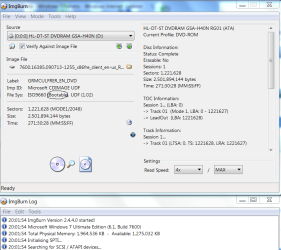
If you burned it yourself, load the ISO again in ImgBurn to see if it lists "bootable".

If so, reburn DVD at 4x with Verify.

View attachment 41028
 
Maybe you missed the "Hit any Key" message that appears on the top left of the screen that is black at that time (It is easy to miss because it is quite faint). Because you have only 10 seconds to hit the key (e.g. the spacebar) after which it defaults back to normal boot - which is probably your Linux.
 

My Computer

Computer Manufacturer/Model Number
HP, Dell, Gateway, Toshiba - 4 laptops and 2 desktops
OS
Vista, Windows7, Mint Mate, Zorin, Windows 8
CPU
from 1.6GHz Duo to i7
Monitor(s) Displays
2x HP w2207
Hard Drives
5x HDD, 7x SSD, 12x Externals
Keyboard
with trackball - no mices
Mouse
Trackball mice
Internet Speed
DSL 6000
Checked to see if that worked whs, as soon as I boot into the CD, it immediately goes into linux.
 

My Computer

OS
Ubuntu 9.0.4
Hmm, something is wrong. Are you sure you changed the boot sequence to CD first? I know you said you did, but just double check. When the splash screen comes on. keep tapping the right F-key or ESC (whatever it is on your system), then navigate to CD ROM with the down key and hit Enter. Make sure the CD is spinning at that time. After that, the "Hit any key" message should come up.
If that does not work, something is wrong with your BIOS. You may have to flash it.
 

My Computer

Computer Manufacturer/Model Number
HP, Dell, Gateway, Toshiba - 4 laptops and 2 desktops
OS
Vista, Windows7, Mint Mate, Zorin, Windows 8
CPU
from 1.6GHz Duo to i7
Monitor(s) Displays
2x HP w2207
Hard Drives
5x HDD, 7x SSD, 12x Externals
Keyboard
with trackball - no mices
Mouse
Trackball mice
Internet Speed
DSL 6000
I checked again, and yet, didn't work. :S

What do you mean by Flash it?
 

My Computer

OS
Ubuntu 9.0.4
in ImgBurn: Insert DVD, select Verify Disk, then click file folder to browse to ISO to compare ISO to DVD

It should say bootable just where this one does and look just like this one.

Then run it to verify.

Capture.PNG
 
Last edited:
To "flash" a BIOS means to updae a BIOS. But do first what Gregrocker suggested - a good suggestion. Maybe you don't have a bootable disk at all.
 

My Computer

Computer Manufacturer/Model Number
HP, Dell, Gateway, Toshiba - 4 laptops and 2 desktops
OS
Vista, Windows7, Mint Mate, Zorin, Windows 8
CPU
from 1.6GHz Duo to i7
Monitor(s) Displays
2x HP w2207
Hard Drives
5x HDD, 7x SSD, 12x Externals
Keyboard
with trackball - no mices
Mouse
Trackball mice
Internet Speed
DSL 6000
Yes, if the DVD cannot boot then it might need a BIOS update. But....

Are you entering the BIOS setup page by tapping repeatedly the F-key given on the first bootup screen? (ESC, F1, F2). If you cannot see which it is, then click all 3 one after the other quickly as the computer starts up.

When you get into BIOS setup page, find Boot Order and set DVD drive to boot first, then Hard Drive. Save settings and exit.

CAN YOU CONFIRM YOU HAVE DONE THIS?
 
Guys,

Did you even look at the link that he posted where he got the software from. It's a copy of the digital river download and the files are box files.

So, first did you make the ISO per the instructions and then burn the disk as an image? To check, put the cd in the computer and tell me if you see only 1 file. (something.iso) or a bunch of files and folders.
 

My Computer

Computer Manufacturer/Model Number
Self-Built in July 2009
OS
Windows 7 Ultimate x64
CPU
Intel Q9550 2.83Ghz OC'd to 3.40Ghz
Motherboard
Gigabyte GA-EP45-UD3R rev. 1.1, F12 BIOS
Memory
8GB G.Skill PI DDR2-800, 4-4-4-12 timings
Graphics Card(s)
EVGA 1280MB Nvidia GeForce GTX570
Sound Card
Realtek ALC899A 8 channel onboard audio
Monitor(s) Displays
23" Acer x233H
Screen Resolution
1920x1080
Hard Drives
Intel X25-M 80GB Gen 2 SSD
Western Digital 1TB Caviar Black, 32MB cache. WD1001FALS
PSU
Corsair 620HX modular
Case
Antec P182
Cooling
stock
Keyboard
ABS M1 Mechanical
Mouse
Logitech G9 Laser Mouse
Internet Speed
15/2 cable modem
Other Info
Windows and Linux enthusiast. Logitech G35 Headset.
Guys,

Did you even look at the link that he posted where he got the software from. It's a copy of the digital river download and the files are box files.

So, first did you make the ISO per the instructions and then burn the disk as an image? To check, put the cd in the computer and tell me if you see only 1 file. (something.iso) or a bunch of files and folders.

What CD? Do you mean the WIn7 DVD?

This is what we are trying to determine, whether it is a bootable ISO.

If he browses/opens the DVD he will see files whether it is an ISO or not.

Digital River also provided ISO's per request. So did the link where he got DL.

Did you follow the steps to create a bootable ISO on the link where you downloaded?

If not, here's the tutorial to create ISO from files: http://www.sevenforums.com/tutorials/30470-make-bootable-iso-student-d-l-57.html
 
Further consideration:

There is nothing wrong with his BIOS or physical DVD-ROM, he managed to to install Ubuntu ;)

He can't currently boot into Windows - windows based .exe are of no use at this stage.

It simply sounds like it's not a bootable image. It needs to be re-burnt as a bootable image from within Ubuntu


What version of Windows is already installed?
 

My Computer

Computer type
PC/Desktop
Computer Manufacturer/Model Number
Systems by SmartEyeball
OS
8 Pro x64
CPU
i7 3770K 4.6GHz
Motherboard
ASUS P8Z77 WS
Memory
16GB G.Skill Trident X 2666mhz
Graphics Card(s)
x2 EVGA 780 Ti Superclocked SLI
Sound Card
SB X-FI Surround 5.1 PRO USB / ATH-AD900 Headphones
Monitor(s) Displays
x3 Dell U2410 / 58" Samsung
Screen Resolution
5760*1200/ 1920*1200
Hard Drives
2x Intel 520 240GB (RAID 0) * 2x WD Caviar Blacks 2TB (RAID 0) * 2TB WD Caviar Black * Sony Optirac DVD
PSU
Silverstone Strider Evolution 1200W
Case
Thermaltake Level 10 GT Snow Edition
Cooling
Noctua NH-D14
Keyboard
Topre Realforce // Ducky Shine MX Black // Filco Ninja TKL
Mouse
Thermaltake Theron (Highly Recommended) + Razer Imperator
Antivirus
MSE
Browser
IE, FF, WaterFox
Other Info
GT Extreme V2 Sim Racing Cockpit + 40" LCD and K/B Mouse stand ▼
Fanatec CSR Elite Wheel + Clubsport V1 Pedals + CSR shifter/7G-H ▼Saitek X52 Pro ▼ TrackIR 5 Pro
Buttkicker v2 Seat Rumbler with Dedicated 5.1 and Sub Woofer attached to frame ▼
=
Bloody Big Grin
I think we are getting closer to the root of the problem. At least I had at first assumed that he has a proper bootable disk. I'll be interested to hear what the OP found out regarding the DVD.
 

My Computer

Computer Manufacturer/Model Number
HP, Dell, Gateway, Toshiba - 4 laptops and 2 desktops
OS
Vista, Windows7, Mint Mate, Zorin, Windows 8
CPU
from 1.6GHz Duo to i7
Monitor(s) Displays
2x HP w2207
Hard Drives
5x HDD, 7x SSD, 12x Externals
Keyboard
with trackball - no mices
Mouse
Trackball mice
Internet Speed
DSL 6000
Back
Top