Linux to Windows 7 - Big Problem

My Computer

Computer type
PC/Desktop
Computer Manufacturer/Model Number
Systems by SmartEyeball
OS
8 Pro x64
CPU
i7 3770K 4.6GHz
Motherboard
ASUS P8Z77 WS
Memory
16GB G.Skill Trident X 2666mhz
Graphics Card(s)
x2 EVGA 780 Ti Superclocked SLI
Sound Card
SB X-FI Surround 5.1 PRO USB / ATH-AD900 Headphones
Monitor(s) Displays
x3 Dell U2410 / 58" Samsung
Screen Resolution
5760*1200/ 1920*1200
Hard Drives
2x Intel 520 240GB (RAID 0) * 2x WD Caviar Blacks 2TB (RAID 0) * 2TB WD Caviar Black * Sony Optirac DVD
PSU
Silverstone Strider Evolution 1200W
Case
Thermaltake Level 10 GT Snow Edition
Cooling
Noctua NH-D14
Keyboard
Topre Realforce // Ducky Shine MX Black // Filco Ninja TKL
Mouse
Thermaltake Theron (Highly Recommended) + Razer Imperator
Antivirus
MSE
Browser
IE, FF, WaterFox
Other Info
GT Extreme V2 Sim Racing Cockpit + 40" LCD and K/B Mouse stand ▼
Fanatec CSR Elite Wheel + Clubsport V1 Pedals + CSR shifter/7G-H ▼Saitek X52 Pro ▼ TrackIR 5 Pro
Buttkicker v2 Seat Rumbler with Dedicated 5.1 and Sub Woofer attached to frame ▼
=
Bloody Big Grin
Is Roflamaow going to let us know if it was a bootable disk?
I would have said that's what it was.Most disc imaging software will tell u if it's bootable when u load it up.Just remember to always install windows first so linux can sort the bootup.
 

My Computer

Computer Manufacturer/Model Number
Si setup
OS
windows 7 Premium
CPU
AMD phenom quad 9550
Motherboard
asus M3A78 Pro
Memory
4gb 1066
Graphics Card(s)
HD 6850 1GB
Sound Card
Realtek
Monitor(s) Displays
acer 19" flat
Screen Resolution
1440x900
Hard Drives
1 x sataII 1TB samsung F3
Corsair Force GT (55 GB)
PSU
500w
Cooling
3 fans
Keyboard
Microsoft 600
Mouse
Laser Logitech MX 518
Internet Speed
30mb / 3mb
I just re-read the tutorial and all of the comments on that Notebook Review forum where OP downloaded his ISO files.

The tut looks much more complicated than the one here making Win7 files into ISO using Vlite: Make bootable iso from student d/l

I'd bet OP hadn't anything near a working ISO and has gone looking for another download source for his ISO.
 
Last edited:
Hi there

If you have a mobile phone / digital camera can you take a picture of the BOOT menu when you are in the BIOS. Upload the image via your Linux browser if you are still in Linux.

If your BIOS boots from a CD and the priority is set to CD first then it should work.

Sometimes though if you've got any USB sticks . drives plugged in BIOS'ES dynamically change these - altering boot sequence unpredictably so remove any USB devices.

Sometimes also pressing F8 on boot throws up a Boot menu -- if your hardware allows that try F8 on Boot.

In any case post the pics.

(I suspect the OP is looking "elsewhere" for a bootable ISO as well. IMO ANYBODY who can even boot a Linux system will know all about "BOOT order" etc. -- Not decrying Windows users - but in general you DO need to have a lot more knowledge to operate even the simplest Linux system -- this is one reason why Windows is STILL the most popular OS around today -- by FAR).

And to the OP if you are around - there's plenty of DECENT 'Nix forums where you won't get snapped at for asking questions

try http://www.linuxquestions.org for one -- OK OT but a great 'nix forum.

Cheers
jimbo
 

My Computer

Computer type
PC/Desktop
Computer Manufacturer/Model Number
Custom built, several laptops HP/ASUS
OS
Linux CENTOS 7 / various Windows OS'es and servers
CPU
Intel i7 Intel i5
Memory
8GB, 16GB
Graphics Card(s)
On Motherboard
Sound Card
Realtek HD audio
Monitor(s) Displays
Apple Cinema display, Samsung LCD
Screen Resolution
1920 X 1080
Hard Drives
4 X 1TB SATA
Mouse
Toshiba wireless laser
Internet Speed
> 20MB up
On a lot of machines you can alter the boot order at any bootup by tapping F12, there's absolutely no need to enter the BIOS. If the OP can't stop the machine from booting to Linux then just run DBAN from a CD to fix that... :zip:
 

My Computer

Computer Manufacturer/Model Number
Custom built machine
OS
W7 x64
CPU
Intel Q9300 2.5Ghz Quad LGA775 (Would like Q9650)
Motherboard
Gigabyte GA-EP45T-UD3R (F6 Bios)
Memory
4Gb OCZ Gold 1,333Mhz
Graphics Card(s)
Palit HD4850 O/C Sonic 512Mb DDR3, Dual DViD's
Sound Card
Azalia to twin Samson 50w Studio Monitors
Monitor(s) Displays
Twin Dell (E-IPS) U2311H 23.6" Screens
Screen Resolution
1920 x 1080 @ 60Hz
Hard Drives
Crucial M4 SSD, archives on twin Western Digital Caviar Black WD2002FAEX, 2TB, 7200rpm HDD's, Samsung Ritemaster CD/DVD Burner...
PSU
OCZ 600w
Case
Lian-Li PC8 acoustifoamed' aluminium tower
Cooling
Scythe 140mm Zipang
Keyboard
Cherry PS/2 custom model
Mouse
Lenovo USB laser "Thinkpad" Mouse
Internet Speed
ADSL2+ @14Mbps downstream & Cat6 Gigabit Ethernet
Antivirus
NOD32
Browser
Opera
Other Info
Silicon Dust HD Homerun Dual FTA (Ethernet) TV Tuners, Dray Tek Vigor 2850Vn router and 8x HP Gigabit Switch. Lian-Li CR26 Card Reader, Canon MF4430 iSensys laser printer/scanner.
Hey everyone, just posting here to tell you all that I'm not dead, but not able to get on the laptop at this moment. So here is what we have settled.

1. My BIOS is not broken/impared.
2. I will check to see if the ISO is bootable.
3. Yes, there are files, I didn't just stick the .iso file onto the disc..
4. I will check to see if the link provided is much easier than the one I used.

One more question though. How many files when I mount the ISO into the CD should be there? I see the folder [BOOT] then a text file. I'm sure this is right because I tried it on a VM and it worked just fine. Another thing, would it maybe effect the installation from the CD if I used a Windows image burner (via WINE's Command Prompt) on a Linux machine? Thanks so much for the help you all are giving me. As soon as I check to see if the ISO is bootable I will post again.
 

My Computer

OS
Ubuntu 9.0.4
One more question though. How many files when I mount the ISO into the CD should be there? I see the folder [BOOT] then a text file. I'm sure this is right because I tried it on a VM and it worked just fine.

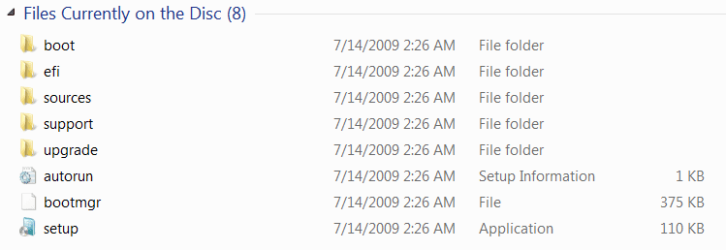
These files are normally on a Win7 DVD (not CD) :

Capture2.PNG

I showed you much earlier how to test whether the ISO is bootable and verify the DVD using ImgBurn.

The definitive test of the ISO's download integrity is comparing it's HASH checksum to the official HASH of the ISO here: http://www.mydigitallife.info/2009/...hash-for-original-msdntechnet-dvd-iso-images/

To checksum the HASH of your ISO to compare it, download and install View attachment 41141
 
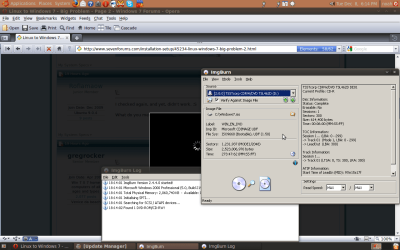
Hey everyone, just checked to see if the ISO was bootable, and turns out it is.

Picture below, will try the post above me.

Verify Picture
 

Attachments

  • verify.png
    verify.png
    53.7 KB · Views: 16

My Computer

OS
Ubuntu 9.0.4
One more question though. How many files when I mount the ISO into the CD should be there? I see the folder [BOOT] then a text file. I'm sure this is right because I tried it on a VM and it worked just fine.

These files are normally on a Win7 DVD (not CD) :

View attachment 41138

I showed you much earlier how to test whether the ISO is bootable and verify the DVD using ImgBurn.

The definitive test of the ISO's download integrity is comparing it's HASH checksum to the official HASH of the ISO here: Windows 7 RTM Build 7600.16385 Official SHA-1 and MD5 Checksum Hash for Original MSDN/TechNet DVD ISO Images My Digital Life

To checksum the HASH of your ISO to compare it, download and install View attachment 41141

It's not wanting to run on my Linux machine, so I'll try download it and verifying this on a Windows PC.
 

My Computer

OS
Ubuntu 9.0.4
Hey everyone, just checked to see if the ISO was bootable, and turns out it is.

Now we need to get the Win7 DVD to boot up from BIOS.

Are you getting the prompt to "hit any key to boot from CD/DVD?"

I know you said you are booting directly into Linux, but perhaps you are missing that prompt if it is flashing by quickly.

Next, look for the Boot Menu key, a F-key given on first bootup menu that will allow you to choose which drive you boot. On my computer it is F10, others F8 or ESC.

You have already confirmed that CD/DVD drive is set to boot first in BIOS. Can you also check which controller is enabled: SATA, IDE or RAID. Do you have SATA drives? You might try IDE if SATA/IHCI is not working to boot DVD.

Are you good with zeroing out the entire HD to get rid of Linux traces? You could make a backup image stored externally to restore it if necessary.
 
Well I was wanting to remove Linux and it's GRUB when I installed Windows 7. Right now I'm going to run the Windows 7 disc on a Windows to make sure it's 100% bootable. As of right now, my BIOS is set to run the CD/DVD first, but yet still goes straight into linux. I'm also going to recompile the ISO on a Windows machine to see if the burner just on Linux isn't working, because it is only showing the [BOOT] folder. Thanks again, will report back later. Oh, and one more thing, I'm not too sure what you mean about the drivers.

- Noah [Roflamaow]

 

My Computer

OS
Ubuntu 9.0.4
Before getting into drivers we need to see your System Specs filled out in the link at the bottom left of post box.

If you confirm the HASH on ISO now, after confirming the DVD is bootable in ImgBurn and on another machine, then both DVD and ISO are good.

Maybe some Ubuntu experts can tell us at this point if something there might be blocking Win7 DVD booting, as my only solution to this possibility is to zero the drive using DBAN>
 
I have a idea, to see if a flash drive of mine may work. I'll get my system specs in a second for you.
 

My Computer

OS
Ubuntu 9.0.4
You can either load the files into flash stick after formatting primary in Disk Management,

or using ISO, Write the ISO to stick using UltraISO trial Bootable tab. View attachment 41158

Then tap Boot Menu F-key given on first bootup screen and find flash under HD's.
 
Are you sure you're pressing the "save and exit" key (F10 on mine) when you switch boot devices and not just ESC?

It took me about a week to figure that out when I first started making computers.
 

My Computer

OS
Windows 7
CPU
Core i5 750
Motherboard
ASRock P55m PRO
Memory
2x2 GB G. Skill Ripjaw DDR3 1333
Graphics Card(s)
PNY Nvidia GTS 250
Sound Card
none
Monitor(s) Displays
Samsung Syncmaster 2243
Screen Resolution
1920X1080
Hard Drives
640GB WD Caviar Black 7200 RPM
PSU
650W Antec Earthwatts
Case
Antec mini P180
Cooling
Sunbeamtech Core Contact Freezer 120mm
Keyboard
Old PS/2 keyboard
Mouse
Old PS/2 mouse
Internet Speed
Verizon DSL
I know it might sound stupid but I had a similar problem yesterday :

I was trying to boot from a DVD so I went inside the Bios Setup and changed my first boot device to be CD-ROM. It wouldn't boot, so after blaming Nero and yelling at my PC bad words, I dediced to go check my Bios again. It turned out that CD-ROM wasn't the right choice, since at the bottom of the list there were a bunch of numbers and letters that looked like a model number of a device. In fact, that was my DVD drive model number listed there. I selected that one and then I was able to boot from my DVD.

Conclusions : have a deeper look at your boot list, your DVD drive might be listed with its model number, then choose that one instead of CD-ROM.

I hope it helps :)
 

My Computer

Computer type
PC/Desktop
Computer Manufacturer/Model Number
Custom Build
OS
Windows 7 Home Premium x64
CPU
Intel(R) Core(TM) i5 CPU 660 @ 3.33GHz, 2 cores, 4 l.p.
Motherboard
Asus P7P55D-E
Memory
Corsair CMT8GX3M2A1866C9 Dominator GT 8GB 1866MHz C9 DDR3
Graphics Card(s)
ASUS GeForce GTX 770 DIrectCU II (GTX770-DC2OC-2GD5)
Sound Card
NVIDIA High Definition Audio
Monitor(s) Displays
LG 23EA93-P UltraWide IPS Monitor 21:9
Screen Resolution
2560x1080 HDMI(60hz)
Hard Drives
- Primary(Boot) : Samsung SSD 840 EVO (120GB)
- WDC WD10EADS-00L5B1 ATA Device (931 GB, IDE)
- oxSATA OEM Ext Hard Disk (5YD2D1AQ) [UPT] (2 TB, USB 3.0)
PSU
LC Power ATX 750W V2.2 Prophecy 2 Active PFC
Case
Cooler Master HAF XM RC-922XM-KKN1
Keyboard
Logitech Compact Keyboard K300
Mouse
Logitech Laser Mouse
Internet Speed
Fiber Optic 100/10 Mbps
Hey guys, problem solved. Thanks to the help here, I was able to get it working. I'm now running my Windows 7 Ultimate x64! Thanks everyone.
 

My Computer

OS
Ubuntu 9.0.4
Back
Top