list of drivers?

soon2bexpat

New member
Member
Local time
7:21 PM
Messages
35
Is there a way to print out a list of all system drivers? I'm thinking of going 64bit and want to first see if the proper drivers are available.
 

My Computer

Computer Manufacturer/Model Number
home built
OS
Windows 7 Professional
CPU
AMD Athlon 64 3800+
Motherboard
Asus A8N-SLI Premium
Memory
4GB OCZ DDR400 PC3200
Graphics Card(s)
ATI Radeon x700 Pro
Monitor(s) Displays
Samsung LCD
Hard Drives
WD 250gb SATA
WD 320gb SATA
WD 640gb SATA
Seagate 350gb SATA
list of drivers

Is there a way to print out a list of all system drivers? I'm thinking of going 64bit and want to first see if the proper drivers are available.

Im sure there is but I cant think of one. the best apps i know for listing things are si-soft sandra, everest. Im sure there is a better app so hang out for a bit and someone will think of it.

Ken
 

My Computer

Computer Manufacturer/Model Number
HP Pavillion dv-7 1005 Tx
OS
Win 8 Release candidate 8400
CPU
[email protected]
Memory
4 gigs
Graphics Card(s)
Nvidia 9600M
Sound Card
HD built-in
Monitor(s) Displays
17" Wxga
Screen Resolution
1440x900
Cooling
none
Internet Speed
45Mb down 5Mb up
I would certainly suggest getting the Win 7 RC1 free download and trying out 64-bit. I had been using 32-bit before this and never took the plunge...but with a free version just waiting for me to try, it was very easy to plop it in and see. And if you are a bit nervous, go to the store and pick up a hard drive and use that instead. They are quite inexpensive these days and you don't have to take any chances with your data.
 

My Computer

Computer Manufacturer/Model Number
Self-Built in July 2009
OS
Windows 7 Ultimate x64
CPU
Intel Q9550 2.83Ghz OC'd to 3.40Ghz
Motherboard
Gigabyte GA-EP45-UD3R rev. 1.1, F12 BIOS
Memory
8GB G.Skill PI DDR2-800, 4-4-4-12 timings
Graphics Card(s)
EVGA 1280MB Nvidia GeForce GTX570
Sound Card
Realtek ALC899A 8 channel onboard audio
Monitor(s) Displays
23" Acer x233H
Screen Resolution
1920x1080
Hard Drives
Intel X25-M 80GB Gen 2 SSD
Western Digital 1TB Caviar Black, 32MB cache. WD1001FALS
PSU
Corsair 620HX modular
Case
Antec P182
Cooling
stock
Keyboard
ABS M1 Mechanical
Mouse
Logitech G9 Laser Mouse
Internet Speed
15/2 cable modem
Other Info
Windows and Linux enthusiast. Logitech G35 Headset.
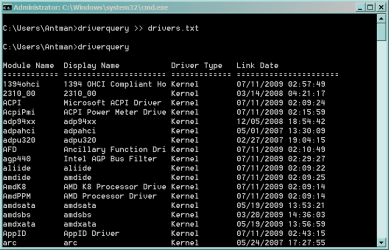
from cmd window

driverquery >> driverlist.txt

driverlist.txt is just a suggestion

but pp arks1 is right. Just install the os. it will warn you.
 

Attachments

  • Capture.PNG
    Capture.PNG
    11.6 KB · Views: 363
Hit Winkey+R and enter cmd (to open a command prompt). Enter System Info and hit return

Will tell you if you have a 64-bit capable processor. If you at least have that, find your other drivers should be easy enough. Don't rely on your OEM to supply the latest x64 drivers however - best to source from manufacturer.

If on an OEM machine (particularly a notebook) running nVidia GPU, look here for the latest drivers and modified INF... Win Update will upgrade it anyhow, so no issues.

Also, just be careful with driver order. Chipset the TurboCache need to be installed before anything else, followed by the display and audio drivers. Wireless also needs to be installed early (unless Win7 loads it out of the box like it did on my Asus notebook).

I'm running an 18mth old notebook on x64 Win7 and hardware running better than it did on Vista. Even had no issues getting suitable x64 drivers for a 7yo scanner.
 

My Computer

Computer Manufacturer/Model Number
ASUS G2S
OS
Win7 x64 & Vista Ultimate x86
CPU
Intel Core Duo T7500 2.20 GHz
Memory
2GB (meaning to upgrade to 4GB)
Graphics Card(s)
GeForce 8600M GT
Sound Card
Realtek High Definition Audio (exact model unknown)
Monitor(s) Displays
in-build notebook (second BENQ 19" in storage)
Screen Resolution
1440x900
Hard Drives
300GB internal, dual partitioned
500GB external WD
Keyboard
diNovo Media Desktop Laser (BlueTooth - love it)
Mouse
as above
Internet Speed
1.5Mb
Other Info
Speakers - Altec Lansing FX6021... blows away most 5.1 speakers on the market
OK, I'm going to do it! All of my HDs are SATA- do I need to burn a 3.5 with the drivers? With XP, I had to hit F6 during the set-up and install the RAID drivers- same with W764?
 

My Computer

Computer Manufacturer/Model Number
home built
OS
Windows 7 Professional
CPU
AMD Athlon 64 3800+
Motherboard
Asus A8N-SLI Premium
Memory
4GB OCZ DDR400 PC3200
Graphics Card(s)
ATI Radeon x700 Pro
Monitor(s) Displays
Samsung LCD
Hard Drives
WD 250gb SATA
WD 320gb SATA
WD 640gb SATA
Seagate 350gb SATA
Looking at your specs the best I can say is maybe to Windows 7 support. For the motherboard (nForce 4) is a big maybe, and if worse comes to worse you should be able to use the Vista drivers,

nForce Driver

One of the best places to find out what is and isn't working regarding Nvidia motherboard drivers is here,

http://www.nforcershq.com/forum/nforce-drivers-f28.html

For your video card (X700) there are currently no Windows 7 drivers, and in all likelihood won't be, as ATI has declared all cards from the X19xx series down legacy (Nvidia has done the same thing with everythhing NF4 and down).

The onboard audio should be OK as it is Realtek and you can get the drivers directly from them.

As for needing a floppy, no. That isn't to say that you may not need to have the SATA driver available, but it can be on a USB key, or on another hard drive for that matter. If Windows won't "see" your drives without the driver, when you get to the part about installing them just click on browse and navigate to where you placed the driver files (will need to have extracted them with Winrar first).
 
Last edited:

My Computer

Computer type
PC/Desktop
Computer Manufacturer/Model Number
Me
OS
Win 7 Ultimate x64
CPU
FX-8350 @ 4.6 GHz so far
Motherboard
Asus M5A97 EVO
Memory
ADATA XPG V1 Series Black 8GB DDR3 1600
Graphics Card(s)
Sapphire R9 270x Dual-X
Sound Card
Xonar DGX w/ Corsair Vengence 1300
Monitor(s) Displays
Acer S232HL Abid
Screen Resolution
1920x1080
Hard Drives
120 GB OCZ Vertex 3
500 GB Seagate 7200.12
PSU
Antec Earthwatts 650W Green
Case
Antec Three Hundred
Cooling
Cooler Master 212 EVO
Keyboard
Logitech G510
Mouse
Logitech G500s
Internet Speed
35000/3000
Although yes Win7 specific drivers are ideal, in most cases, as long as drivers are Vista optimised (ie, not those early patched-up XP drivers) you should be fine. Win7 isn't making the huge break-away that was done with Vista (more evolution than revolution).The reports I am hearing across the boards is that ppl are actually managing to run Win7 on hardware/systems which crumpled under Vista.

As to drivers, compile them prior to installing Win7 (cd, thumb-drive... doesn't matter). DON"T install drivers at Win7 install. That option is ideal ONLY if you know every driver is compatible. In your case, ou might find a couple of different driver versions in some cases and have to experiment a little. Sounds like more work, but done once you can delete those which are useless and there is your base set of drivers all ready for when Win7 hits the deck in full release... this is after all a pre-release, and is designed to give ppl the chance to fiddle and figure out what works best for them.

If you dual boot, or set up as a "virtual" install, you can play with it without losing your original OS install

 

My Computer

Computer Manufacturer/Model Number
ASUS G2S
OS
Win7 x64 & Vista Ultimate x86
CPU
Intel Core Duo T7500 2.20 GHz
Memory
2GB (meaning to upgrade to 4GB)
Graphics Card(s)
GeForce 8600M GT
Sound Card
Realtek High Definition Audio (exact model unknown)
Monitor(s) Displays
in-build notebook (second BENQ 19" in storage)
Screen Resolution
1440x900
Hard Drives
300GB internal, dual partitioned
500GB external WD
Keyboard
diNovo Media Desktop Laser (BlueTooth - love it)
Mouse
as above
Internet Speed
1.5Mb
Other Info
Speakers - Altec Lansing FX6021... blows away most 5.1 speakers on the market
Thanks for your help, everyone. I downloaded some drivers to a separate HD and now I'm running 64! Everything seems fine except I'll need a new SCSI card for the scanner, but they're pretty cheap.
 

My Computer

Computer Manufacturer/Model Number
home built
OS
Windows 7 Professional
CPU
AMD Athlon 64 3800+
Motherboard
Asus A8N-SLI Premium
Memory
4GB OCZ DDR400 PC3200
Graphics Card(s)
ATI Radeon x700 Pro
Monitor(s) Displays
Samsung LCD
Hard Drives
WD 250gb SATA
WD 320gb SATA
WD 640gb SATA
Seagate 350gb SATA
Back
Top