Little identifying bubble not showing (office 2007)

Hartley001

New member
Local time
7:35 PM
Messages
9
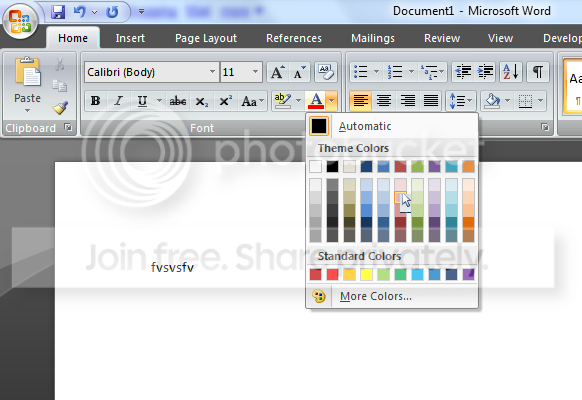
when im using any office program, powerpoint or word and i want to hover over a certain color or certain layout to identify what the color is called or what the layout is called. well the bubble doesnt show up anymore. i noticed this today when i come to do my computer project for college. i had to select a curtain type of Table layout "Change the table design to Dark Style 1 – Accent 1." and i can't find it because i can't hover over them to see which one it is. Can anyone help please

thanks Greg :)
 

My Computer My Computer

At a glance

Windows 7!!!
OS
Windows 7!!!
try to uninstall and install again the soft.
 

My Computer My Computer

At a glance

windows 7Phenom II AMD Dragon 3.5GhzDDR3 4GBATI Radeon 512Mb
Computer Manufacturer/Model Number
built up
OS
windows 7
CPU
Phenom II AMD Dragon 3.5Ghz
Memory
DDR3 4GB
Graphics Card(s)
ATI Radeon 512Mb
Monitor(s) Displays
HP L1506
Screen Resolution
1152 x 864
Hard Drives
WDC 1 TB SATA-II Green Power
Keyboard
HP wireless keyboard
Mouse
HP Optic
Internet Speed
1GB
ive tried that :(
 

My Computer My Computer

At a glance

Windows 7!!!
OS
Windows 7!!!

My Computer My Computer

At a glance

windows 7Phenom II AMD Dragon 3.5GhzDDR3 4GBATI Radeon 512Mb
Computer Manufacturer/Model Number
built up
OS
windows 7
CPU
Phenom II AMD Dragon 3.5Ghz
Memory
DDR3 4GB
Graphics Card(s)
ATI Radeon 512Mb
Monitor(s) Displays
HP L1506
Screen Resolution
1152 x 864
Hard Drives
WDC 1 TB SATA-II Green Power
Keyboard
HP wireless keyboard
Mouse
HP Optic
Internet Speed
1GB
had a look through there couldn't see anything. i've tried looking for on the internet but still couldnt find anything.. this is really getting on my nervous

this is what im talking about
Untitled.png


when hovering no info pops up
 

My Computer My Computer

At a glance

Windows 7!!!
OS
Windows 7!!!
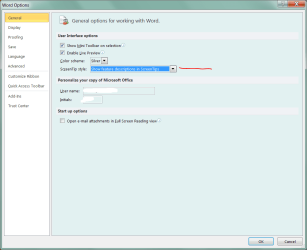
I am using Office 2010, but I think you try this option also.

? Are all tooltips empty, or just in Office?
 

Attachments

  • Capture.PNG
    Capture.PNG
    19.9 KB · Views: 7

My Computer My Computer

At a glance

Windows 7 UltimateIntel Q95504x2GB HyperXATI HD3850 512
Computer Manufacturer/Model Number
Asus P5B
OS
Windows 7 Ultimate
CPU
Intel Q9550
Motherboard
Asus P5B
Memory
4x2GB HyperX
Graphics Card(s)
ATI HD3850 512
Sound Card
Creative X-Fi Platinum
Monitor(s) Displays
Samsung 50 / Samsung 24
Screen Resolution
1920*1080 / 1920*1200
Hard Drives
Multiple RAID volumes
PSU
ThermalTake ToughPower
Case
Armor
Cooling
Liquid
Keyboard
$6 2.4 gHz desktop
Internet Speed
Just this side of fast enough.
i was using the 2010 beta and i was getting the problem so i went back to 2007 and im still getting the same problem. just had a look and this was already selected
 

My Computer My Computer

At a glance

Windows 7!!!
OS
Windows 7!!!
I found a reference that Google Toolbar can cause a similar affect.
 

My Computer My Computer

At a glance

Windows 7 UltimateIntel Q95504x2GB HyperXATI HD3850 512
Computer Manufacturer/Model Number
Asus P5B
OS
Windows 7 Ultimate
CPU
Intel Q9550
Motherboard
Asus P5B
Memory
4x2GB HyperX
Graphics Card(s)
ATI HD3850 512
Sound Card
Creative X-Fi Platinum
Monitor(s) Displays
Samsung 50 / Samsung 24
Screen Resolution
1920*1080 / 1920*1200
Hard Drives
Multiple RAID volumes
PSU
ThermalTake ToughPower
Case
Armor
Cooling
Liquid
Keyboard
$6 2.4 gHz desktop
Internet Speed
Just this side of fast enough.
ok ill have a look into unstalled google toolbar if i have it installed
 

My Computer My Computer

At a glance

Windows 7!!!
OS
Windows 7!!!
Back
Top